
Migration von On-Premises RADIUS (NPS) zu RADIUS as a Service
Dieser maßgebliche Leitfaden beschreibt die technische Architektur, die Implementierungsmethodik und die geschäftlichen Auswirkungen der Migration vom On-Premises Microsoft Network Policy Server (NPS) zu einem Cloud-nativen RADIUS as a Service-Modell. Er bietet IT-Führungskräften und Netzwerkarchitekten praktische Frameworks, um den Betriebsaufwand zu reduzieren, Single Points of Failure zu eliminieren und die Unternehmensauthentifizierung über verteilte Standorte hinweg zu sichern.
Diesen Leitfaden anhören
Podcast-Transkript ansehen
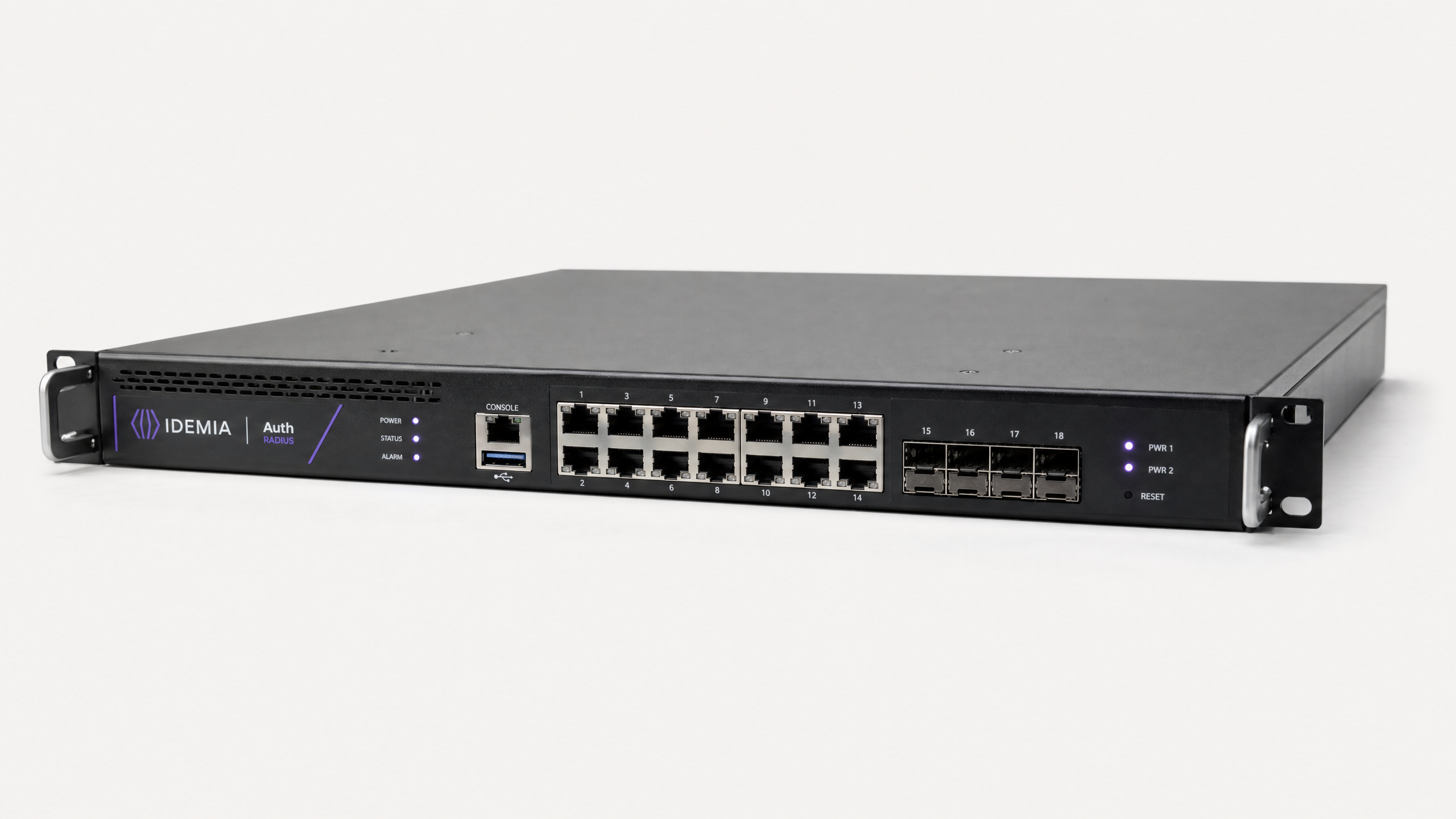
Zusammenfassung für die Geschäftsleitung
Seit fast zwei Jahrzehnten ist der Microsoft Network Policy Server (NPS) die Standard-RADIUS-Implementierung für Unternehmensnetzwerke. Doch während Betreiber von Veranstaltungsorten über verteilte Standorte – von Einzelhandelsketten bis hin zu globalen Hotelgruppen – expandieren, ist der Betriebsaufwand für die Verwaltung der On-Premises-Authentifizierungsinfrastruktur zu einer erheblichen Belastung geworden.
Die Migration zu RADIUS as a Service verlagert die Authentifizierung von einer verwalteten Hardwarekomponente zu einem genutzten Cloud-Dienst. Dieser architektonische Übergang eliminiert den Single Point of Failure, der bei eigenständigen NPS-Bereitstellungen inhärent ist, beseitigt Hardware-Erneuerungszyklen und bietet die elastische Skalierbarkeit, die für Umgebungen mit hoher Dichte wie Stadien und Konferenzzentren erforderlich ist. Für IT-Manager und Netzwerkarchitekten bietet dieser Leitfaden eine herstellerneutrale, strukturierte Methodik zur Migration der 802.1X-Authentifizierung in die Cloud, ohne den Produktionsverkehr zu beeinträchtigen, die Einhaltung von PCI DSS und GDPR zu gewährleisten und die OpEx der Authentifizierungsinfrastruktur um bis zu 80 % zu senken.
Technischer Deep-Dive: Architektur und Standards
Um die Migration zu verstehen, müssen wir zunächst den architektonischen Wandel bei der Bereitstellung der IEEE 802.1X portbasierten Zugriffskontrolle untersuchen.
Die Einschränkungen von On-Premises NPS
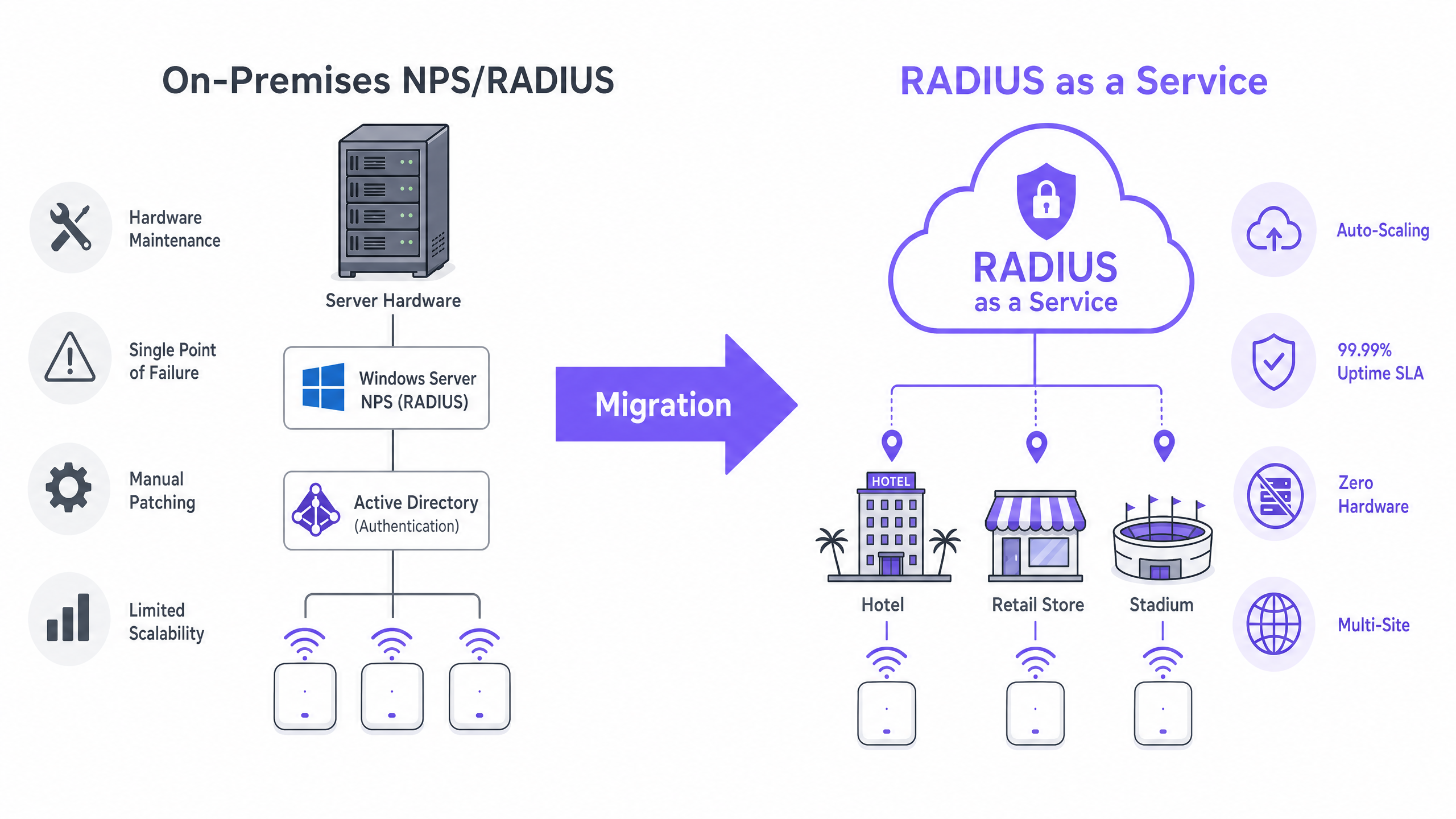
In einer traditionellen Bereitstellung fungieren Access Points als Network Access Server (NAS) und leiten Authentifizierungsanfragen an einen On-Premises NPS-Server weiter. Der NPS-Server bewertet Verbindungsanforderungsrichtlinien, validiert Anmeldeinformationen anhand eines Identitätsspeichers (typischerweise Active Directory über LDAP) und gibt eine Access-Accept- oder Access-Reject-Nachricht zurück.
Dieses Modell weist drei kritische Einschränkungen für moderne Netzwerke auf:
- Hardwareabhängigkeit & Wartung: NPS erfordert dedizierte physische oder virtuelle Maschinen, was kontinuierliches Patching, Kapazitätsplanung und Lifecycle-Management erfordert.
- Komplexität der Hochverfügbarkeit: Das Erreichen von Redundanz erfordert die Bereitstellung von NPS in einem Failover-Paar, wodurch die Lizenzkosten verdoppelt werden, ohne eine echte geografische Redundanz zu bieten.
- Durchsatzengpässe: Während Spitzenzeiten – wie dem Zutritt zu einem Stadion oder den Spitzenhandelszeiten im Einzelhandel – kann eine einzelne NPS-Instanz zu einem Engpass werden, was zu Authentifizierungs-Timeouts und einer verschlechterten Benutzererfahrung führt.
Die Cloud RADIUS-Architektur
RADIUS as a Service abstrahiert die Authentifizierungsschicht. Cloud-Anbieter betreiben verteilte, geo-redundante Cluster von RADIUS-Servern. Der NAS verweist auf diese Cloud-Endpunkte, und Anfragen werden automatisch lastverteilt.
Transportsicherheit: Die Rolle von RadSec Wenn RADIUS in die Cloud verlagert wird, durchläuft der Authentifizierungsverkehr das öffentliche Internet. Während traditionelles RADIUS ein Shared Secret und MD5-Hashing verwendet, müssen moderne Bereitstellungen RadSec (RADIUS over TLS, RFC 6614) implementieren. RadSec umschließt die gesamte RADIUS-Konversation in einem TLS-Tunnel (typischerweise TCP-Port 2083), bietet eine Transport-Layer-Verschlüsselung, die HTTPS entspricht, und eine gegenseitige Authentifizierung zwischen dem NAS und dem Cloud RADIUS-Endpunkt.
Identitätsintegration Cloud RADIUS erfordert keine Migration Ihres Benutzerverzeichnisses. Dienste unterstützen typischerweise LDAPS-Verbindungen zurück zu On-Premises Active Directory oder native API-Integrationen mit Azure Active Directory (Entra ID) über SAML oder SCIM. Dies stellt sicher, dass Ihre bestehenden Benutzer-Lifecycle-Management-Prozesse intakt bleiben.
Für Veranstaltungsorte, die Guest WiFi -Plattformen nutzen, integriert sich Cloud RADIUS direkt und bietet eine einheitliche Steuerungsebene für die 802.1X-Unternehmensauthentifizierung und den Gastnetzwerkzugang, komplett mit erweiterten WiFi Analytics .
Implementierungsleitfaden: Eine 5-Phasen-Methodik
Die Durchführung einer Migration ohne Ausfallzeiten erfordert einen strukturierten, phasenweisen Ansatz.
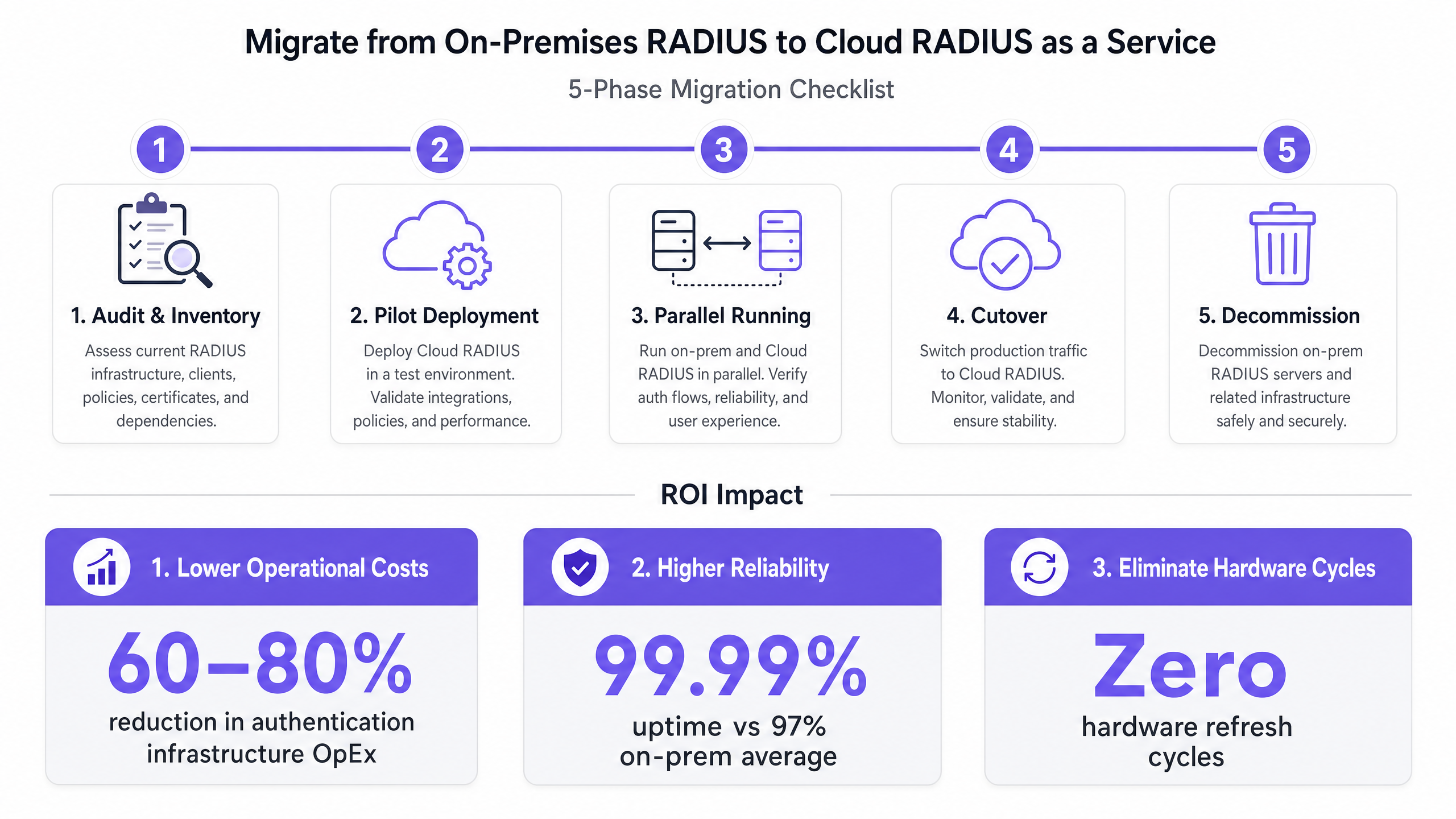
Phase 1: Audit und Bestandsaufnahme
Bevor Sie Änderungen vornehmen, dokumentieren Sie den aktuellen Zustand:
- RADIUS Clients: Identifizieren Sie jeden NAS (Access Points, Switches, VPN-Konzentratoren).
- Richtlinien: Dokumentieren Sie bestehende NPS-Verbindungsanforderungs- und Netzwerkrichtlinien, einschließlich der für die VLAN-Zuweisung verwendeten Vendor-Specific Attributes (VSAs).
- EAP-Methoden: Identifizieren Sie, welche Extensible Authentication Protocol-Methoden verwendet werden (z. B. EAP-TLS, PEAP-MSCHAPv2).
Phase 2: Pilotbereitstellung
Stellen Sie die Cloud RADIUS-Instanz bereit und konfigurieren Sie eine Nicht-Produktions-SSID oder einen einzelnen Teststandort. Validieren Sie die Identitätsverzeichnisintegration (z. B. Entra ID-Synchronisierung) und stellen Sie sicher, dass die EAP-Methode durchgängig funktioniert.
Phase 3: Parallelbetrieb (Risikominderung)
Konfigurieren Sie die Produktions-NAS-Geräte so, dass sie sowohl den Cloud RADIUS-Server (Primär) als auch den Legacy NPS-Server (Fallback) verwenden. Führen Sie diese Konfiguration für mindestens zwei Wochen aus. Überwachen Sie die Authentifizierungs-Erfolgsraten, Latenzmetriken und Abrechnungsdatenflüsse, um Richtlinienabweichungen vor der Umstellung zu identifizieren.
Phase 4: Umstellung
Entfernen Sie während eines geplanten Wartungsfensters die Legacy NPS-Fallback-Konfiguration von den NAS-Geräten. Verpflichten Sie sich vollständig zur Cloud-Infrastruktur. Stellen Sie sicher, dass Ihr Rollback-Verfahren dokumentiert und getestet ist.
Phase 5: Außerbetriebnahme
Nach 30 Tagen stabilen Betriebs nehmen Sie die Legacy NPS-Server sicher außer Betrieb und fordern die Rechenressourcen zurück.
Best Practices & Compliance
Beim Entwurf Ihrer Cloud RADIUS-Architektur halten Sie sich an die folgenden Standards:
- RadSec vorschreiben: Senden Sie niemals RADIUS-Verkehr über das öffentliche Internet mit Standard-UDP 1812/1813, wenn RadSec (TCP 2083) von Ihrer NAS-Hardware unterstützt wird.
- Zertifikatsvertrauensketten: Stellen Sie sicher, dass Client-Geräte dem Zertifikat vertrauenifizierungsstelle (CA), die das Zertifikat des Cloud-RADIUS-Servers ausgestellt hat. Verteilen Sie die Root-CA vor der Migration über MDM oder Gruppenrichtlinien an verwaltete Geräte.
- Compliance-Haltung: Wählen Sie einen Cloud-RADIUS-Anbieter, der eine SOC 2 Typ II-Zertifizierung und ISO 27001-Akkreditierung besitzt. Dies vereinfacht Ihre jährlichen PCI DSS-Bewertungen erheblich, insbesondere für Umgebungen im Einzelhandel und im Gastgewerbe .
Für umfassendere Netzwerkdesign-Prinzipien konsultieren Sie unsere Leitfäden zu WiFi für Unternehmen einrichten: Ein Playbook für 2026 und Verständnis von RSSI und Signalstärke für optimale Kanalplanung .
Fehlerbehebung & Risikominderung
| Fehlermodus | Grundursache | Minderungsstrategie |
|---|---|---|
| Authentifizierungs-Timeouts | Firewall blockiert ausgehenden UDP 1812/1813 oder TCP 2083. | Überprüfen Sie, ob die Perimeter-Firewall-Regeln ausgehenden Datenverkehr zu den spezifischen IP-Bereichen des Cloud-RADIUS-Anbieters zulassen. |
| Zertifikatsvertrauensfehler | Client-Geräten fehlt die Root-CA in ihrem vertrauenswürdigen Speicher. | Stellen Sie die Root-CA vor Phase 3 (Parallelbetrieb) über MDM/GPO bereit. |
| VLAN-Zuweisung fehlgeschlagen | Anbieterspezifische Attribute (VSAs) in Cloud-Richtlinien nicht korrekt zugeordnet. | Replizieren Sie während Phase 1 exakte VSA-String-Formate von NPS in die Cloud-RADIUS-Richtlinien-Engine. |
| Auswirkungen eines WAN-Ausfalls | Internetverlust unterbricht den Zugriff auf Cloud-RADIUS. | Stellen Sie redundante WAN-Verbindungen bereit oder implementieren Sie einen lokalen RADIUS-Proxy, der Anmeldeinformationen für bekannte Geräte zwischenspeichert. |
ROI & Geschäftsauswirkungen
Die Migration zu RADIUS as a Service liefert messbare Geschäftsergebnisse:
- Kostenreduzierung: Eliminiert Hardwarebeschaffung, Windows Server-Lizenzierung und den technischen Aufwand für Patches und Wartung. Die typische OpEx-Reduzierung beträgt 60-80%.
- Zuverlässigkeits-SLA: Cloud-Anbieter bieten finanziell abgesicherte 99,99% Uptime-SLAs, verglichen mit den typischen 97-98%, die bei Single-Site-NPS-Bereitstellungen erreicht werden.
- Agilität: Neue Standorte können sofort ohne Bereitstellung lokaler Authentifizierungs-Hardware online gebracht werden, was die Bereitstellungszeiten für Transport -Hubs und Gesundheitseinrichtungen beschleunigt.
Hören Sie unserem erfahrenen Beratungsteam zu, wie es die strategischen Implikationen in diesem 10-minütigen Briefing erörtert:
Schlüsseldefinitionen
RADIUS (Remote Authentication Dial-In User Service)
A networking protocol that provides centralized Authentication, Authorization, and Accounting (AAA) management for users who connect and use a network service.
The core protocol used by enterprise WiFi networks to validate user credentials before granting network access.
NPS (Network Policy Server)
Microsoft's implementation of a RADIUS server and proxy, bundled as a role in Windows Server.
The legacy on-premises infrastructure that organizations are actively migrating away from to reduce maintenance overhead.
NAS (Network Access Server)
The device that acts as the gateway to the network and passes authentication requests to the RADIUS server.
In a wireless context, the NAS is typically the WiFi Access Point or Wireless LAN Controller.
RadSec (RADIUS over TLS)
A protocol defined in RFC 6614 that transports RADIUS packets over a TCP connection encrypted with TLS.
Essential for cloud RADIUS deployments to ensure credential data is encrypted while traversing the public internet.
EAP (Extensible Authentication Protocol)
An authentication framework frequently used in wireless networks and point-to-point connections.
Determines how the client and server securely exchange credentials (e.g., certificates via EAP-TLS, or passwords via PEAP).
VSA (Vendor-Specific Attribute)
Custom attributes defined by hardware vendors within the RADIUS protocol to support proprietary features.
Crucial during migration; VSAs are often used to assign authenticated users to specific network VLANs dynamically.
LDAPS (Lightweight Directory Access Protocol over SSL)
A secure protocol for querying and modifying directory services like Active Directory.
Used by cloud RADIUS services to securely query on-premises identity stores without migrating the user directory to the cloud.
802.1X
An IEEE standard for port-based network access control (PNAC).
The underlying standard that uses RADIUS to ensure only authenticated devices can pass traffic onto the enterprise LAN or WLAN.
Ausgearbeitete Beispiele
A 200-property hotel group currently runs local NPS servers at each site for staff 802.1X authentication. They are migrating to Entra ID (Azure AD) and want to decommission the local servers. How should they approach the migration?
- Deploy a cloud RADIUS service that integrates natively with Entra ID via SAML/SCIM.
- Configure the cloud RADIUS policies to map Entra ID groups (e.g., 'Front Desk', 'Management') to specific VLAN VSAs.
- At a pilot property, configure the access points to use RadSec to connect to the cloud RADIUS endpoint.
- Push the cloud RADIUS server's Root CA to all staff devices via Microsoft Intune.
- Run parallel authentication at the pilot site, then execute a phased rollout across the remaining 199 properties.
A stadium with 50,000 capacity experiences authentication failures on their corporate SSID during major events because their on-premises NPS server cannot handle the throughput of thousands of devices roaming simultaneously.
- Audit the existing NPS policies and EAP methods.
- Provision a cloud RADIUS service capable of auto-scaling to handle high authentications per second (APS).
- Establish an LDAPS connection from the cloud RADIUS service to the stadium's on-premises Active Directory.
- Update the stadium's high-density wireless LAN controllers to point to the cloud RADIUS endpoints as the primary authentication servers.
Übungsfragen
Q1. Your organization is migrating to Cloud RADIUS. The security team mandates that no authentication traffic can be sent over the internet in cleartext or using deprecated hashing algorithms like MD5. What protocol must you configure on your wireless LAN controllers?
Hinweis: Look for the protocol that wraps RADIUS in a TLS tunnel.
Musterlösung anzeigen
You must configure RadSec (RADIUS over TLS). RadSec establishes a TLS tunnel over TCP port 2083 between the NAS and the cloud RADIUS server, providing transport-layer encryption and mutual authentication, satisfying the security team's requirements.
Q2. During Phase 3 (Parallel Running) of your migration, you notice that users are authenticating successfully against the cloud RADIUS server, but they are not being placed in the correct network segments. What is the most likely configuration gap?
Hinweis: How does a RADIUS server tell an access point which network segment to use?
Musterlösung anzeigen
The Vendor-Specific Attributes (VSAs) for dynamic VLAN assignment have not been configured correctly in the cloud RADIUS policies. You must ensure the exact VSA strings used in the legacy NPS server are replicated in the cloud environment so the NAS knows which VLAN to assign to the user.
Q3. A client device is repeatedly failing EAP-TLS authentication against the new cloud RADIUS service, but it works fine against the legacy NPS server. The device logs show an 'untrusted server' error. How do you resolve this?
Hinweis: EAP-TLS requires the client to trust the server's identity.
Musterlösung anzeigen
The client device does not have the Root Certificate Authority (CA) that issued the cloud RADIUS server's certificate in its trusted root store. You must deploy the Root CA to the client device using a Mobile Device Management (MDM) solution or Group Policy.