
Der Einfluss von Videoanzeigen auf den Durchsatz von Gastnetzwerken
Dieser Leitfaden untersucht, wie automatisch abspielende Videoanzeigen in Umgebungen mit hoher Dichte stillschweigend den Durchsatz von Gastnetzwerken verbrauchen. Er bietet umsetzbare, herstellerneutrale Strategien für IT-Manager und Netzwerkarchitekten, um Bandbreite durch Edge-DNS-Filterung zurückzugewinnen.
Diesen Leitfaden anhören
Podcast-Transkript ansehen

Zusammenfassung für Führungskräfte
Für CTOs und Netzwerkarchitekten, die Veranstaltungsorte mit hoher Dichte verwalten – wie Stadien, Retail -Zentren, Hospitality -Umgebungen und Transport -Drehkreuze – ist die Leistung des Gast-WiFi eine entscheidende operative Metrik. Die Standard-Netzwerkkapazitätsplanung übersieht jedoch oft einen stillen, strukturellen Bandbreitenverbraucher: automatisch abspielende Videoanzeigen.
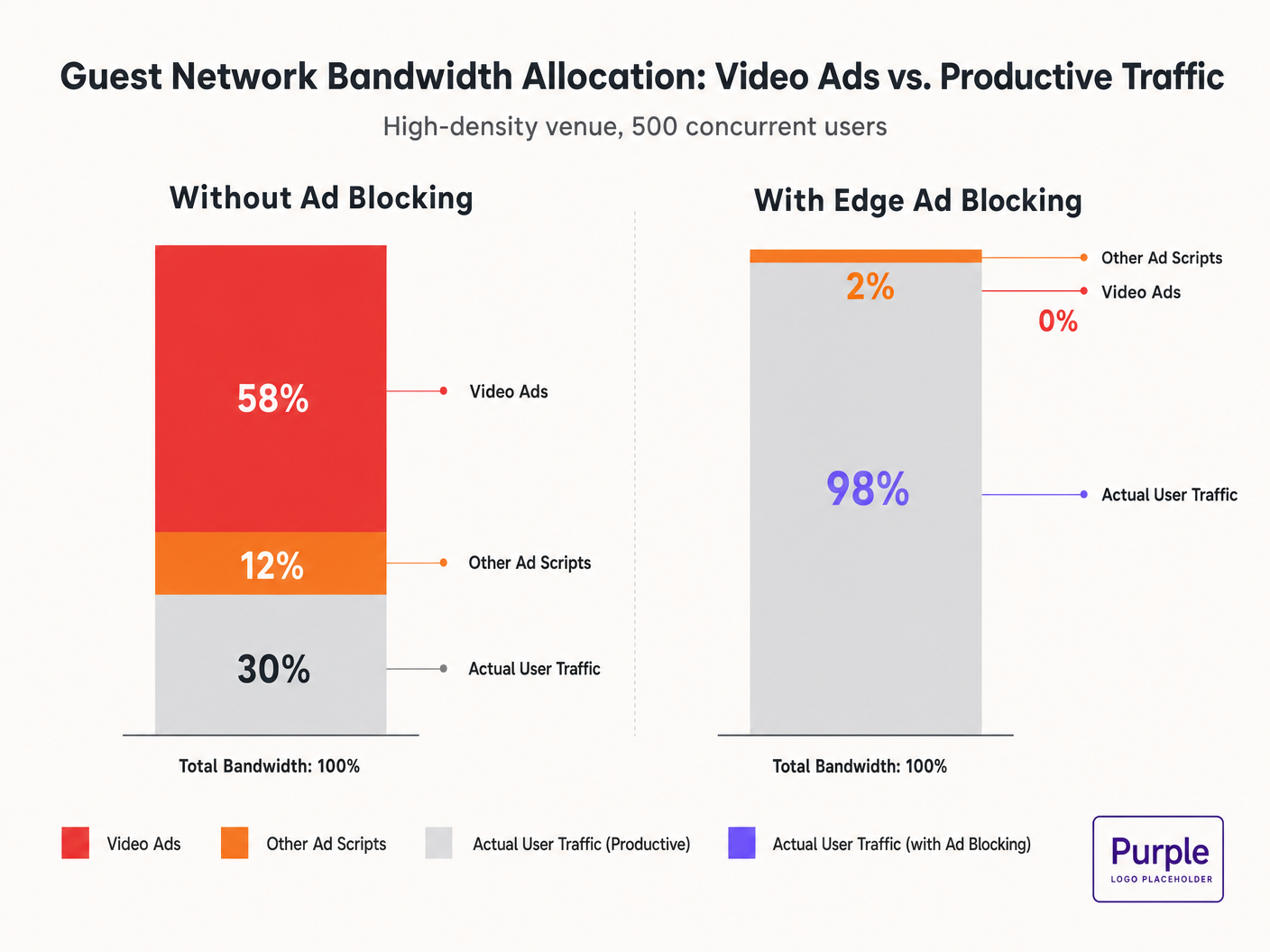
Wenn Gäste sich mit dem Netzwerk verbinden und Standard-Webseiten besuchen, initiieren ihre Geräte Dutzende von Hintergrundverbindungen zu Ad-Delivery-Netzwerken. Diese adaptiven Bitraten-Videostreams können 50-70 % des verfügbaren Durchsatzes verbrauchen, was die Benutzererfahrung für alle Nutzer verschlechtert und die Backhaul-Verbindungen sättigt. Dieser Leitfaden beschreibt die technischen Mechanismen dieses Bandbreitenverbrauchs und bietet einen herstellerneutralen Plan zur Minderung am Edge mittels DNS-Filterung. Durch die Implementierung dieser Strategien können Veranstaltungsorte die Gast-WiFi -Leistung drastisch verbessern, Infrastrukturkosten senken und die Compliance erhöhen, ohne auf einen Hardware-Erneuerungszyklus warten zu müssen.
Hören Sie sich unser Briefing zu diesem Thema an:
Technischer Deep-Dive: Die Physik der werbegetriebenen Netzwerksättigung
Die Anatomie einer Webanfrage
Wenn ein Nutzer in einem Gastnetzwerk auf eine werbefinanzierte Website zugreift, ist das Verhalten des Browsers sehr aggressiv. Ein einzelner Seitenaufruf löst typischerweise Verbindungen zu 8-40 separaten Drittanbieter-Domains aus, darunter Ad Exchanges, Demand-Side Platforms (DSPs) und Content Delivery Networks (CDNs).
Die Bandbreitenstrafe durch Videoanzeigen
Videoanzeigen, insbesondere Pre-Roll- und Mid-Roll-Formate, die von großen Börsen bereitgestellt werden, werden als adaptive Bitraten-Streams ausgeliefert. Das CDN prüft die verfügbare Bandbreite und liefert den Stream in der höchstmöglichen Qualität. In einer Umgebung mit hoher Dichte und 500 gleichzeitigen Nutzern, wenn 20 % der Nutzer einen 1080p-Werbestream mit 4-8 Mbit/s auslösen, steigt die aggregierte Nachfrage sofort um 400-800 Mbit/s. Dieser unerwünschte Traffic umgeht die standardmäßige Quality of Service (QoS)-Gestaltung, da er von legitimen HTTPS-Verbindungen stammt.
Sendezeitverbrauch und spektrale Ineffizienz
Neben der Backhaul-Sättigung verbrauchen Videoanzeigen wertvolle Funk-Sendezeit. In einem gemeinsam genutzten drahtlosen Medium reduziert jedes Gerät, das aktiv einen High-Bitrate-Stream empfängt, die Übertragungsmöglichkeiten für andere Geräte. Während der IEEE 802.11ax (Wi-Fi 6)-Standard OFDMA und BSS Colouring zur Verbesserung der spektralen Effizienz eingeführt hat, können diese Mechanismen das schiere Datenvolumen, das von Werbenetzwerken gefordert wird, nicht kompensieren. Die Funkschicht wird überlastet, was zu erhöhter Latenz und Paketverlusten für produktiven Traffic führt.
DNS-Auflösungs-Latenzkaskaden
Die Anzeigenbereitstellung basiert auf komplexen Weiterleitungsketten. Eine einzelne Anzeigenimpression kann 6-12 DNS-Lookups erfordern, bevor der Videostream startet. In einer dichten Bereitstellung erhöht dies die Last auf den lokalen DNS-Resolver exponentiell. Wenn der Resolver zu einem Engpass wird, kaskadiert die Latenz, was zu einer spürbaren Verschlechterung der Seitenladezeit für jeden Benutzer im Netzwerk führt.
Implementierungsleitfaden: Edge-DNS-Filterarchitektur
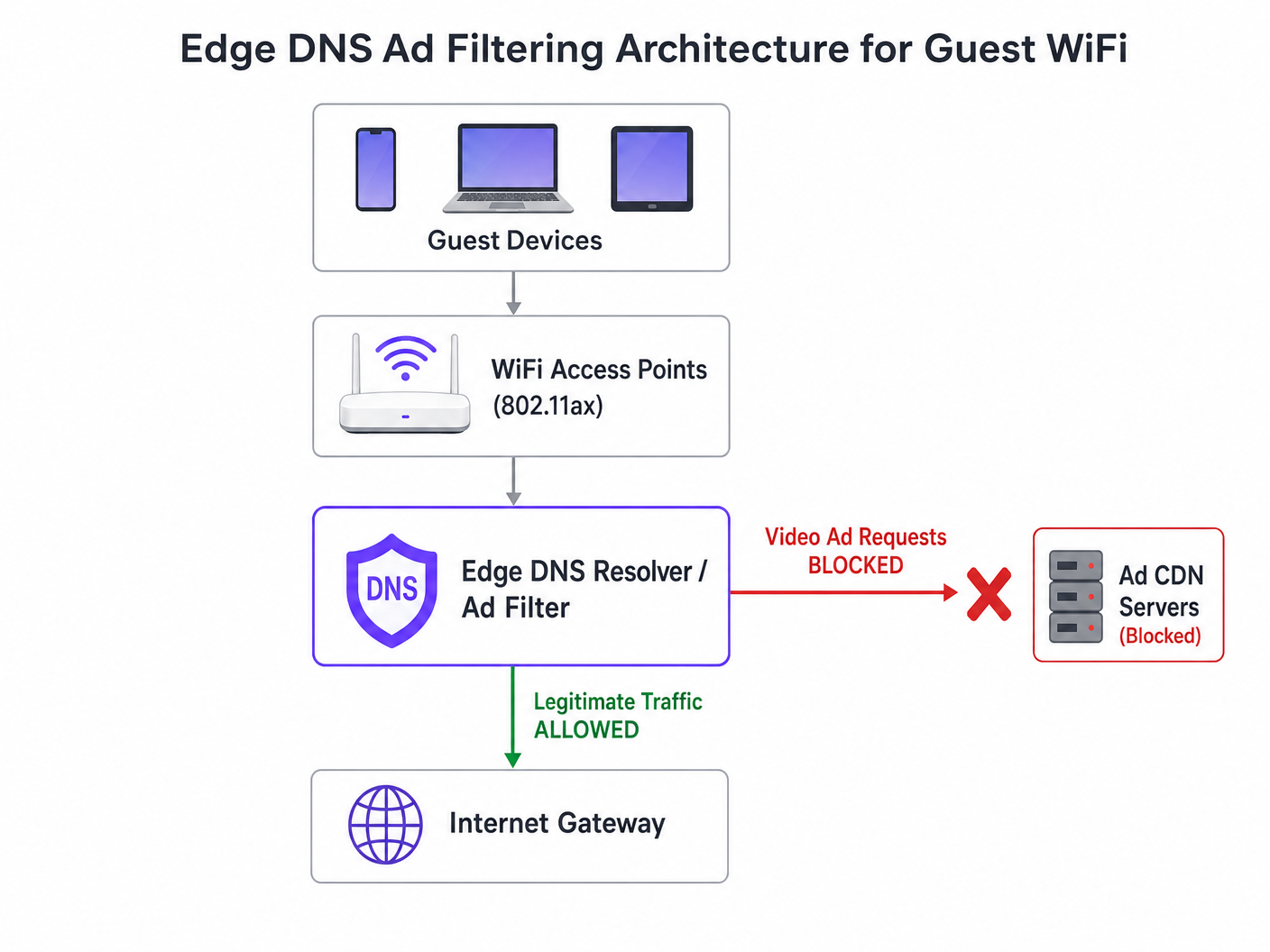
Die effektivste architektonische Intervention ist die Edge-DNS-Filterung. Durch das Blockieren von Ad-Netzwerk-Domains auf Resolver-Ebene verhindert das Netzwerk, dass die TCP-Verbindung überhaupt erst aufgebaut wird. Dieser Ansatz ist zustandslos, skaliert linear und fügt eine vernachlässigbare Latenz hinzu.
Schritt-für-Schritt-Bereitstellungsstrategie
- Passive Instrumentierung: Implementieren Sie passives DNS-Logging im Gastnetzwerk für 48-72 Stunden, um ein Basis-Traffic-Profil zu erstellen. Identifizieren Sie die am häufigsten abgefragten Domains und deren Volumen. Nutzen Sie Plattformen wie WiFi Analytics , um diese Daten zu visualisieren.
- Konservative Blocklist-Anwendung: Setzen Sie am ersten Tag keine massiven Community-Blocklisten (z.B. Steven Blacks Liste) ein. Beginnen Sie mit den Top 500 bekannten Video-Ad-Delivery-Domains. Überprüfen Sie, dass die legitime Inhaltsbereitstellung nicht beeinträchtigt wird.
- Split-Horizon-DNS-Konfiguration: Stellen Sie eine strikte Trennung zwischen der Unternehmens- und Gast-DNS-Infrastruktur sicher. Die Filterrichtlinie muss ausschließlich auf das Gast-VLAN beschränkt sein, um Betriebsunterbrechungen zu vermeiden.
- Automatisierte Blocklist-Wartung: Ad-Netzwerke rotieren Domains dynamisch und verwenden Domain Generation Algorithms (DGAs). Konfigurieren Sie den Resolver so, dass er mindestens alle 4 Stunden aktualisierte Bedrohungsdaten und Blocklist-Feeds abruft.
- Umgang mit DNS over HTTPS (DoH): Moderne Browser versuchen möglicherweise, lokale Resolver mithilfe von DoH zu umgehen. Mindern Sie dies, indem Sie ausgehenden TCP/UDP-Port 443 zu bekannten DoH-Anbieter-IP-Bereichen blockieren und so ein Fallback auf den vom Netzwerk bereitgestellten Resolver erzwingen.
Für einen tieferen Einblick in die Konfigurationsdetails lesen Sie unseren Leitfaden zu Verbesserung der WiFi-Geschwindigkeit durch Blockieren von Ad-Netzwerken am Edge .
Best Practices und Compliance
Datenschutz durch Technikgestaltung (GDPR Artikel 25)
Die Implementierung von Edge-DNS-Filterung steht im Einklang mit den GDPR-Prinzipien des Datenschutzes durch Technikgestaltung. Durch die Verhinderung von Verbindungen zu Tracking-Domains Dritter schützt das Netzwerk Gastdaten von Natur aus vor unbefugter Erfassung. Diese proaktive Haltung reduziert die Compliance-Belastung des Veranstaltungsortes.
Netzwerksegmentierung (PCI DSS)
Für Einzelhandel und KrankenhausVeranstaltungsorte, die Zahlungen verarbeiten, erfordert PCI DSS eine strikte Netzwerksegmentierung. DNS-Filterung verstärkt diese Grenze, indem sie sicherstellt, dass Gastgeräte nicht unbeabsichtigt als Kanäle für bösartige Payloads dienen können, die über kompromittierte Werbenetzwerke (Malvertising) geliefert werden.
Transparente Benutzererfahrung
Im Gegensatz zu Captive Portal-Interstitials oder Deep Packet Inspection ist die DNS-Filterung transparent. Der Benutzer erlebt schnellere Seitenladezeiten und einen geringeren Batterieverbrauch. Wenn ein Werbeplatz nicht geladen wird, klappt er in der Regel zusammen oder zeigt einen leeren Bereich an, was vom Benutzer selten als Netzwerkfehler wahrgenommen wird.
Fehlerbehebung & Risikominderung
| Fehlermodus | Grundursache | Minderungsstrategie |
|---|---|---|
| Übermäßige Blockierung legitimer Inhalte | Blockierung gemeinsam genutzter CDNs auf Root-Ebene (z.B. Akamai, Fastly). | Implementieren Sie die Filterung auf Subdomain-Ebene. Pflegen Sie eine robuste Positivliste für kritische Veranstaltungsdienste. |
| Filterung durch DoH umgangen | Browser, die fest codierte DoH-Resolver verwenden. | Null-Routing bekannter DoH-Anbieter-IPs. Implementieren Sie Split-Tunneling-Richtlinien bei Verwendung von Mobile Device Management (MDM). |
| Resolver-CPU-Erschöpfung | Unterdimensionierte DNS-Infrastruktur, die übermäßige NXDOMAIN-Antworten verarbeitet. | Stellen Sie Resolver mit ausreichender CPU/RAM bereit. Nutzen Sie Caching aggressiv. Ziehen Sie Cloud-gehostete rekursive Resolver für Elastizität in Betracht. |
ROI & Geschäftsauswirkungen
Die geschäftlichen Auswirkungen der Edge-DNS-Filterung sind unmittelbar und messbar:
- Bandbreitenwiederherstellung: Veranstaltungsorte gewinnen typischerweise 30-50% ihrer Gastnetzwerkbandbreite zurück, wodurch kostspielige Backhaul-Upgrades verzögert werden.
- Verbesserte Gästezufriedenheit: Schnellere Seitenladezeiten und zuverlässige Konnektivität korrelieren direkt mit höheren Net Promoter Scores (NPS) und positiven Veranstaltungsbewertungen.
- Operative Effizienz: Reduzierte Helpdesk-Tickets im Zusammenhang mit „langsamem WiFi“ ermöglichen es IT-Teams, sich auf strategische Initiativen zu konzentrieren, wie die Bereitstellung des Offline-Kartenmodus oder die Erweiterung von Smart-City-Integrationen, wie von unserer Führung befürwortet (siehe Purple ernennt Iain Fox zum VP Growth ).
- Verbesserte Sicherheitslage: Proaktives Blockieren von Malvertising- und Tracking-Domains vereinfacht Sicherheitsaudits und Compliance-Berichte. Erfahren Sie mehr über die Aufrechterhaltung einer sicheren Haltung in unserem Artikel: Erklären Sie, was ein Audit Trail für IT-Sicherheit im Jahr 2026 ist .
Schlüsseldefinitionen
Edge DNS Filtering
The practice of blocking access to specific domains at the local DNS resolver level, preventing devices from resolving the IP addresses of known ad networks.
Used by IT teams to silently drop unwanted traffic before a TCP connection is even attempted, saving bandwidth and improving performance.
Adaptive Bitrate Streaming (ABR)
A technology that dynamically adjusts the quality of a video stream based on the user's available bandwidth.
Ad networks use ABR to serve the highest possible quality video, which aggressively consumes available guest WiFi throughput.
Split-Horizon DNS
A configuration where different DNS responses are provided depending on the source IP address of the query (e.g., guest vs. corporate).
Essential for applying restrictive filtering policies to guest networks without impacting back-office operations.
DNS over HTTPS (DoH)
A protocol for performing remote DNS resolution via the HTTPS protocol, encrypting the queries.
DoH can bypass local edge filtering; network architects must actively block known DoH providers to enforce local DNS policies.
BSS Colouring
A Wi-Fi 6 (802.11ax) feature that adds a 'colour' identifier to transmissions, allowing access points to ignore traffic from overlapping networks.
Improves radio efficiency in dense venues, but does not solve the backhaul saturation caused by video ads.
NXDOMAIN
A DNS response code indicating that the requested domain name does not exist.
The standard response returned by a filtering resolver when a device attempts to query a blocked ad network domain.
Domain Generation Algorithm (DGA)
Techniques used by malware and some aggressive ad networks to periodically generate new domain names to evade static blocklists.
Requires IT teams to use dynamic, frequently updated threat intelligence feeds rather than static hosts files.
Malvertising
The use of online advertising to distribute malware or redirect users to malicious websites.
Blocking ad networks at the edge inherently protects guest devices from these threats, improving the venue's security posture.
Ausgearbeitete Beispiele
A 400-room hotel is experiencing severe guest WiFi degradation every evening between 19:00 and 22:00. The 1 Gbps backhaul is saturated, but the property management system (PMS) shows only 600 connected devices. How should the network architect address this without upgrading the circuit?
- Implement passive DNS logging on the guest VLAN to analyze the traffic profile during the peak window. 2. Identify the top bandwidth-consuming domains, which are likely video ad CDNs. 3. Deploy a recursive DNS resolver with a curated blocklist targeting these specific ad networks. 4. Configure the guest DHCP scope to assign the new resolver. 5. Monitor bandwidth utilization; expect a 30-40% reduction in peak load.
A stadium IT director wants to implement DNS ad blocking but is concerned about breaking the venue's own mobile app, which uses a third-party analytics SDK.
- Audit the mobile app's network dependencies using a proxy tool. 2. Identify the specific API endpoints required for the app's functionality. 3. Add these specific FQDNs (Fully Qualified Domain Names) to the DNS resolver's allowlist, superseding any blocklist policies. 4. Roll out the filtering policy to a subset of access points (e.g., one concourse) for beta testing before a venue-wide deployment.
Übungsfragen
Q1. A retail chain wants to deploy DNS filtering across 500 stores. They currently use a cloud-managed firewall solution. Should they deploy local DNS resolvers at each store or route all DNS queries to a centralized cloud resolver?
Hinweis: Consider the latency impact of DNS queries on page load times.
Musterlösung anzeigen
They should route queries to a centralized cloud resolver with geographically distributed points of presence (PoPs), provided the latency to the nearest PoP is under 20ms. Deploying and maintaining 500 local resolvers introduces significant operational overhead. Cloud resolvers offer centralized policy management and automated blocklist updates, which is ideal for a distributed retail environment.
Q2. After implementing a DNS blocklist, the marketing team reports that the venue's captive portal splash page is failing to load for some users. What is the most likely cause?
Hinweis: Captive portals often rely on external resources for tracking or authentication.
Musterlösung anzeigen
The blocklist has likely inadvertently blocked a CDN or tracking pixel domain (e.g., Google Analytics or a social login API) that the captive portal depends on. The architect must review the DNS logs for the captive portal's walled garden IP range, identify the blocked dependency, and add it to the allowlist.
Q3. A conference centre is hosting a digital marketing summit. The IT director is concerned that blocking ad networks will disrupt the attendees' ability to work and demonstrate their products. How should this be handled?
Hinweis: Network policies can be segmented by SSID or VLAN.
Musterlösung anzeigen
The IT director should provision a dedicated SSID/VLAN for the summit attendees with a bypass policy that uses unfiltered DNS resolvers (e.g., 8.8.8.8). The standard guest WiFi network can remain filtered. This provides the necessary access for the specific event without compromising the performance of the general public network.