
Per-Device PSK nach Hersteller: iPSK, DPSK, MPSK und PPSK im Vergleich (und WPA3 Support)
Ein umfassender Vergleich der gerätespezifischen PSK-Implementierungen von Cisco Meraki, HPE Aruba, Ruckus, Juniper Mist, Extreme, Fortinet und Ubiquiti UniFi. Erfahren Sie, wie sich WPA3-SAE auf Strategien für gerätespezifische Schlüssel auswirkt und wann Sie Übergangsmodi einsetzen oder auf 802.1X umsteigen sollten.
Video overview
Diesen Leitfaden anhören
Podcast-Transkript ansehen
Teil unserer Kernserie: Enterprise WiFi Security Guide →
Executive Summary
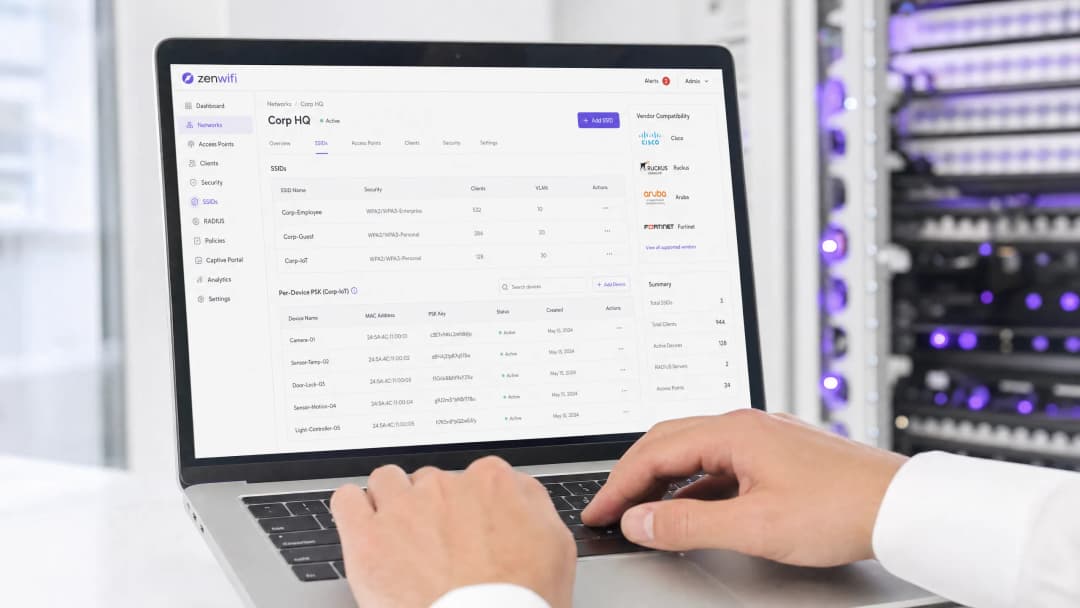
Der gerätespezifische Pre-Shared Key (PSK) ist die entscheidende Übergangstechnologie für Unternehmensnetzwerke, die eine Transparenz auf Geräteebene benötigen, ohne die Komplexität einer vollständigen 802.1X Authentifizierung in Kauf nehmen zu müssen. Während die Hersteller unterschiedliche Bezeichnungen verwenden - Cisco Meraki iPSK, HPE Aruba MPSK, Ruckus DPSK, Juniper Mist PPSK - ist das grundlegende Ziel identisch: die Zuweisung eines eindeutigen Passworts für jedes Gerät auf einer einzigen SSID.
Der Übergang zu WPA3 bringt jedoch eine erhebliche architektonische Einschränkung mit sich. WPA3 ersetzt den traditionellen WPA2 Vier-Wege-Handshake durch Simultaneous Authentication of Equals (SAE). SAE erfordert, dass das Passwort sowohl dem Access Point als auch dem Client vor Beginn des Austauschs bekannt ist. Dies bricht den standardmäßigen RADIUS-basierten Abfragemechanismus, der von den meisten gerätespezifischen PSK-Implementierungen verwendet wird. Dieser Leitfaden beschreibt im Detail, wie die einzelnen großen Hersteller mit gerätespezifischen PSKs umgehen, wie sie Schlüssel speichern und abfragen und wie sie die Herausforderung von WPA3-SAE bewältigen - von WPA3-Übergangsmodi bis hin zu proprietären Erweiterungen wie Ruckus DPSK3.
Technische Detailanalyse
Die Architektur von gerätespezifischen PSKs
Klassisches WPA2-Personal verwendet eine einzige gemeinsame Passphrase für eine gesamte SSID. Jedes Gerät nutzt dasselbe Passwort, was bedeutet, dass Sie den Zugriff für ein einzelnes Gerät nicht widerrufen können, ohne das Passwort für alle anderen zu ändern. Darüber hinaus haben Sie keine Transparenz auf Geräteebene oder Richtliniendurchsetzung.
Der gerätespezifische PSK löst dies, indem er jedem Gerät oder Benutzer individuelle Zugangsdaten zuweist. Sie können einen einzelnen Schlüssel widerrufen, ohne die anderen zu beeinträchtigen. Sie können pro Schlüssel unterschiedliche VLANs, Bandbreitenrichtlinien oder Zugriffszeiten zuweisen.
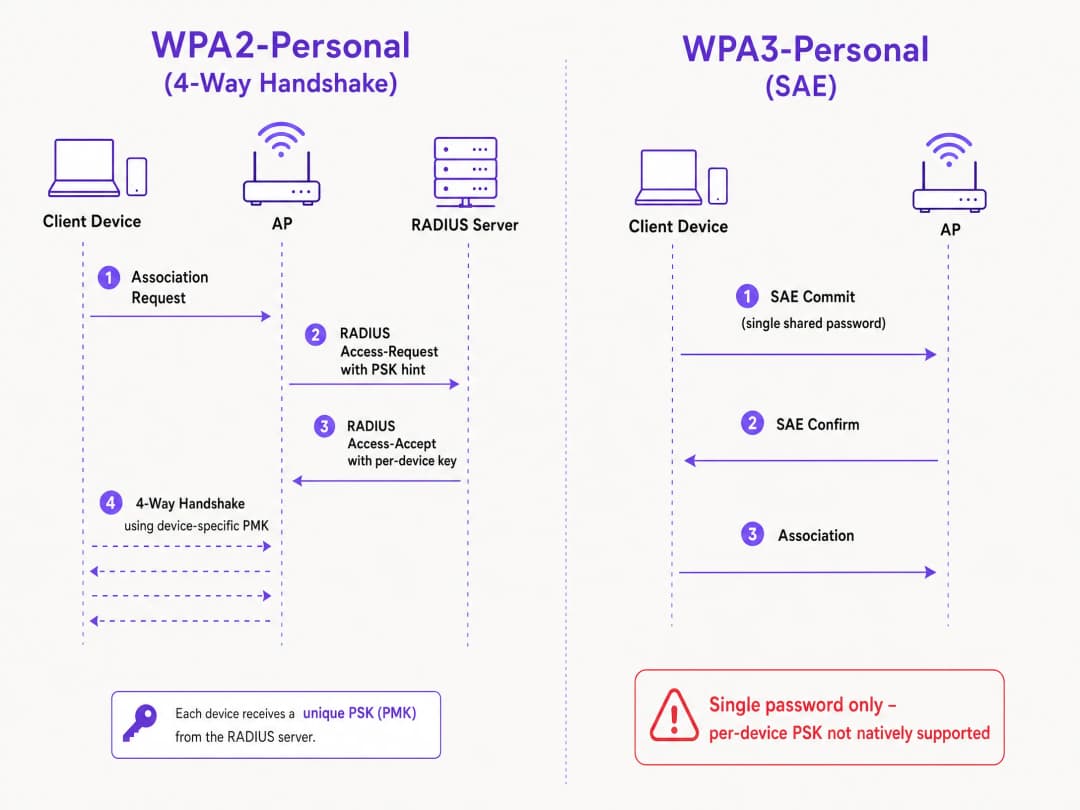
Der technische Mechanismus basiert auf dem WPA2 Vier-Wege-Handshake. Wenn sich ein Client verbindet, sendet der Access Point die MAC-Adresse des Clients in einer Access-Request-Nachricht an einen RADIUS-Server (oder eine lokale Datenbank). Der RADIUS-Server antwortet mit einer Access-Accept-Nachricht, die den spezifischen Schlüssel für dieses Gerät enthält. Der Access Point schließt dann den Vier-Wege-Handshake unter Verwendung dieses spezifischen Schlüssels ab, um den Pairwise Master Key (PMK) abzuleiten.
Die WPA3-SAE Herausforderung
WPA3-Personal ersetzt den Vier-Wege-Handshake durch SAE. SAE ist ein auf Diffie-Hellman basierendes Protokoll, bei dem sich beide Seiten vor dem Abschluss der Verbindung auf ein gemeinsames Passwortelement festlegen, das von der Passphrase abgeleitet wird.
Der entscheidende Unterschied besteht darin, dass das Passwort beiden Seiten bekannt sein muss, bevor der SAE-Austausch beginnt. Es gibt im Protokoll keinen Punkt, an dem ein RADIUS-Server einen abweichenden Schlüssel pro Gerät einspeisen könnte. Der Access Point und der Client führen bereits einen kryptografischen Austausch durch, der auf einem einzigen gemeinsamen Wert basiert. Dies ist eine Protokolleinschränkung, die durch den Standard IEEE 802.11 definiert ist, und keine Einschränkung der Hersteller.### Hersteller-Implementierungen im Vergleich
Jeder führende Enterprise-Hersteller unterstützt gerätespezifische PSKs, allerdings unterscheiden sich deren Implementierungen und die WPA3-Kompatibilität.
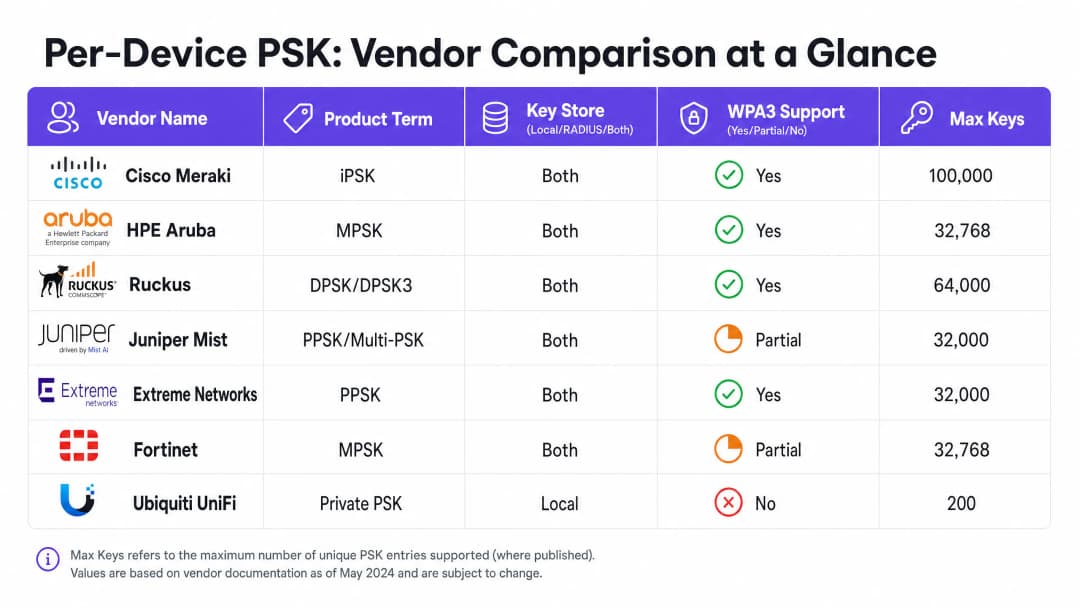
Cisco Meraki (iPSK) Cisco Meraki nennt diese Technologie Identity Pre-Shared Key (iPSK) und unterstützt zwei Betriebsmodi. Ohne RADIUS können Sie bis zu fünf eindeutige PSKs direkt im Meraki Dashboard konfigurieren. Mit RADIUS - typischerweise Cisco ISE - lässt sich das System auf bis zu 100.000 Schlüssel skalieren. Der RADIUS-Server übernimmt die Abfrage und gibt den gerätespezifischen Schlüssel zurück. Bei WPA3 setzt Meraki auf den WPA3-Transitionsmodus (WPA2/WPA3-Mischbetrieb), bei dem WPA2-Clients den Vier-Wege-Handshake nutzen und gerätespezifische Schlüssel erhalten, während WPA3-Clients SAE mit einem einzigen gemeinsamen Passwort verwenden.
HPE Aruba (MPSK) HPE Aruba bezeichnet dies als Multiple Pre-Shared Key (MPSK). Aruba unterstützt MPSK Local, bei dem die Schlüssel auf dem Controller gespeichert werden, sowie MPSK mit ClearPass, das als RADIUS- und Policy-Engine fungiert. ClearPass kann zehntausende Schlüssel verwalten und dynamische VLANs zuweisen. Wie bei Meraki wird die WPA3-Unterstützung derzeit über den Transitionsmodus gelöst.
Ruckus (DPSK und DPSK3) Ruckus nennt es Dynamic Pre-Shared Key (DPSK). Es ist eine der ausgereiftesten Implementierungen, die es bereits seit den Anfängen von SmartZone gibt. Im RADIUS-Modus lässt es sich in Cloudpath integrieren. Ruckus zeichnet sich besonders durch DPSK3 aus, ihre WPA3-Erweiterung. DPSK3 läuft im WPA2/WPA3-Mischbetrieb und setzt Cloudpath als RADIUS-Backend voraus. Dadurch können WPA3-fähige Geräte SAE nutzen, während das System die gerätespezifische Schlüsselbindung über die Cloudpath-Integration verwaltet.
Juniper Mist (PPSK / Multi-PSK) Juniper Mist bezeichnet die Technologie als Private Pre-Shared Key (PPSK) oder Multi-PSK. Mist speichert die Schlüssel in der Cloud-Datenbank mit einem Limit von 5.000 Schlüsseln pro Standort. Die Schlüssel können pro Benutzer, pro Gerät oder pro Gruppe zugewiesen werden. Mist lässt sich in den eigenen Dienst Access Assurance integrieren, was eine RADIUS-basierte PSK-Abfrage ermöglicht. Juniper unterstützt WPA3 RADIUS PSK über Access Assurance, wodurch eine einzige WPA3-Personal SSID mehrere Passphrasen bedienen kann.
Extreme Networks (PPSK) Extreme Networks nennt es Private Pre-Shared Key (PPSK) über ExtremeCloud IQ. Es unterstützt die lokale Schlüsselspeicherung direkt auf dem Access Point, was für Außenstellen praktisch ist, sowie die RADIUS-basierte Abfrage über den Cloud-RADIUS-Dienst von ExtremeCloud IQ. Extreme unterstützt MAC-Binding, um einen PPSK an ein bestimmtes Gerät zu koppeln.
Fortinet (MPSK) Fortinet nennt es Multiple Pre-Shared Key (MPSK), verwaltet über FortiAP und den drahtlosen Controller von FortiGate. Fortinet unterstützt explizit die Sicherheitsmodi WPA3-SAE und WPA3-SAE Transition in seinen MPSK-Profilen. Sie können ein MPSK-Profil mit WPA3-SAE-Schlüsseln erstellen, diese einer VAP zuweisen und die dynamische VLAN-Zuweisung aktivieren.
**Ubiquiti UniFi (Private PSK)**Ubiquiti UniFi nennt es Private Pre-Shared Keys. Die Implementierung erfolgt ausschließlich lokal; die Schlüssel werden im UniFi Network Controller gespeichert. Sie können jedem Schlüssel unterschiedliche VLANs zuweisen. UniFi Private PSK funktioniert jedoch nur in WPA2-Netzwerken auf 2,4 GHz und 5 GHz. WPA3 und 6 GHz werden nicht unterstützt.
Haben Sie Fragen zu Ihrem spezifischen Setup?
Unser Team arbeitet mit Standortbetreibern, IT-Managern und Netzwerktechnikern an über 80.000 Standorten zusammen. Buchen Sie ein 20-minütiges Gespräch und wir zeigen Ihnen, wie andere diese Herausforderungen gelöst haben.
Leitfaden zur Implementierung
Befolgen Sie bei der Bereitstellung von gerätespezifischen PSK diese Schritte, um eine sichere und skalierbare Architektur zu gewährleisten.
- Prüfen Sie Ihre Gerätelandschaft: Identifizieren Sie, welche Geräte WPA3 unterstützen und welche auf WPA2 angewiesen sind. Ältere IoT-Geräte werden auf absehbare Zeit wahrscheinlich WPA2 benötigen.
- Wählen Sie die richtige SSID-Strategie: Richten Sie für eine gemischte Umgebung ein hybrides SSID-Design ein. Betreiben Sie eine WPA2-Personal-SSID mit gerätespezifischem PSK für ältere IoT- und Gastgeräte. Stellen Sie eine WPA3-Enterprise-SSID für verwaltete Mitarbeitergeräte bereit.
- Implementieren Sie den Übergangsmodus sorgfältig: Wenn Sie den WPA3-Übergangsmodus auf Ihrer primären Gast-SSID verwenden, stellen Sie sicher, dass Ihre Access Points und RADIUS-Server korrekt konfiguriert sind, um die gemischten Authentifizierungsabläufe zu verarbeiten.
- Integrieren Sie das Identitätsmanagement: Verwalten Sie Schlüssel nicht manuell. Integrieren Sie Ihre Schlüsselbereitstellung in Ihren Geräteverwaltungs-Workflow oder einen Identity Provider wie Microsoft Entra ID oder Okta.
- Konfigurieren Sie dynamische VLANs: Ordnen Sie jeden gerätespezifischen PSK einem bestimmten VLAN zu, um die Netzwerktrennung durchzusetzen. Dies ist entscheidend, um IoT-Geräte vom Datenverkehr der Gäste zu isolieren.
Best Practices
- Lebenszyklusmanagement durchsetzen: Gerätespezifische PSK erfordern ein striktes Lebenszyklusmanagement. Sie müssen über einen Prozess zum Widerrufen von Schlüsseln verfügen, wenn Geräte außer Betrieb genommen werden, um eine unkontrollierte Verbreitung von Schlüsseln zu verhindern.
- Nutzen Sie 802.1X für verwaltete Endgeräte: Wechseln Sie für Unternehmens-Laptops und Mitarbeitergeräte zu WPA3-Enterprise mit EAP-TLS. Dies bietet stärkere Sicherheit und native Kompatibilität mit Zero-Trust-Modellen.
- Testen Sie WPA3-Upgrades: Aktivieren Sie WPA3 niemals auf einer bestehenden SSID mit gerätespezifischem PSK, ohne dies in einer Pilotumgebung zu testen. Überprüfen Sie die Firmware-Versionen und die Kompatibilität der RADIUS-Server.
- Nutzen Sie Purple für die Identität: Integrieren Sie Purple, um die Identitätsebene zu verwalten. Purple fungiert als Cloud-Overlay, das Authentifizierung, Datenerfassung und Einwilligungsmanagement bereitstellt und die entsprechende VLAN-Zuweisung über RADIUS an Ihre Hardware zurückgibt. Weitere Details finden Sie unter Enterprise WiFi Security: A Complete Guide for 2026.
Fehlerbehebung & Risikominderung
- Clients können keine Verbindung über WPA3 herstellen: Wenn ältere Geräte keine Verbindung zu einer SSID im WPA3-Übergangsmodus herstellen können, liegt dies häufig an inkompatiblen WLAN-Treibern. Stellen Sie sicher, dass die Client-Treiber aktualisiert sind. Wenn das Problem weiterhin besteht, verschieben Sie ältere Geräte auf eine dedizierte reine WPA2-SSID.
- RADIUS-Timeouts: Wenn der Access Point bei der Wartezeit auf den gerätespezifischen Schlüssel vom RADIUS-Server ein Timeout anzeigt, überprüfen Sie den Netzwerkpfad und stellen Sie sicher, dass der RADIUS-Server für die Authentifizierungslast entsprechend skaliert ist.* Fehler bei der VLAN-Zuweisung: Wenn sich ein Gerät verbindet, aber die falsche IP-Adresse erhält, überprüfen Sie die VLAN-Zuweisung in der RADIUS Access-Accept-Nachricht und stellen Sie sicher, dass das VLAN auf dem Access Point und dem Switch-Port vorhanden ist.
ROI & geschäftliche Auswirkungen
Die Implementierung von gerätespezifischen PSK bietet einen messbaren Mehrwert für Ihr Unternehmen, indem Support-Tickets reduziert und die Sicherheit erhöht werden.
- Entlastung des Helpdesks: Die Automatisierung der Bereitstellung und des Entzugs von Schlüsseln macht manuelle Passwort-Zurücksetzungen überflüssig.
- Verbesserte Sicherheitslage: Die Isolierung von Geräten in separate VLANs auf der Grundlage ihres eindeutigen Schlüssels reduziert den Schadensradius eines kompromittierten Geräts.
- Erhöhte Transparenz: Gerätespezifische Schlüssel bieten eine detaillierte Transparenz der Netzwerkauslastung, sodass Sie Bandbreitenfresser identifizieren und die Kapazitätsplanung optimieren können.
Schlüsseldefinitionen
Per-Device PSK
Ein Sicherheitsmechanismus, der jedem Gerät oder Benutzer auf einer einzigen SSID einen eindeutigen Pre-Shared Key zuweist, was eine individuelle Sperrung und dynamische Richtlinienzuweisung ermöglicht.
Wird verwendet, wenn IT-Teams Transparenz und Kontrolle pro Gerät benötigen, ohne eine vollständige 802.1X-Authentifizierung zu implementieren.
WPA3-SAE
Simultaneous Authentication of Equals. Das in WPA3-Personal verwendete sichere Schlüsselaustauschprotokoll, das den WPA2-Vier-Wege-Handshake ersetzt.
Relevant beim Upgrade auf WPA3 oder bei der Bereitstellung von 6-GHz-Netzwerken, da es die Art und Weise der Passwort-Authentifizierung grundlegend ändert.
Transition Mode
Eine Mixed-Mode-Konfiguration, bei der eine SSID die Unterstützung für WPA2-PSK und WPA3-SAE signalisiert, sodass sich ältere und moderne Clients mit demselben Netzwerknamen verbinden können.
Der Standardansatz zur Migration bestehender Netzwerke auf WPA3, ohne ältere Geräte von der Verbindung auszuschließen.
MAC Binding
Der Prozess der Zuordnung eines bestimmten gerätespezifischen PSK zur Hardware-MAC-Adresse eines bestimmten Geräts, wodurch verhindert wird, dass der Schlüssel auf einem anderen Gerät verwendet wird.
Wird verwendet, um die Weitergabe von Anmeldedaten zu verhindern und eine strenge Zugriffskontrolle für IoT-Geräte zu gewährleisten.
Dynamic VLAN Assignment
Die Fähigkeit, ein Gerät basierend auf seinen Authentifizierungsdaten (wie dem gerätespezifischen PSK) einem bestimmten virtuellen LAN (VLAN) zuzuweisen, anstatt auf Basis der SSID, mit der es sich verbindet.
Unerlässlich für die Netzwerksegmentierung, damit die IT den Gästedatenverkehr vom Unternehmensdatenverkehr auf demselben Access Point isolieren kann.
iPSK
Identity Pre-Shared Key. Die Implementierung von per-device PSK von Cisco Meraki.
Wird bei der Verwaltung von drahtlosen Cisco Meraki-Netzwerken eingesetzt.
DPSK
Dynamic Pre-Shared Key. Die Implementierung von per-device PSK von Ruckus, wobei DPSK3 die WPA3-kompatible Version ist.
Wird bei der Verwaltung von drahtlosen Ruckus-Netzwerken eingesetzt.
MPSK
Multiple Pre-Shared Key. Der von HPE Aruba und Fortinet verwendete Begriff für ihre gerätespezifischen PSK-Implementierungen.
Wird bei der Verwaltung von drahtlosen HPE Aruba- oder Fortinet-Netzwerken eingesetzt.
Ausgearbeitete Beispiele
Ein Hotel mit 200 Zimmern muss sicheres Guest WiFi bereitstellen und Smart-TVs in jedem Zimmer isolieren. Derzeit wird ein einziges WPA2-Personal-Passwort für alle Gäste und Geräte verwendet.
Implementieren Sie per-device PSK über ein RADIUS-Backend. Integrieren Sie Purple, um Gästedaten zu erfassen und jedem Gast bei der Registrierung einen eindeutigen PSK zuzuweisen. Generieren Sie für die Smart-TVs einen eindeutigen PSK pro TV und weisen Sie diesen einem dedizierten IoT-VLAN zu. Konfigurieren Sie die Gäste-PSKs so, dass sie einem separaten Guest-VLAN mit aktivierter Client-Isolierung zugewiesen werden.
Ein Universitätscampus rüstet auf WiFi 6E auf und muss WPA3 auf dem 6-GHz-Band unterstützen, verfügt jedoch über Tausende von älteren IoT-Geräten, die nur WPA2 unterstützen.
Implementieren Sie ein hybrides SSID-Design. Erstellen Sie eine WPA3-Enterprise-SSID für Laptops und Smartphones von Studenten und Mitarbeitern unter Verwendung von 802.1X zur Authentifizierung. Erstellen Sie eine separate WPA2-Personal-SSID mit per-device PSK auf den 2,4-GHz- und 5-GHz-Bändern speziell für die älteren IoT-Geräte.
Übungsfragen
Q1. Sie stellen WiFi 6E Access Points bereit und müssen 6-GHz-Clients unterstützen. Ihr bestehendes 5-GHz-Netzwerk verwendet iPSK für IoT-Geräte. Können Sie die iPSK-Konfiguration auf das 6-GHz-Band ausweiten?
Hinweis: Berücksichtigen Sie die obligatorischen Sicherheitsprotokolle für das 6-GHz-Band.
Q2. Eine Einzelhandelskette nutzt Aruba MPSK, um Point-of-Sale-Terminals eindeutige Schlüssel zuzuweisen. Sie möchte ihre primäre SSID auf WPA3 aufrüsten, um eine bessere Sicherheit zu gewährleisten. Was ist der empfohlene Ansatz?
Hinweis: Aruba MPSK erfordert den WPA2-Vier-Wege-Handshake.
Musterlösung anzeigen
Aktivieren Sie den WPA3-Übergangsmodus (WPA2/WPA3-Mischbetrieb) auf der SSID. Die Point-of-Sale-Terminals verbinden sich weiterhin über WPA2 und MPSK, während neuere Geräte eine Verbindung über WPA3-SAE mit einem gemeinsam genutzten Passwort herstellen können.
Q3. Sie verwalten ein Ruckus-Netzwerk und möchten ein per-device PSK für WPA3-Clients bereitstellen. Welche spezifische Konfiguration ist erforderlich?
Hinweis: Berücksichtigen Sie die proprietäre Erweiterung, die Ruckus anbietet, sowie deren Backend-Anforderungen.
Musterlösung anzeigen
Sie müssen Ruckus DPSK3 bereitstellen. Dies erfordert WiFi 6 oder neuere Access Points mit der Firmware 7.0 oder höher, die Konfiguration der SSID für den WPA2/WPA3-Mischbetrieb und die Verwendung von Ruckus Cloudpath als RADIUS-Server.
Weiterlesen in dieser Reihe
iOS und macOS 802.1X Fehlerbehebung: Eine Bereitstellungs-Checkliste für Intune, Jamf und Microsoft Entra ID
Nutzen Sie diese Checkliste, um zu diagnostizieren, warum iPhones, iPads und Macs die 802.1X Authentifizierung bei Intune oder Jamf Pro verweigern. Jeder Fehler lässt sich auf eine von vier Ursachen zurückführen: Server-Vertrauensstellung, Identitätszertifikat, macOS Modus oder Microsoft Entra ID Gruppenzuweisung. Sie bestätigen die Ursache anhand von eapolclient- und RADIUS-Protokollen, wenden den Fix an und planen zukünftige Zertifikatsrotationen.
Intune WiFi-Profil Server-Vertrauensstellung: Zertifikat-Servernamen und Stamm-CA-Checkliste für Entra ID
Sie können die Servervalidierungsseite eines Intune WiFi-Profils so konfigurieren, dass EAP-TLS und PEAP unter Windows, Apple und Android eine Verbindung herstellen. Sie gleichen Zertifikat-Servernamen mit dem RADIUS-Zertifikat ab, stellen die richtige Stamm-CA bereit, richten Entra ID-Gruppenzuweisungen aus und planen Zertifikatsverlängerungen, bevor Verbindungen unbemerkt abbrechen.
Fehlerbehebung bei Android 802.1X und EAP-TLS: Eine Checkliste für die Bereitstellung mit Intune und Microsoft Entra ID
Sie werden in der Lage sein, genau zu bestimmen, warum verwaltete Android-Telefone EAP-TLS auf Ihrer Mitarbeiter-SSID verweigern, und dies in Intune zu beheben. Ordnen Sie jedes Symptom den vier üblichen Ursachen zu - fehlende Zertifizierungsstelle (CA) oder Domäne, Client-Zertifikat im falschen Profil, ein nicht übereinstimmender RADIUS-Servername oder eine nicht zugestellte vertrauenswürdige Root-Zertifizierungsstelle. Wenden Sie dann eine Rollout-Checkliste an, die wiederholte Ausfälle verhindert.
Haben Sie Fragen zu Ihrem spezifischen Setup?
Unser Team arbeitet mit Standortbetreibern, IT-Managern und Netzwerktechnikern an über 80.000 Standorten zusammen. Buchen Sie ein 20-minütiges Gespräch und wir zeigen Ihnen, wie andere diese Herausforderungen gelöst haben.