
Warum verbindet sich mein Gäste-WiFi nicht? Fehlerbehebung bei Captive Portal-Problemen
Dieser maßgebliche technische Leitfaden erklärt die zugrunde liegenden Mechanismen der Captive Portal-Erkennung und beschreibt die sechs primären Fehlermodi, die verhindern, dass sich das Gäste-WiFi verbindet. Er bietet IT-Managern und Netzwerkarchitekten ein praktisches Framework zur Fehlerbehebung, um HTTP-Redirect-Probleme, DNS-Konflikte und Herausforderungen bei der MAC-Randomisierung zu lösen.
Diesen Leitfaden anhören
Podcast-Transkript ansehen
Executive Summary
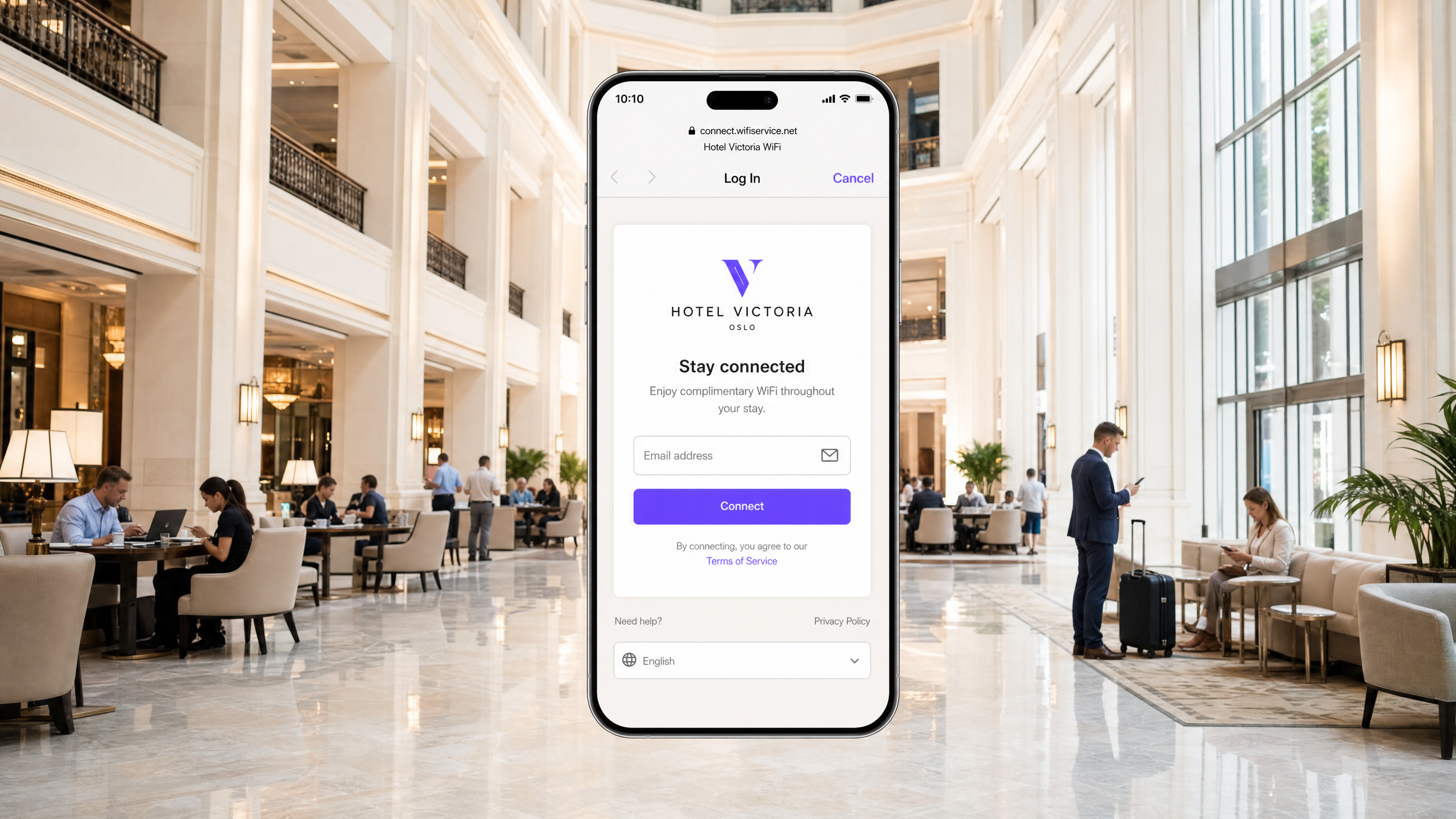
Für moderne Unternehmensstandorte sind drahtlose Gästenetzwerke kein bloßer Service mehr; sie stellen einen entscheidenden Touchpoint für Kundenbindung, operative Intelligenz und Markenpositionierung dar. Der geschäftliche Wert dieser Netzwerke hängt jedoch vollständig von der Zuverlässigkeit des ersten Verbindungserlebnisses ab. Wenn sich ein Gast mit einem Netzwerk verbindet und die Captive Portal-Anmeldeseite nicht geladen wird, leidet der Standort sofort unter erhöhter Reibung im Servicebereich, einem Anstieg der Support-Tickets und verpassten Möglichkeiten zur Datenerfassung.
Im Kern dieser Fehler liegt ein grundlegendes Spannungsfeld zwischen sicheren Webstandards und den Abfangtechniken auf Netzwerkesbene, die in der Vergangenheit von Captive Portals verwendet wurden. Moderne Webbrowser und Betriebssysteme sind darauf ausgelegt, unbefugte Datenverkehrsumleitungen zu erkennen und zu blockieren, um Benutzer vor Man-in-the-Middle-Angriffen zu schützen. Durch das Verständnis der präzisen HTTP- und DNS-Umleitungssequenzen, der Auswirkungen sicherer Protokolle wie HSTS und der Datenschutzfunktionen moderner Mobilgeräte können IT-Teams robuste drahtlose Zugriffslösungen entwickeln. Dieser Leitfaden bietet das maßgebliche Framework zur Diagnose und Behebung der Ursachen für den Fehlerzustand „guest wifi not connecting captive portal“.
Hören Sie sich das vollständige technische Briefing an:
Technischer Deep-Dive: Wie die Captive Portal-Erkennung tatsächlich funktioniert
Um ein Captive Portal-Problem zu beheben, müssen Sie zunächst verstehen, was ein Captive Portal auf Netzwerkesbene tatsächlich tut. Die meisten Menschen denken dabei einfach an eine Anmeldeseite. In Wirklichkeit handelt es sich um einen Mechanismus zum Abfangen von Datenverkehr auf Netzwerkesbene.
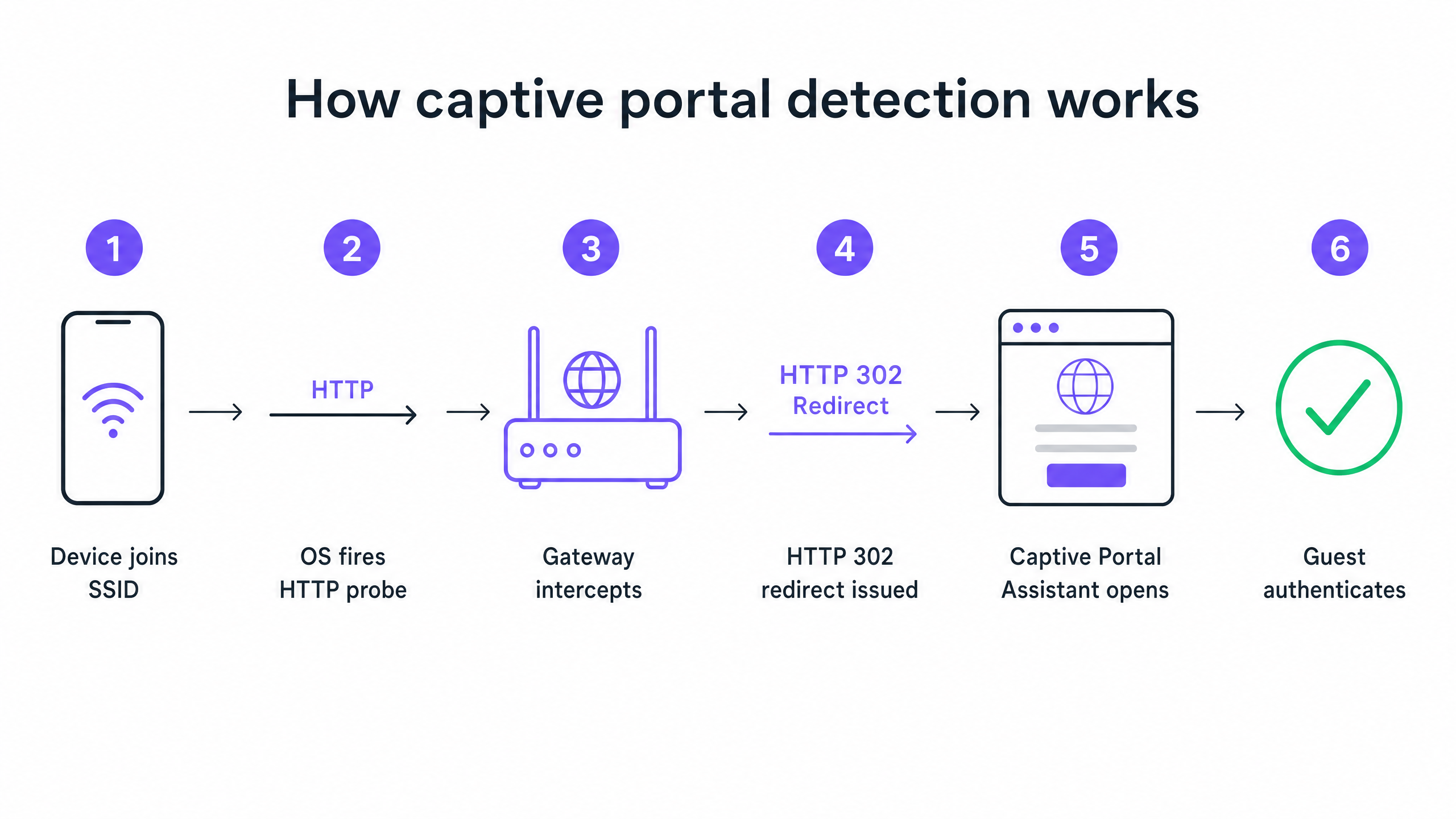
Wenn sich ein Gerät mit Ihrer Gäste-SSID verbindet und eine IP-Adresse über DHCP erhält, wartet das Betriebssystem nicht darauf, dass der Benutzer einen Browser öffnet. Im Hintergrund sendet ein Systemdienst sofort eine unverschlüsselte HTTP-GET-Anfrage an eine vom Hersteller kontrollierte Probe-URL. Apple-Geräte fragen captive.apple.com ab. Android-Geräte fragen connectivitycheck.gstatic.com ab. Windows-Geräte fragen msftconnecttest.com ab.
Wenn das Netzwerk über einen offenen Internetzugang verfügt, geben diese Probes die erwarteten Antworten zurück, und das Betriebssystem kommt zu dem Schluss, dass alles in Ordnung ist. In einem Gästenetzwerk fängt Ihr Wireless-Gateway oder -Controller diese HTTP-Probe jedoch ab, bevor sie das Internet erreicht. Anstelle der erwarteten Antwort gibt das Gateway einen HTTP-302-Redirect zurück, der auf Ihre Captive Portal-Splash-Page verweist. Das Betriebssystem erkennt die unerwartete Umleitung, stellt fest, dass es sich hinter einem Captive Portal befindet, und öffnet ein Sandbox-Browserfenster, um die Anmeldeseite anzuzeigen.
Die sechs primären Fehlermodi
Wenn ein Gast meldet, dass sich das WiFi nicht verbindet, ist der Fehler fast immer auf eine von sechs Ursachen zurückzuführen, die diese Sequenz unterbrechen.
1. Erschöpfung des DHCP-Pools Dies ist der stille Killer bei Veranstaltungen mit hoher Dichte. Wenn Sie eine Konferenz mit 2.000 Teilnehmern in einem Standard-/24-Subnetz veranstalten, stehen Ihnen 254 nutzbare IP-Adressen zur Verfügung. Wenn Ihre DHCP-Lease-Zeit auf den Standardwert von 24 Stunden eingestellt ist, ist dieser Pool innerhalb von Minuten nach der Türöffnung erschöpft. Jeder nachfolgende Verbindungsversuch schlägt fehl, noch bevor die Captive Portal-Sequenz überhaupt beginnt.
2. Fehler beim DNS-Abfangen Die Captive Portal-Umleitung hängt davon ab, dass das Gateway die HTTP-Probe abfängt. Die Probe erfordert jedoch zuerst eine DNS-Abfrage. Wenn Ihre DNS-Konfiguration es nicht authentifizierten Clients nicht erlaubt, externe Domänennamen aufzulösen, wird die Probe nie gestartet.
3. Unvollständiger Walled Garden Der Walled Garden definiert, welche externen Domänen nicht authentifizierte Gäste erreichen können. Wenn Ihre Portal-Splash-Page Assets von einem CDN lädt, das sich nicht im Walled Garden befindet, wird die Seite als leerer Bildschirm dargestellt. Wenn Sie Social Login über Google, Apple oder Facebook anbieten, muss jede von diesen Anbietern verwendete OAuth-Domain auf die Whitelist gesetzt werden. Social-Identity-Anbieter aktualisieren ihre CDN-IP-Bereiche regelmäßig. Ein Walled Garden, der vor sechs Monaten noch perfekt funktionierte, kann heute unbemerkt fehlerhaft sein.
4. HSTS blockiert die Umleitung HTTP Strict Transport Security (HSTS) ist eine Browser-Sicherheitsrichtlinie, die Verbindungen zu bestimmten Domänen ausschließlich über HTTPS erzwingt. Wenn ein Gast versucht, eine HSTS-vorab geladene Domäne zu kontaktieren, und Ihr Gateway versucht, diese HTTPS-Anfrage abzufangen, um sie zum Portal umzuleiten, erkennt der Browser eine Zertifikatsabweichung. Er zeigt eine nicht umgehbare Sicherheitswarnung an und blockiert die Umleitung vollständig. Die richtige Lösung besteht darin, niemals ein HTTPS-Abfangen zu versuchen. Ihr Gateway sollte nur die unverschlüsselten HTTP-Canary-Probes umleiten.
5. Aktives VPN auf dem Gästegerät Ein VPN verschlüsselt den gesamten Datenverkehr vom Gerät und leitet ihn durch einen externen Tunnel, bevor er Ihr Gateway erreicht. Ihr Gateway sieht die HTTP-Probe nie. Die Captive Portal-Erkennungssequenz wird nie ausgelöst.
6. MAC-Adressen-Randomisierung Moderne iOS und Android-Geräte verwenden standardmäßig randomisierte MAC-Adressen als Datenschutzfunktion. Da der Sitzungsstatus des Captive Portals anhand der MAC-Adresse nachverfolgt wird, kann einem Gast, der sich vor einer Stunde authentifiziert hat, die Anmeldeseite erneut angezeigt werden, nachdem die MAC-Adresse seines Geräts gewechselt hat.
Implementierungsleitfaden: Architektur für Zuverlässigkeit
Eine gut konfigurierte Captive Portal-Bereitstellung erfordert eine sorgfältige Abstimmung in Ihrer Guest WiFi -Infrastruktur.
Schritt 1: DHCP-Architektur optimieren
Für jeden Standort, der mehr erwartet als 200 gleichzeitige Geräte, verabschieden Sie sich von einem einzelnen /24-Subnetz. Verwenden Sie /22 oder größer und legen Sie die Lease-Zeiten so fest, dass sie dem Verweildauerprofil Ihres Standorts entsprechen. Ein Hotel setzt Leases auf 8 Stunden. Ein Stadion setzt Leases auf 3 Stunden. Ein Einkaufszentrum setzt Leases auf 90 Minuten. Ein Konferenzzentrum setzt Leases auf 30 Minuten.
Schritt 2: Walled-Garden-Management automatisieren
Validieren Sie Ihren Walled Garden vor jeder größeren Veranstaltung. Auf der Plattform von Purple pflegen und aktualisieren wir diese Walled-Garden-Einträge automatisch als Teil unseres Cloud-Managed-Service, was Ihrem Team den manuellen Wartungsaufwand abnimmt. Wir unterstützen Integrationen mit Cisco Meraki, HPE Aruba, Ruckus, Juniper Mist, Ubiquiti UniFi, Cambium, Extreme und Fortinet.
Schritt 3: RFC 8910 (DHCP-Option 114) implementieren
Die langfristige, standardbasierte Lösung für HSTS-Konflikte ist RFC 8910, das die DHCP-Option 114 definiert. Diese Option ermöglicht es Ihrem DHCP-Server, die Captive Portal-URL direkt an das Client-Gerät zu übermitteln, wodurch eine HTTP-Weiterleitung vollständig überflüssig wird. iOS 14 und Android 11 und höher unterstützen dies nativ.
Best Practices
Profilbasierte Authentifizierung für wiederkehrende Besucher bereitstellen Captive Portals sind eine ausgereifte Technologie, bringen jedoch naturgemäß Reibungspunkte mit sich. OpenRoaming, basierend auf Passpoint und 802.1X, ermöglicht es wiederkehrenden Gästen, sich automatisch und sicher zu verbinden, ohne jemals eine Anmeldeseite zu sehen. Purple fungiert im Rahmen unseres Connect-Tarifs als kostenloser Identitätsanbieter für OpenRoaming. Standorte wie Premier Inn und die Manchester Airports Group setzen dies bereits ein, um Reibungsverluste bei der erneuten Authentifizierung für wiederkehrende Besucher zu vermeiden und gleichzeitig die vollständige GDPR-Konformität sowie die Erfassung von First-Party-Daten zu gewährleisten.
Niemals von einem authentifizierten Gerät aus testen Eine Falle, in die viele IT-Teams tappen: das Portal von einem Gerät aus zu testen, das sich zuvor bereits authentifiziert hat. Ihre Gerätesitzung ist noch aktiv, sodass Sie das Portal vollständig umgehen und fälschlicherweise annehmen, dass alles funktioniert. Testen Sie immer von einem Gerät in einem frischen, nicht authentifizierten Zustand.
Zugehörige Leitfäden lesen Weitere Informationen zur Absicherung Ihrer Netzwerke finden Sie in unserem Leitfaden What Is Secure WiFi: Essential Guide for Business 2026 und unserem Bandwidth Management: A Practical Guide for 2026 .
Fehlerbehebung & Risikominderung
Wenn ein Gast ein Verbindungsproblem meldet, benötigt Ihr Servicepersonal vor Ort ein schnelles Diagnoseschema.
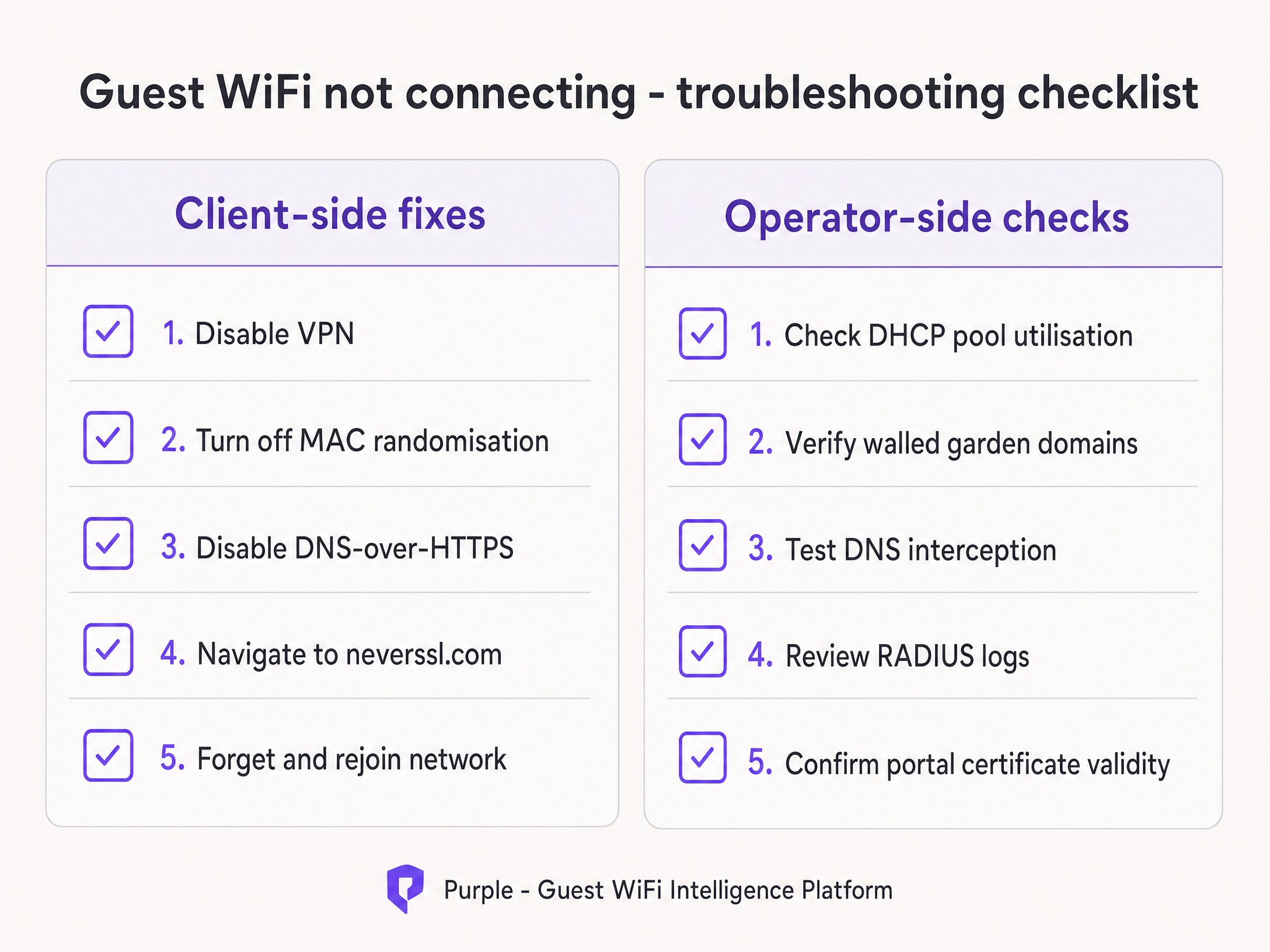
Weisen Sie Ihre Mitarbeiter an, zuerst die clientseitigen Lösungen durchzugehen:
- Bitten Sie den Gast, alle aktiven VPNs zu deaktivieren.
- Weisen Sie den Gast an, die MAC-Randomisierung (Private Adresse) für Ihre spezifische SSID zu deaktivieren.
- Lassen Sie den Gast einen Standardbrowser öffnen und zu
http://neverssl.comnavigieren. Da diese Website so konzipiert ist, dass sie niemals SSL verwendet, kann das Gateway die Anfrage problemlos abfangen und die Weiterleitung auslösen. - Wenn alles andere fehlschlägt, bitten Sie den Gast, das Netzwerk zu ignorieren und sich erneut zu verbinden.
Wenn das Problem bei mehreren Gästen weiterhin besteht, eskalieren Sie zu den betreiberseitigen Prüfungen. Überprüfen Sie sofort die Auslastung des DHCP-Pools, verifizieren Sie die RADIUS-Protokolle auf Access-Reject-Meldungen und testen Sie das DNS-Interception.
ROI & geschäftliche Auswirkungen
Die geschäftlichen Auswirkungen eines zuverlässigen Captive Portals gehen weit über IT-Kennzahlen hinaus. Durch die Vermeidung von Verbindungsfehlern steigern Standorte direkt die Wachstumsrate ihrer Marketingdatenbank.
Nehmen wir Harrods, das durch die Optimierung seiner WiFi Analytics und des Captive Portal-Flusses einen 57-fachen Marketing-ROI erzielt hat. Oder AGS Airports, die durch ein nahtloses, gestaffeltes Bandbreitenmanagement einen ROI von 842 % erzielt haben. Eine zuverlässige Verbindung ist die Grundvoraussetzung für die Erfassung moderner Feedback-Daten, wie sie in unserem Leitfaden Modern Feedback Collection: A Playbook for Venues 2026 beschrieben sind.
Jeder fehlgeschlagene Ladevorgang eines Captive Portals bedeutet ein verlorenes Kundenprofil. Durch die Implementierung der in diesem Leitfaden beschriebenen Architekturstandards verwandeln IT-Verantwortliche ihre drahtlose Infrastruktur von einer Kostenstelle in eine zuverlässige, konforme Umsatzquelle.
Schlüsseldefinitionen
Captive Portal
A network-level interception mechanism that forces an unauthenticated user to view and interact with a specific web page before being granted access to the public internet.
When IT teams deploy guest networks, the captive portal is the primary tool for enforcing terms of service and capturing first-party marketing data.
Walled Garden
A pre-authentication access control list (ACL) that defines which external IP addresses or domain names an unauthenticated device is permitted to access.
Crucial for allowing devices to load the captive portal splash page assets and communicate with social identity providers before the user has fully authenticated.
HSTS (HTTP Strict Transport Security)
A web security policy mechanism that helps to protect websites against man-in-the-middle attacks such as protocol downgrade attacks and cookie hijacking.
HSTS is the primary reason why intercepting HTTPS traffic to display a captive portal results in severe browser security warnings rather than a successful redirect.
RFC 8910 (DHCP Option 114)
An IETF standard that allows a DHCP server to directly advertise the URL of the captive portal to the client device during the initial IP address assignment.
This standard eliminates the need for HTTP redirection entirely, solving the HSTS conflict and providing a cleaner connection experience.
MAC Address Randomisation
A privacy feature in modern mobile operating systems that generates a new, random MAC address for each wireless network the device joins, or periodically rotates the address.
This feature breaks traditional captive portal session persistence, forcing returning guests to log in repeatedly unless the venue upgrades to profile-based authentication like OpenRoaming.
OpenRoaming
A global roaming federation built on Passpoint and 802.1X that allows users to connect to public WiFi networks automatically and securely without interacting with a captive portal.
Purple acts as a free identity provider for OpenRoaming under the Connect plan, allowing venues to eliminate re-authentication friction.
HTTP 302 Redirect
An HTTP response status code indicating that the requested resource resides temporarily under a different URI.
This is the specific mechanism the wireless gateway uses to redirect the device's HTTP canary probe to the captive portal splash page.
Canary Probe
An automated, unencrypted HTTP request sent by an operating system immediately after connecting to a network to test for internet connectivity.
Apple uses captive.apple.com; Android uses connectivitycheck.gstatic.com. Intercepting these probes is the foundation of captive portal detection.
Ausgearbeitete Beispiele
A 2,500-capacity conference centre in London is hosting a major technology summit. Within 45 minutes of the keynote beginning, attendees report that the 'guest wifi not connecting captive portal' issue is widespread. The SSID is visible, but devices either fail to obtain an IP address or receive an IP but see no login screen. The network is configured with a single /23 subnet and 12-hour DHCP leases.
- Identify DHCP Exhaustion: A /23 subnet provides 1,022 usable IP addresses. With 2,500 attendees, the pool is undersized. The 12-hour lease means addresses are not returned to the pool when attendees leave the building for lunch.
- Expand the Subnet: Reconfigure the guest VLAN to use a /21 subnet, providing 4,094 usable IP addresses, comfortably exceeding the venue capacity.
- Reduce Lease Time: Change the DHCP lease time from 12 hours to 30 minutes. This ensures that IP addresses from devices that disconnect (e.g., when an attendee leaves) are quickly reclaimed.
- Clear Leases: Clear the existing DHCP bindings to force active devices to renew under the new parameters.
A retail chain rolls out a new captive portal featuring social login via Google and Facebook. During testing, the IT team finds that the portal splash page loads correctly, but when a user taps 'Log in with Google', the page times out and fails to connect. Standard email registration works perfectly.
- Diagnose Walled Garden Failure: The timeout indicates that the unauthenticated client device cannot reach the Google OAuth servers to complete the authentication handshake.
- Audit Walled Garden Entries: Review the pre-authentication access control list on the wireless controller (e.g., Cisco Meraki or HPE Aruba).
- Add Required Domains: Add the specific Google and Facebook authentication domains (e.g., accounts.google.com) to the walled garden. Crucially, add wildcard entries for the CDNs that serve the login page assets (e.g., *.gstatic.com).
- Implement Automated Updates: Because these providers change their IP ranges frequently, configure the controller to use wildcard domain snooping rather than static IP whitelisting.
Übungsfragen
Q1. A retail venue reports that their captive portal works perfectly for guests using standard email registration, but guests attempting to use the 'Log in with Facebook' option experience a blank white screen after tapping the button. What is the most likely architectural cause?
Hinweis: Consider what network resources the unauthenticated device needs to reach to render the Facebook login prompt.
Musterlösung anzeigen
The venue has an incomplete walled garden. The wireless gateway is blocking the unauthenticated device from reaching Facebook's OAuth domains or CDN infrastructure. The IT team must update the pre-authentication access control list to include all required wildcard domains for Facebook authentication.
Q2. You are designing the guest WiFi architecture for a major football stadium. The venue holds 60,000 fans, and matches last approximately 3 hours. The current configuration uses a /16 subnet and 24-hour DHCP lease times. During the first match, thousands of fans report they cannot connect. What changes should you implement?
Hinweis: Calculate the total available IP addresses in the subnet versus the venue capacity, and evaluate the lifecycle of those addresses.
Musterlösung anzeigen
The network is experiencing DHCP pool exhaustion. A /16 subnet provides 65,534 usable IP addresses, which is theoretically enough for 60,000 fans. However, with a 24-hour lease time, any device that connects briefly (e.g., staff, vendors, or fans walking past) consumes an IP address that will not be released until the next day. The solution is to reduce the DHCP lease time to 3 hours to match the venue's dwell profile, ensuring IP addresses are recycled efficiently during the event.
Q3. A hotel guest complains that the captive portal login page does not appear automatically on their laptop. When the front desk staff checks the guest's device, they notice a corporate VPN client is running. Why does the VPN prevent the portal from loading?
Hinweis: Consider how a VPN routes traffic and how the gateway intercepts the captive portal probe.
Musterlösung anzeigen
The VPN encrypts all traffic from the laptop and attempts to route it through a secure tunnel to the corporate server. Because the traffic is encrypted, the local wireless gateway cannot inspect it, cannot identify the unencrypted HTTP canary probe, and therefore cannot issue the HTTP 302 redirect required to trigger the captive portal. The guest must disable the VPN, authenticate via the portal, and then re-enable the VPN.
Weiterlesen in dieser Reihe
Der Enterprise-Leitfaden für SCEP: Bereitstellung des Simple Certificate Enrollment Protocol für automatisierte Campus-WiFi-Sicherheit
Dieser technische Referenzleitfaden bietet einen definitiven Architektur-Blueprint und eine Schritt-für-Schritt-Implementierungsstrategie für die Bereitstellung von Enterprise-WiFi-Zertifikaten mit SCEP. Er behandelt die entscheidenden Unterschiede zwischen SCEP und PKCS, die genaue Bereitstellungsreihenfolge für einen erfolgreichen Rollout sowie praxisnahe Strategien zur Risikominderung für IT-Verantwortliche.
So implementieren Sie SCEP für die automatisierte WiFi-Zertifikatsregistrierung
Dieser Leitfaden erklärt, wie Sie SCEP (Simple Certificate Enrollment Protocol) für die automatisierte WiFi-Zertifikatsregistrierung in Unternehmensstandorten implementieren. Er deckt den gesamten architektonischen Entwurf ab – vom PKI-Design und der MDM-Integration bis hin zur obligatorischen dreistufigen Bereitstellungssequenz – und zeigt IT-Managern und Netzwerkarchitekten, wie sie gemeinsam genutzte Anmeldedaten eliminieren, das Zertifikats-Lebenszyklusmanagement automatisieren und PCI DSS- und GDPR-Anforderungen im großen Stil erfüllen.
GDPR und Guest WiFi: Compliance-Leitfaden für Venue-Marketer und die IT
Dieser Leitfaden bietet IT-Managern und Venue-Betreibern einen praktischen Rahmen, um sicherzustellen, dass Guest WiFi-Dienste vollständig GDPR-konform sind. Er behandelt die technische Architektur, Einwilligungsmechanismen, Datenaufbewahrung und wie Compliance in ein sicheres First-Party-Daten-Asset transformiert werden kann.