
Mitarbeiter-WiFi-Richtlinien für den Einzelhandel: Sicherung von Back-of-House-Netzwerken
Dieser Leitfaden behandelt die kritischen technischen und richtlinienbezogenen Anforderungen zur Sicherung von Back-of-House-WiFi-Netzwerken im Einzelhandel – von der VLAN-Segmentierung und PCI DSS 4.0-Compliance bis hin zur Verwaltung von Mitarbeiter-BYOD auf der Verkaufsfläche. Er bietet IT-Managern, Netzwerkarchitekten und Betriebsleitern einen praktischen, herstellerneutralen Entwurf, den sie noch in diesem Quartal umsetzen können.
Diesen Leitfaden anhören
Podcast-Transkript ansehen
Teil unserer Kernserie: Enterprise WiFi Security Guide →

Executive Summary
Die Sicherung des Back-of-House-WiFi im Einzelhandel ist eine geschäftskritische Pflicht. Da Einzelhandelsumgebungen immer stärker vernetzt sind, verschwimmt die Grenze zwischen Verkaufsfläche und Backoffice. Mitarbeiter nutzen mobile Point-of-Sale-Geräte (mPOS), Handscanner für den Bestand und persönliche Smartphones in denselben physischen Räumlichkeiten wie das Gäste-WiFi der Kunden. Ohne eine konsequente Netzwerksegmentierung schafft diese Konvergenz eine enorme Angriffsfläche.
PCI DSS 4.0, das seit März 2025 vollständig in Kraft ist, fordert strengere Kontrollen, kontinuierliche Überwachung und alle sechs Monate dokumentierte Segmentierungstests. Ein einziger falsch konfigurierter Access Point oder ein kompromittiertes Mitarbeitergerät kann die Karteninhaber-Datenumgebung (CDE) offenlegen. Dies führt zu Datenpannen und empfindlichen Geldstrafen. Die Datenpanne bei Target im Jahr 2013 – die 18,5 Millionen US-Dollar an Vergleichen kostete – begann mit einem Angreifer, der über das HLK-System eines Drittanbieters in dasselbe flache Netzwerk wie die POS-Systeme eindrang. Diese Lektion gilt heute noch.
Dieser Leitfaden bietet einen praktischen, herstellerneutralen Entwurf für die Implementierung robuster Mitarbeiter-WiFi-Richtlinien. Wir behandeln die technische Architektur, die erforderlich ist, um Back-of-House-Systeme zu isolieren, den BYOD-Zugang von Mitarbeitern zu verwalten und die Compliance aufrechtzuerhalten, ohne die betriebliche Effizienz zu beeinträchtigen. Für einen umfassenderen Überblick über die Sicherheitsarchitektur in Unternehmen lesen Sie unseren Leitfaden Enterprise-WiFi-Sicherheit: Ein vollständiger Leitfaden für 2026.
Technischer Deep-Dive: Architektur und Segmentierung
Die Grundlage für sicheres WiFi im Einzelhandel ist die logische Isolation. Ein flaches Netzwerk ist ein kompromittiertes Netzwerk. Best Practices verlangen eine mehrschichtige Architektur, die die Zuständigkeiten auf verschiedene Netzwerkzonen aufteilt.
Das Vier-Zonen-Netzwerkmodell für den Einzelhandel
Netzwerke in Einzelhandelsgeschäften müssen mithilfe von Virtual Local Area Networks (VLANs) segmentiert werden, um die verschiedenen Datenverkehrsarten zu isolieren. Eine Standardbereitstellung erfordert mindestens vier verschiedene Zonen.
Zone 1 – Karteninhaber-Datenumgebung (CDE), VLAN 10. Dies ist das kritischste Segment. Es beherbergt feste POS-Terminals, Payment-Gateways und alle Geräte, die Kreditkartendaten verarbeiten oder übertragen. Dieses VLAN muss strikt von allen anderen Netzwerken isoliert sein. Je strenger Sie die CDE abriegeln, desto kleiner wird Ihr PCI DSS-Audit-Umfang – was bei den jährlichen Bewertungen erhebliche Zeit und Kosten spart.
Zone 2 – Mitarbeiter-Betriebsnetzwerk, VLAN 20. Dieses Segment unterstützt geschäftskritische Geräte, die keine Zahlungsdaten verarbeiten: Bestands-Scanner, Backoffice-PCs, Tablets von Managern und VoIP-Telefone. Der Zugriff muss über eine 802.1X-Authentifizierung streng kontrolliert werden.
Zone 3 – Mitarbeiter-BYOD / persönliche Geräte, VLAN 30. Hierher gehören die persönlichen Smartphones und Tablets der Mitarbeiter. Dieses Netzwerk sollte nur Internetzugang bieten und vollständig von allen internen Unternehmensressourcen isoliert sein. Bandbreitenkontrollen sind unerlässlich, um zu verhindern, dass Streaming durch Mitarbeiter die Leistung des Betriebsnetzwerks beeinträchtigt.
Zone 4 – Gäste- / Kunden-WiFi, VLAN 40. Dies ist das öffentlich zugängliche Netzwerk für Kunden. Es muss logisch von allen internen Systemen getrennt und direkt ins Internet geroutet werden. Eine detaillierte Anleitung zur Bereitstellung dieser Ebene finden Sie in unseren Ressourcen für die Einzelhandel-Branche.
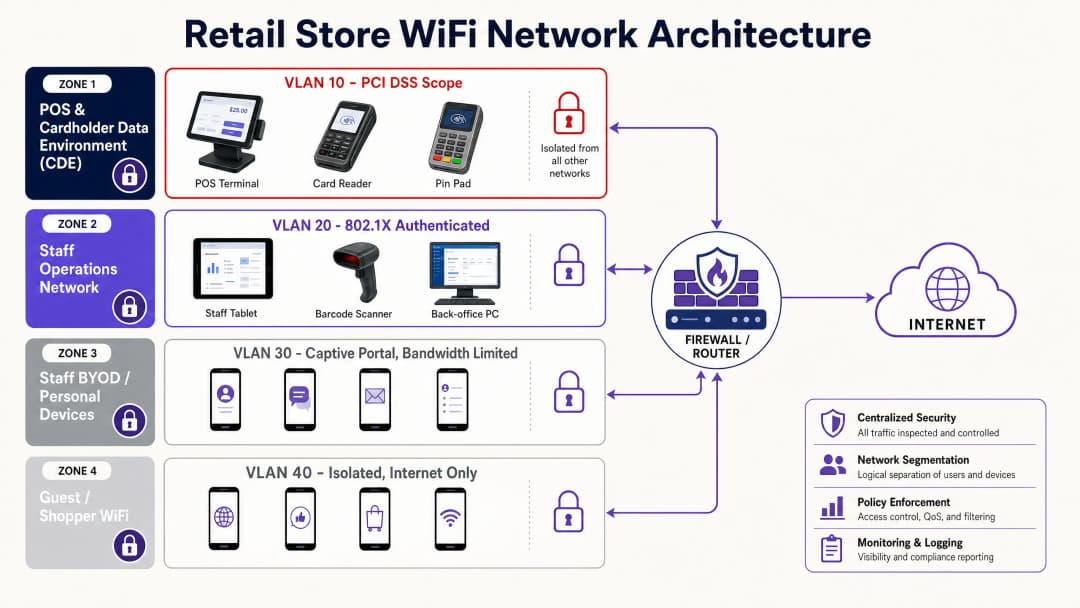
| VLAN | Zone | Geräte | Authentifizierung | Internet | Interner Zugriff |
|---|---|---|---|---|---|
| 10 | CDE / POS | POS-Terminals, Kartenleser | WPA3-Enterprise + 802.1X | Nein | Nur Payment-Gateway |
| 20 | Mitarbeiter-Betrieb | Scanner, Backoffice-PCs, Tablets | WPA3-Enterprise + 802.1X | Eingeschränkt | Bestands-DB, VoIP |
| 30 | Mitarbeiter-BYOD | Persönliche Smartphones, persönliche Laptops | Captive Portal + Unternehmens-SSO | Ja | Keine |
| 40 | Gäste-WiFi | Kundengeräte | Captive Portal | Ja | Keine |
Authentifizierungsprotokolle
Die Sicherung des Mitarbeiter-Betriebsnetzwerks erfordert eine robuste Authentifizierung. Pre-Shared Keys (PSKs) are insufficient for enterprise environments. Wenn ein einziger Mitarbeiter das Unternehmen verlässt, muss der PSK auf allen Geräten geändert werden. Das tut in der Realität niemand, was bedeutet, dass das Netzwerk dauerhaft kompromittiert bleibt.
Implementieren Sie stattdessen eine IEEE 802.1X-Authentifizierung über einen RADIUS-Server. Dieser Standard bietet eine portbasierte Netzwerkzugriffskontrolle und stellt sicher, dass sich nur autorisierte Geräte und Benutzer mit dem Unternehmens-VLAN verbinden können. Für ein Höchstmaß an Sicherheit sollten Sie WPA3-Enterprise bereitstellen, das eine 256-Bit-Verschlüsselung und eine Serverzertifikatsvalidierung vorschreibt.
Verwenden Sie bei der Verwaltung einer Flotte von firmeneigenen Geräten – wie mPOS-Tablets oder Bestands-Scannern – ein Mobile Device Management (MDM), um eindeutige Client-Zertifikate auf jedes Gerät zu übertragen. Dies ist die EAP-TLS-Methode. Sie macht Passwörter völlig überflüssig und stellt sicher, dass nur verwaltete Geräte auf das Betriebsnetzwerk zugreifen können. Wenn ein Gerät verloren geht oder gestohlen wird, sperren Sie sein Zertifikat sofort über die MDM-Konsole, ohne andere Geräte im Netzwerk zu beeinträchtigen.
Für Umgebungen, in denen EAP-TLS noch nicht machbar ist, PEAP (Protected Extensible Authentication Protocol) mit MSCHAPv2 einen sinnvollen Zwischenschritt, bei dem Benutzername und Passwort in einer TLS-Sitzung getunnelt werden.
Implementierungsleitfaden: Bereitstellung von Mitarbeiter-BYOD-Richtlinien
Die Verwaltung persönlicher Geräte von Mitarbeitern auf der Verkaufsfläche stellt eine besondere Herausforderung dar. Ein vollständiges Verbot ist kulturell oft nicht durchsetzbar, aber ein uneingeschränkter Zugriff ist ein Sicherheitsrisiko.
Der Captive Portal-Ansatz
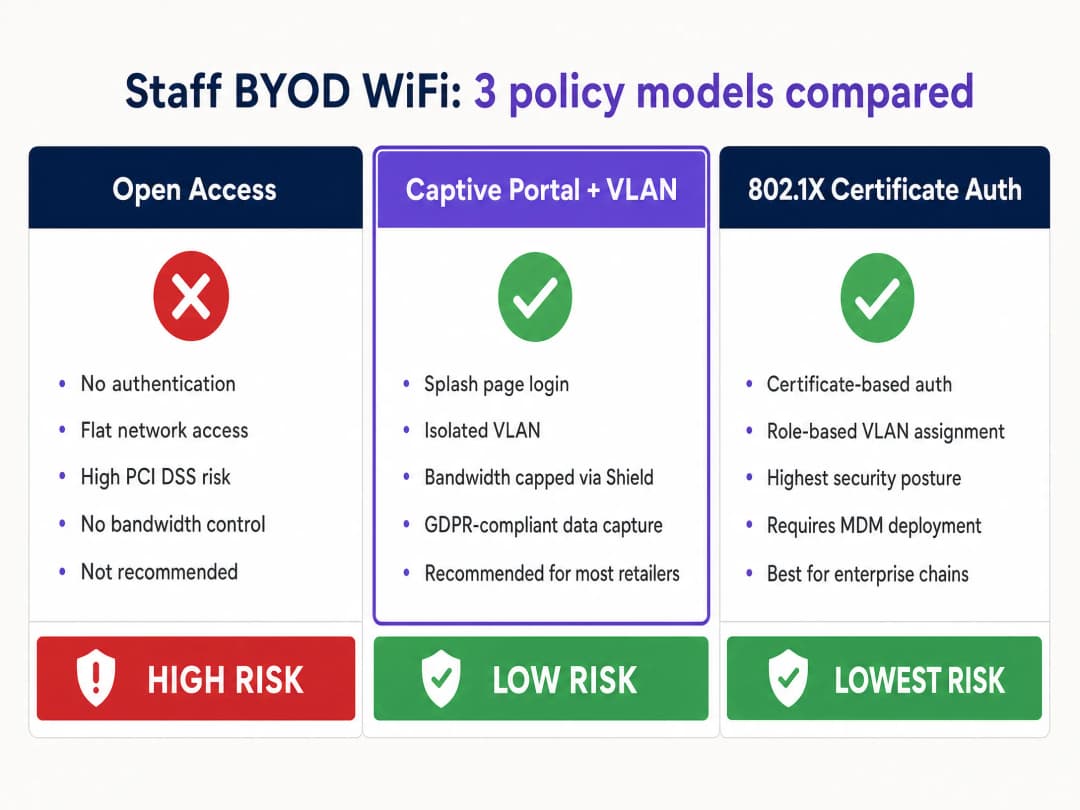
Für die meisten Einzelhandelsumgebungen ist der praktischste Ansatz für Mitarbeiter-BYOD eine dedizierte SSID mit einem Captive Portal, ähnlich einer Bereitstellung von Gäste-WiFi, aber speziell auf Mitarbeiter zugeschnitten.
Schritt 1 – Isolation. Die BYOD-SSID muss einem dedizierten VLAN (VLAN 30) zugewiesen werden, das nur ins Internet routet. Es darf keinerlei Zugriff auf die CDE oder das Mitarbeiter-Betriebsnetzwerk haben. Setzen Sie dies mit expliziten Deny-Regeln in Ihren ACLs durch.
Schritt 2 – Authentifizierung. Verlangen Sie von den Mitarbeitern, sich über das Captive Portal mit ihren Unternehmensdaten zu authentifizieren. Integrieren Sie Microsoft Entra ID, Okta oder Google Workspace, um Single Sign-On bereitzustellen. Dies erstellt ein Audit-Protokoll darüber, wer wann verbunden ist – entscheidend sowohl für Sicherheitsuntersuchungen als auch für die GDPR-Compliance.
Schritt 3 – Bandbreitenmanagement. Implementieren Sie Purple Shield, um strenge Bandbreitenbegrenzungen im BYOD-Netzwerk durchzusetzen. Begrenzen Sie die Geschwindigkeit einzelner Benutzer – in der Regel reichen 2–5 Mbit/s für die persönliche Nutzung aus – und blockieren Sie bandbreitenintensive Anwendungskategorien wie Videostreaming. Dies garantiert, dass die Nutzung persönlicher Geräte den Kernbetrieb des Einzelhandels niemals um die Bandbreite bringt, die für die Zahlungsabwicklung und den Bestandsabgleich benötigt wird.
Schritt 4 – Richtlinienakzeptanz. Das Captive Portal muss von den Mitarbeitern verlangen, die Nutzungsrichtlinien (Acceptable Use Policy, AUP) des Unternehmens ausdrücklich zu akzeptieren, bevor der Zugriff gewährt wird. Unter der GDPR wird so ein dokumentierter Nachweis der Einwilligung für jede mit dem Netzwerkzugriff verbundene Datenverarbeitung erstellt.
Hardware-Integration
Stellen Sie sicher, dass Ihre ausgewählten Access Points und Controller eine dynamische VLAN-Zuweisung und robuste QoS-Richtlinien unterstützen. Enterprise-Hardware von Cisco Meraki, HPE Aruba, Ruckus, Juniper Mist, Ubiquiti UniFi, Cambium, Extreme und Fortinet unterstützt all diese Funktionen. Purple fungiert als hardwareunabhängiges Cloud-Overlay und lässt sich in all diese Plattformen integrieren, um eine konsistente Richtliniendurchsetzung und Analysen für Ihren gesamten Standortbestand zu liefern.
Haben Sie Fragen zu Ihrem spezifischen Setup?
Unser Team arbeitet mit Standortbetreibern, IT-Managern und Netzwerktechnikern an über 80.000 Standorten zusammen. Buchen Sie ein 20-minütiges Gespräch und wir zeigen Ihnen, wie andere diese Herausforderungen gelöst haben.
Best Practices für Einzelhandelsumgebungen
Kontinuierliche Compliance-Überwachung. PCI DSS 4.0 verlagert den Fokus von jährlichen Audits auf kontinuierliche Compliance. Implementieren Sie eine automatisierte Protokollierung und zentrale Überwachung, um unbefugte Zugriffsversuche oder Konfigurationsabweichungen zu erkennen. Jedes Zugriffsereignis auf VLAN 10 sollte einen Protokolleintrag erzeugen.
Regelmäßige Segmentierungstests. Die Anforderung 11.4.5 von PCI DSS 4.0 schreibt vor, dass Segmentierungskontrollen mindestens alle sechs Monate getestet werden müssen. Gehen Sie nicht davon aus, dass Ihre VLANs sicherer sind; beweisen Sie es durch Penetrationstests. VLAN-Bleed – bei dem Datenverkehr aufgrund eines falsch konfigurierten Switch-Ports oder einer ACL versehentlich Zonengrenzen überschreitet – ist die häufigste Ursache für das Scheitern von PCI-Audits.
Veraltete Protokolle deaktivieren. Stellen Sie sicher, dass alle Access Points veraltete, anfällige Protokolle wie WEP und WPA/WPA2-TKIP ablehnen. Erzwingen Sie mindestens WPA2-AES und wechseln Sie zu WPA3, wo immer die Hardware dies unterstützt. Die Unterstützung veralteter Protokolle ist eine häufige Fehlkonfiguration, die unnötige Sicherheitslücken schafft.
Physische Sicherheit. Sichern Sie die physischen Access Points. Ein unbefugtes Gerät, das an einen ungeschützten Ethernet-Port im Lager angeschlossen wird, kann alle drahtlosen Sicherheitskontrollen umgehen. Implementieren Sie Wireless Intrusion Prevention Systems (WIPS), um unbefugte Access Points automatisch zu erkennen und zu neutralisieren. Hardwarehersteller wie Cisco Meraki und HPE Aruba integrieren WIPS-Funktionen in ihre Enterprise-Access-Points.
Multi-Faktor-Authentifizierung für Admins. PCI DSS 4.0 erfordert MFA für alle privilegierten Admin-Konten. Wenn Ihre Netzwerkingenieure die Wireless-Infrastruktur verwalten, müssen sie MFA verwenden, um auf die Verwaltungskonsole zuzugreifen.
Fehlerbehebung und Risikominderung
Häufige Fehlerquellen
VLAN-Bleed. Falsch konfigurierte Switch-Ports oder Router-Regeln können dazu führen, dass Datenverkehr zwischen VLANs springt. Dies ist die häufigste Ursache für das Scheitern von PCI-Audits. Überprüfen Sie regelmäßig die Access Control Lists und testen Sie die Segmentierung nach Firmware-Updates oder Infrastrukturänderungen erneut.
Rogue Access Points. Mitarbeiter schließen möglicherweise herkömmliche WiFi-Router für Verbraucher an Ethernet-Ports des Unternehmens an, um das Signal im Pausenraum zu verbessern. Dies umgeht die Sicherheitskontrollen des Unternehmens vollständig. Implementieren Sie WIPS, um diese automatisch zu erkennen und zu blockieren. Klären Sie die Mitarbeiter darüber auf, dass dies eine disziplinarische Angelegenheit ist und nicht nur eine Unannehmlichkeit für die IT.
Gemeinsame Nutzung von Zugangsdaten. Wenn ein einziger PSK für den Mitarbeiterbetrieb verwendet wird, ist die Weitergabe von Zugangsdaten vorprogrammiert. Wechseln Sie zu 802.1X, um die Authentifizierung an einzelne Benutzeridentitäten oder Geräte-Zertifikate zu binden. Dies liefert auch das von PCI DSS geforderte Audit-Protokoll.
Ablauf von Zertifikaten. Bei der Verwendung von EAP-TLS haben Client-Zertifikate ein Ablaufdatum. Ein abgelaufenes Zertifikat führt zu einer unbemerkten Verweigerung der Authentifizierung, wodurch Geräte vom Netzwerk getrennt werden. Implementieren Sie eine automatisierte Zertifikatsverlängerung über Ihr MDM und richten Sie Warnmeldungen für Zertifikate ein, die innerhalb von 30 Tagen ablaufen.
Bandbreitenengpässe. Ohne QoS-Richtlinien kann ein einziger Mitarbeiter, der 4K-Videos streamt, die gemeinsam genutzte Funkfrequenz überlasten und die POS-Transaktionsgeschwindigkeit beeinträchtigen. Purple Shield löst dies direkt, indem es Bandbreitenbegrenzungen pro Benutzer und Kategorie im BYOD-VLAN durchsetzt.
ROI und geschäftliche Auswirkungen
Die Implementierung einer robusten Mitarbeiter-WiFi-Richtlinie erfordert Investitionen in Enterprise-Hardware und Management-Software, aber der Ertrag ist klar und messbar.
Die durchschnittlichen Kosten einer Datenpanne im Einzelhandel übersteigen 3 Millionen US-Dollar, wenn man Geldstrafen, Schadensbehebung und Reputationsschäden einrechnet. Eine ordnungsgemäße Segmentierung ist die wirksamste Maßnahme gegen dieses Risiko. Die PCI SSC schätzt, dass Unternehmen mit dokumentierter, getesteter Segmentierung ihren Audit-Umfang um bis zu 60 % reduzieren, was die Kosten für jährliche Compliance-Bewertungen direkt senkt.
Das Bandbreitenmanagement über Purple Shield stellt sicher, dass kritische Abläufe im Einzelhandel – wie die Zahlungsabwicklung, der Bestandsabgleich oder der Betrieb von mPOS-Geräten – niemals durch streamende Mitarbeiter im Pausenraum verzögert werden. Dies schützt den Umsatz in Spitzenzeiten.
Eine strukturierte BYOD-Richtlinie verbessert zudem die Arbeitsmoral. Die Bereitstellung einer genehmigten, kontrollierten Option für die Nutzung persönlicher Geräte – anstelle eines strikten Verbots – verringert Reibungsverluste und zeigt, dass das Unternehmen einen ausgewogenen Ansatz bei Technologie-Richtlinien verfolgt.
Für Unternehmen, die den breiteren Ertrag ihrer WiFi-Investition messen möchten, empfehlen wir unseren Leitfaden Messung des geschäftlichen ROI von Gäste-WiFi und Location Analytics.
Purple ist an über 80.000 Live-Standorten im Einsatz und hat im Jahr 2024 440 Millionen Logins verarbeitet. Dies liefert die Skalierbarkeit und die Daten, um Richtlinien zu entwickeln, die in der Praxis funktionieren, nicht nur in der Theorie. Unsere Plattform ist ISO 27001-zertifiziert, GDPR- und CCPA-konform sowie Cyber Essentials-zertifiziert. Das gibt Ihnen die Gewissheit, dass die Infrastruktur hinter Ihren Netzwerkrichtlinien denselben Standards entspricht, die Sie durchsetzen möchten.
Referenzen
[1] BizTech Magazine, "Understanding PCI DSS 4.0: A Guide for IT Leaders in Retail" (May 2024). https://biztechmagazine.com/article/2024/05/pci-dss-40-guide-for-retail-it-leaders-perfcon
[2] PDI Technologies, "Enterprise Retail Network Architecture: Build a Scalable, Secure Foundation for Growth". https://security.pditechnologies.com/blog/enterprise-retail-network-architecture/
[3] SecureW2, "What Is 802.1X? IEEE 802.1X Authentication". https://securew2.com/protocols/802-1x-authentication-configuration
[4] Cloud4Wi, "5 best practices for strengthening enterprise WiFi security" (March 2024). https://cloud4wi.ai/resources/enterprise-wifi-security-best-practices-revealed/
[5] OpenMetal, "Building PCI DSS Compliant Infrastructure for Payment Processors" (April 2026). https://openmetal.io/resources/blog/building-pci-dss-compliant-infrastructure-for-payment-processors/
Schlüsseldefinitionen
VLAN (Virtual Local Area Network)
Eine logische Gruppierung von Netzwerkgeräten, die den Datenverkehr auf Layer 2 isoliert, selbst wenn sie dieselben physischen Switches und Access Points nutzen. Der Datenverkehr zwischen VLANs muss über einen Router oder eine Firewall laufen, wo Zugriffskontrollregeln durchgesetzt werden können.
Das wichtigste Werkzeug zur Trennung von POS-Systemen von Mitarbeiter- und Gästenetzwerken, um die PCI DSS-Anforderungen zu erfüllen, ohne an jedem Standort separate physische Hardware bereitzustellen.
PCI DSS 4.0
Die neueste Version des Payment Card Industry Data Security Standard, die ab März 2025 vollständig in Kraft ist. Sie führt 64 neue Anforderungen ein, die sich auf kontinuierliche Überwachung, strengere Multi-Faktor-Authentifizierung und alle sechs Monate dokumentierte Segmentierungstests konzentrieren.
Jeder Einzelhändler, der Kredit- oder Debitkartenzahlungen verarbeitet, muss diese Richtlinien einhalten. Eine Nichteinhaltung führt zu Geldstrafen durch die Kartennetzwerke und im Falle einer Datenpanne zu einer deutlich höheren Haftung.
802.1X
Ein IEEE-Standard für die portbasierte Netzwerkzugriffskontrolle. Er erfordert, dass sich Geräte an einem RADIUS-Server authentifizieren, bevor ihnen Netzwerkzugriff gewährt wird, unter Verwendung von Methoden wie EAP-TLS (Zertifikate) oder PEAP (Benutzername und Passwort).
Ersetzt gemeinsam genutzte PSKs für Enterprise-WiFi. Bindet den Netzwerkzugriff an einzelne Benutzer- oder Geräteidentitäten, was eine sofortige Sperrung ermöglicht und das von PCI DSS geforderte Audit-Protokoll liefert.
CDE (Karteninhaber-Datenumgebung)
Der spezifische Bereich des Netzwerks, der Zahlungskartendaten speichert, verarbeitet oder überträgt. Von PCI DSS als primärer Umfang der Compliance-Bewertung definiert.
Die Isolation der CDE in ein eigenes VLAN reduziert die Anzahl der Systeme, die für ein PCI-Audit relevant sind, was die Compliance-Kosten und -Komplexität direkt senkt.
Captive Portal
Eine Webseite, die Benutzer sehen und mit der sie interagieren müssen, bevor ihnen Netzwerkzugriff gewährt wird. Wird typischerweise verwendet, um eine Anmeldung zu verlangen, Nutzungsbedingungen anzuzeigen oder Einwilligungen einzuholen.
Wird sowohl für Gäste-WiFi als auch für Mitarbeiter-BYOD-Netzwerke verwendet, um die Authentifizierung durchzusetzen, die Einwilligung gemäß GDPR einzuholen und ein Audit-Protokoll des Netzwerkzugriffs bereitzustellen.
WPA3-Enterprise
Das neueste WiFi-Sicherheitsprotokoll für Unternehmensumgebungen, das eine 256-Bit-Verschlüsselung (GCMP-256) und eine obligatorische Serverzertifikatsvalidierung bietet, um Man-in-the-Middle-Angriffe zu verhindern.
Der empfohlene Sicherheitsstandard für Betriebsnetzwerke im Einzelhandel. Verhindert, dass Angreifer einen unbefugten Access Point mit derselben SSID bereitstellen, um die Zugangsdaten von Mitarbeitern abzufangen.
MDM (Mobile Device Management)
Software, die von IT-Teams verwendet wird, um Smartphones, Tablets und andere Endgeräte zu steuern, zu sichern und Richtlinien auf ihnen durchzusetzen. Zu den Funktionen gehören Fernlöschung, Zertifikatsbereitstellung und Anwendungsverwaltung.
Unerlässlich für die skalierte Bereitstellung von EAP-TLS-Zertifikaten auf firmeneigenen Einzelhandels-Scannern und mPOS-Geräten sowie für die sofortige Sperrung des Zugriffs, wenn ein Gerät verloren geht oder ein Mitarbeiter das Unternehmen verlässt.
Rogue Access Point
Ein unbefugter Wireless-Router, der mit dem Unternehmensnetzwerk verbunden ist, typischerweise von einem Mitarbeiter, der eine bessere Signalabdeckung wünscht. Er umgeht alle Sicherheitskontrollen des Unternehmens, einschließlich Firewalls und VLAN-Segmentierung.
Eine erhebliche und häufige Bedrohung in Back-of-House-Umgebungen des Einzelhandels. Erfordert Wireless Intrusion Prevention Systems (WIPS) zur automatischen Erkennung und Neutralisierung.
EAP-TLS (Extensible Authentication Protocol - Transport Layer Security)
Eine zertifikatsbasierte Authentifizierungsmethode, die innerhalb von 802.1X verwendet wird. Sowohl der Client als auch der Server weisen Zertifikate vor, was eine gegenseitige Authentifizierung ermöglicht und passwortbasierte Angriffe ausschließt.
Die stärkste verfügbare Authentifizierungsmethode für firmeneigene Geräteflotten. Erfordert ein MDM zur Verteilung von Client-Zertifikaten, bietet aber das höchste Sicherheitsniveau.
RADIUS (Remote Authentication Dial-In User Service)
Ein Netzwerkprotokoll, das eine zentrale Authentifizierung, Autorisierung und Kontoführung (AAA) für den Netzwerkzugriff bereitstellt. Fungiert als Authentifizierungsserver in einer 802.1X-Bereitstellung.
Die serverseitige Komponente der WiFi-Authentifizierung in Unternehmen. Kann in Identitätsanbieter wie Microsoft Entra ID, Okta und Google Workspace integriert werden, um vorhandene Unternehmens-Zugangsdaten zu nutzen.
Ausgearbeitete Beispiele
Eine nationale Supermarktkette mit 400 Standorten muss mobile Bestands-Scanner für die Mitarbeiter auf der Verkaufsfläche bereitstellen. Derzeit nutzen die Geschäfte ein einziges WPA2-PSK-Netzwerk für alle Abläufe – POS, Backoffice-PCs und Mitarbeitergeräte teilen sich dieselbe SSID. Wie sollten sie die Bereitstellung der neuen Scanner architektonisch gestalten?
- Erstellen Sie eine dedizierte SSID für die Bestands-Scanner, getrennt vom bestehenden Betriebsnetzwerk. 2. Weisen Sie diese SSID einem neuen VLAN (VLAN 20 – Mitarbeiter-Betrieb) zu, das vollständig von der POS-Umgebung (VLAN 10 – CDE) isoliert ist. 3. Implementieren Sie eine 802.1X-Authentifizierung über einen RADIUS-Server. 4. Stellen Sie eine MDM-Lösung bereit, um eindeutige Client-Zertifikate (EAP-TLS) auf jeden Scanner zu übertragen. 5. Konfigurieren Sie ACLs so, dass die Scanner nur mit der zentralen Bestandsdatenbank kommunizieren können, und blockieren Sie allen anderen internen und Internet-Datenverkehr. 6. Migrieren Sie gleichzeitig die POS-Systeme in ihr eigenes dediziertes VLAN 10 mit strengen Isolationsregeln. 7. Schalten Sie das flache WPA2-PSK-Netzwerk nach Abschluss der Migration vollständig ab.
Ein großes Kaufhaus verzeichnet während der Mittagszeit langsame POS-Transaktionszeiten. Untersuchungen zeigen, dass Mitarbeiter ihre persönlichen Smartphones mit dem Backoffice-WiFi-Netzwerk verbinden, um Videos zu streamen. Das IT-Team möchte dies lösen, ohne persönliche Geräte zu verbieten, da die Personalabteilung darauf hingewiesen hat, dass ein striktes Verbot der Arbeitsmoral schaden würde.
- Erstellen Sie eine dedizierte „Mitarbeiter-BYOD“-SSID, die einem isolierten VLAN 30 zugewiesen ist, das nur Internetzugang bietet. 2. Implementieren Sie ein Captive Portal, das von den Mitarbeitern verlangt, sich mit ihren Microsoft Entra ID-Zugangsdaten zu authentifizieren. 3. Implementieren Sie Purple Shield auf VLAN 30, um eine Bandbreitenbegrenzung von 2 Mbit/s pro Benutzer durchzusetzen und Videostreaming-Anwendungskategorien zu blockieren. 4. Aktualisieren Sie die Backoffice-SSID (VLAN 20) auf die Verwendung der 802.1X-Authentifizierung und entfernen Sie den PSK, den persönliche Geräte für den Zugriff verwendet haben. 5. Kommunizieren Sie die neue BYOD-SSID an alle Mitarbeiter zusammen mit den aktualisierten Nutzungsrichtlinien. 6. Überwachen Sie die Bandbreitennutzung in beiden VLANs zwei Wochen lang nach der Bereitstellung, um zu bestätigen, dass sich die POS-Leistung erholt hat.
Übungsfragen
Q1. Ein Filialleiter bittet darum, seinen persönlichen Laptop in das Mitarbeiter-Betriebsnetzwerk (VLAN 20) aufzunehmen, damit er Dienstpläne direkt auf dem Backoffice-Drucker ausdrucken kann. Der Filialleiter argumentiert, dass er ein vertrauenswürdiger Mitarbeiter ist und der Laptop nur für die Arbeit genutzt wird. Wie sollte die IT reagieren und welche Alternative sollte sie anbieten?
Hinweis: Bedenken Sie die Risiken unverwalteter Geräte im Betriebs-VLAN, unabhängig von der Vertrauenswürdigkeit des Besitzers.
Musterlösung anzeigen
Lehnen Sie die Anfrage ab. Persönliche, unverwaltete Geräte dürfen niemals im Mitarbeiter-Betriebsnetzwerk platziert werden. Das Risiko liegt nicht in der Absicht des Filialleiters, sondern im Sicherheitsstatus des Geräts – einem unverwalteten Laptop fehlt möglicherweise der Endpunktschutz, er hat veraltete Software oder trägt unbemerkt Malware in sich. Die Platzierung in VLAN 20 schafft einen potenziellen Angriffspunkt für den Übergang in die CDE. Die richtige Alternative besteht darin, entweder ein firmeneigenes, verwaltetes Gerät für betriebliche Aufgaben bereitzustellen (im MDM registriert und mit Zertifikaten ausgestattet) oder die Druckarchitektur so zu aktualisieren, dass sie sicheres Cloud-Printing unterstützt, das vom BYOD-VLAN aus zugänglich ist, welches wiederum von internen Systemen isoliert ist.
Q2. Bei einem Netzwerkaudit stellen Sie fest, dass sich das Gäste-WiFi-VLAN (VLAN 40) und das POS-VLAN (VLAN 10) denselben physischen Switch teilen, aber durch ACLs logisch getrennt sind. Ein Junior-Ingenieur markiert dies als PCI DSS-Verstoß und empfiehlt die Bereitstellung separater physischer Switches. Hat der Ingenieur recht?
Hinweis: Überprüfen Sie die PCI DSS-Definition von logischer versus physischer Segmentierung.
Musterlösung anzeigen
Der Ingenieur hat nicht recht. PCI DSS erlaubt eine logische Segmentierung mittels VLANs auf gemeinsam genutzter physischer Infrastruktur, vorausgesetzt, der Switch ist korrekt mit strengen ACLs konfiguriert, die verhindern, dass Datenverkehr zwischen den VLANs fließt. Eine physische Trennung ist nicht erforderlich. Diese Konfiguration erfordert jedoch alle sechs Monate strenge, dokumentierte Tests (gemäß PCI DSS 4.0 Anforderung 11.4.5), um zu beweisen, dass die Isolation hält. Das Audit sollte überprüfen, ob die ACLs korrekt konfiguriert sind und die Switch-Firmware auf dem neuesten Stand ist. Die Bereitstellung separater physischer Switches würde die Kosten erhöhen, ohne die Sicherheit zu verbessern, wenn die logischen Kontrollen korrekt implementiert und getestet werden.
Q3. Ihre Einzelhandelskette stellt 500 neue mPOS-Tablets in 50 Filialen bereit. Der Tablet-Hersteller schlägt vor, einen einzigen, komplexen WPA3-PSK für alle 500 Geräte zu verwenden, um die Bereitstellung zu vereinfachen. Ihr Sicherheitsteam hat damit Bedenken. Wer hat recht und was ist der richtige Ansatz?
Hinweis: Denken Sie daran, was passiert, wenn ein einzelnes Tablet verloren geht oder ein Mitarbeiter das Unternehmen verlässt.
Musterlösung anzeigen
Ihr Sicherheitsteam hat recht. Die Verwendung eines einzigen PSK für eine große Flotte ist ein dauerhaftes Sicherheitsrisiko. Wenn ein Tablet verloren geht oder gestohlen wird, muss der PSK auf allen 500 Geräten gleichzeitig geändert werden, um die Sicherheit aufrechtzuerhalten – ein betrieblicher Albtraum, der in der Praxis meist ausbleibt, wodurch das Netzwerk dauerhaft kompromittiert bleibt. Der richtige Ansatz ist die Verwendung von WPA3-Enterprise mit zertifikatsbasierter 802.1X-Authentifizierung (EAP-TLS), wobei über ein MDM eindeutige Client-Zertifikate auf jedes Tablet übertragen werden. Dies ermöglicht es, einzelne Geräte sofort zu sperren, ohne den Rest der Flotte zu beeinträchtigen. Der anfängliche Bereitstellungsaufwand ist zwar höher, aber das langfristige Sicherheitsniveau und die betriebliche Verwaltbarkeit sind deutlich besser.
Q4. Sechs Monate nach der Bereitstellung Ihrer Vier-Zonen-VLAN-Architektur zeigt ein routinemäßiger Penetrationstest, dass ein Gerät in VLAN 30 (Mitarbeiter-BYOD) einen internen Dateiserver in VLAN 20 (Mitarbeiter-Betrieb) erreichen kann. Niemand hat die Konfiguration absichtlich geändert. Was sind die wahrscheinlichsten Ursachen und wie beheben Sie das Problem?
Hinweis: Überlegen Sie, welche Ereignisse die Netzwerkkonfiguration geändert haben könnten, ohne dass eine bewusste Richtlinienänderung stattgefunden hat.
Musterlösung anzeigen
Die wahrscheinlichsten Ursachen sind: (1) ein Firmware-Update auf dem Core-Switch oder der Firewall, das die ACL-Regeln auf einen Standardzustand zurückgesetzt oder geändert hat; (2) ein neuer Switch-Port, der während einer Filialrenovierung hinzugefügt und nicht korrekt dem richtigen VLAN zugewiesen wurde; oder (3) ein falsch konfigurierter Access Point, der die BYOD-SSID ausstrahlt, aber Geräte dem falschen VLAN zuweist. Behebungsschritte: Blockieren Sie sofort den identifizierten Datenpfad durch Aktualisierung der ACL; überprüfen Sie alle Switch-Port-Konfigurationen anhand der dokumentierten Baseline; prüfen Sie das Änderungsprotokoll des Firmware-Updates auf ACL-bezogene Änderungen; führen Sie den Penetrationstest erneut durch, um die Behebung zu bestätigen; und aktualisieren Sie den Change-Management-Prozess so, dass nach jeder Infrastrukturänderung ein Segmentierungstest erforderlich ist, nicht nur im Sechs-Monats-Rhythmus.
Weiterlesen in dieser Reihe
CIPA-Compliance: Checkliste für Betreiber von Veranstaltungsorten
Sie können entscheiden, ob CIPA für Ihr WiFi bindend ist, dann Netzwerke segmentieren, den DNS-Verkehr über Purple Shield leiten und Umgehungswege schließen. Sie wissen zudem, welche Nachweise Sie für die Zertifizierung nach Form 486 oder Form 479 aufbewahren müssen. Die Checkliste weist jeder Anforderung einen Verantwortlichen zu, damit bei Ihrer nächsten Zertifizierung für das Förderjahr nichts fehlt.
WPA3 Transition Mode Verbindungsfehler: Eine Bereitstellungs-Checkliste für Cisco Meraki, HPE Aruba und Ruckus
Nutzen Sie diese Checkliste, um zu diagnostizieren, warum Geräte auf einer WPA3 SAE Transition Mode SSID fehlschlagen, und beheben Sie das Problem auf Cisco Meraki, HPE Aruba oder Ruckus. Sie werden 802.11 Status-Codes den Ursachen zuordnen, PMF-, 802.11r- und 6GHz-Probleme isolieren und entscheiden, wann der Wechsel zu einer reinen WPA3 SSID sinnvoll ist.
Bestes DNS-Filtering: Ein umfassender Leitfaden für Unternehmen
Dieser technische Leitfaden erklärt, wie DNS-Filtering für Unternehmen öffentliche Netzwerke sichert, indem schädliche Domains auf der Auflösungsebene blockiert werden - noch bevor eine Verbindung hergestellt wird. Er bietet IT-Leitern, Netzwerkarchitekten und Standort-Betriebsteams die Bereitstellungsarchitektur, Firewall-Konfiguration und den Compliance-Kontext, die sie benötigen, um Guest WiFi in der Hotellerie, im Einzelhandel und im öffentlichen Sektor zu schützen. Purple Shield blockiert Malware, Botnetze und unangemessene Inhalte auf DNS-Ebene an über 80.000 Live-Standorten.
Haben Sie Fragen zu Ihrem spezifischen Setup?
Unser Team arbeitet mit Standortbetreibern, IT-Managern und Netzwerktechnikern an über 80.000 Standorten zusammen. Buchen Sie ein 20-minütiges Gespräch und wir zeigen Ihnen, wie andere diese Herausforderungen gelöst haben.