
Reduzierung der Latenz in High-Density WiFi Netzwerken
Dieser Leitfaden beschreibt detailliert, wie die Eliminierung unnötiger DNS-Abfragen für Tracking-Domains die Latenz in High-Density WiFi Netzwerken drastisch senkt. Er bietet praxisnahe Anleitungen zu Architektur, Implementierung und ROI für IT-Verantwortliche, die stark ausgelastete Veranstaltungsorte verwalten.
Diesen Leitfaden anhören
Podcast-Transkript ansehen
Executive Summary

Für CTOs und Netzwerkarchitekten, die hochdichte Umgebungen wie Hospitality Veranstaltungsorte, Stadien und Retail Immobilien verwalten, wird Latenz oft fälschlicherweise als reines HF- oder Backhaul-Problem verstanden. Ein erheblicher Prozentsatz der wahrgenommenen Latenz in modernen WiFi Netzwerken entsteht jedoch auf der DNS-Ebene. Wenn sich ein Benutzer mit Ihrem Guest WiFi verbindet, kann ein einzelner Seitenaufruf zwischen 20 und 70 DNS-Abfragen auslösen, hauptsächlich für Tracking-Pixel von Drittanbietern, Werbenetzwerke und Telemetrie-Beacons. In einem überfüllten Veranstaltungsort führt dies zu einem "DNS-Abfragesturm", der lokale Resolver blockiert und wertvolle Sendezeit verbraucht.
Durch die Implementierung von aggressivem lokalem DNS-Caching am Edge und das Filtern von Tracking-Domains können Veranstaltungsorte sofort NXDOMAIN für unnötige Anfragen zurückgeben. Dieser Ansatz eliminiert Roundtrips über das öffentliche Internet und reduziert die wahrgenommene Latenz um bis zu 87%. Dieser Leitfaden bietet die technische Architektur und das Implementierungs-Framework für die Bereitstellung von DNS-optimiertem WiFi, was das Benutzererlebnis verbessert, Support-Tickets reduziert und eine nahtlose Erfassung von WiFi Analytics Daten gewährleistet.
Technische Vertiefung
Anatomie eines DNS-Abfragesturms
In hochdichten Implementierungen mit 802.11ax (WiFi 6/6E) sind Effizienzmechanismen wie OFDMA und BSS-Coloring darauf ausgelegt, Gleichkanalstörungen zu verwalten und die Sendezeit zu optimieren. Diese Mechanismen gehen jedoch davon aus, dass das Funkmedium tatsächliche Benutzerdaten überträgt. Wenn 3.000 Gäste in einem Hotel oder 10.000 Fans in einem Stadion gleichzeitig versuchen, Webseiten zu laden, führt die schiere Menge an DNS-Abfragen für nicht-essenzielle Domains (z. B. ad-tracker.com, analytics.thirdparty.net) zu einem massiven Overhead.
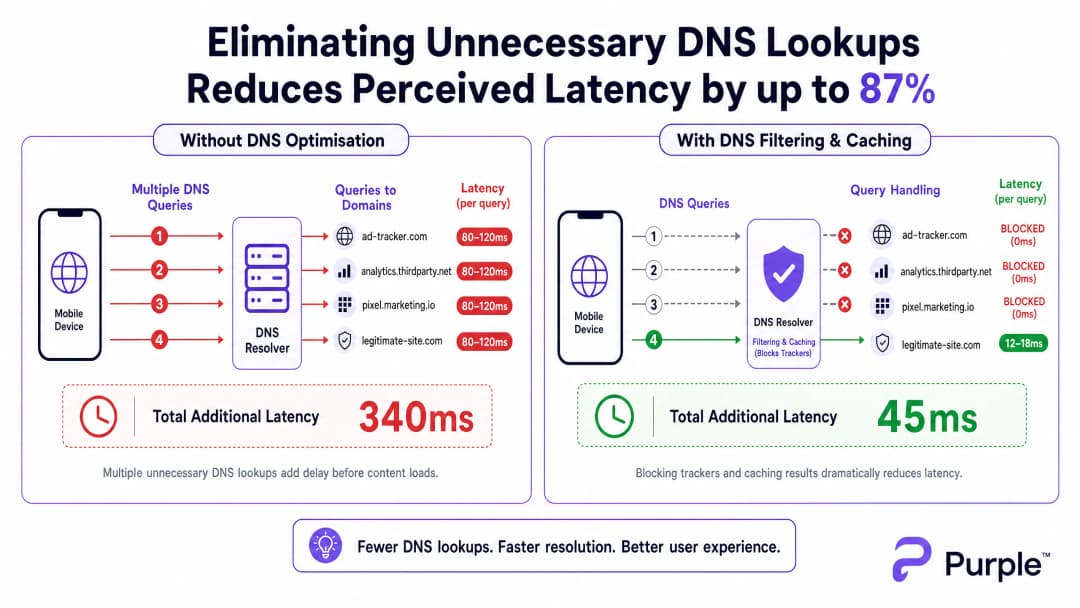
Jede DNS-Abfrage, die an einen externen Resolver gesendet wird (wie das Standard-DNS eines ISP oder das 8.8.8.8 von Google), verursacht eine Roundtrip-Zeit von 80 - 150 ms über überlastete Netzwerke. Wenn eine Seite vor dem Rendern der Inhalte 15 Suchen nach Tracking-Domains erfordert, erlebt der Benutzer eine unsichtbare Verzögerung von über einer Sekunde. Dies ist kein Durchsatzproblem, sondern ein transaktionaler Engpass.
Architektur für die Edge-Auflösung
Um dies zu entschärfen, muss die Architektur die Auflösung an den Netzwerkrand (Edge) verlagern. Die Bereitstellung eines lokalen DNS-Resolvers mit einem aggressiven TTL-Cache stellt sicher, dass gültige, häufig angeforderte Domains in unter 5 ms aufgelöst werden.

Entscheidend ist, dass dieser Resolver eine kuratierte Blockliste integriert (z. B. Pi-hole Enterprise-Modus, Cisco Umbrella), um Abfragen für bekannte Tracking-Domains zu verwerfen. Die sofortige Rückgabe von NXDOMAIN gibt Übertragungskapazitäten (TXOP) über das Wireless-Medium frei, sodass echte Nutzdaten schneller fließen können.
Haben Sie Fragen zu Ihrem spezifischen Setup?
Unser Team arbeitet mit Standortbetreibern, IT-Managern und Netzwerktechnikern an über 80.000 Standorten zusammen. Buchen Sie ein 20-minütiges Gespräch und wir zeigen Ihnen, wie andere diese Herausforderungen gelöst haben.
Implementierungsleitfaden
Schritt 1: Baseline-Auditing
Bevor Sie den DNS-Pfad ändern, erstellen Sie eine Baseline. Instrumentieren Sie Ihren vorhandenen Resolver oder setzen Sie passive Taps ein, um Abfrageprotokolle während der Hauptnutzungszeiten zu erfassen. Identifizieren Sie die 50 am häufigsten abgefragten Domains - in der Regel sind 30 - 50 % davon Tracking- oder Telemetriedienste.
Schritt 2: Bereitstellung des lokalen Resolvers
Stellen Sie einen On-Premises- oder Edge-gehosteten Resolver bereit. Konfigurieren Sie autoritative Zonen für interne Ressourcen (Split DNS) und wenden Sie eine konservative Blockliste an. Vermeiden Sie anfangs aggressive Listen, um die Beeinträchtigung legitimer Anwendungen zu verhindern.
Schritt 3: Verwaltung von DNS over HTTPS (DoH)
Moderne Betriebssysteme umgehen lokale Resolver zunehmend mittels DoH. Um die Kontrolle zu behalten, fangen Sie DoH-Verkehr an der Firewall ab, indem Sie ausgehende TCP/UDP-Verbindungen auf Port 443 zu bekannten DoH-Anbietern blockieren und diese auf Ihren verwalteten DoH-Resolver umleiten. Ausführliche Informationen zu den Auswirkungen finden Sie in unserem Leitfaden zu DNS Over HTTPS (DoH): Implications for Public WiFi Filtering .
Best Practices
- Iteratives Blocklisting: Aktualisieren Sie Blocklisten wöchentlich über automatisierte Feeds, aber halten Sie einen schnell reagierenden Whitelist-Prozess für Fehlalarme bereit.
- Einhaltung von Compliance-Vorgaben: Dokumentieren Sie die DNS-Filterung in den Nutzungsbedingungen Ihres Captive Portals. Dies steht im Einklang mit der GDPR, da die Datenerfassung durch Drittanbieter aktiv reduziert wird.
- VLAN-Segmentierung: Testen Sie neue Blocklisten auf Staging-VLANs oder bestimmten Teilmengen von APs, bevor Sie sie standortweit einführen.
Fehlerbehebung und Risikominimierung
- Anwendungsfehler: Das häufigste Fehlerszenario ist eine legitime App, die fehlschlägt, weil eine Abhängigkeit blockiert wurde. Überwachen Sie die
NXDOMAIN-Spitzenraten - ein plötzlicher Anstieg deutet meist auf einen Fehlalarm hin. - Fehlgeschlagene DoH-Bypässe: Wenn die Latenz trotz lokaler Filterung hoch bleibt, prüfen Sie die Firewall-Protokolle auf verschlüsseltes DNS, das Ihre Abfangregeln umgeht.
- Cache-Poisoning: Stellen Sie sicher, dass Ihr lokaler Resolver gegen Cache-Poisoning-Angriffe geschützt ist, insbesondere bei öffentlich zugänglichen Bereitstellungen im Transportwesen ( Transport ) oder im Gesundheitswesen ( Healthcare ).
ROI und geschäftliche Auswirkungen
Die Reduzierung der Latenz durch DNS-Optimierung wirkt sich direkt auf das Geschäftsergebnis aus. Bei einem Hotel korrelieren schnellere Ladezeiten des Captive Portals und ein reaktionsschnelles Surfen direkt mit höheren TripAdvisor-Bewertungen. Im Einzelhandel gewährleistet dies eine nahtlose Integration mit Tools wie standortbasierten Diensten, wie beispielsweise der Initiative Purple Appoints Iain Fox as VP Growth – Public Sector to Drive Digital Inclusion and Smart City Innovation oder Purple Launches Offline Maps Mode for Seamless, Secure Navigation to WiFi Hotspots .Indem Venues DNS als eine kritische Infrastrukturebene betrachten und nicht als Nebensache, können sie die maximale Leistung aus ihren bestehenden Investitionen in RF-Hardware herausholen.
Podcast-Expertenbericht
Hören Sie sich die Analyse unseres Senior Consultants über die Mechanismen und Implementierungsstrategien zur DNS-Optimierung in High-Density-Venues an.
Schlüsseldefinitionen
DNS Query Storm
Ein massiver, gleichzeitiger Anstieg von Domain-Namen-Auflösungsanfragen, der typischerweise auftritt, wenn sich Hunderte von Geräten gleichzeitig verbinden und tracking-intensive Websites laden.
Tritt häufig in Stadien und Hotels zu Spitzenzeiten auf und führt zu einer wahrgenommenen Netzwerkstörung, selbst wenn genügend Bandbreite vorhanden ist.
NXDOMAIN
Ein DNS-Antwortcode, der angibt, dass der angeforderte Domain-Name nicht existiert.
Wird strategisch bei der DNS-Filterung eingesetzt, um Anfragen nach bekannten Tracking-Domains sofort zu beenden, was Latenz und Airtime einspart.
DNS over HTTPS (DoH)
Ein Protokoll zur Durchführung einer Remote-Domain-Name-System-Auflösung über das HTTPS-Protokoll, bei dem die Daten zwischen dem DoH-Client und dem DoH-basierten DNS-Resolver verschlüsselt werden.
Während DoH gut für den Datenschutz der Nutzer ist, kann es Netzwerkkontrollen und -filter in Unternehmen umgehen, was spezifische Abfangstrategien auf der Firewall erfordert.
TTL-Cache (Time to Live)
Ein Mechanismus, bei dem ein lokaler DNS-Resolver die IP-Adresse einer kürzlich aufgelösten Domain für einen bestimmten Zeitraum speichert, um nachfolgende Anfragen sofort zu beantworten, ohne den autoritativen Server abzufragen.
Entscheidend für die Reduzierung der Latenz bei legitimen, stark frequentierten Domains (z. B. google.com, netflix.com) an einem Veranstaltungsort.
Airtime-Overhead
Der Anteil der drahtlosen Übertragungskapazität, der durch Management-Frames, Control-Frames und transaktionale Protokolle (wie DNS) anstelle der eigentlichen Nutzdaten der Anwender verbraucht wird.
Die Reduzierung unnötiger DNS-Abfragen verringert direkt den Airtime-Overhead und verbessert die Effizienz des gesamten AP-Clusters.
Split DNS
Eine Implementierung, bei der je nach Quell-IP-Adresse der Anfrage unterschiedliche DNS-Antworten bereitgestellt werden, was häufig verwendet wird, um interne Hostnamen anders als externe aufzulösen.
Erforderlich, wenn ein Veranstaltungsort lokale Dienste hostet (wie ein Captive Portal oder einen lokalen Medienserver), die nicht über das öffentliche Internet aufgelöst werden sollen.
BSS Colouring
Eine räumliche Wiederverwendungsmethode in 802.11ax (WiFi 6), die jedem Basic Service Set eine "Farbe" (eine Nummer) zuweist. Dies ermöglicht es APs auf demselben Kanal, zwischen ihrem eigenen Datenverkehr und überlappendem Netzwerkverkehr zu unterscheiden.
Eine wichtige Funktion zur HF-Optimierung, die am besten funktioniert, wenn das Netzwerk nicht durch unnötigen transaktionalen Overhead wie übermäßige DNS-Abfragen belastet wird.
Passiver DNS-Abgriff
Eine Methode zur Überwachung des DNS-Verkehrs durch Kopieren von Paketen von einem Switch-Port (SPAN-Port), ohne den eigentlichen Datenfluss zu beeinträchtigen.
Wird während der ersten Audit-Phase verwendet, um das Abfragevolumen zu verstehen und die am häufigsten genutzten Tracking-Domains zu identifizieren, bevor eine Filterung implementiert wird.
Ausgearbeitete Beispiele
Ein Resort-Hotel mit 500 Zimmern verzeichnet während der Check-in-Zeit von 16:00 bis 18:00 Uhr massive Beschwerden über "langsames WiFi", obwohl im vergangenen Jahr ein Upgrade auf WiFi 6 Access Points durchgeführt wurde. Die Backhaul-Auslastung liegt bei nur 40 %.
- Bereitstellen eines lokalen Caching-DNS-Resolvers (z. B. Unbound) im Gäste-VLAN. 2. Implementieren einer restriktiven Blockliste für Tracking-Domains. 3. Konfigurieren des DHCP-Servers so, dass allen Gäste-Clients die IP des lokalen Resolvers zugewiesen wird. 4. Einrichten von Firewall-Regeln, die den ausgehenden Port 53 blockieren, um den gesamten DNS-Verkehr über den lokalen Resolver zu erzwingen.
Ein großes Konferenzzentrum möchte eine DNS-Filterung zur Reduzierung der Latenz implementieren, befürchtet jedoch, dass moderne Smartphones den lokalen Resolver mittels DNS over HTTPS (DoH) umgehen.
- Identifizieren der IP-Bereiche großer öffentlicher DoH-Anbieter (Cloudflare, Google, Quad9). 2. Erstellen von Firewall-Regeln, die den ausgehenden TCP-Port 443 zu diesen spezifischen IP-Bereichen blockieren. 3. Bereitstellen eines lokalen, DoH-fähigen Resolvers. 4. Nutzen von Netzwerkrichtlinien (z. B. DHCP-Option 6), um Clients an den verwalteten DoH-Resolver weiterzuleiten.
Übungsfragen
Q1. Sie verwalten ein Stadion-WiFi-Netzwerk. In der Halbzeitpause berichten Benutzer von langsamen Ladezeiten. Die Dashboard-Metriken zeigen, dass die CPU-Auslastung der APs niedrig ist und die Backhaul-Bandbreite bei 30 % Kapazität liegt. Was ist die wahrscheinlichste Ursache und wie sieht die sofortige Schadensbegrenzung aus?
Hinweis: Berücksichtigen Sie das Transaktionsvolumen, das entsteht, wenn 15.000 Menschen gleichzeitig ihr Smartphone öffnen.
Musterlösung anzeigen
Die wahrscheinlichste Ursache ist ein DNS-Abfragesturm, der den lokalen Resolver oder den Resolver des Upstream-ISP überlastet. Die sofortige Schadensbegrenzung besteht darin, die Cache-Trefferquote des lokalen Resolvers zu überprüfen und sicherzustellen, dass eine Sperrliste für hochvolumige Tracking-Domains aktiv ist, die sofort NXDOMAIN zurückgibt, um die Abfragelast zu reduzieren.
Q2. Eine Einzelhandelskette implementiert eine lokale DNS-Filterung, um Tracking-Domains zu blockieren. Eine Woche später beschwert sich das Marketing-Team, dass ihre neue In-Store-Analytics-App im Gäste-WiFi nicht geladen werden kann. Wie lösen Sie dieses Problem, während Sie die Latenzvorteile beibehalten?
Hinweis: Filterung ist keine Konfiguration, die man einmal einrichtet und dann vergisst.
Musterlösung anzeigen
Überprüfen Sie die DNS-Abfrageprotokolle für die spezifischen Geräte oder Zeiträume, in denen die App fehlgeschlagen ist. Identifizieren Sie die blockierte Domain, von der die App abhängt (ein Fehlalarm). Fügen Sie diese spezifische Domain zur Whitelist des Resolvers hinzu, um sicherzustellen, dass die App funktioniert, während die restlichen Tracking-Domains blockiert bleiben.
Q3. Sie stellen einen lokalen DNS-Resolver mit aggressivem Caching und Filtern in einem Gebäude des öffentlichen Sektors bereit. Paketanalysen zeigen jedoch, dass immer noch ein erhebliches Volumen an DNS-Verkehr das Netzwerk über Port 443 verlässt. Was passiert hier und wie setzen Sie die lokalen Richtlinien durch?
Hinweis: Moderne Browser verwenden verschlüsselte Protokolle, um den Standard-Port 53 DNS zu umgehen.
Musterlösung anzeigen
Geräte verwenden DNS over HTTPS (DoH), um den lokalen Resolver zu umgehen. Um die Richtlinien durchzusetzen, müssen Sie die Firewall so konfigurieren, dass sie ausgehenden TCP/UDP-Port-443-Verkehr zu bekannten IP-Bereichen öffentlicher DoH-Anbieter (z. B. Cloudflare, Google) blockiert. Dies zwingt die Geräte, auf den per DHCP bereitgestellten lokalen Resolver zurückzugreifen.
Weiterlesen in dieser Reihe
Verständnis von RSSI und Signalstärke für eine optimale Kanalplanung
Dieser Leitfaden bietet einen umfassenden technischen Einblick in RSSI, Signal-Rausch-Verhältnis (SNR) und HF-Ausbreitungsprinzipien für eine optimale Kanalplanung. Er bietet IT-Managern, Netzwerkarchitekten und Leitern des Standortbetriebs umsetzbare Strategien zur Reduzierung von Co-Kanal- und Nachbarkanal-Interferenzen, zur Optimierung der AP-Platzierung und zur Nutzung von Analysen für messbare geschäftliche Auswirkungen in den Bereichen Gastgewerbe, Einzelhandel und im öffentlichen Sektor.
20MHz vs 40MHz vs 80MHz: Welche Kanalbreite sollten Sie nutzen?
Dieser Leitfaden bietet IT-Managern, Netzwerkarchitekten und Leitern des Standortbetriebs eine definitive, herstellerneutrale technische Referenz für die Auswahl der richtigen WiFi Kanalbreite - 20MHz, 40MHz oder 80MHz - bei Enterprise-Bereitstellungen in den Bereichen Hotellerie, Einzelhandel, Events und im öffentlichen Sektor. Er behandelt die zugrunde liegende IEEE 802.11-Mechanik, reale Kapazitätskompromisse und eine schrittweise Anleitung zur Bereitstellung, um Teams dabei zu helfen, in diesem Quartal die richtige Entscheidung zu treffen. Die Wahl der Kanalbreite gehört zu den Entscheidungen mit der größten Hebelwirkung bei jedem Wireless LAN Design, da sie sich direkt auf den Durchsatz, Interferenzen, die Client-Dichte und die Zuverlässigkeit von Services für Gäste auswirkt.
WiFi 6 vs. WiFi 5: Löst es Kanalinterferenzen?
Dieser Leitfaden bietet einen technischen Deep-Dive darüber, wie WiFi 6 (802.11ax) Kanalinterferenzen in High-Density-Unternehmensumgebungen durch OFDMA und BSS Coloring bewältigt. Er stattet IT-Manager, Netzwerkarchitekten und CTOs mit praxisnahen Bereitstellungsstrategien, realen Fallstudien aus dem Gastgewerbe und dem Gesundheitswesen sowie einem Framework zur Bewertung des ROI von Infrastruktur-Upgrades an Standorten aus, an denen die Wireless-Performance geschäftskritisch ist.
Haben Sie Fragen zu Ihrem spezifischen Setup?
Unser Team arbeitet mit Standortbetreibern, IT-Managern und Netzwerktechnikern an über 80.000 Standorten zusammen. Buchen Sie ein 20-minütiges Gespräch und wir zeigen Ihnen, wie andere diese Herausforderungen gelöst haben.