
Cisco SUDI verstehen: Hardware-basierte Geräteidentität in der Netzwerk-Zugriffskontrolle
Dieser Leitfaden beschreibt die technische Architektur von Cisco SUDI und erklärt, wie eine hardware-verankerte Identität die Netzwerk-Zugriffskontrolle sichert. Er bietet praktische Implementierungsschritte für IT-Verantwortliche zur Bereitstellung der 802.1X EAP-TLS Authentifizierung und zur Automatisierung des Zero Touch Provisioning in Unternehmensstandorten.
Video overview
Diesen Leitfaden anhören
Podcast-Transkript ansehen
Teil unserer Kernserie: Enterprise WiFi Sicherheitsleitfaden →
Management-Zusammenfassung
Die Hardware-Authentifizierung sichert das physische Fundament von Unternehmensnetzwerken. Der Cisco Secure Unique Device Identifier (SUDI) bietet eine unveränderliche, kryptografisch überprüfbare Identität für Infrastrukturgeräte, die bereits während der Herstellung direkt in einen manipulationssicheren Chip integriert wird. Für IT-Verantwortliche, die große Bereitstellungen im Gastgewerbe, im Einzelhandel und im öffentlichen Sektor verwalten, eliminiert SUDI das Risiko von Rogue-Hardware und ermöglicht ein automatisiertes Zero Touch Provisioning.
Dieser Leitfaden beschreibt detailliert die technische Architektur von Cisco SUDI, die Integration mit der IEEE 802.1X Network Access Control (NAC) sowie die betrieblichen Schritte, die für die Bereitstellung und Wartung hardwarebasierter Identitäten in großem Maßstab erforderlich sind. Sie erfahren, wie Sie von einem schwachen MAC-Address-Bypass zu einer robusten EAP-TLS-Authentifizierung wechseln, den SUDI-2099-Zertifikatslebenszyklus verwalten und die Infrastruktursicherheit mit Plattformen für das Benutzeridentitätsmanagement wie Purple abstimmen.
Technische Vertiefung
Die Architektur der Hardware-Identität
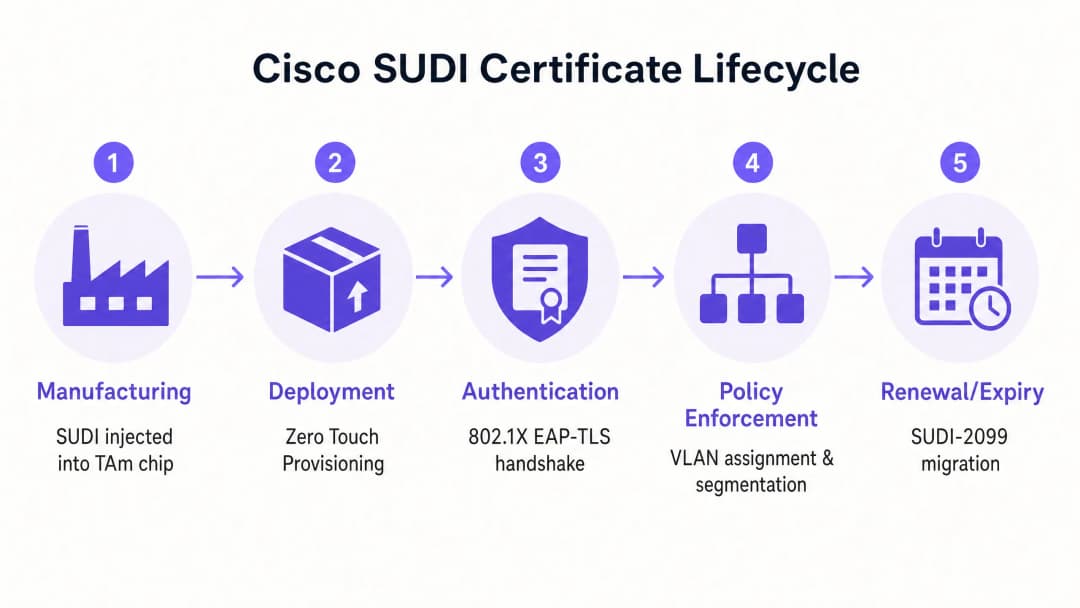
Der Cisco Secure Unique Device Identifier (SUDI) ist ein X.509v3-Zertifikat, das eine dauerhafte Identität für Netzwerkgeräte bereitstellt. Im Gegensatz zu Software-Zertifikaten, die von IT-Teams erstellt und bereitgestellt werden, integriert Cisco das SUDI-Zertifikat und das zugehörige Schlüsselpaar bereits während des Herstellungsprozesses in das Gerät.
Das Zertifikat ist sicher im Trust Anchor-Modul (TAm) gespeichert, einem proprietären, manipulationssicheren Chip. Das TAm generiert den privaten Schlüssel intern, wodurch sichergestellt wird, dass dieser niemals exportiert oder geklont werden kann. Dieser Hardware-Root-of-Trust garantiert: Wenn sich ein Gerät erfolgreich mit seiner SUDI authentifiziert, handelt es sich um ein echtes Cisco-Produkt.
SUDI implementiert den IEEE 802.1AR-Standard für Secure Device Identifiers. Gemäß diesem Standard wird das vom Hersteller bereitgestellte Zertifikat als Initial Device Identifier (IDevID) bezeichnet. Unternehmen können die IDevID durch einen Locally Significant Device Identifier (LDevID) ergänzen, der von ihrer eigenen Unternehmens-Public-Key-Infrastruktur (PKI) ausgestellt wird.

Integration in die Network Access Control
In einer Unternehmensumgebung integriert sich SUDI primär über die portbasierte Authentifizierung nach IEEE 802.1X in Network Access Control (NAC) Systeme. Wenn sich ein Cisco Access Point oder Switch mit dem Netzwerk verbindet, agiert er als Supplicant und präsentiert sein SUDI-Zertifikat einem RADIUS-Server wie der Cisco Identity Services Engine (ISE).Der Authentifizierungsprozess verwendet das Extensible Authentication Protocol mit Transport Layer Security (EAP-TLS). Der RADIUS-Server validiert das SUDI-Zertifikat mit der Cisco Public Key Infrastructure. Nach der Validierung autorisiert der RADIUS-Server das Gerät und weist es basierend auf der Netzwerkzugriffsrichtlinie dem korrekten VLAN zu.
Dieser Ansatz ersetzt den MAC Address Bypass (MAB), eine veraltete Methode, die auf leicht manipulierbaren MAC-Adressen basiert. MAB bietet keinerlei kryptografische Sicherheit für die Geräteidentität, was Netzwerke anfällig für nicht autorisierte Access Points macht.
Hardware-Fingerprinting und Manipulationserkennung
Das Trust Anchor-Modul bietet mehr als nur sicheren Speicher. Es schützt das Gerät aktiv vor physischer Manipulation während des Transports oder der Bereitstellung.
Während der Herstellung zeichnet Cisco einen kryptografischen Fingerabdruck der kritischen Hardwarekomponenten wie CPUs und ASICs auf. Dieser Fingerabdruck wird dauerhaft im TAm gespeichert. Wenn das Gerät bootet, berechnet die UEFI-Firmware einen neuen Fingerabdruck der erkannten Hardware und vergleicht ihn mit dem Master-Fingerabdruck im TAm. Wenn die Fingerabdrücke nicht übereinstimmen, bricht das Gerät den Bootvorgang ab. Dieser Mechanismus stellt sicher, dass Hardware, die in einem Hotel oder Einzelhandelsgeschäft bereitgestellt wird, zwischen dem Werk und dem Installationsort nicht manipuliert wurde.
Haben Sie Fragen zu Ihrem spezifischen Setup?
Unser Team arbeitet mit Standortbetreibern, IT-Managern und Netzwerktechnikern an über 80.000 Standorten zusammen. Buchen Sie ein 20-minütiges Gespräch und wir zeigen Ihnen, wie andere diese Herausforderungen gelöst haben.
Implementierungshandbuch
Die Bereitstellung der SUDI-basierten Authentifizierung erfordert die Abstimmung zwischen Ihrer Switching-Infrastruktur, Ihrem RADIUS-Server und Ihrer Netzwerkmanagement-Plattform. Befolgen Sie diese Schritte, um die Hardware-Identität zu implementieren.
Schritt 1: RADIUS-Vertrauen konfigurieren
Ihr RADIUS-Server muss der Cisco Zertifizierungsstelle vertrauen, die die SUDI ausgestellt hat.
- Laden Sie die Cisco Root CA und die ACT2 SUDI CA-Zertifikate vom Cisco PKI-Portal herunter.
- Importieren Sie diese Zertifikate in den Speicher für vertrauenswürdige Zertifikate Ihres RADIUS-Servers (z. B. Cisco ISE).
- Konfigurieren Sie den RADIUS-Server so, dass er diese Zertifikate für die EAP-TLS-Authentifizierung verwendet.
Schritt 2: 802.1X-Richtlinien definieren
Erstellen Sie spezifische Authentifizierungsrichtlinien für Infrastrukturgeräte, getrennt von den Benutzerauthentifizierungsrichtlinien.
- Erstellen Sie ein Richtlinienset in Cisco ISE, das den SUDI-Zertifikatsattributen entspricht (z. B. Abgleich des Subject Alternative Name mit den erwarteten Geräte-PIDs).
- Weisen Sie erfolgreiche Authentifizierungen dem Infrastruktur-Management-VLAN zu.
- Konfigurieren Sie ein Quarantäne-VLAN für Geräte, bei denen die SUDI-Authentifizierung fehlschlägt. Konfigurieren Sie keinen Fallback auf MAB für Infrastruktur-Ports.
Schritt 3: Zero Touch Provisioning aktivieren
Verwenden Sie SUDI, um das Onboarding von Geräten zu automatisieren.
- Konfigurieren Sie Ihr Netzwerkmanagementsystem (wie Cisco Catalyst Center) so, dass es als ZTP-Server fungiert.
- Wenn sich ein neues Gerät verbindet, legt es sein SUDI-Zertifikat vor.
- Das Managementsystem verifiziert das Zertifikat, gleicht die Seriennummer des Geräts mit der Inventardatenbank ab und überträgt die Erstkonfiguration.
Schritt 4: Verwalten Sie die SUDI-2099 Migration
SUDI-Zertifikate, die vor Mai 2019 ausgestellt wurden, herlaufen entweder 10 Jahre nach dem Herstellungsdatum oder am 14. Mai 2029 ab, je nachdem, was früher eintritt. Wenn ein SUDI abläuft, schlagen Funktionen fehl, die darauf angewiesen sind, einschließlich HTTPS, SSH und Zero Touch Provisioning.
Cisco hat SUDI-2099-Zertifikate eingeführt, die bis Dezember 2099 gültig bleiben. Um die Kontinuität zu gewährleisten:
- Überprüfen Sie Ihren Bestand mit dem Befehl
show crypto pki certificateauf IOS-XE-Geräten. Prüfen Sie dasend datedesCISCO_IDEVID_SUDI-Trustpoints. - Aktualisieren Sie die betroffene Hardware auf die empfohlenen Software-Releases. Beispielsweise benötigen Catalyst 9200 Switches IOS-XE 17.12.2 oder höher, um das Ablaufdatum 2099 korrekt zu verarbeiten.
Best Practices
Um die Sicherheitsvorteile der Hardware-Identität zu maximieren, halten Sie sich an diese herstellerneutralen Prinzipien.
- Erzwingen Sie striktes EAP-TLS: Fordern Sie EAP-TLS für alle Infrastrukturgeräte. Lassen Sie keine schwächeren EAP-Methoden wie PEAP für die Geräteauthentifizierung zu.
- Infrastruktur-Identität von Benutzeridentität trennen: SUDI authentifiziert die Hardware, nicht den Benutzer. Verwenden Sie eine dedizierte Plattform zur Verwaltung menschlicher Identitäten. Verwenden Sie beispielsweise Purple, um die Gastauthentifizierung, die Einwilligungserfassung und die Erfassung von Erstanbieterdaten abzuwickeln, während Sie sich auf SUDI verlassen, um die zugrunde liegende Cisco Meraki- oder HPE Aruba-Hardware zu sichern.
- Zertifikatsüberwachung automatisieren: Implementieren Sie Monitoring-Tools, um die Ablaufdaten von Zertifikaten über Ihren gesamten Bestand hinweg zu verfolgen. Proaktive Überwachung verhindert plötzliche Authentifizierungsfehler.
- Mikrosegmentierung implementieren: Verwenden Sie die durch SUDI verifizierte Identität, um Geräte streng kontrollierten VLANs zuzuweisen. Ein Access Point sollte nur Netzwerkverbindung zu seinem Controller und seinen Managementsystemen haben, sonst nichts.
Fehlerbehebung & Risikominderung
Bereiten Sie sich bei der Bereitstellung von SUDI-basierter Authentifizierung auf diese häufigen Fehlerszenarien vor.
| Fehlerszenario | Ursache | Minderungsstrategie |
|---|---|---|
| EAP-TLS-Authentifizierung schlägt fehl | Dem RADIUS-Server fehlen die korrekten Cisco Root- oder Intermediate-CA-Zertifikate. | Überprüfen Sie, ob die vollständige Cisco Vertrauenskette im vertrauenswürdigen Speicher des RADIUS-Servers installiert ist. |
| Gerät weigert sich zu booten | Der beim Booten berechnete Hardware-Fingerabdruck stimmt nicht mit dem Master-Fingerabdruck im TAm überein. | Behandeln Sie das Gerät als kompromittiert. Senden Sie die Hardware über den RMA-Prozess an den Hersteller zurück. |
| Management-Zugriff schlägt fehl | Das SUDI-Zertifikat ist abgelaufen, wodurch die HTTPS- und SSH-Zertifikatsauthentifizierung unterbrochen wird. | Aktualisieren Sie die Geräte-Firmware auf eine Version, die SUDI-2099 unterstützt, oder stellen Sie eine LDevID über Ihre Unternehmens-PKI bereit. |
| Unerlaubtes Gerät erhält Zugriff | Der Switch-Port ist so konfiguriert, dass er bei einem Fehlschlagen von 802.1X auf MAC Address Bypass (MAB) zurückgreift. | MAB-Fallback-Konfigurationen von Infrastruktur-Ports entfernen. Strikte 802.1X-Richtlinie erzwingen. |
ROI & geschäftliche Auswirkungen
Die Implementierung hardwarebasierter Geräteidentität liefert messbaren Geschäftswert in drei Bereichen.
1. Reduzierte Bereitstellungskosten Die durch SUDI gesicherte Zero Touch Provisioning macht eine manuelle Einrichtung überflüssig. Anstatt dass ein Techniker 45 Minuten damit verbringt, einen Access Point vorzukonfigurieren, bevor er an eine Filiale versendet wird, wird das Gerät direkt vom Distributor geliefert. Es authentifiziert sich beim Verbinden sicher und lädt seine Konfiguration automatisch herunter. Bei einer Bereitstellung in 500 Filialen spart dies ca. 375 Technikerstunden.
2. Beseitigung des Risikos unerlaubter Geräte Durch die Ablösung des MAC Address Bypass zugunsten kryptografischer Hardware-Identität eliminieren Sie das Risiko, dass ein Angreifer ein unerlaubtes Gerät an einen Infrastruktur-Port anschließt. Dies unterstützt direkt die Einhaltung der Anforderungen von PCI-DSS und ISO 27001 für die Netzwerkzugriffskontrolle.
3. Klare Identitätsgrenzen Der Einsatz von SUDI schafft eine saubere Architekturgrenze. Die Hardwareschicht authentifiziert sich kryptografisch, sodass Sie Ihre Ressourcen auf die Benutzeridentitätsschicht konzentrieren können. Wenn Sie eine Plattform wie Purple integrieren, um Guest WiFi und WiFi Analytics zu verwalten, tun Sie dies auf einem verifizierbaren, sicheren Infrastrukturfundament.
Schlüsseldefinitionen
SUDI (Secure Unique Device Identifier)
Ein X.509v3-Zertifikat und der zugehörige private Schlüssel, die während der Herstellung in ein Cisco Gerät integriert werden, um eine unveränderliche Hardware-Identität bereitzustellen.
Wird von IT-Teams verwendet, um kryptografisch zu verifizieren, dass es sich bei einem Gerät, das eine Verbindung zum Netzwerk herstellt, um ein echtes Cisco Produkt handelt.
TAm (Trust Anchor module)
Ein proprietärer, manipulationssicherer Hardware-Chip, der das SUDI-Zertifikat sicher speichert, kryptografische Schlüssel generiert und das Hardware-Fingerprinting verwaltet.
Stellt den hardwarebasierten Vertrauensanker (Root of Trust) bereit. Wenn das TAm kompromittiert ist, schlägt der Start oder die Authentifizierung des Geräts fehl.
IDevID (Initial Device Identifier)
Der vom Hersteller installierte sichere Gerätebezeichner, der durch den Standard IEEE 802.1AR definiert ist. Cisco SUDI ist eine Implementierung einer IDevID.
Stellt die grundlegende Identität für ein Gerät bereit, bevor es in die eigene PKI-Umgebung einer Organisation integriert wird.
LDevID (Locally Significant Device Identifier)
Ein Gerätezertifikat, das von der eigenen Public-Key-Infrastruktur eines Unternehmens ausgestellt wird und die IDevID des Herstellers ergänzt.
Wird verwendet, wenn IT-Teams verlangen, dass sich Geräte mit Zertifikaten authentifizieren, die von ihrer internen Unternehmens-CA statt der CA des Herstellers ausgestellt wurden.
IEEE 802.1X
Der IEEE-Standard für portbasierte Netzwerkzugriffskontrolle, der einen Authentifizierungsmechanismus für Geräte bereitstellt, die eine Verbindung zu einem LAN oder WLAN herstellen möchten.
Das primäre Protokoll zur Durchsetzung der Netzwerksicherheit, das sicherstellt, dass nur autorisierte Geräte und Benutzer Datenverkehr über einen Switch-Port senden können.
EAP-TLS (Extensible Authentication Protocol-Transport Layer Security)
Ein hochsicheres Authentifizierungsprotokoll, bei dem sowohl der Client als auch der Authentifizierungsserver ihre Identität mithilfe digitaler Zertifikate nachweisen müssen.
Die spezifische Methode, die innerhalb von 802.1X verwendet wird, um das SUDI-Zertifikat zwischen dem Netzwerkgerät und dem RADIUS-Server zu validieren.
Zero Touch Provisioning (ZTP)
Ein automatisierter Prozess, der es ermöglicht, Netzwerkgeräte automatisch ohne manuelles Eingreifen bereitzustellen und zu konfigurieren.
SUDI sichert ZTP, indem sichergestellt wird, dass das Managementsystem Konfigurationen nur an verifizierte, echte Hardware sendet.
MAC Address Bypass (MAB)
Eine veraltete Authentifizierungsmethode, bei der ein Switch die MAC-Adresse des verbindenden Geräts als Identitätsnachweis verwendet.
Eine unsichere Fallback-Methode, die eliminiert und durch eine SUDI-basierte 802.1X-Authentifizierung ersetzt werden sollte.
Ausgearbeitete Beispiele
Ein Hotel mit 400 Zimmern aktualisiert seine Netzwerkinfrastruktur und muss 250 neue Cisco Catalyst Access Points bereitstellen. Das IT-Team möchte die manuelle Konfiguration jedes einzelnen Geräts vor der Installation vermeiden und gleichzeitig sicherstellen, dass keine unbefugten Geräte dem Management-VLAN beitreten können.
- Das IT-Team konfiguriert Cisco ISE mit der Cisco Root CA, um SUDI-Zertifikaten zu vertrauen.
- Sie erstellen eine 802.1X Richtlinie in ISE, die Geräte mit einer gültigen SUDI einem eingeschränkten Bereitstellungs-VLAN zuweist.
- Die Access Points werden direkt an das Hotel geliefert und an die PoE-Switches angeschlossen.
- Jeder AP startet, präsentiert seine SUDI über EAP-TLS und wird von ISE authentifiziert.
- Das Management-System (Catalyst Centre) überprüft die Seriennummer, stellt den AP bereit, und ISE verschiebt den Port in das produktive Management-VLAN.
Eine nationale Einzelhandelskette mit 1.200 Filialen stellt fest, dass ihre alten Switches MAC Address Bypass (MAB) zur Authentifizierung von Access Points verwenden. Sie müssen auf einen sicheren Standard umstellen, ohne dass es zu Ausfällen in den Filialen kommt.
- Das Netzwerkteam prüft den Switch-Bestand, um zu bestätigen, dass alle Geräte 802.1X und SUDI unterstützen.
- Sie stellen die Cisco CA-Zertifikate in ihrer RADIUS-Infrastruktur bereit.
- Sie konfigurieren die Switch-Ports im "Monitor-Modus" (offene Authentifizierung). Dies ermöglicht es den Geräten, 802.1X EAP-TLS unter Verwendung von SUDI zu versuchen, während bei einem Fehlschlag auf MAB zurückgegriffen wird, wobei die Ergebnisse jedoch protokolliert werden.
- Nach der Überprüfung in den RADIUS-Protokollen, dass sich alle legitimen APs erfolgreich über SUDI authentifizieren, schalten sie die Ports in den "geschlossenen Modus", um striktes 802.1X zu erzwingen und MAB zu deaktivieren.
Übungsfragen
Q1. Sie stellen 50 neue Cisco Catalyst Switches in einer Stadionumgebung bereit. Die Sicherheitsrichtlinie schreibt eine strikte 802.1X-Authentifizierung für alle Infrastrukturgeräte vor. Während des Tests schlägt die Authentifizierung der Switches am Cisco ISE-Server fehl. Was ist die wahrscheinlichste Ursache?
Hinweis: Berücksichtigen Sie die Vertrauenskette, die für die EAP-TLS-Authentifizierung erforderlich ist.
Musterlösung anzeigen
Dem Cisco ISE-Server fehlen die Cisco Root CA- oder die ACT2 SUDI CA-Zertifikate in seinem Speicher für vertrauenswürdige Zertifikate. Ohne diese kann ISE das von den Switches präsentierte SUDI-Zertifikat nicht validieren. Sie müssen die Zertifikate vom Cisco PKI-Portal herunterladen und in ISE importieren.
Q2. Ein Netzwerktechniker schlägt vor, Switch-Ports so zu konfigurieren, dass sie zuerst eine 802.1X-Authentifizierung versuchen, aber auf MAC Address Bypass (MAB) zurückgreifen, wenn das Gerät kein gültiges Zertifikat besitzt. Warum sollten Sie diesen Vorschlag für Infrastruktur-Ports ablehnen?
Hinweis: Bewerten Sie die Sicherheitsstärke des Fallback-Mechanismus.
Musterlösung anzeigen
Der Rückfall auf MAB untergräbt das gesamte Sicherheitsmodell. Ein Angreifer kann einfach ein manipuliertes Gerät anschließen, den 802.1X-Timeout abwarten und die MAC-Adresse eines legitimen Access Points fälschen, um Zugriff auf das Infrastruktur-VLAN zu erhalten. Infrastruktur-Ports sollten ein striktes 802.1X mit SUDI erzwingen, und nicht-konforme Geräte sollten in ein eingeschränktes Quarantäne-VLAN verschoben werden.
Q3. Sie prüfen ein Netzwerk von Catalyst 9200 Switches, die im Jahr 2018 bereitgestellt wurden. Sie führen den Befehl "show crypto pki certificate" aus und stellen fest, dass der Trustpoint CISCO_IDEVID_SUDI im Mai 2029 abläuft. Welche Maßnahme müssen Sie ergreifen, um zukünftige Ausfälle zu verhindern?
Hinweis: Überprüfen Sie die SUDI-2099-Migrationsanforderungen für ältere Hardware.
Musterlösung anzeigen
Sie müssen die IOS-XE-Software auf den Catalyst 9200 Switches auf Version 17.12.2 oder höher aktualisieren. Dieses Upgrade stellt sicher, dass die Hardware die SUDI-2099-Zertifikatserweiterung ordnungsgemäß unterstützt, wodurch die gültige Identität des Geräts bis Dezember 2099 verlängert wird und Authentifizierungsfehler bei Diensten wie HTTPS und ZTP verhindert werden.
Weiterlesen in dieser Reihe
CIPA-Compliance: Checkliste für Betreiber von Veranstaltungsorten
Sie können entscheiden, ob CIPA für Ihr WiFi bindend ist, dann Netzwerke segmentieren, den DNS-Verkehr über Purple Shield leiten und Umgehungswege schließen. Sie wissen zudem, welche Nachweise Sie für die Zertifizierung nach Form 486 oder Form 479 aufbewahren müssen. Die Checkliste weist jeder Anforderung einen Verantwortlichen zu, damit bei Ihrer nächsten Zertifizierung für das Förderjahr nichts fehlt.
WPA3 Transition Mode Verbindungsfehler: Eine Bereitstellungs-Checkliste für Cisco Meraki, HPE Aruba und Ruckus
Nutzen Sie diese Checkliste, um zu diagnostizieren, warum Geräte auf einer WPA3 SAE Transition Mode SSID fehlschlagen, und beheben Sie das Problem auf Cisco Meraki, HPE Aruba oder Ruckus. Sie werden 802.11 Status-Codes den Ursachen zuordnen, PMF-, 802.11r- und 6GHz-Probleme isolieren und entscheiden, wann der Wechsel zu einer reinen WPA3 SSID sinnvoll ist.
Bestes DNS-Filtering: Ein umfassender Leitfaden für Unternehmen
Dieser technische Leitfaden erklärt, wie DNS-Filtering für Unternehmen öffentliche Netzwerke sichert, indem schädliche Domains auf der Auflösungsebene blockiert werden - noch bevor eine Verbindung hergestellt wird. Er bietet IT-Leitern, Netzwerkarchitekten und Standort-Betriebsteams die Bereitstellungsarchitektur, Firewall-Konfiguration und den Compliance-Kontext, die sie benötigen, um Guest WiFi in der Hotellerie, im Einzelhandel und im öffentlichen Sektor zu schützen. Purple Shield blockiert Malware, Botnetze und unangemessene Inhalte auf DNS-Ebene an über 80.000 Live-Standorten.
Haben Sie Fragen zu Ihrem spezifischen Setup?
Unser Team arbeitet mit Standortbetreibern, IT-Managern und Netzwerktechnikern an über 80.000 Standorten zusammen. Buchen Sie ein 20-minütiges Gespräch und wir zeigen Ihnen, wie andere diese Herausforderungen gelöst haben.