
Most captive portal guides start in the wrong place. They begin with the logo, the splash-page colours and the email form, then treat network security as a checkbox. A polished page doesn't make an open SSID safe, and a successful login doesn't prove that a guest device can't reach internal systems.
A reliable captive portal setup starts with the access network. You need a separate guest path, tightly controlled pre-authentication traffic, an authentication journey that works for real visitors, and operational controls that remain effective after launch. The portal is part of the security architecture, not just a marketing surface.
Redefining the Portal as an Access Boundary
Public Wi-Fi became an everyday service as venues expanded access across cafés, hotels, transport locations, libraries and other public spaces. In 2014, the UK had approximately one Wi-Fi hotspot for every 11 people, and most hotspots required registration before internet access, although some were free and others were commercial services. The same UK local government digital connectivity guidance warned that public Wi-Fi security could be “lax or non-existent”.
That history matters because it exposes the portal's real function. It sits between wireless association and unrestricted access, providing a registration, terms-acceptance or payment checkpoint. It can authenticate a visitor or record consent, but it doesn't encrypt ordinary traffic by itself and it doesn't stop a connected device from attacking another device unless the network enforces isolation.
Practical rule: Treat the portal as an authorisation workflow placed inside an untrusted network, not as a security boundary that replaces segmentation.
The distinction is easy to miss. A guest can complete a branded sign-in and still be exposed to threats associated with open wireless access. If the guest VLAN can route towards corporate services, management interfaces, printers or smart devices, the portal has only made an unsafe network look more trustworthy.
This is why identity and network policy belong together. An identity-aware design can associate access with a person, session or policy, but the enforcement point still needs to restrict what that session can reach. A useful reference for that model is identity-based networking, particularly where venues need different treatment for visitors, staff, contractors and managed devices.
The UK's connected population already expected convenient mobile access by 2015, when 78% of adults in Great Britain, or 39.3 million people, used the internet every day or almost every day, according to the Office for National Statistics internet access release. A good portal must therefore balance two realities: visitors expect a quick connection, while the operator remains responsible for a controlled and explainable access path.
Network Prerequisites and Traffic Isolation
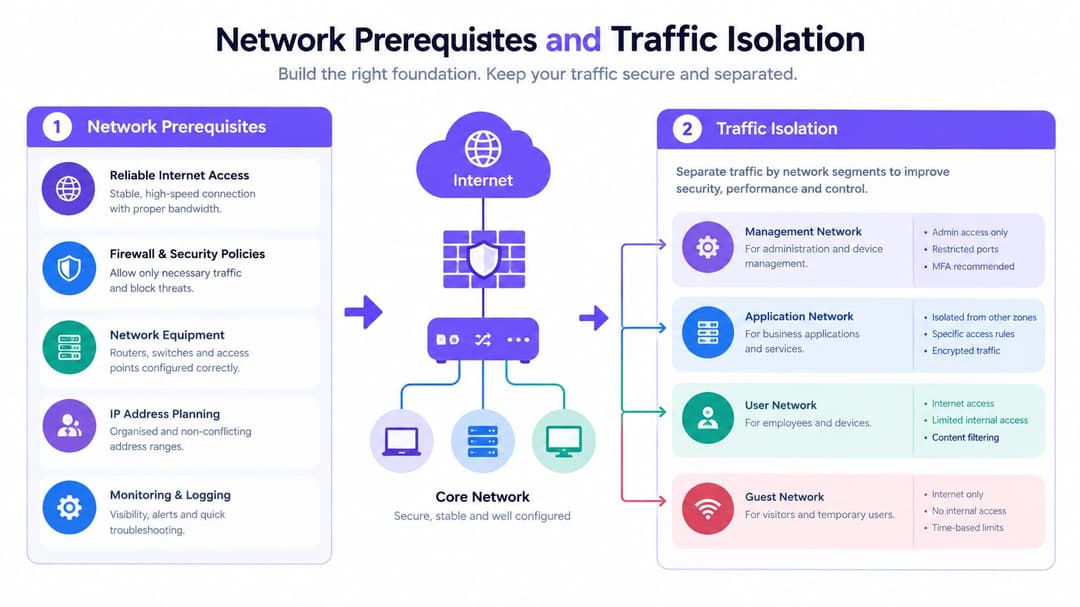
Build the guest network before configuring the page. Start with a dedicated guest SSID mapped to a separate VLAN. Don't reuse a staff SSID with a different splash screen, and don't assume that a guest role alone provides sufficient separation until you have tested the resulting firewall behaviour.
Build the guest path first
The VLAN should have its own DHCP and DNS scope. Apply stateful firewall rules that block:
- Guest-to-corporate traffic: Prevent access to business applications, file services, voice systems and other private resources.
- Guest-to-management traffic: Deny access to wireless controllers, switches, gateways, access points and administrative interfaces.
- Unauthenticated inbound traffic: Stop unsolicited connections from reaching guest clients and internal networks.
- Guest lateral traffic: Enable client isolation at the WLAN layer where the platform supports it, then verify the result from real test devices.
Before authentication, permit only the dependencies required to complete the journey. That normally includes DHCP, DNS, the portal and API endpoints, and any explicitly required operating-system connectivity checks. Keep the pre-authentication allow-list narrow. A broad allow-list makes troubleshooting easier for a few minutes, then creates a policy that nobody can confidently review.
Keep the walled garden deliberate
Redirect web requests to an HTTPS portal with a valid certificate. Allow the portal's content and authentication dependencies before login, but don't permit unrelated browsing as a workaround for a page that fails to load. A walled garden generator can help assemble the required entries, but the final list still needs review against the actual identity, content delivery and payment services in use.
Platform choice affects how much of this policy you can express cleanly. If you're comparing wireless encryption and enterprise access options alongside a guest design, this WPA3 business guide provides useful context. WPA3 doesn't remove the need for a captive portal, but it can be relevant when choosing more secure paths for staff or managed devices.
The acceptance test is not “the page loads”. It is “an unauthenticated guest can reach only the destinations we intended, and an authenticated guest still cannot reach private networks”.
Don't place privileged administrative devices on a captive network unless additional controls mitigate the risk. The NCSC VPN guidance notes that captive portals require direct browsing outside a VPN during authentication and can expose devices during that process. Staff and administrators should normally use certificate-based enterprise Wi-Fi or another controlled access path.
Choosing the Right Authentication Method
Authentication is a design decision, not a form-field decision. Email capture may suit a café, SSO may suit employees, iPSK may suit legacy equipment, and Passpoint may remove the portal altogether for recurring users. The correct choice depends on who is connecting, what the operator must prove, and what happens when the preferred method fails.
| Method | User Friction | Security Level | Ideal Use Case |
|---|---|---|---|
| Click-through or email capture | Low to moderate, depending on required fields | Basic identity or consent signal | Public guest access where proportionate data collection is acceptable |
| SSO | Moderate for visitors, low for existing staff users | Stronger, directory-backed access | Employees and contractors with managed organisational identities |
| iPSK | Low after provisioning, higher during device setup | Strong device or segment control | Legacy devices, IoT and multi-tenant environments |
| Passpoint or OpenRoaming | Very low after enrolment | Stronger encrypted onboarding | Returning users and seamless cellular offload |
Match the method to the user
Email capture is easy to understand, but it becomes problematic when operators treat marketing consent as a condition of internet access. Provide a clearly labelled non-marketing route where possible, explain why data is collected, and avoid requesting information that the service doesn't need.
SSO is appropriate for staff because the organisation can connect access to an existing directory and revoke it when employment or contractor status changes. It isn't a universal guest method. Visitors may not have a compatible account, and forcing a consumer through an enterprise identity flow creates unnecessary friction.
iPSK gives administrators more control than a shared password, especially for devices that cannot handle modern interactive authentication. Use separate keys or policies where devices require different treatment, and plan a revocation process before distributing credentials.
Passpoint and OpenRoaming work well when the priority is frictionless, encrypted access rather than a branded splash page. They require compatible enrolment and identity infrastructure, so they complement rather than replace a portal in every venue.
For directory-backed authentication, a managed RADIUS service can reduce the burden of maintaining an on-premises authentication stack. RADIUS as a service is one option to evaluate alongside the capabilities already available in your wireless platform.
Design for failure and accessibility
A well-planned journey accounts for visitors without mobile signal, people who don't consent to marketing, users with assistive technology, and guests who need immediate access for medical, work or safeguarding reasons. Offer staff-assisted access, vouchers or another proportionate fallback, and make sure the page works with keyboard navigation and screen readers.
The portal should also separate internet authorisation from promotional consent. The 2025 hotel and consumer technology report describes a nationally representative survey of British consumers and reinforces why hospitality operators should test preferences instead of assuming that every guest wants the same digital journey.
Vendor-Specific Configuration Nuances
The architecture stays consistent across vendors, but the failure points don't. In every case, the controller must know where to send the unauthenticated client, which destinations are reachable before authentication, and how a successful callback changes the client's access state.
Meraki
On Meraki, choose the appropriate splash-page mode for the guest SSID and configure the external portal or authentication service. Review the associated walled-garden and firewall controls together. A portal can load successfully while the callback is blocked, leaving the user authenticated in the browser but unauthorised at the gateway.
Check redirect parameters carefully. Your portal needs enough context to identify the venue, SSID and client session, but you shouldn't expose unnecessary information in a URL. Validate the post-authentication return path and confirm that the policy change occurs on the expected network device.
Aruba
Aruba environments commonly derive access from user roles. Confirm which role applies before authentication, which role applies after a successful callback, and whether the role's firewall policy permits the intended internet services. A correctly configured external portal is useless if the resulting role still blocks DNS or outbound traffic.
Keep the pre-authentication role deliberately restrictive. Test role assignment with both a clean device and a previously authorised device, because cached state can hide an incorrect transition.
Ruckus
Ruckus hotspot services require close attention to the relationship between the hotspot profile and the WLAN. Confirm that the external login page, walled garden and post-authentication policy are attached to the same guest service. Check roaming behaviour as a client moves between access points, particularly where the controller or gateway maintains session state centrally.
Mist
Mist deployments should be tested at the policy and cloud-integration layers. Verify that the WLAN policy, guest VLAN and external authentication workflow agree about the client state. Cloud-managed visibility is useful, but it doesn't replace packet-level checks when a callback succeeds without granting access.
UniFi
UniFi's external portal server settings need the portal URL, redirect handling and pre-authorisation access list to align. Avoid allowing the entire portal's parent domain when a narrower set of destinations is possible. After login, inspect whether the client has moved out of the guest restriction and whether DNS, IPv4 and IPv6 follow the same policy.
A successful splash page proves only that the browser reached the page. It says nothing about the callback, role transition or firewall result.
Across all vendors, record the exact policy state at each stage: associated, addressed, pre-authenticated, authenticated and expired. That makes troubleshooting concrete. If authentication succeeds but internet access doesn't, inspect the callback path, authorisation state, DNS reachability and gateway logs rather than redesigning the page.
Rigorous Testing and Validation Procedures
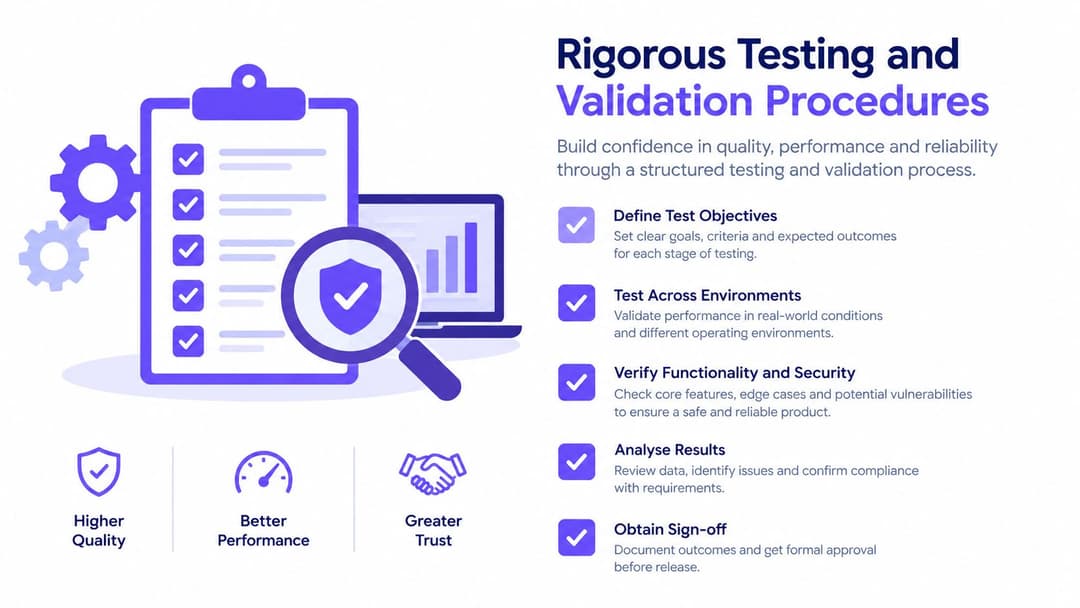
A single phone loading the splash page is not a deployment test. It is a visual check. Production validation must establish that the network behaves correctly before authentication, after authentication, during movement between access points and when a dependency fails.
Test the security boundary
Use a clean client on the guest SSID and attempt to reach internal services, management interfaces and other guest clients. Run controlled internal-network scans from an authorised test device, confirm that client-to-client traffic is blocked where required, and inspect both firewall logs and WLAN policy counters.
Test unauthenticated and authenticated states separately. An unauthenticated client should receive only the DHCP and DNS behaviour required to discover the portal, plus the approved pre-authentication destinations. After authorisation, the client should receive internet access without gaining a route into corporate, management or restricted device networks.
Test real device behaviour
Use iOS, Android, Windows and macOS devices. Captive Network Assistants can behave differently from full browsers, especially when the portal uses complex JavaScript, redirects across domains or depends on a VPN. The NCSC specifically advises using the platform's captive-portal helper where available and treating public Wi-Fi as untrusted.
Work through this validation list:
- Certificate checking: Confirm the portal presents a valid certificate for its name and that clients don't receive certificate warnings.
- DNS behaviour: Check that pre-authentication DNS works as intended and that private DNS or DNS-over-HTTPS settings don't bypass policy unexpectedly.
- IPv4 and IPv6: Apply equivalent controls to both protocols. An IPv6 path that bypasses the captive policy is a deployment failure.
- Roaming: Move between access points and verify that the session remains consistent or expires according to policy.
- VPN startup: Complete the portal flow, then confirm that a VPN can establish immediately. Don't assume an always-on VPN can authenticate through the captive state.
- Timeouts: Let sessions expire and verify that the client returns to the expected restricted state.
- Failure handling: Disconnect the controller, gateway or portal dependency in a controlled test and document whether access fails closed, fails open or leaves stale sessions.
Test identity without MAC assumptions
Don't use a MAC address as a durable identity. Randomised MAC addresses, roaming and device resets make MAC-based recognition unstable. Use short-lived authenticated sessions and central logs, then test repeated connections with privacy-addressing enabled.
If you haven't tested failure, you haven't tested the portal.
Operational Governance and Directory Integration
A guest network becomes difficult to manage when the portal is treated as a one-off launch project. Define ownership, policy, retention and escalation before the first visitor connects. The operator should know who reviews suspicious activity, who can change the portal, and how quickly access can be revoked.
Directory integration is especially valuable for staff and contractors. Connect the staff journey to the organisation's chosen identity directory, such as Entra ID, Google Workspace or Okta, then map directory groups to network roles. Provisioning should follow employment or contract status, and revocation should follow directory changes rather than a manual spreadsheet.
Log enough to investigate
Record the outcome of authentication, the assigned device or session identifier, the timestamp, the access point or location and the policy version. Keep administrative access restricted, synchronise clocks, protect central log storage and define retention before deployment. Minimise personal data, and state the purpose and retention period clearly to visitors.
Government wireless-security guidance requires successful guest captive-portal authentications to be logged or monitored, repeated failed attempts to be investigated and guest activity to be monitored against an acceptable-use policy. It also supports a practical operating model:
- Repeated failures: Rate-limit attempts and alert on suspicious patterns.
- Policy violations: Review activity against the published acceptable-use policy.
- Portal changes: Test changes in a controlled location before wider release.
- Incident response: Maintain a clear route for blocking sessions, disabling credentials and preserving relevant records.
- Privacy review: Remove fields and retention that aren't necessary for the stated purpose.
Measure service quality and control
A portal can be secure and still fail operationally if guests abandon it or staff spend their time resolving avoidable login problems. Track portal completion rate, median time-to-internet, authentication failure rate, help-desk incidents and policy-violation alerts by site and device type.
Don't optimise completion by weakening controls. A shorter form may improve access while increasing data-quality problems, and a broad walled garden may reduce tickets while expanding exposure. The right design reaches the internet quickly, records proportionate evidence, isolates guest traffic and gives operators a defensible response when something goes wrong.
Purple provides cloud captive portal and identity-based networking capabilities that work with existing environments such as Meraki, Aruba, Ruckus, Mist and UniFi, including branded guest authentication, directory-connected staff access and operational analytics. Review your current guest VLAN, authentication fallbacks and logging controls, then visit Purple to assess how its platform could fit your captive portal setup.