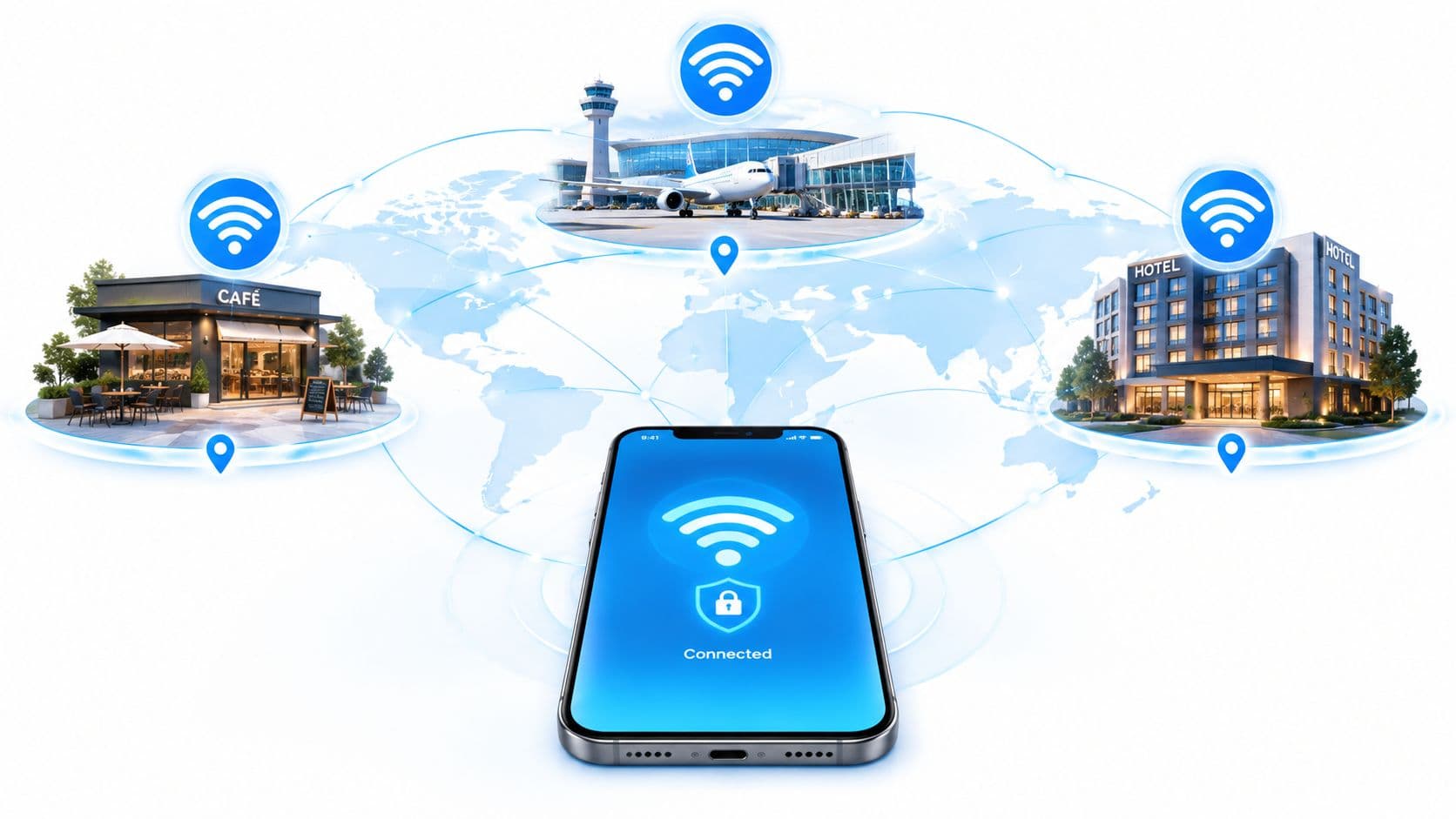
UK travellers paid £508 million in out-of-bundle international roaming charges in 2025, and secure roaming Wi-Fi such as Passpoint can eliminate those costs while providing encrypted connectivity from the first packet. For venue operators, roaming Wi-Fi isn't merely a cheaper data option. It's an identity, security, and network-design decision.
The distinction matters because public Wi-Fi often asks users to choose between cost and trust. A hotel, airport, hospital, shopping centre, or transport operator may advertise free access, yet still depend on an open network, a shared password, or a captive portal that gives users no strong proof of network identity. Passpoint and OpenRoaming approach the problem differently. They let an enrolled device discover a trusted network, authenticate with stored credentials, and maintain secure access as the user moves through participating coverage areas.
That creates a different operating model for UK venues. The question isn't only whether guests can get online. IT teams must also decide who is allowed to connect, how access is revoked, which devices are supported, how traffic is isolated, and whether the radio design can sustain movement without disruption.
The High Cost of Casual Wi-Fi Connectivity
A traveller arrives at a foreign airport, sees a familiar-looking network name, and connects to avoid mobile data charges. The network may use a splash page, a room number, or a password printed beside the reception desk. The traveller then checks email, opens a work application, or makes a payment, often without knowing whether the connection was encrypted before authentication or whether the network belongs to the venue.
The financial pressure behind that decision is substantial. UK travellers incurred £508 million in out-of-bundle international roaming charges in 2025, while pay-monthly customers accounted for approximately 98% of the total, according to reporting on the UK roaming charge figure. Avoiding a bill can therefore feel like a sensible reason to use public Wi-Fi, but an open network can expose users to eavesdropping, credential theft, and fraudulent lookalike access points.

Free access isn't the same as trusted access
A shared password creates a particularly weak boundary. Everyone receives the same credential, the venue can't easily attribute access to an individual device, and removing one former guest usually means changing the password for everyone. A captive portal may collect an email address or ask the user to accept terms, but that process alone doesn't prove that the wireless link was protected from the first exchange.
Practical rule: Treat “free Wi-Fi” and secure roaming Wi-Fi as different products. Price answers what the user pays, while authentication determines what the network can protect.
Passpoint changes the starting point. A compatible device evaluates network information before association, checks whether it has a matching credential or trusted profile, and then establishes enterprise-grade authentication. With suitable WPA3 and EAP-TLS configuration, the device can use certificate-based identity rather than a shared password.
The venue carries responsibility too
A venue operator that deploys casual guest access accepts more than a support burden. It also has to manage impersonation risk, guest isolation, identity records, logging, and the consequences of a compromised shared credential. Healthcare, hospitality, transport, retail, and residential operators face different compliance and service expectations, but they all need a clear answer to the same question: how does the network know that this device is entitled to connect?
Roaming Wi-Fi doesn't remove the need for governance. It replaces repeated, user-visible logins with policy-driven trust. That makes the design more secure when identity, certificates, federation, and network segmentation are handled properly, but it also means a venue must manage those dependencies deliberately.
Understanding Passpoint and OpenRoaming Standards
Passpoint, also known as Hotspot 2.0, uses IEEE 802.11u discovery and enterprise authentication to make Wi-Fi behave more like a managed roaming service. Instead of asking a user to select an SSID and complete a portal every time, the access point advertises information that lets a device determine whether the network is suitable.
OpenRoaming extends that model through federation. A device's identity provider, carrier, or other trusted authority can establish the relationship that allows automatic access across participating networks. The venue still controls its own policy, but the user doesn't need to create a new account at every location.
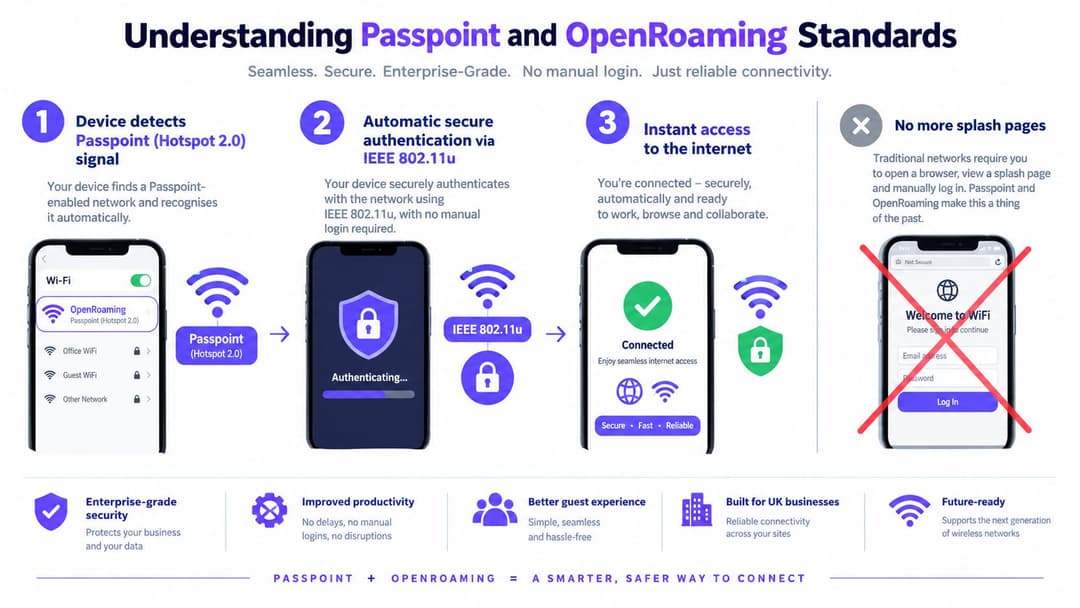
The connection sequence
The process is easier to understand as a sequence:
- Discovery: The access point advertises supported network information. The device can identify the venue, operator, roaming consortium, and available authentication options.
- ANQP exchange: The client uses the Access Network Query Protocol to request further details, including domain and identity information.
- Credential matching: The device checks whether a stored profile, certificate, SIM-related identity, or other approved credential matches the network policy.
- Authentication: The client authenticates through EAP and 802.1X. For enterprise deployments, EAP-TLS can validate a client certificate rather than relying on a shared password.
- Protected access: The device joins using an enterprise security policy, such as WPA3 where supported, and receives network access without a conventional captive portal.
The Passpoint overview for venue Wi-Fi is useful for teams that need to map these concepts to guest and enterprise access scenarios.
What OpenRoaming adds
Passpoint solves discovery and secure network access. OpenRoaming adds the federation layer that allows participating identity providers and network operators to recognise one another. This can support a user who authenticates once and later reconnects at another trusted venue, provided the device, identity provider, network policy, and federation relationship all align.
That last condition is important. A matching SSID doesn't create roaming. The client must support the relevant features, the network must publish accurate ANQP information, the authentication service must trust the identity provider, and the venue must apply a consistent policy. If one of those elements fails, the device may fall back to another access method or refuse the connection.
For operators, the practical benefit is less visible friction without abandoning identity controls. For guests, the benefit is automatic selection and secure authentication. For IT teams, the trade-off is that federation introduces more parties to govern, monitor, and audit.
Technical Requirements for Roaming Wi-Fi Deployment
A roaming Wi-Fi deployment needs more than a modern access point and a common network name. The wireless LAN must support Passpoint or Hotspot 2.0 functions, advertise accurate ANQP information, and identify the operator and roaming consortium correctly. Protected Management Frames should also form part of the security baseline.
The authentication path needs equal attention. WPA3-Enterprise and EAP-TLS can provide certificate-based authentication, which gives each enrolled device an individual identity instead of distributing one password across a whole venue. Certificates introduce lifecycle work, including provisioning, renewal, revocation, device retirement, and recovery when a handset or laptop is lost.
Build the AAA path before the SSID
The wireless configuration is only the visible layer. Behind it, the venue needs a functioning authentication, authorisation, and accounting path.
- RADIUS trust: The access points or controllers must reach the correct AAA service and apply the expected policies.
- Protected exchanges: Jisc recommends RADIUS over TLS, commonly called RadSec, for protected authentication and roaming exchanges. A managed option such as RADIUS as a service for roaming deployments can reduce the need to operate every RADIUS component on premises.
- Identity integration: The operator needs a defined relationship with its identity provider, carrier, or federation service. Authentication shouldn't succeed merely because a device knows the SSID.
- Policy enforcement: Guest, staff, tenant, contractor, and operational devices need separate authorisation rules, even when they use the same physical WLAN.
- Certificate controls: The team must know how to issue, renew, suspend, and revoke certificates, and what a device does when validation fails.
Radio design determines whether roaming feels seamless
A client can only hand off cleanly when neighbouring cells provide a usable target. Too little overlap creates coverage gaps and dropped sessions. Too much overlap raises co-channel contention and can encourage sticky-client behaviour, where a device remains attached to a weak access point instead of moving to a better one.
Ofcom publishes calibrated, geo-located measurements for UK 2.4 GHz and 5 GHz Wi-Fi propagation, including airborne measurements and surveys around Northampton, through its open Wi-Fi propagation datasets. Those measurements can support modelling, but they don't replace an active survey inside the venue.
Design for the application edge: A handset making a voice call needs a stable, usable path where people actually walk, not merely a strong signal at the centre of an access-point cell.
Validate the handoff with real devices and live traffic. Monitor authentication latency, reassociation failures, channel utilisation, and packet loss while a test handset moves through corridors, lifts, concourses, wards, guest rooms, or retail floors. A vendor coverage map can show theoretical reach. It can't prove that a certificate exchange, client decision, and application session will complete cleanly at the boundary.
Comparing Open Guest Wi-Fi Versus Secure Roaming
Open guest Wi-Fi remains easy to deploy, but it creates the weakest security starting point. A device may associate without encryption and only encounter a portal afterwards. That arrangement can expose pre-authentication traffic and makes it harder for users to distinguish a genuine venue network from an imitation.
A password-protected guest network improves the basic barrier, but it still has operational weaknesses. The same password circulates through staff and visitors, guests must re-enter it when they change devices or return later, and a venue often has no practical way to revoke one person's access without rotating the credential for everyone.

Three access models, three operating burdens
| Access model | Guest experience | Security and identity | Operator burden |
|---|---|---|---|
| Open network with a portal | Manual selection and portal interaction | Weakest protection before authentication | Portal support, abuse controls, and limited attribution |
| Shared-password network | Familiar but repetitive | A common credential is difficult to control or revoke per user | Password rotation and help-desk requests |
| Passpoint or OpenRoaming | Automatic selection and repeat access | Identity-based authentication with encrypted enterprise access | Federation, certificates, AAA, policy, and device testing |
The third model isn't automatically secure just because it uses the word roaming. A venue must validate certificates, configure trusted identity providers, isolate traffic, and define fallback behaviour for devices that don't support the required profile. A poorly governed federation can still create excessive access or weak accountability.
Separate authentication from authorisation
A device proving who it is doesn't decide what it may reach. That distinction is central to network policy, and a practical explanation of system design authorization vs authentication helps teams avoid treating successful login as unrestricted permission.
For a hotel, a guest device might receive internet access but no access to staff systems. In a residential building, tenants may use the same service while remaining isolated from one another. In a hospital, staff identity and device posture may determine access to clinical resources, while visitors receive a separate policy.
Secure roaming therefore earns its place when an operator values encrypted access, repeat recognition, individual accountability, and lower friction. Open access still has a role for low-risk, low-complexity scenarios, but it shouldn't be presented as equivalent.
How Purple Enables Secure Roaming Wi-Fi
Venue operators often have the wireless hardware already. The harder problem is coordinating identity, federation, guest access, staff controls, and legacy devices without building a separate workflow for every network. Purple provides one implementation option for that operating model, using Passpoint and OpenRoaming to support automatic authentication across participating networks.
For a guest, the important change is that access can be tied to an identity rather than a shared venue password. The device receives a profile or certificate-based trust relationship, then uses that relationship when it encounters a compatible network. The connection can be protected from the first packet, while the venue applies its own segmentation and access policy.
Identity workflows matter more than the portal
Staff access presents a different requirement from guest access. A departing employee shouldn't retain wireless access because a shared password remains active, and an administrator shouldn't need to update every access point manually. Purple can integrate staff authentication with Entra ID, Google Workspace, and Okta, allowing directory changes to influence provisioning and revocation.
That model supports a useful separation:
- Guests receive a controlled, low-friction internet policy.
- Staff authenticate through the organisation's identity provider and receive role-based access.
- Tenants or residents can receive individual or household policies without exposing neighbouring devices.
- Legacy equipment can use mechanisms such as iPSK where certificate-based client support isn't available.
The network still needs normal engineering discipline. A platform can't correct insufficient cell overlap, poor channel planning, an overloaded DHCP service, or a broken upstream identity provider. It can, however, centralise the identity and policy operations that make multi-site roaming difficult to manage manually.
Fit the platform to the existing WLAN
Purple is described for integration with network vendors including Meraki, Aruba, Ruckus, Mist, and UniFi. That matters to operators that want to preserve an existing access-layer investment while changing how users authenticate. The right evaluation should test the complete path, not just confirm that a dashboard can display access points.
Ask the implementation team to demonstrate certificate enrolment, device removal, staff offboarding, guest isolation, fallback for unsupported handsets, and behaviour during an authentication-service outage. Also check whether analytics and CRM connections match the organisation's privacy policy and data-minimisation requirements.
For teams comparing guest-access approaches, secure guest Wi-Fi with identity-based access provides a relevant product reference. The purchasing decision should still be based on the venue's identity model, wireless estate, support capability, and governance requirements rather than on the portal experience alone.
Operational Benefits for Venues and Their Guests
Roaming Wi-Fi changes the support profile of a venue. Guests no longer need to find a network name, read a password from a sign, complete a portal, and repeat the process after moving to another participating location. Staff also spend less time explaining why a credential failed or rotating a password after it has spread beyond the intended audience.
That convenience has security value, but the commercial case depends on how the operator uses identity. A hotel can separate guest access from staff systems. A shopping centre can maintain a consistent experience across managed areas. A residential operator can give tenants simple access without allowing devices in one flat to browse devices in another.
What operators can measure
A roaming deployment should have service measures that reflect both the network and the business:
- Authentication health: Track failed authentications, certificate errors, identity-provider failures, and time taken to complete access.
- Mobility quality: Test reassociation failures, packet loss, and application continuity along actual guest and staff routes.
- Support demand: Compare recurring password, portal, and connection complaints before and after the change.
- Identity lifecycle: Check whether joiner, mover, and leaver events produce the intended access changes.
- Repeat recognition: Use privacy-conscious analytics to understand returning devices or authenticated identities without collecting unnecessary personal data.
- Segmentation: Confirm that guest, staff, tenant, and operational policies remain separate at every access point and controller.
Operational rule: Don't measure roaming by the absence of complaints alone. A quiet help desk can hide failed authentication, poor coverage, or users who have stopped trying to connect.
The most valuable benefit is consistency. A user who authenticates once can reconnect at trusted locations without repeatedly surrendering information to separate portals. The operator gains a more durable identity relationship, but that relationship creates duties around consent, retention, revocation, logging, and transparent privacy notices.
Roaming Wi-Fi is therefore a security-and-cost decision. It can reduce dependence on shared credentials and manual support, but it won't deliver those outcomes if the venue keeps weak fallback networks, ignores legacy devices, or treats identity data as an unlimited marketing resource.
Implementation Checklist and Next Steps
Start with an inventory, not a product demo. Record the access-point models, controller or cloud management platform, firmware levels, existing SSIDs, VLAN policies, RADIUS services, identity providers, and the physical routes where guests and staff move. Mark any device category that can't support modern enterprise authentication, including printers, building systems, point-of-sale equipment, and older handhelds.
Validate the technical path
Use this sequence with the network and security teams:
- Confirm Passpoint capability: Check whether the WLAN supports Hotspot 2.0, ANQP, operator identifiers, roaming-consortium identifiers, and Protected Management Frames.
- Review authentication: Confirm the chosen EAP method, certificate authority, identity-provider trust, and failure behaviour. Don't assume that a supported access point includes a complete AAA design.
- Assess RADIUS transport: Establish whether the current service supports RadSec and whether authentication exchanges are protected across every relevant network boundary.
- Map authorisation: Write separate policies for guests, staff, residents, contractors, and managed devices. Authentication identifies the client, while authorisation determines its reach.
- Check lifecycle controls: Test enrolment, renewal, lost-device response, employee offboarding, and certificate revocation before inviting real users.
- Test client diversity: Use representative iOS, Android, Windows, and specialist devices. Confirm automatic selection, profile installation, certificate validation, and fallback behaviour.
- Survey the radio environment: Combine active measurements with relevant Ofcom propagation data. Plan overlap for the application edge, not only for a visually attractive heat map.
- Run movement tests: Walk normal routes while using voice or other real-time traffic. Record authentication latency, reassociation failures, channel utilisation, and packet loss.
- Prepare operations: Give the service desk procedures for profile removal, identity failures, unsupported devices, and suspected rogue networks.
- Review privacy and reporting: Define what identity and analytics data the venue stores, why it needs the data, who can access it, and when it is deleted.
A pilot should include the busiest areas and the least forgiving routes, such as reception queues, corridors, stairwells, platforms, wards, event floors, and car parks. Test failure as seriously as success. Disconnect the identity provider, revoke a certificate, move between access points, and introduce a legacy device so the team can observe the fallback path before guests do.
Purple provides Passpoint and OpenRoaming capabilities for identity-based guest and staff access, alongside integrations designed for existing venue networks. Visit Purple to evaluate a roaming Wi-Fi approach that combines encrypted connectivity, lifecycle controls, and operational visibility. Ask for a deployment review based on your access-point estate, identity provider, venue layout, and device mix.