
2.4GHz vs 5GHz in the Enterprise: When to Use Which
A comprehensive technical reference guide for IT directors and network architects on optimising enterprise WLANs. It details the physical characteristics of 2.4GHz and 5GHz bands, best practices for SSID segmentation, and how to configure band steering to maximise throughput while supporting legacy devices.
Listen to this guide
View podcast transcript

Executive Summary
For enterprise venues—from high-density stadiums to sprawling retail floors—the choice between 2.4GHz and 5GHz is no longer a simple binary. It is a strategic decision that directly impacts operational efficiency, guest experience, and the bottom line. This guide provides actionable intelligence for IT directors and network architects on when to deploy which band, how to configure band steering effectively, and the real-world implications of these choices.
The fundamental physics remain unchanged: 2.4GHz offers superior penetration and range at the cost of channel capacity and congestion, while 5GHz provides massive throughput and channel availability but suffers from rapid attenuation. In modern deployments, success relies on intelligent coexistence. By leveraging both bands with purpose-built SSIDs and precise band steering, organisations can support legacy IoT devices while delivering gigabit speeds to modern consumer hardware.
This reference document outlines the technical architecture, implementation best practices, and risk mitigation strategies necessary to optimise your WLAN for both corporate operations and Guest WiFi monetisation.
Technical Deep-Dive: Physics, Channels, and Capacity
Understanding the core differences between the two bands is essential for designing a robust network architecture.
The 2.4GHz Band: The Penetration Workhorse
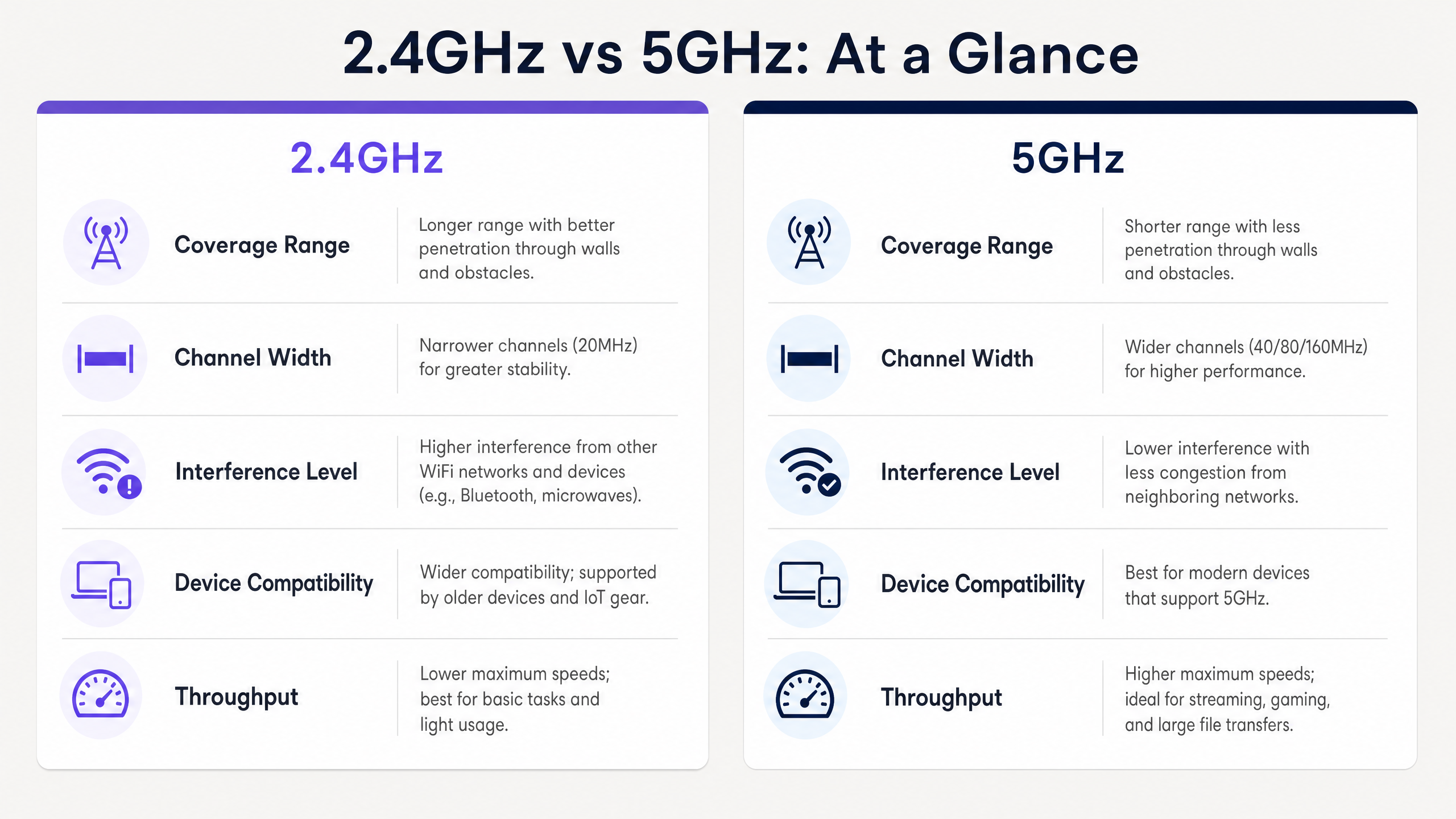
Operating at a lower frequency, the 2.4GHz band features longer wavelengths that easily penetrate physical obstacles such as concrete walls, steel shelving, and lift shafts. This makes it ideal for Hospitality environments with thick internal walls or expansive warehouse spaces.
However, the 2.4GHz spectrum is severely limited by its channel architecture. In most regulatory domains, there are only three non-overlapping 20MHz channels (Channels 1, 6, and 11). This scarcity leads to significant co-channel interference (CCI) and adjacent-channel interference (ACI), especially in dense environments where neighbouring networks, Bluetooth devices, and even microwaves compete for airtime.
The 5GHz Band: The High-Capacity Highway
Conversely, the 5GHz band operates at a higher frequency, resulting in shorter wavelengths. While this reduces its ability to penetrate physical barriers, it offers a vast expanse of available spectrum. Depending on the regulatory domain and the use of Dynamic Frequency Selection (DFS) channels, you can access up to 25 non-overlapping 20MHz channels.
This abundance allows for channel bonding (40MHz, 80MHz, or even 160MHz widths), enabling the high throughput required for modern applications. Under IEEE 802.11ac (Wi-Fi 5) and 802.11ax (Wi-Fi 6), 5GHz networks can deliver gigabit speeds, making it the preferred band for high-density environments like conference centres and Transport hubs.
Implementation Guide: Intelligent Coexistence
Deploying a modern enterprise WLAN requires a nuanced approach to band allocation. The goal is to offload capable devices to the 5GHz band while preserving the 2.4GHz band for devices that truly need it.
1. SSID Segmentation
The most effective strategy for managing mixed device populations is SSID segmentation. Create dedicated SSIDs for different use cases:
- Operational SSID (2.4GHz Only): Reserved for legacy hardware, IoT sensors, barcode scanners, and EPOS terminals. This ensures clean airtime for critical operational tools.
- Guest/Corporate SSID (Dual-Band or 5GHz Primary): Designed for modern smartphones, tablets, and laptops. This SSID should leverage band steering to push capable clients to 5GHz.
2. Configuring Band Steering
Band steering is the mechanism by which the wireless infrastructure encourages dual-band clients to associate with the 5GHz radio.
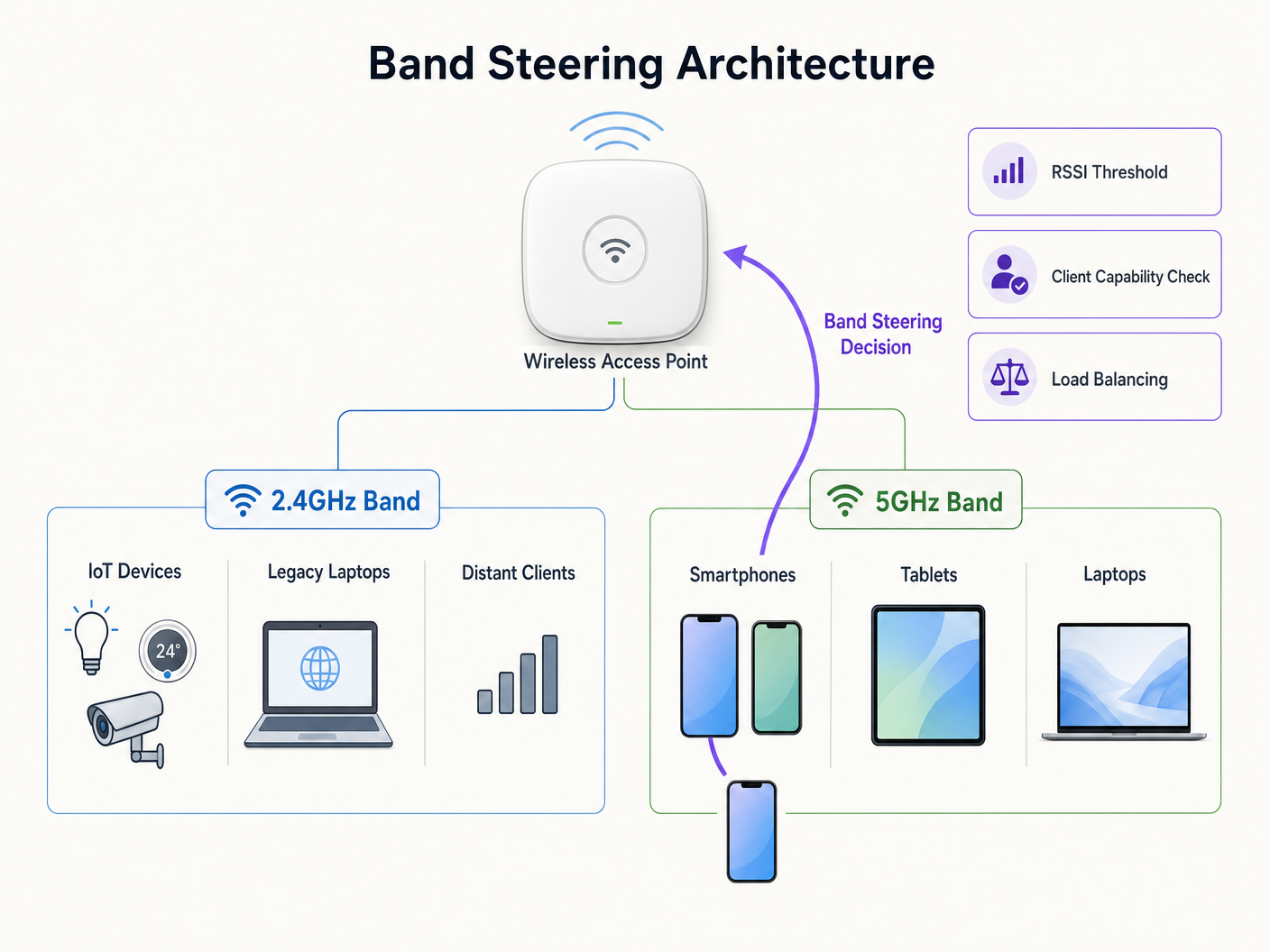
When configuring band steering, consider the following parameters:
- Probe Response Suppression: The AP ignores probe requests on the 2.4GHz band from clients it knows are 5GHz-capable, forcing them to associate on 5GHz.
- RSSI Thresholds: Implement strict Received Signal Strength Indicator (RSSI) thresholds. If a client's 5GHz signal drops below a certain level (e.g., -72 dBm), the AP should allow the client to fall back to 2.4GHz gracefully to prevent connection drops.
3. Validating the RF Design
Band steering is not a panacea for poor network design. If your 5GHz coverage has gaps, aggressive band steering will result in frequent disconnections and a poor user experience. Always validate your RF design with a comprehensive site survey before enabling steering features.
Best Practices & Security Considerations
Channel Width Optimisation
While 80MHz channels offer impressive theoretical throughput, they consume four standard 20MHz channels, increasing the likelihood of CCI in high-density deployments. For most enterprise environments, standardising on 40MHz channel widths on the 5GHz band provides the optimal balance of throughput and channel availability.
Security and Compliance
The 2.4GHz band's congested nature makes it more susceptible to certain types of interference and deauthentication attacks. To maintain a strong security posture, especially for environments subject to PCI DSS or GDPR:
- Enforce WPA3 with Protected Management Frames (PMF) across all corporate SSIDs.
- Ensure strict VLAN segregation between guest traffic and corporate/payment networks.
- Regularly audit your environment for rogue APs, which are more prevalent on the easily accessible 2.4GHz band.
For more insights on managing network data securely, review our guide on The Hidden Cost of Telemetry Data on Corporate WLANs (also available in French: Le coût caché des données de télémétrie sur les WLAN d'entreprise ).
Troubleshooting & Risk Mitigation
When issues arise, they often manifest as connectivity drops or poor performance. Here are common failure modes and how to mitigate them:
- Sticky Clients: Devices that cling to a weak 2.4GHz signal even when a strong 5GHz signal is available. Mitigation: Tune your RSSI thresholds and enable 802.11k/v/r (Fast BSS Transition) to assist client roaming decisions.
- DFS Channel Interference: Radar systems can force APs to vacate DFS channels, disrupting connectivity. Mitigation: Monitor controller logs for DFS events. If frequent, exclude the affected channels from your dynamic channel assignment plan.
- IoT Connectivity Failures: Many smart devices lack 5GHz radios and struggle with complex authentication. Mitigation: Ensure your dedicated IoT SSID operates strictly on 2.4GHz and uses simpler authentication methods (e.g., WPA2-PSK or MAC Authentication Bypass) while maintaining strict network isolation.
ROI & Business Impact
Optimising your band strategy directly impacts your organisation's bottom line. A well-tuned network reduces support tickets, increases operational efficiency for staff using mobile devices, and enhances the guest experience.
When integrated with WiFi Analytics , a robust 5GHz deployment provides the high-fidelity location data necessary for advanced marketing initiatives. As seen in recent developments, such as how a wi fi assistant Enables Passwordless Access in 2026 , seamless connectivity is the foundation for driving digital inclusion and maximising the value of your physical space. Furthermore, features like Offline Maps Mode rely on stable initial connections to download necessary assets, underscoring the importance of a reliable RF environment.
Listen to our comprehensive podcast briefing below for a deeper dive into these strategies:
Key Definitions
Band Steering
A network infrastructure feature that detects dual-band capable clients and actively encourages them to connect to the less congested 5GHz band rather than the 2.4GHz band.
Crucial for optimizing airtime utilization in environments with a mix of modern smartphones and legacy IoT devices.
Co-Channel Interference (CCI)
Interference that occurs when two or more access points operate on the exact same frequency channel, forcing them to share the available airtime.
A primary cause of slow network performance on the 2.4GHz band due to the limited number of non-overlapping channels.
Dynamic Frequency Selection (DFS)
A mechanism that allows Wi-Fi networks to use 5GHz channels typically reserved for radar systems, provided the AP can detect radar pulses and automatically switch to a different channel.
Unlocks additional 5GHz channels for enterprise use, but requires careful planning to avoid sudden channel changes that disconnect clients.
RSSI (Received Signal Strength Indicator)
A measurement of the power level being received by the antenna, typically expressed in negative decibels (dBm). Closer to zero is stronger.
Used by network administrators to set thresholds for roaming and band steering decisions (e.g., steering clients to 2.4GHz when 5GHz RSSI drops below -75 dBm).
SSID Segmentation
The practice of broadcasting different network names (SSIDs) for different user groups or device types, often tied to specific frequency bands or security policies.
Essential for isolating vulnerable IoT devices on 2.4GHz from high-speed corporate traffic on 5GHz.
Attenuation
The gradual loss of signal strength as radio waves travel through space or pass through physical objects like walls and floors.
Explains why 5GHz signals require denser AP placement compared to 2.4GHz signals in environments with heavy structural interference.
Spatial Stream
Multiple independent data signals transmitted simultaneously over different antennas using MIMO (Multiple Input, Multiple Output) technology to increase throughput.
Determines the maximum potential speed of a connection; modern 5GHz clients often support 2x2 or 3x3 spatial streams for gigabit performance.
Protected Management Frames (PMF)
A security standard (mandatory in WPA3) that encrypts the management frames used to control Wi-Fi connections, preventing deauthentication attacks.
Critical for securing the easily accessible 2.4GHz band against malicious actors attempting to disrupt network operations.
Worked Examples
A 200-room hotel is experiencing poor guest WiFi performance in the lobby during peak check-in times, while in-room connectivity remains stable. The current configuration uses a single dual-band SSID across the entire property.
Implement a dual-strategy approach. First, enable band steering on the guest SSID with a strict RSSI threshold (-70 dBm) to force modern smartphones and laptops in the dense lobby area onto the high-capacity 5GHz band. Second, reduce the 2.4GHz transmit power on the lobby APs to shrink the cell size and reduce co-channel interference. Finally, ensure 5GHz channel widths are set to 40MHz to maximize available non-overlapping channels in the high-density space.
A large [Retail](/industries/retail) chain is rolling out new 2.4GHz-only wireless barcode scanners for inventory management. Simultaneously, they want to offer high-speed Guest WiFi to shoppers. How should the network be configured to prevent the consumer devices from degrading scanner performance?
Deploy SSID segmentation. Create a dedicated 'Ops-Inventory' SSID broadcast only on the 2.4GHz radio, utilizing WPA3-Personal or 802.1X for security, and assign it to a restricted VLAN. Create a separate 'Guest-WiFi' SSID broadcast on both bands, but with aggressive band steering enabled to push consumer devices to 5GHz. Apply Quality of Service (QoS) policies prioritizing traffic from the operational VLAN.
Practice Questions
Q1. You are deploying a new WLAN in a large, open-plan warehouse. The primary devices are legacy 802.11b/g barcode scanners used by forklift operators. There are very few modern devices in the space. Which band strategy should you prioritize?
Hint: Consider the capabilities of the primary client devices and the physical environment.
View model answer
Prioritize a robust 2.4GHz design. Since the legacy scanners only support 2.4GHz, a 5GHz-focused design would be useless for operations. Ensure AP placement provides adequate 2.4GHz coverage and carefully manage channel planning (using only channels 1, 6, and 11) to minimize co-channel interference in the open space.
Q2. During a busy conference, attendees are complaining of slow WiFi speeds, despite showing full signal strength on their devices. A packet capture reveals heavy utilization on channels 1, 6, and 11, but channels 36-48 are relatively quiet. What is the most likely configuration issue?
Hint: Think about why modern devices might be congregating on the congested channels instead of the available ones.
View model answer
Band steering is likely disabled or configured incorrectly. The devices are defaulting to the 2.4GHz band (channels 1, 6, 11) because it often presents a stronger initial signal, leading to congestion. Enabling band steering would force the capable modern devices onto the quiet 5GHz channels (36-48), alleviating the congestion and improving speeds.
Q3. A hospital IT team wants to implement 80MHz channel widths on their 5GHz network to support high-resolution medical imaging transfers. However, they operate in a high-density environment with many APs deployed close together. What is the primary risk of this approach?
Hint: Consider the relationship between channel width and the number of available non-overlapping channels.
View model answer
The primary risk is a massive increase in Co-Channel Interference (CCI). Using 80MHz channels consumes four standard 20MHz channels per AP. In a high-density deployment, this drastically reduces the number of non-overlapping channels available, meaning neighboring APs will likely end up on the same frequency, causing interference that degrades overall network performance rather than improving it.