
Airport WiFi: How Operators Deliver Connectivity Across Terminals
This guide provides IT leaders with actionable strategies for designing, deploying, and managing high-density airport WiFi networks. It covers technical architecture, RF planning, and how to leverage platforms like Purple to turn passenger connectivity into valuable analytics and revenue.
Listen to this guide
View podcast transcript
Part of our core series: Guest WiFi Guide →
Executive Summary
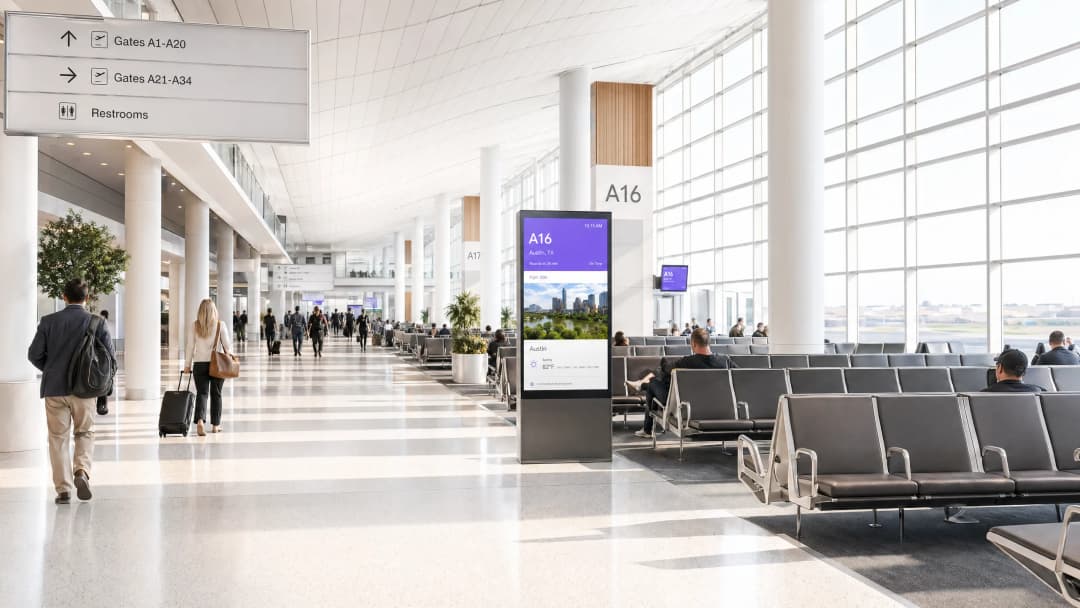
For IT managers and network architects, deploying an airport wireless network is one of the most difficult challenges in enterprise IT. You are not just providing internet access; you are managing a high-density, high-interference RF environment that spans millions of square feet and serves thousands of users simultaneously. Passengers expect seamless, high-speed connectivity from the moment they enter the terminal until they board. Failing to deliver this results in poor passenger experience scores and lost business opportunities.
This technical reference guide analyses the architecture, deployment strategies, and business impact of enterprise-grade airport WiFi. We will explore how to transition from legacy deployments to high-capacity WiFi 6/6E networks, how to mitigate common RF challenges, and how to use platforms like Purple's Guest WiFi to capture first-party data, increase loyalty, and unlock new revenue streams through retail media monetisation.
Technical Deep-Dive: Architecture and Standards
Providing reliable WiFi for passengers requires a robust, multi-tiered architecture designed not just for coverage, but for capacity.
Access Layer: Conquering Density
The access layer is where the performance battle is won or lost. In an airport environment, the primary challenge is density - thousands of devices converging simultaneously in departure lounges, food courts, and baggage claim areas.
- WiFi 6 (802.11ax) and 6E: Upgrading to WiFi 6 is critical. Features like Orthogonal Frequency-Division Multiple Access (OFDMA) and Multi-User MIMO (MU-MIMO) allow Access Points (APs) to handle multiple client devices simultaneously, significantly reducing latency in congested areas. WiFi 6E introduces the 6GHz band, providing much-needed clean spectrum away from the congested 2.4GHz and 5GHz bands.
- Dynamic RF Management: The physical environment of an airport is constantly changing. A centralised controller must use dynamic RF management to automatically adjust channel assignment and transmit power to minimise co-channel interference as passenger volumes fluctuate.
- Client Steering: The network should aggressively steer capable clients towards the 5GHz or 6GHz bands, reserving the 2.4GHz band for legacy devices and IoT infrastructure.
Core Network and Security
The core network must aggregate massive volumes of traffic without bottlenecks.
- High-Speed Uplinks: Redundant, high-capacity internet connections are mandatory. Understanding What Is a Leased Line? Dedicated Business Internet is crucial to ensuring guaranteed bandwidth and SLAs.
- Security and Segmentation: Guest traffic must be strictly segregated from operational networks (e.g., baggage handling, security systems) using VLANs and firewalls. Implementing WPA3 (where supported) and robust DNS filtering is essential to Protect Your Network with Strong DNS and Security.

Got questions about your specific setup?
Our team works with venue operators, IT managers, and network engineers across 80,000 venues. Book a 20-minute call and we will show you how others like you solved it.
Implementation Guide: Deployment Strategies
Deploying a wireless network airport environment requires meticulous planning.
- Comprehensive Site Surveys: Never rely solely on predictive modelling. Conduct active and passive RF site surveys to account for attenuation caused by architectural elements like reinforced concrete, structural steel, and specialised glass.
- Design for Capacity: Traditional deployments focused on coverage (getting a signal everywhere). Modern deployments must focus on capacity (ensuring sufficient throughput for all connected devices in a given zone). This often means higher AP density with lower transmit power to minimise cell overlap.
- Seamless Roaming: Implement fast roaming protocols (such as 802.11r/k/v) to ensure client devices can transition smoothly between APs as they move through the terminal, preventing dropped connections during VoIP calls or video streams.
- Profile-Based Authentication: To reduce friction, implement profile-based authentication methods like OpenRoaming. This allows compatible devices to connect automatically and securely, significantly improving the user experience while allowing the venue to maintain control.
Best Practices for Venue Operators
Beyond the physical infrastructure, how you manage the connection determines its business value.
- Leverage the Captive Portal: The Captive Portal is a strategic touchpoint. Use it to capture first-party data (with GDPR/CCPA compliance) and present targeted offers. This transforms the network from a cost centre into a marketing asset.
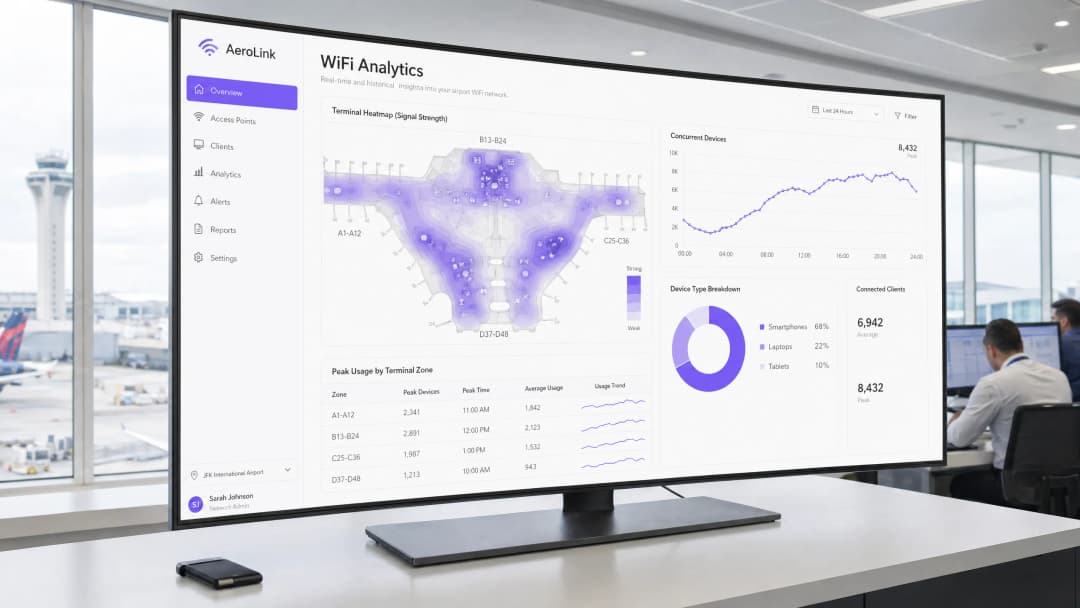
- Utilise WiFi Analytics: Deploy platforms like Purple's WiFi Analytics to gain actionable insights. By analysing device probe requests and connection data, operators can visualise passenger flow, measure dwell times in retail zones, and optimise terminal layouts.
- Cross-Industry Learnings: Look to other high-density environments for proven strategies. The challenges faced in airports are similar to those in large retail centres or major transport hubs. For instance, reviewing how operators handle connectivity in the Retail sector or exploring Railway WiFi Network: How Operators Are Delivering Connectivity at Speed can provide valuable architectural insights.
Troubleshooting and Risk Mitigation
Even well-designed networks encounter issues. Common failure modes include:
- Sticky Clients: Devices that refuse to roam to a closer AP, degrading performance for themselves and others. Mitigation: Implement strict minimum RSSI (Received Signal Strength Indicator) thresholds to force clients to disconnect and find a better AP.
- Rogue APs: Unauthorised access points (such as passenger mobile hotspots) that cause interference. Mitigation: Use Wireless Intrusion Prevention Systems (WIPS) to automatically detect and contain rogue APs.
- Captive Portal Failures: Users unable to authenticate due to DNS or DHCP exhaustion. Mitigation: Ensure DHCP scopes are appropriately sized for peak capacity and DNS servers are highly available.
ROI and Business Impact
Deploying an enterprise-grade airport wireless network requires significant CapEx, but the ROI is measurable.
- Operational Efficiency: Analytics derived from the network allow for optimised staffing (e.g., opening more security lanes based on real-time passenger density).
- Retail Media Monetisation: By utilising WiFi screen real estate and the Captive Portal, airports can deliver targeted advertising, generating new revenue streams that can offset the cost of the network infrastructure.
- Improved Passenger Experience: Reliable connectivity directly correlates with higher passenger satisfaction scores, influencing airline route planning and overall airport competitiveness.
Key Definitions
High-Density Deployment
A network design strategy focused on serving a massive number of concurrent client devices in a confined physical space, prioritising capacity and throughput over simple geographic coverage.
Crucial for areas like departure gates and baggage claim where thousands of passengers congregate simultaneously.
Captive Portal
A web page that a user of a public access network is obliged to view and interact with before access is granted, typically used for authentication, accepting terms of service, or marketing.
The primary mechanism for venue operators to capture first-party data and present retail media to passengers.
Band Steering
A feature on wireless controllers that encourages dual-band client devices to connect to the less congested 5GHz or 6GHz bands rather than the crowded 2.4GHz band.
Essential for maximising overall network performance and ensuring a smooth experience in crowded terminals.
OFDMA (Orthogonal Frequency-Division Multiple Access)
A key feature of WiFi 6 that allows a single Access Point to communicate with multiple client devices simultaneously by dividing the wireless channel into smaller sub-channels.
Dramatically reduces latency and improves efficiency in high-density environments compared to older WiFi standards.
RSSI (Received Signal Strength Indicator)
A measurement of the power present in a received radio signal. Higher values indicate a stronger connection.
IT teams use RSSI thresholds to force 'sticky clients' to disconnect from distant APs and roam to closer ones, optimising network health.
First-Party Data
Information a company collects directly from its customers or users, such as email addresses, demographics, and behavioural data (like dwell time).
Captured via the WiFi captive portal, this data is highly valuable for personalised marketing and operational analytics, especially as third-party cookies are phased out.
Retail Media Monetisation
The practice of using owned digital real estate (like a WiFi captive portal or venue app) to display targeted advertising or promotions.
A key strategy for airport operators to generate revenue from their IT infrastructure by partnering with terminal retailers.
Profile-Based Authentication (e.g., OpenRoaming)
A system that allows users to securely and automatically connect to participating WiFi networks without needing to manually enter passwords or interact with a captive portal every time.
Provides a frictionless passenger experience while maintaining security, representing the future of seamless secure WiFi.
Worked Examples
A major international airport is experiencing severe network degradation in its newly renovated Concourse B during peak departure times. Passengers report being connected to the WiFi but having no internet access. The IT team notices that the DHCP pool for the guest VLAN is exhausted.
The immediate solution is to decrease the DHCP lease time for the guest network. In a high-churn environment like an airport concourse, a standard 24-hour lease time will quickly exhaust available IP addresses as passengers connect, board their flights, and leave, while their IP remains reserved. The lease time should be reduced to 1 or 2 hours. Furthermore, the subnet size for the guest VLAN should be evaluated and likely expanded (e.g., moving from a /24 to a /22 or /21) to accommodate the peak volume of concurrent devices.
An airport operator wants to increase retail revenue in Terminal 1. They have a robust WiFi network but are currently only offering a basic 'click-to-accept' terms and conditions page for access.
The operator should deploy a sophisticated captive portal solution, such as Purple's Guest WiFi platform. Instead of a simple splash page, the portal should require a social login or email address to authenticate. Once authenticated, the user is redirected to a landing page featuring targeted promotions for restaurants and duty-free shops within Terminal 1. Simultaneously, the platform begins collecting location data to analyse dwell times and foot traffic patterns around the retail units.
Practice Questions
Q1. Your airport is expanding Terminal 3 with a new high-end retail and dining concourse. The commercial director wants to ensure maximum engagement with the new stores. How should you architect the WiFi access layer and authentication process to support this business goal?
Hint: Consider both RF capacity for a crowded space and the mechanism for delivering targeted content.
View model answer
Architecturally, deploy high-density WiFi 6/6E APs focused on capacity (smaller cell sizes) to handle the expected device volume in the dining areas. For authentication, deploy a captive portal requiring user registration (email or social login) to capture first-party data. Integrate this with a platform like Purple to display targeted retail media (e.g., duty-free discount codes) on the landing page post-authentication. Furthermore, utilise the WiFi analytics to track dwell times in front of specific retail units to provide ROI data back to the commercial director.
Q2. During a busy holiday travel weekend, the IT helpdesk receives numerous complaints of dropped WiFi connections as passengers walk from the security checkpoint to their departure gates in Concourse A. What is the most likely technical cause, and how do you resolve it?
Hint: Think about how a client device behaves when moving between the coverage areas of different Access Points.
View model answer
The most likely cause is a failure of seamless roaming, often due to 'sticky clients' holding onto a weak AP signal instead of transitioning to a closer, stronger one. To resolve this, ensure fast roaming protocols (802.11r/k/v) are enabled on the wireless controller. Additionally, implement or adjust minimum RSSI thresholds to actively disassociate clients with weak signals, forcing them to roam to a better AP as they move through the concourse.
Q3. You are tasked with securing the airport's new public WiFi network. The operations team is concerned that passenger devices might interfere with or access the baggage handling systems, which operate on the same physical switching infrastructure. What is the standard approach to mitigate this risk?
Hint: Consider network segmentation and traffic isolation techniques at the core network layer.
View model answer
The standard approach is strict network segmentation using Virtual Local Area Networks (VLANs). The public WiFi traffic must be placed on a dedicated, isolated guest VLAN. This VLAN should have strict firewall rules applied, explicitly denying any routing or access to the operational VLANs (like the baggage handling system). Furthermore, client isolation should be enabled on the guest SSID to prevent passenger devices from communicating directly with each other, mitigating the risk of peer-to-peer attacks.
Continue reading in this series
Staff WiFi vs. Guest WiFi: Best Practices for Corporate Network Segmentation
A comprehensive technical guide for IT leaders on segmenting staff and guest WiFi networks. It covers VLAN architecture, 802.1X authentication, firewall policies, and the business impact of secure network design.
Hotel Guest WiFi Management: Integrating PMS, Portals, and Brand Standards
This technical guide details how to architect enterprise-grade hotel WiFi networks, focusing on VLAN segmentation, PMS integration for automated session management, and captive portal optimisation for GDPR-compliant data capture.
How to Set Up Guest WiFi: A Secure Enterprise Configuration Guide
This authoritative guide provides IT leaders and network architects with a definitive blueprint for deploying secure enterprise guest WiFi. It covers essential architecture, WPA3 migration, VLAN segmentation, and captive portal integration to protect internal systems while capturing compliant first-party data.
Got questions about your specific setup?
Our team works with venue operators, IT managers, and network engineers across 80,000 venues. Book a 20-minute call and we will show you how others like you solved it.