
How to Configure SCEP for Automated Enterprise WiFi Certificate Enrollment
This guide explains how to configure SCEP (Simple Certificate Enrollment Protocol) for automated enterprise WiFi certificate enrolment, covering the full architecture from PKI and NDES through to MDM profile deployment and RADIUS validation. It is aimed at IT managers, network architects, and CTOs at hotels, retail chains, stadiums, conference centres, and public-sector organisations who need to move beyond pre-shared keys and implement scalable, identity-based 802.1X EAP-TLS authentication. Purple's hardware-agnostic, cloud overlay platform integrates directly with this architecture, providing the guest and BYOD WiFi layer that sits alongside your certificate-authenticated staff network.
Video overview
Listen to this guide
View podcast transcript
Part of our core series: Enterprise WiFi Security Guide →
Resumo executivo
Para espaços empresariais - quer se trate de um hotel de 200 quartos, de uma cadeia de retalho com 50 localizações ou de um grande centro de conferências - depender de chaves pré-partilhadas para o WiFi dos funcionários é um risco de segurança e um estrangulamento operacional. Uma única palavra-passe divulgada expõe toda a rede. A autenticação baseada em certificados via IEEE 802.1X e EAP-TLS (Extensible Authentication Protocol - Transport Layer Security) elimina totalmente esse risco. Cada dispositivo prova a sua identidade de forma criptográfica antes de o ponto de acesso lhe conceder acesso à rede.
O desafio reside na distribuição. Implementar manualmente certificados de cliente exclusivos em milhares de dispositivos Windows, iOS e Android não é viável. O SCEP (Simple Certificate Enrollment Protocol), formalizado como RFC 8894 pela IETF em 2020, resolve este problema. Automatiza o processo de solicitação, emissão e instalação de certificados digitais em dispositivos geridos através da sua plataforma MDM - sem qualquer interação do utilizador.
Este guia abrange toda a arquitetura: o que o SCEP faz, como se integra com o Microsoft Intune, Jamf e outras plataformas MDM, a sequência exata de implementação que a maioria das equipas erra e as armadilhas operacionais que causam interrupções de serviço. Também abordamos dois cenários reais de implementação em hotelaria e retalho, e explicamos onde a plataforma de Guest WiFi da Purple se enquadra ao lado da sua rede de funcionários autenticada por certificado.
Ouça o podcast informativo complementar:
Análise técnica detalhada: SCEP, PKI e 802.1X
O que o SCEP realmente faz
O SCEP não substitui a sua Public Key Infrastructure (PKI). É a camada de registo automatizada que se posiciona sobre ela. A sua PKI - normalmente uma hierarquia de dois níveis com uma CA raiz offline e uma CA emissora online - continua a ser a âncora de confiança. O SCEP automatiza a etapa em que um dispositivo solicita um certificado a essa CA, eliminando a necessidade de geração manual de CSR e instalação de certificados.
No contexto da autenticação WiFi, o protocolo de destino é o EAP-TLS. Este é o método de autenticação 802.1X que exige que tanto o dispositivo cliente como o servidor RADIUS apresentem certificados X.509 válidos. Nenhuma das partes confia na outra sem prova criptográfica. Esse modelo de autenticação mútua elimina o roubo de credenciais e protege contra ataques de "evil twin", em que um atacante cria um ponto de acesso falso para recolher nomes de utilizador e palavras-passe.
Para uma análise detalhada do handshake EAP-TLS, consulte o nosso guia sobre WiFi Certificate Authentication: Secure Network Access.
O fluxo de registo SCEP, passo a passo
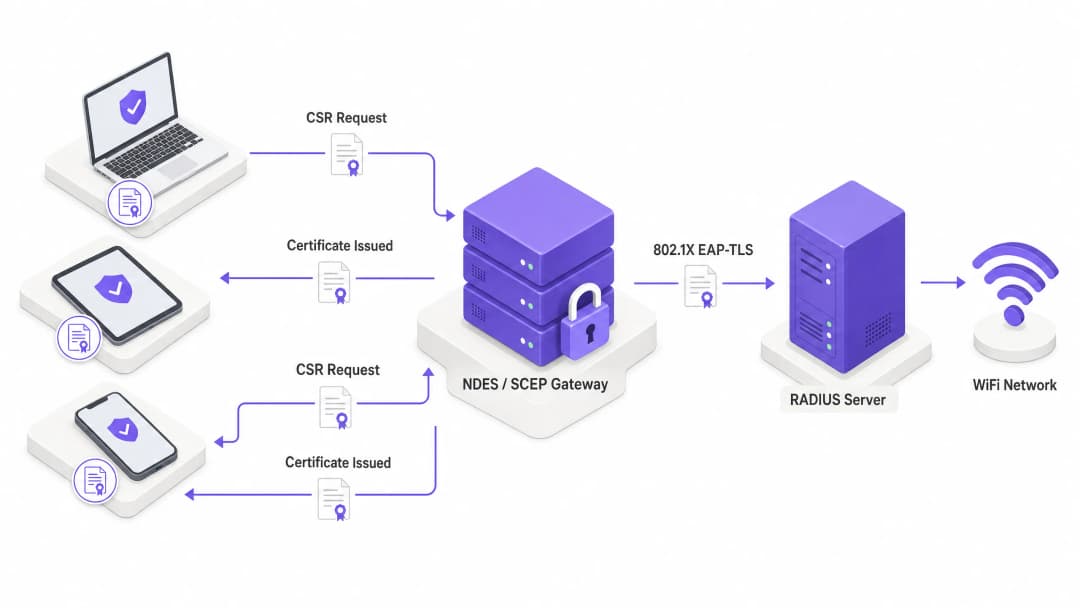
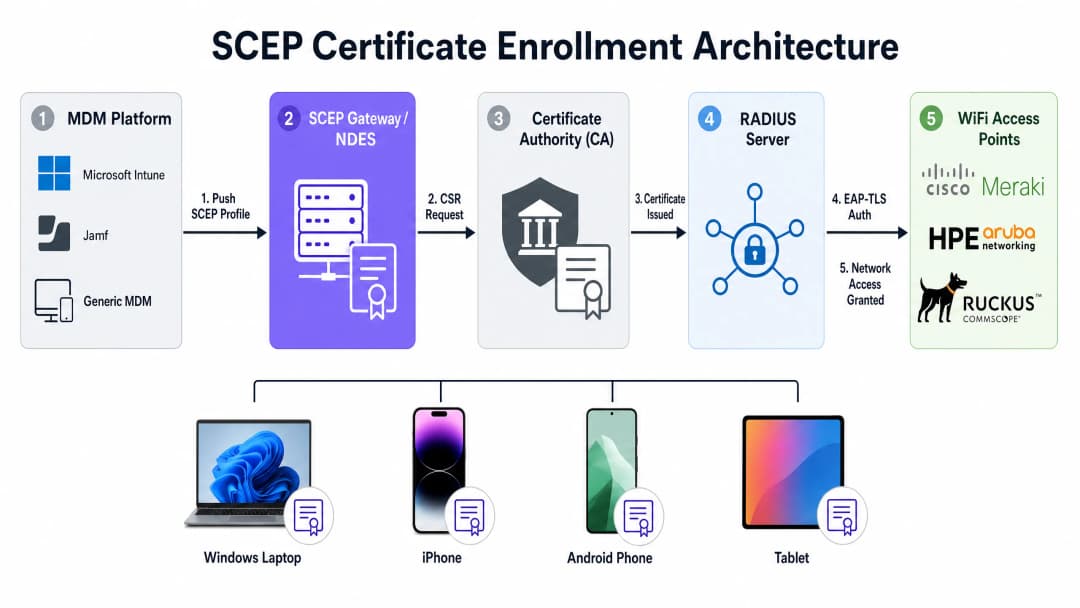
A cadeia de registo completa funciona da seguinte forma. A sua plataforma MDM - Microsoft Intune, Jamf ou outro MDM - envia um payload SCEP para um dispositivo gerido. Esse payload contém duas coisas: o URL do SCEP que aponta para o seu servidor NDES (Network Device Enrollment Service) ou gateway SCEP na nuvem, e uma palavra-passe de desafio ou segredo partilhado.
O dispositivo gera o seu próprio par de chaves pública e privada localmente. Esta é a propriedade de segurança crítica do SCEP: a chave privada é gerada no dispositivo, armazenada no enclave seguro ou chip TPM, e nunca é transmitida pela rede. O dispositivo cria então um Certificate Signing Request (CSR) e envia-o para o gateway SCEP. O gateway valida a palavra-passe de desafio, encaminha o CSR para a sua Autoridade de Certificação (CA), e a CA assina-o e devolve o certificado público ao dispositivo.
A partir desse momento, quando o dispositivo se liga ao seu SSID de WiFi, apresenta esse certificado ao servidor RADIUS. O servidor RADIUS valida o certificado em relação à sua cadeia de confiança da CA, verifica a Lista de Revogação de Certificados (CRL) para confirmar que o certificado não foi revogado e, se tudo estiver correto, envia uma mensagem Access-Accept para o ponto de acesso. O dispositivo está na rede. Todo o processo é invisível para o utilizador.
SCEP vs. PKCS: qual utilizar para WiFi
As plataformas MDM como o Intune suportam dois mecanismos de entrega de certificados: SCEP e PKCS (Public Key Cryptography Standards). A diferença arquitetónica é significativa.
Com o SCEP, a chave privada é gerada no dispositivo e nunca sai dele. Com o PKCS, a Autoridade de Certificação gera a chave pública e a privada centralmente, e o conector de certificados envia o par de chaves para o dispositivo através da rede. Isso significa que a chave privada é transmitida, o que introduz uma superfície de ataque teórica.
O PKCS é adequado para casos de utilização em que a custódia de chaves é necessária, como a encriptação de e-mail S/MIME. Para a autenticação WiFi, o SCEP é a escolha correta. A chave privada permanece no dispositivo.
| Propriedade | SCEP | PKCS |
|---|---|---|
| Geração de chave privada | No dispositivo (TPM/Secure Enclave) | Centralizada (CA) |
| Transmissão de chave privada | Nunca | Através da rede |
| Servidor NDES necessário | Sim (ou gateway na nuvem) | Não |
| Recomendado para WiFi | Sim | Não |
| Recomendado para S/MIME | Não | Sim |
Compatibilidade de hardware
O SCEP e o EAP-TLS são normas independentes de fornecedor. Funcionam em pontos de acesso Cisco Meraki, HPE Aruba, Ruckus, Juniper Mist, Ubiquiti UniFi, Cambium, Extreme e Fortinet. A sua configuração RADIUS - quer seja Windows NPS, FreeRADIUS ou um serviço RADIUS na nuvem - é onde define a política de validação de certificados e a atribuição dinâmica de VLAN.
A atribuição dinâmica de VLAN é a forma como segmenta a rede através da identidade do dispositivo. Um dispositivo de um funcionário recebe a VLAN 10 com acesso a sistemas internos. O dispositivo de um prestador de serviços recebe a VLAN 20 apenas com acesso à internet. Um terminal de ponto de venda recebe a VLAN 30 apenas com acesso a sistemas de processamento de pagamentos. Tudo isto é gerido por atributos de certificado e pela política RADIUS, sem qualquer intervenção manual por dispositivo.
Para saber mais sobre como o WiFi Analytics se integra com a segmentação de rede baseada em identidade, consulte a nossa visão geral da plataforma de analytics.
Guia de implementação: a sequência de implementação
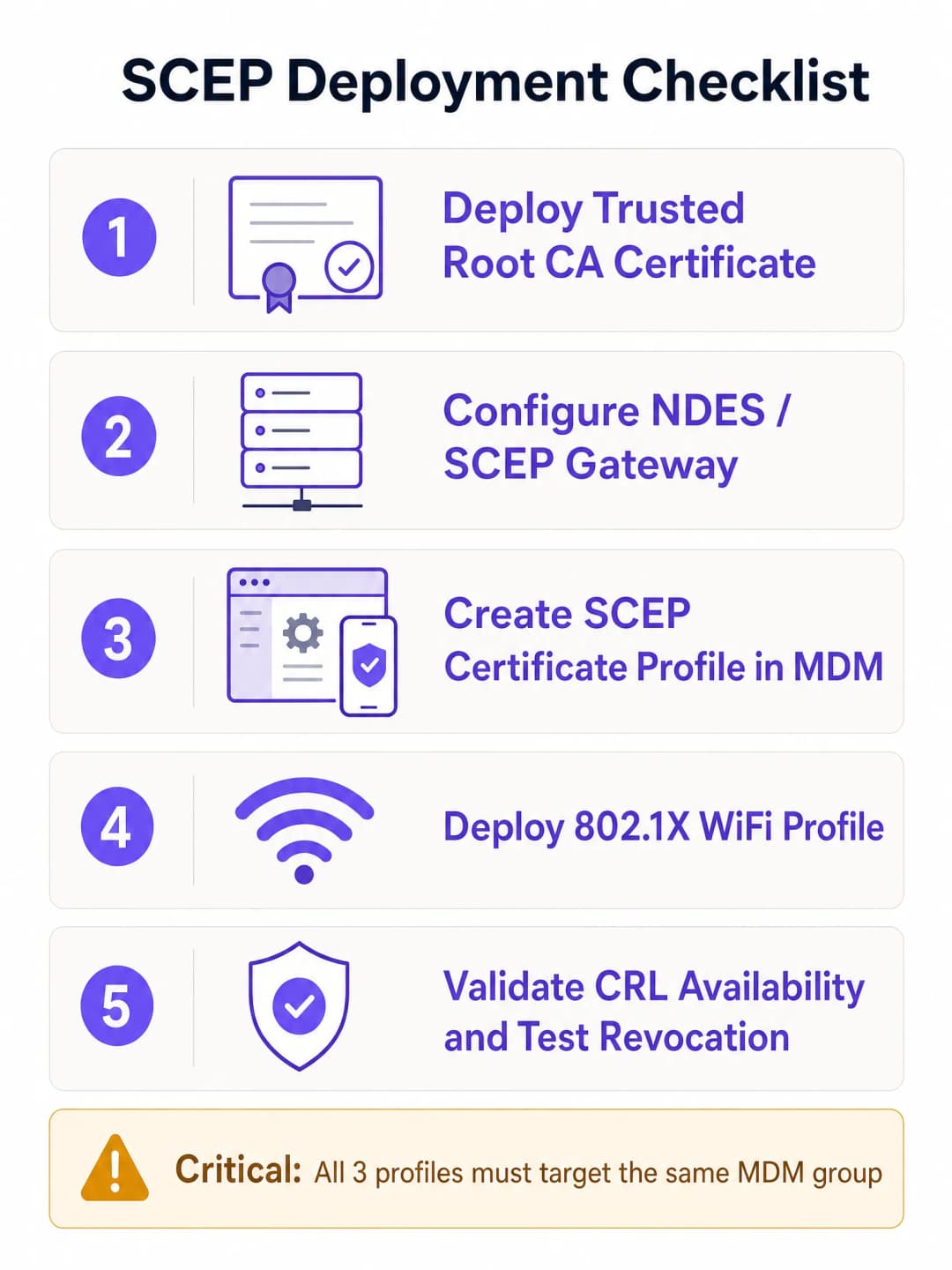
A configuração bem-sucedida do SCEP para WiFi empresarial exige a adesão estrita a uma sequência de implementação específica. As plataformas MDM impõem dependências de perfil: um perfil de WiFi que faça referência a um certificado SCEP não pode ser aplicado até que esse certificado exista no dispositivo. A violação desta sequência é a causa mais comum de falhas na implementação.
A sequência é: primeiro a Raiz de Confiança (Trusted Root), segundo o perfil SCEP, terceiro o perfil WiFi. Esta ordem não é negociável.
Passo 1: implementar o perfil de Certificado de Raiz de Confiança (Trusted Root)
Antes de qualquer dispositivo poder solicitar um certificado de cliente ou confiar no seu servidor RADIUS, deve confiar na Autoridade de Certificação (CA) emissora. Exporte o seu certificado de CA Raiz - e quaisquer certificados de CA Intermédia - como ficheiros .cer. No seu centro de administração MDM, crie um perfil de Certificado de Confiança, carregue o ficheiro .cer e implemente-o no seu grupo de dispositivos de destino.
Se tiver uma hierarquia PKI de dois níveis (recomendado), precisa de implementar tanto o certificado da CA raiz como o da CA emissora como perfis de Certificado de Confiança separados, ou como uma cadeia num único perfil, dependendo da sua plataforma MDM.
Passo 2: configurar o perfil de Certificado SCEP
Assim que a confiança estiver estabelecida, configure o perfil SCEP para instruir os dispositivos sobre como obter o seu certificado de cliente.
Crie um novo perfil de configuração e selecione o tipo de perfil de certificado SCEP. Configure o formato do Nome do Requerente (Subject name). Para autenticação baseada no utilizador, CN={{UserPrincipalName}} é o padrão. Para autenticação de dispositivos (dispositivos partilhados, IoT, terminais POS), utilize CN={{AAD_Device_ID}}. Defina a Utilização da chave (Key usage) para Assinatura digital e Cifragem de chave. Defina a Utilização de Chave Alargada (Extended Key Usage) para Autenticação de Cliente (OID: 1.3.6.1.5.5.7.3.2). Associe este perfil ao perfil de certificado de Raiz de Confiança criado no Passo 1. Forneça o URL externo do seu servidor NDES.Para o Microsoft Intune especificamente, o servidor NDES deve ser publicado através do Azure AD Application Proxy para permitir que os dispositivos remotos se registem antes de chegarem ao local. Não exponha o NDES diretamente à internet.
Passo 3: implementar o perfil de WiFi 802.1X
O passo final é enviar a configuração de WiFi que associa os certificados ao SSID da rede. Crie um perfil de configuração de Wi-Fi. Introduza o Nome da rede (SSID) exatamente como é transmitido pelos seus pontos de acesso. Selecione WPA2-Enterprise ou WPA3-Enterprise como o tipo de segurança. Defina o tipo de EAP para EAP-TLS. Nas definições de autenticação, selecione o perfil de certificado SCEP criado no Passo 2 como o certificado de autenticação do cliente. Especifique o certificado Trusted Root para validação do servidor - isto garante que o dispositivo apenas se liga ao seu servidor RADIUS legítimo e não a um ponto de acesso não autorizado.
Integração do fornecedor de identidade
Os atributos do certificado SCEP - especificamente o Subject Alternative Name (SAN) - podem conter o nome principal do utilizador do Microsoft Entra ID, Okta ou Google Workspace. Isto associa o certificado a uma identidade específica. Quando desativa uma conta no Entra ID e o MDM remove o registo do dispositivo, o certificado é revogado e o acesso ao WiFi é cortado automaticamente. Essa revogação automatizada é a história de segurança que as chaves pré-partilhadas não conseguem igualar.
Para saber mais sobre EAP Method WiFi: A Guide to Secure Network Access, incluindo caminhos de migração PEAP-MSCHAPv2, consulte o nosso guia dedicado.
Got questions about your specific setup?
Our team works with venue operators, IT managers, and network engineers across 80,000 venues. Book a 20-minute call and we will show you how others like you solved it.
Boas práticas e padrões da indústria
Posicionamento do servidor NDES
O servidor NDES deve estar acessível a partir da internet para que os dispositivos se possam registar antes de chegarem ao local. Publique o URL do NDES através do Azure AD Application Proxy. Isto fornece um acesso remoto seguro sem abrir portas de firewall de entrada e permite-lhe aplicar políticas de Acesso Condicional ao fluxo de registo. Nunca exponha o NDES diretamente à internet.
Para redes com mais de 500 dispositivos geridos, considere um gateway SCEP na nuvem em vez de um NDES local. Os gateways na nuvem eliminam o ponto único de falha do NDES, escalam horizontalmente e, normalmente, integram-se diretamente com serviços RADIUS na nuvem.
Disponibilidade da CRL
O seu servidor RADIUS verifica a Lista de Revogação de Certificados (CRL) sempre que um dispositivo se autentica. Se o seu Ponto de Distribuição de CRL (CDP) estiver indisponível - porque um servidor está em baixo ou o URL mudou - a autenticação falha para todos os dispositivos na rede em simultâneo. Configure o seu servidor NPS ou RADIUS para impor uma verificação rigorosa da CRL e torne os seus endpoints de CRL altamente disponíveis. Teste a revogação antes de entrar em produção.
O Requisito 8.6 do PCI DSS 4.0 exige autenticação multifator na camada de rede para ambientes de dados de titulares de cartões. O EAP-TLS com certificados provisionados por SCEP satisfaz este requisito para redes sem fios em ambientes de Retail e Hospitality.
Compatibilidade com WPA3
O EAP-TLS é totalmente compatível com o WPA3-Enterprise. O WPA3-Enterprise com a suite de segurança de 192 bits (Suite B) exige o EAP-TLS e é a combinação recomendada pela Wi-Fi Alliance para redes governamentais, financeiras e de saúde. Se está a implementar em ambientes de Saúde ou Transportes com requisitos de conformidade rigorosos, o WPA3-Enterprise com EAP-TLS é a arquitetura-alvo correta.
BYOD e WiFi de convidados
O SCEP requer a inscrição no MDM para enviar o payload do certificado. Não abrange dispositivos BYOD não geridos ou convidados. Para esses casos de utilização, necessita de um SSID separado com um Captive Portal e verificação de identidade. A plataforma da Purple lida com essa camada de forma limpa, coexistindo com a sua rede de funcionários autenticada por certificado. A nossa plataforma de Guest WiFi suporta opt-ins de escolha consciente, captura de dados primários (first-party) e integração com o Microsoft Entra ID, Okta e Google Workspace para verificação de identidade.
Resolução de problemas e mitigação de riscos
Falha na aplicação do perfil de WiFi
Sintoma: O dispositivo recebe os certificados Trusted Root e SCEP, mas o perfil de WiFi é apresentado como Erro ou Não Aplicável no MDM.
Causa raiz: Incompatibilidade de segmentação de grupo. Se o perfil SCEP se destinar a um grupo de Utilizadores e o perfil de WiFi se destinar a um grupo de Dispositivos, o MDM não consegue resolver a dependência.
Solução: Audite as suas atribuições. Certifique-se de que os perfis Trusted Root, SCEP e WiFi se destinam todos exatamente ao mesmo grupo de diretório.
Erros NDES 403 Forbidden
Sintoma: Os dispositivos não conseguem obter o certificado SCEP. Os registos do IIS do NDES mostram erros HTTP 403.
Causa raiz: A conta de serviço do MDM Certificate Connector não tem permissões de Leitura e Inscrição (Read and Enroll) no modelo de certificado, ou a filtragem de URLs da firewall está a bloquear os parâmetros de query string do SCEP.
Solução: Verifique se a conta do conector tem permissões de Leitura e Inscrição no modelo da CA. Verifique os registos da firewall para garantir que os URLs que contêm ?operation=GetCACaps não estão bloqueados.
Falha de autenticação em massa após expiração da CRL
Sintoma: Todos os dispositivos na rede falham a autenticação em simultâneo.
Causa raiz: A CRL expirou ou o URL do CDP está inacessível. O servidor RADIUS não consegue confirmar se os certificados são válidos e falha por omissão (fails closed).
Solução: Configure a monitorização e alertas de CRL. Publique as CRLs com um período de validade significativamente superior ao intervalo de publicação. Teste a acessibilidade do CDP a partir do servidor RADIUS antes do lançamento.
Expiração de certificado a causar falhas silenciosas
Sintoma: Dispositivos individuais falham a ligação de forma intermitente, sem um padrão claro.
Causa raiz: Os certificados de cliente expiraram e o MDM não os renovou com sucesso.
Solução: Configure a renovação do certificado para ser acionada a 80% do tempo de vida do certificado. Monitorize os relatórios de estado de inscrição do MDM para dispositivos com erros de certificado. Defina períodos de validade de certificado adequados ao ciclo de atualização dos seus dispositivos - normalmente um a dois anos para endpoints geridos.
ROI e impacto empresarial
A transição para a autenticação por certificado 802.1X baseada em SCEP proporciona retornos mensuráveis em termos de segurança, operações e conformidade.
Redução de pedidos de suporte: O WiFi baseado em palavra-passe gera um volume significativo de pedidos de suporte - expiração de palavras-passe, bloqueios e erros de digitação. A autenticação baseada em certificado é invisível para o utilizador. As organizações registam tipicamente uma redução de 70-80% no volume de suporte relacionado com WiFi após a migração.
Postura de segurança: O EAP-TLS elimina a recolha de credenciais e os ataques Man-in-the-Middle. Isto apoia diretamente a conformidade com a norma PCI DSS 4.0 para redes de retalho e hotelaria, bem como os requisitos do Artigo 32.º do GDPR para medidas técnicas de segurança adequadas.
Revogação automatizada: Quando um colaborador sai da empresa, a desativação da sua conta no Microsoft Entra ID aciona a revogação automática do certificado e a desassociação do MDM. O acesso ao WiFi é cortado sem qualquer intervenção manual por parte da equipa de rede.
Segmentação de rede: A atribuição dinâmica de VLAN através de atributos de certificado RADIUS oferece-lhe uma segmentação de rede aplicada de forma criptográfica. Os dispositivos entram no segmento de rede correto com base nas propriedades do certificado, e não na seleção de SSID ou na filtragem de endereços MAC - ambas facilmente contornáveis.
A Purple opera em mais de 80.000 locais ativos com 99,999% de tempo de atividade, e a nossa plataforma possui as certificações ISO 27001, GDPR, CCPA e Cyber Essentials. A nossa sobreposição de nuvem agnóstica em termos de hardware integra-se com Cisco Meraki, HPE Aruba, Ruckus, Juniper Mist, Ubiquiti UniFi, Cambium, Extreme e Fortinet - para que a sua rede de colaboradores autenticada por certificado e a nossa camada de WiFi de convidados funcionem a partir da mesma infraestrutura.
Para saber mais sobre como a análise comportamental (Behavioral Analytics: Insights for WiFi Networks) pode complementar a sua implementação de rede segura, consulte o nosso guia de análise.
Referências
[1] RFC 8894: Simple Certificate Enrollment Protocol - IETF [2] Configure infrastructure to support SCEP with Intune - Microsoft Learn [3] PCI DSS Wireless Guidelines - PCI Security Standards Council
Key Definitions
SCEP (Simple Certificate Enrollment Protocol)
A protocol formalised in RFC 8894 that allows managed devices to automatically request and receive X.509 digital certificates from a Certificate Authority via HTTP, using a shared challenge password for initial authentication. The private key is generated on the device and never transmitted.
The standard mechanism used by MDM platforms like Microsoft Intune and Jamf to deploy WiFi authentication certificates to managed endpoints at scale.
EAP-TLS (Extensible Authentication Protocol - Transport Layer Security)
The most secure 802.1X authentication method, requiring both the client device and the RADIUS server to present valid X.509 certificates. Mutual authentication means neither side trusts the other without cryptographic proof.
The target authentication protocol for enterprise WiFi. Mandated or strongly recommended by PCI DSS 4.0, WPA3-Enterprise 192-bit (Suite B), and HIPAA for wireless networks handling sensitive data.
NDES (Network Device Enrollment Service)
A Microsoft Windows Server role that acts as a Registration Authority (RA) between SCEP-enabled devices and a Certificate Authority. It validates challenge passwords and forwards CSRs to the CA on behalf of devices that lack domain credentials.
Required infrastructure for SCEP deployment with Microsoft Intune. Should be published via Azure AD Application Proxy rather than exposed directly to the internet.
PKI (Public Key Infrastructure)
The hierarchy of Certificate Authorities, policies, and procedures used to issue, manage, and revoke digital certificates. A two-tier PKI consists of an offline root CA (the master trust anchor) and an online issuing CA (which handles day-to-day certificate issuance).
The non-negotiable prerequisite for EAP-TLS and SCEP deployment. The root CA should be kept air-gapped; its private key is the foundation of your entire certificate trust chain.
CSR (Certificate Signing Request)
A message generated by a device containing its public key and identity information, sent to a Certificate Authority to request a signed digital certificate. In SCEP, the CSR is generated on-device and wrapped in a PKCS envelope before transmission.
Generated automatically by the device during the SCEP enrolment flow. The private key used to sign the CSR never leaves the device.
CRL (Certificate Revocation List)
A list published by the Certificate Authority containing the serial numbers of certificates that have been revoked before their expiry date. RADIUS servers check the CRL on every authentication attempt to ensure revoked certificates cannot access the network.
CRL Distribution Point (CDP) availability is critical. If the RADIUS server cannot reach the CRL, it fails closed and denies all authentication - causing a network-wide outage.
RADIUS (Remote Authentication Dial-In User Service)
A networking protocol that provides centralised Authentication, Authorisation, and Accounting (AAA) for network access. In 802.1X WiFi, the RADIUS server validates client certificates, checks the CRL, and returns an Access-Accept or Access-Reject message to the access point.
The authentication server in the 802.1X supplicant-authenticator-server model. Common implementations include Windows NPS, FreeRADIUS, and cloud RADIUS services.
Dynamic VLAN assignment
A RADIUS feature that places an authenticated device on a specific VLAN based on certificate attributes or directory group membership, rather than relying on SSID selection or MAC address filtering. Enforces network segmentation by device identity.
Enables a single SSID to serve multiple device types with different network access levels. A staff device gets VLAN 10 (internal access); a contractor device gets VLAN 20 (internet only); a POS terminal gets VLAN 30 (payment systems only).
MDM (Mobile Device Management)
Software used by IT teams to enrol, configure, secure, and manage smartphones, tablets, and laptops. MDM platforms like Microsoft Intune and Jamf use SCEP profiles to push certificate enrolment instructions to managed devices without user interaction.
The prerequisite for SCEP-based certificate deployment. Devices must be MDM-enrolled before they can receive SCEP and WiFi profiles. Unmanaged BYOD devices require a separate onboarding approach.
Worked Examples
A 200-room Premier Inn property needs to secure its staff WiFi for point-of-sale tablets and housekeeping smartphones. They currently use a pre-shared key that has been leaked to contractors. They manage devices via Microsoft Intune and have a mix of iOS and Android devices. The property uses HPE Aruba access points.
- Deploy an internal Microsoft AD CS two-tier PKI. Configure NDES on a dedicated Windows Server and publish it via Azure AD Application Proxy.
- In Intune, create a Trusted Root Certificate profile containing the Root CA and Issuing CA certificates. Deploy to a 'Property Staff Devices' Azure AD group.
- Create a SCEP Certificate profile in Intune pointing to the NDES external URL. Set Subject Name format to CN={{AAD_Device_ID}} since these are shared devices. Set Key Usage to Digital Signature and Key Encipherment, Extended Key Usage to Client Authentication. Deploy to 'Property Staff Devices'.
- Create a Wi-Fi profile for the staff SSID, configuring WPA2-Enterprise and EAP-TLS. Select the SCEP profile for client authentication and the Root CA for server validation. Deploy to 'Property Staff Devices'.
- Configure the HPE Aruba RADIUS settings to point to Windows NPS. On NPS, configure a Network Policy requiring EAP-TLS and assigning VLAN 10 for staff devices.
- Once devices receive profiles and connect successfully, rotate the PSK on the old SSID and schedule its decommission.
A retail chain with 50 locations wants to deploy 802.1X for corporate laptops across all sites. They use Cisco Meraki access points and Microsoft Intune. They do not want to deploy and maintain on-premises NDES servers or AD CS infrastructure at each location or in their data centre.
- Implement a cloud-based PKI and SCEP gateway service that integrates with Intune via the SCEP protocol. The cloud CA issues certificates; the cloud SCEP gateway handles CSR validation.
- Configure the cloud RADIUS service (provided by the PKI vendor) within the Cisco Meraki dashboard under Wireless > Access Control for the corporate SSID. Set security to WPA2-Enterprise and point RADIUS to the cloud service.
- In Intune, create a Trusted Root Certificate profile containing the cloud CA root certificate. Deploy to 'Corporate Laptops' device group.
- Create a SCEP Certificate profile pointing to the cloud SCEP gateway URL. Set Subject Name to CN={{UserPrincipalName}} for user-based authentication. Deploy to 'Corporate Laptops'.
- Create a Wi-Fi profile for the corporate SSID with EAP-TLS, referencing the SCEP profile and the cloud CA root. Deploy to 'Corporate Laptops'.
- When laptops enrol in Intune, they automatically request certificates from the cloud CA via the cloud SCEP gateway. No on-premises infrastructure is required at any of the 50 locations.
Practice Questions
Q1. Your organisation is migrating from PEAP-MSCHAPv2 to EAP-TLS. You have successfully deployed the Trusted Root and SCEP profiles to your 'Corporate Users' Azure AD group in Intune. You deploy the WiFi profile to 'All Corporate Devices'. Users report they cannot connect and the WiFi profile shows as Not Applicable.
Hint: Check the profile dependencies and group targeting rules. Intune resolves profile dependencies based on the assigned group.
View model answer
The issue is a group targeting mismatch. The WiFi profile depends on the SCEP profile, which was targeted at a User group ('Corporate Users'). The WiFi profile was targeted at a Device group ('All Corporate Devices'). Intune cannot resolve the dependency across group types. The fix is to change all three profile assignments - Trusted Root, SCEP, and WiFi - to target the same group. Decide whether to use a User group or a Device group based on your authentication model (user-based vs device-based), and apply that consistently across all three profiles.
Q2. A security audit reveals that when an employee is terminated and their Microsoft Entra ID account is disabled, their corporate smartphone can still connect to the staff WiFi network for up to a week after termination.
Hint: Consider how the RADIUS server determines whether a certificate is still valid after the account is disabled. What is the mechanism for communicating revocation status?
View model answer
The RADIUS server is not performing strict Certificate Revocation List checking, or the CRL is published infrequently. When an employee is terminated, the MDM should unenroll the device and the CA should revoke the certificate. However, if the RADIUS server is not checking the CRL on every authentication attempt - or if the CRL is only published weekly - the revoked certificate continues to be accepted. The fix involves three steps: configure the RADIUS server to enforce strict CRL checking on every authentication; configure the CA to publish the CRL at a shorter interval (daily or more frequently); and ensure the MDM is configured to trigger certificate revocation when a device is unenrolled.
Q3. You need to provide secure WiFi access for headless IoT devices (smart thermostats, digital signage players) that cannot run an MDM agent and cannot display a Captive Portal. Can you use SCEP for these devices, and if not, what is the recommended alternative?
Hint: Consider the prerequisites for SCEP enrolment and what alternatives exist for devices that cannot be MDM-enrolled or interact with a browser.
View model answer
SCEP cannot be used for these devices. SCEP requires an MDM agent to receive the enrolment URL and challenge password, generate the key pair, and install the resulting certificate. Headless IoT devices that cannot run an MDM agent cannot participate in the SCEP enrolment flow. The recommended alternatives are: (1) MAC Authentication Bypass (MAB) combined with strict VLAN segmentation - the RADIUS server allows the device based on its MAC address and places it on an isolated IoT VLAN with no access to corporate systems; (2) if the device supports it, EST (Enrolment over Secure Transport, RFC 7030) can provision certificates to devices that support HTTPS but not MDM; (3) for devices with a management interface, some vendors support SCEP enrolment directly via the device firmware without requiring an MDM agent. In all cases, IoT devices should be isolated on a dedicated VLAN regardless of the authentication method used.
Continue reading in this series
How to Securely Segment Staff and Guest WiFi Networks: Best Practices for Enterprise LANs
This guide provides IT managers and network architects with a vendor-neutral, technical blueprint for securing enterprise LANs by properly segmenting staff and guest WiFi traffic. It covers 802.1X authentication, cloud RADIUS, VLAN isolation, and the credential lifecycle management required to eliminate shared passphrases and protect corporate assets.
Best DNS filtering: a comprehensive guide for businesses
This technical reference guide explains how enterprise DNS filtering secures public networks by blocking malicious domains at the resolution layer - before a connection is ever established. It gives IT directors, network architects, and venue operations teams the deployment architecture, firewall configuration, and compliance context they need to protect Guest WiFi across hospitality, retail, and public-sector environments. Purple Shield blocks malware, botnets, and inappropriate content at the DNS level across 80,000+ live venues.
Understanding Cisco SUDI: Hardware-Anchored Identity in Secure Network Access Control
This guide explains how Cisco SUDI provides hardware-anchored, cryptographically secure identity for enterprise network infrastructure. Learn how to replace spoofable MAC addresses with immutable 802.1AR certificates to secure your venue's network access control.
Got questions about your specific setup?
Our team works with venue operators, IT managers, and network engineers across 80,000 venues. Book a 20-minute call and we will show you how others like you solved it.