
So konfigurieren Sie SCEP für die automatisierte Zertifikatsregistrierung für Enterprise-WiFi
Dieser Leitfaden erklärt, wie Sie SCEP (Simple Certificate Enrollment Protocol) für die automatisierte Zertifikatsregistrierung für Enterprise-WiFi konfigurieren, und deckt die gesamte Architektur von PKI und NDES bis hin zur MDM-Profilbereitstellung und RADIUS-Validierung ab. Er richtet sich an IT-Manager, Netzwerkarchitekten und CTOs in Hotels, Einzelhandelsketten, Stadien, Konferenzzentren und Organisationen des öffentlichen Sektors, die von Pre-Shared Keys auf eine skalierbare, identitätsbasierte 802.1X-EAP-TLS-Authentifizierung umsteigen möchten. Die hardwareunabhängige Cloud-Overlay-Plattform von Purple lässt sich direkt in diese Architektur integrieren und bietet die Gäste- und BYOD-WiFi-Schicht, die parallel zu Ihrem zertifikatsauthentifizierten Mitarbeiter-WiFi läuft.
Diesen Leitfaden anhören
Podcast-Transkript ansehen
Teil unserer Kernserie: Enterprise WiFi Security Guide →
Executive Summary
Für Unternehmensumgebungen – ob ein Hotel mit 200 Zimmern, eine Einzelhandelskette mit 50 Standorten oder ein großes Konferenzzentrum – ist die Abhängigkeit von Pre-Shared Keys für das Mitarbeiter-WiFi ein Sicherheitsrisiko und ein operativer Engpass. Ein einziges durchgesickertes Passwort gefährdet das gesamte Netzwerk. Die zertifikatsbasierte Authentifizierung über IEEE 802.1X und EAP-TLS (Extensible Authentication Protocol - Transport Layer Security) eliminiert dieses Risiko vollständig. Jedes Gerät beweist seine Identität kryptografisch, bevor der Access Point ihm Netzwerkzugriff gewährt.
Die Herausforderung liegt in der Verteilung. Die manuelle Bereitstellung eindeutiger Client-Zertifikate auf Tausenden von Windows-, iOS- und Android-Geräten ist nicht machbar. SCEP (Simple Certificate Enrollment Protocol), das 2020 von der IETF als RFC 8894 formalisiert wurde, löst dieses Problem. Es automatisiert den Prozess der Anforderung, Ausstellung und Installation digitaler Zertifikate auf verwalteten Geräten über Ihre MDM-Plattform – ganz ohne Benutzerinteraktion.
Dieser Leitfaden deckt die gesamte Architektur ab: Was SCEP tut, wie es sich in Microsoft Intune, Jamf und andere MDM-Plattformen integriert, die genaue Bereitstellungsreihenfolge, die die meisten Teams falsch machen, und die operativen Fallstricke, die zu Serviceunterbrechungen führen. Wir behandeln auch zwei reale Bereitstellungsszenarien im Gastgewerbe und im Einzelhandel und erklären, wo sich die Gäste-WiFi-Plattform von Purple neben Ihrem zertifikatsauthentifizierten Mitarbeiter-WiFi einfügt.
Hören Sie sich den begleitenden informativen Podcast an:
Detaillierte technische Analyse: SCEP, PKI und 802.1X
Was SCEP wirklich tut
SCEP ersetzt nicht Ihre Public Key Infrastructure (PKI). Es ist die automatisierte Registrierungsschicht, die darauf aufsetzt. Ihre PKI – in der Regel eine zweistufige Hierarchie mit einer Offline-Root-CA und einer Online-Issuing-CA – bleibt der Vertrauensanker. SCEP automatisiert den Schritt, bei dem ein Gerät ein Zertifikat von dieser CA anfordert, wodurch die manuelle CSR-Erstellung und Zertifikatsinstallation entfallen.
Im Kontext der WiFi-Authentifizierung ist das Zielprotokoll EAP-TLS. Dies ist die 802.1X-Authentifizierungsmethode, bei der sowohl das Client-Gerät als auch der RADIUS-Server gültige X.509-Zertifikate vorlegen müssen. Keine der Parteien vertraut der anderen ohne kryptografischen Nachweis. Dieses Modell der gegenseitigen Authentifizierung eliminiert den Diebstahl von Anmeldedaten und schützt vor „Evil Twin“-Angriffen, bei denen ein Angreifer einen gefälschten Access Point einrichtet, um Benutzernamen und Passwörter abzufangen.
Eine detaillierte Analyse des EAP-TLS-Handshakes finden Sie in unserem Leitfaden über WiFi-Zertifikatsauthentifizierung: Sicherer Netzwerkzugriff.
Der SCEP-Registrierungsablauf Schritt für Schritt
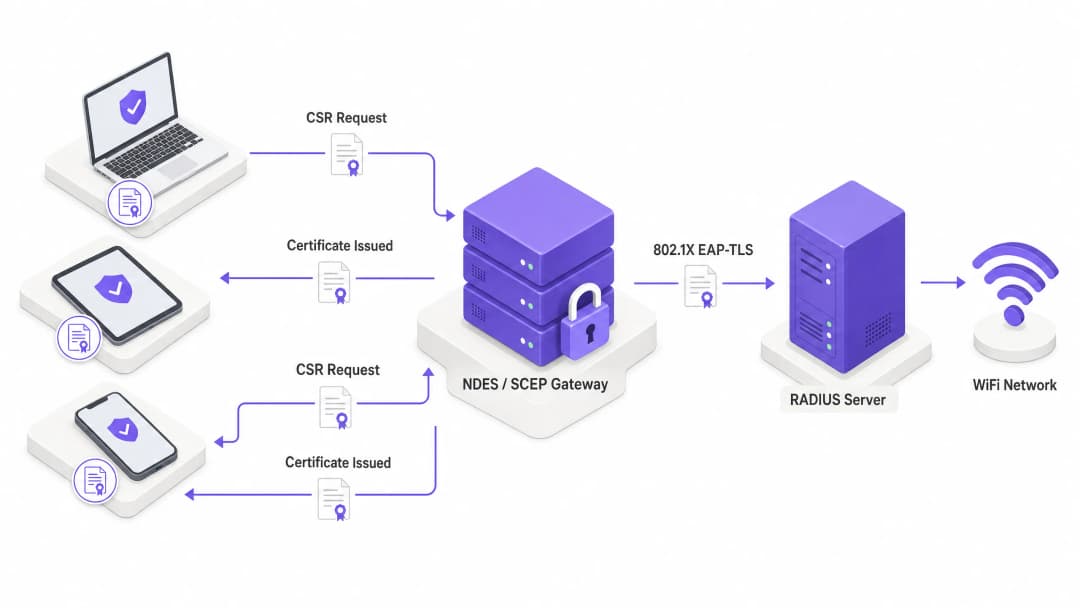
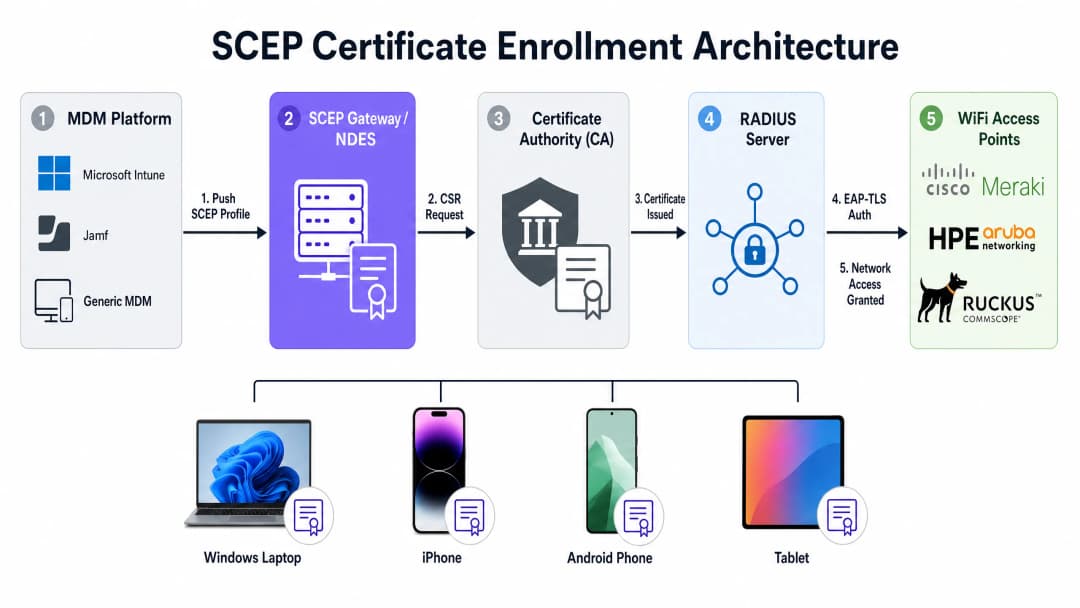
Die vollständige Registrierungskette funktioniert wie folgt: Ihre MDM-Plattform – Microsoft Intune, Jamf oder ein anderes MDM – sendet eine SCEP-Nutzlast an ein verwaltetes Gerät. Diese Nutzlast enthält zwei Dinge: die SCEP-URL, die auf Ihren NDES-Server (Network Device Enrollment Service) oder Ihr Cloud-SCEP-Gateway verweist, und ein Challenge-Passwort oder ein Shared Secret.
Das Gerät generiert lokal sein eigenes öffentliches und privates Schlüsselpaar. Dies ist das entscheidende Sicherheitsmerkmal von SCEP: Der private Schlüssel wird auf dem Gerät generiert, in der Secure Enclave oder dem TPM-Chip gespeichert und niemals über das Netzwerk übertragen. Das Gerät erstellt dann einen Certificate Signing Request (CSR) und sendet ihn an das SCEP-Gateway. Das Gateway validiert das Challenge-Passwort, leitet den CSR an Ihre Zertifizierungsstelle (CA) weiter, und die CA signiert ihn und gibt das öffentliche Zertifikat an das Gerät zurück.
Ab diesem Moment präsentiert das Gerät dieses Zertifikat dem RADIUS-Server, wenn es sich mit Ihrer WiFi-SSID verbindet. Der RADIUS-Server validiert das Zertifikat anhand Ihrer CA-Vertrauenskette, prüft die Zertifikatssperrliste (CRL), um zu bestätigen, dass das Zertifikat nicht gesperrt wurde, und sendet bei Erfolg eine Access-Accept-Nachricht an den Access Point. Das Gerät befindet sich im Netzwerk. Der gesamte Prozess ist für den Benutzer unsichtbar.
SCEP vs. PKCS: Was für WiFi zu verwenden ist
MDM-Plattformen wie Intune unterstützen zwei Mechanismen zur Zertifikatsbereitstellung: SCEP und PKCS (Public Key Cryptography Standards). Der architektonische Unterschied ist erheblich.
Bei SCEP wird der private Schlüssel auf dem Gerät generiert und verlässt dieses nie. Bei PKCS generiert die Zertifizierungsstelle den öffentlichen und privaten Schlüssel zentral, und der Zertifikatskonnektor sendet das Schlüsselpaar über das Netzwerk an das Gerät. Das bedeutet, dass der private Schlüssel übertragen wird, was eine theoretische Angriffsfläche darstellt.
PKCS eignet sich für Anwendungsfälle, in denen eine Schlüsselhinterlegung erforderlich ist, wie z. B. bei der S/MIME-E-Mail-Verschlüsselung. Für die WiFi-Authentifizierung ist SCEP die richtige Wahl. Der private Schlüssel verbleibt auf dem Gerät.
| Eigenschaft | SCEP | PKCS |
|---|---|---|
| Generierung des privaten Schlüssels | Auf dem Gerät (TPM/Secure Enclave) | Zentralisiert (CA) |
| Übertragung des privaten Schlüssels | Niemals | Über das Netzwerk |
| NDES-Server erforderlich | Ja (oder Cloud-Gateway) | Nein |
| Empfohlen für WiFi | Ja | Nein |
| Empfohlen für S/MIME | Nein | Ja |
Hardware-Kompatibilität
SCEP und EAP-TLS sind herstellerunabhängige Standards. Sie funktionieren auf Access Points von Cisco Meraki, HPE Aruba, Ruckus, Juniper Mist, Ubiquiti UniFi, Cambium, Extreme und Fortinet. In Ihrer RADIUS-Konfiguration – ob Windows NPS, FreeRADIUS oder ein Cloud-RADIUS-Dienst – definieren Sie die Richtlinie zur Zertifikatsvalidierung und die dynamische VLAN-Zuweisung.
Über die dynamische VLAN-Zuweisung segmentieren Sie das Netzwerk anhand der Geräteidentität. Ein Mitarbeitergerät erhält VLAN 10 mit Zugriff auf interne Systeme. Das Gerät eines Dienstleisters erhält VLAN 20 mit reinem Internetzugriff. Ein Point-of-Sale-Terminal erhält VLAN 30 mit Zugriff nur auf Zahlungsverarbeitungssysteme. All dies wird über Zertifikatsattribute und die RADIUS-Richtlinie gesteuert, ohne manuelles Eingreifen pro Gerät.
Um mehr darüber zu erfahren, wie sich WiFi Analytics in die identitätsbasierte Netzwerksegmentierung integriert, lesen Sie unsere Übersicht über die Analytics-Plattform.
Implementierungsleitfaden: Die Bereitstellungsreihenfolge
Die erfolgreiche Konfiguration von SCEP für Enterprise-WiFi erfordert die strikte Einhaltung einer bestimmten Bereitstellungsreihenfolge. MDM-Plattformen erzwingen Profilabhängigkeiten: Ein WiFi-Profil, das auf ein SCEP-Zertifikat verweist, kann erst angewendet werden, wenn dieses Zertifikat auf dem Gerät vorhanden ist. Die Verletzung dieser Reihenfolge ist die häufigste Ursache für Bereitstellungsfehler.
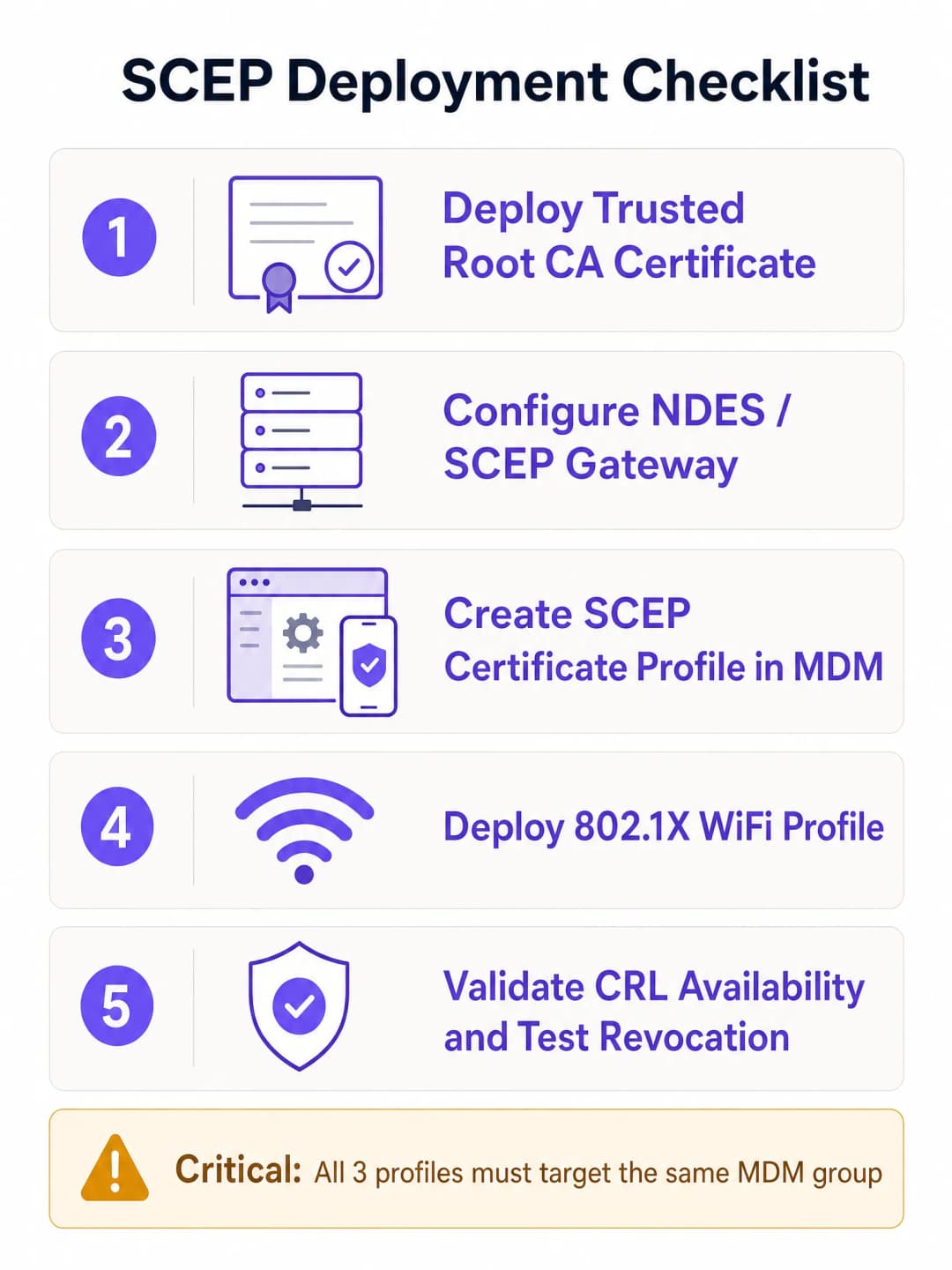
Die Reihenfolge lautet: Erstens Trusted Root, zweitens SCEP-Profil, drittens WiFi-Profil. Diese Reihenfolge ist nicht verhandelbar.
Schritt 1: Bereitstellung des Trusted-Root-Zertifikatsprofils
Bevor ein Gerät ein Client-Zertifikat anfordern oder Ihrem RADIUS-Server vertrauen kann, muss es der ausstellenden Zertifizierungsstelle (CA) vertrauen. Exportieren Sie Ihr Root-CA-Zertifikat – und alle Zwischen-CA-Zertifikate – als .cer-Dateien. Erstellen Sie in Ihrem MDM-Admin-Center ein Profil für vertrauenswürdige Zertifikate, laden Sie die .cer-Datei hoch und stellen Sie es für Ihre Zielgerätegruppe bereit.
Wenn Sie eine zweistufige PKI-Hierarchie haben (empfohlen), müssen Sie sowohl das Root-CA- als auch das ausstellende CA-Zertifikat als separate Profile für vertrauenswürdige Zertifikate oder als Kette in einem einzigen Profil bereitstellen, je nach Ihrer MDM-Plattform.
Schritt 2: Konfiguration des SCEP-Zertifikatsprofils
Sobald das Vertrauen etabliert ist, konfigurieren Sie das SCEP-Profil, um den Geräten mitzuteilen, wie sie ihr Client-Zertifikat erhalten.
Erstellen Sie ein neues Konfigurationsprofil und wählen Sie den Profiltyp SCEP-Zertifikat. Konfigurieren Sie das Format des Antragstellernamens (Subject Name). Für die benutzerbasierte Authentifizierung ist CN={{UserPrincipalName}} der Standard. Für die Geräteauthentifizierung (gemeinsam genutzte Geräte, IoT, POS-Terminals) verwenden Sie CN={{AAD_Device_ID}}. Legen Sie die Schlüsselverwendung (Key Usage) auf Digitale Signatur und Schlüsselverschlüsselung fest. Legen Sie die erweiterte Schlüsselverwendung (Extended Key Usage) auf Client-Authentifizierung (OID: 1.3.6.1.5.5.7.3.2) fest. Verknüpfen Sie dieses Profil mit dem in Schritt 1 erstellten Trusted-Root-Zertifikatsprofil. Geben Sie die externe URL Ihres NDES-Servers an. Speziell for Microsoft Intune sollte der NDES-Server über den Azure AD Application Proxy veröffentlicht werden, damit sich Remote-Geräte registrieren können, bevor sie vor Ort eintreffen. Setzen Sie NDES nicht direkt dem Internet aus.
Schritt 3: Bereitstellung des 802.1X-WiFi-Profils
Der letzte Schritt besteht darin, die WiFi-Konfiguration bereitzustellen, die die Zertifikate mit der Netzwerk-SSID verknüpft. Erstellen Sie ein WiFi-Konfigurationsprofil. Geben Sie den Netzwerknamen (SSID) genau so ein, wie er von Ihren Access Points ausgestrahlt wird. Wählen Sie WPA2-Enterprise oder WPA3-Enterprise als Sicherheitstyp. Legen Sie den EAP-Typ auf EAP-TLS fest. Wählen Sie in den Authentifizierungseinstellungen das in Schritt 2 erstellte SCEP-Zertifikatsprofil als Client-Authentifizierungszertifikat aus. Geben Sie das Trusted-Root-Zertifikat für die Servervalidierung an – dies stellt sicher, dass sich das Gerät nur mit Ihrem legitimen RADIUS-Server und nicht mit einem unbefugten Access Point verbindet.
Integration des Identitätsanbieters
Die Attribute des SCEP-Zertifikats – insbesondere der Subject Alternative Name (SAN) – können den User Principal Name aus Microsoft Entra ID, Okta oder Google Workspace enthalten. Dadurch wird das Zertifikat mit einer bestimmten Identität verknüpft. Wenn Sie ein Konto in Microsoft Entra ID deaktivieren und das MDM die Registrierung des Geräts aufhebt, wird das Zertifikat gesperrt und der WiFi-Zugriff automatisch gesperrt. Diese automatisierte Sperrung ist der Sicherheitsvorteil, den Pre-Shared Keys nicht bieten können.
Um mehr über EAP-Methode WiFi: Ein Leitfaden für sicheren Netzwerkzugriff zu erfahren, einschließlich PEAP-MSCHAPv2-Migrationspfaden, lesen Sie unseren speziellen Leitfaden.
Haben Sie Fragen zu Ihrem spezifischen Setup?
Unser Team arbeitet mit Standortbetreibern, IT-Managern und Netzwerktechnikern an über 80.000 Standorten zusammen. Buchen Sie ein 20-minütiges Gespräch und wir zeigen Ihnen, wie andere diese Herausforderungen gelöst haben.
Best Practices und Branchenstandards
Platzierung des NDES-Servers
Der NDES-Server muss über das Internet erreichbar sein, damit sich Geräte registrieren können, bevor sie vor Ort eintreffen. Veröffentlichen Sie die NDES-URL über den Azure AD Application Proxy. Dies bietet einen sicheren Remote-Zugriff, ohne eingehende Firewall-Ports zu öffnen, und ermöglicht es Ihnen, Richtlinien für bedingten Zugriff auf den Registrierungsablauf anzuwenden. Setzen Sie NDES niemals direkt dem Internet aus.
Für Netzwerke mit mehr als 500 verwalteten Geräten sollten Sie ein Cloud-SCEP-Gateway anstelle eines lokalen NDES in Betracht ziehen. Cloud-Gateways eliminieren den Single Point of Failure von NDES, skalieren horizontal und lassen sich in der Regel direkt in Cloud-RADIUS-Dienste integrieren.
CRL-Verfügbarkeit
Ihr RADIUS-Server überprüft bei jeder Authentifizierung eines Geräts die Zertifikatssperrliste (CRL). Wenn Ihr CRL-Verteilungspunkt (CDP) nicht verfügbar ist – weil ein Server offline ist oder sich die URL geändert hat –, schlägt die Authentifizierung für alle Geräte im Netzwerk gleichzeitig fehl. Konfigurieren Sie Ihren NPS- oder RADIUS-Server so, dass er eine strenge CRL-Prüfung erzwingt, und machen Sie Ihre CRL-Endpunkte hochverfügbar. Testen Sie die Sperrung vor der Inbetriebnahme.
Die Anforderung 8.6 von PCI-DSS 4.0 fordert eine Multi-Faktor-Authentifizierung auf Netzwerkebene für Karteninhaber-Datenumgebungen. EAP-TLS mit über SCEP bereitgestellten Zertifikaten erfüllt diese Anforderung für drahtlose Netzwerke in Retail- und Hospitality-Umgebungen.
WPA3-Kompatibilität
EAP-TLS ist vollständig kompatibel mit WPA3-Enterprise. WPA3-Enterprise mit der 192-Bit-Sicherheitssuite (Suite B) erfordert EAP-TLS und ist die von der Wi-Fi Alliance empfohlene Kombination für Regierungs-, Finanz- und Gesundheitsnetzwerke. Wenn Sie in Healthcare- oder Transport-Umgebungen mit strengen Compliance-Anforderungen bereitstellen, ist WPA3-Enterprise mit EAP-TLS die richtige Zielarchitektur.
BYOD und Gäste-WiFi
SCEP erfordert die MDM-Registrierung, um die Zertifikatsnutzlast bereitzustellen. Es deckt keine nicht verwalteten BYOD- oder Gäste-Geräte ab. Für diese Anwendungsfälle benötigen Sie eine separate SSID mit einem Captive Portal und einer Identitätsprüfung. Die Plattform von Purple übernimmt diese Schicht nahtlos und koexistiert mit Ihrem zertifikatsauthentifizierten Mitarbeiter-WiFi. Unsere Gäste-WiFi-Plattform unterstützt bewusste Opt-ins, die Erfassung von First-Party-Daten und die Integration in Microsoft Entra ID, Okta und Google Workspace zur Identitätsprüfung.
Fehlerbehebung und Risikominderung
Fehler beim Anwenden des WiFi-Profils
Symptom: Das Gerät erhält die Trusted-Root- und SCEP-Zertifikate, aber das WiFi-Profil wird im MDM als „Fehler“ oder „Nicht anwendbar“ angezeigt.
Ursache: Diskrepanz bei der Gruppenzuweisung. Wenn das SCEP-Profil einer Benutzergruppe und das WiFi-Profil einer Gerätegruppe zugewiesen ist, kann das MDM die Abhängigkeit nicht auflösen.
Lösung: Überprüfen Sie Ihre Zuweisungen. Stellen Sie sicher, dass die Trusted-Root-, SCEP- und WiFi-Profile alle genau derselben Verzeichnisgruppe zugewiesen sind.
NDES-Fehler 403 Forbidden
Symptom: Geräte können das SCEP-Zertifikat nicht abrufen. Die IIS-Protokolle von NDES zeigen HTTP-403-Fehler.
Ursache: Das Dienstkonto des MDM-Zertifikatskonnektors verfügt nicht über die Berechtigungen „Lesen“ und „Registrieren“ (Read and Enroll) für die Zertifikatsvorlage, oder die URL-Filterung der Firewall blockiert die SCEP-Abfragezeichenfolgen-Parameter.
Lösung: Überprüfen Sie, ob das Konnektorkonto über Lese- und Registrierungsberechtigungen für die Vorlage in der CA verfügt. Überprüfen Sie die Firewall-Protokolle, um sicherzustellen, dass URLs, die ?operation=GetCACaps enthalten, nicht blockiert werden.
Massenauthentifizierungsfehler nach CRL-Ablauf
Symptom: Bei allen Geräten im Netzwerk schlägt die Authentifizierung gleichzeitig fehl.
Ursache: Die CRL ist abgelaufen oder die CDP-URL ist nicht erreichbar. Der RADIUS-Server kann nicht bestätigen, ob die Zertifikate gültig sind, und schließt im Fehlerfall (fails closed).
Lösung: Konfigurieren Sie die CRL-Überwachung und -Alarmierung. Veröffentlichen Sie CRLs mit einer Gültigkeitsdauer, die deutlich über dem Veröffentlichungsintervall liegt. Testen Sie die Erreichbarkeit des CDP vom RADIUS-Server aus vor der Inbetriebnahme.
Zertifikatsablauf führt zu unbemerktem Verbindungsverlust
Symptom: Einzelne Geräte verlieren sporadisch und ohne klares Muster die Verbindung.
Ursache: Die Client-Zertifikate sind abgelaufen und das MDM hat sie nicht erfolgreich erneuert.
Lösung: Konfigurieren Sie die Zertifikatserneuerung so, dass sie bei 80 % der Zertifikatslebensdauer ausgelöst wird. Überprüfen Sie die MDM-Registrierungsstatusberichte auf Geräte mit Zertifikatsfehlern. Legen Sie Zertifikatsgültigkeitszeiträume fest, die zum Aktualisierungszyklus Ihrer Geräte passen – in der Regel ein bis zwei Jahre für verwaltete Endpunkte.
ROI und geschäftlicher Nutzen
Der Übergang zur SCEP-basierten 802.1X-Zertifikatsauthentifizierung bietet messbare Vorteile in Bezug auf Sicherheit, Betrieb und Compliance.
Weniger Support-Tickets: Passwortbasiertes WiFi verursacht ein erhebliches Volumen an Support-Tickets – Passwortablauf, Sperren und Tippfehler. Die zertifikatsbasierte Authentifizierung ist für den Benutzer unsichtbar. Unternehmen verzeichnen nach der Migration in der Regel eine Reduzierung des WiFi-bezogenen Support-Volumens um 70–80 %.
Sicherheitsniveau: EAP-TLS eliminiert das Abfangen von Anmeldedaten und Man-in-the-Middle-Angriffe. Dies unterstützt direkt die Einhaltung von PCI-DSS 4.0 für Einzelhandels- und Gastgewerbe-Netzwerke sowie die Anforderungen von Artikel 32 der GDPR für angemessene technische Sicherheitsmaßnahmen.
Automatisierte Sperrung: Wenn ein Mitarbeiter das Unternehmen verlässt, löst die Deaktivierung seines Kontos in Microsoft Entra ID die automatische Zertifikatssperrung und die Aufhebung der MDM-Registrierung aus. Der WiFi-Zugriff wird ohne manuelles Eingreifen des Netzwerkteams gesperrt.
Netzwerksegmentierung: Die dynamische VLAN-Zuweisung über RADIUS-Zertifikatsattribute bietet Ihnen eine kryptografisch erzwungene Netzwerksegmentierung. Geräte werden basierend auf den Zertifikatseigenschaften dem richtigen Netzwerksegment zugewiesen, nicht basierend auf der SSID-Auswahl oder MAC-Adressfilterung – beides lässt sich leicht umgehen.
Purple ist an über 80.000 aktiven Standorten mit einer Verfügbarkeit von 99,999 % im Einsatz. Unsere Plattform ist nach ISO 27001, GDPR, CCPA und Cyber Essentials zertifiziert. Unser hardwareunabhängiges Cloud-Overlay lässt sich in Cisco Meraki, HPE Aruba, Ruckus, Juniper Mist, Ubiquiti UniFi, Cambium, Extreme und Fortinet integrieren – sodass Ihr zertifikatsauthentifiziertes Mitarbeiternetzwerk und unsere Gäste-WiFi-Schicht auf derselben Infrastruktur laufen.
Um mehr darüber zu erfahren, wie Verhaltensanalysen (Verhaltensanalyse: Einblicke für WiFi-Netzwerke) Ihre sichere Netzwerkimplementierung ergänzen können, lesen Sie unseren Analytics-Leitfaden.
Referenzen
[1] RFC 8894: Simple Certificate Enrollment Protocol - IETF [2] Configure infrastructure to support SCEP with Intune - Microsoft Learn [3] PCI DSS Wireless Guidelines - PCI Security Standards Council
Schlüsseldefinitionen
SCEP (Simple Certificate Enrollment Protocol)
Ein in RFC 8894 formalisiertes Protokoll, das es verwalteten Geräten ermöglicht, automatisch digitale X.509-Zertifikate von einer Zertifizierungsstelle über HTTP anzufordern und zu empfangen, wobei ein gemeinsames Challenge-Passwort für die erste Authentifizierung verwendet wird. Der private Schlüssel wird auf dem Gerät generiert und niemals übertragen.
Der Standardmechanismus, der von MDM-Plattformen wie Microsoft Intune und Jamf verwendet wird, um WiFi-Authentifizierungszertifikate in großem Umfang auf verwalteten Endpunkten bereitzustellen.
EAP-TLS (Extensible Authentication Protocol - Transport Layer Security)
Die sicherste 802.1X-Authentifizierungsmethode, bei der sowohl das Client-Gerät als auch der RADIUS-Server gültige X.509-Zertifikate vorlegen müssen. Gegenseitige Authentifizierung bedeutet, dass keine Seite der anderen ohne kryptografischen Nachweis vertraut.
Das Ziel-Authentifizierungsprotokoll für Enterprise-WiFi. Vorgeschrieben oder dringend empfohlen von PCI-DSS 4.0, WPA3-Enterprise 192-Bit (Suite B) und HIPAA für drahtlose Netzwerke, die sensible Daten verarbeiten.
NDES (Network Device Enrollment Service)
Eine Microsoft Windows Server-Rolle, die als Registrierungsstelle (Registration Authority, RA) zwischen SCEP-fähigen Geräten und einer Zertifizierungsstelle fungiert. Sie validiert Challenge-Passwörter und leitet CSRs im Namen von Geräten ohne Domänen-Anmeldedaten an die CA weiter.
Erforderliche Infrastruktur für die SCEP-Bereitstellung mit Microsoft Intune. Sollte über den Azure AD Application Proxy veröffentlicht und nicht direkt dem Internet ausgesetzt werden.
PKI (Public Key Infrastructure)
Die Hierarchie von Zertifizierungsstellen, Richtlinien und Verfahren, die zur Ausstellung, Verwaltung und Sperrung digitaler Zertifikate verwendet werden. Eine zweistufige PKI besteht aus einer Offline-Root-CA (dem Hauptvertrauensanker) und einer Online-Issuing-CA (die die tägliche Zertifikatsausstellung übernimmt).
Die nicht verhandelbare Voraussetzung für die Bereitstellung von EAP-TLS und SCEP. Die Root-CA sollte physisch vom Netzwerk getrennt (air-gapped) aufbewahrt werden; ihr privater Schlüssel ist das Fundament Ihrer gesamten Zertifikats-Vertrauenskette.
CSR (Certificate Signing Request)
Eine von einem Gerät generierte Nachricht, die dessen öffentlichen Schlüssel und Identitätsinformationen enthält und an eine Zertifizierungsstelle gesendet wird, um ein signiertes digitales Zertifikat anzufordern. Bei SCEP wird der CSR auf dem Gerät generiert und vor der Übertragung in einen PKCS-Umschlag verpackt.
Wird während des SCEP-Registrierungsablaufs automatisch vom Gerät generiert. Der zum Signieren des CSR verwendete private Schlüssel verlässt das Gerät nie.
CRL (Certificate Revocation List)
Eine von der Zertifizierungsstelle veröffentlichte Liste, die die Seriennummern von Zertifikaten enthält, die vor ihrem Ablaufdatum gesperrt wurden. RADIUS-Server prüfen die CRL bei jedem Authentifizierungsversuch, um sicherzustellen, dass gesperrte Zertifikate nicht auf das Netzwerk zugreifen können.
Die Verfügbarkeit des CRL-Verteilungspunkts (CDP) ist kritisch. Wenn der RADIUS-Server die CRL nicht erreichen kann, verweigert er standardmäßig den Zugriff (fails closed) und lehnt jede Authentifizierung ab – was zu einem netzwerkweiten Ausfall führt.
RADIUS (Remote Authentication Dial-In User Service)
Ein Netzwerkprotokoll, das eine zentrale Authentifizierung, Autorisierung und Abrechnung (AAA) für den Netzwerkzugriff bereitstellt. Bei 802.1X-WiFi validiert der RADIUS-Server Client-Zertifikate, prüft die CRL und sendet eine Access-Accept- oder Access-Reject-Nachricht an den Access Point zurück.
Der Authentifizierungsserver im 802.1X-Modell aus Supplicant, Authenticator und Server. Gängige Implementierungen sind Windows NPS, FreeRADIUS und Cloud-RADIUS-Dienste.
Dynamische VLAN-Zuweisung
Eine RADIUS-Funktion, die ein authentifiziertes Gerät basierend auf Zertifikatsattributen oder der Zugehörigkeit zu einer Verzeichnisgruppe in ein bestimmtes VLAN einordnet, anstatt sich auf die SSID-Auswahl oder MAC-Adressfilterung zu verlassen. Erzwingt die Netzwerksegmentierung nach Geräteidentität.
Ermöglicht es einer einzigen SSID, mehrere Gerätetypen mit unterschiedlichen Netzwerkzugriffsebenen zu bedienen. Ein Mitarbeitergerät erhält VLAN 10 (interner Zugriff); ein Gerät eines externen Dienstleisters erhält VLAN 20 (nur Internet); ein POS-Terminal erhält VLAN 30 (nur Zahlungssysteme).
MDM (Mobile Device Management)
Software, die von IT-Teams verwendet wird, um Smartphones, Tablets und Laptops zu registrieren, zu konfigurieren, zu sichern und zu verwalten. MDM-Plattformen wie Microsoft Intune und Jamf verwenden SCEP-Profile, um Anweisungen zur Zertifikatsregistrierung ohne Benutzerinteraktion an verwaltete Geräte zu senden.
Die Voraussetzung für die SCEP-basierte Zertifikatsbereitstellung. Geräte müssen im MDM registriert sein, bevor sie SCEP- und WiFi-Profile empfangen können. Nicht verwaltete BYOD-Geräte erfordern einen separaten Onboarding-Ansatz.
Ausgearbeitete Beispiele
Ein Premier Inn-Hotel mit 200 Zimmern muss sein Mitarbeiter-WiFi für Point-of-Sale-Tablets und Smartphones des Housekeepings sichern. Derzeit wird ein Pre-Shared Key verwendet, der an externe Dienstleister durchgesickert ist. Die Geräte werden über Microsoft Intune verwaltet, wobei eine Mischung aus iOS- und Android-Geräten zum Einsatz kommt. Das Hotel nutzt Access Points von HPE Aruba.
- Stellen Sie eine interne zweistufige Microsoft AD CS PKI bereit. Konfigurieren Sie NDES auf einem dedizierten Windows Server und veröffentlichen Sie ihn über den Azure AD Application Proxy.
- Erstellen Sie in Intune ein Trusted-Root-Zertifikatsprofil, das die Root-CA- und ausstellenden CA-Zertifikate enthält. Stellen Sie es für eine Azure AD-Gruppe „Property Staff Devices“ bereit.
- Erstellen Sie ein SCEP-Zertifikatsprofil in Intune, das auf die externe NDES-URL verweist. Legen Sie das Format des Antragstellernamens auf CN={{AAD_Device_ID}} fest, da es sich um gemeinsam genutzte Geräte handelt. Legen Sie die Schlüsselverwendung auf Digitale Signatur und Schlüsselverschlüsselung sowie die erweiterte Schlüsselverwendung auf Client-Authentifizierung fest. Stellen Sie es für „Property Staff Devices“ bereit.
- Erstellen Sie ein WiFi-Profil für die Mitarbeiter-SSID und konfigurieren Sie WPA2-Enterprise und EAP-TLS. Wählen Sie das SCEP-Profil für die Client-Authentifizierung und die Root-CA für die Servervalidierung aus. Stellen Sie es für „Property Staff Devices“ bereit.
- Konfigurieren Sie die RADIUS-Einstellungen von HPE Aruba so, dass sie auf Windows NPS verweisen. Konfigurieren Sie auf dem NPS eine Netzwerkrichtlinie, die EAP-TLS erfordert und VLAN 10 für Mitarbeitergeräte zuweist.
- Sobald die Geräte die Profile erhalten und sich erfolgreich verbinden, ändern Sie den PSK auf der alten SSID und planen Sie deren Außerbetriebnahme.
Eine Einzelhandelskette mit 50 Standorten möchte 802.1X für Firmen-Laptops an allen Standorten bereitstellen. Sie nutzt Access Points von Cisco Meraki und Microsoft Intune. Sie möchte keine lokalen NDES-Server oder AD CS-Infrastrukturen an jedem Standort oder in ihrem Rechenzentrum bereitstellen und warten.
- Implementieren Sie einen cloudbasierten PKI- und SCEP-Gateway-Dienst, der sich über das SCEP-Protokoll in Intune integriert. Die Cloud-CA stellt Zertifikate aus; das Cloud-SCEP-Gateway übernimmt die CSR-Validierung.
- Konfigurieren Sie den Cloud-RADIUS-Dienst (vom PKI-Anbieter bereitgestellt) im Cisco Meraki-Dashboard unter Wireless > Access Control für die Unternehmens-SSID. Stellen Sie die Sicherheit auf WPA2-Enterprise ein und verweisen Sie RADIUS auf den Cloud-Dienst.
- Erstellen Sie in Intune ein Trusted-Root-Zertifikatsprofil, das das Root-Zertifikat der Cloud-CA enthält. Stellen Sie es für die Gerätegruppe „Corporate Laptops“ bereit.
- Erstellen Sie ein SCEP-Zertifikatsprofil, das auf die URL des Cloud-SCEP-Gateways verweist. Legen Sie den Subject Name für die benutzerbasierte Authentifizierung auf CN={{UserPrincipalName}} fest. Stellen Sie es für „Corporate Laptops“ bereit.
- Erstellen Sie ein WiFi-Profil für die Unternehmens-SSID mit EAP-TLS, das auf das SCEP-Profil und die Cloud-CA-Root verweist. Stellen Sie es für „Corporate Laptops“ bereit.
- Wenn sich Laptops in Intune registrieren, fordern sie automatisch Zertifikate von der Cloud-CA über das Cloud-SCEP-Gateway an. An keinem der 50 Standorte ist eine lokale Infrastruktur erforderlich.
Übungsfragen
Q1. Ihr Unternehmen migriert von PEAP-MSCHAPv2 zu EAP-TLS. Sie haben die Trusted-Root- und SCEP-Profile erfolgreich für Ihre Azure AD-Gruppe „Corporate Users“ in Intune bereitgestellt. Sie stellen das WiFi-Profil für „All Corporate Devices“ bereit. Benutzer berichten, dass sie keine Verbindung herstellen können, und das WiFi-Profil wird als „Nicht anwendbar“ angezeigt.
Hinweis: Überprüfen Sie die Profilabhängigkeiten und die Regeln für die Gruppenzuweisung. Intune löst Profilabhängigkeiten basierend auf der zugewiesenen Gruppe auf.
Musterlösung anzeigen
Das Problem ist eine Diskrepanz bei der Gruppenzuweisung. Das WiFi-Profil hängt vom SCEP-Profil ab, das einer Benutzergruppe („Corporate Users“) zugewiesen wurde. Das WiFi-Profil wurde einer Gerätegruppe („All Corporate Devices“) zugewiesen. Intune kann die Abhängigkeit nicht über verschiedene Gruppentypen hinweg auflösen. Die Lösung besteht darin, alle drei Profilzuweisungen – Trusted Root, SCEP und WiFi – so zu ändern, dass sie auf dieselbe Gruppe abzielen. Entscheiden Sie basierend auf Ihrem Authentifizierungsmodell (benutzerbasiert vs. gerätebasiert), ob Sie eine Benutzergruppe oder eine Gerätegruppe verwenden möchten, und wenden Sie dies konsistent auf alle drei Profile an.
Q2. Eine Sicherheitsüberprüfung ergibt, dass das geschäftliche Smartphone eines ausgeschiedenen Mitarbeiters nach der Deaktivierung seines Microsoft Entra ID-Kontos noch bis zu einer Woche lang eine Verbindung zum Mitarbeiter-WiFi-Netzwerk herstellen kann.
Hinweis: Überlegen Sie, wie der RADIUS-Server feststellt, ob ein Zertifikat nach der Deaktivierung des Kontos noch gültig ist. Welcher Mechanismus wird zur Übermittlung des Sperrstatus verwendet?
Musterlösung anzeigen
Der RADIUS-Server führt keine strenge Prüfung der Zertifikatssperrliste (CRL) durch, oder die CRL wird zu selten veröffentlicht. Wenn ein Mitarbeiter ausscheidet, sollte das MDM die Registrierung des Geräts aufheben und die CA das Zertifikat sperren. Wenn der RADIUS-Server jedoch nicht bei jedem Authentifizierungsversuch die CRL prüft – oder wenn die CRL nur wöchentlich geändert wird –, wird das gesperrte Zertifikat weiterhin akzeptiert. Die Lösung umfasst drei Schritte: Konfigurieren Sie den RADIUS-Server so, dass er bei jeder Authentifizierung eine strenge CRL-Prüfung erzwingt; konfigurieren Sie die CA so, dass sie die CRL in kürzeren Abständen (täglich oder häufiger) veröffentlicht; und stellen Sie sicher, dass das MDM so konfiguriert ist, dass es die Zertifikatssperrung auslöst, wenn die Registrierung eines Geräts aufgehoben wird.
Q3. Sie müssen einen sicheren WiFi-Zugriff für Headless-IoT-Geräte (intelligente Thermostate, Digital-Signage-Player) bereitstellen, auf denen kein MDM-Agent ausgeführt werden kann und die kein Captive Portal anzeigen können. Können Sie SCEP für diese Geräte verwenden, und wenn nicht, was ist die empfohlene Alternative?
Hinweis: Berücksichtigen Sie die Voraussetzungen für die SCEP-Registrierung und welche Alternativen für Geräte existieren, die nicht im MDM registriert werden oder nicht mit einem Browser interagieren können.
Musterlösung anzeigen
SCEP kann für diese Geräte nicht verwendet werden. SCEP erfordert einen MDM-Agenten, um die Registrierungs-URL und das Challenge-Passwort zu empfangen, das Schlüsselpaar zu generieren und das resultierende Zertifikat zu installieren. Headless-IoT-Geräte, auf denen kein MDM-Agent ausgeführt werden kann, können nicht am SCEP-Registrierungsablauf teilnehmen. Die empfohlenen Alternativen sind: (1) MAC Authentication Bypass (MAB) in Kombination mit einer strengen VLAN-Segmentierung – der RADIUS-Server lässt das Gerät basierend auf seiner MAC-Adresse zu und platziert es in einem isolierten IoT-VLAN ohne Zugriff auf Unternehmenssysteme; (2) falls vom Gerät unterstützt, kann EST (Enrollment over Secure Transport, RFC 7030) Zertifikate für Geräte bereitstellen, die HTTPS, aber kein MDM unterstützen; (3) bei Geräten mit einer Verwaltungsoberfläche unterstützen einige Hersteller die SCEP-Registrierung direkt über die Geräte-Firmware, ohne dass ein MDM-Agent erforderlich ist. In jedem Fall sollten IoT-Geräte unabhängig von der verwendeten Authentifizierungsmethode in einem dedizierten VLAN isoliert werden.
Weiterlesen in dieser Reihe
Sichere Segmentierung von Mitarbeiter und Gast WiFi Netzwerken: Best Practices für Enterprise LANs
Dieser Leitfaden bietet IT-Managern und Netzwerkarchitekten ein herstellerneutrales, technisches Konzept zur Absicherung von Enterprise LANs durch die ordnungsgemäße Segmentierung des Datenverkehrs von Mitarbeitern und Gästen. Er behandelt die Themen 802.1X Authentifizierung, Cloud RADIUS, VLAN Isolation und das Lifecycle-Management von Zugangsdaten, das erforderlich ist, um gemeinsam genutzte Passwörter zu eliminieren und Unternehmensressourcen zu schützen.
Beste DNS-Filterung: Ein umfassender Leitfaden für Unternehmen
Dieser technische Leitfaden erklärt, wie DNS-Filterung der Enterprise-Klasse öffentliche Netzwerke sichert, indem bösartige Domains auf der Auflösungsebene blockiert werden - noch bevor eine Verbindung hergestellt wird. Er bietet IT-Leitern, Netzwerkarchitekten und Venue-Operations-Teams die Deployment-Architektur, Firewall-Konfiguration und den Compliance-Kontext, die sie benötigen, um Guest WiFi in der Hotellerie, im Einzelhandel und im öffentlichen Sektor zu schützen. Purple Shield blockiert Malware, Botnets und unangemessene Inhalte auf DNS-Ebene an über 80.000 Live-Standorten.
Cisco SUDI verstehen: Hardware-verankerte Identität bei der sicheren Netzwerk-Zugangskontrolle
Dieser Leitfaden erklärt, wie Cisco SUDI eine hardware-verankerte, kryptografisch sichere Identität für die IT-Infrastruktur von Unternehmen bereitstellt. Erfahren Sie, wie Sie fälschbare MAC-Adressen durch unveränderliche 802.1AR-Zertifikate ersetzen, um die Netzwerk-Zugangskontrolle Ihres Standorts zu sichern.
Haben Sie Fragen zu Ihrem spezifischen Setup?
Unser Team arbeitet mit Standortbetreibern, IT-Managern und Netzwerktechnikern an über 80.000 Standorten zusammen. Buchen Sie ein 20-minütiges Gespräch und wir zeigen Ihnen, wie andere diese Herausforderungen gelöst haben.