
Comment implémenter SCEP pour l'enrôlement automatisé de certificats WiFi
Ce guide explique comment implémenter SCEP (Simple Certificate Enrollment Protocol) pour l'enrôlement automatisé de certificats WiFi dans les établissements d'entreprise. Il couvre l'ensemble du schéma architectural - de la conception de la PKI et l'intégration MDM à la séquence de déploiement obligatoire en trois étapes - et montre aux responsables informatiques et architectes réseau comment éliminer les identifiants partagés, automatiser la gestion du cycle de vie des certificats et respecter les exigences PCI DSS et GDPR à grande échelle.
Écouter ce guide
Voir la transcription du podcast
Fait partie de notre série principale : Enterprise WiFi Security Guide →
Executive summary
For venue operators running Guest WiFi across hotels, retail estates, stadiums, and conference centres, relying on pre-shared keys or basic captive portals for staff network access is a security liability. Modern network architecture demands 802.1X authentication using EAP-TLS (Extensible Authentication Protocol - Transport Layer Security), ensuring every device is cryptographically verified before it touches the network. The challenge is distribution: how do you deploy unique client certificates to thousands of Windows, iOS, and Android devices without burying your helpdesk?
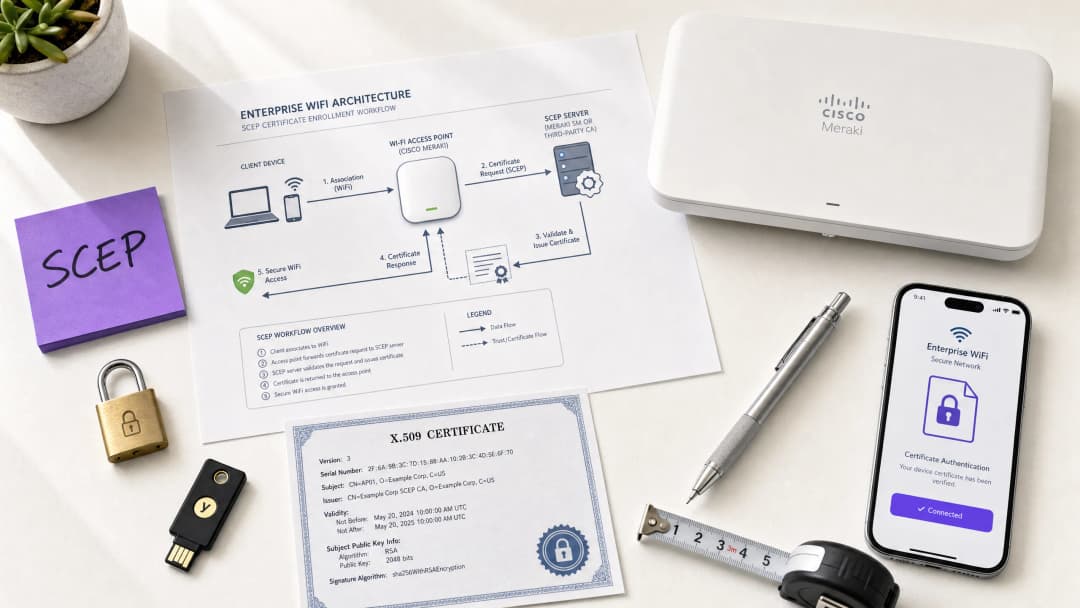
The answer is SCEP - the Simple Certificate Enrolment Protocol. Formalised by the IETF as RFC 8894 in 2020, SCEP automates certificate enrolment across managed device fleets. When integrated with an MDM platform such as Microsoft Intune or Jamf, SCEP delivers zero-touch certificate provisioning: devices request, receive, and renew their own certificates without any IT intervention. The private key is generated locally on the device and never transmitted across the network - a fundamental security advantage over PKCS-based delivery.
This guide walks through the complete SCEP implementation workflow: PKI architecture, NDES gateway configuration, the mandatory three-step MDM deployment sequence, and the operational controls - particularly CRL checking and group targeting - that determine whether a rollout succeeds or stalls. Two real-world scenarios illustrate the approach in hospitality and retail environments. Purple operates across 80,000+ live venues and 350 million unique users; the patterns described here reflect what works at that scale.
Technical deep-dive
What SCEP actually does
SCEP sits between your MDM platform and your Certificate Authority (CA). It provides a standardised HTTP-based mechanism for devices to request, receive, and renew X.509 certificates without requiring a domain-joined credential or manual administrator involvement. The protocol was originally developed in the early 2000s and gained widespread adoption in enterprise MDM environments before the IETF formally published it as RFC 8894.
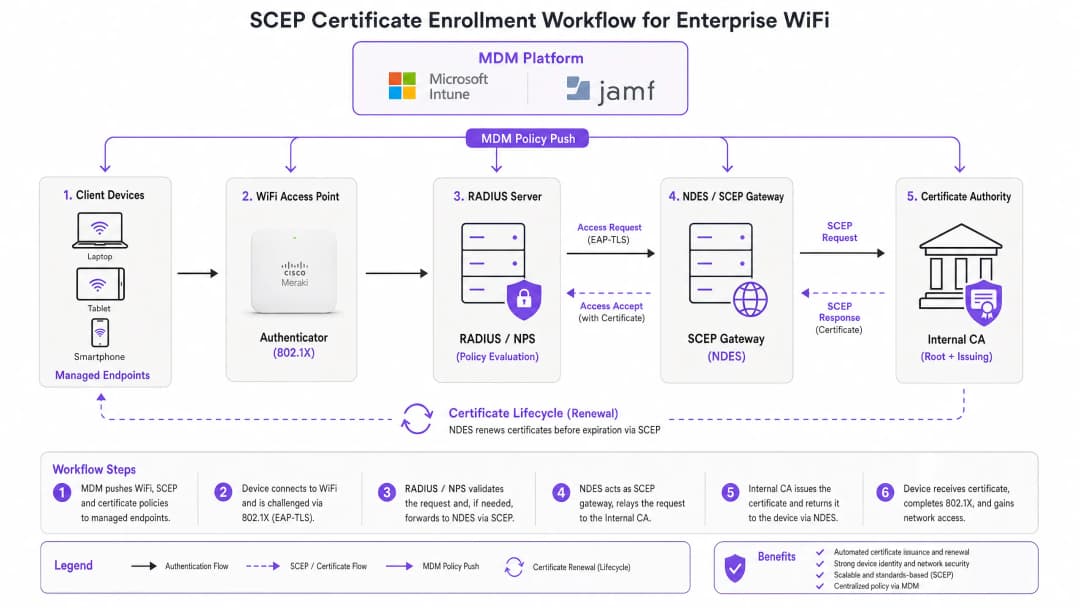
The six-step enrolment flow works as follows. First, the managed device connects to the SCEP gateway URL pre-configured in its MDM profile. Second, the device generates a private/public key pair locally and creates a Certificate Signing Request (CSR). Third, the SCEP gateway validates the device's authorisation using a challenge password or OTP embedded in the MDM policy. Fourth, the gateway forwards the validated CSR to the CA. Fifth, the CA signs the certificate and returns it to the gateway. Sixth, the gateway delivers the signed certificate to the device. Future renewals follow the same automated path - the device re-enrols before expiry without any user or administrator action.
SCEP vs PKCS: the decision that matters
Microsoft Intune and most MDM platforms support two certificate delivery mechanisms: SCEP and PKCS. The distinction is architectural, not cosmetic.
With SCEP, the private key is generated on the device and stays there. The CA never sees it. The device's TPM (on Windows) or Secure Enclave (on iOS/macOS) protects the key at the hardware level. With PKCS, the CA generates the key pair centrally and transmits it to the device over the network. The CA retains a copy, enabling key escrow - which is useful for S/MIME email encryption but introduces unnecessary risk for network authentication.
For 802.1X WiFi authentication, use SCEP. The private key never leaves the device. That is the rule.
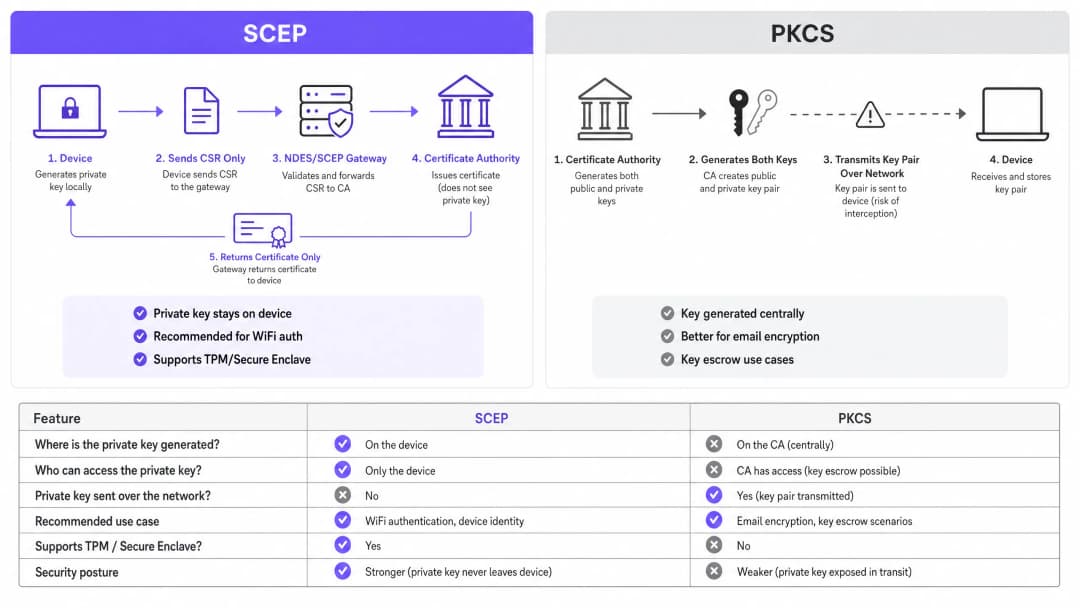
| Criterion | SCEP | PKCS |
|---|---|---|
| Private key generated on | Device | CA (centrally) |
| Private key transmitted over network | Never | Yes |
| Supports TPM / Secure Enclave | Yes | No |
| Recommended for WiFi auth | Yes | No |
| Recommended for email encryption (S/MIME) | No | Yes |
| Key escrow possible | No | Yes |
802.1X and EAP-TLS: the authentication framework
IEEE 802.1X is the port-based network access control standard that underpins enterprise WiFi security. It defines three roles: the supplicant (the client device), the authenticator (the access point - Cisco Meraki, HPE Aruba, Ruckus, Juniper Mist, Ubiquiti UniFi, Cambium, Extreme, or Fortinet), and the authentication server (a RADIUS server such as Microsoft NPS, FreeRADIUS, or Cisco ISE).
EAP-TLS is the most secure EAP method for 802.1X. Both sides present certificates: the RADIUS server presents its certificate to the client, and the client presents its SCEP-provisioned certificate to the RADIUS server. Neither side can impersonate the other without a valid, non-revoked certificate from the trusted CA hierarchy. This mutual authentication model eliminates credential theft, Evil Twin attacks, and rogue access point risks in a single architectural decision.
EAP-TLS satisfies PCI DSS 4.0 Requirement 8.6 for multi-factor authentication at the network layer. It is required for WPA3 Enterprise 192-bit (Suite B) deployments. For any wireless network in scope for cardholder data processing - retail point-of-sale, hotel front desk, stadium ticketing - EAP-TLS is the correct choice.
For a deeper look at secure WiFi architecture and how certificate-based authentication fits within a broader security posture, see our essential guide.
Implementation guide
The deployment sequence is non-negotiable. Intune and Jamf resolve profile dependencies in order: the WiFi profile depends on the SCEP profile, which depends on the Trusted Root profile. Deploy them out of sequence and the WiFi profile will fail to apply.
Step 1: Design your PKI
Before you touch an MDM console, design your certificate hierarchy. A two-tier PKI is standard: an offline root CA and an online issuing CA. The root CA's private key is the master trust anchor for your entire certificate infrastructure - keep it air-gapped. The issuing CA handles day-to-day certificate issuance and publishes the Certificate Revocation List (CRL) and OCSP responder.
For most enterprise venue deployments, Microsoft Active Directory Certificate Services (AD CS) running on Windows Server provides the issuing CA. Cloud-hosted PKI services from providers such as SCEPman or SecureW2 eliminate the on-premises infrastructure requirement entirely and are worth evaluating for distributed estate deployments across hotel groups, retail chains, or multi-site public-sector organisations.
Step 2: Deploy the NDES server (or cloud SCEP gateway)
NDES (Network Device Enrolment Service) is the Microsoft Windows Server role that acts as the SCEP gateway between your MDM and your CA. Key configuration requirements:
- Publish the NDES URL externally via Azure AD Application Proxy (or equivalent reverse proxy). This allows remote devices to enrol before they arrive on-site, without opening inbound firewall ports.
- The NDES service account requires Read and Enrol permissions on the CA certificate template.
- Configure the certificate template with Key Usage set to Digital Signature and Key Encipherment, and Extended Key Usage set to Client Authentication (OID: 1.3.6.1.5.5.7.3.2).
- Set an appropriate certificate validity period. One year is standard for client certificates; two years is acceptable for device certificates in stable fleets.
If you prefer to avoid on-premises NDES infrastructure, cloud SCEP gateways integrate directly with Intune and your CA via API, removing the IIS dependency entirely.
Step 3: Deploy the Trusted Root Certificate profile
In your MDM platform, create a Trusted Certificate profile and upload your Root CA certificate (and any Intermediate CA certificates) as .cer files. Deploy this profile to your target device groups before any other certificate or WiFi profiles. Without this step, devices cannot validate the RADIUS server's certificate during the EAP-TLS handshake, and they cannot trust the issuing CA when requesting their own SCEP certificate.
Rule of thumb: Always target the same Azure AD group (either Users or Devices) across all three related profiles. A mismatch here is the single most common cause of WiFi profile deployment failures.
Step 4: Configure the SCEP Certificate profile
Create a SCEP certificate configuration profile in your MDM:
- Subject name format: For user-driven authentication, use
CN={{UserPrincipalName}}. For device authentication (recommended for shared devices and IoT), useCN={{AAD_Device_ID}}. - Key usage: Digital Signature, Key Encipherment.
- Extended key usage: Client Authentication (OID: 1.3.6.1.5.5.7.3.2).
- SCEP server URL: The externally published NDES URL.
- Root certificate: Link to the Trusted Root profile from Step 3.
- Certificate validity period: Match the template configured on the CA.
Step 5: Deploy the 802.1X WiFi profile
Create a WiFi configuration profile:
- SSID: Enter the network name exactly as broadcast by your access points.
- Security type: WPA2-Enterprise or WPA3-Enterprise.
- EAP type: EAP-TLS.
- Client authentication certificate: Select the SCEP certificate profile from Step 4.
- Server validation: Specify the Trusted Root certificate from Step 3 and enter the expected RADIUS server name. This prevents devices from connecting to rogue access points presenting fraudulent certificates.
Vous avez des questions sur votre configuration spécifique ?
Notre équipe collabore avec des exploitants de sites, des responsables informatiques et des ingénieurs réseau au sein de 80 000 sites. Réservez un appel de 20 minutes et nous vous montrerons comment d'autres professionnels comme vous ont résolu ce problème.
Best practices
Enforce strict CRL checking on your RADIUS server
Certificate revocation is the operational control that closes the gap between disabling an account and blocking network access. When a device is lost, stolen, or an employee leaves, disable the AD account and revoke the certificate at the CA. Your RADIUS server must be configured to check the CRL on every authentication attempt. If the CRL is unavailable - because the CDP (CRL Distribution Point) is unreachable - most RADIUS servers default to failing open, which is a security risk. Ensure your CDPs are highly available and that your RADIUS server is configured to fail closed if the CRL cannot be fetched.
For real-time revocation, configure OCSP (Online Certificate Status Protocol) in addition to CRL. OCSP provides per-certificate status responses without requiring the RADIUS server to download and parse the entire CRL.
Use device certificates for shared and IoT devices
For shared devices - hotel housekeeping tablets, retail POS terminals, stadium access control readers - use device certificates rather than user certificates. Device certificates are tied to the machine identity, not a user account. This means the device authenticates regardless of which user is logged in, and revocation is tied to the device record rather than an employee's departure.
For retail deployments, device certificates on POS hardware also satisfy the PCI DSS requirement for network-layer device identity without introducing user-credential complexity at the point of sale.
Automate certificate renewal
SCEP supports automatic renewal: the MDM instructs the device to re-enrol before the certificate expires. Configure your SCEP profile to trigger renewal at 20% of the certificate's remaining validity period. For a one-year certificate, renewal begins approximately 73 days before expiry. This window provides enough time to resolve any renewal failures before the certificate expires and devices lose network access.
Expired certificates causing mass authentication failures are the most common operational incident in 802.1X deployments. Automated renewal via SCEP eliminates this risk entirely.
Segment networks by certificate attribute
RADIUS servers can read certificate attributes - Subject, SAN, or custom OIDs - and use them to assign devices to VLANs dynamically. A housekeeping tablet with a certificate issued from the HousekeepingDevices template lands on the housekeeping VLAN. A POS terminal with a certificate from the RetailPOS template lands on the PCI-scoped VLAN. This is cryptographically enforced network segmentation - far more reliable than SSID-based or MAC-based approaches.
For hospitality operators running Guest WiFi alongside Staff WiFi on the same physical infrastructure, VLAN assignment via certificate attributes ensures guests and staff are always on separate network segments, regardless of which SSID a device connects to.
Troubleshooting & risk mitigation
WiFi profile shows 'Error' or 'Not Applicable' in Intune
Root cause: Group targeting mismatch. The SCEP profile is assigned to a different group than the WiFi profile. Intune cannot resolve the certificate dependency.
Fix: Audit all three profiles (Trusted Root, SCEP, WiFi). Ensure they are all assigned to the exact same Azure AD group. If you are deploying to Users, all three profiles must target a Users group. If deploying to Devices, all three must target a Devices group.
NDES returns HTTP 403 errors
Root cause: The Intune Certificate Connector service account lacks Read or Enrol permissions on the CA certificate template, or firewall URL filtering is blocking SCEP query strings.
Fix: Verify the connector account has Read and Enrol permissions on the template in the CA console. Check firewall logs for blocked requests containing ?operation=GetCACaps or ?operation=PKIOperation. These query strings must pass through without modification.
Devices fail to renew certificates before expiry
Root cause: The SCEP renewal window is too short, or the NDES server is unreachable at the time of renewal.
Fix: Set the renewal threshold to 20% of certificate validity. Ensure the NDES URL is published via a highly available reverse proxy. Monitor NDES IIS logs for renewal request failures and alert on them proactively.
RADIUS rejects valid certificates
Root cause: The RADIUS server's trusted CA store does not include the issuing CA certificate, or the CRL is stale.
Fix: Import the full CA chain (Root CA + Issuing CA) into the RADIUS server's trusted store. Verify the CRL is being fetched successfully and that the CDP URL is reachable from the RADIUS server. Check the CRL's next-update timestamp - if it has passed, the CA needs to publish a new CRL.
For broader network performance considerations alongside security, see our bandwidth management guide.
ROI & business impact
The business case for SCEP-based certificate enrolment is straightforward. Password-based WiFi generates a predictable volume of helpdesk tickets: password expirations, lockouts, staff sharing credentials with guests, and onboarding friction for new starters. Certificate-based authentication is invisible to the end user. Devices connect automatically. There are no passwords to expire, share, or forget.
Organisations that migrate from password-based WiFi to EAP-TLS with SCEP typically report a 70-80% reduction in WiFi-related helpdesk tickets (Purple internal data, 2024, based on deployments across hospitality and retail estates). The helpdesk saving alone often justifies the implementation cost within the first year.
The compliance impact is equally concrete. EAP-TLS satisfies PCI DSS 4.0 Requirement 8.6 for multi-factor authentication at the network layer. For healthcare environments, it aligns with HIPAA technical safeguard requirements for wireless network access. For public-sector organisations, it supports NCSC Cyber Essentials Plus certification requirements for network access control.
For transport operators - rail franchises, airport operators, bus networks - certificate-based authentication on staff devices ensures that operational networks carrying safety-critical data are isolated from passenger WiFi and protected against credential-based attacks.
Purple's WiFi Analytics platform integrates with 802.1X-secured networks to deliver first-party data insights without compromising the security posture of the underlying infrastructure. The 29 billion data points collected across Purple's network demonstrate that security and analytics are complementary, not competing, objectives.
For feedback and experience management alongside your secure network deployment, see our venue feedback playbook.
Définitions clés
SCEP (Simple Certificate Enrollment Protocol)
Un protocole standardisé par l'IETF (RFC 8894) qui automatise l'enregistrement des certificats X.509 pour les appareils gérés. L'appareil génère sa propre clé privée localement et envoie uniquement une demande de signature de certificat (CSR) à l'autorité de certification (CA) via une passerelle. La clé privée ne quitte jamais l'appareil.
Les équipes informatiques rencontrent SCEP lors de la configuration des plateformes MDM (Intune, Jamf) pour déployer des certificats d'authentification WiFi à grande échelle. C'est le mécanisme recommandé pour les déploiements 802.1X EAP-TLS car la clé privée est protégée par le matériel sur le terminal.
EAP-TLS (Extensible Authentication Protocol - Transport Layer Security)
La méthode d'authentification 802.1X la plus sécurisée. L'appareil client et le serveur RADIUS présentent tous deux des certificats X.509. Aucune des deux parties ne peut s'authentifier sans un certificat valide et non révoqué provenant de la hiérarchie de l'autorité de certification (CA) de confiance.
EAP-TLS est le protocole d'authentification cible activé par le déploiement de certificats SCEP. Il répond à l'exigence 8.6 de PCI DSS 4.0 et est requis pour les déploiements WPA3 Enterprise 192 bits (Suite B).
PKCS (Public Key Cryptography Standards)
Un mécanisme de distribution de certificats dans lequel l'autorité de certification (CA) génère la paire de clés publique et privée de manière centralisée et les transmet au terminal. L'autorité de certification conserve une copie de la clé privée, ce qui permet le séquestre de clés.
Les équipes informatiques choisissent entre SCEP et PKCS lors de la configuration des profils de certificat dans Intune. PKCS est adapté au chiffrement des e-mails S/MIME où le séquestre de clés est requis. Il n'est pas recommandé pour l'authentification WiFi car la clé privée est transmise sur le réseau.
NDES (Network Device Enrollment Service)
Un rôle Windows Server de Microsoft qui sert de passerelle SCEP entre une plateforme MDM et une autorité de certification (CA). Il valide les demandes d'enregistrement des appareils et transmet les CSR à l'autorité de certification.
NDES est un composant d'infrastructure requis pour les déploiements SCEP sur site avec Microsoft Intune. Il doit être publié en externe via un proxy d'application pour permettre aux appareils distants de s'enregistrer. Les passerelles SCEP dans le cloud constituent une alternative qui élimine la dépendance à NDES sur site.
CRL (Certificate Revocation List)
Une liste publiée par l'autorité de certification (CA) contenant les numéros de série des certificats qui ont été révoqués avant leur date d'expiration. Les serveurs RADIUS consultent la CRL pour s'assurer que les appareils dotés de certificats révoqués ne peuvent pas s'authentifier.
La vérification de la CRL est le contrôle opérationnel qui applique la révocation des certificats. Les équipes informatiques doivent configurer leur serveur RADIUS pour vérifier la CRL à chaque tentative d'authentification et s'assurer que le point de distribution de la CRL (CDP) est hautement disponible.
802.1X
Une norme IEEE pour le contrôle d'accès réseau basé sur les ports. Elle définit le framework d'authentification tripartite (supplicant, authentificateur, serveur d'authentification) utilisé dans les réseaux WiFi d'entreprise et les réseaux filaires.
802.1X est le framework au sein duquel fonctionnent EAP-TLS et SCEP. Les équipes informatiques y sont confrontées lors de la configuration des SSID WPA2-Enterprise ou WPA3-Enterprise et lors de la configuration des politiques de serveurs RADIUS.
RADIUS (Remote Authentication Dial-In User Service)
Un protocole réseau qui fournit une authentification, une autorisation et une comptabilité (AAA) centralisées pour l'accès au réseau. Dans les déploiements 802.1X, le serveur RADIUS valide les certificats des clients et applique les politiques d'attribution de VLAN.
Le serveur RADIUS est le point de décision d'authentification dans chaque déploiement 802.1X. Les implémentations courantes incluent Microsoft NPS, FreeRADIUS et Cisco ISE. Il doit être configuré avec la chaîne de l'autorité de certification (CA) de confiance et une vérification stricte de la CRL ou de l'OCSP.
CSR (Certificate Signing Request)
Un bloc de texte codé généré par un appareil qui contient sa clé publique et ses informations d'identité. L'appareil envoie la CSR à l'autorité de certification (via la passerelle SCEP) pour demander un certificat signé. La clé privée correspondante est générée et conservée sur l'appareil.
La CSR est l'élément central du flux d'enregistrement SCEP. Les équipes informatiques configurent le format de la CSR (nom du sujet, utilisation de la clé, EKU) dans le profil de certificat SCEP au sein de leur plateforme MDM.
PKI (Public Key Infrastructure)
L'ensemble du matériel, des logiciels, des politiques et des procédures nécessaires pour créer, gérer, distribuer et révoquer des certificats numériques. Une PKI d'entreprise standard comprend une autorité de certification (CA) racine hors ligne et une autorité de certification émettrice en ligne.
La PKI est le prérequis de tout déploiement EAP-TLS. Les équipes informatiques doivent concevoir et déployer une hiérarchie de CA à deux niveaux avant de configurer SCEP. Les services de PKI hébergés dans le cloud réduisent la charge d'infrastructure pour les déploiements sur des parcs distribués.
VLAN (Virtual Local Area Network)
Un segment de réseau logique qui isole le trafic au niveau de la couche 2. Dans les déploiements 802.1X, les serveurs RADIUS attribuent dynamiquement les appareils aux VLAN en fonction des attributs du certificat, de l'identité de l'utilisateur ou de la politique.
L'attribution de VLAN via RADIUS est le mécanisme qui applique la segmentation du réseau dans le WiFi d'entreprise. Les équipes informatiques l'utilisent pour séparer les terminaux de point de vente sur des VLAN dédiés PCI, les appareils des invités sur des VLAN réservés à Internet, et les appareils du personnel sur les VLAN de l'entreprise - le tout à partir d'une seule infrastructure physique.
Exemples concrets
Un établissement Premier Inn de 200 chambres doit déployer un WiFi sécurisé pour 150 appareils de ménage iOS. Le personnel partage actuellement un mot de passe WPA2-Personal avec les clients, ce qui crée un risque de conformité et d'exploitation. Le directeur informatique doit éliminer le mot de passe partagé sans perturber les opérations quotidiennes.
Le directeur informatique implémente un déploiement SCEP piloté par Jamf en trois phases. Phase une : le certificat Root CA est poussé vers les 150 appareils iOS via un profil de certificat approuvé Jamf, ciblant le groupe intelligent "Housekeeping Devices". Phase deux : un profil de certificat SCEP est déployé, orientant les appareils vers un serveur NDES publié via Azure AD App Proxy. Le nom de l'objet utilise CN={{SERIALNUMBER}} pour lier le certificat au matériel de l'appareil. Phase trois : un profil WiFi WPA2-Enterprise est poussé, spécifiant EAP-TLS et le liant au certificat SCEP. Les appareils s'authentifient de manière silencieuse. L'SSID au mot de passe partagé est mis hors service. Le serveur RADIUS est configuré avec une vérification stricte de la CRL et une attribution de VLAN : les appareils de ménage se connectent au VLAN 20 (opérations), les appareils des clients au VLAN 10 (internet uniquement).
Une chaîne de vente au détail de 500 points de vente doit sécuriser le WiFi d'entreprise pour des tablettes POS Windows exécutant un logiciel de traitement des paiements. La conformité PCI DSS 4.0 exige une authentification multifacteur au niveau de la couche réseau. La configuration WPA2-Personal actuelle échoue à l'évaluation de l'exigence 8.6 de la norme PCI DSS.
L'architecte réseau déploie EAP-TLS via Microsoft Intune et SCEP sur l'ensemble des 500 points de vente. Le déploiement utilise des certificats d'appareil avec CN={{AAD_Device_ID}} comme nom d'objet, liant chaque certificat à l'enregistrement de l'appareil dans Intune. La séquence à trois profils (Trusted Root, SCEP, WiFi) est déployée sur le groupe Azure AD "POS Devices" - le même groupe pour les trois profils. Le serveur RADIUS attribue les appareils POS à un VLAN dédié au périmètre PCI (VLAN 100) en fonction du modèle d'émission du certificat. La CRL est publiée sur un point de terminaison hautement disponible hébergé sur un CDN avec une fenêtre de validité de quatre heures. OCSP est activé pour la vérification des révocations en temps réel. Le déploiement est validé par rapport à l'exigence 8.6 de la norme PCI DSS 4.0 par le QSA.
Questions d'entraînement
Q1. Vous avez déployé des profils de certificat Racine approuvée et SCEP sur le groupe d'utilisateurs « Tous les collaborateurs » dans Intune. Vous déployez ensuite le profil WiFi sur le groupe d'appareils « Appareils de l'entreprise ». Les appareils reçoivent les certificats, mais le profil WiFi affiche « Erreur » dans la console Intune. Quelle est la cause la plus probable et comment la résoudre ?
Conseil : Considérez comment Intune résout les dépendances entre les profils et ce qui se passe lorsque les profils ciblent différents types de groupes.
Voir la réponse type
La cause principale est une incohérence de ciblage de groupe. Le profil WiFi dépend du profil SCEP, qui dépend lui-même du profil Racine approuvée. Intune ne peut pas résoudre ces dépendances lorsque les profils ciblent différents types de groupes (Utilisateurs vs Appareils). Solution : redéployez les trois profils sur le même groupe. Si le profil WiFi cible « Appareils de l'entreprise » (un groupe d'appareils), les profils SCEP et Racine approuvée doivent également cibler « Appareils de l'entreprise ». Alternativement, déplacez les trois vers un groupe d'utilisateurs si une authentification basée sur l'utilisateur est requise.
Q2. L'iPad d'un agent d'entretien d'hôtel est signalé comme volé. Vous désactivez immédiatement le compte Active Directory de l'agent. Le lendemain matin, l'iPad volé se connecte toujours au réseau WPA2-Enterprise de l'hôtel. Pourquoi, et quelles sont les deux mesures à prendre pour empêcher cela ?
Conseil : Pensez à ce que le serveur RADIUS valide réellement lors de l'authentification EAP-TLS et aux contrôles qui régissent la validité des certificats.
Voir la réponse type
La désactivation du compte AD ne révoque pas le certificat client stocké sur l'iPad. Le serveur RADIUS valide le certificat, et non l'état du compte AD, lors de l'authentification EAP-TLS. Les deux actions requises sont : (1) révoquer le certificat de l'appareil au niveau de l'AC - cela ajoute le numéro de série du certificat à la CRL ; (2) s'assurer que le serveur RADIUS est configuré avec une vérification stricte de la CRL afin qu'il récupère la CRL mise à jour et rejette le certificat révoqué lors de la tentative d'authentification suivante. Pour une révocation plus rapide, configurez l'OCSP sur le serveur RADIUS pour des vérifications de l'état des certificats en temps réel.
Q3. Une chaîne de magasins déploie du WiFi 802.1X sur 500 points de vente. L'architecte sécurité propose d'utiliser la distribution de certificats PKCS au lieu de SCEP pour éviter de déployer un serveur NDES. L'évaluateur QSA examinant la conformité PCI DSS 4.0 soulève une objection. Quelle est cette objection et quelle est la recommandation correcte ?
Conseil : Considérez ce que stipule la norme GDPR / PCI DSS concernant la gestion des clés privées et ce que fait PKCS avec la clé privée lors de la transmission.
Voir la réponse type
L'objection du QSA réside dans le fait que PKCS transmet la clé privée sur le réseau depuis l'AC vers l'appareil. L'exigence 3.5 de la norme PCI DSS 4.0 impose que les clés privées utilisées pour l'authentification soient protégées contre la divulgation. Transmettre la clé privée sur le réseau - même chiffrée - introduit un risque que SCEP élimine entièrement. La recommandation correcte est d'utiliser SCEP, où la clé privée est générée directement sur l'appareil du point de vente et ne le quitte jamais. Pour éviter d'installer une infrastructure NDES sur site, l'architecte devrait évaluer un service de passerelle SCEP cloud qui s'intègre directement avec Intune et l'AC via API.
Q4. Vous concevez un réseau WiFi pour un grand centre de congrès qui accueille plus de 50 événements par an. Les appareils du personnel doivent être connectés à un réseau sécurisé 802.1X. Vous souhaitez vous assurer que si l'appareil d'un prestataire est compromis, il puisse être isolé du réseau sous 15 minutes. Quel mécanisme de révocation de certificat configurez-vous et pourquoi ?
Conseil : Comparez la CRL et l'OCSP en termes de latence de révocation et déterminez ce qui régit la rapidité avec laquelle un serveur RADIUS réagit à une révocation.
Voir la réponse type
Configurez l'OCSP (Online Certificate Status Protocol) sur le serveur RADIUS. La révocation basée sur la CRL présente une latence définie par la période de validité de la CRL - généralement de une à 24 heures - ce qui signifie qu'un certificat révoqué peut toujours s'authentifier jusqu'à ce que le serveur RADIUS télécharge la CRL suivante. L'OCSP fournit des réponses de statut en temps réel pour chaque certificat : lorsqu'un certificat est révoqué au niveau de l'AC, le répondeur OCSP renvoie immédiatement un statut « révoqué » lors de la requête suivante. Avec l'OCSP configuré sur le serveur RADIUS, le certificat du prestataire révoqué est bloqué dès la tentative d'authentification suivante, généralement en quelques secondes. Veillez à ce que le répondeur OCSP soit hautement disponible - s'il est inaccessible et que le serveur RADIUS est configuré pour bloquer l'accès en cas d'échec de validation, toutes les authentifications échoueront.
Continuer la lecture de cette série
Comment segmenter de manière sécurisée les réseaux WiFi du personnel et des invités : meilleures pratiques pour les LAN d'entreprise
Ce guide fournit aux responsables informatiques et aux architectes réseau un modèle technique et indépendant des fournisseurs pour sécuriser les réseaux LAN d'entreprise en segmentant correctement le trafic WiFi du personnel et des invités. Il couvre l'authentification 802.1X, le RADIUS dans le cloud, l'isolation VLAN et la gestion du cycle de vie des identifiants nécessaires pour éliminer les phrases de passe partagées et protéger les actifs de l'entreprise.
Le meilleur filtrage DNS : un guide complet pour les entreprises
Ce guide de référence technique explique comment le filtrage DNS d'entreprise sécurise les réseaux publics en bloquant les domaines malveillants au niveau de la couche de résolution - avant même qu'une connexion ne soit établie. Il fournit aux directeurs informatiques, architectes réseau et équipes d'exploitation des sites l'architecture de déploiement, la configuration du pare-feu et le contexte de conformité nécessaires pour protéger le WiFi invité dans les secteurs de l'hôtellerie, du commerce de détail et du secteur public. Purple Shield bloque les logiciels malveillants, les botnets et les contenus inappropriés au niveau DNS sur plus de 80 000 sites actifs.
Comprendre Cisco SUDI : L'identité ancrée dans le matériel pour le contrôle d'accès réseau sécurisé
Ce guide explique comment Cisco SUDI fournit une identité sécurisée par cryptographie et ancrée dans le matériel pour l'infrastructure réseau d'entreprise. Découvrez comment remplacer les adresses MAC falsifiables par des certificats 802.1AR immuables afin de sécuriser le contrôle d'accès réseau de votre site.
Vous avez des questions sur votre configuration spécifique ?
Notre équipe collabore avec des exploitants de sites, des responsables informatiques et des ingénieurs réseau au sein de 80 000 sites. Réservez un appel de 20 minutes et nous vous montrerons comment d'autres professionnels comme vous ont résolu ce problème.