
Understanding Cisco SUDI: Hardware-Based Device Identity in Network Access Control
This guide details the technical architecture of Cisco SUDI, explaining how hardware-anchored identity secures network access control. It provides actionable implementation steps for IT leaders to deploy 802.1X EAP-TLS authentication and automate Zero Touch Provisioning across enterprise venues.
Video overview
Listen to this guide
View podcast transcript
Part of our core series: Enterprise WiFi Security Guide →

Executive Summary
Hardware authentication secures the physical foundation of enterprise networks. The Cisco Secure Unique Device Identifier (SUDI) provides an immutable, cryptographically verifiable identity for infrastructure devices, embedded directly into a tamper-resistant chip during manufacturing. For IT leaders managing large-scale deployments across hospitality, retail, and public sectors, SUDI eliminates the risk of rogue hardware and enables automated Zero Touch Provisioning.
This guide details the technical architecture of Cisco SUDI, its integration with IEEE 802.1X Network Access Control (NAC), and the operational steps required to deploy and maintain hardware-based identity at scale. You will learn how to transition from weak MAC address bypass to robust EAP-TLS authentication, manage the SUDI-2099 certificate lifecycle, and align infrastructure security with user identity management platforms like Purple.
Technical Deep-Dive
The Architecture of Hardware Identity
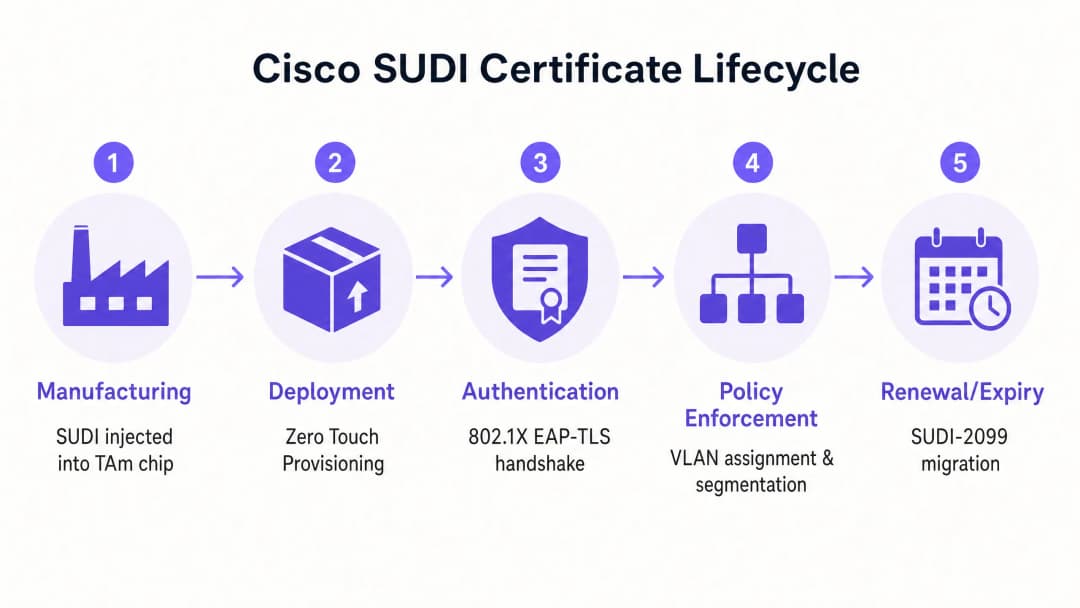
The Cisco Secure Unique Device Identifier (SUDI) is an X.509v3 certificate that provides a permanent identity for network devices. Unlike software certificates that IT teams generate and deploy, Cisco injects the SUDI certificate and its associated key pair into the device during the manufacturing process.
The certificate is securely stored in the Trust Anchor module (TAm), a proprietary, tamper-resistant chip. The TAm generates the private key internally, ensuring it can never be exported or cloned. This hardware root of trust guarantees that if a device successfully authenticates using its SUDI, it is a genuine Cisco product.
SUDI implements the IEEE 802.1AR standard for Secure Device Identifiers. Under this standard, the manufacturer-provided certificate is known as an Initial Device Identifier (IDevID). Organisations can supplement the IDevID with a Locally Significant Device Identifier (LDevID) issued by their own enterprise Public Key Infrastructure (PKI).

Integration with Network Access Control
In an enterprise environment, SUDI integrates with Network Access Control (NAC) systems primarily through IEEE 802.1X port-based authentication. When a Cisco access point or switch connects to the network, it acts as a supplicant and presents its SUDI certificate to a RADIUS server, such as Cisco Identity Services Engine (ISE).
The authentication process uses Extensible Authentication Protocol with Transport Layer Security (EAP-TLS). The RADIUS server validates the SUDI certificate against the Cisco Public Key Infrastructure. Once validated, the RADIUS server authorises the device and assigns it to the correct VLAN based on the network access policy.
This approach replaces MAC Address Bypass (MAB), a legacy method that relies on easily spoofed MAC addresses. MAB provides zero cryptographic assurance of device identity, leaving networks vulnerable to rogue access points.
Hardware Fingerprinting and Tamper Detection
The Trust Anchor module provides more than secure storage. It actively protects the device against physical tampering during transit or deployment.
During manufacturing, Cisco records a cryptographic fingerprint of the critical hardware components, such as CPUs and ASICs. This fingerprint is permanently stored in the TAm. When the device boots, the UEFI firmware calculates a new fingerprint of the observed hardware and compares it to the master fingerprint in the TAm. If the fingerprints do not match, the device halts the boot process. This mechanism ensures that hardware deployed in a hotel or retail store has not been compromised between the factory and the installation site.
Got questions about your specific setup?
Our team works with venue operators, IT managers, and network engineers across 80,000 venues. Book a 20-minute call and we will show you how others like you solved it.
Implementation Guide
Deploying SUDI-based authentication requires coordination between your switching infrastructure, your RADIUS server, and your network management platform. Follow these steps to implement hardware identity.
Step 1: Configure RADIUS Trust
Your RADIUS server must trust the Cisco Certificate Authority that issued the SUDI.
- Download the Cisco Root CA and the ACT2 SUDI CA certificates from the Cisco PKI portal.
- Import these certificates into the trusted certificate store of your RADIUS server (e.g., Cisco ISE).
- Configure the RADIUS server to use these certificates for EAP-TLS authentication.
Step 2: Define 802.1X Policies
Create specific authentication policies for infrastructure devices, separate from user authentication policies.
- Create a policy set in Cisco ISE that matches the SUDI certificate attributes (e.g., matching the Subject Alternative Name against expected device PIDs).
- Assign successful authentications to the infrastructure management VLAN.
- Configure a quarantine VLAN for devices that fail SUDI authentication. Do not configure a fallback to MAB for infrastructure ports.
Step 3: Enable Zero Touch Provisioning
Use SUDI to automate device onboarding.
- Configure your network management system (such as Cisco Catalyst Center) to act as the ZTP server.
- When a new device connects, it presents its SUDI certificate.
- The management system verifies the certificate, confirms the device serial number against the inventory database, and pushes the initial configuration.
Step 4: Manage the SUDI-2099 Migration
SUDI certificates issued before May 2019 expire either 10 years from the date of manufacture or on 14 May 2029, whichever is earlier. When a SUDI expires, features that rely on it, including HTTPS, SSH, and Zero Touch Provisioning, will fail.
Cisco has introduced SUDI-2099 certificates, which remain valid until December 2099. To ensure continuity:
- Audit your inventory using the
show crypto pki certificatecommand on IOS-XE devices. Check theend dateof theCISCO_IDEVID_SUDItrustpoint. - Upgrade affected hardware to the recommended software releases. For example, Catalyst 9200 switches require IOS-XE 17.12.2 or later to correctly handle the 2099 expiry date.
Best Practices
To maximise the security benefits of hardware identity, adhere to these vendor-neutral principles.
- Enforce Strict EAP-TLS: Require EAP-TLS for all infrastructure devices. Do not permit weaker EAP methods like PEAP for device authentication.
- Isolate Infrastructure Identity from User Identity: SUDI authenticates the hardware, not the user. Use a dedicated platform to manage human identity. For example, use Purple to handle guest authentication, consent capture, and first-party data collection, while relying on SUDI to secure the underlying Cisco Meraki or HPE Aruba hardware.
- Automate Certificate Monitoring: Implement monitoring tools to track certificate expiry dates across your entire estate. Proactive monitoring prevents sudden authentication failures.
- Implement Micro-segmentation: Use the identity verified by SUDI to assign devices to strictly controlled VLANs. An access point should only have network reachability to its controller and management systems, nothing else.
Troubleshooting & Risk Mitigation
When deploying SUDI-based authentication, prepare for these common failure modes.
| Failure Mode | Root Cause | Mitigation Strategy |
|---|---|---|
| EAP-TLS Authentication Fails | RADIUS server lacks the correct Cisco Root or Intermediate CA certificates. | Verify that the complete Cisco trust chain is installed in the RADIUS server's trusted store. |
| Device Refuses to Boot | The hardware fingerprint calculated at boot does not match the master fingerprint in the TAm. | Treat the device as compromised. Return the hardware to the vendor via the RMA process. |
| Management Access Fails | The SUDI certificate has expired, breaking HTTPS and SSH certificate authentication. | Upgrade the device firmware to a release that supports SUDI-2099, or deploy an LDevID using your enterprise PKI. |
| Rogue Device Gains Access | The switch port is configured to fall back to MAC Address Bypass (MAB) if 802.1X fails. | Remove MAB fallback configurations from infrastructure ports. Enforce strict 802.1X policy. |
ROI & Business Impact
Implementing hardware-based device identity delivers measurable business value across three areas.
1. Reduced Provisioning Costs Zero Touch Provisioning secured by SUDI eliminates manual staging. Instead of an engineer spending 45 minutes pre-configuring an access point before shipping it to a retail store, the device ships directly from the distributor. It authenticates securely upon connection and downloads its configuration automatically. For a 500-site retail deployment, this saves approximately 375 engineering hours.
2. Eliminated Rogue Device Risk By deprecating MAC Address Bypass in favour of cryptographic hardware identity, you eliminate the risk of an attacker connecting a rogue device to an infrastructure port. This directly supports compliance with PCI DSS and ISO 27001 requirements for network access control.
3. Clear Identity Boundaries Deploying SUDI establishes a clean architectural boundary. The hardware layer authenticates itself cryptographically, allowing you to focus your resources on the user identity layer. When you integrate a platform like Purple to manage Guest WiFi and WiFi Analytics, you do so on top of a verifiable, secure infrastructure foundation.
Key Definitions
SUDI (Secure Unique Device Identifier)
An X.509v3 certificate and associated private key embedded into a Cisco device during manufacturing to provide an immutable hardware identity.
Used by IT teams to cryptographically verify that a device connecting to the network is a genuine Cisco product.
TAm (Trust Anchor module)
A proprietary, tamper-resistant hardware chip that securely stores the SUDI certificate, generates cryptographic keys, and manages hardware fingerprinting.
Provides the hardware root of trust. If the TAm is compromised, the device will fail to boot or authenticate.
IDevID (Initial Device Identifier)
The manufacturer-installed secure device identifier defined by the IEEE 802.1AR standard. Cisco SUDI is an implementation of an IDevID.
Provides the foundational identity for a device before it is integrated into an organisation's own PKI environment.
LDevID (Locally Significant Device Identifier)
A device certificate issued by an organisation's own enterprise Public Key Infrastructure, supplementing the manufacturer's IDevID.
Used when IT teams require devices to authenticate using certificates issued by their internal corporate CA rather than the vendor's CA.
IEEE 802.1X
The IEEE standard for port-based network access control, providing an authentication mechanism to devices wishing to attach to a LAN or WLAN.
The primary protocol used to enforce network security, ensuring only authorised devices and users can send traffic through a switch port.
EAP-TLS (Extensible Authentication Protocol-Transport Layer Security)
A highly secure authentication protocol that requires both the client and the authentication server to prove their identities using digital certificates.
The specific method used within 802.1X to validate the SUDI certificate between the network device and the RADIUS server.
Zero Touch Provisioning (ZTP)
An automated process that allows network devices to be provisioned and configured automatically without manual intervention.
SUDI secures ZTP by ensuring the management system only pushes configurations to verified, genuine hardware.
MAC Address Bypass (MAB)
A legacy authentication method where a switch uses the connecting device's MAC address as its identity credential.
An insecure fallback method that should be eliminated and replaced by SUDI-based 802.1X authentication.
Worked Examples
A 400-room hotel is upgrading its network infrastructure and needs to deploy 250 new Cisco Catalyst access points. The IT team wants to avoid manually configuring each device before installation while ensuring no rogue devices can join the management VLAN.
- The IT team configures Cisco ISE with the Cisco Root CA to trust SUDI certificates.
- They create an 802.1X policy in ISE that assigns devices presenting a valid SUDI to a restricted provisioning VLAN.
- The access points are shipped directly to the hotel and plugged into the PoE switches.
- Each AP boots, presents its SUDI via EAP-TLS, and is authenticated by ISE.
- The management system (Catalyst Centre) verifies the serial number, provisions the AP, and ISE shifts the port to the production management VLAN.
A national retail chain with 1,200 stores discovers that their legacy switches use MAC Address Bypass (MAB) to authenticate access points. They need to migrate to a secure standard without causing store outages.
- The network team audits the switch inventory to confirm all devices support 802.1X and SUDI.
- They deploy the Cisco CA certificates to their RADIUS infrastructure.
- They configure the switch ports in 'monitor mode' (open authentication), allowing devices to attempt 802.1X EAP-TLS using SUDI while falling back to MAB if they fail, but logging the results.
- After verifying in the RADIUS logs that all legitimate APs are successfully authenticating via SUDI, they switch the ports to 'closed mode', enforcing strict 802.1X and disabling MAB.
Practice Questions
Q1. You are deploying 50 new Cisco Catalyst switches in a stadium environment. The security policy mandates strict 802.1X authentication for all infrastructure devices. During testing, the switches fail to authenticate to your Cisco ISE server. What is the most likely cause?
Hint: Consider the chain of trust required for EAP-TLS authentication.
View model answer
The Cisco ISE server is missing the Cisco Root CA or the ACT2 SUDI CA certificates in its trusted certificate store. Without these, ISE cannot validate the SUDI certificate presented by the switches. You must download the certificates from the Cisco PKI portal and import them into ISE.
Q2. A network engineer proposes configuring switch ports to attempt 802.1X authentication first, but fall back to MAC Address Bypass (MAB) if the device does not have a valid certificate. Why should you reject this proposal for infrastructure ports?
Hint: Evaluate the security strength of the fallback mechanism.
View model answer
Falling back to MAB undermines the entire security model. An attacker can simply connect a rogue device, wait for the 802.1X timeout, and spoof the MAC address of a legitimate access point to gain access to the infrastructure VLAN. Infrastructure ports should enforce strict 802.1X with SUDI, and non-compliant devices should be placed in a restricted quarantine VLAN.
Q3. You are auditing a network of Catalyst 9200 switches deployed in 2018. You run the 'show crypto pki certificate' command and notice the CISCO_IDEVID_SUDI trustpoint expires in May 2029. What action must you take to prevent future outages?
Hint: Review the SUDI-2099 migration requirements for legacy hardware.
View model answer
You must upgrade the IOS-XE software on the Catalyst 9200 switches to version 17.12.2 or later. This upgrade ensures the hardware properly supports the SUDI-2099 certificate extension, extending the valid identity of the device until December 2099 and preventing authentication failures for services like HTTPS and ZTP.
Continue reading in this series
CIPA compliance: compliance checklist for venue operators
You will be able to decide whether CIPA binds your WiFi, then segment networks, route DNS through Purple Shield and close bypass routes. You will also know what evidence to keep for Form 486 or Form 479 certification. The checklist assigns every requirement an owner, so your next funding year certification has nothing missing.
WPA3 transition mode connection failures: a deployment checklist for Cisco Meraki, HPE Aruba and Ruckus
Use this checklist to diagnose why devices fail on a WPA3 SAE transition mode SSID and fix it on Cisco Meraki, HPE Aruba or Ruckus. You will match 802.11 status codes to causes, isolate PMF, 802.11r and 6GHz issues, and decide when to move to a WPA3-only SSID.
Best DNS filtering: a comprehensive guide for businesses
This technical reference guide explains how enterprise DNS filtering secures public networks by blocking malicious domains at the resolution layer - before a connection is ever established. It gives IT directors, network architects, and venue operations teams the deployment architecture, firewall configuration, and compliance context they need to protect Guest WiFi across hospitality, retail, and public-sector environments. Purple Shield blocks malware, botnets, and inappropriate content at the DNS level across 80,000+ live venues.
Got questions about your specific setup?
Our team works with venue operators, IT managers, and network engineers across 80,000 venues. Book a 20-minute call and we will show you how others like you solved it.