
Comprendere Cisco SUDI: Identità del Dispositivo Basata su Hardware nel Controllo dell'Accesso alla Rete
Questa guida dettaglia l'architettura tecnica di Cisco SUDI, spiegando come l'identità ancorata all'hardware protegga il controllo dell'accesso alla rete. Fornisce passaggi di implementazione pratici per i leader IT per implementare l'autenticazione 802.1X EAP-TLS e automatizzare il Provisioning Zero Touch nelle sedi aziendali.
Video overview
Ascolta questa guida
Visualizza trascrizione del podcast
Parte della nostra serie principale: Guida alla Sicurezza dell'Enterprise WiFi →

Executive Summary
L'autenticazione hardware protegge le fondamenta fisiche delle reti aziendali. Il Cisco Secure Unique Device Identifier (SUDI) fornisce un'identità immutabile e crittograficamente verificabile per i dispositivi di infrastruttura, integrata direttamente in un chip antimanomissione durante la produzione. Per i leader IT che gestiscono distribuzioni su larga scala nei settori dell'ospitalità, del retail e pubblico, SUDI elimina il rischio di hardware non autorizzato e consente il Zero Touch Provisioning automatizzato.
Questa guida dettaglia l'architettura tecnica di Cisco SUDI, la sua integrazione con il Network Access Control (NAC) IEEE 802.1X e i passaggi operativi necessari per implementare e mantenere l'identità basata su hardware su scala. Imparerai come passare dal debole bypass dell'indirizzo MAC a una solida autenticazione EAP-TLS, gestire il ciclo di vita del certificato SUDI-2099 e allineare la sicurezza dell'infrastruttura con le piattaforme di gestione dell'identità degli utenti come Purple.
Technical Deep-Dive
L'Architettura dell'Identità Hardware
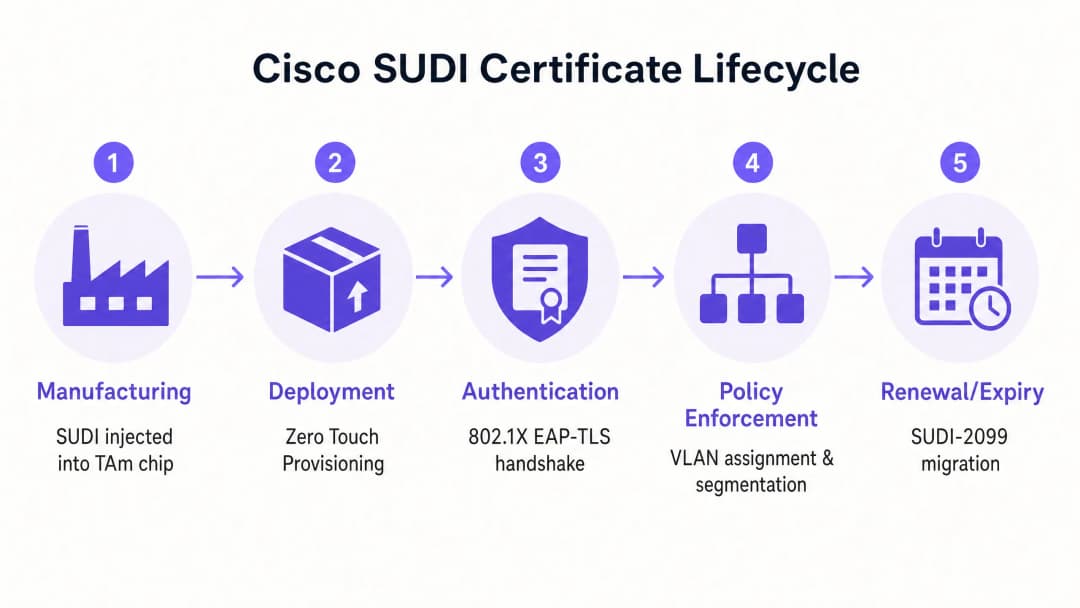
Il Cisco Secure Unique Device Identifier (SUDI) è un certificato X.509v3 che fornisce un'identità permanente per i dispositivi di rete. A differenza dei certificati software che i team IT generano e distribuiscono, Cisco inserisce il certificato SUDI e la relativa coppia di chiavi nel dispositivo durante il processo di produzione.
Il certificato è memorizzato in modo sicuro nel modulo Trust Anchor (TAm), un chip proprietario e antimanomissione. Il TAm genera la chiave privata internamente, garantendo che non possa mai essere esportata o clonata. Questa radice di attendibilità hardware garantisce che se un dispositivo si autentica correttamente utilizzando il proprio SUDI, si tratta di un prodotto Cisco originale.
SUDI implementa lo standard IEEE 802.1AR per i Secure Device Identifiers. In base a questo standard, il certificato fornito dal produttore è noto come Initial Device Identifier (IDevID). Le organizzazioni possono integrare l'IDevID con un Locally Significant Device Identifier (LDevID) emesso dalla propria Public Key Infrastructure (PKI) aziendale.

Integrazione con il Network Access Control
In un ambiente aziendale, SUDI si integra con i sistemi di Network Access Control (NAC) principalmente tramite l'autenticazione basata su porta IEEE 802.1X. Quando un access point o uno switch Cisco si connette alla rete, agisce come supplicant e presenta il proprio certificato SUDI a un server RADIUS, come Cisco Identity Services Engine (ISE).Il processo di autenticazione utilizza l'Extensible Authentication Protocol con Transport Layer Security (EAP-TLS). Il server RADIUS convalida il certificato SUDI rispetto alla Cisco Public Key Infrastructure. Una volta convalidato, il server RADIUS autorizza il dispositivo e lo assegna alla VLAN corretta in base alla policy di accesso alla rete.
Questo approccio sostituisce il MAC Address Bypass (MAB), un metodo legacy che si affida a indirizzi MAC facilmente falsificabili. Il MAB fornisce una sicurezza crittografica pari a zero sull'identità del dispositivo, lasciando le reti vulnerabili ad access point non autorizzati.
Impronta Digitale dell'Hardware e Rilevamento delle Manomissioni
Il modulo Trust Anchor fornisce molto di più di uno storage sicuro. Protegge attivamente il dispositivo da manomissioni fisiche durante il trasporto o l'installazione.
Durante la produzione, Cisco registra un'impronta digitale crittografica dei componenti hardware critici, come CPU e ASIC. Questa impronta viene memorizzata in modo permanente nel TAm. All'avvio del dispositivo, il firmware UEFI calcola una nuova impronta digitale dell'hardware rilevato e la confronta con l'impronta principale nel TAm. Se le impronte non corrispondono, il dispositivo interrompe il processo di avvio. Questo meccanismo garantisce che l'hardware distribuito in un hotel o in un negozio al dettaglio non sia stato compromesso tra la fabbrica e il sito di installazione.
Hai domande sulla tua configurazione specifica?
Il nostro team collabora con gestori di sedi, responsabili IT e ingegneri di rete in 80.000 sedi. Prenota una chiamata di 20 minuti e ti mostreremo come altri professionisti come te hanno risolto il problema.
Guida all'Implementazione
La distribuzione dell'autenticazione basata su SUDI richiede il coordinamento tra l'infrastruttura di switching, il server RADIUS e la piattaforma di gestione della rete. Segui questi passaggi per implementare l'identità hardware.
Passaggio 1: Configurare il RADIUS Trust
Il server RADIUS deve considerare attendibile la Cisco Certificate Authority che ha emesso il SUDI.
- Scarica i certificati Cisco Root CA e ACT2 SUDI CA dal portale Cisco PKI.
- Importa questi certificati nell'archivio dei certificati attendibili del tuo server RADIUS (ad es. Cisco ISE).
- Configura il server RADIUS per utilizzare questi certificati per l'autenticazione EAP-TLS.
Passaggio 2: Definire le Policy 802.1X
Crea policy di autenticazione specifiche per i dispositivi infrastrutturali, separate dalle policy di autenticazione degli utenti.
- Crea un set di policy in Cisco ISE che corrisponda agli attributi del certificato SUDI (ad es. confrontando il Subject Alternative Name con i PID previsti del dispositivo).
- Assegna le autenticazioni andate a buon fine alla VLAN di gestione dell'infrastruttura.
- Configura una VLAN di quarantena per i dispositivi che non superano l'autenticazione SUDI. Non configurare un fallback al MAB per le porte dell'infrastruttura.
Passaggio 3: Abilitare lo Zero Touch Provisioning
Utilizza SUDI per automatizzare l'onboarding dei dispositivi.
- Configura il tuo sistema di gestione di rete (come Cisco Catalyst Center) affinché funga da server ZTP.
- Quando un nuovo dispositivo si connette, presenta il suo certificato SUDI.
- Il sistema di gestione verifica il certificato, conferma il numero di serie del dispositivo rispetto al database dell'inventario e invia la configurazione iniziale.
Passaggio 4: Gestire la migrazione a SUDI-2099
I certificati SUDI emessi prima di maggio 2019 scadono 10 anni dopo la data di fabbricazione o il 14 maggio 2029, a seconda di quale evento si verifichi per primo. Quando un certificato SUDI scade, le funzionalità che si affidano ad esso, inclusi HTTPS, SSH e Zero Touch Provisioning, smetteranno di funzionare.
Cisco ha introdotto i certificati SUDI-2099, che rimangono validi fino a dicembre 2099. Per garantire la continuità:
- Controlla il tuo inventario utilizzando il comando
show crypto pki certificatesui dispositivi IOS-XE. Verifica laend datedel trustpointCISCO_IDEVID_SUDI. - Aggiorna l'hardware interessato alle versioni software consigliate. Ad esempio, gli switch Catalyst 9200 richiedono IOS-XE 17.12.2 o versioni successive per gestire correttamente la data di scadenza del 2099.
Best Practice
Per massimizzare i vantaggi in termini di sicurezza offerti dall'identità hardware, attieniti a questi principi indipendenti dal fornitore.
- Imponi EAP-TLS rigido: Richiedi EAP-TLS per tutti i dispositivi di infrastruttura. Non consentire metodi EAP meno sicuri come PEAP per l'autenticazione dei dispositivi.
- Isola l'identità dell'infrastruttura dall'identità utente: SUDI autentica l'hardware, non l'utente. Utilizza una piattaforma dedicata per gestire l'identità umana. Ad esempio, utilizza Purple per gestire l'autenticazione degli ospiti, l'acquisizione del consenso e la raccolta di dati di prima parte, affidandoti al contempo a SUDI per proteggere l'hardware sottostante Cisco Meraki o HPE Aruba.
- Automatizza il monitoraggio dei certificati: Implementa strumenti di monitoraggio per tracciare le date di scadenza dei certificati in tutta la tua infrastruttura. Il monitoraggio proattivo previene improvvisi errori di autenticazione.
- Implementa la micro-segmentazione: Utilizza l'identità verificata da SUDI per assegnare i dispositivi a VLAN rigorosamente controllate. Un access point deve disporre della raggiungibilità di rete solo verso il proprio controller e i sistemi di gestione, e nient'altro.
Risoluzione dei problemi e mitigazione dei rischi
Quando distribuisci l'autenticazione basata su SUDI, preparati a questi scenari di errore comuni.
| Scenario di errore | Causa principale | Strategia di mitigazione |
|---|---|---|
| Autenticazione EAP-TLS non riuscita | Al server RADIUS mancano i certificati CA Cisco Root o Intermediate corretti. | Verifica che l'intera catena di attendibilità Cisco sia installata nell'archivio attendibile del server RADIUS. |
| Il dispositivo rifiuta l'avvio | L'impronta digitale dell'hardware calcolata all'avvio non corrisponde all'impronta master nel TAm. | Considera il dispositivo come compromesso. Restituisci l'hardware al fornitore tramite la procedura RMA. |
| Accesso di gestione non riuscito | Il certificato SUDI è scaduto, interrompendo l'autenticazione del certificato HTTPS e SSH. | Aggiorna il firmware del dispositivo a una versione che supporti SUDI-2099, oppure distribuisci un LDevID utilizzando la PKI aziendale. |
| Il dispositivo non autorizzato ottiene l'accesso | La porta dello switch è configurata per il fallback su MAC Address Bypass (MAB) se l'802.1X fallisce. | Rimuovere le configurazioni di fallback MAB dalle porte dell'infrastruttura. Imporre una policy 802.1X rigorosa. |
ROI e impatto aziendale
L'implementazione dell'identità del dispositivo basata su hardware offre un valore aziendale misurabile in tre aree.
1. Riduzione dei costi di provisioning Lo Zero Touch Provisioning protetto da SUDI elimina la configurazione manuale. Invece di un tecnico che impiega 45 minuti per preconfigurare un access point prima di spedirlo a un punto vendita, il dispositivo viene spedito direttamente dal distributore. Si autentica in modo sicuro al momento della connessione e scarica automaticamente la sua configurazione. Per una distribuzione retail in 500 siti, questo consente di risparmiare circa 375 ore di ingegneria.
2. Eliminazione del rischio di dispositivi non autorizzati Sostituendo il MAC Address Bypass a favore dell'identità hardware crittografica, si elimina il rischio che un utente malintenzionato colleghi un dispositivo non autorizzato a una porta dell'infrastruttura. Ciò supporta direttamente la conformità ai requisiti PCI-DSS e ISO 27001 per il controllo dell'accesso alla rete.
3. Confini di identità chiari La distribuzione di SUDI stabilisce un confine architetturale chiaro. Il livello hardware si autentica crittograficamente, consentendo di concentrare le risorse sul livello di identità dell'utente. Quando si integra una piattaforma come Purple per gestire il Guest WiFi e WiFi Analytics, lo si fa su una base infrastrutturale verificabile e sicura.
Definizioni chiave
SUDI (Secure Unique Device Identifier)
Un certificato X.509v3 e la relativa chiave privata associata integrati in un dispositivo Cisco durante la produzione per fornire un'identità hardware immutabile.
Utilizzato dai team IT per verificare crittograficamente che un dispositivo che si connette alla rete sia un prodotto Cisco autentico.
TAm (Trust Anchor module)
Un chip hardware proprietario e resistente alle manomissioni che memorizza in modo sicuro il certificato SUDI, genera chiavi crittografiche e gestisce l'impronta digitale dell'hardware.
Fornisce la radice di attendibilità hardware. Se il TAm è compromesso, il dispositivo non sarà in grado di avviarsi o di autenticarsi.
IDevID (Initial Device Identifier)
L'identificatore sicuro del dispositivo installato dal produttore, definito dallo standard IEEE 802.1AR. Il SUDI di Cisco è un'implementazione di un IDevID.
Fornisce l'identità fondamentale per un dispositivo prima che venga integrato nell'ambiente PKI dell'organizzazione.
LDevID (Locally Significant Device Identifier)
Un certificato di dispositivo emesso dalla Public Key Infrastructure aziendale di un'organizzazione, che integra l'IDevID del produttore.
Utilizzato quando i team IT richiedono che i dispositivi si autentichino utilizzando certificati emessi dalla propria CA aziendale interna anziché dalla CA del fornitore.
IEEE 802.1X
Lo standard IEEE per il controllo dell'accesso alla rete basato su porte, che fornisce un meccanismo di autenticazione ai dispositivi che desiderano connettersi a una LAN o WLAN.
Il protocollo principale utilizzato per applicare la sicurezza di rete, garantendo che solo i dispositivi e gli utenti autorizzati possano inviare traffico attraverso una porta dello switch.
EAP-TLS (Extensible Authentication Protocol-Transport Layer Security)
Un protocollo di autenticazione altamente sicuro che richiede sia al client sia al server di autenticazione di dimostrare la propria identità utilizzando certificati digitali.
Il metodo specifico utilizzato all'interno di 802.1X per convalidare il certificato SUDI tra il dispositivo di rete e il server RADIUS.
Zero Touch Provisioning (ZTP)
Un processo automatizzato che consente il provisioning e la configurazione automatica dei dispositivi di rete senza intervento manuale.
SUDI protegge lo ZTP garantendo che il sistema di gestione invii le configurazioni solo a hardware verificato e autentico.
MAC Address Bypass (MAB)
Un metodo di autenticazione legacy in cui uno switch utilizza l'indirizzo MAC del dispositivo di connessione come credenziale di identità.
Un metodo di fallback non sicuro che dovrebbe essere eliminato e sostituito dall'autenticazione 802.1X basata su SUDI.
Esempi pratici
Un hotel da 400 camere sta aggiornando la propria infrastruttura di rete e deve installare 250 nuovi access point Cisco Catalyst. Il team IT desidera evitare di configurare manualmente ogni dispositivo prima dell'installazione, garantendo al contempo che nessun dispositivo non autorizzato possa accedere alla VLAN di gestione.
- Il team IT configura Cisco ISE con la Cisco Root CA per considerare attendibili i certificati SUDI.
- Creano una policy 802.1X in ISE che assegna i dispositivi che presentano un SUDI valido a una VLAN di provisioning limitata.
- Gli access point vengono spediti direttamente all'hotel e collegati agli switch PoE.
- Ogni AP si avvia, presenta il proprio SUDI tramite EAP-TLS e viene autenticato da ISE.
- Il sistema di gestione (Catalyst Centre) verifica il numero di serie, configura l'AP e ISE sposta la porta sulla VLAN di gestione di produzione.
Una catena di vendita al dettaglio nazionale con 1.200 negozi scopre che i propri switch legacy utilizzano il MAC Address Bypass (MAB) per autenticare gli access point. Devono migrare a uno standard sicuro senza causare interruzioni nei negozi.
- Il team di rete esegue un audit dell'inventario degli switch per confermare che tutti i dispositivi supportino 802.1X e SUDI.
- Distribuiscono i certificati CA Cisco nella propria infrastruttura RADIUS.
- Configurano le porte degli switch in 'monitor mode' (autenticazione aperta), consentendo ai dispositivi di tentare l'autenticazione 802.1X EAP-TLS utilizzando il SUDI e di ricorrere al MAB in caso di errore, registrando tuttavia i risultati.
- Dopo aver verificato nei log RADIUS che tutti gli AP legittimi si autenticano correttamente tramite SUDI, impostano le porte in 'closed mode', imponendo lo standard rigido 802.1X e disabilitando il MAB.
Domande di esercitazione
Q1. Stai distribuendo 50 nuovi switch Cisco Catalyst in un ambiente stadio. La policy di sicurezza impone una rigida autenticazione 802.1X per tutti i dispositivi di infrastruttura. Durante i test, gli switch non riescono ad autenticarsi sul server Cisco ISE. Qual è la causa più probabile?
Suggerimento: Considera la catena di attendibilità richiesta per l'autenticazione EAP-TLS.
Visualizza risposta modello
Nel server Cisco ISE mancano i certificati Cisco Root CA o ACT2 SUDI CA nell'archivio dei certificati attendibili. Senza questi, ISE non può convalidare il certificato SUDI presentato dagli switch. È necessario scaricare i certificati dal portale Cisco PKI e importarli in ISE.
Q2. Un ingegnere di rete propone di configurare le porte dello switch per tentare prima l'autenticazione 802.1X, per poi passare al MAC Address Bypass (MAB) come fallback se il dispositivo non ha un certificato valido. Perché dovresti rifiutare questa proposta per le porte dell'infrastruttura?
Suggerimento: Valuta l'efficacia di sicurezza del meccanismo di fallback.
Visualizza risposta modello
Il passaggio a MAB compromette l'intero modello di sicurezza. Un utente malintenzionato potrebbe semplicemente collegare un dispositivo non autorizzato, attendere il timeout di 802.1X e camuffare l'indirizzo MAC di un access point legittimo per accedere alla VLAN dell'infrastruttura. Le porte dell'infrastruttura dovrebbero imporre un rigido 802.1X con SUDI, e i dispositivi non conformi dovrebbero essere inseriti in una VLAN di quarantena limitata.
Q3. Stai eseguendo l'audit di una rete di switch Catalyst 9200 distribuiti nel 2018. Esegui il comando 'show crypto pki certificate' e noti che il trustpoint CISCO_IDEVID_SUDI scade a maggio 2029. Quale azione devi intraprendere per prevenire future interruzioni del servizio?
Suggerimento: Esamina i requisiti di migrazione a SUDI-2099 per l'hardware legacy.
Visualizza risposta modello
È necessario aggiornare il software IOS-XE sugli switch Catalyst 9200 alla versione 17.12.2 o successiva. Questo aggiornamento garantisce che l'hardware supporti correttamente l'estensione del certificato SUDI-2099, prolungando l'identità valida del dispositivo fino a dicembre 2099 ed evitando errori di autenticazione per servizi come HTTPS e ZTP.
Continua a leggere questa serie
Conformità CIPA: checklist di conformità per i gestori di sedi
Sarai in grado di decidere se la conformità CIPA vincola il tuo WiFi, quindi segmentare le reti, instradare il DNS tramite Purple Shield e chiudere i percorsi di bypass. Saprai anche quali prove conservare per la certificazione del Form 486 o del Form 479. La checklist assegna ogni requisito a un responsabile, in modo che la certificazione del prossimo anno di finanziamento non presenti lacune.
Errori di connessione in modalità di transizione WPA3: una checklist di implementazione per Cisco Meraki, HPE Aruba e Ruckus
Usa questa checklist per diagnosticare il motivo per cui i dispositivi non riescono a connettersi a un SSID in modalità di transizione WPA3 SAE e risolvere il problema su Cisco Meraki, HPE Aruba o Ruckus. Imparerai a far corrispondere i codici di stato 802.11 alle relative cause, a isolare i problemi di PMF, 802.11r e 6GHz, e a decidere quando passare a un SSID solo WPA3.
Miglior filtraggio DNS: una guida completa per le aziende
Questa guida di riferimento tecnica spiega come il filtraggio DNS aziendale protegga le reti pubbliche bloccando i domini dannosi a livello di risoluzione - prima ancora che venga stabilita una connessione. Offre ai direttori IT, agli architetti di rete e ai team operativi delle strutture l'architettura di implementazione, la configurazione del firewall e il contesto di conformità necessari per proteggere il WiFi per gli ospiti nei settori dell'ospitalità, del retail e del settore pubblico. Purple Shield blocca malware, botnet e contenuti inappropriati a livello DNS in oltre 80.000 sedi attive.
Hai domande sulla tua configurazione specifica?
Il nostro team collabora con gestori di sedi, responsabili IT e ingegneri di rete in 80.000 sedi. Prenota una chiamata di 20 minuti e ti mostreremo come altri professionisti come te hanno risolto il problema.