
Implementing SCEP for Secure BYOD and 802.1X WiFi in Higher Education
This technical guide details how higher education IT teams can automate 802.1X certificate enrollment for thousands of BYOD devices using SCEP. It covers the architecture, security benefits, and practical deployment steps to replace manual onboarding with a secure, zero-touch network access model.
Video overview
Listen to this guide
View podcast transcript
Part of our core series: Enterprise WiFi Security Guide →
Executive Summary
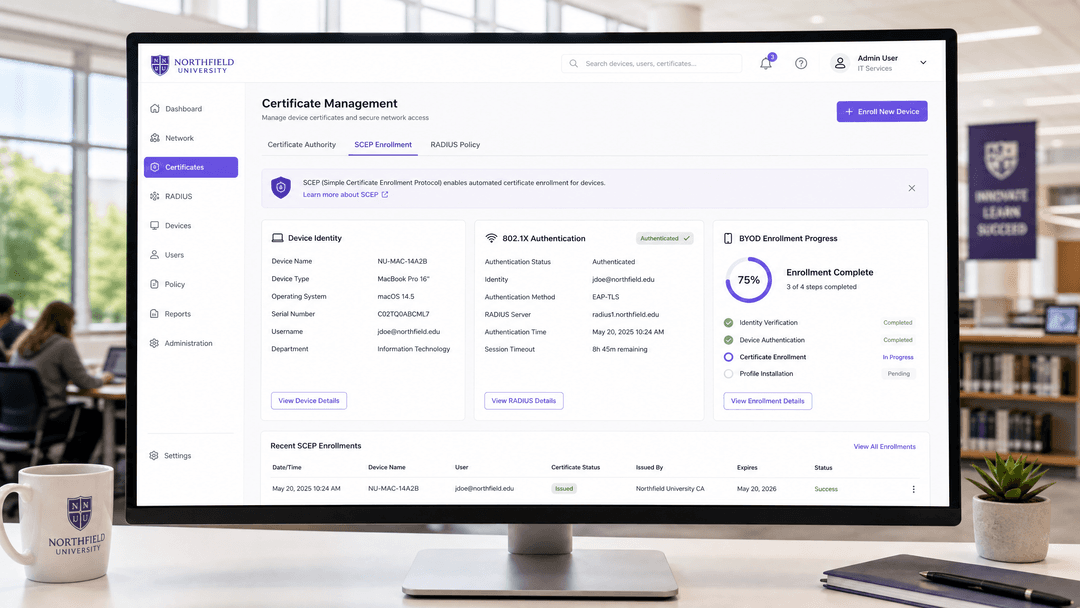
Higher education IT teams face a unique networking challenge every autumn: onboarding tens of thousands of unmanaged student devices onto a secure campus network. Traditional captive portals frustrate students and generate high helpdesk ticket volumes. Manual certificate installation is unscalable. The solution is Simple Certificate Enrollment Protocol (SCEP) combined with 802.1X authentication.
This guide provides a comprehensive technical reference for network architects and IT directors on implementing SCEP for Bring Your Own Device (BYOD) environments. By automating the distribution of digital certificates, universities can enforce EAP-TLS authentication - the gold standard for wireless security. This approach eliminates password-related vulnerabilities, prevents MAC randomisation issues, and provides granular visibility into network usage.
We will examine the architecture required, including Mobile Device Management (MDM) integration, Certificate Authority (CA) configuration, and cloud RADIUS deployment. We will also outline the implementation steps to transition from legacy authentication methods to a modern, Identity-Based Network.
Technical Deep-Dive: SCEP and 802.1X Architecture
To understand how SCEP secures a campus network, we must examine the interaction between device identity, certificate management, and network access control.
The Role of SCEP
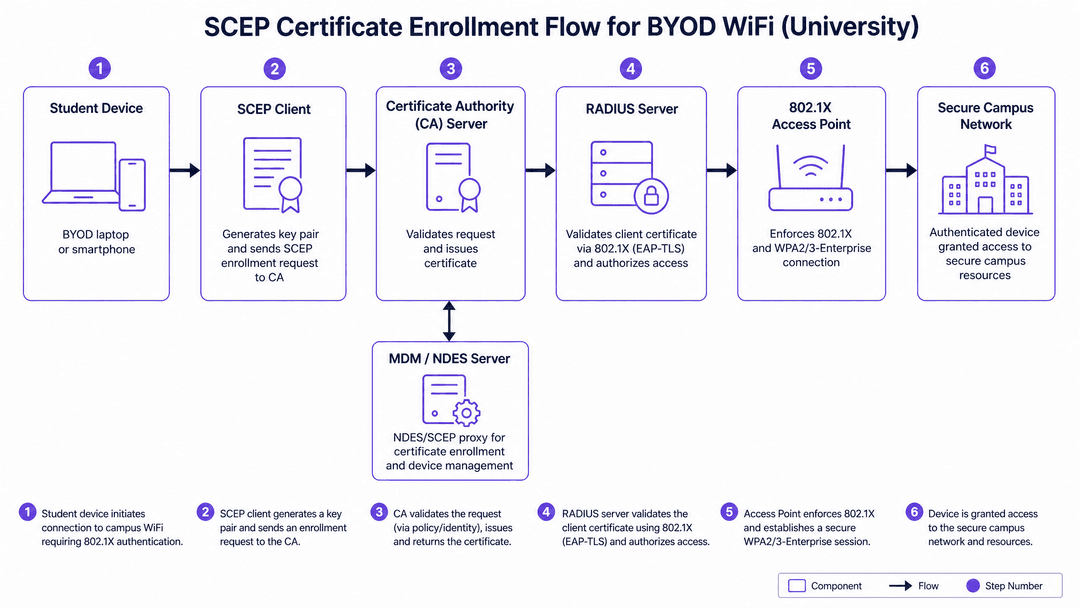
SCEP automates the process of requesting and receiving digital certificates. Originally developed by Cisco, it replaces the manual exchange of public keys with an automated workflow. When a device is enrolled in an MDM platform, it receives a configuration profile containing a SCEP URL and a challenge password. The device generates a cryptographic key pair locally, keeping the private key secure in its hardware enclave. It then sends a Certificate Signing Request (CSR) to the Certificate Authority via the SCEP proxy (often an NDES server).
The CA validates the request against the challenge password and issues a certificate binding the device's identity to its public key. This entire process occurs in the background, typically within 30 seconds, requiring no action from the student.
802.1X and EAP-TLS Authentication
Once the device holds a valid certificate, it can authenticate to the campus WiFi using IEEE 802.1X. Specifically, the network should be configured to use EAP-TLS (Extensible Authentication Protocol with Transport Layer Security).
Unlike PEAP or TTLS, which rely on usernames and passwords, EAP-TLS requires mutual certificate authentication. The access point acts as the authenticator, passing the device's certificate to the RADIUS server. The RADIUS server validates the certificate against the CA. Simultaneously, the device validates the RADIUS server's certificate. If both checks pass, the device is granted access.
Infrastructure Components
A successful SCEP deployment requires coordination across several infrastructure layers:
- Mobile Device Management (MDM): The system that pushes the SCEP configuration profile to the device.
- Network Device Enrollment Service (NDES): Acts as a proxy between the MDM-managed devices and the CA.
- Certificate Authority (CA): The entity that issues and revokes the digital certificates.
- Cloud RADIUS: The authentication server that validates certificates during the 802.1X handshake. Purple SecurePass provides a cloud-native RADIUS service (rad1-secure.purple.ai and rad2-secure.purple.ai) operating on standard ports (1812/1813).
- Wireless Access Points: Enterprise-grade hardware supporting WPA2/WPA3-Enterprise and Passpoint (Hotspot 2.0). Supported vendors include Cisco Meraki, HPE Aruba, Ruckus, Juniper Mist, Ubiquiti UniFi, and Fortinet.
Got questions about your specific setup?
Our team works with venue operators, IT managers, and network engineers across 80,000 venues. Book a 20-minute call and we will show you how others like you solved it.
Implementation Guide
Deploying SCEP for a university BYOD population requires a phased approach. The goal is to transition devices from open networks or legacy authentication to certificate-based access with minimal disruption.
Step 1: Configure the Certificate Authority and NDES
Establish your PKI infrastructure. If using Microsoft Active Directory Certificate Services (AD CS), install the NDES role. Configure the certificate templates for client authentication. Ensure the NDES server is accessible from the internet or via your MDM's cloud connector, as devices must reach it to request certificates.
Step 2: Integrate MDM and Identity Provider
Link your MDM platform with your primary identity provider, such as Microsoft Entra ID or Google Workspace. This integration is crucial for the "joiners, movers, leavers" workflow. When a student's account is disabled in Entra ID upon graduation, their network access must be automatically revoked. Configure the MDM to push the SCEP payload, specifying the CA URL, the challenge type, and the required certificate subject format (e.g., embedding the user's email or device MAC address).
Step 3: Configure Cloud RADIUS and Access Points
Set up your RADIUS servers to authenticate against your CA. In the Purple dashboard, configure SecurePass to validate the specific certificate templates you created.
Configure your wireless controllers or access points to broadcast a dedicated SSID for secure access. This SSID must have WPA2/WPA3-Enterprise and Hotspot 2.0 enabled. Do not reuse your existing captive portal SSID. Ensure the SSID is broadcast; hidden SSIDs will prevent the automatic connection behaviour that SCEP enables.
Step 4: Phased Rollout
Begin with staff devices. Staff laptops and phones are typically corporate-owned and already managed by MDM, providing a controlled environment to validate the SCEP flow and RADIUS authentication. Once the staff deployment is stable, extend the MDM enrollment and SCEP profile distribution to student BYOD devices.
Best Practices
Based on deployments across 80,000+ live venues, adhere to the following best practices for SCEP and 802.1X implementations:
- Implement Passpoint (Hotspot 2.0): Use Passpoint alongside 802.1X. Passpoint enables seamless network discovery. A student enrolled via SecurePass will automatically connect not only on your campus but at any of the 80,000+ OpenRoaming locations worldwide.
- Align Certificate Lifetimes with the Academic Year: Set certificate validity periods carefully. A standard one-year lifetime may cause mass expirations during critical periods. Configure automatic SCEP renewal (e.g., renewing at 80% of the lifetime) to prevent authentication failures.
- Do Not Rely on MAC Addresses for Identity: Since iOS 14 and Android 10, devices use randomised MAC addresses. SCEP solves this by identifying devices via their cryptographic certificate, ensuring accurate analytics and stable authentication regardless of MAC rotation.
Troubleshooting & Risk Mitigation
Even with automated enrollment, edge cases occur. Prepare your IT helpdesk for the following scenarios:
- NDES Challenge Password Expiry: The challenge password generated by the MDM has a short validity window. If the device delays requesting the certificate (e.g., due to poor connectivity during setup), the challenge will expire, and enrollment will fail. Ensure devices have a stable internet connection during the initial MDM profile installation.
- Android Fragmentation: While iOS and macOS have robust, native SCEP support, Android behaviour varies significantly by manufacturer. Maintain clear documentation for Android users, noting that some devices may require a third-party MDM agent app to process the SCEP payload correctly.
- Unsupported Devices: IoT devices (smart TVs, gaming consoles) typically lack 802.1X support. Segment these devices onto a separate VLAN using an alternative authentication method, such as iPSK (Identity Pre-Shared Key), rather than attempting to force them through a SCEP workflow.
ROI & Business Impact
Transitioning to SCEP and 802.1X delivers measurable returns across security and operational efficiency:
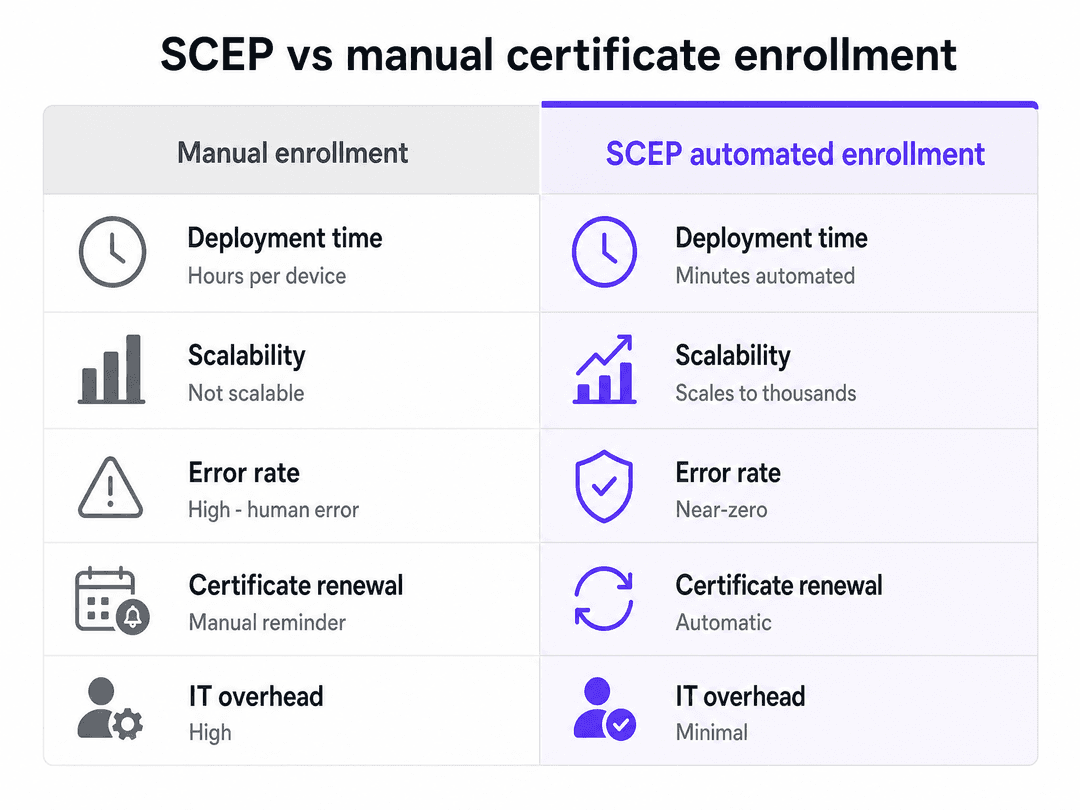
- Reduced Helpdesk Volume: Automating certificate enrollment eliminates the majority of WiFi-related support tickets at the start of the academic year.
- Enhanced Security Posture: EAP-TLS mutual authentication mitigates the risk of man-in-the-middle attacks and credential theft. The network is protected by cryptography rather than easily shared passwords.
- Accurate Network Analytics: By identifying users via stable certificates rather than rotating MAC addresses, IT and estates teams gain reliable data on campus utilisation and dwell times.
For further details on configuring your specific hardware vendors, consult the Purple Supported Hardware documentation.
Expert Audio Briefing
Listen to our senior technical consultant discuss the implementation strategy and common pitfalls in this 10-minute briefing:
Key Definitions
SCEP (Simple Certificate Enrollment Protocol)
A protocol that automates the issuance of digital certificates to network devices without manual IT intervention.
Used to deploy certificates to thousands of student BYOD devices at scale.
802.1X
An IEEE standard for port-based network access control that provides an authentication mechanism to devices wishing to attach to a LAN or WLAN.
The security framework that blocks unauthorized devices from accessing the campus network.
EAP-TLS
Extensible Authentication Protocol with Transport Layer Security; an authentication method requiring both the client and the server to prove their identity via digital certificates.
The most secure WiFi authentication method, replacing vulnerable usernames and passwords.
NDES (Network Device Enrollment Service)
A Microsoft service that acts as a proxy, allowing devices running without domain credentials to obtain certificates via SCEP.
The critical middleware bridging the MDM platform and the Certificate Authority.
Passpoint (Hotspot 2.0)
A Wi-Fi Alliance standard that enables devices to automatically discover and securely connect to trusted networks without selecting an SSID or entering a password.
Allows students to connect seamlessly on campus and at 80,000+ OpenRoaming venues globally.
MDM (Mobile Device Management)
Software used by IT to administer and secure mobile devices, capable of pushing configuration profiles and SCEP payloads.
The prerequisite system needed to deliver the SCEP instructions to the student's device.
RADIUS
Remote Authentication Dial-In User Service; a networking protocol that provides centralized Authentication, Authorization, and Accounting (AAA) management.
The server (e.g., Purple SecurePass) that validates the device's certificate during the 802.1X handshake.
MAC Randomisation
A privacy feature in modern operating systems that changes the device's MAC address on different networks, breaking traditional tracking.
The primary reason venues must shift from MAC-based authentication to certificate-based identity.
Worked Examples
A university with 15,000 students needs to transition from a legacy captive portal to secure 802.1X WiFi. They currently use Microsoft Entra ID for identity and have a mix of iOS, Android, and Windows BYOD devices. How should they architect the certificate enrollment?
The university should deploy a cloud-based MDM integrated with Entra ID. They will configure an NDES server connected to their internal Certificate Authority. The MDM will be configured to push a WiFi profile containing the SCEP payload to student devices upon enrollment. For authentication, they will configure their wireless controllers to point to a cloud RADIUS service like Purple SecurePass (rad1-secure.purple.ai). The access points will broadcast a new, dedicated SSID with WPA3-Enterprise and Hotspot 2.0 enabled.
During a phased rollout of SCEP, the IT team notices that while macOS and iOS devices enroll successfully, a significant percentage of Windows laptops are failing to receive certificates. What is the likely cause and resolution?
The likely cause is a misconfiguration in how the MDM agent interacts with the Windows certificate store, or a timeout in the NDES challenge password. The resolution involves verifying that the MDM agent has the correct permissions to request and install machine or user certificates on Windows. Additionally, the IT team should check the NDES server logs to confirm if challenge passwords are expiring before the Windows devices complete the request. Increasing the challenge validity window slightly or ensuring the devices are on a fast provisioning network can resolve the timeout issue.
Practice Questions
Q1. A student reports they cannot connect to the new 802.1X network. You verify their device is enrolled in the MDM, but the RADIUS logs show no authentication attempts from their MAC address. What is the most likely failure point?
Hint: If RADIUS isn't seeing the attempt, the device doesn't have the credentials to start the handshake.
View model answer
The SCEP enrollment failed, meaning the device never received its certificate. You should check the MDM logs to see if the SCEP payload was delivered, and check the NDES/CA logs to see if a certificate signing request was ever received from that device.
Q2. Your university wants to ensure that when a student graduates in July, their network access is revoked immediately, even if their certificate is valid until December. How do you architect this?
Hint: Think about the integration between your directory service and your authentication infrastructure.
View model answer
Integrate your identity provider (e.g., Microsoft Entra ID) with your MDM and RADIUS infrastructure. When the student's account is disabled in Entra ID, the MDM can send a command to wipe the corporate profile (including the certificate) from the device. Alternatively, the RADIUS server (like Purple SecurePass) can check the Entra ID status in real-time during the authentication handshake and deny access to disabled accounts.
Q3. You are deploying SecurePass. You configure the SSID for WPA3-Enterprise and 802.1X, but devices are not automatically discovering the network, forcing students to manually select the SSID. What configuration step was missed?
Hint: Automatic discovery relies on a specific Wi-Fi Alliance standard.
View model answer
Hotspot 2.0 (Passpoint) was not enabled on the SSID, or the SSID is set to hidden. Passpoint must be enabled on the wireless controller so the access points broadcast the necessary ANQP (Access Network Query Protocol) information, allowing the device to match its installed profile to the network silently.
Continue reading in this series
A Network Administrator’s Guide to Configuring RADIUS Authentication for Guest WiFi
A comprehensive technical reference for network administrators on deploying RADIUS authentication for guest WiFi. Covers architecture, vendor-neutral configuration steps, security best practices, and troubleshooting common deployment failures.
Configuring RADIUS Authentication for Guest and Staff WiFi Networks
This technical reference guide outlines the architecture, configuration, and deployment of RADIUS authentication for enterprise guest and staff WiFi networks. It provides network architects and IT managers with the exact protocols, security standards, and troubleshooting methodologies required to build secure, scalable wireless access control systems.
Passpoint and OpenRoaming: Complete Guide
This technical reference guide provides a comprehensive analysis of Passpoint (Hotspot 2.0) and WBA OpenRoaming frameworks within enterprise WiFi networks. It details the underlying authentication protocols, architectural components, and deployment strategies required to establish secure, frictionless guest connectivity. Network architects and IT leaders will learn how to design, implement, and troubleshoot these standards to eliminate manual login barriers while maintaining enterprise-grade security.
Got questions about your specific setup?
Our team works with venue operators, IT managers, and network engineers across 80,000 venues. Book a 20-minute call and we will show you how others like you solved it.