
What is a Probe Request? Understanding How Devices Discover Networks
This technical reference guide provides a deep-dive into IEEE 802.11 probe requests, active versus passive scanning, and the impact of MAC randomisation on venue analytics. It delivers actionable implementation strategies for network architects to optimise high-density deployments, mitigate probe storms, and ensure accurate, GDPR-compliant data collection using authenticated identity layers.
Listen to this guide
View podcast transcript
Executive Summary
For enterprise network architects and venue operations directors, the probe request is the foundational mechanism of wireless device discovery. It is a Layer 2 management frame that dictates how unconnected devices identify and associate with access points in Retail , Hospitality , and Transport environments. However, the landscape of probe-based analytics has fundamentally shifted. With the ubiquitous implementation of MAC address randomisation across iOS and Android, legacy footfall tracking and dwell time measurement relying solely on unauthenticated probe data are no longer viable or compliant.
This guide unpacks the technical mechanics of the probe request and response cycle, explores the critical distinction between active and passive scanning, and details the operational impact of probe storms in high-density deployments. More importantly, it provides a strategic roadmap for transitioning from hardware-based tracking to authenticated, identity-driven analytics using Guest WiFi and WiFi Analytics platforms, ensuring robust network performance and actionable business intelligence.
Technical Deep-Dive: The Mechanics of Discovery
The IEEE 802.11 State Machine
Before a device can transmit IP traffic, it must traverse the 802.11 connection state machine: Discovery, Authentication, and Association. The probe request operates exclusively in the Discovery phase. It is classified as a Subtype 4 Management Frame, transmitted by the client device (STA) to locate available Basic Service Sets (BSS).
There are two primary methods of discovery:
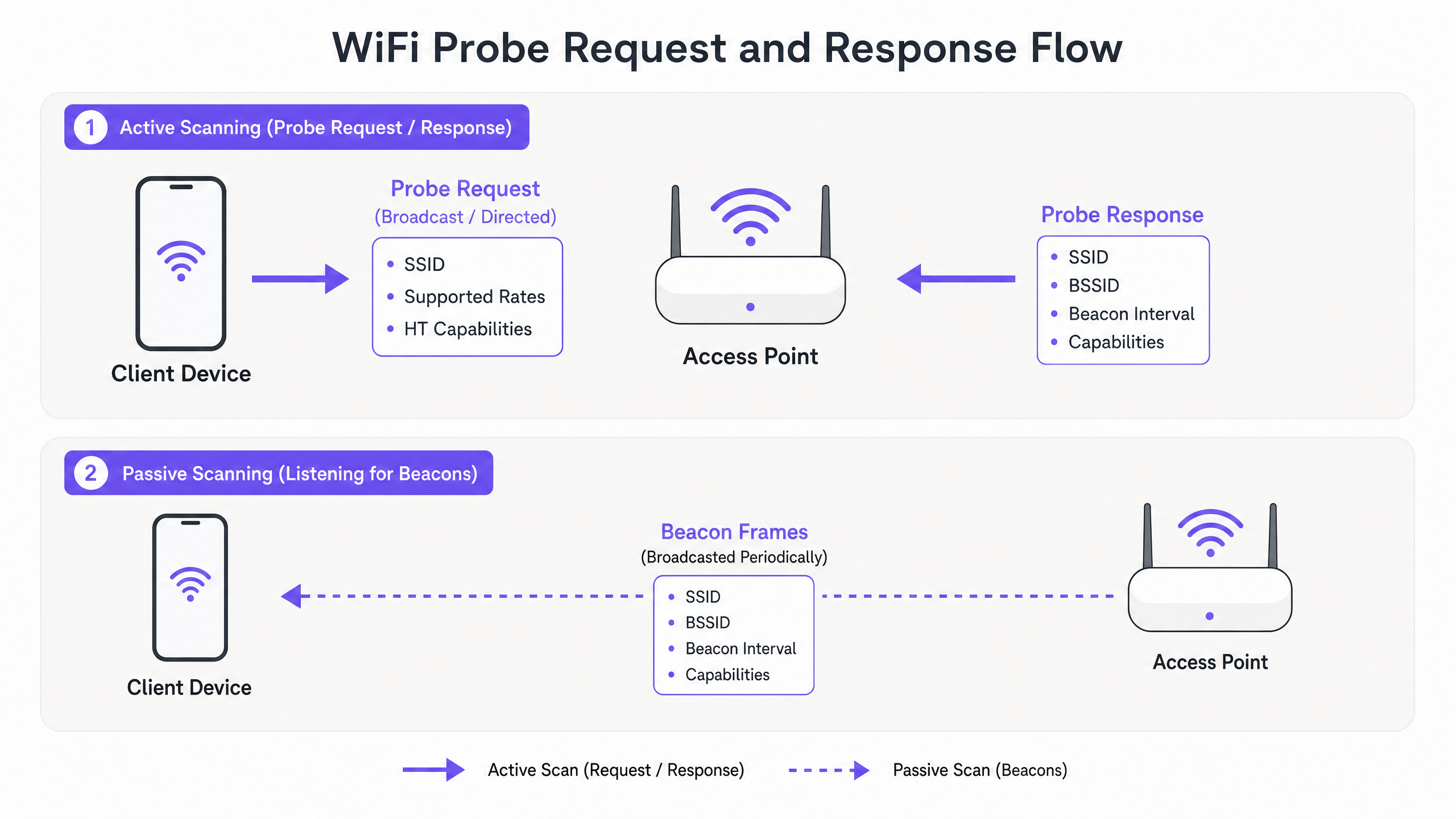
- Passive Scanning: The client device tunes its radio to a specific channel and listens for Beacon frames broadcasted periodically (typically every 100ms) by the Access Point (AP). This method conserves battery life but increases discovery latency.
- Active Scanning: The client device proactively transmits Probe Request frames on various channels and awaits Probe Response frames from APs. This accelerates discovery but consumes airtime and power.
Broadcast vs. Directed Probe Requests
Active scanning utilises two distinct types of probe requests:
- Broadcast (Wildcard) Probe Request: The Service Set Identifier (SSID) field is set to null (length zero). The device is broadcasting to any AP in range, effectively asking, "Who is out there?" All APs receiving this frame, provided they are not configured to hide their SSID, will reply with a Probe Response.
- Directed Probe Request: The SSID field contains a specific network name. The device is querying for a known network from its Preferred Network List (PNL). Only APs hosting that specific SSID will respond. This mechanism is crucial for devices attempting to auto-connect to hidden networks.
Anatomy of a Probe Request Frame
A standard probe request frame contains critical Information Elements (IEs) that inform the AP of the client's capabilities. Key fields include:
- MAC Header: Contains the Frame Control, Duration, Destination Address (usually the broadcast address
ff:ff:ff:ff:ff:ff), Source Address (the client's MAC), and BSSID. - SSID: The target network name (or null for broadcast).
- Supported Rates: Defines the basic and operational data rates the client supports (e.g., 1, 2, 5.5, 11 Mbps for legacy 802.11b, up to modern OFDM rates).
- Extended Supported Rates: Additional data rates supported by the client.
- HT/VHT/HE Capabilities: Indicates support for High Throughput (802.11n), Very High Throughput (802.11ac), or High Efficiency (802.11ax/WiFi 6) features, including spatial streams and channel widths.
Understanding these capabilities is essential for APs to negotiate the optimal connection parameters during the subsequent association phase.
The Impact of MAC Randomisation
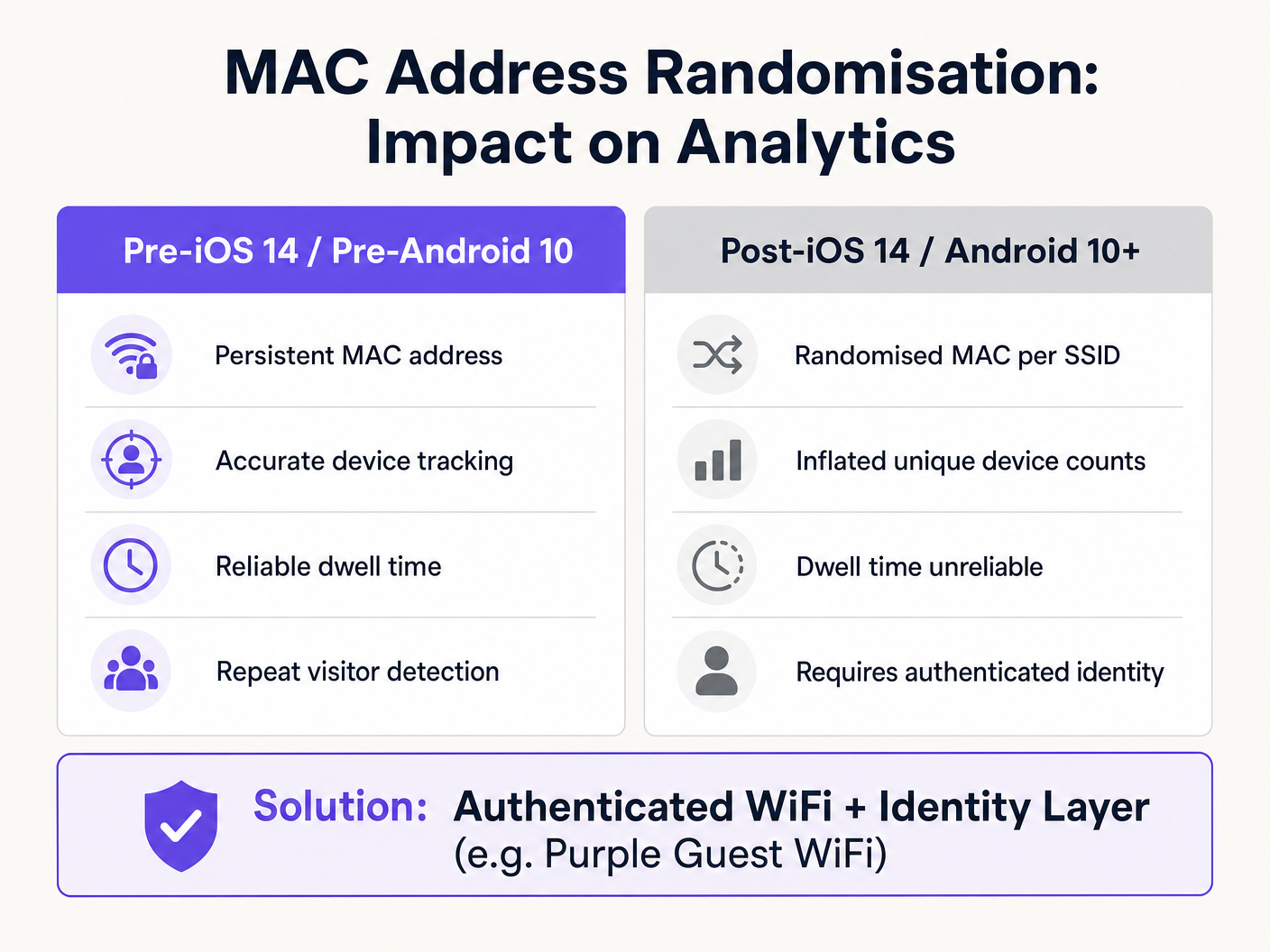
Historically, the Source Address in the probe request was the device's globally unique, burned-in MAC address. This persistence allowed venue operators to track unconnected devices, measure dwell times, and build footfall heatmaps simply by passively listening to probe requests.
However, privacy concerns regarding the broadcast of persistent identifiers led to the implementation of MAC randomisation. Introduced in iOS 14 and Android 10, modern operating systems now generate a randomised, locally administered MAC address when transmitting probe requests.
The End of Unauthenticated Tracking
The operational impact is profound:
- Inflated Device Counts: A single device may generate multiple randomised MAC addresses over time, artificially inflating unique visitor metrics in legacy analytics systems.
- Broken Dwell Time: Tracking a device's journey across a venue is impossible if its identifier changes mid-visit.
- Loss of Repeat Visitor Data: Without a persistent identifier, distinguishing a new visitor from a returning one via probe data is unfeasible.
The IIdentity-Driven Solution
To restore analytical accuracy, the tracking paradigm must shift from Layer 2 hardware identifiers to Layer 7 authenticated identities. By implementing a robust captive portal or seamless onboarding flow (such as How a wi fi assistant Enables Passwordless Access in 2026 ), venues capture a persistent, consented identity (e.g., email, social profile, or loyalty ID).
Once a user authenticates, the Purple platform correlates the current MAC address (even if randomised for that specific SSID) with the user's persistent profile. This ensures that subsequent visits and movements are accurately tracked against the authenticated identity, bypassing the limitations of MAC randomisation entirely. This approach is fundamental to executing strategies outlined in How To Improve Guest Satisfaction: The Ultimate Playbook .
Implementation Guide: Optimising for High-Density
In environments like stadiums or large retail spaces, the sheer volume of probe requests from thousands of devices can severely degrade network performance. This phenomenon, known as a Probe Storm, consumes valuable airtime, leaving less capacity for actual data transmission.
Mitigating Probe Storms
Network architects must implement proactive configuration strategies to manage management frame overhead:
- Probe Response Suppression: Configure APs to ignore broadcast probe requests from devices with a Received Signal Strength Indicator (RSSI) below a specific threshold (e.g., -75 dBm). If a device is too far away to establish a reliable connection, the AP should not waste airtime responding to its probes.
- Disable Lower Data Rates: By disabling legacy data rates (e.g., 1, 2, 5.5, 11 Mbps) and setting the minimum mandatory basic rate to 12 Mbps or 24 Mbps, management frames (which are transmitted at the lowest basic rate) consume significantly less airtime.
- Band Steering: Actively steer capable clients to the 5 GHz or 6 GHz bands. The 2.4 GHz band has limited non-overlapping channels and is highly susceptible to congestion from probe storms.
- Limit SSIDs: Every SSID broadcasted by an AP requires its own set of Beacon frames and Probe Responses. Restrict the number of SSIDs to an absolute minimum (ideally no more than three per AP) to reduce management overhead.
Security and Compliance
The Privacy Exposure of Directed Probes
Directed probe requests pose a unique security risk. Because they broadcast the names of previously connected networks (the PNL), an attacker capturing these frames can build a profile of a user's movements (e.g., identifying their home network, employer, or frequented cafes).
Furthermore, this exposes the device to Evil Twin attacks. An attacker can deploy a rogue AP broadcasting an SSID from the victim's PNL. The victim's device, recognising the familiar SSID in its directed probe response, may automatically associate with the rogue AP, exposing traffic to interception.
Mitigation: Implementing WPA3-Enterprise or WPA3-Enhanced Open (OWE) mitigates the risk of interception post-association, but network hygiene (users manually forgetting public networks) remains the primary defence against PNL exposure.
GDPR and Legitimate Interest
Under the UK GDPR and EU GDPR, collecting MAC addresses—even if hashed or randomised—can constitute processing personal data if it can be linked to an individual. When deploying probe-based analytics, organisations must:
- Establish a clear lawful basis (typically Legitimate Interest for anonymised footfall, or Consent for targeted marketing).
- Implement prominent signage informing visitors that WiFi scanning is in operation.
- Provide a clear opt-out mechanism.
Transitioning to an authenticated Guest WiFi model simplifies compliance, as explicit consent is captured during the onboarding process.
ROI & Business Impact
Understanding and managing probe requests is not merely a technical exercise; it directly impacts the bottom line.
- Network Performance: Proper probe storm mitigation ensures high throughput and low latency for connected users, directly influencing guest satisfaction and operational efficiency.
- Accurate Analytics: Transitioning from flawed probe-based tracking to authenticated identity layers ensures marketing and operations teams base decisions on reliable data. This is critical for measuring campaign attribution, optimising staffing levels based on genuine footfall, and driving revenue through targeted engagement.
- Risk Mitigation: Proactive management of management frames and adherence to privacy regulations protects the organisation from compliance fines and reputational damage.
By mastering the mechanics of device discovery, IT leaders can architect networks that are not only resilient and performant but also serve as foundational assets for enterprise intelligence. For further insights into location-based tracking, review The Mechanics of WiFi Wayfinding: Trilateration and RSSI Explained .
Key Definitions
Probe Request
A Layer 2 management frame transmitted by a client device to discover available 802.11 networks in its vicinity.
The fundamental mechanism for network discovery before a device authenticates or associates.
Probe Response
A management frame transmitted by an Access Point in reply to a Probe Request, containing network capabilities and configuration parameters.
Provides the client with the necessary information to initiate the association process.
MAC Randomisation
A privacy feature where a device generates a temporary, locally administered MAC address instead of its permanent hardware address when scanning for networks.
Renders legacy, unauthenticated footfall analytics inaccurate by inflating unique device counts.
Probe Storm
A condition in high-density environments where the sheer volume of probe requests and responses consumes a significant percentage of available airtime.
Causes severe network performance degradation, requiring specific AP configuration mitigations.
Preferred Network List (PNL)
A list maintained by a client device containing the SSIDs of networks it has previously connected to.
Devices broadcast these SSIDs in Directed Probe Requests, creating potential privacy and security risks.
RSSI (Received Signal Strength Indicator)
A measurement of the power present in a received radio signal.
Used in Probe Response Suppression to filter out requests from distant devices.
Management Frame
802.11 frames used to establish and maintain communications between clients and APs (e.g., Beacons, Probes, Authentication frames).
Unlike data frames, they carry network control information and must be carefully managed to preserve airtime.
Band Steering
A technique used by APs to encourage dual-band clients to connect to the less congested 5 GHz or 6 GHz bands rather than 2.4 GHz.
A key strategy for mitigating the impact of probe storms on legacy bands.
Worked Examples
A 400-store retail chain is experiencing severe WiFi performance degradation during peak weekend hours. The IT dashboard shows high channel utilisation on the 2.4 GHz band, but data throughput is low. How should the network architect address this?
- Conduct a packet capture to confirm the presence of a probe storm. 2. Implement Probe Response Suppression, configuring APs to ignore probe requests with an RSSI weaker than -75 dBm. 3. Disable legacy 802.11b data rates (1, 2, 5.5, 11 Mbps) to force management frames to transmit at higher speeds, consuming less airtime. 4. Enable aggressive band steering to push dual-band clients to 5 GHz.
A marketing director at a large conference centre reports that their footfall analytics dashboard shows 50,000 unique visitors, but ticket sales indicate only 15,000 attendees. What is causing this discrepancy and how can it be resolved?
The discrepancy is caused by MAC address randomisation. Unconnected devices are transmitting probe requests with rotating MAC addresses, causing the legacy analytics platform to count single devices multiple times. The solution is to deploy an authenticated Guest WiFi portal. By requiring users to log in (e.g., via email or social SSO), the venue ties analytics to a persistent identity rather than a rotating hardware identifier.
Practice Questions
Q1. You are designing the WiFi network for a 50,000-seat stadium. During a test event, you observe 60% channel utilisation on 2.4 GHz, but very little actual data traffic. Which configuration change will have the most immediate positive impact?
Hint: Consider how management frames are transmitted and how to reduce their footprint on the airtime.
View model answer
Disable the lowest mandatory basic data rates (1, 2, 5.5, 11 Mbps) and implement Probe Response Suppression for clients with an RSSI weaker than -75 dBm. This forces management frames to transmit faster (taking up less airtime) and stops the APs from responding to devices too far away to connect reliably.
Q2. A client requests a footfall tracking solution that does not require users to connect to the WiFi, citing a desire for 'frictionless analytics'. How should you advise them?
Hint: Factor in modern mobile OS privacy features and the limitations of Layer 2 tracking.
View model answer
Advise the client that unauthenticated, probe-based footfall tracking is no longer reliable due to MAC address randomisation in iOS 14+ and Android 10+. Unconnected devices will appear as multiple unique visitors, severely inflating the data. The recommended architecture is to deploy a seamless, authenticated Guest WiFi portal to capture persistent Layer 7 identities, ensuring accurate data and GDPR compliance.
Q3. An executive is concerned about the security implications of devices broadcasting their Preferred Network Lists (PNL). What is the specific attack vector they are worried about, and how is it executed?
Hint: Think about how an attacker might use the information contained in a Directed Probe Request.
View model answer
The executive is concerned about an Evil Twin attack. An attacker captures a Directed Probe Request containing an SSID from the device's PNL. The attacker then stands up a rogue access point broadcasting that exact SSID. Because the device trusts the network name, it may automatically associate with the rogue AP, allowing the attacker to intercept traffic or launch man-in-the-middle attacks.