
Indoor WiFi Positioning Systems: How They Work and How to Deploy Them
This comprehensive guide details the technical architecture, deployment strategies, and business value of WiFi-based indoor positioning systems. It provides network architects and IT directors with actionable guidance on AP placement, RF calibration, and overcoming MAC randomisation to deliver precise spatial analytics.
Video overview
Listen to this guide
View podcast transcript
Part of our core series: WiFi Analytics Guide →

Executive Summary
For enterprise venue operators, understanding visitor movement is no longer a luxury - it is a fundamental requirement for operational efficiency and business optimisation. Indoor WiFi positioning systems transform existing network infrastructure into a powerful spatial analytics engine. By leveraging Received Signal Strength Indicator (RSSI) measurements from your deployed access points, these systems provide actionable insights into footfall, dwell time, and zone transitions without requiring additional hardware overlays such as Bluetooth beacons or ultra-wideband sensors.
This technical reference guide details the architecture, deployment considerations, and business impact of WiFi-based indoor positioning. Designed for network architects and IT directors, it provides vendor-neutral guidance on access point configuration, site surveys, and radio calibration, whilst demonstrating how integration with platforms like Purple's WiFi Analytics transforms raw telemetry data into measurable ROI. Whether you are managing a 200-room hotel, a multi-floor retail environment, or a large public sector facility, this guide provides the technical foundation required to deploy positioning analytics effectively and compliantly.
Technical Deep-Dive: Architecture and Standards
The fundamental challenge of indoor positioning is that GPS signals cannot reliably penetrate building construction materials. Consequently, enterprise venues must rely on local radio frequency (RF) infrastructure. Given its ubiquitous deployment for connectivity, WiFi is a logical choice.
How RSSI Trilateration Works
The core metric for WiFi positioning is the Received Signal Strength Indicator (RSSI). Every WiFi-enabled device constantly scans for available networks, measuring the signal strength of nearby access points (APs). RSSI is expressed in decibels relative to a milliwatt (dBm), typically ranging from -30 dBm (excellent signal) to -90 dBm (unusable signal).
Indoor positioning platforms use trilateration to estimate a device's location. When a device's RSSI is measured by three or more APs with known physical coordinates, the system calculates the estimated distance from each AP. The intersection of these probability radii determines the estimated location.
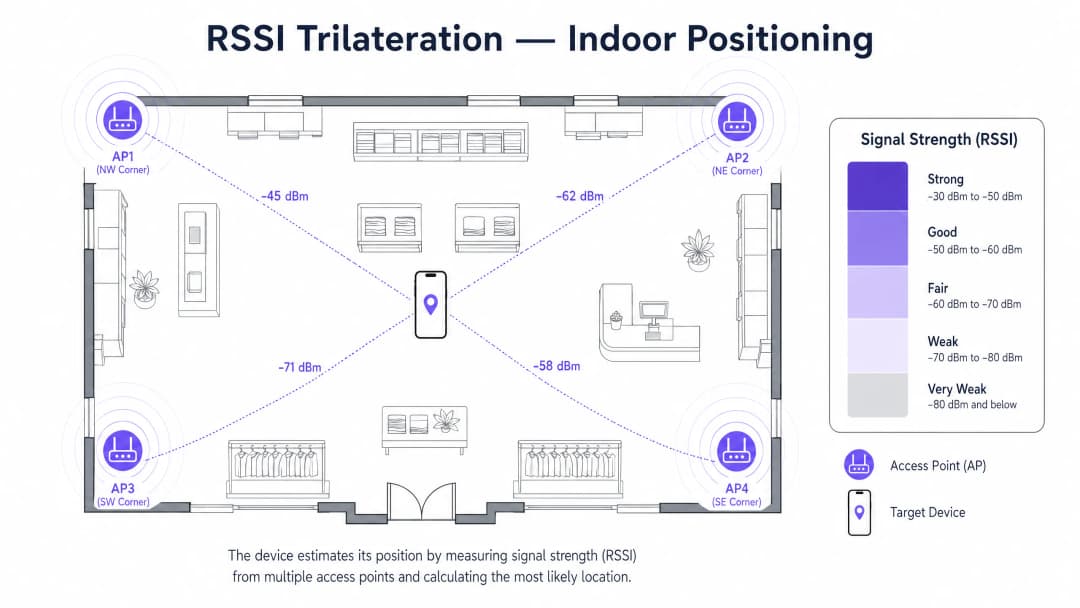
Although trilateration provides the mathematical foundation, raw RSSI is highly volatile due to multipath fading, absorption by physical obstacles, and interference. Therefore, enterprise systems use RF fingerprinting - a calibration process where empirical RSSI measurements are recorded at known locations to build a reference database. During operation, the system compares real-time RSSI readings against this fingerprint database using probabilistic algorithms (such as k-nearest neighbours or Bayesian inference) to significantly improve accuracy.
Device-Side vs. Infrastructure-Side Positioning
There are two primary architectural models for processing location data:
- Device-Side Positioning: The client device (e.g., a smartphone running a specific app) measures RSSI from nearby APs, calculates its own position, and optionally reports this to a server. This approach scales well but requires user effort (app installation) and is susceptible to OS-level background scanning restrictions.
- Infrastructure-Side Positioning: Network APs listen for probe requests emitted by client devices. The APs forward these RSSI measurements to a central controller or cloud analytics engine, which calculates the position. This is the preferred enterprise model, as it requires no client-side software and provides passive analytics for all transmitting devices. Purple's platform uses this infrastructure-side approach, correlating location data with authenticated profiles via the Guest WiFi Captive Portal.
Relevant IEEE Standards
To optimise positioning accuracy, network architects must ensure that their infrastructure supports specific IEEE 802.11 amendments:
- 802.11k (Radio Resource Measurement): Enables APs and clients to exchange information about the RF environment, giving the network better visibility into client RSSI.
- 802.11v (BSS Transition Management): Allows the network to steer clients to optimal APs, indirectly improving the quality of location telemetry by ensuring clients are connected to APs with the best signal characteristics.
- 802.11ac (Wave 2) and 802.11ax (WiFi 6): Whilst primarily focused on throughput and capacity, the advanced beamforming and MU-MIMO capabilities of these standards provide a more stable RF environment, which benefits RSSI stability.
- 802.11az (Next Generation Positioning): The emerging standard for Fine-Time Measurement (FTM), which uses time-of-flight instead of RSSI to achieve sub-metre accuracy. Whilst not yet ubiquitous, it represents the future of WiFi positioning.
Got questions about your specific setup?
Our team works with venue operators, IT managers, and network engineers across 80,000 venues. Book a 20-minute call and we will show you how others like you solved it.
Implementation Guide: Deployment and Configuration
Deploying an indoor positioning system requires meticulous planning. A network design that provides excellent data coverage does not automatically deliver excellent location accuracy.
Step 1: RF Site Survey
A predictive software survey is insufficient for positioning. You must conduct an active, on-site RF survey. This involves walking the venue with specialised spectrum analysis tools to map actual signal propagation, identify interference sources (e.g., HVAC systems, structural steel), and detect signal dead zones. The survey determines where APs must be added or relocated to ensure that every trackable zone has line-of-sight or strong penetration from at least three APs. For detailed guidance on securing these APs once deployed, see our Access Point Security: Your 2026 Enterprise Guide.
Step 2: Access Point Placement Strategy
For connectivity, APs are often placed in hallways to maximise coverage area. For positioning, this is counter-productive. APs should be placed on the perimeter and corners of the zones you wish to track, drawing the RF signal inwards.
- Density: Aim for at least three APs detecting a client device at any given point (typically at -75 dBm or better).
- Geometry: Avoid placing APs in a straight line. An equilateral triangle or staggered grid pattern provides the best geometry for trilateration algorithms.
- Height: Mount APs at a uniform height, typically between 3 and 4 metres. Excessive height reduces the horizontal RSSI resolution required for accurate 2D positioning.
Step 3: Radio Map Calibration (Fingerprinting)
Once the infrastructure is deployed, you must calibrate the system. This involves uploading an accurate, to-scale floor plan to the positioning platform. A technician then walks the venue, stopping at defined grid points (typically every 2 to 5 metres) to record empirical RSSI samples. This fingerprinting process teaches the algorithm how RF signals actually behave in your specific physical environment, taking into account walls, shelving, and other obstacles.
Step 4: Platform Integration and Identity Resolution
Raw X/Y coordinates are useless without business context. The positioning engine must feed into an analytics dashboard. Furthermore, modern mobile operating systems use MAC address randomisation to prevent passive tracking of unauthenticated devices.
To overcome this, the positioning system must be integrated with the network authentication layer. When a user logs into Guest WiFi (e.g., via a Captive Portal), their randomised MAC address is temporarily associated with their authenticated profile. This allows platforms like Purple to provide rich, longitudinal analytics whilst remaining fully compliant with privacy regulations. For smaller venues looking to implement this baseline connectivity, see How to Set Up a WiFi Hotspot for Your Business (or the Portuguese version, Como Configurar um Hotspot WiFi para o Seu Negócio).
Best Practices for Enterprise Environments
Different industries present unique RF challenges. Adapting the technical strategy to the physical environment is essential for a successful deployment.
Hospitality and Healthcare
In Hospitality and Healthcare environments, the primary challenge is signal attenuation caused by dense walls, fire doors, and elevator shafts.
- Best Practice: Deploy APs within rooms rather than relying on hallway APs to penetrate walls. This micro-cell architecture provides the distinct RF signature required for room-level accuracy.
Retail and Supermarkets
Retail environments struggle with changing RF dynamics. Metal shelving, inventory density, and large crowds absorb and reflect RF signals, meaning the RF environment changes between opening hours and peak times.
- Best Practice: Perform radio calibration during operational hours with normal foot traffic, not in an empty store. Use dynamic calibration algorithms if supported by your vendor.
Transport and Stadiums
In Transport hubs and large event venues, the challenge is the sheer scale and AP density. High AP density can lead to co-channel interference.
- Best Practice: Carefully manage transmit power. APs should be configured with lower transmit power to reduce cell size and interference, relying on a higher density of APs to provide the overlapping coverage required for positioning.

Troubleshooting and Risk Mitigation
Despite meticulous planning, positioning systems can experience degradation. IT teams must proactively monitor and mitigate these common failure modes.
1. The Challenge of MAC Randomisation
As mentioned, iOS and Android randomise MAC addresses to prevent passive tracking. If your system relies entirely on passive probe requests, your analytics will show massively inflated visitor counts and zero repeat visitors.
- Mitigation: Mandate Captive Portal authentication for guest access. The value exchange (free WiFi in exchange for contact details) provides the legal basis and technical mechanism to resolve identity. Ensure your network is protected against spoofing; review Protect Your Network with Strong DNS and Security for strategies on hardening infrastructure.
2. Firmware Anomalies
RSSI reporting behaviour can change dramatically between AP firmware versions. An update can alter how frequently an AP reports probe requests or how it calculates the RSSI value.
- Mitigation: Standardise firmware across the entire deployment. Before rolling out vendor firmware updates, test them in a staging environment to verify they do not degrade the location analytics feed.
3. Environmental Drift
A venue refurbished with new metal fixtures or relocated partition walls will invalidate the existing RF fingerprint map, leading to a severe degradation in location accuracy.
- Mitigation: Implement a policy requiring an IT review of any significant physical changes to the venue. Schedule periodic recalibration of the radio map, especially in dynamic environments like retail.
ROI and Business Impact
The justification for deploying an indoor positioning system hinges on its ability to generate actionable business intelligence. When integrated with platforms like Purple's WiFi Analytics, technical telemetry translates directly into business value.
Measuring Success
Success should be measured against specific operational KPIs:
- Capture Rate: The percentage of total foot traffic that connects to the WiFi and becomes an authenticated, trackable profile.
- Zone Conversion: Analysing the funnel of visitors moving from the entrance to specific high-value zones (e.g., the restaurant in a hotel, or a specific department in retail).
- Dwell Time Optimisation: Identifying areas where visitors spend excessive time (indicating bottlenecks, such as checkout queues) versus areas where they linger (indicating engagement, such as lounges or feature displays).
Cost-Benefit Analysis
The primary cost benefit of WiFi positioning is that it leverages sunk costs. APs, switching, and cabling for connectivity are already deployed. The incremental cost is the software licensing for the analytics platform and the labour for site surveys and calibration.
Benefits are realised through operational efficiency. For example, a stadium can dynamically deploy security or concession staff based on real-time crowd density heatmaps. A retail chain can correlate dwell times in specific aisles with point-of-sale data to measure the effectiveness of end-cap displays. As Purple continues to expand its analytics capabilities - highlighted recently by strategic moves such as the appointment of VP Education Tim Peers to drive sector-specific solutions - the ability to extract deep, contextual insights from existing network infrastructure remains a compelling value proposition for enterprise IT leaders.
Key Definitions
RSSI (Received Signal Strength Indicator)
A measurement of the power level of an RF signal received by a client device from an access point, expressed in negative decibels (dBm).
RSSI is the raw telemetry data used by trilateration algorithms to estimate the distance between a device and an AP.
Trilateration
A mathematical technique used to determine location by measuring the distance from three or more known reference points.
This is the core algorithm used by the infrastructure to calculate X/Y coordinates based on RSSI values from multiple APs.
RF Fingerprinting
The process of empirically measuring and recording RSSI values at specific physical coordinates to create a database of the venue's unique radio environment.
Essential for overcoming multipath interference and improving accuracy beyond basic mathematical trilateration.
MAC Address Randomisation
A privacy feature in modern mobile OSs where the device broadcasts a fake, rotating MAC address when scanning for networks.
This breaks passive tracking systems, necessitating the use of captive portals to authenticate users and resolve their identity.
Probe Request
A management frame transmitted by a client device to discover available 802.11 networks in its vicinity.
Infrastructure-side positioning systems listen for these requests to gather the RSSI data needed for location calculation.
802.11k/v
IEEE standards that allow APs and clients to exchange information about the RF environment and manage roaming.
Supporting these standards ensures the network has better visibility into client RSSI, improving positioning accuracy.
Multipath Interference
A phenomenon where radio signals reach the receiving antenna by two or more paths due to reflection off surfaces like metal or glass.
Multipath causes RSSI fluctuations, which is why RF fingerprinting is required to map the actual signal behaviour in the venue.
Dwell Time
The duration a specific device remains within a defined physical zone.
A critical business metric derived from positioning data, used to measure engagement in retail displays or queue lengths in transport hubs.
Worked Examples
A 300-room hotel is experiencing poor location accuracy (15+ metres) in its guest corridors, making it impossible to determine which specific room a device is in. The current deployment uses high-powered APs spaced every 20 metres in the main hallways.
The IT team must transition from a hallway-centric coverage model to a micro-cell architecture. They should deploy lower-powered wall-plate APs directly inside the guest rooms (e.g., one AP for every two rooms). They must then perform a new RF fingerprint calibration. This creates distinct RF signatures for each room, allowing the system to differentiate between a device in Room 101 versus Room 102.
A large retail client reports that their passive WiFi analytics dashboard shows 10,000 unique visitors per day, but door counters only register 2,000. Furthermore, the dashboard shows a 0% repeat visitor rate.
The system is falling victim to MAC address randomisation from modern iOS and Android devices. The IT team must configure the analytics platform to filter out locally administered (randomised) MAC addresses from the passive analytics feed. To capture accurate, longitudinal data, they must implement a Captive Portal on the Guest WiFi, requiring users to authenticate. The analytics engine will then track the authenticated session rather than the ephemeral MAC address.
Practice Questions
Q1. You are designing the AP layout for a new 5,000 sq ft open-plan retail store. The primary requirement is accurate indoor positioning to track customer flow. Should you place the APs in a straight line down the centre aisle to maximise aesthetic appeal and simplify cabling?
Hint: Consider how trilateration algorithms calculate distance based on intersecting circles.
View model answer
No. Placing APs in a straight line provides terrible geometry for trilateration, as the intersecting probability circles will overlap in two places (mirror images on either side of the line), making it impossible for the system to determine which side of the aisle the customer is on. APs must be placed in a staggered or perimeter configuration to surround the tracked area.
Q2. Your venue has recently installed a large, floor-to-ceiling mirrored glass water feature in the centre of the main lobby. Shortly after, the location accuracy in the lobby degrades significantly. What is the likely technical cause, and what is the remediation?
Hint: Consider how RF signals interact with reflective surfaces.
View model answer
The mirrored glass and water are causing severe multipath interference, reflecting the RF signals and altering the RSSI values received by the APs. The remediation is to perform a new RF site survey and recalibrate the radio fingerprint map for the lobby, teaching the algorithm the new RF characteristics of the space.
Q3. A stakeholder wants to track the movement of every single person who walks past the storefront, regardless of whether they connect to the Guest WiFi. Explain why this is technically unfeasible and legally problematic.
Hint: Think about mobile OS privacy features and GDPR lawful basis requirements.
View model answer
Technically, iOS and Android devices use MAC address randomisation when probing for networks, meaning a single device walking past will appear as multiple different, untrackable devices. Legally, tracking individuals without consent or a clear lawful basis violates GDPR. The correct approach is to require users to connect to the Guest WiFi via a captive portal, providing consent and allowing the system to track an authenticated session.
Continue reading in this series
Cisco Meraki location analytics: what you get built in and where it stops
You will be able to decide which Meraki presence questions the built-in dashboard can answer, when to stream raw observations through the scanning API, and when you need a captive portal for identified visitors. You will also know why loyalty figures mislead, and which figures you can safely put in front of your board.
Measuring the Business ROI of Guest WiFi and Location Analytics
This technical reference shows IT and venue teams how to measure the ROI of guest WiFi with a defensible chain from network health and consented data to validated operational or commercial outcomes. It separates measurable evidence from assumptions, maps Purple Connect, Capture and Engage to the right measurement layer, and gives planning scenarios for hotels, retail estates and event venues.
Privacy by Design: Anonymising WiFi Data for GDPR Compliance
This authoritative guide details the technical architecture and implementation strategies for anonymising WiFi data to ensure GDPR compliance. It provides IT leaders and network architects with actionable frameworks for balancing robust venue analytics with strict data privacy requirements.
Got questions about your specific setup?
Our team works with venue operators, IT managers, and network engineers across 80,000 venues. Book a 20-minute call and we will show you how others like you solved it.