
Sistemas de posicionamiento WiFi en interiores: cómo funcionan y cómo implementarlos
Esta guía exhaustiva detalla la arquitectura técnica, las estrategias de implementación y el valor comercial de los sistemas de posicionamiento en interiores basados en WiFi. Proporciona a los arquitectos de red y directores de TI orientación práctica sobre la ubicación de AP, la calibración de RF y cómo superar la aleatorización de direcciones MAC para ofrecer analíticas espaciales precisas.
Video overview
Escucha esta guía
Ver transcripción del podcast
Parte de nuestra serie principal: Guía de analíticas WiFi →

Resumen ejecutivo
Para los operadores de espacios empresariales, comprender el movimiento de los visitantes ya no es un lujo; es un requisito fundamental para la eficiencia operativa y la optimización del negocio. Los sistemas de posicionamiento en interiores con WiFi transforman la infraestructura de red existente en un potente motor de análisis espacial. Al aprovechar las mediciones del indicador de fuerza de la señal recibida (RSSI) de sus puntos de acceso implementados, estos sistemas proporcionan información útil sobre la afluencia de personas, el tiempo de permanencia y las transiciones entre zonas sin necesidad de hardware adicional como balizas Bluetooth o sensores de banda ultraancha.
Esta guía de referencia técnica detalla la arquitectura, las consideraciones de implementación y el impacto empresarial del posicionamiento en interiores basado en WiFi. Diseñada para arquitectos de redes y directores de TI, ofrece una orientación neutral respecto al proveedor sobre la configuración de los puntos de acceso, los estudios de cobertura y la calibración de radio, al tiempo que demuestra cómo la integración con plataformas como el WiFi Analytics de Purple transforma los datos de telemetría sin procesar en un ROI medible. Ya sea que gestione un hotel de 200 habitaciones, un entorno comercial de varios pisos o una gran instalación del sector público, esta guía proporciona la base técnica necesaria para implementar análisis de posicionamiento de manera eficaz y de conformidad con las normativas.
Análisis técnico profundo: arquitectura y estándares
El desafío fundamental del posicionamiento en interiores es que las señales GPS no pueden penetrar de manera confiable los materiales de construcción de los edificios. Por lo tanto, los espacios empresariales deben depender de la infraestructura local de radiofrecuencia (RF). Dado su despliegue ubicuo para la conectividad, el WiFi es una opción lógica.
Cómo funciona la trilateración RSSI
La métrica principal para el posicionamiento WiFi es el Indicador de Fuerza de la Señal Recibida (RSSI). Cada dispositivo con WiFi habilitado escanea constantemente las redes disponibles, midiendo la fuerza de la señal de los puntos de acceso (AP) cercanos. El RSSI se expresa en decibelios relativos a un milivatio (dBm), que normalmente oscila entre -30 dBm (excelente señal) y -90 dBm (señal inutilizable).
Las plataformas de posicionamiento en interiores utilizan la trilateración para estimar la ubicación de un dispositivo. Cuando el RSSI de un dispositivo es medido por tres o más AP con coordenadas físicas conocidas, el sistema calcula la distancia estimada desde cada AP. La intersección de estos radios de probabilidad determina la ubicación estimada.
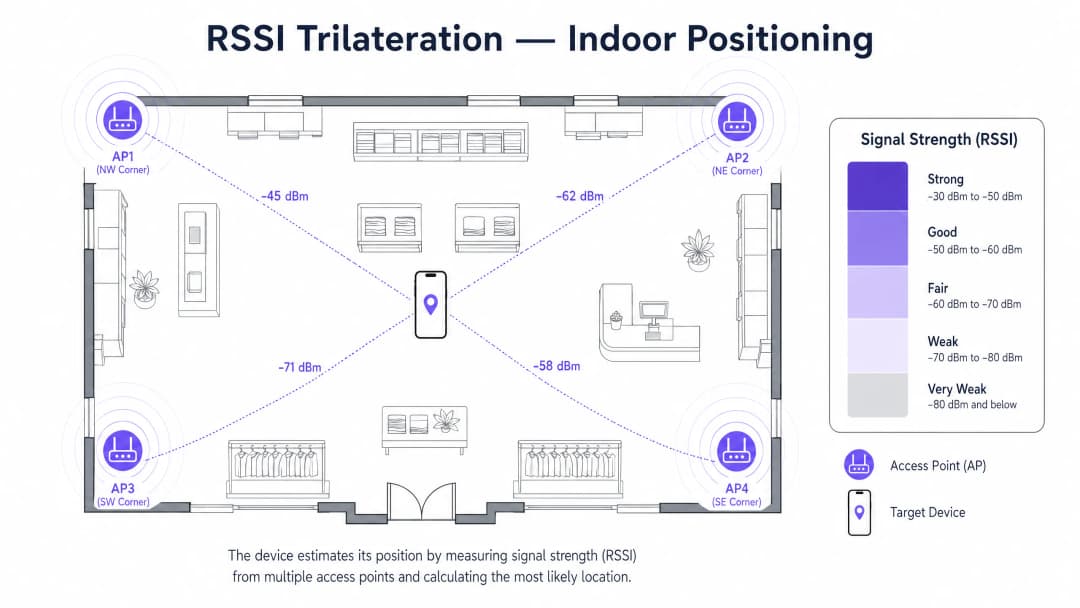
Aunque la trilateración proporciona la base matemática, el RSSI bruto es altamente volátil debido al desvanecimiento por trayectorias múltiples, la absorción por obstáculos físicos y la interferencia. Por lo tanto, los sistemas empresariales utilizan la huella digital de RF (RF fingerprinting), un proceso de calibración en el que se registran mediciones empíricas de RSSI en ubicaciones conocidas para construir una base de datos de referencia. Durante el funcionamiento, el sistema compara las lecturas de RSSI en tiempo real con esta base de datos de huellas digitales utilizando algoritmos probabilísticos (como k-vecinos más cercanos o inferencia bayesiana) para mejorar significativamente la precisión.
Posicionamiento del lado del dispositivo frente al lado de la infraestructura
Existen dos modelos arquitectónicos principales para procesar los datos de ubicación:
- Posicionamiento del lado del dispositivo: el dispositivo del cliente (por ejemplo, un teléfono inteligente que ejecuta una aplicación específica) mide el RSSI de los AP cercanos, calcula su propia posición y, opcionalmente, la reporta a un servidor. Este enfoque escala bien, pero requiere el esfuerzo del usuario (instalación de la aplicación) y es susceptible a las restricciones de escaneo en segundo plano a nivel del sistema operativo.
- Posicionamiento del lado de la infraestructura: los AP de la red escuchan las solicitudes de sondeo (probe requests) emitidas por los dispositivos de los clientes. Los AP reenvían estas mediciones de RSSI a un controlador central o a un motor de análisis en la nube, que calcula la posición. Este es el modelo empresarial preferido, ya que no requiere software del lado del cliente y proporciona análisis pasivos para todos los dispositivos emisores. La plataforma de Purple utiliza este enfoque del lado de la infraestructura, correlacionando los datos de ubicación con perfiles autenticados a través del Captive Portal de Guest WiFi.
Estándares IEEE relevantes
Para optimizar la precisión del posicionamiento, los arquitectos de red deben asegurarse de que su infraestructura admita enmiendas específicas de IEEE 802.11:
- 802.11k (Radio Resource Measurement): permite a los AP y a los clientes intercambiar información sobre el entorno de RF, lo que brinda a la red una mejor visibilidad de la RSSI del cliente.
- 802.11v (BSS Transition Management): permite a la red dirigir a los clientes a los AP óptimos, mejorando indirectamente la calidad de la telemetría de ubicación al garantizar que los clientes estén conectados a los AP con las mejores características de señal.
- 802.11ac (Wave 2) y 802.11ax (WiFi 6): aunque se centran principalmente en el rendimiento y la capacidad, las capacidades avanzadas de beamforming y MU-MIMO de estos estándares proporcionan un entorno de RF más estable, lo que beneficia la estabilidad de la RSSI.
- 802.11az (Next Generation Positioning): el estándar emergente para Fine-Time Measurement (FTM), que utiliza el tiempo de vuelo en lugar de la RSSI para lograr una precisión de menos de un metro. Aunque aún no es omnipresente, representa el futuro del posicionamiento WiFi.
Guía de implementación: despliegue y configuración
Desplegar un sistema de posicionamiento en interiores requiere una planificación meticulosa. Un diseño de red que proporciona una excelente cobertura de datos no ofrece automáticamente una excelente precisión de ubicación.
Paso 1: estudio de sitio de RF
Un estudio predictivo por software es insuficiente para el posicionamiento. Debe realizar un estudio de RF activo en el sitio. Esto implica recorrer el lugar con herramientas especializadas de análisis de espectro para mapear la propagación real de la señal, identificar fuentes de interferencia (por ejemplo, sistemas HVAC, acero estructural) y detectar zonas muertas de señal. El estudio determina dónde deben agregarse o reubicarse los AP para garantizar que cada zona rastreable tenga línea de visión o una fuerte penetración de al menos tres AP. Para obtener una guía detallada sobre cómo proteger estos AP una vez desplegados, consulte nuestra Access Point Security: Your 2026 Enterprise Guide.
Paso 2: estrategia de colocación de Access Points
Para fines de conectividad, los AP a menudo se colocan en los pasillos para maximizar el área de cobertura. Para el posicionamiento, esto resulta contraproducente. Los AP deben colocarse en el perímetro y en las esquinas de las zonas que desea rastrear, atrayendo la señal de RF hacia el interior.
- Densidad: el objetivo es tener al menos tres AP detectando un dispositivo cliente en cualquier punto dado (generalmente a -75 dBm o mejor).
- Geometría: evite colocar los AP en línea recta. Un patrón de triángulo equilátero o de cuadrícula escalonada proporciona la mejor geometría para los algoritmos de trilateración.
- Altura: monte los AP a una altura uniforme, típicamente entre 3 y 4 metros. Una altura excesiva reduce la resolución horizontal de la RSSI requerida para un posicionamiento 2D preciso.
Paso 3: calibración del mapa de radio (huella digital)
Una vez desplegada la infraestructura, debe calibrar el sistema. Esto implica cargar un plano de planta preciso y a escala en la plataforma de posicionamiento. Luego, un técnico recorre el recinto, deteniéndose en puntos de cuadrícula definidos (normalmente cada 2 a 5 metros) para registrar muestras de RSSI empíricas. Este proceso de huella digital o fingerprinting enseña al algoritmo cómo se comportan realmente las señales de RF en su entorno físico específico, teniendo en cuenta paredes, estanterías y otros obstáculos.
Paso 4: Integración de Plataforma y Resolución de Identidad
Las coordenadas X/Y brutas son inútiles sin el contexto empresarial. El motor de posicionamiento debe alimentar un panel de analíticas. Además, los sistemas operativos móviles modernos utilizan la aleatorización de direcciones MAC para evitar el seguimiento pasivo de dispositivos no autenticados.
Para superar esto, el sistema de posicionamiento debe integrarse con la capa de autenticación de red. Cuando un usuario inicia sesión en el Guest WiFi (por ejemplo, a través de un Captive Portal), su dirección MAC aleatoria se asocia temporalmente con su perfil autenticado. Esto permite que plataformas como Purple proporcionen analíticas longitudinales completas sin dejar de cumplir totalmente con las regulaciones de privacidad. Para recintos más pequeños que buscan implementar esta conectividad de línea base, consulte Cómo configurar un hotspot WiFi para su negocio (o la versión en portugués, Como Configurar um Hotspot WiFi para o Seu Negócio).
¿Tiene preguntas sobre su configuración específica?
Nuestro equipo trabaja con gestores de espacios, responsables de TI e ingenieros de redes en 80 000 establecimientos. Reserve una llamada de 20 minutos y le mostraremos cómo lo resolvieron otros profesionales como usted.
Mejores Prácticas para Entornos Empresariales
Las diferentes industrias presentan desafíos de RF únicos. Adaptar la estrategia técnica al entorno físico es esencial para un despliegue exitoso.
Hospitalidad y Atención Médica
En entornos de Hospitality y Healthcare, el principal desafío es la atenuación de la señal causada por paredes densas, puertas cortafuegos y pozos de ascensores.
- Mejor Práctica: Despliegue APs dentro de las habitaciones en lugar de depender de los APs de los pasillos para penetrar las paredes. Esta arquitectura de microceldas proporciona la firma de RF distintiva requerida para la precisión a nivel de habitación.
Retail y Supermercados
Los entornos de Retail luchan con la dinámica cambiante de las RF. Las estanterías metálicas, la densidad de inventario y las grandes multitudes absorben y reflejan las señales de RF, lo que significa que el entorno de RF cambia entre las horas de apertura y las horas pico.
- Mejor Práctica: Realice la calibración de radio durante las horas operativas con tráfico peatonal normal, no en una tienda vacía. Utilice algoritmos de calibración dinámica si su proveedor los admite.
Transporte y Estadios
En los centros de Transport y grandes recintos para eventos, el desafío es la escala absoluta y la densidad de APs. Una alta densidad de APs puede provocar interferencias de canal adyacente.
- Mejor Práctica: Gestione cuidadosamente la potencia de transmisión. Los APs deben configurarse con una potencia de transmisión más baja para reducir el tamaño de la celda y la interferencia, confiando en una mayor densidad de APs para proporcionar la cobertura superpuesta necesaria para el posicionamiento.

Solución de problemas y mitigación de riesgos
A pesar de una planificación minuciosa, los sistemas de posicionamiento pueden experimentar una degradación en su rendimiento. Los equipos de TI deben monitorear y mitigar de manera proactiva estos fallos comunes.
1. El desafío de la aleatorización de direcciones MAC
Como se mencionó, iOS y Android aleatorizan las direcciones MAC para evitar el seguimiento pasivo. Si su sistema depende por completo de solicitudes de sondeo pasivo, sus analíticas mostrarán un número de visitantes enormemente inflado y cero visitantes recurrentes.
- Mitigación: Exija la autenticación a través de un Captive Portal para el acceso de invitados. El intercambio de valor (WiFi gratuito a cambio de datos de contacto) proporciona la base legal y el mecanismo técnico para resolver la identidad. Asegúrese de que su red esté protegida contra el spoofing; consulte Protect Your Network with Strong DNS and Security para conocer las estrategias sobre cómo reforzar la infraestructura.
2. Anomalías de firmware
El comportamiento de los reportes de RSSI puede cambiar drásticamente entre las distintas versiones de firmware de los AP. Una actualización puede alterar la frecuencia con la que un AP reporta solicitudes de sondeo o cómo calcula el valor RSSI.
- Mitigación: Estandarice el firmware en toda la implementación. Antes de implementar actualizaciones de firmware de los proveedores, pruébelas en un entorno de pruebas para verificar que no afecten el flujo de analíticas de ubicación.
3. Deriva ambiental
Un establecimiento remodelado con nuevos accesorios metálicos o muros divisorios reubicados invalidará el mapa de huella de RF existente, lo que provocará una grave pérdida de precisión en la ubicación.
- Mitigación: Implemente una política que requiera una revisión de TI ante cualquier cambio físico significativo en el establecimiento. Programe una recalibración periódica del mapa de radio, especialmente en entornos dinámicos como el sector minorista.
ROI e impacto empresarial
La justificación para implementar un sistema de posicionamiento en interiores radica en su capacidad para generar inteligencia de negocios procesable. Cuando se integra con plataformas como WiFi Analytics de Purple, la telemetría técnica se traduce directamente en valor comercial.
Medición del éxito
El éxito debe medirse con base en KPI operativos específicos:
- Tasa de captura: El porcentaje del tráfico peatonal total que se conecta al WiFi y se convierte en un perfil autenticado e identificable.
- Conversión de zona: Análisis del embudo de visitantes que se desplazan desde la entrada hacia zonas específicas de alto valor (por ejemplo, el restaurante de un hotel o un departamento específico en una tienda minorista).
- Optimización del tiempo de permanencia: Identificación de áreas donde los visitantes pasan demasiado tiempo (lo que indica cuellos de botella, como las filas de pago) frente a áreas donde se demoran por interés (lo que indica interacción, como salas de espera o áreas de exhibición).
Análisis de costo-beneficio
El principal beneficio de costo del posicionamiento con WiFi es que aprovecha los costos ya incurridos. Los puntos de acceso, la conmutación y el cableado para la conectividad ya están implementados. El costo incremental es la licencia de software para la plataforma de análisis y la mano de obra para los estudios de cobertura y la calibración.
Los beneficios se logran a través de la eficiencia operativa. Por ejemplo, un estadio puede distribuir dinámicamente al personal de seguridad o de alimentos y bebidas en función de mapas de calor de densidad de multitudes en tiempo real. Una cadena de tiendas de retail puede correlacionar los tiempos de permanencia en pasillos específicos con los datos del punto de venta para medir la efectividad de las exhibiciones en las cabeceras de góndola. A medida que Purple continúa expandiendo sus capacidades de análisis - destacado recientemente por movimientos estratégicos como el nombramiento del VP de Educación Tim Peers para impulsar soluciones específicas del sector - la capacidad de extraer información contextual y profunda de la infraestructura de red existente sigue siendo una propuesta de valor convincente para los líderes de TI empresariales.
Definiciones clave
RSSI (Indicador de fuerza de señal recibida)
Una medida del nivel de potencia de una señal de RF recibida por un dispositivo cliente desde un punto de acceso, expresada en decibelios negativos (dBm).
RSSI son los datos de telemetría sin procesar que utilizan los algoritmos de trilateración para estimar la distancia entre un dispositivo y un AP.
Trilateración
Una técnica matemática utilizada para determinar la ubicación midiendo la distancia desde tres o más puntos de referencia conocidos.
Este es el algoritmo central utilizado por la infraestructura para calcular las coordenadas X/Y en función de los valores RSSI de múltiples AP.
RF Fingerprinting (Huellas digitales de RF)
El proceso de medir y registrar empíricamente los valores RSSI en coordenadas físicas específicas para crear una base de datos del entorno de radio único del recinto.
Esencial para superar la interferencia por trayectorias múltiples y mejorar la precisión más allá de la trilateración matemática básica.
Aleatorización de direcciones MAC
Una función de privacidad en los sistemas operativos móviles modernos donde el dispositivo transmite una dirección MAC falsa y rotativa al buscar redes.
Esto interrumpe los sistemas de seguimiento pasivo, lo que requiere el uso de portales cautivos para autenticar a los usuarios y resolver su identidad.
Probe Request (Solicitud de sondeo)
Una trama de administración transmitida por un dispositivo cliente para descubrir redes 802.11 disponibles en sus cercanías.
Los sistemas de posicionamiento del lado de la infraestructura escuchan estas solicitudes para recopilar los datos RSSI necesarios para el cálculo de la ubicación.
802.11k/v
Estándares IEEE que permiten a los AP y clientes intercambiar información sobre el entorno de RF y gestionar el roaming.
El soporte de estos estándares garantiza que la red tenga una mejor visibilidad del RSSI del cliente, mejorando la precisión de posicionamiento.
Interferencia por trayectorias múltiples
Un fenómeno en el que las señales de radio llegan a la antena receptora a través de dos o más trayectorias debido a la reflexión en superficies como metal o vidrio.
La propagación multitrayecto causa fluctuaciones de RSSI, razón por la cual se requiere la huella digital de RF para mapear el comportamiento real de la señal en el sitio.
Tiempo de Permanencia
La duración que un dispositivo específico permanece dentro de una zona física definida.
Una métrica de negocio crítica derivada de los datos de posicionamiento, utilizada para medir la interacción en exhibiciones comerciales o la longitud de las filas en centros de transporte.
Ejemplos resueltos
Un hotel de 300 habitaciones experimenta una precisión de ubicación deficiente (más de 15 metros) en sus pasillos de huéspedes, lo que hace imposible determinar en qué habitación específica se encuentra un dispositivo. La implementación actual utiliza AP de alta potencia espaciados cada 20 metros en los pasillos principales.
El equipo de TI debe realizar la transición de un modelo de cobertura centrado en pasillos a una arquitectura de microceldas. Deben implementar AP de placa de pared de menor potencia directamente dentro de las habitaciones de los huéspedes (por ejemplo, un AP por cada dos habitaciones). Luego, deben realizar una nueva calibración de huellas digitales de RF. Esto crea firmas de RF distintas para cada habitación, lo que permite al sistema diferenciar entre un dispositivo en la habitación 101 frente a la habitación 102.
Un cliente de retail a gran escala informa que su panel de analíticas pasivas de WiFi muestra 10,000 visitantes únicos por día, pero los contadores de puertas solo registran 2,000. Además, el panel muestra una tasa de visitantes recurrentes del 0%.
El sistema está siendo víctima de la aleatorización de direcciones MAC de los dispositivos modernos iOS y Android. El equipo de TI debe configurar la plataforma de analíticas para filtrar las direcciones MAC administradas localmente (aleatorizadas) del flujo de analíticas pasivas. Para capturar datos longitudinales precisos, deben implementar un Captive Portal en el WiFi de invitados, que requiera que los usuarios se autentiquen. El motor de analíticas rastreará entonces la sesión autenticada en lugar de la dirección MAC efímera.
Preguntas de práctica
Q1. ¿Está diseñando la distribución de AP para una nueva tienda minorista de diseño abierto de 5,000 pies cuadrados. El requisito principal es un posicionamiento en interiores preciso para rastrear el flujo de clientes. ¿Debería colocar los AP en línea recta a lo largo del pasillo central para maximizar el atractivo estético y simplificar el cableado?
Sugerencia: Considere cómo los algoritmos de trilateración calculan la distancia basándose en círculos que se intersecan.
Ver respuesta modelo
No. Colocar los AP en línea recta proporciona una geometría terrible para la trilateración, ya que los círculos de probabilidad intersecados se solaparán en dos lugares (imágenes espejo a ambos lados de la línea), haciendo imposible que el sistema determine en qué lado del pasillo se encuentra el cliente. Los AP deben colocarse en una configuración escalonada o perimetral para rodear el área rastreada.
Q2. Su establecimiento ha instalado recientemente una gran fuente de agua de vidrio espejado de piso a techo en el centro del vestíbulo principal. Poco después, la precisión de la ubicación en el vestíbulo se degrada significativamente. ¿Cuál es la causa técnica probable y cuál es la solución?
Sugerencia: Considere cómo interactúan las señales de RF con las superficies reflectantes.
Ver respuesta modelo
El vidrio espejado y el agua están causando una interferencia multitrayecto severa, reflejando las señales de RF y alterando los valores de RSSI recibidos por los AP. La solución es realizar un nuevo estudio de sitio de RF y recalibrar el mapa de huella digital de radio para el vestíbulo, enseñando al algoritmo las nuevas características de RF del espacio.
Q3. Un interesado desea rastrear el movimiento de cada persona que pasa frente a la tienda, independientemente de si se conectan al WiFi de invitados. Explique por qué esto es técnicamente inviable y legalmente problemático.
Sugerencia: Piense en las funciones de privacidad de los OS móviles y en los requisitos de base legal del GDPR.
Ver respuesta modelo
Técnicamente, los dispositivos iOS y Android utilizan la aleatorización de direcciones MAC al escanear redes, lo que significa que un solo dispositivo que pasa se mostrará como múltiples dispositivos diferentes e irrastreables. Legalmente, rastrear personas sin consentimiento o una base legal clara infringe el GDPR. El enfoque correcto es requerir que los usuarios se conecten al WiFi de invitados a través de un Captive Portal, proporcionando su consentimiento y permitiendo que el sistema rastree una sesión autenticada.
Continúe leyendo esta serie
Medición del ROI empresarial de Guest WiFi y Location Analytics
Esta referencia técnica muestra a los equipos de TI y de recintos cómo medir el ROI de Guest WiFi con una cadena defendible desde la salud de la red y los datos consentidos hasta los resultados operativos o comerciales validados. Separa la evidencia medible de las suposiciones, mapea Purple Connect, Capture y Engage con la capa de medición correcta y ofrece escenarios de planificación para hoteles, propiedades de retail y recintos de eventos.
Privacy by Design: Anonymising WiFi Data for GDPR Compliance
Esta guía de autoridad detalla la arquitectura técnica y las estrategias de implementación para la anonimización de datos de WiFi para garantizar el cumplimiento de la norma GDPR. Proporciona a los líderes de TI y arquitectos de redes marcos de trabajo prácticos para equilibrar la analítica robusta de las instalaciones con los estrictos requisitos de privacidad de datos.
Heatmapping frente a Analítica de Presencia: Diferencias Técnicas
Esta guía técnica autorizada detalla las diferencias arquitectónicas y operativas críticas entre el heatmapping de WiFi y la analítica de presencia para operadores de recintos empresariales. Proporciona a los líderes de TI, arquitectos de red y directores de operaciones marcos de implementación accionables, escenarios de implementación del mundo real y mejores prácticas neutrales con respecto al proveedor para extraer el máximo ROI de su infraestructura inalámbrica existente.
¿Tiene preguntas sobre su configuración específica?
Nuestro equipo trabaja con gestores de espacios, responsables de TI e ingenieros de redes en 80 000 establecimientos. Reserve una llamada de 20 minutos y le mostraremos cómo lo resolvieron otros profesionales como usted.