Guest WiFi architecture, capacity and authentication planner
Model access point density, DHCP subnet sizing, bandwidth contention, and secure authentication methods for your enterprise venue.
Capacity limited (13 APs needed for 700 devices)
1,022 usable IPs for 700 estimated devices
4 hours (visitor meeting window)
Calculated at 5:1 enterprise contention
Network segmentation & airspace isolation best practices
A password-protected guest SSID isn't a secure guest network. It may encrypt the radio link, but it doesn't stop a visitor from reaching a staff subnet, prevent one guest device from attacking another, protect a captive portal from credential theft, or govern the personal data collected during sign-in. How to secure guest WiFi therefore starts with a broader design question: what can a connected device reach, what identity does the venue retain, and how quickly can the team detect abuse?
The practical answer is layered. Use strong wireless encryption, isolate guest traffic at the routing boundary, control lateral movement, choose authentication that matches the venue, minimize collected data, and operate the network as a monitored service rather than a one-off configuration.
Why Most Guest WiFi Setups Are Less Secure Than They Look
A guest SSID can display a password, assign clients to a VLAN, and still expose the venue to avoidable risk. Cybersecurity best practices require clear separation between guest and corporate traffic and say guest users must authenticate before reaching internet services. These security standards make guest access a segmentation and authentication control, not a password choice.
The attack surface also extends beyond the radio network. A captive portal can collect credentials, an appliance can expose administrative access, and a visitor database can retain more personal information than the service needs. VLANs and portal pages address only part of the problem.
User behavior adds another risk. A 2012 survey already showed that 56% of public WiFi users didn't check whether WiFi was encrypted before browsing, while 42% of adults who used public WiFi never or rarely checked whether a network was secure. It also reported users entering email passwords, social media credentials, payment card details, and online banking passwords over public WiFi. These figures are a historical baseline, not a description of every current deployment. They still show why a venue cannot depend on visitors spotting a fake SSID or judging whether a connection is trustworthy. Public WiFi user risk survey
Three failures that appear in real deployments
- A forgotten firewall rule: A coffee shop maps its guest SSID to a VLAN, but an old rule still permits traffic toward the POS subnet. The VLAN exists, yet the routing policy defeats the isolation.
- A careless portal form: A hotel asks guests for an email address and password-like information on a splash page. Weak transport security, excessive collection, or an exposed database turns the portal into a source of identity data.
- An unmanaged appliance: A clinic leaves default administrative access enabled on its controller or access points. An attacker who takes over the management plane can change the wireless configuration, even if guest traffic is otherwise isolated.
Practical rule: Treat guest devices as untrusted from association onward. Encryption protects the connection, segmentation limits reach, authentication establishes accountability, and monitoring shows when someone abuses those controls.
PSK rotation is only one control. Guests can screenshot, reuse, or publish a shared key, and changing it does not repair an exposed management interface, a weak portal, or an over-permissive firewall. Secure guest WiFi needs separate controls for confidentiality, containment, identity, and operational oversight. The venue also needs a retention and access policy for visitor data, because securing the network while leaving the guest database exposed solves only half the problem.
Choosing the Right Encryption and Authentication
Encryption choice should follow the venue's device mix and its need for accountability. The US NIST wireless standards identify WPA2-PSK with AES as a practical baseline for shared wireless networks and recommend a long pre-shared key that can withstand guessing attacks. Four randomly selected words offer a workable balance between security and usability. This remains suitable where older devices or a simple visitor experience rule out identity-based access.
WPA3-Personal strengthens protection against password-guessing through SAE and provides stronger session protection for each connection. The shared credential remains its limitation. The network cannot identify which visitor used it, and any guest can copy or distribute the key. Use WPA3-Personal when compatible devices and straightforward onboarding matter. Enable transition mode only where older clients still require it, because supporting legacy devices extends the weaker compatibility path.
WPA3-Enterprise uses 802.1X and assigns access to a user or device identity. EAP-TLS with certificates gives operators a cleaner revocation process. One compromised identity can be disabled without replacing credentials for every visitor. PEAP may be easier to introduce, but password handling and phishing risks remain. Purple's WPA-Enterprise guidance explains the architecture and its deployment considerations.
Choose shared access when operational simplicity outweighs individual accountability. Choose identity-based access when revocation, repeat visits, or audit records matter.
Captive portals are workflows, not encryption
A captive portal manages onboarding and policy acknowledgment. It does not encrypt all guest traffic end to end, and it cannot replace WPA2 or WPA3, VLAN separation, or firewall controls. A portal can also become a data-governance problem if it collects more information than the service needs.
| Method | Security strength | Deployment effort | Best fit |
|---|---|---|---|
| Click-through | Low identity assurance, simple access control | Low | Public spaces where accountability requirements are limited |
| Voucher | Better session accountability and time control | Moderate | Events and serviced venues |
| SMS OTP | Ties access to a cell phone number, but creates privacy and delivery dependencies | Moderate | Venues that need stronger identity without a full identity provider |
| Social login | Convenient identity signal, with third-party and consent implications | Moderate | Retail and hospitality marketing journeys |
| Email registration | Useful for consent and return visits, but creates a visitor database | Moderate | Customer-facing venues with a clear retention policy |
| 802.1X with certificates | Strong per-device identity and revocation | High | Enterprise, regulated, and repeat-visitor environments |
The main trade-off is governance. A click-through page records acknowledgment, not meaningful identity. SMS and social login introduce personal-data collection and third-party dependencies. Email registration creates a visitor database, so restrict administrative access, document the purpose, set retention limits, and provide a process for deletion or correction.
For venue-specific operating models, keep the choice narrow: use vouchers where staff need time-limited accountability, and use enterprise authentication where the venue can operate an identity service and certificate lifecycle. The checklist later maps those decisions to venue types without repeating the network design.
PSK rotation helps only when distribution is controlled. If a guest posts the key in a screenshot, rotating it later contains the exposure but does not establish identity. Select the simplest method that gives the venue the accountability, privacy controls, and operational workload it can manage.
Designing Network Segmentation and Isolation
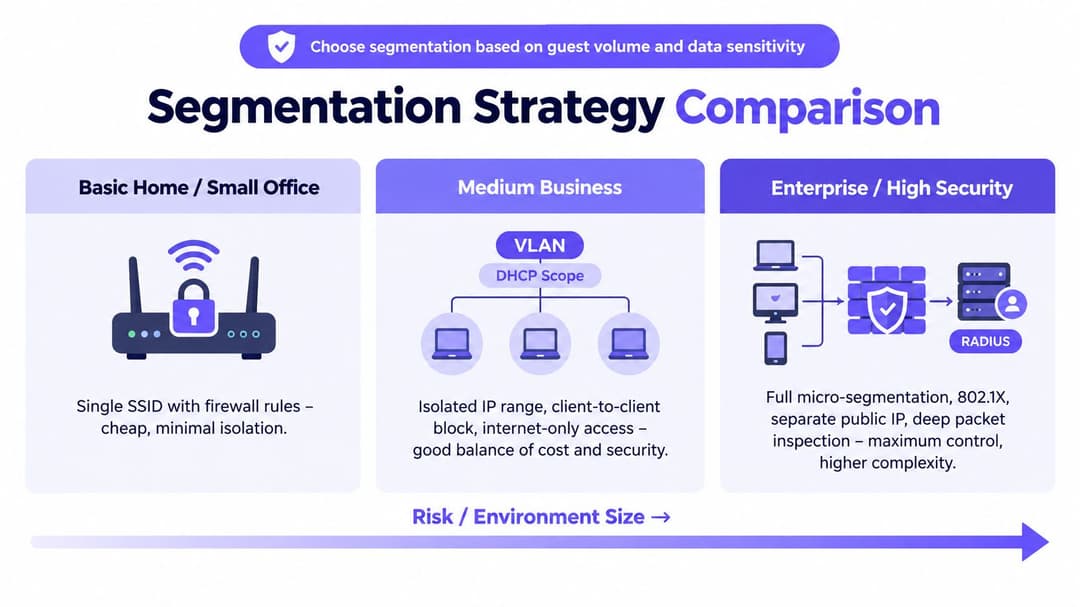
The minimum useful boundary sits at layer three. Put the guest SSID on its own VLAN, assign it a dedicated DHCP scope, and route it through a firewall whose default position is to deny access to staff, IoT, payment, and management networks. Permit only the outbound services the venue needs, normally web and DNS, then add explicit exceptions only when a real requirement exists.
US cybersecurity guidance requires visitor access not to expose privileged LAN access and recommends isolation between visitor devices. A practical hardening sequence also places the guest SSID on its own VLAN, uses stateful outbound firewall rules, and blocks client-to-client traffic. Guest WiFi hardening guidance
Match the topology to the risk
A small venue may use one guest VLAN, AP-level client isolation, and an internet-only firewall rule. That's inexpensive and workable, but it leaves less room for role-specific policy and can become fragile when the venue adds payment terminals, cameras, or building systems.
A medium venue should separate guest, staff, and IoT VLANs, with the router or firewall enforcing the layer-three boundary. Client isolation must be enabled on the wireless infrastructure as well as the firewall, because guests shouldn't be able to attack each other inside the same IP range.
An enterprise or multi-site deployment may need VRFs, or an equivalent virtual separation model, role-based firewall policy, and central NAC. iPSK can provide a useful middle ground for BYOD-heavy environments by mapping different pre-shared keys to devices or roles, without requiring every device to support a complete 802.1X rollout. It still needs lifecycle management and shouldn't be mistaken for certificate-grade identity.
Purple's private-area network guidance describes the type of isolation needed when different user groups share infrastructure.
The recurring trunk error deserves a physical check. A guest VLAN tagged onto a switch trunk can be perfectly legitimate, but if that trunk also exposes the wrong access paths to the core, the broadcast domain and routing policy may not behave as intended. Test from a guest device, attempt access to internal services and management interfaces, and verify that peer-to-peer traffic fails. Don't approve the design because the VLAN name looks correct in the controller.
Certificate-Based Access and Seamless Roaming
Certificate-based access changes the visitor experience from “find the SSID, read a password, accept a portal” to automatic network selection and authentication. With Passpoint or OpenRoaming, a device can discover a trusted provider, validate the network, and join without presenting a shared key at every visit. The guest may see no splash page at all.
For the operator, that simplicity requires real infrastructure. You need a RADIUS or cloud authentication service, a certificate or federation provider, correctly advertised roaming information, and a process for device profiling and identity revocation. Purple's Passpoint overview covers this type of passwordless roaming model.
What the operator gains
There is no communal PSK to print, photograph, or circulate. Access can be associated with an individual device identity, a SIM-backed relationship, or an email-based enrollment, depending on the federation and onboarding model. That gives the security team a more precise revocation point and reduces the temptation to keep one credential unchanged because changing it would inconvenience every guest.
A hotel chain with repeat visitors can justify the operational investment because returning guests benefit from automatic connection across participating properties. The front desk no longer needs to explain the password, and the chain can apply consistent policy across locations.
A coffee shop may not need a full PKI program. A trusted Google or Apple hotspot federation can provide a simpler roaming experience for the portion of visitors whose devices and accounts support it, while a conventional guest method remains available for everyone else.
Where it doesn't fit
Certificate lifecycle is the hard part on unmanaged BYOD. Devices get replaced, profiles become stale, users forget how enrollment works, and support teams must distinguish a failed certificate from a coverage or DNS problem. Device profiling also matters, because a certificate proves the enrolled identity, not necessarily that the device is healthy or appropriate for every network role.
Adopt certificate-based access when repeat visits, regulated information, or partner roaming justify the deployment and support cost. If only a small share of visitors will use it and the venue has no team to manage identity lifecycle, start with a well-controlled personal or voucher model rather than deploying a system nobody maintains.
Monitoring, Patching, and Incident Response
Guest WiFi becomes secure in operation, not at the moment someone clicks Save in the controller. The team needs visibility into the access points, gateway, DHCP assignments, authentication workflow, DNS behavior, and outbound traffic, with enough context to connect a device, session, and policy decision.
Send controller and firewall logs to a central store or SIEM where possible. Keep DHCP lease records alongside authentication records, because an incident investigation often needs to associate a temporary address with a device and session. Retention should match the venue's documented legal, contractual, and breach-response requirements, not an arbitrary default.
Watch for behavior that configuration won't prevent
Monitor for rogue access points using the venue's SSID, unusual DNS volumes or tunneling patterns, repeated captive portal failures, unexpected outbound destinations, and suspicious credential-stuffing activity against the onboarding service. Filtering and rate controls can reduce abuse, but they won't replace review of the signals.
Access-point firmware and wireless-controller patches matter even on a guest SSID. A guest network can be isolated from internal systems while the appliance that enforces that isolation remains vulnerable. Stage updates on a representative site, confirm the guest policy after reboot, and record the version and rollback path.
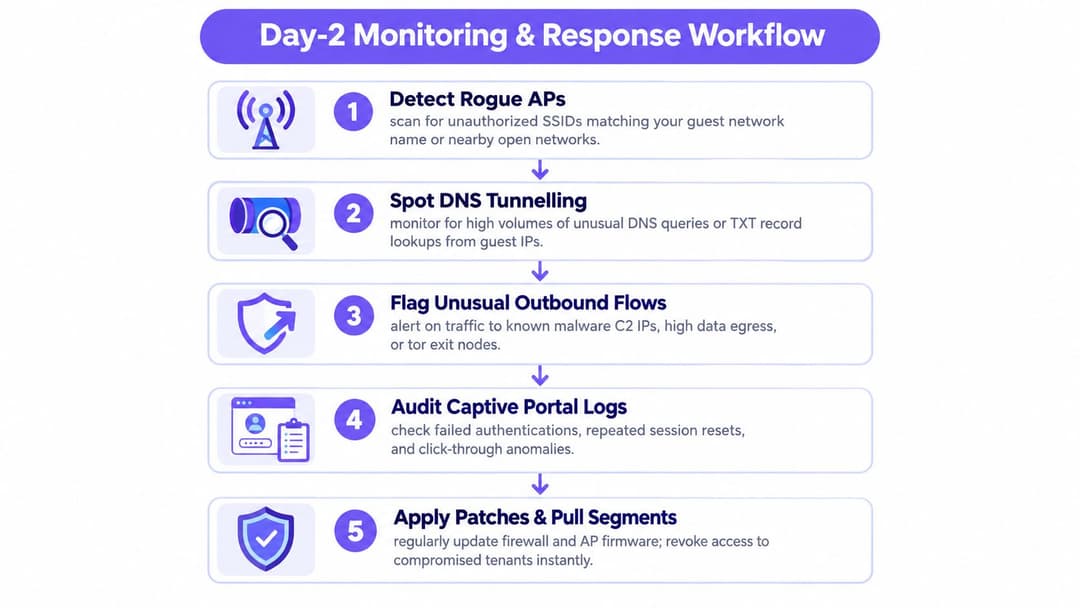
When an incident is suspected, preserve evidence before making disruptive changes.
- Identify: Confirm the affected SSID, sites, access points, controller, gateway, identity service, and time window.
- Contain: Disable the affected SSID if necessary, revoke certificates or vouchers, block malicious destinations, and isolate compromised appliances.
- Communicate: Tell venue staff what changed, update signage or a status page, and involve legal or privacy teams if identifiable visitor data was collected.
- Review: Determine whether the failure came from the radio, VLAN, firewall, portal, management plane, or data store.
- Improve: Correct the control, test it from a guest device, and update the runbook.
A guest SSID is a service with a lifecycle. Configuration is only the first release.
A Practical Hardening Checklist for Your Venue
Work through the checklist with evidence, not assumptions. A screenshot of a controller setting proves the setting exists. A test from an actual guest device proves the policy works across the wireless, switching, routing, and firewall layers.
Network controls
- Select WPA3 where supported. Keep WPA2 with AES available only where older clients require it, and use a long, randomly generated PSK if a shared model remains necessary.
- Create a dedicated guest VLAN. Give it its own DHCP scope and remove every route to corporate, payment, IoT, and management networks.
- Enable client isolation. Verify that one guest device can't discover or connect to another.
- Restrict egress. Apply stateful rules that permit necessary outbound web and DNS traffic while blocking unwanted protocols and destinations.
- Protect DNS. Use filtering appropriate to the venue and alert on unusual query behavior.
- Secure the portal. Serve the splash page and all form submissions over HTTPS with a valid certificate. Collect only information tied to a stated purpose.
Identity and data governance
- Replace shared access where practical. Use vouchers, per-user credentials, RADIUS, or cloud authentication when the venue needs traceability.
- Rotate a shared PSK under a documented schedule. A quarterly rotation is a useful operational target for some venues, but it doesn't undo a key that has already been shared. Where possible, replace the PSK with individual access.
- Define the visitor record. Decide whether the venue needs an email address, cell phone number, device identifier, or only terms acknowledgment.
- Limit administrative access. Require MFA for platform administrators and separate operational reporting permissions from bulk data export.
- Write a retention rule. State how long contact and session information is kept, who can access it, and how deletion requests are handled.
Day-two operations
- Centralize logs. Forward controller, firewall, DHCP, and authentication events to a protected store.
- Patch the infrastructure. Keep AP and controller firmware within the vendor's supported maintenance window, and test policy enforcement after updates.
- Test shutdown. Document who can disable the SSID, revoke active identities, block destinations, and communicate an outage.
- Run an access test. From a guest device, test internal services, peer devices, the router management interface, DNS filtering, and portal TLS.
- Review the design after change. New switches, payment systems, cameras, tenants, and portal fields can all invalidate an earlier assumption.
| Venue type | Recommended auth | Why it fits | Trade-off |
|---|---|---|---|
| Cafe | Shared PSK with controlled rotation, or click-through where appropriate | Low-friction access suits short visits | The key can spread, and identity assurance remains limited |
| Hotel | Vouchers for rooms, with Passpoint for repeat visitors | Supports time-bound access and returning guests | Requires more operational coordination and device support |
| Clinic | 802.1X with device certificates for managed users, tightly isolated guest access for visitors | Keeps identity and sensitive environments separate | Certificate lifecycle and support require discipline |
| School | Vouchers or managed identity-based access | Access can follow students, staff, visitors, or events | Different user groups need distinct policy and safeguarding review |
| Coworking space | Per-user vouchers or 802.1X, with bandwidth controls | Members need accountability and predictable service | Onboarding and offboarding become ongoing administrative tasks |
Frequently Asked Questions About Securing Guest WiFi
Is rotating a shared PSK every month enough?
Usually not. Rotation limits the lifetime of a credential, but it doesn't tell you which guest used it and it won't prevent a screenshot from circulating before the next change. If the venue needs accountability, move to vouchers, per-user credentials, or certificate-based access instead of relying on more frequent password changes.
Do bandwidth limits stop abuse?
They control consumption, not intent. A per-user cap can stop one guest from exhausting the connection, while QoS can prioritize business-critical traffic over guest traffic. Neither control blocks phishing, malicious DNS activity, credential theft, or attempts to reach internal systems.
Is the venue liable if a guest downloads illegal material?
The answer depends on the facts, contracts, applicable law, and the records the venue maintains. A sensible operator keeps a documented acceptable-use policy, preserves relevant authentication and network logs, restricts abusive traffic where justified, and obtains advice from its legal and privacy teams rather than promising immunity.
What should happen in the first 60 minutes after a suspected breach?
Preserve AP, controller, firewall, RADIUS, captive portal, and DHCP records before wiping or rebuilding anything. Identify the affected site and time window, restrict the SSID or revoke identities if containment requires it, snapshot the relevant leases and authentication trail, and record every action. Don't destroy evidence while trying to make the dashboard look clean.
Does a captive portal make WiFi secure?
No. It manages access and may support consent or identity collection, but it doesn't replace WPA2 or WPA3 encryption, VLAN isolation, client isolation, firewall policy, patching, or data governance. Treat the portal as one component in the design, and secure the appliance and database behind it.
Purple provides captive portal authentication, identity-based access, Passpoint and OpenRoaming support, and network controls such as VLAN-aware guest isolation and iPSK for environments that need more than a shared password. Review how Purple can fit your venue's guest WiFi, identity, and visitor-data governance requirements.