You're staring at a Network Policy Server that nobody wants to patch, a wireless controller pointing at a single RADIUS box in an IT closet, and a helpdesk queue full of password resets. Identity has moved to Entra ID or Okta, yet WiFi authentication still depends on local infrastructure built for on-premises Active Directory. That mismatch is where organizations start looking at a cloud radius server, not because moving a server is exciting, but because the old model no longer fits how users, devices, and sites work.
What a Cloud RADIUS Server Is
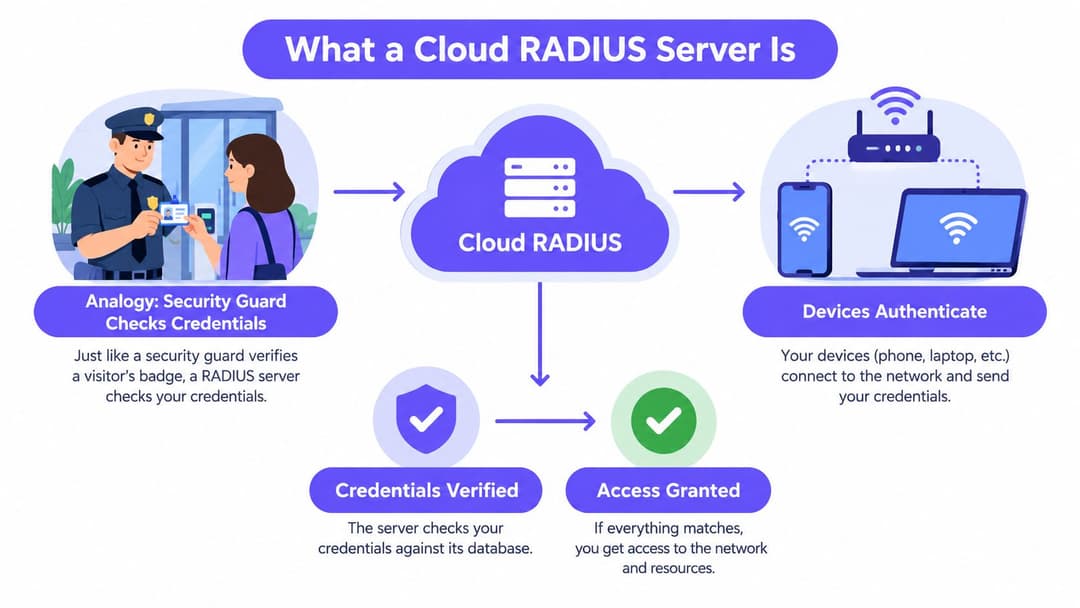
Think of RADIUS as a security guard at a building entrance. A person arrives, shows a badge, and the guard checks the badge against an approved list before opening the door. If the badge is valid, the guard also decides which floors that person can reach. If it isn't, the door stays shut.
A cloud radius server moves that guard from a local booth to a centrally managed service. The check still happens at the door, which in WiFi terms is your access point or switch. The decision, however, comes from a hosted service that you configure through policies rather than servers you patch, back up, and cluster yourself.
How the Authentication Flow Works
A laptop or phone connects to a WPA-Enterprise SSID protected by 802.1X. The access point doesn't decide on its own. It forwards the authentication request to the cloud radius server, which validates the credential, certificate, or device identity against your directory or certificate authority.
The server returns an accept or reject, often with attributes such as a VLAN, role, or session limit. The access point enforces that decision locally. That separation matters, because RADIUS is the decision point, not the whole network, and not your identity provider itself.
- Supplicant: The laptop, cell phone, or device requesting access and presenting a credential or certificate.
- Authenticator: The access point, controller, or switch that forwards the request and enforces the result.
- Identity source: Entra ID, Okta, Google Workspace, Active Directory, or a certificate authority that holds the authoritative record.
Why Hybrid Is the Normal Starting Point
US organizations didn't move everything to cloud in one step. The Cloud Industry Forum reported that 84% of UK organizations had formally adopted at least one cloud service in its 2016 research, up from 48% in 2010, which helps explain why cloud RADIUS is usually deployed as part of a hybrid architecture rather than as an immediate replacement for every local component, as set out in the Cloud Industry Forum UK cloud adoption research for 2016.
In practice, your switches, access points, printers, and legacy systems stay on site. What changes is where the authentication decision is made and how consistently you can apply it across sites. That's a narrower, more useful definition than calling it a hosted server swap.
Cloud RADIUS vs On-Premises RADIUS
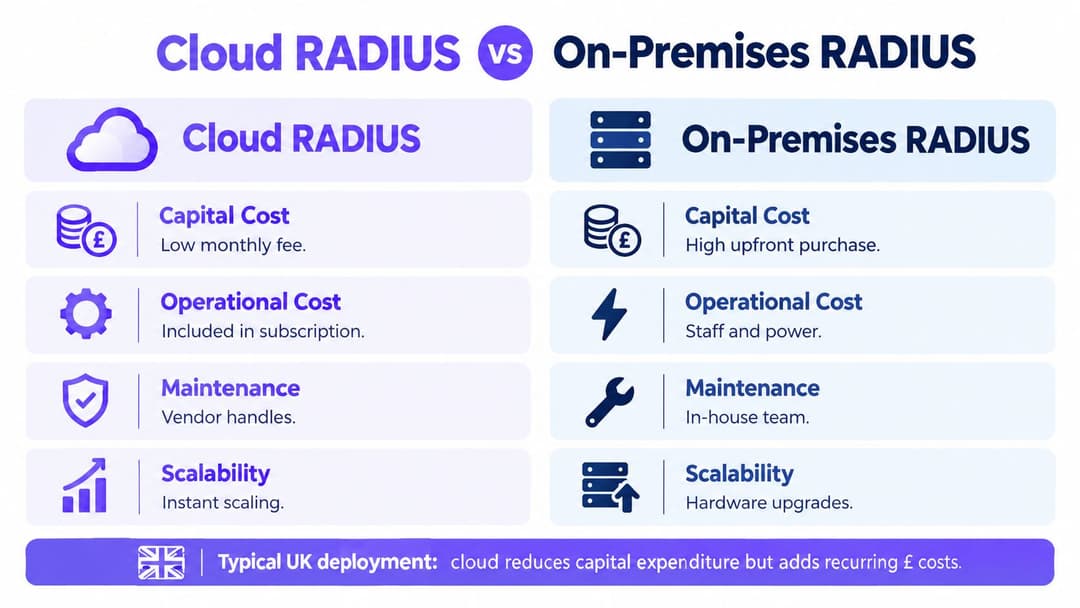
The honest comparison isn't cloud good, on-premises bad. It's about who carries operational load, how much control you need, and what fails when something breaks. A well-run on-premises pair can work for years. A neglected one becomes a single point of failure that nobody dares to touch.
US estates also remain mixed. A 2025 UK government review found that approximately 55% of central-government organizations reported having more than 60% of their technology estate in the cloud, while about 28% of central-government technology estates remained legacy, according to the State of Digital Government Review. That mix is exactly why you still need to connect cloud identity to buildings and wireless networks that remain on premises.
Cost and Maintenance Side by Side
| Criteria | Cloud RADIUS | On-Premises RADIUS |
|---|---|---|
| Capital cost | Low, subscription based | Higher upfront hardware and licensing |
| Maintenance | Provider patches and operates the service | Your team patches OS, RADIUS, and certificates |
| Scalability | Add sites by configuration | Add servers, clustering, and load balancing |
| Control | Policy control, less infrastructure control | Full control, full responsibility |
| Resilience | Redundant endpoints from the provider | You design and test failover yourself |
FreeRADIUS looks free until you count engineer time, certificate renewals, monitoring, and after-hours troubleshooting. Microsoft NPS looks included until you need native integration with a cloud directory it wasn't built for. Cisco ISE offers deep policy features, but it carries licensing and specialist skills that many teams can't justify for WiFi alone.
The Security Misconception
Server location doesn't make authentication secure. Configuration, identity integration, encrypted transport, and monitoring do.
Cloud shifts risk rather than removing it. You gain consistent patching and multi-site policy, but you depend on internet connectivity, the provider's control plane, and the identity provider. On-premises keeps traffic local, but a single unpatched server with shared secrets everywhere isn't safer just because it's in your building.
Choose cloud when you lack the staff to run a highly available pair properly, run many sites, or have already moved identity to the cloud. Stay on-premises when regulation, latency, or a disconnected site genuinely requires local decisions. Many HR and IT migrations follow the same hybrid logic, which is why this guide for Microsoft 365 HR teams is a useful parallel read on moving core systems without pretending legacy disappears overnight.
Integrating with Entra ID, Okta, and Certificates
A cloud radius server earns its keep at the joins. If it can't talk cleanly to your directory, your certificate authority, and your guest flows, you've bought a hosted bottleneck. Get the integration patterns right and network access starts following the same joiner, mover, and leaver logic as the rest of IT.
RADIUS itself doesn't speak modern web federation. If your team is untangling where network authentication ends and application single sign-on begins, this SAML and OIDC authentication overview helps separate those layers. RADIUS handles network admission, while SAML and OIDC typically handle application sign-in after a user is already connected.
Directory Backed Authentication for Staff
With Entra ID or Okta, the RADIUS service checks the user or device against groups and attributes in the directory. A finance user can land in a different role from a facilities contractor, even on the same SSID. When HR disables an account, that change should flow through to network access without a separate ticket to the network team.
For Entra ID specifically, validate how groups, device objects, and conditional signals map into RADIUS policy before you roll out widely, as covered in this Entra ID RADIUS as a service integration guide. Test a departure, a role change, and a disabled device during the pilot. Those three cases reveal more than a hundred successful logins.
Certificates for Devices You Manage
EAP-TLS uses certificates on both sides, so there's no password to phish, share, or brute force. It's the strongest pattern for managed laptops, provided you can issue, renew, and revoke certificates through MDM or SCEP without manual effort. If certificate provisioning is flaky, users will pressure you back to passwords, and they'll win.
- Issue identity: Push a user or device certificate through Intune, Jamf, or your MDM with a clear owner and expiration.
- Validate trust: Configure the RADIUS service to trust your issuing CA and check revocation status.
- Bind to policy: Map certificate fields and directory groups to VLANs or roles at the access point.
- Revoke quickly: Remove the certificate and directory access together when a device is lost or a person leaves.
Guests and Devices That Cannot Do 802.1X
Guests shouldn't need a corporate account to get secure access. Passpoint and OpenRoaming let a device authenticate once and reconnect with encrypted access on return visits, which suits hotels, transit hubs, and multi-site venues. For printers, payment terminals, and older IoT kit that can't present certificates, use MAC authentication bypass or individual pre-shared keys with tight segmentation, and treat those devices as untrusted by default.
Security and Zero-Trust Considerations
Treat a cloud radius server as a trust boundary, not as a convenient utility. It decides who gets onto your network, it talks to your directory, and its admin console can change policy for every site at once. That concentration of power is useful, and it's exactly why the controls around it need scrutiny.
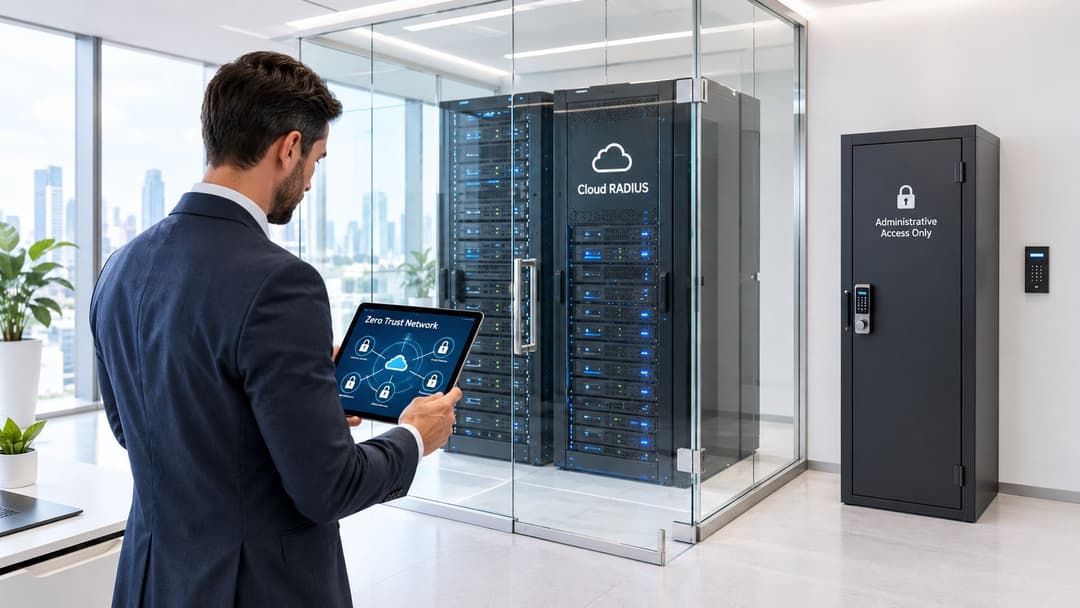
The NCSC recommends that cloud-service interfaces expose access only to authenticated and authorized identities, with contextual authentication using cryptographic assertions or secure key exchange, as described in NCSC Principle 10 on identity and authentication. For cloud RADIUS, that means treating the service and its administrative interfaces as separate trust boundaries, with unique service identities, tightly scoped permissions, and auditable authentication events rather than shared admin credentials.
Stop Trusting Network Location
Zero trust changes the question from, is this device on our VLAN, to, who is this user, what is this device, and what should they reach right now. Presence on a corporate or guest VLAN isn't proof of authorization. Access should stay conditional on authenticated identity and policy for that session, tenant, and venue.
That principle has practical consequences for WiFi design. A contractor laptop and a finance laptop can share an SSID but shouldn't share reachability. Your broader control set should align with an enterprise WiFi security guide for zero trust network access so authentication decisions connect to segmentation, monitoring, and least privilege, not just to getting connected.
Controls to Demand From a Provider
- Encrypted transport: RadSec or equivalent protection for RADIUS traffic, plus modern TLS for APIs and admin access.
- Rotation and revocation: Documented certificate and secret rotation, and fast revocation when accounts or devices are disabled.
- Role-based administration: Separate reader, operator, and admin roles, with no shared logins for policy changes.
- Logging that you can use: Authentication events, policy changes, and admin actions exported to your SIEM with clear retention.
Practical rule: If compromising one venue or integration account gives an attacker authority over other tenants or the control plane, the design has failed.
Ask awkward questions early. Who can see authentication logs, where are they stored, and how is vendor management access separated from your data plane. If a vendor can't answer plainly, that's information.
Deployment Patterns for Enterprise and Multi-Tenant WiFi
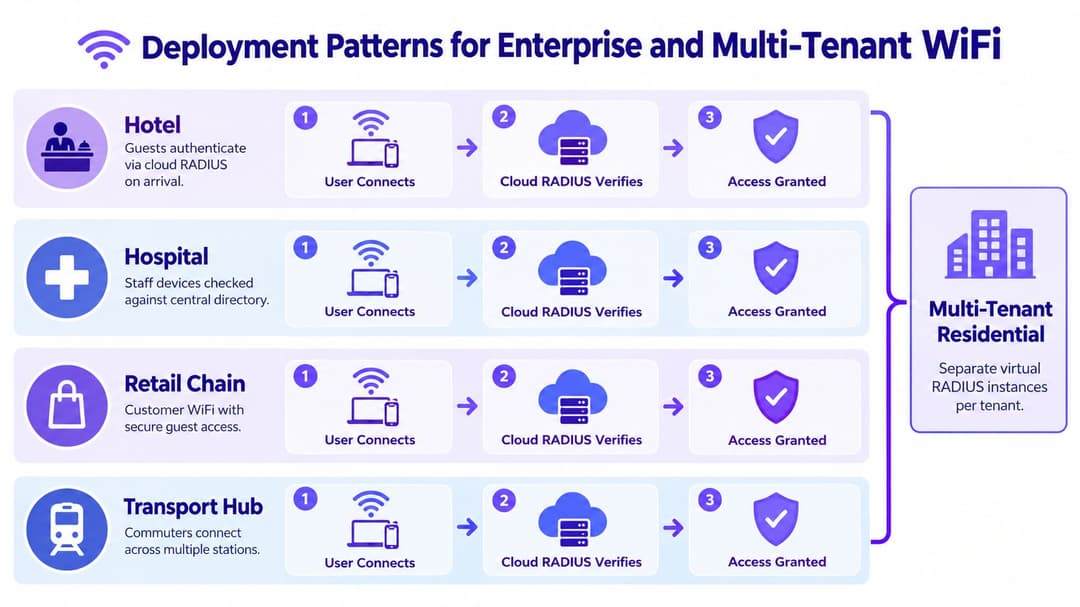
A hotel at check-in, a ward with medical devices, and a shopping center on a Saturday don't share a risk profile. They can share a cloud radius server, provided each population gets its own policy and the network enforces separation after authentication. The mistake is assuming a successful login equals a segmented network.
Government survey data indicates that 85% of large US businesses maintained separate staff and visitor WiFi networks, down from 93% previously, in the Cyber Security Breaches Survey 2025 chapter on network security controls. Separation isn't a solved problem, even for large organizations. Cloud RADIUS must therefore be combined with dynamic VLANs or policy enforcement to deliver real segmentation, not just nicer authentication.
What Different Sites Actually Need
In hospitality, guests authenticate on arrival, staff devices check against the directory, and payment terminals sit in a restricted segment that can't see either. In healthcare, clinical staff, orderlies, patients, and medical equipment coexist, and some of that equipment will never support certificates. Policy has to reflect that reality instead of forcing every device into one model.
Retail chains face a scale problem rather than a complexity problem at each store. Corporate headquarters wants consistent staff access and guest separation across every branch without shipping servers to each location. Transit hubs add roaming, where a commuter expects the connection they enrolled at one station to work at the next. A central service suits both patterns because policy travels with identity.
Multi-Tenant Buildings Need Isolation by Design
Residents in multi-family or student housing expect home-like WiFi, but each household's devices must stay invisible to neighbors. That requires per-tenant policies, individual keys for legacy devices, and staff access that doesn't bleed into resident networks. A multi-tenant WiFi guide for isolated resident networks is worth reviewing alongside your RADIUS design, because authentication only helps if the underlying tenant separation is sound.
Before rollout, map every device class you have, not the tidy list in the asset register. Staff, guests, contractors, IoT, registers, scanners, and the ancient printer in finance all need a defined path. Devices you don't plan for become the exception that undermines the policy.
Best Practices for Implementation and Operation
Most cloud RADIUS problems aren't protocol problems. They're operational surprises that nobody tested, such as a revoked account that keeps working, a site that loses internet access, or an emergency login that leaves no audit trail. Plan for those cases before the first site goes live, not during the first outage.
The UK Government's Cyber Security Breaches Survey 2025 found that 43% of businesses reported a breach or attack in the previous 12 months, yet only 31% conducted formal cyber-risk assessments, as reported in the Cyber Security Breaches Survey 2025 to 2026 findings. That gap is why you need explicit answers for provider outage, identity provider downtime, and loss of connectivity, plus audited emergency access.
Define Failure Behavior Per SSID
Decide in writing where authentication fails closed and where a narrow fallback is acceptable. Privileged staff SSIDs and sensitive segments should fail closed, because open access during an outage defeats the purpose of 802.1X. Operationally critical services may justify a tightly scoped, time-limited fallback, but it should be alarmed, logged, and reviewed.
- Pilot one site and one SSID: Prove authentication, VLAN assignment, and logging with real devices, including your oldest supported hardware.
- Break things deliberately: Disable a test account, revoke a certificate, and simulate loss of the primary endpoint, then measure what users experience.
- Measure revocation speed: Time how long a disabled Entra ID or Okta account retains network access, and record the result in the runbook.
- Test the exit path: Confirm you can export configuration and logs and repoint access points to another service without rebuilding policy from memory.
Operate It Like Critical Infrastructure
Monitor authentication success and failure rates, endpoint health, and unusual spikes by site. Review logs for repeated failures from a single device, because that's often a misconfiguration, a stale certificate, or something probing your network. Agree log retention, US data residency needs, and support response in the contract, not in a sales call.
Don't measure success by whether 802.1X is switched on. Measure whether isolation works, revocation is fast, and a site degrades predictably when connectivity drops.
Review vendor risk annually, including subprocessors and where support access originates. Keep a short runbook that an engineer on call can follow at night without the project team. If that runbook doesn't exist, you don't have an operating model yet.
Key Takeaways and Next Steps
A cloud radius server makes sense when identity already lives in the cloud, you run multiple sites, or your team can't operate a resilient on-premises pair to a high standard. It removes server maintenance and centralizes policy. It doesn't remove your responsibility for segmentation, revocation, logging, or outage planning.
It also isn't segmentation on its own. Authentication decides who a device claims to be. Dynamic VLANs, role-based policy, and least-privilege rules decide what that device can reach, and you need both working together.
A Short Evaluation Checklist
- Identity fit: Native integration with your directory, and tested joiner, mover, and leaver behavior.
- Certificate handling: Managed issuance, renewal, and revocation that your device estate can support.
- Failure behavior: Fail closed for sensitive SSIDs, with any fallback narrow, logged, and time limited.
- Evidence: Exportable logs, clear data residency, role-based admin, and separation between tenants.
- Exit: Configuration and log export, so leaving the provider is a project rather than a rebuild.
Start with a pilot on one venue or SSID, measure authentication success and revocation latency, and break the integration on purpose before users depend on it. Scale only when those results are boring. Boring is what good authentication looks like in production.
Purple provides RADIUS as a service for guest, staff, and multi-tenant WiFi, integrating with Entra ID, Google Workspace, and Okta so you can retire on-premises RADIUS servers and apply consistent, identity-based access across every venue. If you're planning a pilot or replacing a fragile NPS or FreeRADIUS setup, visit Purple to see how managed cloud RADIUS, Passpoint, and per-tenant isolation work with your existing Meraki, Aruba, Ruckus, Mist, or UniFi estate.