WiFi latency & bufferbloat diagnostic calculator
Model your venue latency metrics to identify whether delays stem from wireless airtime congestion, gateway bufferbloat, slow DNS resolvers, or packet loss.
Guest rooms, lobbies, and conference halls with heavy video streaming and captive portal logins. Concurrency: High (100 - 500 devices).
Moderate bufferbloat. Audio calls and real-time tools may encounter sporadic micro-stutters.
At 9 ms jitter and 1.5% packet loss, real-time protocols experience retransmission penalties that inflate perceived interaction delays.
Actionable remediation checklist for hospitality & hotels
A guest opens the hotel app in the lobby, the payment screen hangs, and the front desk hears, "The WiFi is slow." The access point may be reporting plenty of capacity. The internet circuit may be delivering an impressive download result. Yet the experience still feels broken because the device is waiting for authentication, DNS, a roaming decision, an application response, or a packet retransmission.
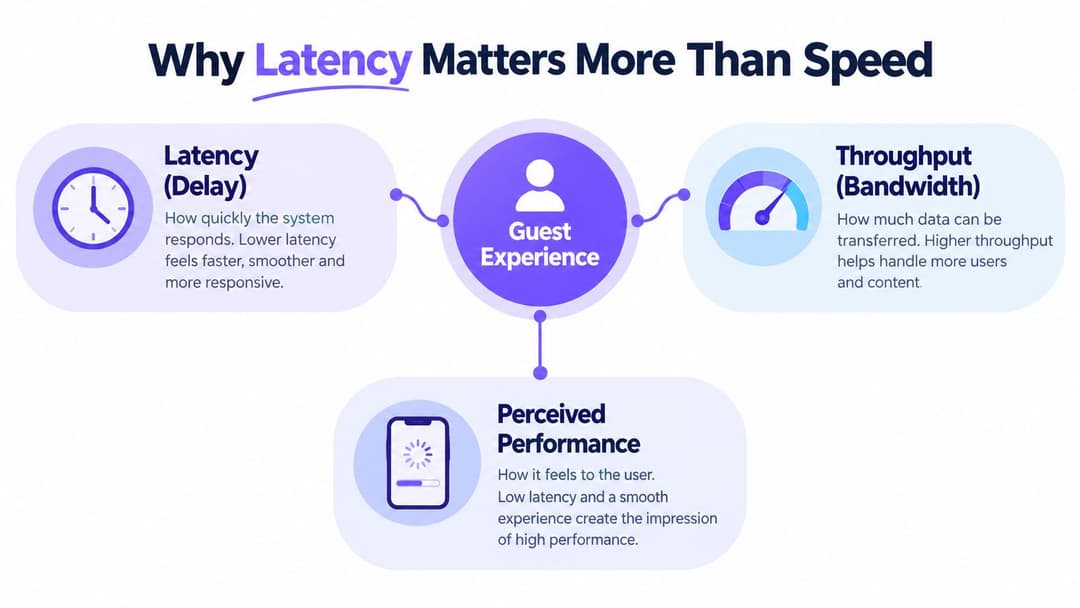
That's the practical difference between throughput and latency. Throughput describes how much data a connection can move. Latency describes how long a packet takes to travel and receive a response. In venues, guests usually notice delay before they notice a lack of bandwidth. The reliable way to learn how to reduce latency is to measure the complete path, identify the layer adding the delay, and fix the access and authentication choices before spending money on a larger WAN circuit.
Why Latency Matters More Than Speed in Venues
Latency appears in small interactions that staff often describe as "slow WiFi." A hotel guest waits for a room-control app to authenticate. A retail colleague scans an item, but the stock system takes time to respond. A patient checks in at a healthcare reception desk and watches a browser spinner while the device negotiates access and reaches a cloud service. None of these tasks necessarily needs high bandwidth. They need short, consistent response times.
A venue network usually adds delay in three places:
- WiFi airtime: Contention, interference, weak signals, retransmissions, and inefficient roaming make clients wait before they can send.
- LAN and WAN transport: Switch queues, overloaded uplinks, routing hops, congestion, and bufferbloat increase the time packets spend in transit.
- The application path: DNS lookups, TLS negotiation, identity redirects, API calls, and distant cloud regions add round trips even when the radio is clean.
FCC measurements show why access architecture deserves priority. In March 2023, fiber-to-the-home packages recorded the lowest median average 24-hour latency among the tested home broadband technologies, while ADSL2+ recorded the highest values, at around 24 ms, a level the FCC described as unlikely to harm most user experiences. The same measurements establish a useful engineering baseline: legacy copper access remains a structural source of delay, while fiber removes much of that access-layer drag. The FCC's March 2023 home broadband performance report separates latency from speed, which is exactly how venue teams should evaluate an upgrade.
A fast circuit won't rescue a crowded lobby with overlapping channels, sticky clients, poor airtime fairness, or a captive portal that forces several redirects. Conversely, a carefully designed access layer can make everyday applications feel responsive before any WAN change. If guests need to share a presentation or display content on a screen, a practical resource such as this screen mirroring HDMI guide can also help staff distinguish a local display problem from a network response problem.
Practical rule: Treat latency as a path problem, not a speed-test problem. Measure the client's journey from association to application response.
The rest of the work is disciplined rather than mysterious. Establish a baseline, isolate WiFi from transport and application delay, apply the least disruptive fixes first, then repeat the same measurements under comparable load. That process keeps the team from masking an access-layer fault with more bandwidth.
How to Measure Latency and Find the Real Bottleneck
Start with a measurement plan that can survive a busy service period. A single ping taken beside an access point proves very little. Venue conditions change with client density, roaming, staff devices, video traffic, cloud backups, and authentication events.
Track four related signals:
- Round-trip time, or RTT: The time for a packet to reach a destination and return. Capture it from a wired reference client, a representative WiFi client, and, where possible, a synthetic probe near the application path.
- Jitter: Variation between successive response times. A low average with occasional large spikes can still disrupt voice, interactive video, payment workflows, and remote desktop sessions.
- Packet loss: Lost packets trigger retransmission and can make an application appear slow even when average latency looks acceptable.
- Loaded latency: Response time while the link carries traffic. This exposes queues and bufferbloat that an idle test won't reveal.
The FCC defines mobile latency as half the round-trip packet time. Its 2025 Mobile Matters report recorded average response times below 25 ms on both 5G and 4G, with 5G ranging from 15 ms to 21 ms and 4G from 18 ms to 23 ms. Those values are useful only as a reference. A venue still needs to measure its own radio, transport, and application path. The FCC's Mobile Matters 2025 report also reinforces the need to use packet-based response measurements rather than relying on headline throughput.
A repeatable venue workflow
- Baseline by access path: Test wired, 5 GHz, and 6 GHz clients separately where available. Record the SSID, client type, access point, channel, signal conditions, and time of day.
- Test the local gateway: A clean result to the gateway with a poor result to the internet points towards WAN, routing, DNS, or the remote service. A poor gateway result points towards WiFi or the local LAN.
- Trace the route: Use traceroute or an equivalent path tool to identify extra hops and unexpected inspection, NAT, or VPN devices. Interpret intermediate-hop results carefully, because some routers deprioritize diagnostic traffic.
- Generate controlled traffic: Use iperf on a managed test path to compare idle and loaded conditions. Do not run uncontrolled saturation during service hours.
- Correlate wireless analytics: Check channel utilization, retries, roaming events, transmit rates, airtime fairness, and client association decisions against the latency graph.
- Test the application separately: Measure DNS resolution, connection setup, authentication redirects, and time to first useful response. A fast ping does not prove that the application path is fast.
Use a WiFi-specific tool such as the Purple latency and jitter test as one input, not as a replacement for packet captures, controller analytics, and application monitoring. Synthetic checks should run from fixed points and representative wireless clients, with results retained long enough to expose recurring peaks.
The FCC's fixed broadband methodology offers another important discipline. Three fiber services recorded median 24-hour latency values between 6.4 ms and 6.9 ms, so the measurement window matters as much as the test itself. The FCC's technical report on home broadband performance shows why a full-day median is more useful than a single best-case sample when validating a change.
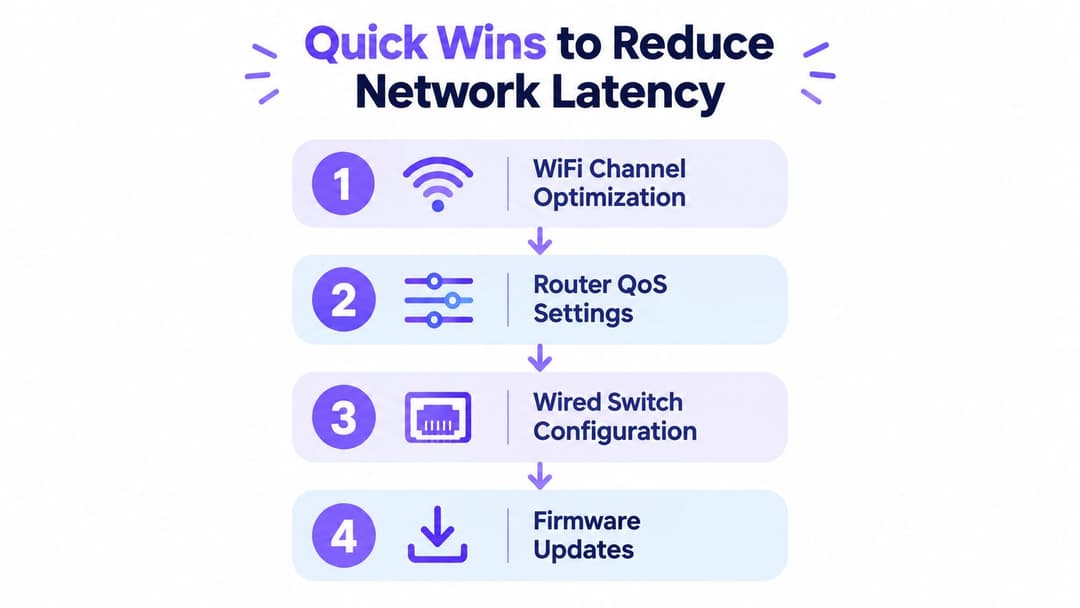
Quick Wins to Reduce Latency on WiFi and Wired Networks
The quickest gains usually come from removing contention and queueing, not from increasing the circuit size. Apply changes in a controlled order, keep a rollback record, and retest after each meaningful group of changes.
Clean up the radio first
Begin with a survey based on real client locations, not just access-point placement on a floor plan. Reduce co-channel contention, avoid unnecessary channel width in crowded areas, and move latency-sensitive clients towards cleaner 5 GHz or 6 GHz channels where their devices support them. A WiFi channel planner can support the planning process, but the final design still needs validation during peak occupancy.
Band steering can help dual-band clients choose a more suitable band, but it isn't magic. Some clients ignore steering hints, and forcing a client away from a strong 2.4 GHz signal can create more retries rather than fewer. Use airtime fairness where the platform implements it properly, because a slow client consuming disproportionate airtime can affect every other device. Review minimum basic rates carefully. Raising them may reduce low-rate airtime, but aggressive settings can disconnect legitimate edge-of-cell devices.
Beacon overhead also matters when an environment carries many SSIDs. Remove abandoned networks, avoid creating a separate SSID for every department, and keep guest, staff, operational, and IoT access logically separated through policy rather than needless broadcast sprawl.
Control queues instead of chasing peak speed
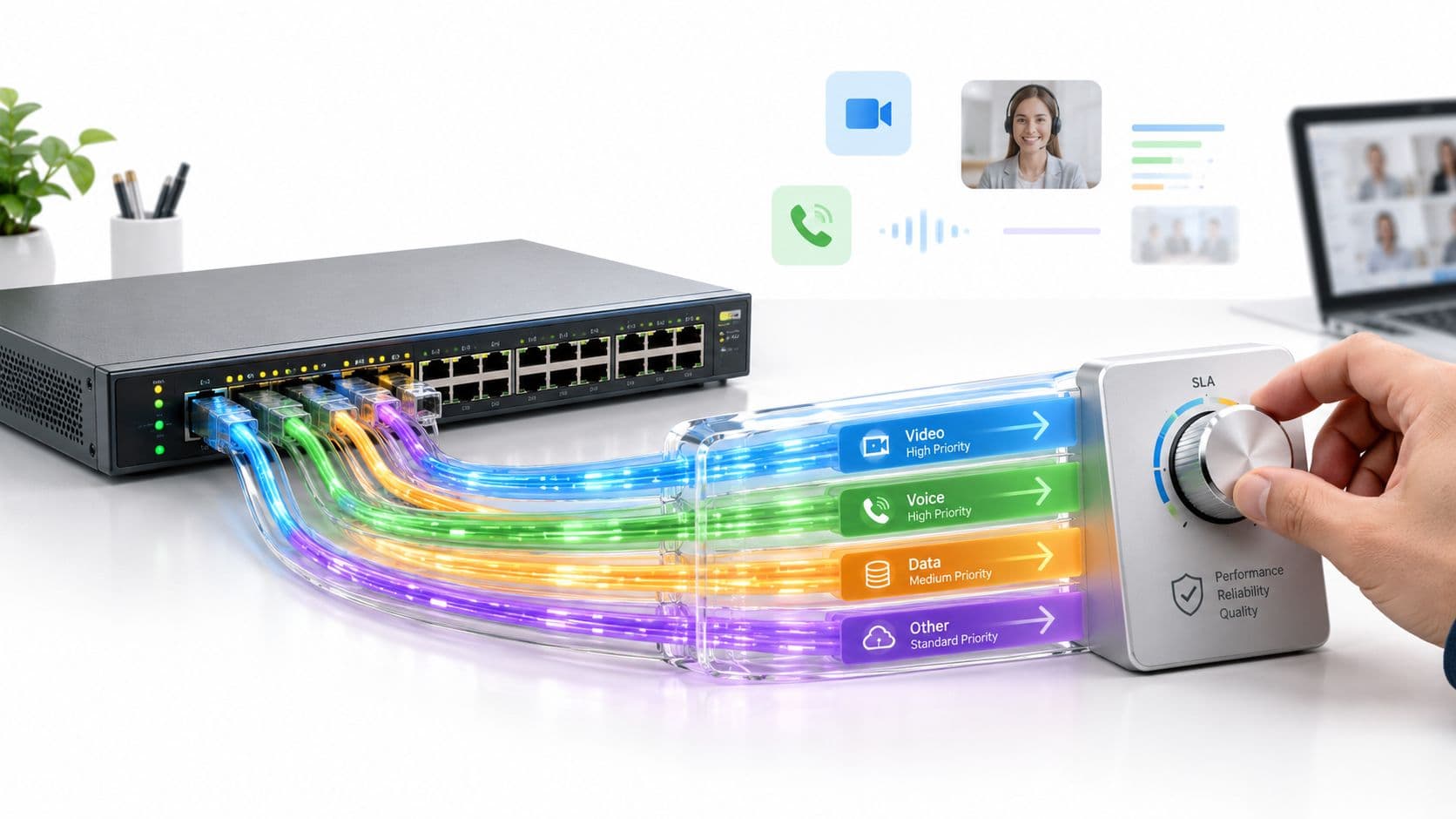
Use WMM and 802.11e priority queues for applications that need predictable response, such as voice, payment signaling, and interactive operational tools. Classification must be accurate. Marking every packet as high priority only moves the queue and creates unfairness.
On the gateway, shape traffic slightly below the practical upstream and downstream limit when testing shows bufferbloat. Give interactive traffic a fair queue, keep large transfers from filling the uplink, and apply sensible limits to guest networks. A busy hotel lobby often feels slow because a handful of uploads fill the upstream queue while everyone else waits for small responses.
Tune the wired path
Check switch uplinks, port errors, duplex negotiation, spanning-tree events, and oversubscribed aggregation links. Keep latency-sensitive traffic away from unnecessary inspection and tunneling hops. Review MTU consistency across the path, but don't change it casually. An incorrect MTU can create fragmentation, black holes, or intermittent failures that look like latency.
TCP tuning should follow evidence from the actual workload and operating system. Larger windows can help long-distance transfers, but they won't remove a congested queue. Likewise, jumbo frames can reduce processing overhead on a controlled path, yet they add risk when every device and service doesn't support the same frame size.
Firmware updates deserve a place in the plan because wireless drivers, switch code, and gateway queue handling can contain latency fixes. Test them in a representative area first. A firmware change that improves one client family can expose roaming or compatibility problems in another.
A venue's best quick win is often less airtime competition, not more radio power. Increasing transmit power can enlarge cells, encourage sticky clients, and make co-channel contention worse.
Distributed workloads may also influence where you place compute and services. Teams assessing local or edge capacity can use this overview of modular data centers as background, but moving a service closer only helps if the route, authentication flow, and local access layer are measured together.
Application Layer Fixes That Cut Perceived Delay
A clean WiFi trace doesn't guarantee a fast guest experience. The browser may still wait for DNS, establish several connections, follow an identity redirect, fetch scripts from a distant service, and call multiple APIs before it can render a useful screen.
Map the application path from the client, through DNS and the security stack, to the service endpoint. Record where connections are created, where redirects occur, and which calls block the first meaningful response. This often reveals that the user is waiting on an avoidable application hop rather than the radio.
DNS is an early candidate. Use a responsive resolver close to the venue, cache answers according to the service's policy, and monitor failures as well as response time. Don't treat DNS filtering as automatically beneficial. A filtering service can add a remote lookup or policy delay if it isn't placed and cached properly.
Connection reuse is another practical lever. Persistent HTTP connections, keep-alive behavior, session resumption, and sensible connection pooling reduce repeated setup work. CDN and edge caching can keep static assets and frequently requested content closer to users, but dynamic APIs still need careful regional placement and backend performance.
Authentication is part of the latency budget
Captive portals commonly create a burst of redirects and checks before the user reaches the intended application. Each extra round trip matters, particularly when the device has weak radio conditions or the identity provider sits far from the venue. The portal may also reopen after roaming, sleep, or a change in network state, creating a repeated delay that users interpret as unreliable WiFi.
Design the join flow so the client receives policy once and doesn't revisit identity services unnecessarily. Cache safe session state, use short and predictable redirect chains, and make the failure path clear. For staff, integrate identity with the network in a way that avoids repeated password prompts while still enforcing revocation and device policy.
Uplink behavior deserves equal attention. Venue traffic isn't only downloads. Telemetry, camera events, video calls, point-of-sale synchronization, cloud storage, and authentication callbacks all compete for upstream capacity. Ookla's 2026 US analysis reported 46.4 ms multi-server latency for 5G AI workloads and a 2.6x difference between the best and worst operators on loaded latency, showing why traffic conditions and network choice matter alongside nominal coverage. The same analysis reported median absolute 5G upload speed of 10.96 Mbps, with upload representing 9.18% of throughput, so Ookla's US 5G AI workload analysis provides a useful reminder to inspect upstream behavior rather than focusing only on downloads.
Prioritize upstream traffic by business impact, shape bulk flows, and test the application under realistic load. If the access layer is quiet but the application remains slow, the next fix may be a shorter identity path, a better resolver, an edge cache, or a service endpoint closer to the venue.
Purple and Vendor Configuration Choices That Lower Latency
Authentication design changes the first part of every user journey. The right choice depends on whether the client is a guest cell phone, a managed staff device, an IoT endpoint, or a resident device that should behave like it belongs on the property network.
A traditional captive portal is simple to deploy and works with many unmanaged devices. Its trade-off is interaction and repeated web redirection. Passpoint and OpenRoaming let a compatible device discover and join a trusted network with less visible friction, while encrypted connectivity from the first packet improves the security posture. Compatibility still matters, so venues should retain a controlled fallback for devices that cannot use the preferred method.
Shared PSKs are easy to explain but difficult to govern. A single change affects every device, and staff often end up sharing credentials informally. iPSK assigns distinct keys or policies to devices and groups, which suits IoT, operational equipment, and legacy endpoints that cannot complete a modern identity flow. Cloud RADIUS can reduce on-site infrastructure, while on-prem RADIUS can offer local control and continued operation during WAN disruption. The operational trade-off is maintenance versus dependency.
Purple fits into this decision as a WiFi authentication and identity platform. Its documented options include Passpoint and OpenRoaming for encrypted guest access, iPSK for legacy devices, and staff integrations with Entra ID, Google Workspace, and Okta. For controller-specific deployment considerations, review the Purple integration for Cisco Meraki, then apply the same questions to Aruba, Ruckus, Mist, or UniFi: where does authentication occur, how many round trips does joining require, and what happens when the identity service is unavailable?
| Access Method | Latency Impact | Best For |
|---|---|---|
| Captive portal | Adds join-time redirects and can repeat checks after state changes | Broad guest compatibility and simple short-term access |
| Passpoint or OpenRoaming | Reduces visible sign-in interaction and supports encrypted onboarding | Returning guests and compatible managed or provisioned devices |
| Shared PSK | Fast association, but weak governance can create operational delays during credential changes | Small, controlled networks |
| iPSK | Supports separate device credentials and policy without requiring a full supplicant workflow | IoT, legacy equipment, and segmented operational devices |
| Cloud RADIUS | Centralizes identity and policy, but depends on a healthy WAN path | Distributed venues with central IT |
| On-prem RADIUS | Keeps authentication local, but requires local resilience and administration | Sites needing continued local authentication during WAN issues |
The lowest-latency design isn't always the one with the fewest components. It is the design that authenticates predictably, avoids repeated redirects, keeps policy close to the access decision, and fails in a controlled way.
Monitoring Verification and Troubleshooting Checklist
Latency work only pays off when the improvement survives the next busy event, firmware release, tenant change, or identity-provider update. Keep the original baseline, use the same client classes and test destinations, and compare full-day behavior rather than a convenient quiet-period sample.
Monitor these signals continuously:
- Wireless health: Channel utilization, retries, roaming duration, association failures, and client data rates.
- Path quality: RTT, jitter, packet loss, and loaded latency from wired and wireless probes.
- Queue behavior: WAN utilization, upstream saturation, buffer occupancy where available, and drops on gateway or switch interfaces.
- Identity performance: Authentication response time, redirect count, timeout rate, and reauthentication events.
- Application response: DNS time, connection setup, time to first useful response, and error rate.
Ofcom's fixed-line measurements demonstrate the value of a 24-hour median, while its mobile data shows that national operator averages don't explain every local result. Set service objectives by user journey and venue type, then define acceptable response behavior for guest onboarding, payment, check-in, clinical access, and staff applications. Don't use one site-wide number to hide a failing lobby or a congested residential wing.
A practical fault checklist
- Latency rises on one channel or floor: Check interference, channel reuse, transmit power, and client concentration. Rebalance access points and channels before changing the WAN.
- Gateway latency is poor: Inspect radio retries, signal quality, switch errors, and uplink contention. A clean internet ping cannot compensate for a bad local hop.
- Only name-based applications fail: Compare DNS response and failure rates with direct service tests. Review resolver reachability, filtering policy, and cache behavior.
- Users slow down while uploading: Examine upstream queues, camera traffic, telemetry, backups, and cloud synchronization. Apply shaping and business-priority queues.
- Problems follow roaming: Review neighbor reports, minimum rates, band steering, session persistence, and authentication rechecks. Test with the actual handset and operating system, not only a survey laptop.
- Joining is slow but browsing is fine: Count redirects and identity calls. Reduce repeated portal checks and validate the fallback path.
Keep the access layer lean, authenticated, and observable. A larger circuit can hide congestion for a while, but it won't correct poor airtime design or a chatty identity flow. When every change is measured against the same path and workload, future network upgrades add capacity instead of masking delay.
Use Purple to streamline guest authentication with Passpoint and OpenRoaming, support iPSK for legacy and IoT devices, and connect staff access to Entra ID, Google Workspace, or Okta. Visit Purple to assess an identity-based WiFi design that reduces join friction while giving venue teams clearer analytics and control.