
Nama ff iPSK seram: a comprehensive guide for businesses
This guide explains how Identity Pre-Shared Keys (iPSK) solve the multi-tenant WiFi dilemma for Build-to-Rent (BTR) operators, property developers, and landlords. It covers the technical authentication architecture, compares iPSK against standard PSK and 802.1X Enterprise, and delivers a practical deployment blueprint for secure, isolated, Instant-On resident connectivity. Purple's Multi-Tenant WiFi platform automates the full iPSK key lifecycle across Cisco Meraki, HPE Aruba, Ruckus, Juniper Mist, Ubiquiti UniFi, Cambium, Extreme, and Fortinet hardware.
Listen to this guide
View podcast transcript
Executive summary
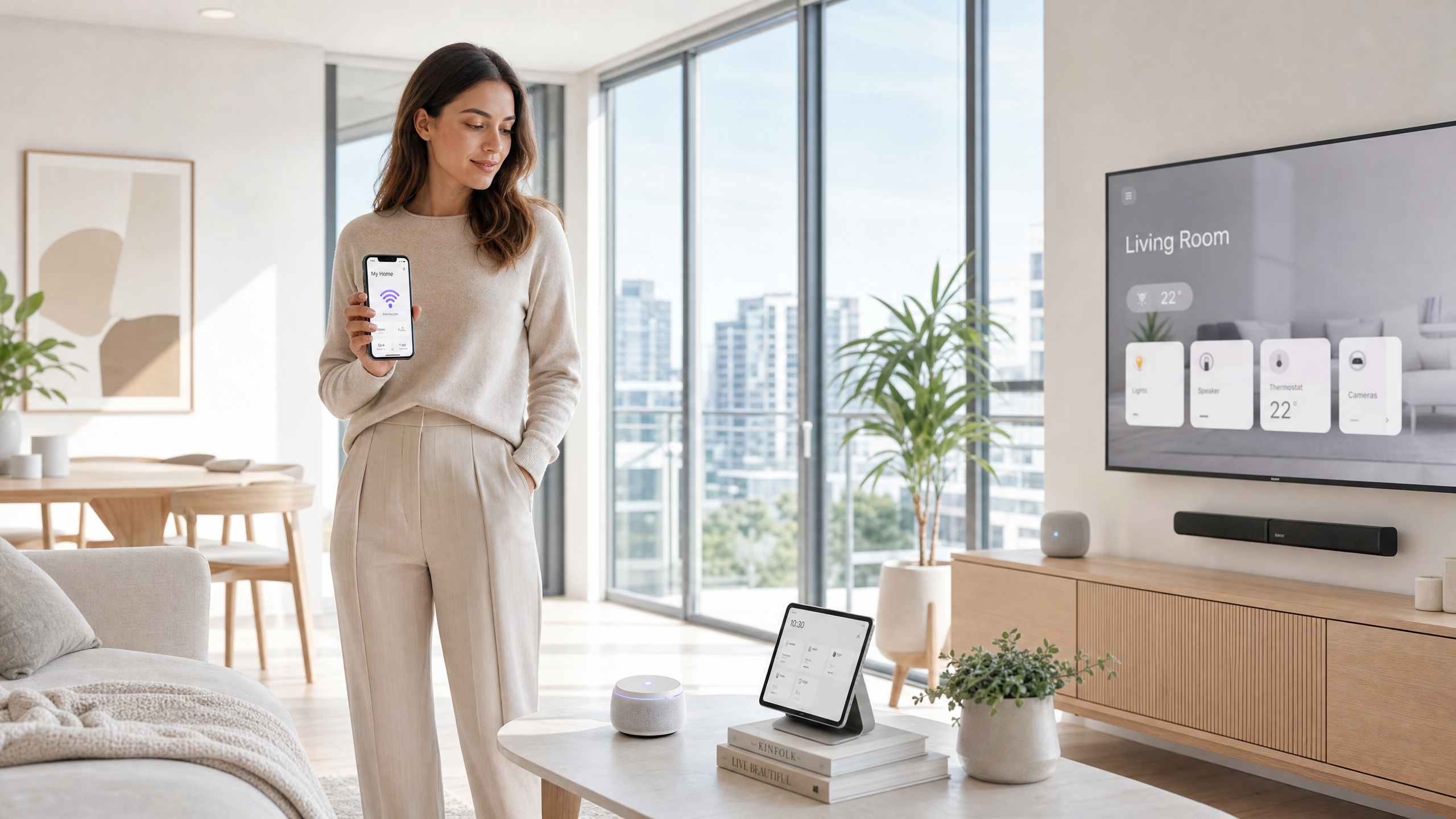
In the Build-to-Rent (BTR) and multi-dwelling unit (MDU) market, WiFi is the utility residents judge most harshly. A shared password fails on privacy. A full 802.1X enterprise deployment fails on device compatibility. Identity Pre-Shared Key (iPSK) - also called PPSK by Aruba and Personal Private Network by Cisco Meraki - bridges that gap. Every resident receives a unique WiFi key. All residents connect to one SSID. The network isolates each household into its own Private Area Network (PAN), where smart speakers, Chromecasts, and gaming consoles work exactly as they do on a home router. Purple's Multi-Tenant WiFi platform runs as a hardware-agnostic cloud overlay on the access points you already own, automating key provisioning at lease signing and revocation at move-out. BTR operators using managed WiFi as an amenity see a £15-30 per unit per month rent premium and void periods that are five to ten days shorter, according to British Property Federation benchmarks.
Technical deep-dive: the iPSK architecture
iPSK solves a problem that has existed since the first shared WiFi password was written on a hotel lobby chalkboard. Standard WPA2-Personal uses one passphrase for every device on the network. Change it for one person and you change it for everyone. Worse, Layer 2 isolation is absent by default, so a resident's smart TV is visible to every neighbour on the same segment. WPA3-Enterprise with IEEE 802.1X solves the security problem but creates a new one: it requires every device to run a supplicant capable of certificate or credential-based authentication. Gaming consoles, smart speakers, IoT sensors, and streaming sticks cannot do this. In a 200-unit building with 15-25 devices per household, that is thousands of devices that simply will not connect.
iPSK assigns a unique pre-shared key to each resident or device, but all keys share a single SSID. The authentication flow works as follows. When a device sends an association request, the Wireless LAN Controller (WLC) intercepts the device's MAC address and forwards it to a RADIUS server in an Access-Request message. The RADIUS server queries its identity store, finds the matching record, and returns an Access-Accept message. Embedded in that response are Cisco AV-Pair attributes specifying the PSK mode and the unique passphrase for that device. The WLC uses the returned passphrase to validate the four-way handshake the device presented. If they match, the device is authenticated. The RADIUS response simultaneously carries VLAN assignment, bandwidth policy, and QoS attributes, placing the device into its designated logical segment without any additional configuration.
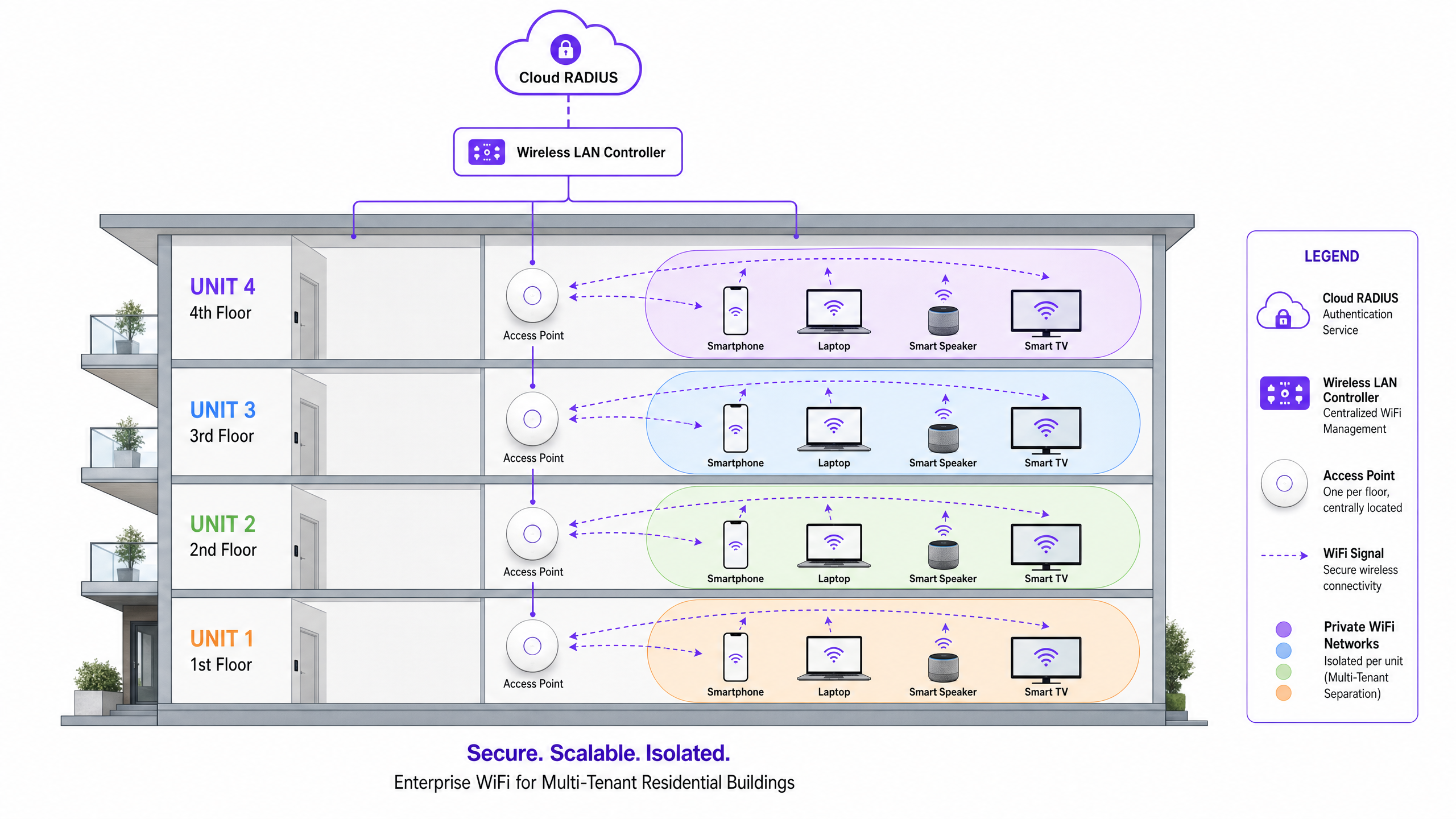
This mechanism enables the Private Area Network. Layer 2 isolation ensures that traffic from one resident's key is cryptographically separated from every other resident's traffic, even when their devices connect to the same physical access point. With mDNS reflection (Bonjour gateway) configured per VLAN, a resident's phone discovers their Chromecast, their smart speaker pairs with their bulbs, and their console finds their TV - all within the PAN. Neighbour devices remain completely invisible.
The major vendors implement iPSK under different names but with the same underlying principle. Cisco calls it iPSK, delivered via ISE or a cloud RADIUS service. HPE Aruba calls it MPSK (Multi-PSK). Ruckus calls it DPSK (Dynamic PSK). Juniper Mist, Ubiquiti UniFi, Cambium, Extreme, and Fortinet all support equivalent per-client key mechanisms. Purple's platform abstracts these vendor differences, presenting a single management interface regardless of the hardware underneath.
Implementation guide: deploying iPSK in a BTR environment
Deploying iPSK is as much an operational project as a technical one. The RF and controller configuration is straightforward. The lifecycle management is where deployments succeed or fail.
Step 1 - RF design. Remove individual consumer routers from each apartment. A 200-unit building with 200 consumer routers creates severe RF interference that degrades throughput for every resident. Replace them with enterprise access points placed in corridors, ceiling voids, or alternating units. One well-placed access point typically serves two to four apartments. This reduces hardware count, lowers energy consumption, and delivers cleaner signal.
Step 2 - Controller and RADIUS configuration. Configure a single SSID on the WLC with WPA2-Personal (or WPA3 transition mode for newer hardware). Enable MAC filtering and AAA Override. Point the WLC at your RADIUS server - either on-premises or Purple's cloud RADIUS service. On the RADIUS server, create an authorisation profile that returns the cisco-av-pair attributes for PSK mode and PSK password, plus the VLAN assignment for each resident.
Step 3 - Integrate with the Property Management System. This is the step that separates a scalable deployment from an IT support nightmare. Connect the WiFi orchestration platform to your PMS. When a lease is signed, the system generates a unique iPSK and emails it to the resident. When the tenancy ends, the key is revoked automatically. Purple's platform provides this integration layer, supporting Microsoft Entra ID, Okta, and Google Workspace as identity providers alongside direct PMS integrations.
Step 4 - Address MAC randomisation. iOS 14 and later, Android 10 and later, and Windows 11 all randomise MAC addresses by default. Because iPSK relies on stable MAC address lookups, configure the SSID to prompt residents to disable private addressing, or implement a device pre-registration portal where residents register their devices' permanent MAC addresses before connecting.
Step 5 - Configure mDNS reflection. Enable a Bonjour gateway or mDNS proxy on the controller, scoped strictly to each resident's VLAN. This allows smart home devices to discover each other within the PAN without leaking multicast traffic across tenant boundaries.
See also: Guest WiFi for transient visitor connectivity in communal areas, and WiFi Analytics for aggregate usage insights across the property.
For a broader view of multi-SSID design principles, Three SSIDs to rule them all: guest, Passpoint, and IoT WiFi covers how to structure the full network alongside the resident iPSK layer.
Best practices and standards
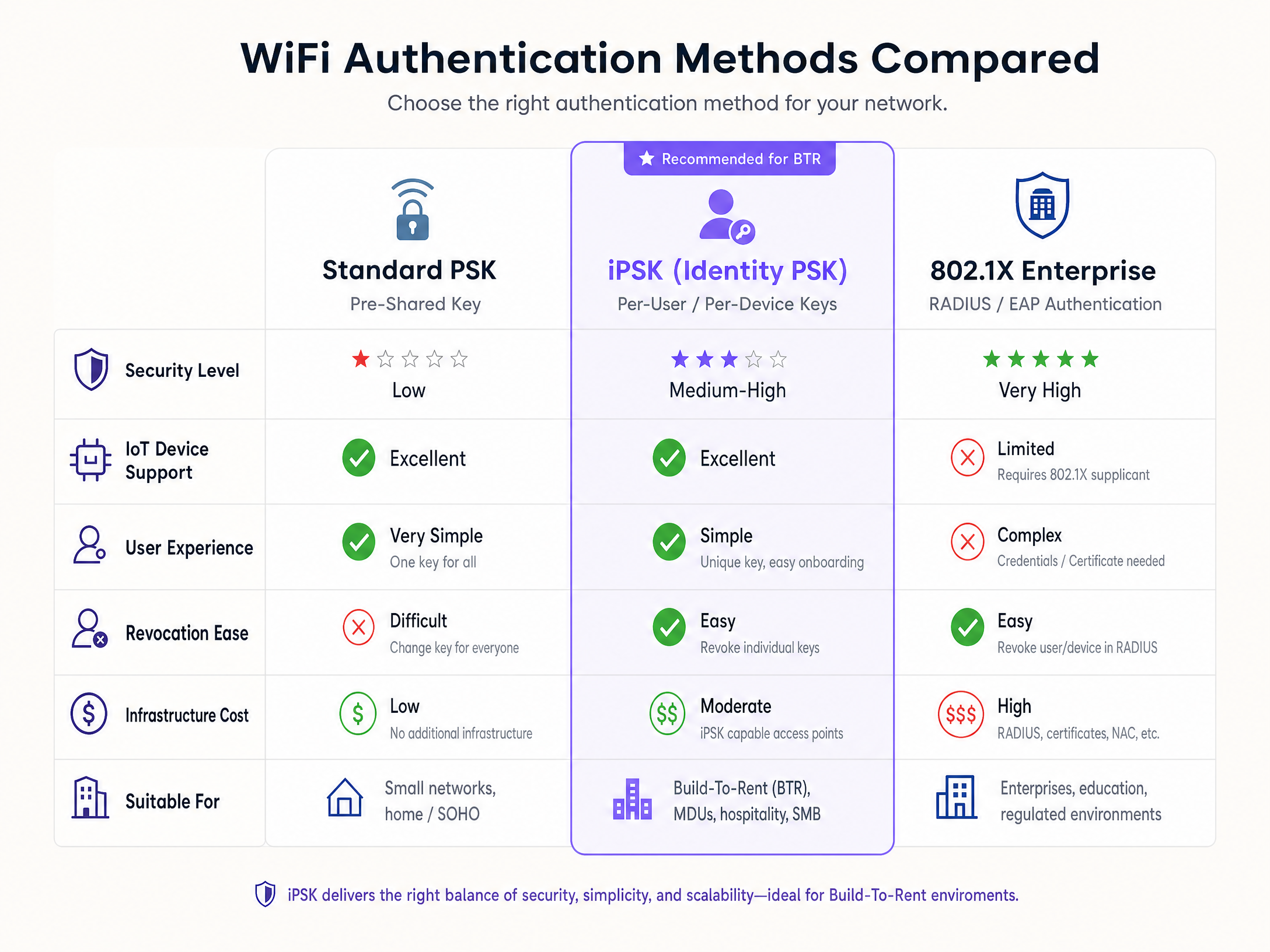
The table below summarises the key decision criteria for choosing between the three primary WiFi authentication models in a multi-tenant context.
| Criterion | Standard PSK | iPSK | 802.1X Enterprise |
|---|---|---|---|
| IoT and headless device support | Full | Full | Limited |
| Per-user revocation | No - requires full password change | Yes - revoke individual key | Yes |
| User experience | Simple | Simple | Complex - requires supplicant |
| Infrastructure overhead | Minimal | Moderate - RADIUS required | High - PKI, certificates, NAC |
| Layer 2 isolation | None by default | Per-key VLAN assignment | Per-user VLAN assignment |
| Suitable for BTR | No | Yes | No |
From a standards perspective, iPSK operates within the WPA2-Personal or WPA3-Personal framework defined by the Wi-Fi Alliance, using the IEEE 802.11 four-way handshake. The RADIUS backend aligns with RFC 2865 (RADIUS) and RFC 2868 (RADIUS tunnel attributes). VLAN assignment follows IEEE 802.1Q. For properties handling payment data in communal areas, the ability to demonstrate cryptographic isolation between resident traffic and any payment processing segment supports PCI DSS compliance requirements.
GDPR compliance requires that the MAC address and key data held in the RADIUS identity store constitute personal data under Article 4 of the UK GDPR. You must have a lawful basis for processing this data (typically contractual necessity under the tenancy agreement), provide a privacy notice, and delete the data when the tenancy ends. Purple stores data in ISO 27001-certified infrastructure and supports configurable data retention policies.
Troubleshooting and risk mitigation
RADIUS unavailability. If the RADIUS server is unreachable, the WLC cannot authenticate new devices. Existing sessions typically persist, but no new connections are possible. Deploy redundant RADIUS instances - primary and secondary - with automatic failover configured on the WLC. Purple's cloud RADIUS service operates at 99.999% uptime.
MAC randomisation failures. The most common support ticket in a new iPSK deployment. A device presenting a randomised MAC address receives an Access-Reject because no matching record exists. The fix is resident education and a clear onboarding flow that instructs residents to disable private addressing for the building SSID. Most operating systems display this option during the WiFi connection process.
mDNS leakage. Misconfigured mDNS reflection can allow multicast traffic to cross VLAN boundaries, exposing one resident's devices to another. Scope mDNS reflection strictly to the source VLAN. Test with two separate resident accounts before go-live.
WPA3 compatibility. Pure WPA3-SAE mode changes the handshake mechanism in ways that affect some iPSK implementations. Use WPA2/WPA3 transition mode to maintain backward compatibility with older IoT devices. Check your specific controller vendor's release notes before enabling WPA3-only mode.
IoT device quirks. A small number of legacy IoT devices have non-standard WPA2-PSK handshake behaviour. Run a device compatibility test against your specific hardware fleet before go-live, particularly for any bespoke or older devices.
ROI and business impact
Managed WiFi as an amenity is a measurable commercial decision, not a cost centre. The British Property Federation benchmarks the rent premium for high-quality, Instant-On connectivity at £15-30 per unit per month in the BTR sector. A 200-unit building at the midpoint of that range generates £48,000 in additional annual revenue against a managed WiFi operating cost that is 30-50% lower than the equivalent in per-unit broadband contracts.
Void period reduction is the second lever. Move-in-day WiFi readiness eliminates the five to ten day wait for residential broadband installation. For a 200-unit building with 30% annual turnover, that is 60 void periods per year, each shortened by up to ten days. At typical BTR rental rates, the financial impact is material.
Resident retention is the third. WiFi quality consistently ranks in the top five amenity factors in BTR and purpose-built student accommodation booking research. Operators leading on connectivity quality outperform sector averages on amenity satisfaction scores, which directly correlates with renewal rates.
For property developers evaluating the capital case, Purple's hardware-agnostic model means the software overlay runs on Cisco Meraki, HPE Aruba, Ruckus, Juniper Mist, Ubiquiti UniFi, Cambium, Extreme, or Fortinet access points already specified in the building design. There is no requirement to replace hardware or add a bundled broadband contract that captures the value.
Related guides
- Logo iPSK: a comprehensive guide for businesses - companion guide covering iPSK visual identity and branding considerations for venue operators.
- Three SSIDs to rule them all: guest, Passpoint, and IoT WiFi - how to structure the full network design alongside the resident iPSK layer.
Purple operates 80,000+ live venues across hospitality , retail , healthcare , and transport . Founded 2012. ISO 27001, GDPR, CCPA, Cyber Essentials, and B Corp certified.
Key Definitions
iPSK (Identity Pre-Shared Key)
An authentication method where each user or device is assigned a unique WiFi passphrase, but all devices connect to the same SSID. The network uses the specific key to identify the user, apply VLAN policies, and isolate traffic.
The foundational technology for secure, manageable Multi-Tenant WiFi. Supported on Cisco Meraki, HPE Aruba (as MPSK), Ruckus (as DPSK), Juniper Mist, Ubiquiti UniFi, Cambium, Extreme, and Fortinet.
PAN (Private Area Network)
A logically isolated network segment created for an individual user or household within a shared physical infrastructure. Devices on the same key can discover and communicate with each other; devices on different keys are invisible to each other.
The resident-facing outcome of a correctly configured iPSK deployment. Ensures privacy and enables smart home functionality in BTR and MDU environments.
RADIUS (Remote Authentication Dial-In User Service)
A networking protocol defined in RFC 2865 that provides centralised authentication, authorisation, and accounting management. In an iPSK deployment, the RADIUS server holds the MAC address-to-key mapping and returns the unique passphrase and VLAN assignment in the Access-Accept response.
The backend engine that makes iPSK work. Without a reliable RADIUS server, no new devices can authenticate. Design for redundancy.
VLAN (Virtual Local Area Network)
A logical grouping of network devices defined by IEEE 802.1Q that behaves as a separate physical network, regardless of the devices' actual physical location.
Used in conjunction with iPSK to enforce the PAN architecture. Each resident's key maps to a dedicated VLAN, ensuring Layer 2 isolation between households.
Headless device
A network-connected device without a traditional screen or keyboard interface, such as a smart speaker, thermostat, streaming stick, or IoT sensor.
These devices cannot run an 802.1X supplicant, making them incompatible with WPA3-Enterprise. iPSK supports them fully because they only need to present a passphrase.
mDNS reflection
A network service (also called a Bonjour gateway) that forwards multicast Domain Name System traffic across subnet or VLAN boundaries, allowing devices to discover services such as AirPrint, Google Cast, and AirPlay.
Essential for smart home functionality within a PAN. Without it, a resident's phone cannot discover their Chromecast even if both are on the same iPSK key.
MAC randomisation
A privacy feature in iOS 14+, Android 10+, and Windows 11 that periodically changes a device's hardware address to prevent location tracking across networks.
The most common cause of authentication failures in new iPSK deployments. Residents must disable private addressing for the building SSID, or a pre-registration portal must capture the permanent MAC address.
Instant-On
A resident experience where internet connectivity is active and ready to use the moment they move into an apartment, without waiting for hardware installation or an engineer visit.
Delivered by integrating the WiFi orchestration platform with the PMS so that a unique iPSK is generated and emailed at lease signing. A key differentiator for premium BTR operators.
WPA3-SAE (Simultaneous Authentication of Equals)
A WiFi security protocol defined by the Wi-Fi Alliance that replaces the WPA2 four-way handshake with a Dragonfly key exchange, providing stronger protection against offline dictionary attacks.
Affects iPSK implementations because it changes the handshake mechanism. Use WPA2/WPA3 transition mode in multi-tenant environments to maintain compatibility with older IoT devices.
Worked Examples
A 250-unit Build-to-Rent development currently uses individual consumer broadband routers in every apartment. Residents report slow speeds, frequent Chromecast failures, and the property manager receives 30-40 support calls per month about connectivity. How should the network be redesigned?
Remove the 250 consumer routers. Each one broadcasts its own SSID, creating severe RF interference across the building - 250 devices competing for the same 2.4 GHz and 5 GHz channels. Replace them with 60-80 enterprise access points (Cisco Meraki MR46 or HPE Aruba AP-515 are appropriate for this density) placed in corridors and ceiling voids, each serving two to four apartments. Deploy a single building-wide SSID with iPSK authentication. Integrate the WiFi orchestration platform with the PMS: keys are generated at lease signing and emailed to residents. Configure each key to assign the resident's devices to a dedicated VLAN. Enable mDNS reflection per VLAN so Chromecasts, smart speakers, and printers are discoverable within each apartment's PAN. Instruct residents to disable private addressing on their devices during onboarding.
A purpose-built student accommodation (PBSA) operator manages 800 beds across three buildings. Every August, 800 new students move in during a single week. The current system requires IT staff to manually generate and distribute WiFi credentials. How should this be automated?
Integrate the WiFi orchestration platform with the student management system used for enrolment. When a student's room booking is confirmed, the system automatically generates a unique iPSK and includes it in the welcome email alongside the room key and access card information. On move-in day, students connect immediately without visiting a help desk. The key is scoped to their room's VLAN, isolating their devices from other students. When the academic year ends and the student's booking closes, the key is revoked automatically. For the following year's cohort, new keys are generated fresh - no manual intervention required. Configure the SSID in WPA2/WPA3 transition mode to support the full range of student devices, from new MacBooks to older gaming consoles.
Practice Questions
Q1. A property developer is planning a 400-unit BTR project. The IT consultant recommends deploying WPA3-Enterprise (802.1X) to ensure maximum security. What is the primary operational risk of this approach, and what is the correct recommendation?
Hint: Consider the types of devices residents will bring into their apartments and whether those devices can support the required authentication mechanism.
View model answer
The primary risk is device incompatibility. WPA3-Enterprise requires every device to run an 802.1X supplicant capable of certificate or credential-based authentication. A significant proportion of resident devices - smart TVs, gaming consoles, smart speakers, IoT sensors - are headless and cannot support this. The result is a flood of unresolvable support tickets and frustrated residents. The correct recommendation is iPSK, which provides per-resident isolation and individual revocation while supporting 100% of consumer devices. WPA3-Enterprise is appropriate only for a fully managed corporate fleet where every device is enrolled in MDM with certificates pre-deployed.
Q2. During an iPSK deployment in a 150-unit BTR building, a resident reports that their new iPhone cannot connect to the network even though they are entering the correct unique passphrase. Their laptop and smart speaker connect without issue. What is the most likely cause and how do you resolve it?
Hint: Think about a privacy feature introduced in iOS 14 that affects how the device identifies itself on a network.
View model answer
The iPhone is using MAC address randomisation (labelled 'Private Wi-Fi Address' in iOS settings). Because iPSK relies on the RADIUS server matching the device's MAC address to the assigned passphrase, a randomised MAC address returns an Access-Reject. The laptop and smart speaker connect because they either use stable MAC addresses by default or were registered before randomisation was enabled. The resolution is to instruct the resident to open WiFi settings on the iPhone, tap the building's SSID, and disable 'Private Wi-Fi Address' for that network. The device will then present its permanent MAC address, the RADIUS lookup will succeed, and the connection will complete.
Q3. A coworking space operator wants to use iPSK to provide isolated networks for member companies. They plan to manually generate passwords and email them to new members. A member company has 12 employees. Why is this approach unsustainable at scale, and what is the recommended architecture?
Hint: Consider both the provisioning overhead and the security risk when a membership ends.
View model answer
Manual key generation fails on two counts. First, the administrative overhead scales linearly with membership - every new member requires an IT action. Second, and more critically, manual revocation is unreliable. When a membership ends, the key must be revoked immediately to prevent former members from accessing the network. Manual processes introduce delays that create security gaps. The recommended architecture integrates the WiFi orchestration platform with the coworking CRM or identity provider (Microsoft Entra ID or Okta). Keys are provisioned automatically when a membership is activated and revoked the moment it is cancelled. For a company with 12 employees, each employee receives their own key mapped to the company's VLAN, providing isolation from other member companies while allowing internal device discovery.
Continue reading in this series
PPSK wpa3: comparing features and deployment models
This technical reference guide compares PPSK and WPA3-SAE, explaining their architectural differences and deployment models for multi-tenant environments. It provides actionable guidance for IT managers and property developers on achieving secure, isolated WiFi networks using Purple's identity-based solutions.
PPSK wpa3: comparing features and deployment models
This technical reference guide compares PPSK and WPA3-SAE, explaining their architectural differences and deployment models for multi-tenant environments. It provides actionable guidance for IT managers and property developers on achieving secure, isolated WiFi networks using Purple's identity-based solutions.
PPSK life: comparing features and deployment models
This guide compares PPSK (Private Pre-Shared Key) against standard PSK and 802.1X, detailing implementation models for multi-tenant environments. It equips IT managers and property operators to deploy secure, resident-isolated WiFi that supports smart home devices and drives measurable business value.