
The Enterprise Guide to SCEP: Deploying Simple Certificate Enrollment Protocol for Automated Campus WiFi Security
This technical reference guide provides a definitive architectural blueprint and step-by-step implementation strategy for enterprise WiFi certificate deployment using SCEP. It covers the critical differences between SCEP and PKCS, the exact deployment sequence required for success, and real-world risk mitigation strategies for IT leaders.
Listen to this guide
View podcast transcript

Executive Summary
For enterprise venues, whether a bustling hospitality environment, a multi-site retail operation, or a modern corporate campus, relying on pre-shared keys or basic captive portals for staff WiFi is a security vulnerability and an operational bottleneck. Modern network architecture demands 802.1X authentication using EAP-TLS, ensuring every device is cryptographically verified before accessing the network.
The challenge lies in distribution: how do you deploy unique client certificates to thousands of Windows, iOS, and Android devices without burying your helpdesk in support tickets? Microsoft Intune and other MDM platforms solve this through automated certificate lifecycle management. By deploying Simple Certificate Enrollment Protocol (SCEP) profiles, IT teams push trusted root and client certificates silently to managed endpoints.
This guide provides a definitive architectural blueprint and step-by-step implementation strategy for enterprise WiFi certificate deployment. We explore the critical differences between SCEP and PKCS, detail the exact deployment sequence required for success, and outline real-world risk mitigation strategies to ensure your Guest WiFi and corporate networks remain secure and performant.
Listen to the Briefing
Technical Deep-Dive: SCEP Architecture
When designing your enterprise WiFi certificate deployment strategy, the first architectural decision is selecting the certificate delivery mechanism. Mobile device management platforms support both SCEP and PKCS, but they operate fundamentally differently.
Simple Certificate Enrollment Protocol (SCEP)
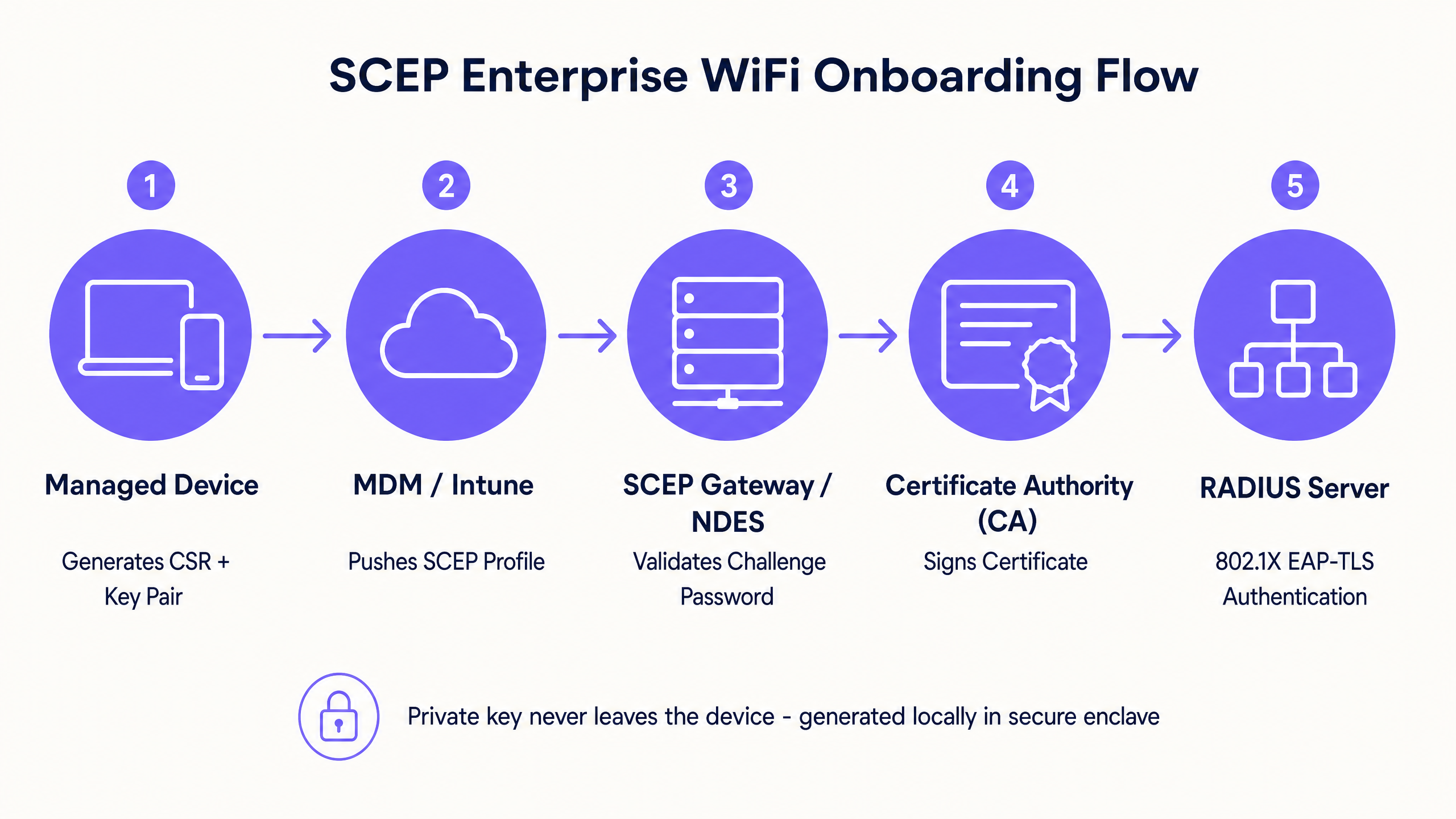
SCEP is the industry standard for enterprise device enrollment. In a SCEP workflow, the management service instructs the endpoint to generate its own private and public key pair. The device creates a Certificate Signing Request (CSR) and sends it via a Network Device Enrollment Service (NDES) server to your Certificate Authority (CA). The CA signs the request and returns the public certificate to the device.
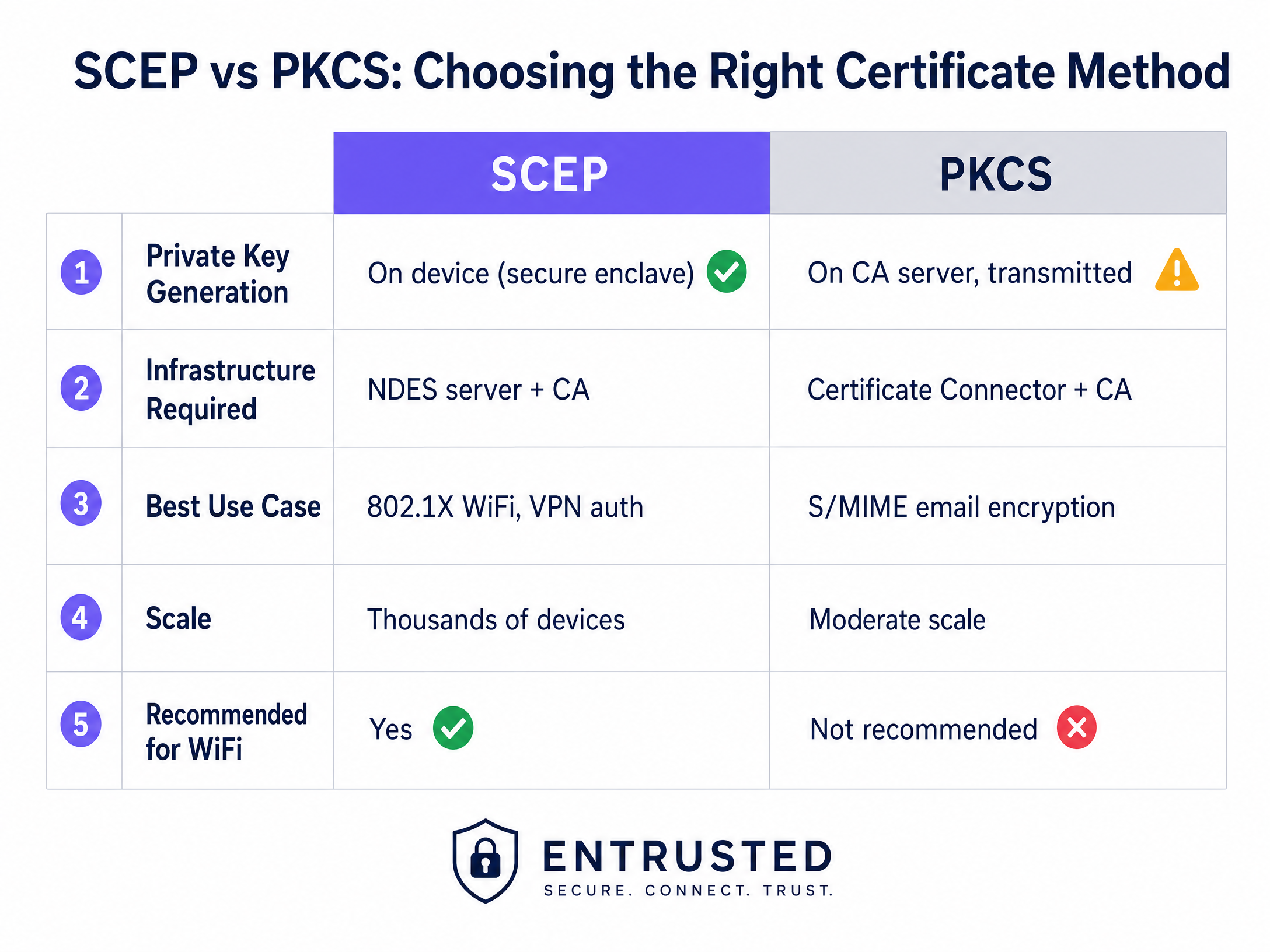
The critical security advantage of SCEP is that the private key never leaves the device. It is generated locally, stored in the device's secure enclave (such as the TPM on Windows or the Secure Enclave on iOS), and is never transmitted across the network. This makes SCEP the strongly recommended approach for 802.1X authentication.
Public Key Cryptography Standards (PKCS)
Conversely, with PKCS, the Certificate Authority generates both the public and private keys centrally. The certificate connector securely exports this key pair and pushes it down to the target device.
While PKCS eliminates the need to deploy and maintain an NDES server, simplifying the infrastructure footprint, it introduces a theoretical security risk because the private key is transmitted over the network. PKCS is generally better suited for use cases where key escrow is required, such as S/MIME email encryption, rather than network authentication.
Implementation Guide: The Deployment Sequence
Successfully configuring a managed WiFi profile for 802.1X requires strict adherence to a specific deployment sequence. Profile dependencies dictate that trust must be established before authentication can be configured.
Step 1: Deploy the Trusted Root Certificate Profile
Before any device can request a client certificate or trust your RADIUS server, it must trust the issuing Certificate Authority.
- Export your Root CA certificate and any Intermediate CA certificates as .cer files.
- In your MDM console, create a new configuration profile.
- Select the target platform and choose the trusted certificate profile type.
- Upload the .cer file and deploy this profile to your target device groups.
Step 2: Configure the SCEP Certificate Profile
Once trust is established, configure the SCEP profile to instruct devices on how to obtain their client certificate.
- Create a new configuration profile and select SCEP certificate.
- Configure the subject name format. For user-driven authentication,
CN={{UserPrincipalName}}is standard. For device authentication, useCN={{AAD_Device_ID}}. - Set the key usage to digital signature and key encipherment.
- Under extended key usage, specify client authentication (OID: 1.3.6.1.5.5.7.3.2).
- Link this profile to the trusted root certificate profile created in Step 1.
- Provide the external URL of your SCEP gateway or NDES server.
Step 3: Deploy the 802.1X WiFi Profile
The final step is pushing the WiFi configuration that ties the certificates to the network SSID.
- Create a WiFi configuration profile.
- Enter the network name exactly as it is broadcast by your wireless access points.
- Select WPA2-Enterprise or WPA3-Enterprise as the security type.
- Set the EAP type to EAP-TLS.
- In the authentication settings, select the SCEP certificate profile created in Step 2 as the client authentication certificate.
- Specify the trusted root certificate for server validation to ensure the device only connects to your legitimate RADIUS server.
Best Practices & Industry Standards
When implementing SCEP certificate deployment, adhere to the following vendor-neutral best practices to ensure compliance and reliability.
SCEP Gateway Placement and Security
The SCEP gateway must be accessible from the internet to allow remote devices to provision certificates before arriving on-site. Exposing an internal server directly to the internet is a significant security risk. Publish the SCEP URL using an application proxy or reverse proxy. This provides secure remote access without opening inbound firewall ports and allows you to apply conditional access policies to the enrollment flow.
RADIUS and CRL Checking
Certificate deployment is only half the security equation; revocation is equally critical. If an employee is terminated, disabling their directory account may not immediately revoke their WiFi access if their client certificate remains valid and the RADIUS server is not strictly checking the Certificate Revocation List (CRL).
Configure your RADIUS server to enforce strict CRL checking. Ensure your CRL distribution points are highly available; if the RADIUS server cannot reach the CRL, authentication will fail, causing a widespread outage.
For broader considerations on modern connectivity, review our guidance on Bandwidth Management: A Practical Guide for 2026 .
Troubleshooting & Risk Mitigation
Even with meticulous planning, certificate deployment can encounter issues. Here are common failure modes and mitigation strategies.
WiFi Profile Fails to Apply
The device receives the trusted root and SCEP certificates, but the WiFi profile shows as an error or not applicable in the MDM console. This is almost always caused by a mismatch in group targeting. If the SCEP profile is assigned to a user group, but the WiFi profile is assigned to a device group, the MDM cannot resolve the dependency. Audit your assignments. Ensure the trusted root, SCEP, and WiFi profiles are all deployed to the exact same group.
Gateway 403 Forbidden Errors
Devices fail to retrieve the SCEP certificate, and the gateway logs show HTTP 403 errors. The connector service account lacks the necessary permissions on the certificate template, or the URL filtering on your firewall is blocking the specific query string parameters used by SCEP. Verify that the connector account has read and enroll permissions on the CA template. Check firewall logs to ensure URLs containing ?operation=GetCACaps are not being blocked.
ROI & Business Impact
Transitioning to SCEP-driven 802.1X certificate deployment delivers measurable returns across security and operations.
- Helpdesk Ticket Reduction: Password-based WiFi generates a significant volume of support tickets regarding password expirations, lockouts, and typos. Certificate-based authentication is invisible to the user, typically reducing WiFi-related helpdesk volume by 70%.
- Enhanced Security Posture: EAP-TLS eliminates the risk of credential harvesting and Man-in-the-Middle attacks. This is critical for compliance with frameworks like PCI DSS and GDPR, particularly in Retail and Healthcare environments.
- Seamless Onboarding: Integrating certificate deployment with existing MDM workflows ensures a unified, zero-touch provisioning experience from day one.
While SCEP secures your managed corporate devices, guest and visitor networks require a different approach. For unmanaged devices, a captive portal with social login or SMS verification feeds into a first-party data layer, giving you actionable insights. Explore our WiFi Analytics platform to see how this data drives revenue.
Key Definitions
SCEP (Simple Certificate Enrollment Protocol)
A protocol that allows devices to request digital certificates from a Certificate Authority, where the private key is generated and stored securely on the device itself.
The recommended method for deploying WiFi authentication certificates due to its high security and scalability across enterprise fleets.
PKCS (Public Key Cryptography Standards)
A set of standards where both the public and private keys are generated by the Certificate Authority and then securely delivered to the endpoint.
Often used for S/MIME email encryption, but less ideal for WiFi authentication due to the network transmission of the private key.
NDES (Network Device Enrollment Service)
A Microsoft Windows Server role that acts as a bridge, allowing devices without domain credentials to obtain certificates via SCEP.
A required infrastructure component when implementing SCEP certificate deployment with on-premises Microsoft PKI.
EAP-TLS (Extensible Authentication Protocol - Transport Layer Security)
The most secure 802.1X authentication method, requiring both the server and the client to present valid digital certificates.
The target authentication protocol that MDM WiFi and certificate profiles are designed to enable, eliminating password-based access.
CRL (Certificate Revocation List)
A list published by the Certificate Authority containing the serial numbers of certificates that have been revoked before their scheduled expiration date.
RADIUS servers must check the CRL during authentication to ensure terminated employees cannot access the network using a previously valid certificate.
CSR (Certificate Signing Request)
A block of encoded text given to a Certificate Authority when applying for an SSL/TLS certificate, containing the public key and identity information.
Generated locally by the managed device during the SCEP flow to request its unique identity credential.
802.1X
An IEEE standard for port-based network access control that provides an authentication mechanism to devices wishing to attach to a LAN or WLAN.
The foundational framework that enforces the requirement for EAP-TLS certificate validation before granting network access.
RADIUS (Remote Authentication Dial-In User Service)
A networking protocol that provides centralized authentication, authorization, and accounting management for users who connect and use a network service.
The server that evaluates the client certificate against the CA and CRL to make the final allow or deny decision for WiFi access.
Worked Examples
A 150-property hotel group needs to secure their staff network across a mix of Windows laptops for front-of-house, iOS devices for housekeeping, and Android tablets for restaurant point-of-sale. They currently use WPA2-Personal with a shared password rotated quarterly, generating massive helpdesk volume.
The hotel group deploys three Intune profiles in sequence to a unified device group. First, a Trusted Root Certificate profile establishes trust with the corporate CA. Second, a SCEP Certificate profile instructs devices to request a unique client certificate. Third, a WiFi profile configures the corporate SSID with WPA3-Enterprise and EAP-TLS, pointing to the SCEP certificate for authentication. The RADIUS server enforces strict CRL checking to revoke access instantly upon employee termination.
A fashion retailer with 200 stores requires PCI DSS compliance for their Windows-based point-of-sale systems managed through Intune. They must ensure strong authentication and strict network segmentation for any device handling cardholder data.
The retailer implements SCEP-based EAP-TLS for device-level authentication on the staff SSID. The RADIUS policy drives VLAN assignment, placing authenticated POS terminals onto a strictly isolated, PCI-scoped VLAN automatically. Guest WiFi is handled on a completely separate SSID with its own captive portal authentication flow, ensuring the two networks never intersect.
Practice Questions
Q1. Your Intune deployment shows the Trusted Root and SCEP profiles successfully applied to a user's laptop, but the WiFi profile shows an 'Error' state. The user cannot connect to the corporate SSID. What is the most likely architectural cause?
Hint: Consider how MDM platforms resolve dependencies between related configuration profiles.
View model answer
A group targeting mismatch. The SCEP profile is likely assigned to a User group, while the WiFi profile is assigned to a Device group (or vice versa). Intune cannot resolve the dependency across different group types, causing the WiFi profile deployment to fail. Audit the assignments and ensure all three profiles target the exact same Azure AD group.
Q2. A newly acquired subsidiary requires 802.1X authentication for their staff devices. Their security team mandates that private keys must never traverse the network and must be generated within the hardware TPM of the endpoint. Which certificate deployment method must you use?
Hint: Compare where the private key is generated in the SCEP workflow versus the PKCS workflow.
View model answer
You must use SCEP (Simple Certificate Enrollment Protocol). In a SCEP workflow, the device generates its own private and public key pair locally within its secure enclave (TPM) and only sends a Certificate Signing Request (CSR) across the network. PKCS generates the private key centrally on the CA and transmits it over the network, which violates the security team's mandate.
Q3. An employee is terminated and their Active Directory account is disabled. However, their laptop remains connected to the corporate WiFi network for several hours before losing access. How do you resolve this security gap?
Hint: Disabling an account does not invalidate an existing certificate. What mechanism does the RADIUS server use to check certificate validity?
View model answer
You must configure the RADIUS server to enforce strict Certificate Revocation List (CRL) checking. When an employee is terminated, their certificate must be explicitly revoked in the Certificate Authority. The RADIUS server will then check the CRL during the next authentication cycle and immediately deny access, regardless of the Active Directory account status.
Continue reading in this series
Why Is My Guest WiFi Not Connecting? Troubleshooting Captive Portal Issues
This authoritative technical reference guide explains the underlying mechanics of captive portal detection and details the six primary failure modes that prevent guest WiFi from connecting. It provides IT managers and network architects with a practical troubleshooting framework to resolve HTTP redirect issues, DNS conflicts, and MAC randomisation challenges.
Why Is My Guest WiFi Not Connecting? Troubleshooting Captive Portal Issues
This authoritative technical reference guide explains the underlying mechanics of captive portal detection and details the six primary failure modes that prevent guest WiFi from connecting. It provides IT managers and network architects with a practical troubleshooting framework to resolve HTTP redirect issues, DNS conflicts, and MAC randomisation challenges.
How to Implement SCEP for Automated WiFi Certificate Enrollment
This guide explains how to implement SCEP (Simple Certificate Enrollment Protocol) for automated WiFi certificate enrollment across enterprise venues. It covers the full architectural blueprint - from PKI design and MDM integration to the mandatory three-step deployment sequence - and shows IT managers and network architects how to eliminate shared credentials, automate certificate lifecycle management, and satisfy PCI DSS and GDPR requirements at scale.