
PPSK directory: comparing features and deployment models
This guide details PPSK (Private Pre-Shared Key) directory architecture for multi-tenant networks, comparing it against 802.1X and standard PSK. It provides network architects and IT managers with vendor-neutral deployment models for Build to Rent, student accommodation, and MDU environments, covering cloud controller, RADIUS backend, and hybrid authentication patterns.
Listen to this guide
View podcast transcript
Executive summary
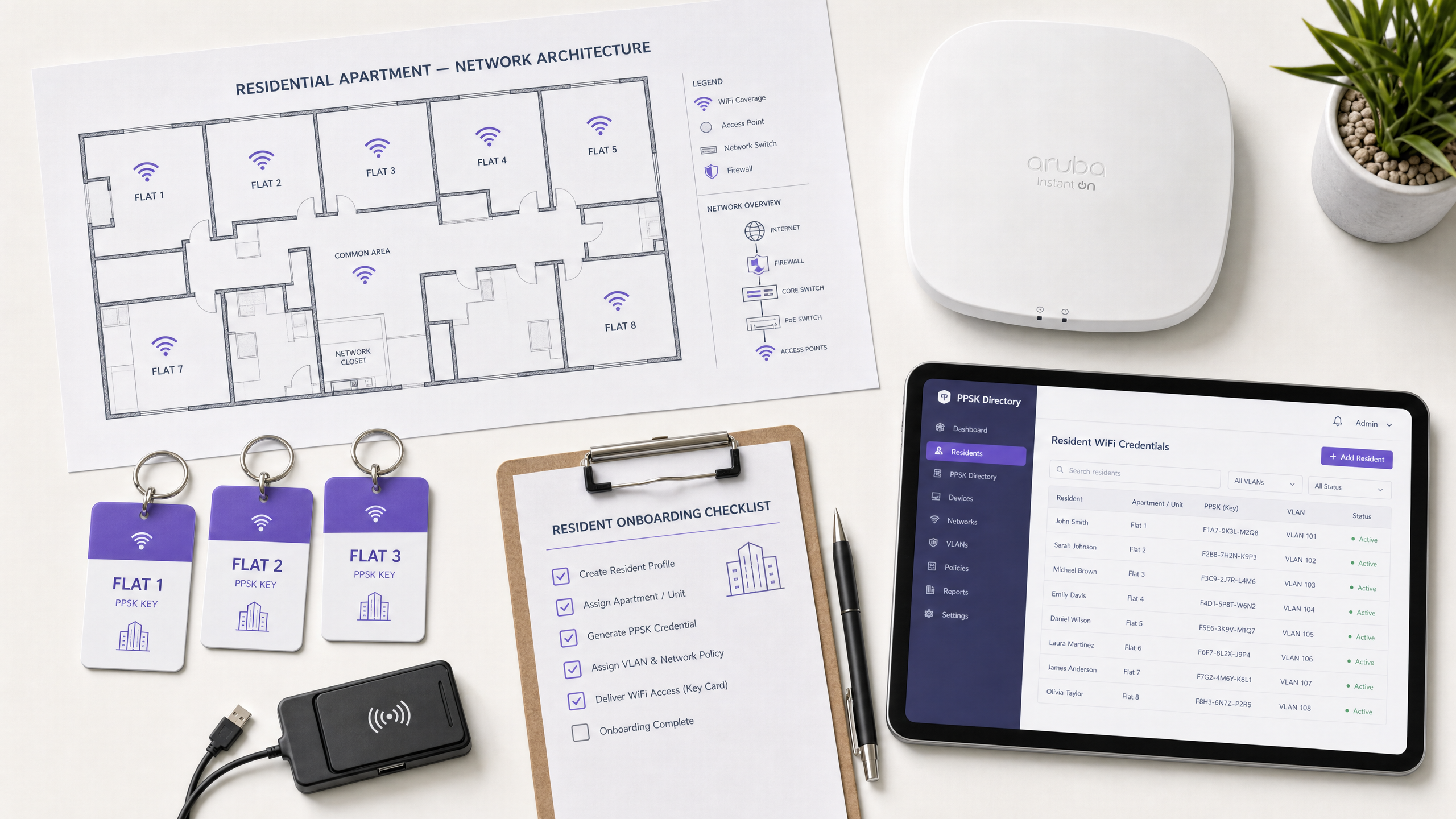
Traditional WPA2-Personal networks share a single password across all devices. In a 200-unit Build to Rent (BTR) development, that means one password for every resident, every smart TV, every thermostat, and every games console in the building. When a resident moves out, you either rotate the password for everyone - breaking connectivity for the other 199 flats - or you leave the former resident with access. Neither is acceptable.
Private Pre-Shared Key (PPSK) directory integration solves this. PPSK issues a unique WiFi password to each resident or unit, tying that key to a specific Virtual Local Area Network (VLAN). Devices connect to the same Service Set Identifier (SSID), but the network isolates them into private segments. Each resident's devices discover each other. No resident can see another's devices. When a tenancy ends, you revoke one key without touching anyone else's connection.
This guide compares PPSK directory deployment against standard PSK and IEEE 802.1X, details the three primary deployment architectures, and provides actionable implementation guidance for property developers, BTR operators, and the IT teams who support them. Purple operates across 80,000+ live venues and integrates as a cloud overlay across Cisco Meraki, HPE Aruba, Ruckus, Juniper Mist, Ubiquiti UniFi, Cambium, Extreme, and Fortinet.
Technical deep-dive: PPSK vs 802.1X vs standard PSK
To understand why PPSK dominates multi-tenant deployments, you must compare it to the alternatives at the association layer.
Standard PSK: the home network model
In a standard WPA2-Personal setup, the Access Point (AP) broadcasts an SSID and requires a single Pre-Shared Key. Every device uses this key. The AP places all devices onto the same VLAN. Devices can discover each other - ideal for a single household, unacceptable for a 200-unit BTR development. Standard PSK lacks any per-user revocation mechanism. Revoking access for one user requires rotating the key for everyone.
802.1X: the enterprise standard
IEEE 802.1X (WPA-Enterprise) requires a RADIUS server, an identity provider such as Microsoft Entra ID, Okta, or Google Workspace, and a supplicant on every device. The supplicant handles the Extensible Authentication Protocol (EAP) exchange. This provides robust, identity-backed security with per-user accountability. However, 802.1X fails in residential environments because IoT devices - smart TVs, game consoles, wireless speakers, and smart home sensors - lack 802.1X supplicants. Deploying 802.1X in a BTR building means leaving every IoT device either unauthenticated or on a separate unmanaged network.
PPSK directory: the multi-tenant solution
PPSK (called iPSK by Cisco Meraki, Personal Private Network by Cisco, and ePSK by Juniper Mist and Cambium) bridges this gap. The AP broadcasts a single SSID. When a device connects, it presents its unique key during the WPA2 four-way handshake. The AP queries the PPSK directory - hosted in the cloud controller or a RADIUS backend - to validate the key and retrieve the assigned VLAN. The device perceives a standard home network. The operator achieves complete per-unit isolation.
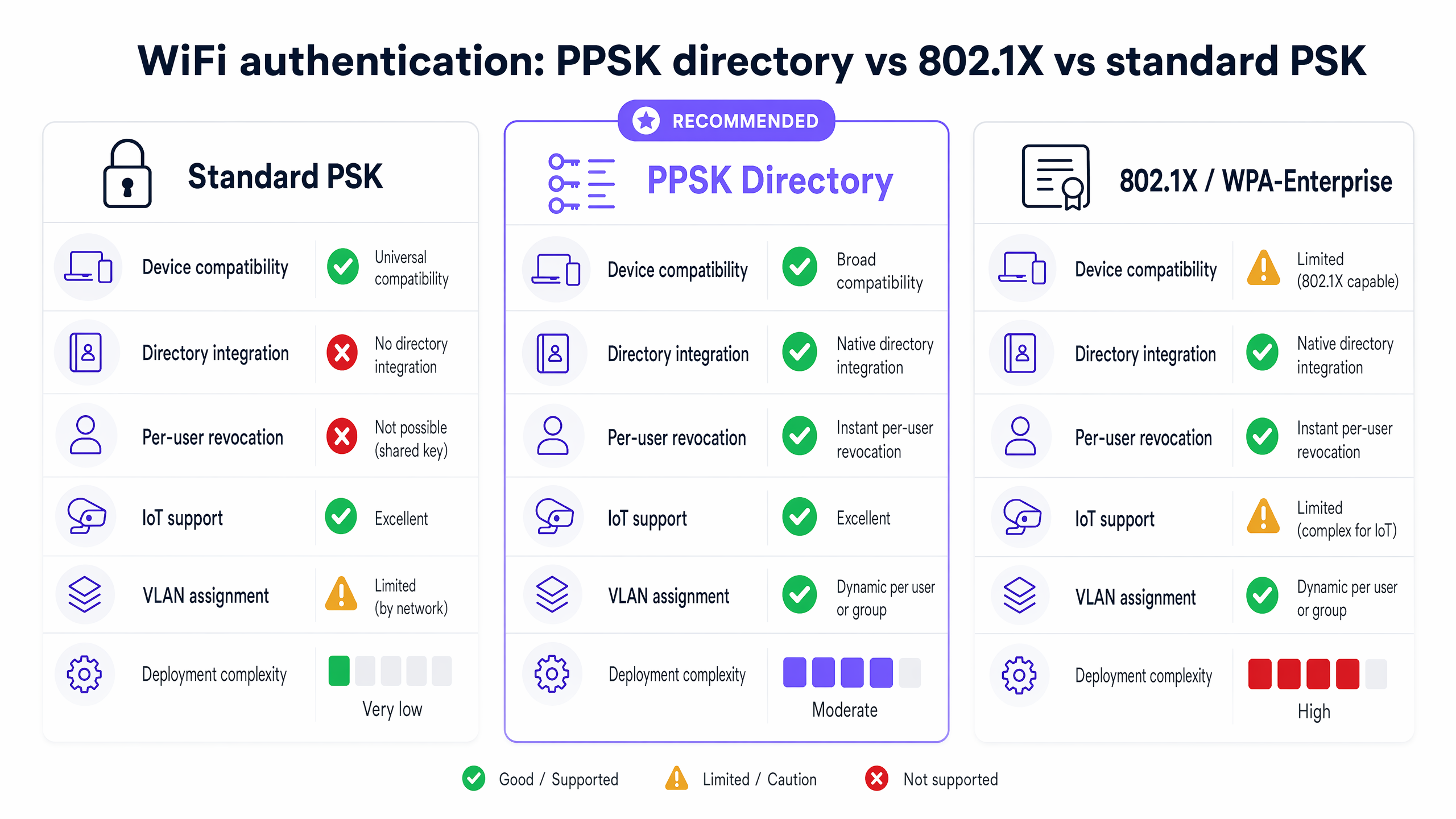
The table below summarises the key capability differences across the three authentication models.
| Capability | Standard PSK | PPSK directory | 802.1X / WPA-Enterprise |
|---|---|---|---|
| Device compatibility | Universal | Broad (all WPA2 devices) | Limited (requires supplicant) |
| Directory integration | None | Native (cloud or RADIUS) | Native (RADIUS + IdP) |
| Per-user revocation | Not possible | Instant | Instant |
| IoT device support | Yes | Yes | No (no supplicant) |
| Dynamic VLAN assignment | No | Yes | Yes |
| Deployment complexity | Very low | Moderate | High |
| WPA3 support | Yes | Yes (most vendors) | Yes |
Implementation guide: architecture and deployment models
Deploying a PPSK directory requires a structured approach to logical design before any hardware configuration begins.
Step 1: logical network design
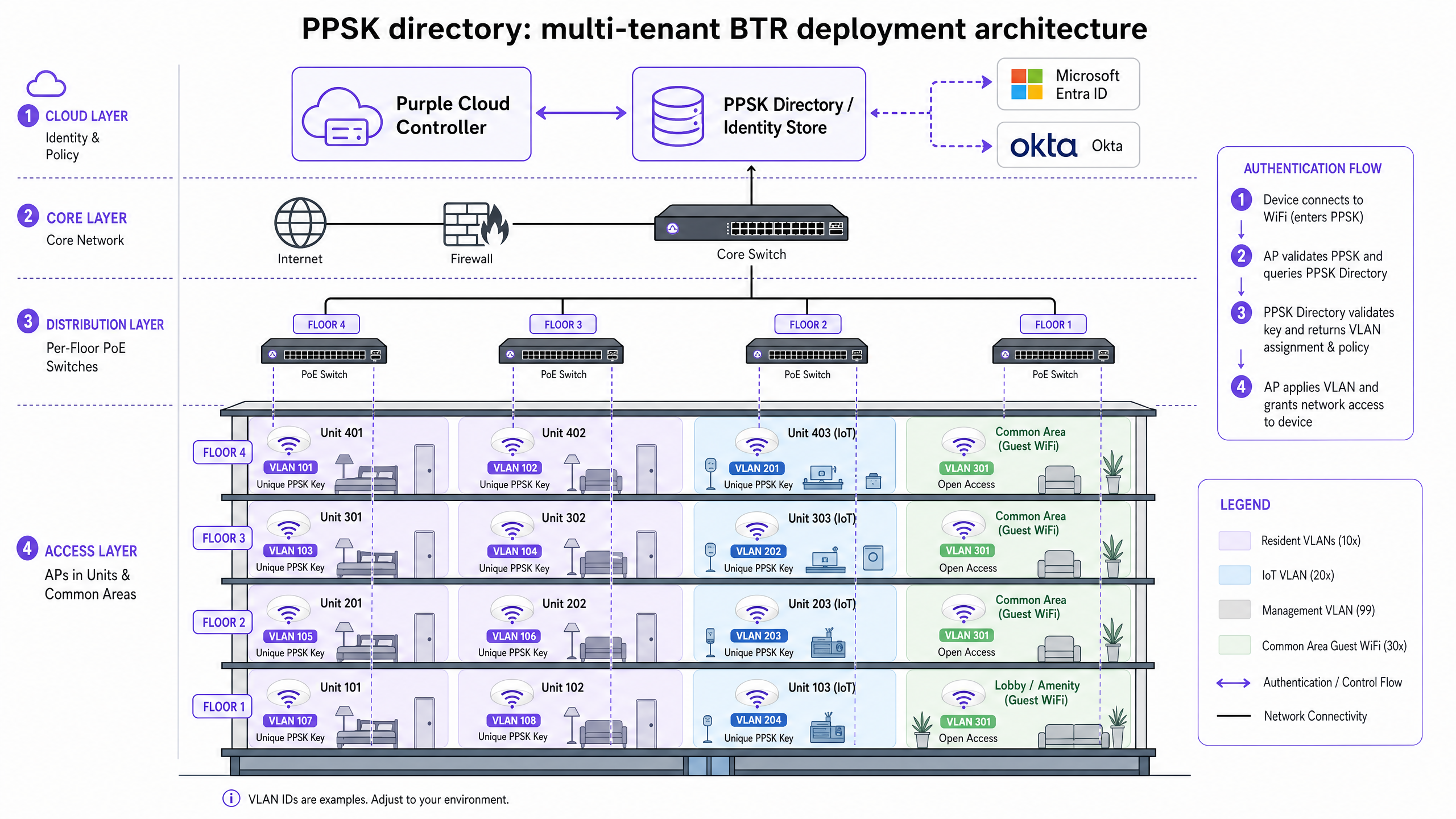
Map your resident count and IoT device categories before touching hardware. A standard BTR deployment isolates traffic as follows. Resident VLANs run from VLAN 10 through to whatever your unit count requires - one VLAN per flat is the standard approach. A dedicated IoT VLAN (typically VLAN 99) serves building management systems, CCTV, and smart sensors. A management VLAN (VLAN 100) carries staff device traffic, authenticated via 802.1X. A guest VLAN (VLAN 200) serves transient visitors in common areas via a captive portal.
Calculate your IP addressing requirements carefully. British Property Federation research indicates 15 to 25 devices per household. A 200-unit building hosts up to 5,000 devices simultaneously. Use RFC 1918 private addressing with a /24 subnet (254 usable addresses) per resident VLAN to ensure sufficient capacity. A /23 (510 addresses) provides headroom for high-density units.
Step 2: choosing the deployment model
Three primary PPSK architectures are in production today.
Cloud controller model. The PPSK directory resides in the vendor's cloud platform - Aruba Central, Meraki Dashboard, Ruckus Cloud, or Juniper Mist. The controller pushes policies to the APs. When a resident moves in, you generate a key in the portal. When they leave, you delete it. This is the most common model for new deployments due to its operational simplicity and zero on-premises infrastructure requirement.
RADIUS backend model. The APs forward authentication requests to a central RADIUS server such as Cisco ISE or FreeRADIUS, which queries an identity store. The RADIUS server returns the VLAN assignment via a Cisco-AVPair attribute. This model suits environments requiring deep audit trails and integration with existing enterprise directories. It adds infrastructure overhead but provides the accountability of 802.1X with the device compatibility of PPSK.
Hybrid authentication model. Residents use PPSK for their laptops and IoT devices. Building staff use 802.1X for corporate devices against Microsoft Entra ID or Okta. Both groups connect to the same physical infrastructure but map to different logical segments. Purple recommends this architecture for comprehensive BTR and multi-dwelling unit (MDU) deployments. Residents get PPSK. Building management systems get a dedicated IoT VLAN with PPSK. The property management team's devices use 802.1X. Three distinct authentication models, three distinct VLANs, one physical infrastructure.
Step 3: hardware integration
PPSK is supported across all major enterprise AP platforms, though implementation details vary by vendor.
| Vendor | PPSK term | Management platform | WPA3 support | Key limit |
|---|---|---|---|---|
| Cisco Meraki | iPSK | Meraki Dashboard | Yes | 5,000 per network |
| HPE Aruba | PPSK | Aruba Central / ArubaOS | Yes | Thousands |
| Ruckus | PPSK | SmartZone / Ruckus Cloud | Yes | Thousands |
| Juniper Mist | ePSK | Mist AI | Yes | Thousands |
| Ubiquiti UniFi | PPSK | UniFi Network | No (WPA2 only) | 1,000 per network |
| Cambium | ePSK | cnMaestro | Yes | Thousands |
| Extreme | Private PSK | ExtremeCloud IQ | Yes | Thousands |
| Fortinet | PPSK | FortiWLM / FortiGate | Yes | Thousands |
Note the specific constraint with Ubiquiti UniFi: its current PPSK implementation is restricted to WPA2. If you deploy WiFi 6E access points and require the 6GHz band, you must use a platform that supports WPA3-SAE with PPSK. Aruba, Ruckus, and Meraki all support PPSK on WPA3 configurations.
Purple integrates as a hardware-agnostic cloud overlay across all platforms in this list, providing a unified PPSK directory and resident management interface regardless of the underlying hardware vendor. See our guide on Three SSIDs to rule them all: guest, Passpoint, and IoT WiFi for the broader SSID architecture context.
Best practices for multi-tenant WiFi
Control SSID proliferation
Limit your broadcast to a maximum of four SSIDs per radio. Each additional SSID consumes airtime for beacon frames. In a dense residential building with 30 APs, broadcasting eight SSIDs per AP generates 240 beacon streams competing for airtime. Use PPSK to segment users logically behind a single SSID rather than creating a separate SSID per flat or per floor. See Three SSIDs to rule them all for the recommended SSID architecture.
Automate key distribution
Do not rely on manual password sheets. Integrate your PPSK directory with your property management system via the vendor REST API. Generate the unique key automatically at tenancy sign-up and deliver it via a QR code in the welcome email. Build the key distribution workflow before deployment, not after. Operators who automate key delivery report 30% fewer WiFi-related support tickets compared to manual distribution methods (Purple internal data, 2024).
Validate trunk links before go-live
The most common commissioning failure is missing VLAN tags on trunk links between distribution switches and the core network. Design your VLAN scheme, then verify that every resident VLAN is permitted on every relevant trunk link. Test with a device on each VLAN before residents move in.
Apply egress filtering to the IoT VLAN
Building infrastructure devices - HVAC controllers, CCTV cameras, access control panels - should sit on a dedicated IoT VLAN with strict egress filtering at the firewall. This prevents a compromised IoT device from reaching resident VLANs or the management network.
For more on Guest WiFi architecture and WiFi Analytics integration, see our product documentation. Operators in Hospitality should also review our guide on how to make a great first impression with your guest WiFi .
Troubleshooting and risk mitigation
Gaming consoles and NAT type
Residents expect their PlayStation or Xbox to report a "Type 2" or "Open" NAT type for online multiplayer. Overly aggressive Carrier-Grade NAT (CGNAT) implementation produces "Strict" NAT, generating a high volume of support tickets. Configure your firewall to handle UPnP correctly per resident segment. Do not apply a blanket restriction across all resident VLANs.
Smart home device pairing
Chromecast, Apple TV, Amazon Echo, and Sonos require device discovery on the same logical network. With PPSK, all devices on the same resident key share a VLAN and can discover each other. Devices on different keys cannot. This is the correct behaviour. If residents report smart home pairing failures, verify that all their devices are using the same PPSK key.
Key exhaustion on UniFi
Ubiquiti UniFi supports up to 1,000 PPSK entries per network. For a development with more than 1,000 units, or one with high IoT device counts, this limit requires careful planning. Consider segmenting the network across multiple UniFi sites, or migrating to a platform with higher key limits such as HPE Aruba or Cisco Meraki.
GDPR and resident data
PPSK key stores contain resident-identifiable data. Ensure your key management platform stores data in a compliant region. Purple stores data in line with GDPR and CCPA requirements, with selectable data residency for EU deployments. Retain resident-identifiable WiFi logs only as long as required for security and operations - six months is a common ceiling for BTR environments.
ROI and business impact
Managed WiFi is a core amenity in BTR and purpose-built student accommodation. Operators deploying PPSK networks see measurable returns across three dimensions.
Rent premium. BTR operators typically command a £15 to £30 monthly premium per unit for high-quality, move-in-ready WiFi, according to British Property Federation sector research. On a 200-unit development, that represents £36,000 to £72,000 in additional annual revenue.
Operational efficiency. Unique keys eliminate building-wide password rotations. Operators report a 30% reduction in WiFi-related support tickets after migrating from shared PSK to PPSK (Purple internal data, 2024). Move-in-day connectivity also reduces void periods by five to ten days.
Hardware-agnostic deployment. By deploying Purple's Multi-Tenant WiFi solution as a software overlay on your existing or chosen hardware, you retain control of the network and the NOI uplift. You avoid ceding the revenue to a third-party broadband provider who bundles connectivity into a contract that captures the amenity premium.
Purple has operated across 80,000+ live venues since 2012, with 99.999% uptime and ISO 27001, GDPR, CCPA, and Cyber Essentials certifications. For Retail and Healthcare deployments requiring similar network segmentation, the same PPSK directory architecture applies with sector-specific compliance overlays.
For the iPSK variant of this architecture, see our related guide: Logo guild iPSK: a comprehensive guide for businesses .
Key Definitions
PPSK (Private Pre-Shared Key)
An authentication method that issues unique WiFi passwords to individual users, devices, or units on a single SSID, mapping each key to a specific network policy or VLAN. Also called iPSK (Cisco Meraki), ePSK (Juniper Mist, Cambium), or Private PSK (Extreme Networks).
Essential for multi-tenant environments where residents require per-unit isolation but their IoT devices do not support 802.1X.
IEEE 802.1X
An IEEE standard for port-based network access control that provides authenticated access using a RADIUS server and an identity provider. Requires a software supplicant on the client device.
Used for staff and management networks in BTR deployments. Cannot be used for IoT devices that lack supplicants.
VLAN (Virtual Local Area Network)
A logical subnetwork that groups a collection of devices, isolating their broadcast traffic from other devices on the same physical infrastructure.
PPSK uses VLANs to create private WiFi bubbles for each flat. Each resident's key maps to a unique VLAN.
RADIUS (Remote Authentication Dial-In User Service)
A networking protocol that provides centralised Authentication, Authorisation, and Accounting management for users connecting to a network service.
Used in the RADIUS backend deployment model to validate PPSK credentials against an identity store and return VLAN assignments via Cisco-AVPair attributes.
Supplicant
A software client on an end-user device that communicates with an authenticator to gain network access via 802.1X. Handles the EAP authentication exchange.
The absence of supplicants on IoT devices is the primary reason PPSK is required in residential networks. Laptops and phones have supplicants; smart speakers and thermostats do not.
WPA3-SAE (Simultaneous Authentication of Equals)
The latest WiFi security standard using a Dragonfly key exchange to protect against offline dictionary attacks, replacing the WPA2 four-way handshake for PSK authentication.
Required for 6GHz network operation on WiFi 6E access points. Architects must verify their chosen AP vendor supports PPSK over WPA3 before specifying hardware.
CGNAT (Carrier-Grade NAT)
A method of sharing a single public IP address among multiple private IP addresses, commonly used by ISPs and large network operators to conserve IPv4 address space.
Improper CGNAT configuration in BTR networks restricts gaming console multiplayer connectivity, producing 'Strict' NAT type instead of the required 'Open' or 'Type 2'.
SSID (Service Set Identifier)
The name of a WiFi network as broadcast by an access point. Devices scan for SSIDs to identify available networks.
PPSK allows multiple resident segments to share a single SSID, preventing the airtime degradation caused by broadcasting separate SSIDs per unit.
Worked Examples
A 180-unit Build to Rent development requires move-in-day WiFi with full smart home support. The operator wants to eliminate password rotation when tenancies end and reduce support tickets from residents who cannot connect their Chromecast or smart speaker.
Deploy HPE Aruba access points managed via Aruba Central. Configure a single SSID with PPSK enabled. Map VLANs 10 through 190 to individual flats (one VLAN per unit). Integrate the property management system via the Aruba Central REST API to automatically generate a unique PPSK key at lease signing. Deliver the key to the resident via a QR code in their welcome email. When a tenancy ends, delete the key in the portal. Configure DHCP with /24 subnets per VLAN to accommodate up to 25 devices per flat. Set a dedicated IoT VLAN (VLAN 99) for building management systems with egress filtering.
A 400-bed purpose-built student accommodation block needs to handle cohort move-in week, with hundreds of students arriving simultaneously and connecting multiple devices each. The previous deployment used a shared password that was rotated annually, causing chaos at the start of each academic year.
Deploy Ruckus access points managed via SmartZone. Configure PPSK with one unique key per room. Pre-generate all keys before the academic year begins. Include each room's QR code in the welcome pack sent to students before arrival. Configure per-room VLANs with /23 subnets to accommodate laptops, phones, consoles, and smart TVs. Enable WPA3-SAE on the PPSK SSID for improved security. Set up a self-service resident portal where students can retrieve their key and add new devices mid-year without contacting IT.
Practice Questions
Q1. You are advising a BTR operator on upgrading a 400-unit development. They currently broadcast a separate SSID for each floor (eight floors, eight SSIDs). Residents report slow WiFi, especially in the evenings. What is the likely cause and what do you recommend?
Hint: Consider the relationship between SSID count, beacon frames, and airtime utilisation.
View model answer
The likely cause is airtime saturation from excessive beacon frames. Each SSID broadcasts beacons multiple times per second. Eight SSIDs across 30 access points generates 240 competing beacon streams, consuming a significant proportion of available airtime before any resident data is transmitted. The recommendation is to consolidate to a single SSID and deploy PPSK to achieve the required per-floor or per-unit isolation. This eliminates the beacon overhead while maintaining security.
Q2. A BTR operator reports that residents' smart TVs, Chromecasts, and smart speakers frequently stop working after other residents move out. The IT team rotates the building password at each move-out. What is the architectural flaw and what is the correct solution?
Hint: Analyse the impact of a shared PSK on all connected devices when the key is rotated.
View model answer
The network uses a standard shared PSK for all residents. When the key rotates on move-out, every device in the building loses its connection and must be manually reconnected. The correct solution is to migrate to a PPSK directory, issuing a unique key per flat. When a resident moves out, the operator deletes only that flat's key. The other 399 flats are unaffected. Smart TVs, Chromecasts, and smart speakers reconnect automatically because their credentials have not changed.
Q3. You are specifying WiFi 6E access points for a new 200-unit BTR development. The client requires unique PPSK keys per flat and wants to use the 6GHz band for high-bandwidth applications. You are evaluating Ubiquiti UniFi against HPE Aruba. What compatibility issue must you identify and how does it affect your hardware recommendation?
Hint: Check the relationship between the 6GHz band, WPA3 requirements, and vendor PPSK implementation constraints.
View model answer
The 6GHz band mandates WPA3-SAE. Ubiquiti UniFi currently restricts PPSK to WPA2 only, meaning PPSK clients cannot use the 6GHz band on UniFi hardware. HPE Aruba supports PPSK on WPA3-SAE, enabling full 6GHz band utilisation for PPSK clients. The recommendation is HPE Aruba for this deployment. If the client has an existing UniFi investment, PPSK clients must be restricted to the 2.4GHz and 5GHz bands until Ubiquiti adds WPA3 support for PPSK.
Continue reading in this series
Uu PPSK pdf: comparing features and deployment models
This technical reference guide compares Private Pre-Shared Key (PPSK) WiFi architecture against traditional 802.1X and standard PSK deployments. It provides network architects and IT managers with vendor-neutral implementation strategies for multi-tenant residential, IoT, and BTR environments.
Uu PPSK pdf: comparing features and deployment models
This technical reference guide compares Private Pre-Shared Key (PPSK) WiFi architecture against traditional 802.1X and standard PSK deployments. It provides network architects and IT managers with vendor-neutral implementation strategies for multi-tenant residential, IoT, and BTR environments.
Uu PPSK 2023: comparing features and deployment models
This technical reference guide compares Unique per-User Private Pre-Shared Key (UU PPSK) WiFi architecture against traditional shared PSK and 802.1X deployments, with a specific focus on the 2023 landscape of vendor implementations and platform capabilities. It provides property developers, BTR operators, and MDU landlords with actionable deployment strategies, VLAN architecture guidance, and automated lifecycle management workflows. The guide covers three deployment models, real-world case studies, and the compliance implications of each authentication approach.