
EAP-TLS vs EAP-TTLS: Which Certificate-Based WiFi Protocol Should You Choose?
This guide provides a definitive head-to-head comparison of EAP-TLS and EAP-TTLS for enterprise WiFi authentication under IEEE 802.1X. It explains the architectural difference between mutual certificate authentication and server-only certificate tunnelling, and gives IT managers, network architects, and CISOs a clear decision framework based on device management capabilities and compliance requirements. Purple supports both EAP-TLS and EAP-TTLS authentication paths for Staff WiFi, and this guide helps organisations understand the infrastructure trade-offs before committing to either approach.
Listen to this guide
View podcast transcript

कार्यकारी सारांश (Executive summary)
अपने 802.1X डिप्लॉयमेंट के लिए सही EAP विधि चुनना यह तय करता है कि आपका एंटरप्राइज WiFi वास्तव में सुरक्षित है या केवल कागजों पर ही अनुपालन करता है। EAP-TLS (Extensible Authentication Protocol - Transport Layer Security), जो RFC 5216 में परिभाषित है, को आपसी प्रमाणपत्र प्रमाणीकरण (mutual certificate authentication) की आवश्यकता होती है: नेटवर्क एक्सेस मिलने से पहले क्लाइंट डिवाइस और RADIUS सर्वर दोनों वैध X.509 प्रमाणपत्र प्रस्तुत करते हैं। किसी भी समय पासवर्ड का आदान-प्रदान नहीं किया जाता है। EAP-TTLS (Tunneled Transport Layer Security), जो RFC 5281 में परिभाषित है, को एक एन्क्रिप्टेड TLS टनल स्थापित करने के लिए केवल एक सर्वर-साइड प्रमाणपत्र की आवश्यकता होती है, जिसके अंदर क्लाइंट मौजूदा निर्देशिका क्रेडेंशियल का उपयोग करके प्रमाणित होता है।
रिटेल चेन, हॉस्पिटैलिटी स्थलों और सार्वजनिक क्षेत्र के संगठनों में बुनियादी ढांचे का प्रबंधन करने वाले CTOs और नेटवर्क आर्किटेक्ट्स के लिए, यह निर्णय केवल एक प्रश्न पर निर्भर करता है: क्या आप उपकरणों का प्रबंधन करते हैं? यदि आप MDM के माध्यम से डिवाइस बेड़े को नियंत्रित करते हैं, तो EAP-TLS निश्चित विकल्प है। यदि आप एक विविध BYOD वातावरण का समर्थन करते हैं या एक मजबूत पब्लिक की इन्फ्रास्ट्रक्चर (PKI) की कमी है, तो EAP-TTLS एक व्यावहारिक, अत्यधिक सुरक्षित विकल्प प्रदान करता है। Purple 80,000+ से अधिक लाइव स्थलों पर Staff WiFi के लिए दोनों प्रमाणीकरण पथों का समर्थन करता है।
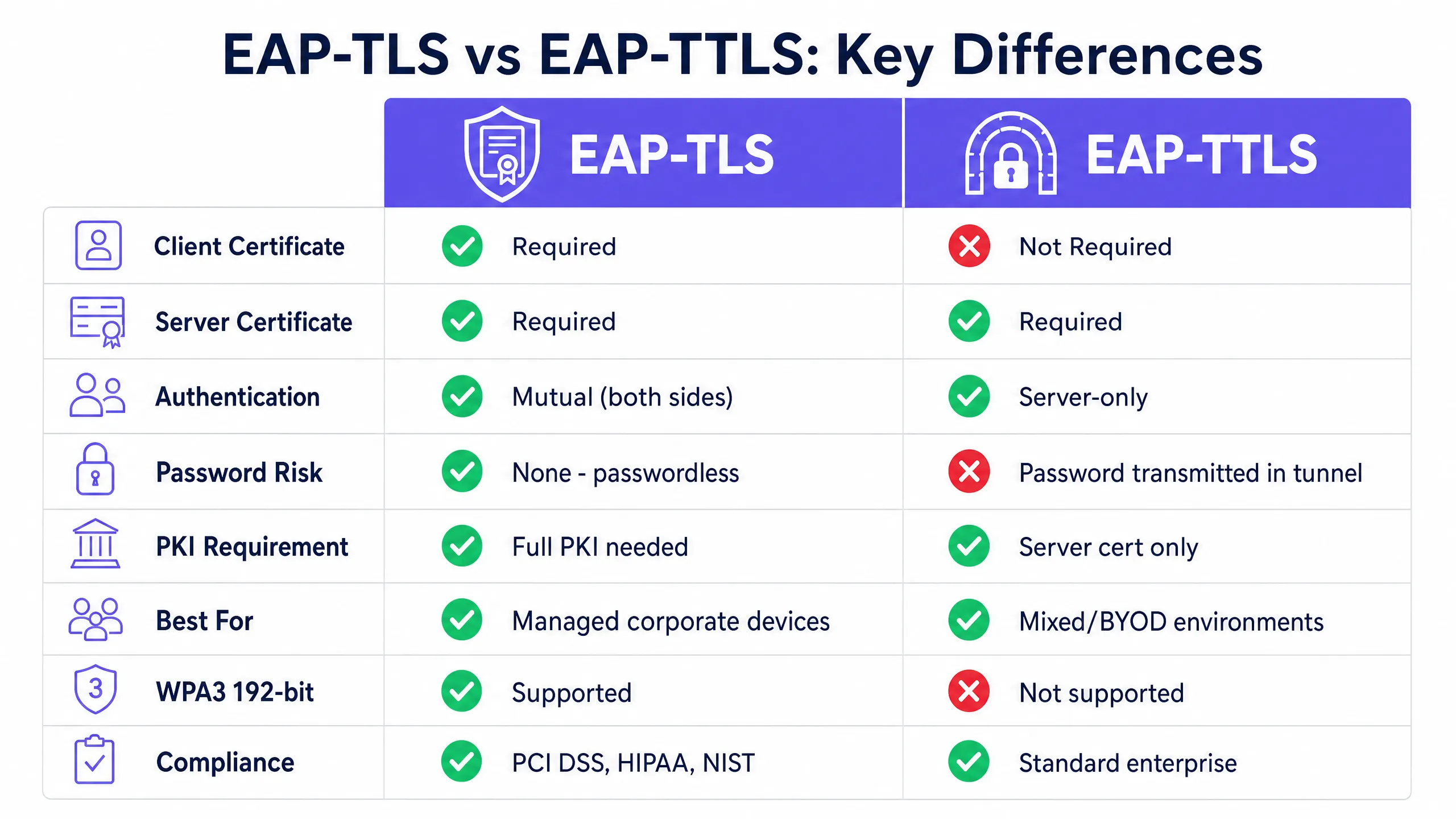
तकनीकी गहन विश्लेषण (Technical deep-dive)
EAP-TLS की वास्तुकला
EAP-TLS, IEEE 802.1X पोर्ट-आधारित एक्सेस कंट्रोल फ्रेमवर्क के भीतर एक आपसी प्रमाणीकरण (mutual authentication) मॉडल पर काम करता है। प्रत्येक प्रमाणीकरण विनिमय में तीन मुख्य कारक होते हैं: सप्लिकेंट (क्लाइंट डिवाइस), ऑथेंटिकेटर (वायरलेस एक्सेस पॉइंट), और ऑथेंटिकेशन सर्वर (RADIUS सर्वर)। एक्सेस पॉइंट स्वयं प्रमाणीकरण निर्णय नहीं लेता है। यह एक पारदर्शी रिले के रूप में कार्य करता है, जो EAP संदेशों को RADIUS पैकेटों में समाहित करता है और उन्हें ऑथेंटिकेशन सर्वर पर भेजता है।
EAP-TLS हैंडशेक इस प्रकार आगे बढ़ता है। एक्सेस पॉइंट कनेक्ट होने वाले डिवाइस को एक EAP-Request/Identity भेजता है। डिवाइस अपनी पहचान के साथ प्रतिक्रिया देता है। RADIUS सर्वर EAP-TLS/Start संदेश के साथ TLS हैंडशेक शुरू करता है। क्लाइंट एक ClientHello भेजता है, जो इसके समर्थित TLS साइफर सुइट्स का विज्ञापन करता है। RADIUS सर्वर ServerHello, अपने X.509 सर्वर सर्टिफिकेट और एक सर्टिफिकेट अनुरोध के साथ प्रतिक्रिया देता है। क्लाइंट अपने विश्वसनीय रूट CA स्टोर के खिलाफ सर्वर सर्टिफिकेट को सत्यापित करता है। यदि सत्यापन विफल हो जाता है, तो हैंडशेक समाप्त हो जाता है - जो अनधिकृत (rogue) एक्सेस पॉइंट से सुरक्षा प्रदान करता है। इसके बाद क्लाइंट अपना स्वयं का X.509 सर्टिफिकेट प्रस्तुत करता है। RADIUS सर्वर क्लाइंट सर्टिफिकेट को सत्यापित करता है, विश्वसनीय रूट CA तक सिग्नेचर चेन की जांच करता है, सत्यापित करता है कि सर्टिफिकेट समाप्त नहीं हुआ है, और सर्टिफिकेट निरसन सूची (CRL) की जांच करता है या OCSP से पूछताछ करता है। केवल तभी जब दोनों पक्ष संतुष्ट होते हैं, TLS टनल स्थापित होती है और नेटवर्क एक्सेस प्रदान किया जाता है।
चूंकि किसी भी पासवर्ड का आदान-प्रदान नहीं होता है, इसलिए EAP-TLS ऑफलाइन डिक्शनरी हमलों, क्रेडेंशियल स्टफिंग और फ़िशिंग से सुरक्षित है। यह एकमात्र EAP तरीका है जो WPA3-Enterprise 192-bit (Suite B) आवश्यकताओं को पूरा करता है, और इसे कार्डधारक डेटा वातावरण के लिए PCI DSS 4.0 द्वारा और उच्च-सुरक्षा वायरलेस परिनियोजन के लिए NIST SP 800-120 द्वारा अनिवार्य या दृढ़ता से अनुशंसित किया गया है।
EAP-TLS के लिए एक PKI की आवश्यकता होती है। आपको कम से कम एक ऑफलाइन रूट CA और एक ऑनलाइन जारी करने वाले CA की आवश्यकता होती है। रूट CA एयर-गैप्ड होना चाहिए, क्योंकि इसकी प्राइवेट की (private key) आपके संपूर्ण सर्टिफिकेट पदानुक्रम के लिए मास्टर ट्रस्ट एंकर है। जारी करने वाला CA दैनिक सर्टिफिकेट जारी करने का काम संभालता है और CRL प्रकाशित करता है। क्लाइंट सर्टिफिकेट व्यक्तिगत उपकरणों को जारी किए जाते हैं, उपयोगकर्ताओं को नहीं - यह एक डिवाइस-आइडेंटिटी मॉडल है। यह अंतर IoT उपकरणों, साझा टर्मिनलों और हेडलेस सिस्टम के लिए महत्वपूर्ण है।
EAP-TTLS की संरचना
EAP-TTLS को हर क्लाइंट डिवाइस पर सर्टिफिकेट तैनात करने के परिचालन बोझ के बिना मजबूत 802.1X सुरक्षा प्रदान करने के लिए डिज़ाइन किया गया था। यह दो चरणों में काम करता है। पहले चरण में, RADIUS सर्वर अपना सर्टिफिकेट प्रस्तुत करता है और एक सुरक्षित TLS टनल स्थापित करता है। केवल सर्वर को ही सर्टिफिकेट की आवश्यकता होती है। दूसरे चरण में, क्लाइंट एक आंतरिक प्रमाणीकरण पद्धति का उपयोग करके उस एन्क्रिप्टेड टनल के भीतर प्रमाणित होता है। सामान्य आंतरिक तरीकों में PAP (Password Authentication Protocol), CHAP, और MS-CHAPv2 शामिल हैं। क्लाइंट अपना उपयोगकर्ता नाम और पासवर्ड भेजता है, लेकिन क्योंकि यह आदान-प्रदान TLS टनल के भीतर होता है, क्रेडेंशियल ट्रांज़िट में एन्क्रिप्टेड होते हैं और कभी भी हवा में उजागर नहीं होते हैं।
EAP-TTLS macOS, Linux, Android, और iOS पर उत्कृष्ट क्रॉस-प्लेटफ़ॉर्म सहायता प्रदान करता है। चेतावनी Windows को लेकर है: इन-बिल्ट Windows सप्लिकेंट वायरलेस 802.1X के लिए EAP-TTLS को पूरी तरह से लागू नहीं करता है। अधिक Windows वाले वातावरणों को एक तृतीय-पक्ष सप्लिकेंट की आवश्यकता हो सकती है, जो परिचालन जटिलता को बढ़ाता है। Windows-केंद्रित वातावरणों के लिए, MS-CHAPv2 के साथ PEAP अक्सर अधिक व्यावहारिक विकल्प होता है।
EAP-TTLS की सबसे बड़ी सीमा यह है कि यह पासवर्ड के अंतर्निहित जोखिमों को समाप्त नहीं करता है। यदि कोई उपयोगकर्ता कमज़ोर पासवर्ड चुनता है, तो वह बाद में ऑफ़लाइन ब्रूट फ़ोर्स के प्रति संवेदनशील रहता है। यदि आंतरिक प्रमाणीकरण PAP का उपयोग करता है, तो पासवर्ड टनल के भीतर प्लेनटेक्स्ट में भेजा जाता है - जो तब स्वीकार्य है जब आप अपने RADIUS इन्फ्रास्ट्रक्चर पर भरोसा करते हैं, लेकिन इसे एक ट्रस्ट मॉडल के रूप में समझना आवश्यक है।
आमने-सामने तुलना
| विशेषता | EAP-TLS | EAP-TTLS |
|---|---|---|
| RFC मानक | RFC 5216 | RFC 5281 |
| क्लाइंट प्रमाणपत्र आवश्यक | हाँ | नहीं |
| सर्वर प्रमाणपत्र आवश्यक | हाँ | हाँ |
| प्रमाणीकरण मॉडल | आपसी (दोनों पक्ष) | केवल-सर्वर |
| पासवर्ड का जोखिम | कोई नहीं - पासवर्ड रहित | एन्क्रिप्टेड टनल में पासवर्ड |
| PKI आवश्यकता | पूर्ण PKI (रूट CA + जारीकर्ता CA + MDM) | केवल सर्वर प्रमाणपत्र |
| WPA3-Enterprise 192-bit | आवश्यक विधि | समर्थित नहीं |
| PCI DSS 4.0 संरेखण | दृढ़ता से अनुशंसित | मजबूत आंतरिक प्रमाणीकरण के साथ स्वीकार्य |
| BYOD उपयुक्तता | कम (क्लाइंट प्रमाणपत्र की आवश्यकता होती है) | उच्च (केवल क्रेडेंशियल्स) |
| IoT डिवाइस उपयुक्तता | उच्च (स्टेजिंग पर प्रमाणपत्र प्रदान किया गया) | कम (क्रेडेंशियल इनपुट के लिए कोई UI नहीं) |
| Windows मूल समर्थन | हाँ | आंशिक (अक्सर तृतीय-पक्ष सप्लीकेंट की आवश्यकता होती है) |
| macOS/Linux/Android समर्थन | हाँ | हाँ |
| परिनियोजन जटिलता | उच्च | मध्यम |
कार्यान्वयन गाइड
प्रबंधित फ़्लीट के लिए EAP-TLS तैनात करना
EAP-TLS को तैनात करने के लिए एक कार्यात्मक PKI और एक MDM प्लेटफॉर्म की आवश्यकता होती है। मैन्युअल प्रमाणपत्र स्थापना एंटरप्राइज़ स्तर पर व्यवहार्य नहीं है। आपको SCEP (सिंपल सर्टिफिकेट एनरोलमेंट प्रोटोकॉल) या EST (एनरोलमेंट ओवर सिक्योर ट्रांसपोर्ट) का उपयोग करके अपने PKI को अपने MDM के साथ एकीकृत करना होगा। जब एक कॉर्पोरेट डिवाइस नामांकित होता है, तो यह उपयोगकर्ता के हस्तक्षेप के बिना स्वचालित रूप से अपने प्रमाणपत्र का अनुरोध करता है और प्राप्त करता है।
पहचान प्रबंधन के लिए, Connect लाइसेंस के तहत OpenRoaming जैसी सेवाओं के लिए Purple एक निःशुल्क पहचान प्रदाता के रूप में कार्य करता है, जो अंतर्निहित प्रमाणपत्र और पहचान ढांचे का उपयोग करके विभिन्न स्थानों पर सुरक्षित रोमिंग की सुविधा प्रदान करता है।
RADIUS की ओर, अपने आंतरिक CA के विरुद्ध क्लाइंट प्रमाणपत्रों को मान्य करने और रीयल-टाइम निरसन जाँच के लिए CRL की जाँच करने या OCSP का उपयोग करने के लिए अपने सर्वर को कॉन्फ़िगर करें। समर्थित RADIUS प्लेटफॉर्म में FreeRADIUS, Microsoft NPS और Cisco ISE शामिल हैं। Purple का क्लाउड ओवरले Cisco Meraki, HPE Aruba, Ruckus, Juniper Mist, Ubiquiti UniFi, Cambium, Extreme और Fortinet हार्डवेयर के साथ एकीकृत होता है।
मिश्रित परिवेशों के लिए EAP-TTLS तैनात करना
अप्रबंधित उपकरणों वाले परिवेशों के लिए EAP-TTLS इष्टतम विकल्प है। आपको केवल अपने RADIUS सर्वर पर एक विश्वसनीय प्रमाणपत्र तैनात करने की आवश्यकता है। सुनिश्चित करें कि आपका RADIUS सर्वर आंतरिक प्रमाणीकरण क्रेडेंशियल्स को मान्य करने के लिए सीधे आपकी निर्देशिका सेवा - Microsoft Entra ID, Okta, या Google Workspace - के साथ एकीकृत हो। अपने MDM-तैनात WiFi प्रोफाइल को अपने विशिष्ट विश्वसनीय CA के विरुद्ध सर्वर प्रमाणपत्र सत्यापन लागू करने के लिए कॉन्फ़िगर करें। इस चरण के बिना, TLS टनल दुष्ट एक्सेस पॉइंट्स के खिलाफ कोई सुरक्षा प्रदान नहीं करती है।

सर्वोत्तम प्रथाएं
प्रत्येक क्लाइंट पर सर्वर प्रमाणपत्र सत्यापन लागू करें
EAP-TLS और EAP-TTLS दोनों के लिए सबसे महत्वपूर्ण कॉन्फ़िगरेशन चरण क्लाइंट डिवाइस पर सर्वर प्रमाणपत्र सत्यापन को लागू करना है। यदि कोई डिवाइस किसी विशिष्ट विश्वसनीय CA के विरुद्ध RADIUS सर्वर के प्रमाणपत्र को सत्यापित नहीं करता है, तो यह किसी भी प्रमाणपत्र को प्रस्तुत करने वाले किसी भी सर्वर से जुड़ जाएगा - जिसमें एक दुष्ट एक्सेस पॉइंट भी शामिल है। हमेशा अपने MDM-नियोजित WiFi प्रोफाइल में विश्वसनीय CA और अपेक्षित सर्वर नाम निर्दिष्ट करें। यह एकल कॉन्फ़िगरेशन जांच सबसे प्रभावी सुरक्षा सुधार है जिसे आप आज लागू कर सकते हैं।
प्रमाणपत्र जीवनचक्र प्रबंधन को स्वचालित करें
प्रमाणपत्रों की अवधि समाप्त हो जाती है। यदि आपके पास स्वचालित नवीनीकरण प्रक्रिया नहीं है, तो प्रमाणपत्रों की अवधि एक साथ समाप्त होने पर आपको बड़े पैमाने पर प्रमाणीकरण विफलताओं का सामना करना पड़ेगा। नवीनीकरण को स्वचालित करने के लिए SCEP या EST का उपयोग करें, और समाप्ति तिथियों से काफी पहले निगरानी अलर्ट कॉन्फ़िगर करें। यदि कोई डिवाइस खो जाता है या कोई कर्मचारी चला जाता है, तो प्रमाणपत्र को तुरंत निरस्त कर दें। रीयल-टाइम सत्यापन के लिए CRL की जांच करने या OCSP का उपयोग करने के लिए अपने RADIUS सर्वर को कॉन्फ़िगर करें।
प्रमाणीकरण विधि द्वारा अपने नेटवर्क को विभाजित करें
बड़े या वितरित परिवेशों में, अलग-अलग SSID पर दोनों प्रोटोकॉल चलाने पर विचार करें। कॉर्पोरेट प्रबंधित डिवाइस एक समर्पित स्टाफ WiFi SSID पर EAP-TLS के माध्यम से प्रमाणित होते हैं। ठेकेदार और BYOD डिवाइस उपयुक्त VLAN विभाजन के साथ एक अलग SSID पर EAP-TTLS के माध्यम से प्रमाणित होते हैं। यह पैटर्न प्रीमियर इन और व्हिटब्रेड जैसे आतिथ्य समूहों में आम है, जहां स्टाफ उपकरणों को प्रबंधित और प्रमाणपत्र जारी किए जाते हैं, जबकि मेहमानों के लिए बुनियादी ढांचा एक अलग प्रमाणीकरण पथ का उपयोग करता है। SSID आर्किटेक्चर के बारे में अधिक जानकारी के लिए, हमारा गाइड देखें Three SSIDs to rule them all: the WiFi design for guest, staff and IoT ।
सभी बुनियादी ढांचे में समय को सिंक्रनाइज़ करें
प्रमाणपत्र सत्यापन सटीक सिस्टम समय पर निर्भर करता है। क्लाइंट उपकरणों या RADIUS सर्वरों पर घड़ी का विचलन 'अभी तक मान्य नहीं' या 'समय समाप्त' प्रमाणपत्र त्रुटियां उत्पन्न करता है जिनका निदान करना कठिन होता है। सुनिश्चित करें कि सभी बुनियादी ढांचा घटक विश्वसनीय NTP सर्वरों के साथ सिंक्रनाइज़ हों।
समस्या निवारण और जोखिम शमन
अज्ञात CA त्रुटियां
यदि RADIUS लॉग 'अज्ञात CA' दिखाते हैं, तो क्लाइंट डिवाइस उस CA पर भरोसा नहीं करता है जिसने RADIUS सर्वर का प्रमाणपत्र जारी किया है। सत्यापित करें कि आपके MDM प्रोफ़ाइल में रूट CA प्रमाणपत्र शामिल है और उस पर भरोसा करने के लिए सप्लीकेंट को कॉन्फ़िगर किया गया है। CA रोटेशन या प्रमाणपत्र नवीनीकरण के बाद, अपडेट किए गए CA बंडल को सभी उपकरणों पर फिर से पुश करें।
EAP विधि बेमेल
यदि डिवाइस एक्सेस पॉइंट से कनेक्ट होते हैं लेकिन प्रमाणीकरण विफल हो जाता है, तो जांचें कि क्लाइंट पर कॉन्फ़िगर की गई EAP विधि RADIUS सर्वर द्वारा स्वीकार की जाने वाली विधि से मेल खाती है। EAP-TLS के लिए सेट किया गया डिवाइस प्रोफ़ाइल केवल PEAP के लिए कॉन्फ़िगर किए गए RADIUS सर्वर पर विफल हो जाएगा।
सर्टिफिकेट की समय सीमा समाप्त होने के कारण सामूहिक विफलताएं
यदि बड़ी संख्या में डिवाइस एक साथ प्रमाणित होने में विफल रहते हैं, तो सबसे पहले सर्टिफिकेट की समाप्ति तिथियों की जांच करें। यह EAP-TLS डिप्लॉयमेंट में बड़े पैमाने पर 802.1X विफलताओं का सबसे आम कारण है। ऐसा मॉनिटरिंग सिस्टम लागू करें जो समाप्ति से 60 दिन, 30 दिन और सात दिन पहले अलर्ट भेजे।
RADIUS क्लाइंट का गलत कॉन्फ़िगरेशन
प्रत्येक एक्सेस पॉइंट या वायरलेस कंट्रोलर को सही IP एड्रेस और शेयर्ड सीक्रेट के साथ RADIUS क्लाइंट के रूप में परिभाषित किया जाना चाहिए। बेमेल होने के कारण प्रमाणीकरण टाइमआउट होता है जिसे अक्सर गलत तरीके से EAP विधि के कारण मान लिया जाता है। पहले दिन से ही विस्तृत RADIUS लॉगिंग सक्षम करें। अधिक WiFi समस्या निवारण मार्गदर्शन के लिए, हमारी गाइड Troubleshooting Public WiFi: Fixing 'Connected, No Internet' and Splash Page Redirection Failures देखें।
अनुपालन और नियामक संरेखण
CISOs और नेटवर्क आर्किटेक्ट्स के लिए EAP-TLS बनाम EAP-TTLS का निर्णय लेने के लिए नियामक परिदृश्य को समझना आवश्यक है। EAP विधि का चयन सीधे कई प्रमुख फ्रेमवर्क में आपके अनुपालन की स्थिति को प्रभावित करता है।
PCI DSS 4.0 (पेमेंट कार्ड इंडस्ट्री डेटा सिक्योरिटी स्टैंडर्ड) को कार्डधारक डेटा परिवेश में वायरलेस नेटवर्क के लिए मजबूत क्रिप्टोग्राफिक प्रमाणीकरण की आवश्यकता होती है। आवश्यकता 8.3 CDE तक की सभी पहुंच के लिए मल्टी-फैक्टर प्रमाणीकरण को अनिवार्य बनाती है, और दायरे में आने वाले वायरलेस नेटवर्क को मजबूत प्रमाणीकरण तंत्र का उपयोग करना चाहिए। सर्टिफिकेट-आधारित म्यूचुअल प्रमाणीकरण के साथ EAP-TLS इस आवश्यकता को निश्चित रूप से पूरा करता है। MS-CHAPv2 के साथ EAP-TTLS स्वीकार्य है यदि आंतरिक प्रमाणीकरण ठीक से सुरक्षित है और सर्वर सर्टिफिकेट सत्यापन लागू किया गया है, लेकिन EAP-TLS अधिक मजबूत और ऑडिटर-अनुकूल विकल्प है।
HIPAA (हेल्थ इंश्योरेंस पोर्टेबिलिटी एंड अकाउंटेबिलिटी एक्ट) के तहत कवर की गई संस्थाओं के लिए तकनीकी सुरक्षा उपाय लागू करना आवश्यक है जो इलेक्ट्रॉनिक संचार नेटवर्क पर प्रसारित होने वाली इलेक्ट्रॉनिक संरक्षित स्वास्थ्य जानकारी (ePHI) की रक्षा करते हैं। HIPAA सुरक्षा नियम विशिष्ट प्रोटोकॉल को अनिवार्य नहीं करता है, लेकिन ePHI ले जाने वाले वायरलेस नेटवर्क के लिए एन्क्रिप्शन और एक्सेस कंट्रोल की उम्मीद प्रबंधित चिकित्सा उपकरण बेड़े के लिए EAP-TLS और स्टाफ उपकरणों के लिए लागू सर्वर सर्टिफिकेट सत्यापन के साथ EAP-TTLS के पक्ष में मजबूती से झुकी हुई है।
WPA3-Enterprise 192-bit (जिसे सुइट B या CNSA मोड के रूप में भी जाना जाता है) Wi-Fi Alliance के WPA3 सर्टिफिकेशन का उच्चतम सुरक्षा स्तर है। यह एकमात्र अनुमत प्रमाणीकरण विधि के रूप में EAP-TLS को अनिवार्य करता है, विशिष्ट सिफर सुइट्स (P-384 के साथ ECDHE, AES-256-GCM) के साथ TLS 1.2 या उच्चतर की आवश्यकता होती है, और ECDSA या RSA-3072 सर्टिफिकेट की आवश्यकता होती है। सरकारी, रक्षा, या महत्वपूर्ण बुनियादी ढांचा अनुप्रयोगों के लिए WPA3-Enterprise 192-bit तैनात करने वाले संगठनों को EAP-TLS का उपयोग करना चाहिए। ISO/IEC 27001 विशिष्ट प्रोटोकॉल को अनिवार्य नहीं करता है, लेकिन संगठनों को नेटवर्क संसाधनों के लिए उपयुक्त एक्सेस नियंत्रण लागू करने की आवश्यकता होती है। EAP-TLS या EAP-TTLS (लागू सर्वर प्रमाणपत्र सत्यापन के साथ) में से किसी एक के साथ 802.1X परिनियोजन (deployment) Annex A.9.1 और A.13.1 की नेटवर्क एक्सेस नियंत्रण आवश्यकताओं को पूरा करता है।
ROI और व्यावसायिक प्रभाव
EAP-TLS पर माइग्रेट करने के लिए PKI और MDM एकीकरण में शुरुआती निवेश की आवश्यकता होती है, लेकिन यह पासवर्ड रीसेट के परिचालन ओवरहेड और क्रेडेंशियल से समझौता होने के कारण होने वाले नेटवर्क ब्रीच के वित्तीय जोखिम को समाप्त करता है। 400 स्टोर वाली एक रिटेल चेन के लिए, साझा PSK नेटवर्क पर एक सिंगल कॉम्प्रोमाइज्ड पासवर्ड पूरे एस्टेट को खतरे में डाल सकता है। EAP-TLS उस अटैक वेक्टर को पूरी तरह से समाप्त कर देता है।
मल्टी-टेनेंट वातावरण और ट्रैवल हब के लिए, सुरक्षित प्रमाणीकरण (authentication) यह सुनिश्चित करता है कि केवल अधिकृत उपयोगकर्ता ही नेटवर्क बैंडविड्थ का उपयोग करें, जिससे बुनियादी ढांचे (infrastructure) के उपयोग को अनुकूलित किया जा सके। RADIUS प्रमाणपत्र विशेषताओं के माध्यम से डायनामिक VLAN असाइनमेंट क्रिप्टोग्राफिक रूप से लागू नेटवर्क सेगमेंटेशन को सक्षम बनाता है, जिससे SSID चयन या MAC address फ़िल्टरिंग पर निर्भर रहने के बजाय प्रमाणपत्र गुणों के आधार पर उपकरणों को सही नेटवर्क सेगमेंट पर रखा जा सकता है।
Purple का WiFi Analytics प्लेटफ़ॉर्म दोनों प्रमाणीकरण पथों के साथ एकीकृत होता है, जो आपके पूरे एस्टेट में डिवाइस की संख्या, सत्र की अवधि (session durations) और नेटवर्क उपयोग की दृश्यता प्रदान करता है। क्षेत्र-विशिष्ट परिनियोजन मार्गदर्शन के लिए, हॉस्पिटैलिटी , रिटेल , हेल्थकेयर , और ट्रांसपोर्ट के लिए हमारे संसाधनों को एक्सप्लोर करें।
Key Definitions
EAP-TLS (Extensible Authentication Protocol - Transport Layer Security)
An 802.1X authentication method defined in RFC 5216 that requires both the client device and the RADIUS server to present valid X.509 certificates. No passwords are exchanged. Authentication is mutual and cryptographically bound.
The gold standard for enterprise wireless security. Required for WPA3-Enterprise 192-bit and strongly recommended for PCI DSS 4.0 cardholder data environments.
EAP-TTLS (Extensible Authentication Protocol - Tunneled Transport Layer Security)
An 802.1X authentication method defined in RFC 5281 that requires only a server-side certificate to establish an encrypted TLS tunnel. The client authenticates inside the tunnel using a secondary inner authentication method, typically a username and password.
The preferred choice for BYOD environments and mixed-OS networks where deploying client certificates is operationally impractical.
802.1X
An IEEE standard for port-based network access control that provides an authentication mechanism for devices connecting to a LAN or WLAN. It defines the roles of supplicant, authenticator, and authentication server.
The foundational framework that enables enterprise networks to authenticate individual devices rather than relying on a single shared password. Both EAP-TLS and EAP-TTLS operate within this framework.
RADIUS (Remote Authentication Dial-In User Service)
A networking protocol that provides centralised authentication, authorisation, and accounting management for users connecting to a network service. In 802.1X deployments, the RADIUS server is the authentication server that verifies certificates or credentials.
The server component that verifies the certificates or passwords and instructs the access point whether to grant or deny network access. Supported platforms include FreeRADIUS, Microsoft NPS, and Cisco ISE.
PKI (Public Key Infrastructure)
A set of roles, policies, hardware, software, and procedures needed to create, manage, distribute, use, store, and revoke digital certificates. A typical enterprise PKI consists of an offline root CA and an online issuing CA.
The backend infrastructure required to issue the client and server certificates used in EAP-TLS authentication. Without a PKI, EAP-TLS cannot be deployed.
MDM (Mobile Device Management)
Software used by IT departments to monitor, manage, and secure employees' mobile devices and laptops. MDM platforms like Microsoft Intune and Jamf can automate the deployment of certificates and WiFi profiles to enrolled devices.
Essential for automating the deployment of client certificates for EAP-TLS at scale. Without MDM integration, manually installing certificates on thousands of devices is operationally impossible.
SCEP (Simple Certificate Enrollment Protocol)
A protocol used to automate the issuance of digital certificates to network devices. MDM platforms use SCEP to silently request and install certificates on enrolled corporate devices without user interaction.
The standard mechanism for zero-touch certificate provisioning in EAP-TLS deployments. Supported by Microsoft Intune, Jamf, and most enterprise MDM platforms.
CRL (Certificate Revocation List)
A list of digital certificates that have been revoked by the issuing Certificate Authority before their scheduled expiration date. RADIUS servers check the CRL to verify that a connecting device's certificate is still valid.
The mechanism that allows you to immediately block a stolen or compromised device from the network by revoking its certificate. RADIUS servers should be configured to check the CRL frequently, or use OCSP for real-time validation.
X.509
An ITU-T standard defining the format of public key certificates. EAP-TLS and EAP-TTLS both use X.509 certificates for server authentication. EAP-TLS also requires X.509 certificates on the client device.
The certificate format used in all enterprise PKI deployments. When IT teams refer to 'digital certificates' in the context of 802.1X, they mean X.509 certificates.
Inner authentication method
The secondary authentication protocol used inside the encrypted TLS tunnel established by EAP-TTLS. Common inner methods include PAP (Password Authentication Protocol), CHAP, and MS-CHAPv2.
The choice of inner authentication method affects the security properties of an EAP-TTLS deployment. PAP sends the password in plaintext inside the tunnel; MS-CHAPv2 uses a challenge-response mechanism. The tunnel encrypts all inner authentication traffic.
Worked Examples
A national retail chain with 400 stores needs to secure its point-of-sale (POS) terminals and staff handheld scanners. The environment is in scope for PCI DSS 4.0. All devices are enrolled in Microsoft Intune. Which protocol should they deploy, and what are the key configuration steps?
Deploy EAP-TLS. Step 1: Establish a two-tier PKI with an air-gapped offline root CA and an online issuing CA. Step 2: Configure Microsoft Intune with a SCEP certificate profile targeting all POS and scanner devices. Step 3: Deploy a RADIUS server (Microsoft NPS or cloud RADIUS) and configure it to validate client certificates against the internal CA. Step 4: Enable CRL checking or OCSP on the RADIUS server. Step 5: Push a WiFi profile via Intune specifying the SSID, EAP-TLS as the authentication method, the trusted root CA, and the expected RADIUS server name. Step 6: Test with a pilot group of 10 devices before rolling out to all 400 sites. Step 7: Establish a certificate expiry monitoring process with alerts at 60, 30, and seven days before expiry.
A large university campus needs to provide secure WiFi for 20,000 students using a mix of personal laptops, smartphones, and tablets (BYOD). The IT team cannot install certificates on personal devices. The university uses Microsoft Entra ID for identity management. Which protocol should they deploy?
Deploy EAP-TTLS with MS-CHAPv2 as the inner authentication method, integrated with Microsoft Entra ID via RADIUS. Step 1: Obtain a server certificate from a public CA trusted by all major operating systems, or deploy an internal CA and distribute the root certificate via the university's device management tools for managed devices. Step 2: Configure the RADIUS server to authenticate against Microsoft Entra ID using LDAP or RADIUS proxy. Step 3: Create a WiFi onboarding guide for students specifying the SSID, EAP-TTLS, MS-CHAPv2, and the trusted CA. Step 4: Enforce strong password policies at the Entra ID level and consider enabling multi-factor authentication for initial enrolment. Step 5: Configure the WiFi profile to enforce server certificate validation and specify the trusted CA and RADIUS server name.
Practice Questions
Q1. You are deploying EAP-TLS for a fleet of 5,000 corporate laptops across 50 office locations. After pushing the WiFi profile via Microsoft Intune, devices are failing to connect. The RADIUS server logs show 'Unknown CA' for every failed authentication attempt. What is the most likely cause, and how do you resolve it?
Hint: Consider the certificate validation chain on the client side, and what the MDM profile must include beyond just the EAP method setting.
View model answer
The client devices are not configured to trust the internal Certificate Authority that issued the RADIUS server's certificate. The MDM WiFi profile must include the root CA certificate (and any intermediate CA certificates) and configure the supplicant to trust them for server validation. Without this, the client rejects the RADIUS server's certificate and terminates the handshake. Resolution: update the Intune WiFi profile to include the trusted root CA certificate under the 'Root certificate for server validation' setting, and re-push the profile to all devices.
Q2. Your organisation has deployed EAP-TTLS for a mixed BYOD environment. During a security review, your penetration testing team demonstrates that they can capture user credentials by setting up a rogue access point with a self-signed certificate. How do you remediate this vulnerability without migrating to EAP-TLS?
Hint: Think about what happens before the inner authentication and what configuration on the client side prevents the TLS tunnel from establishing with an untrusted server.
View model answer
The vulnerability exists because client devices are not configured to validate the RADIUS server's certificate. Remediation: update all WiFi profiles (via MDM for managed devices, and via a new onboarding guide for BYOD) to enforce server certificate validation. Specify the trusted CA and the expected RADIUS server name in the profile. Clients configured this way will refuse to establish the TLS tunnel with any server that cannot present a certificate signed by the specified trusted CA, eliminating the rogue access point attack vector.
Q3. A hospital IT director wants to deploy 802.1X for their medical IoT devices (infusion pumps, patient monitors, environmental sensors). They are considering EAP-TTLS because they believe certificate management is too complex. Why is this reasoning flawed, and what is the correct approach?
Hint: Consider how headless IoT devices handle authentication prompts and what happens when a device cannot input credentials.
View model answer
The reasoning is flawed for two reasons. First, most headless medical IoT devices do not have a user interface to input credentials, making EAP-TTLS with username/password inner authentication operationally impossible. Second, EAP-TLS is actually simpler for IoT in practice: certificates can be provisioned during device staging before deployment, and the device authenticates automatically with no user interaction. The correct approach is EAP-TLS with certificates provisioned via the device management system used during staging. This also satisfies HIPAA requirements for strong wireless authentication in healthcare environments.
Q4. You are the network architect for a hotel group with 200 properties. You need to secure Staff WiFi for 3,000 managed staff devices (enrolled in Intune) and also provide secure WiFi for contractors and third-party vendors who bring their own laptops. Design the authentication architecture.
Hint: Consider whether a single SSID with a single EAP method can serve both populations, and what network segmentation implications arise from the two user types.
View model answer
Deploy two separate SSIDs with different authentication methods and VLAN assignments. SSID 1 (Staff WiFi): EAP-TLS, certificates pushed via Intune SCEP, VLAN assigned to the staff network segment with full access to hotel management systems. SSID 2 (Contractor WiFi): EAP-TTLS with MS-CHAPv2, credentials validated against a separate directory or a time-limited contractor account in Microsoft Entra ID, VLAN assigned to an isolated internet-only segment with no access to internal systems. Both SSIDs must enforce server certificate validation. This architecture gives staff the highest security while providing contractors with a practical authentication method, and network segmentation ensures that a compromised contractor credential cannot reach internal hotel management systems.
Continue reading in this series
Server RADIUS: a comprehensive guide for businesses
This guide provides IT managers, network architects, and CTOs with a definitive technical reference on server RADIUS authentication for enterprise WiFi. It covers the AAA framework, 802.1X architecture, EAP method selection, cloud versus on-premises deployment trade-offs, and dynamic VLAN assignment. Venue operators across hospitality, retail, events, and the public sector will find actionable implementation guidance, real-world case studies, and the decision frameworks needed to migrate from insecure pre-shared keys to a secure, identity-driven network access control architecture.
Server RADIUS: a comprehensive guide for businesses
This guide provides IT managers, network architects, and CTOs with a definitive technical reference on server RADIUS authentication for enterprise WiFi. It covers the AAA framework, 802.1X architecture, EAP method selection, cloud versus on-premises deployment trade-offs, and dynamic VLAN assignment. Venue operators across hospitality, retail, events, and the public sector will find actionable implementation guidance, real-world case studies, and the decision frameworks needed to migrate from insecure pre-shared keys to a secure, identity-driven network access control architecture.
Aruba ClearPass vs. Purple WiFi: Comparing Features and Co-deployment
A comprehensive technical guide detailing the co-deployment architecture of Aruba ClearPass and Purple WiFi. It covers RADIUS proxy configuration, dynamic VLAN assignment, and best practices for delivering secure, analytics-driven guest networks alongside enterprise NAC.