
Nama iPSK: a comprehensive guide for businesses
Identity Pre-Shared Key (iPSK) is the current best-practice authentication model for multi-tenant environments, delivering per-unit credential uniqueness, Layer 2 device isolation via Private Area Networks, and full IoT device compatibility. This guide details the technical architecture, deployment strategies, and business impact of iPSK for property developers, BTR operators, and landlords deploying managed WiFi across residential and mixed-use buildings. Purple's cloud overlay automates the full resident lifecycle, from key provisioning at lease signing to instant revocation at move-out, across Cisco Meraki, HPE Aruba, Ruckus, Juniper Mist, Ubiquiti UniFi, Cambium, Extreme, and Fortinet hardware.
Listen to this guide
View podcast transcript
Executive summary
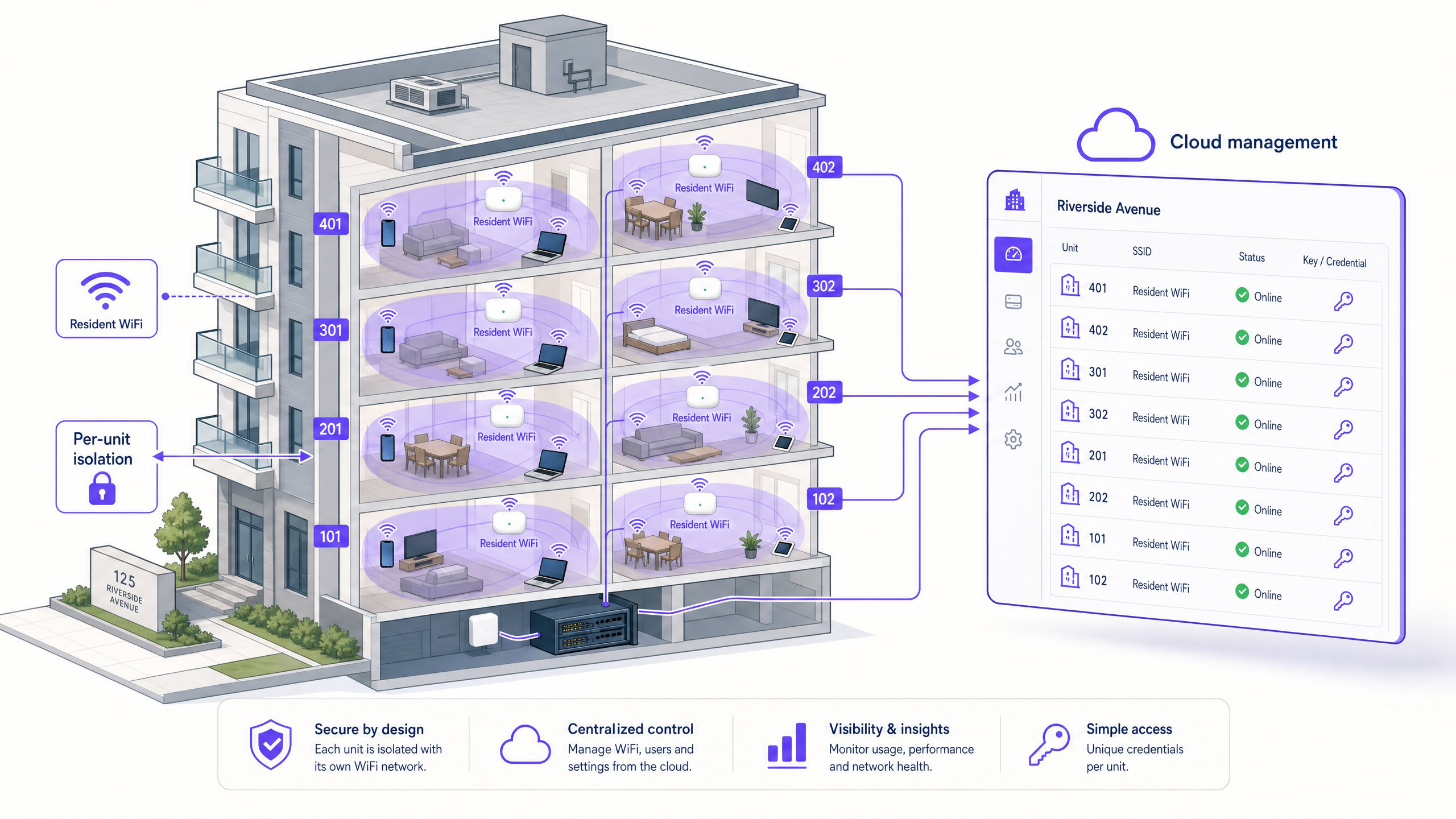
Managing connectivity in multi-tenant environments forces a compromise. Deploy individual hardware per unit and you create severe RF interference and a hardware maintenance burden. Broadcast shared SSIDs and you compromise resident privacy and break IoT device compatibility. Identity Pre-Shared Key (iPSK) eliminates this compromise. It lets you broadcast a single, secure SSID while assigning a unique credential to every resident unit. The RADIUS server maps each credential to a dedicated VLAN, creating a Private Area Network (PAN) for each apartment. Residents connect smart TVs, gaming consoles, and laptops with the simplicity of a home network. IT teams maintain centralised visibility, dynamic VLAN assignment, and automated lifecycle management. This guide details the technical architecture, deployment steps, and measurable business outcomes of iPSK implementation for property developers, BTR operators, and landlords.
Technical deep-dive: the iPSK architecture
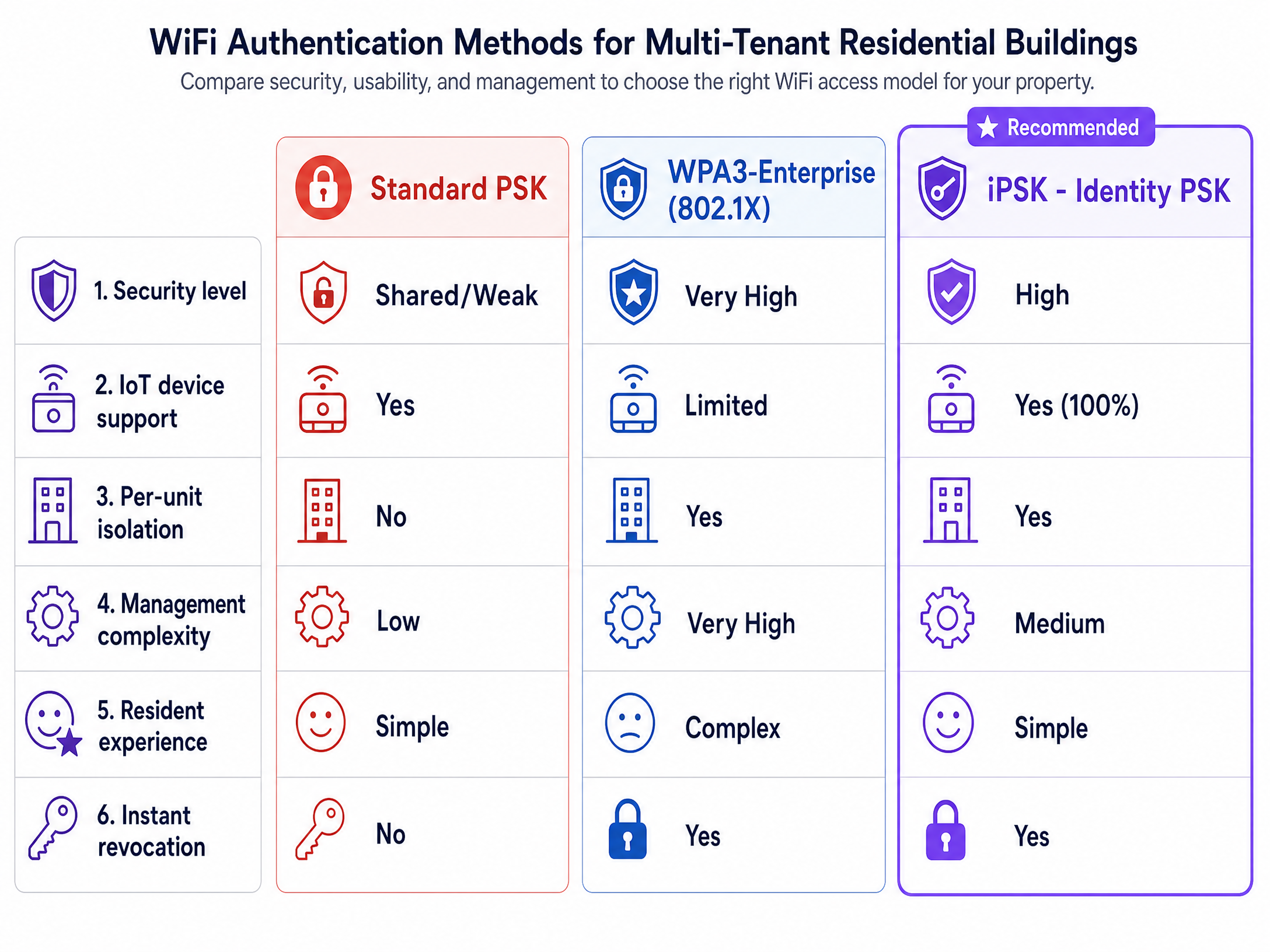
Traditional network security models fail in modern residential environments. Standard PSK (WPA2-Personal) offers zero isolation between units and scales poorly. WPA3-Enterprise (802.1X) provides excellent security but breaks compatibility with headless IoT devices and gaming consoles, which cannot navigate certificate-based authentication flows.
iPSK solves this by moving the segmentation logic from the RF layer to the RADIUS authentication layer. Every resident receives a unique pre-shared key. That key is the identity token. When the RADIUS server validates it, it simultaneously assigns the resident to a dedicated VLAN, isolating their traffic from every other unit in the building.
The authentication flow
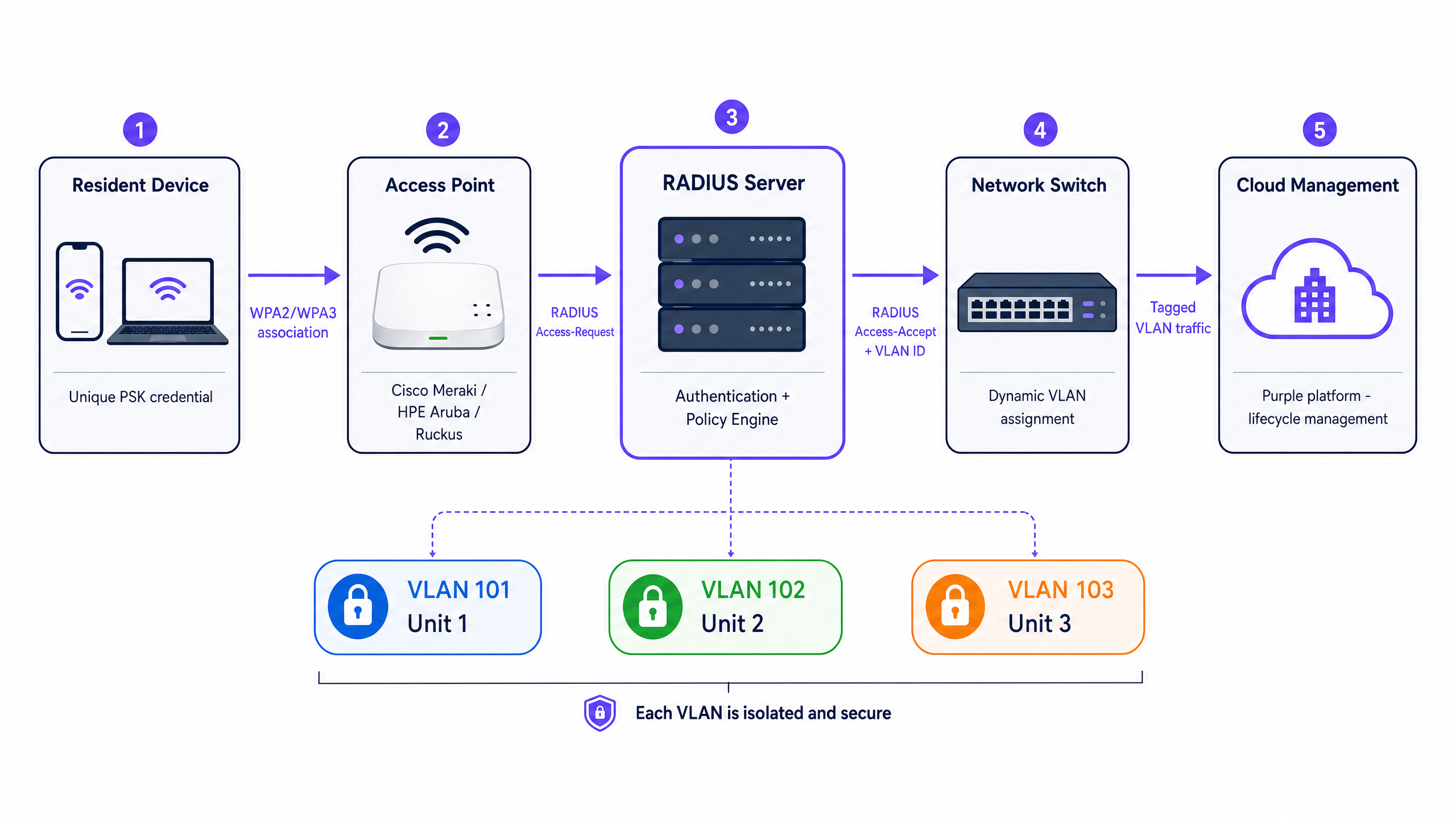
When a resident connects a device to the building-wide SSID, the following sequence occurs:
Step 1 - Association. The device associates with the Access Point using its unique PSK credential. The AP blocks all traffic except EAPOL (Extensible Authentication Protocol over LAN) frames.
Step 2 - RADIUS request. The AP encapsulates the credential and forwards it to the RADIUS server as an Access-Request packet.
Step 3 - Policy evaluation. The RADIUS server validates the key against the identity store. On a match, it prepares an Access-Accept response containing three critical IETF standard attributes:
| RADIUS attribute | Value | Purpose |
|---|---|---|
Tunnel-Type (64) |
13 (VLAN) | Declares VLAN segmentation |
Tunnel-Medium-Type (65) |
6 (IEEE 802) | Specifies the medium type |
Tunnel-Private-Group-ID (81) |
e.g., "101" | The specific VLAN to assign |
Step 4 - Dynamic assignment. The AP reads the Tunnel-Private-Group-ID and drops the device's traffic directly into the resident's dedicated VLAN. The upstream network switch handles this traffic as if the resident were physically plugged into a dedicated port.
Step 5 - Private Area Network. The resident's devices are now isolated at Layer 2. They can discover and communicate with each other (via mDNS reflection) but remain invisible to every other unit in the building.
This architecture ensures that 200 apartments sharing the same physical access points have completely isolated traffic. A resident in unit 401 can cast to their Apple TV. They cannot see the printer in unit 402.
Vendor implementation names
The core iPSK logic is consistent across the enterprise hardware stack, though vendor naming differs:
| Vendor | Product name | RADIUS integration |
|---|---|---|
| Cisco Meraki | iPSK | RADIUS with Tunnel-Password attribute |
| HPE Aruba | MPSK (Multi-PSK) | RADIUS with Aruba-MPSK-Passphrase VSA |
| Ruckus | DPSK (Dynamic PSK) | RADIUS with Ruckus-DPSK-Passphrase VSA |
| Juniper Mist | PPSK (Private PSK) | RADIUS with Tunnel-Private-Group-ID |
| Ubiquiti UniFi | PPSK | RADIUS with standard attributes |
| Cambium | PPSK | RADIUS with standard attributes |
| Extreme | PPSK | RADIUS with standard attributes |
| Fortinet | MPSK | RADIUS with Tunnel-Private-Group-ID |
Implementation guide: deploying iPSK
Deploying iPSK requires coordination across your network stack. Follow this vendor-neutral deployment sequence.
Phase 1: network infrastructure preparation
Define your VLAN scheme before touching any hardware. For a 200-unit building, allocate VLANs 101 to 300, one per apartment. Each VLAN needs its own dedicated subnet and DHCP scope.
We recommend a /28 subnet (14 usable IP addresses) per apartment to accommodate modern device density. The average resident brings seven to 10 connected devices. A /28 provides sufficient headroom without wasting address space. For a 200-unit building, the parent network block is a /21 (2,048 total IPs).
Critical step: Tag all potential tenant VLANs on the trunk ports connecting your edge switches to the Access Points. If the RADIUS server assigns a user to VLAN 105 but VLAN 105 is not tagged on the switch port, the traffic drops into a black hole. The user authenticates successfully but fails to obtain an IP address via DHCP. This is the most common deployment error in MDU environments.
Phase 2: wireless controller configuration
Configure your wireless controller to broadcast a single SSID. Set the security mode to WPA2/WPA3 with iPSK or MAC-based access control enabled. Point all authentication requests to your RADIUS server. Disable SSID broadcast for any legacy per-unit networks once the iPSK SSID is validated.
Consolidating to a single SSID has an immediate RF performance benefit. Every SSID you broadcast consumes airtime with management frames (beacons, probe responses) at the lowest mandatory data rate. Eliminating 10 legacy SSIDs can recover 15 to 20% of available airtime, according to Purple's own deployment data.
Phase 3: RADIUS server and identity provider integration
Your RADIUS server is the policy engine. It must be configured to:
- Accept authentication requests from your Access Points (shared secret configuration).
- Validate credentials against your identity store (Microsoft Entra ID, Okta, Google Workspace, or a local database).
- Return the correct
Tunnel-Private-Group-IDattribute for each credential.
Purple acts as the orchestration layer between your Property Management Software (PMS) and the RADIUS server. When a lease is signed in your PMS, Purple automatically generates a unique iPSK, associates it with the correct VLAN, and emails the credential to the resident. When the lease ends, Purple revokes the key instantly. The IT team touches nothing.
Phase 4: mDNS reflection configuration
Residents expect smart home functionality. Casting from a phone to a TV, printing wirelessly, and connecting smart speakers all rely on mDNS (multicast DNS) discovery, also known as Apple Bonjour or DLNA.
In a standard network, mDNS is blocked between VLANs to prevent cross-tenant device discovery. This is correct behaviour. However, you must enable mDNS reflection within each individual VLAN so that a resident's own devices can discover each other. Configure your wireless controller to reflect mDNS traffic within the boundaries of each tenant VLAN only. Do not enable global mDNS forwarding across all VLANs.
Phase 5: lifecycle automation and self-service
Do not manage keys manually. At 200 units with regular tenant turnover, manual key management introduces human error and creates security gaps when departing tenants retain active credentials.
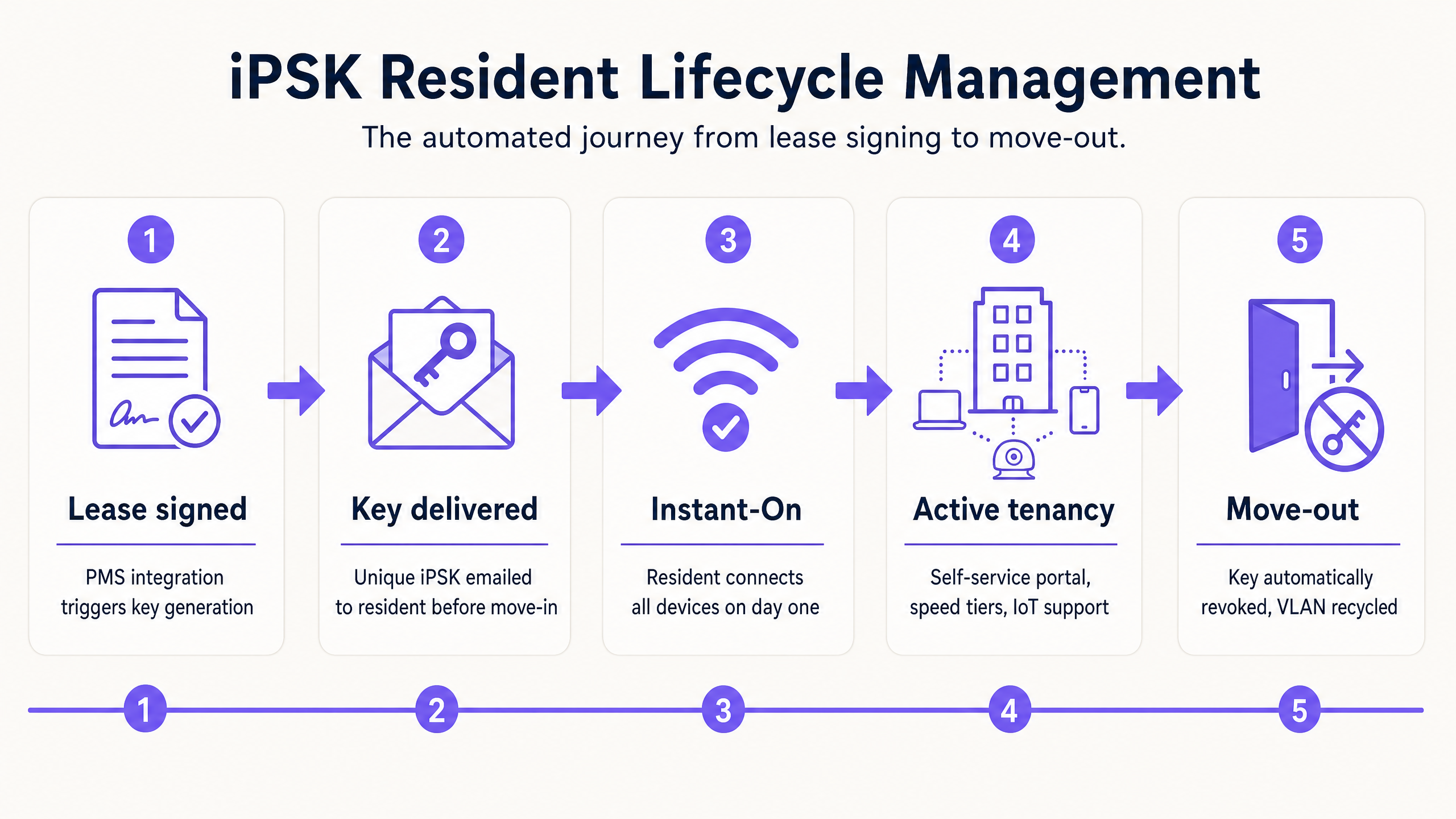
The Purple app automates the complete resident lifecycle:
- Onboarding: PMS integration triggers key generation and delivery before move-in.
- Active tenancy: Residents use the self-service portal to add devices, check speeds, or request a key refresh.
- Offboarding: Move-out date triggers automatic key revocation and VLAN recycling.
Best practices for BTR operators
Automate onboarding. Do not manage keys manually. Integrate your PMS with Purple to trigger automatic key generation and email delivery before the resident moves in. This delivers the Instant-On experience that defines a premium BTR brand.
Enable mDNS reflection per VLAN. Ensure casting and smart home devices work correctly within each PAN. Restrict mDNS strictly to the boundaries of each individual VLAN to prevent cross-unit device discovery.
Monitor RF health continuously. Consolidating to a single SSID reduces management frame overhead. Use the reclaimed airtime to optimise channel widths and transmit power. Purple's WiFi Analytics platform provides the visibility to act on this data.
Plan for device density. Design your IP addressing scheme to support peak density without exhausting DHCP pools. Use Purple's multi-tenant iPSK subnet designer to calculate the correct parent network block for your building.
Set certificate renewal alerts. If your RADIUS infrastructure uses server-side certificates, set renewal reminders at 90, 60, and 30 days. An expired certificate drops the entire building offline.
Maintain WPA2 compatibility. Some legacy IoT devices do not support WPA3 transition modes. Keep WPA2 compatibility enabled on the same SSID to avoid breaking older devices.
For a broader view of SSID architecture, read Three SSIDs to rule them all: guest, Passpoint, and IoT WiFi .
Troubleshooting and risk mitigation
The black hole VLAN. Symptom: user authenticates successfully but fails to obtain an IP address. Cause: the assigned VLAN is not tagged end-to-end from the AP through the edge switches to the DHCP server. Resolution: verify trunk port configuration on every switch in the path.
Certificate expiration. Symptom: entire building loses WiFi access simultaneously. Cause: RADIUS server certificate has expired. Resolution: implement automated certificate monitoring with 90-day advance alerts. Consider using Let's Encrypt with automated renewal for RADIUS server certificates.
mDNS not working within a unit. Symptom: resident cannot cast to their TV or discover their printer. Cause: mDNS reflection is disabled globally or not scoped to the resident's VLAN. Resolution: enable per-VLAN mDNS reflection on the wireless controller.
DHCP pool exhaustion. Symptom: devices connect to WiFi but cannot obtain an IP address, despite correct VLAN tagging. Cause: DHCP scope is too small for the number of connected devices. Resolution: expand the subnet to a /27 (30 usable IPs) for high-density units or student accommodation.
Key sharing between residents. Symptom: multiple residents appear on the same VLAN. Cause: a resident has shared their unique PSK with a neighbour. Resolution: implement key rotation policies and educate residents that their key is tied to their unit's network segment.
ROI and business impact
Transitioning to an iPSK architecture delivers measurable business outcomes for BTR operators and landlords.
Capital expenditure reduction. Eliminating in-unit routers across a 200-unit building removes 200 consumer-grade devices from the network. Based on Purple's own deployment data, this reduces hardware CapEx by up to 40% compared to a per-unit router model. Centralised enterprise-grade Access Points, placed strategically throughout the building, deliver better coverage with fewer devices.
Operational expenditure reduction. Automated lifecycle management eliminates the manual IT effort associated with password resets, captive portal troubleshooting, and hardware replacement. Support ticket volumes related to WiFi connectivity drop significantly when residents receive a working credential before they move in.
Revenue generation. The iPSK architecture enables tiered bandwidth packages. You can offer a standard tier included in the service charge and a premium tier (for example, a gaming or streaming tier with higher speeds) as an optional add-on. Because iPSK is identity-based, you can upgrade a resident's speed tier instantly via the Purple dashboard, with no hardware changes required.
Resident retention. In the BTR market, WiFi quality is consistently cited as a top-three factor in resident satisfaction surveys. The Instant-On experience — where WiFi works the moment a resident walks through the door — directly supports retention and positive reviews.
For vertical-specific context, explore Purple's guides for Hospitality , Retail , and Healthcare environments, or see the related guide on Logo iPSK: a comprehensive guide for businesses .
Purple is founded in 2012 and operates across 80,000+ live venues, with 350 million unique users and 440 million logins recorded in 2024. Purple holds ISO 27001, GDPR, CCPA, Cyber Essentials, and B Corp certifications.
Key Definitions
iPSK (Identity Pre-Shared Key)
A WiFi authentication mechanism that assigns a unique pre-shared key to each individual user, device group, or apartment unit on a single SSID. The key serves as an identity token that the RADIUS server maps to a specific network policy and VLAN.
Used in BTR, MDU, student accommodation, and hospitality environments to provide per-unit security without requiring 802.1X certificates.
Private Area Network (PAN)
A virtual, isolated network segment created for a specific user or group within a larger shared infrastructure. Devices within a PAN can discover and communicate with each other but are invisible to devices in other PANs.
The PAN is the resident-facing outcome of iPSK and Dynamic VLAN Assignment. It delivers the home-network experience within a shared building infrastructure.
Dynamic VLAN Assignment
The process of placing a user into a specific Virtual Local Area Network based on their identity, as dictated by the RADIUS server during authentication, rather than by the SSID they connect to.
The technical mechanism that makes iPSK isolation work. The RADIUS server returns the Tunnel-Private-Group-ID attribute, which the AP uses to assign the user to the correct VLAN.
RADIUS (Remote Authentication Dial-In User Service)
A networking protocol that provides centralised Authentication, Authorisation, and Accounting (AAA) for network access. In an iPSK deployment, the RADIUS server validates credentials and returns VLAN assignment attributes.
The policy engine at the heart of any iPSK architecture. It connects the wireless infrastructure to the identity store and dictates per-user network policies.
mDNS Reflection
A network feature that allows multicast DNS discovery protocols (Apple Bonjour, DLNA) to function across specific network boundaries. In an iPSK deployment, it must be enabled within each tenant VLAN to allow casting and smart home device discovery.
Without per-VLAN mDNS reflection, residents cannot cast to their TVs or discover their printers, breaking the home-like experience that iPSK is designed to deliver.
Headless device
A network-connected device that lacks a screen or user interface capable of entering complex login credentials, such as a username, password, or digital certificate. Examples include smart speakers, gaming consoles, smart TVs, and IoT sensors.
Headless devices cannot connect to 802.1X networks. iPSK solves this by using a simple pre-shared key that any device can use, regardless of its interface capabilities.
Tunnel-Private-Group-ID
An IETF standard RADIUS attribute (attribute 81) that specifies the VLAN ID to assign to an authenticated user. It is the critical attribute that enables Dynamic VLAN Assignment in an iPSK architecture.
When the RADIUS server returns this attribute in an Access-Accept message, the Access Point uses it to drop the user's traffic into the correct VLAN.
Build-to-Rent (BTR)
Purpose-built residential properties designed specifically for long-term rental rather than for sale. BTR developments typically include amenity spaces, concierge services, and managed utilities such as WiFi.
BTR operators are the primary audience for iPSK deployments. Managed WiFi is increasingly positioned as a core utility in BTR, alongside water, gas, and electricity.
PMS (Property Management Software)
Software used by property operators to manage leases, resident records, maintenance requests, and billing. In an iPSK deployment, PMS integration enables automated key provisioning and revocation tied to the lease lifecycle.
PMS integration is what transforms iPSK from a manual IT task into a fully automated resident lifecycle management system.
Worked Examples
A property developer is building a 250-unit BTR complex. They want to provide building-wide WiFi as a managed utility. The brief requires: residents connect all their devices on move-in day, smart home devices must work, and no resident should be able to see another resident's devices. How should the network be designed?
Deploy a unified network broadcasting a single SSID named 'Resident WiFi'. Implement iPSK to assign a unique password to each apartment. Configure the wireless controller (Cisco Meraki, HPE Aruba, or Ruckus) to forward authentication requests to a RADIUS server. Configure the RADIUS server to return the Tunnel-Private-Group-ID attribute for each credential, mapping each apartment to a dedicated VLAN (VLANs 101 to 350). Size each VLAN with a /28 subnet (14 usable IPs) to support up to 10 devices per unit. Enable per-VLAN mDNS reflection to allow casting and smart home discovery within each apartment. Integrate the PMS with Purple to automate key generation at lease signing and revocation at move-out. Verify that all potential tenant VLANs are tagged on every trunk port in the network path.
A resident in a 150-unit BTR building reports that their smartphone connects to the building WiFi successfully, but they cannot cast Netflix to their Chromecast. Both devices are connected using the resident's unique iPSK. The IT team has confirmed both devices are on the correct VLAN. What is the likely cause and resolution?
The IT team must verify the mDNS reflection configuration on the wireless controller. Casting relies on mDNS (multicast DNS) for device discovery. In a correctly configured iPSK network, mDNS is blocked between VLANs to prevent cross-tenant device discovery. However, mDNS reflection must be enabled within each individual VLAN so that a resident's own devices can discover each other. If mDNS reflection is disabled globally or not scoped to individual VLANs, casting will fail even though both devices are on the correct VLAN and have internet access.
Practice Questions
Q1. You are the IT manager for a 180-unit BTR development. The property team wants WiFi included in the service charge. Students and young professionals will be the primary residents, each bringing an average of eight connected devices including gaming consoles and smart home devices. The existing network uses WPA3-Enterprise. Residents are complaining that their PlayStation 5 consoles and Amazon Echo devices will not connect. What is the most appropriate architectural change?
Hint: Consider the authentication requirements of headless devices and the need to maintain per-unit accountability and isolation.
View model answer
Migrate the network from WPA3-Enterprise (802.1X) to an iPSK architecture. WPA3-Enterprise requires 802.1X authentication, which gaming consoles and smart speakers cannot support as they lack the interface to enter credentials or install certificates. iPSK allows these devices to connect using a simple pre-shared key while maintaining per-unit isolation via Dynamic VLAN Assignment. The RADIUS server maps each unique key to a dedicated VLAN, preserving the security and accountability that WPA3-Enterprise was intended to provide.
Q2. After deploying iPSK in a 100-unit apartment building, the IT team receives reports that residents in units 201 to 210 can authenticate to the WiFi network but cannot obtain an IP address. Residents in all other units are connecting normally. The RADIUS server logs show successful authentication for all affected units. What is the most likely cause?
Hint: Think about the network path between the Access Points serving floors 2 and the DHCP server, and what must be configured end-to-end.
View model answer
The switch port connecting to the Access Points serving floors 2 is likely missing the VLAN tags for VLANs 201 to 210. When the RADIUS server authenticates a resident in unit 201 and returns VLAN 201 in the Tunnel-Private-Group-ID attribute, the AP attempts to place the traffic on VLAN 201. If VLAN 201 is not tagged on the switch port, the traffic drops and the DHCP request never reaches the DHCP server. The resolution is to add the missing VLAN tags to the affected trunk port. The fact that authentication succeeds but IP assignment fails is the diagnostic signature of this specific issue.
Q3. A BTR operator wants to offer a premium 'Gamer Tier' WiFi package at an additional monthly cost, with guaranteed higher bandwidth for residents who opt in. The building already runs iPSK with per-unit VLAN isolation. How can this be implemented without deploying additional hardware?
Hint: Consider how the RADIUS server can return different policy attributes for different credentials, and what the management platform needs to support.
View model answer
The operator can implement bandwidth tiering through the RADIUS server and Quality of Service (QoS) policies. When a resident upgrades to the Gamer Tier, the management platform (Purple) updates their RADIUS profile to return a different policy attribute alongside the VLAN assignment. This attribute triggers a higher bandwidth cap or QoS priority on the wireless controller. No hardware changes are required. The Purple dashboard allows the property team to upgrade a resident's tier instantly, and the change takes effect at the next authentication event.
Continue reading in this series
PPSK wpa3: comparing features and deployment models
This technical reference guide compares PPSK and WPA3-SAE, explaining their architectural differences and deployment models for multi-tenant environments. It provides actionable guidance for IT managers and property developers on achieving secure, isolated WiFi networks using Purple's identity-based solutions.
PPSK wpa3: comparing features and deployment models
This technical reference guide compares PPSK and WPA3-SAE, explaining their architectural differences and deployment models for multi-tenant environments. It provides actionable guidance for IT managers and property developers on achieving secure, isolated WiFi networks using Purple's identity-based solutions.
PPSK life: comparing features and deployment models
This guide compares PPSK (Private Pre-Shared Key) against standard PSK and 802.1X, detailing implementation models for multi-tenant environments. It equips IT managers and property operators to deploy secure, resident-isolated WiFi that supports smart home devices and drives measurable business value.