
How to Improve WiFi Speed Without Buying New Access Points
This guide details how enterprise venues can reclaim 30%+ of their WiFi bandwidth without purchasing new access points. By implementing DNS filtering, band steering, and QoS policies, IT teams can extend hardware lifespans, reduce CapEx, and improve network performance and security.
Video overview
Listen to this guide
View podcast transcript
Part of our core series: Guest WiFi Guide →

Executive Summary
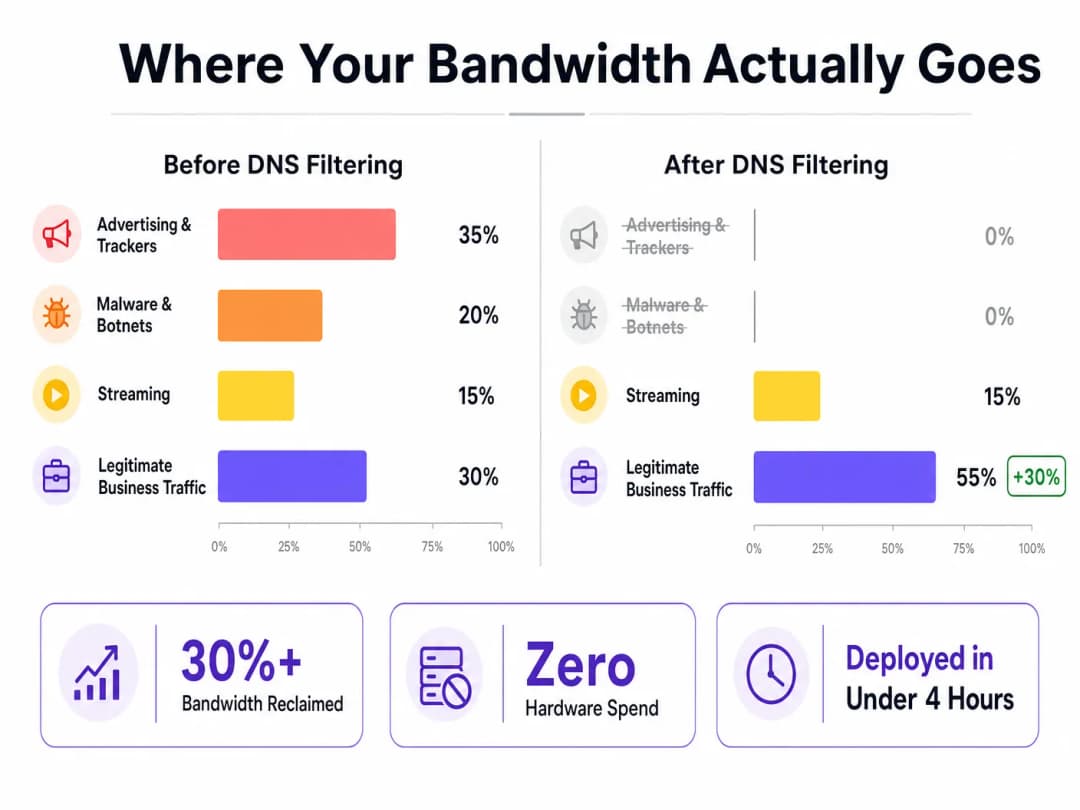
For IT Directors and CTOs managing large-scale venue networks, buying new hardware is often the costly default option when bandwidth runs out. However, up to 40% of guest network bandwidth is typically consumed by useless background telemetry, ad trackers, and malware traffic. By implementing software-layer optimization - specifically through DNS filtering, intelligent band steering, and QoS policy enforcement - venues can reclaim over 30%+ of their existing bandwidth without adding a single new access point.
This guide details how to implement these optimizations to extend the lifespan of existing hardware, reduce CapEx, and improve the user experience in Hospitality, Retail, Healthcare, and Transport environments.
Technical Deep-Dive
Bandwidth Waste: Telemetry and Trackers
When examining the traffic profile of a typical Guest WiFi network, the volume of non-user-initiated traffic is significant. Ad networks and third-party trackers account for 25% to 40% of DNS query volume. Every time an app is launched, dozens of lookups are initiated in the background for analytics platforms and tracking pixels, which provide no benefit to the guest but consume uplink capacity.
Additionally, compromised devices on the network generate malware and botnet traffic, which constantly attempt to contact command-and-control servers. This wastes bandwidth and creates serious compliance and security risks.
DNS Filtering Solution
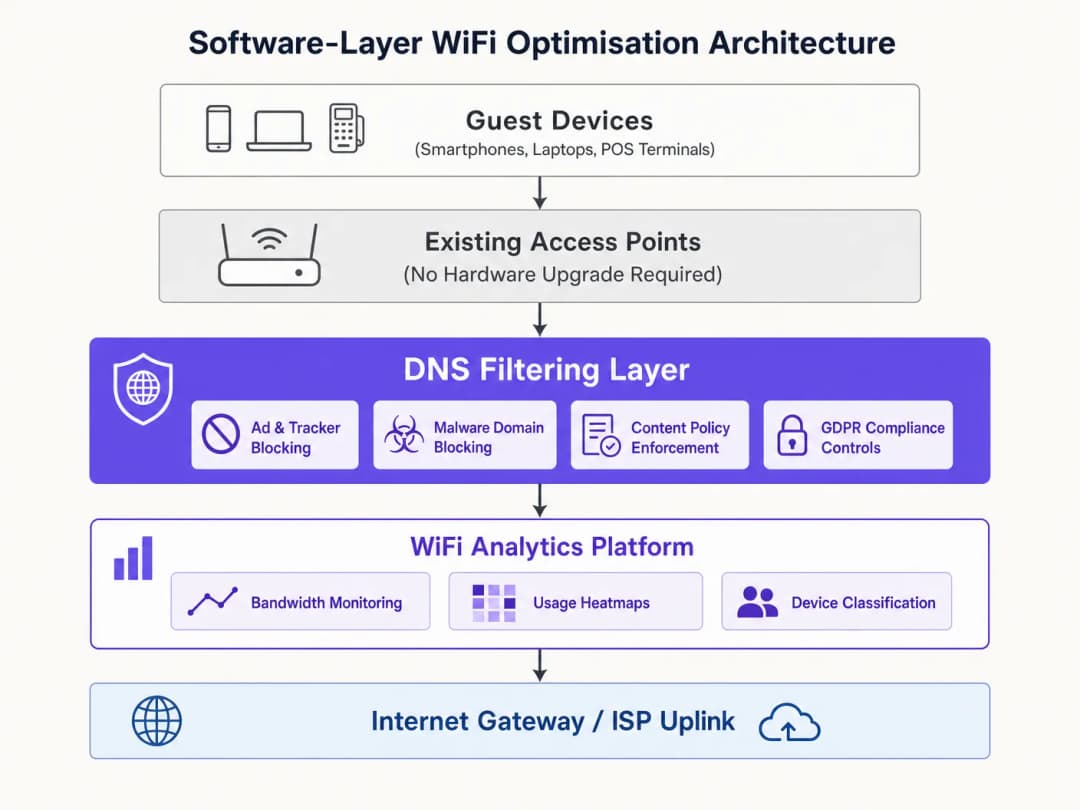
DNS filtering operates at the resolution layer. It intercepts DNS queries before they even reach the uplink. If a domain is associated with an ad network, known malware host, or policy-restricted category, the query is blocked and the device receives a null response. No data is transferred; no bandwidth is consumed.
Compared to firewalls that inspect packets after they arrive or proxies that intercept them mid-transit, DNS filtering prevents the request from being initiated in the first place. This architectural advantage is highly efficient for reclaiming bandwidth.
Managing DNS over HTTPS (DoH)
A key technical consideration is the growing use of DNS over HTTPS (DoH). DoH encrypts DNS queries, bypassing network-level DNS and circumventing traditional filtering rules. To maintain filtering effectiveness, networks must implement DoH interception by identifying DoH traffic (typically on port 443 of known resolvers) and redirecting it to a DoH-capable filtering resolver. For more details, see our guide DNS Over HTTPS (DoH): Implications for Public WiFi Filtering (or the Portuguese version: DNS Over HTTPS (DoH): Implicações para a Filtragem de WiFi Público).
Got questions about your specific setup?
Our team works with venue operators, IT managers, and network engineers across 80,000 venues. Book a 20-minute call and we will show you how others like you solved it.
Implementation Guide
Deploying software-layer optimization is straightforward and can be centrally managed for multi-site operators using platforms like WiFi Analytics to monitor the impact.
- Baseline Measurement: Configure the network to capture DNS query volume by category and per-client bandwidth usage. This establishes a baseline for ROI calculation.
- Monitoring Mode: Deploy DNS filtering in passive monitoring mode for 48 - 72 hours to understand traffic patterns without blocking and to avoid false positives.
- Phased Blocking: Enable blocking first for high-confidence categories (e.g. known malware, botnets, ad networks). Review logs daily to adjust policies.
- Complementary Optimizations:
- Band Steering: Steer capable devices to the 5GHz band to reduce congestion on the crowded 2.4GHz band.
- SSID Consolidation: Reduce management overhead by consolidating SSIDs and using VLAN tagging for segmentation.
- QoS Enforcement: Implement per-client rate limits to protect business-critical traffic (e.g. VoIP, POS) from heavy streaming.
- Documentation and Measurement: After 30 days, compare bandwidth usage against the baseline to quantify the ROI.
Best Practices
- Segment IoT Traffic: IoT devices often generate large volumes of telemetry. Keep them on a separate VLAN with appropriate filtering policies to avoid disrupting their functionality while tightening rules.
- Avoid Over-Blocking: Start with conservative blocking policies to avoid disrupting legitimate business SaaS applications, and gradually expand based on log reviews.
- Regular RF Surveys: Periodically re-optimize channel assignments and transmit power to minimize co-channel interference as physical environments change.
Troubleshooting & Risk Mitigation
- Legitimate Services Blocked: If users report that applications are not working, check DNS logs for broad category blocks affecting required domains (e.g. cloud storage, payment gateways) and whitelist them.
- Degraded Filtering Effectiveness: If bandwidth usage spikes again, verify whether DoH bypass policies are actively intercepting and redirecting encrypted DNS queries.
- Connectivity Issues on Legacy Devices: If legacy devices struggle to connect after enabling band steering, ensure the 2.4GHz band is still sufficiently available and consider adjusting the steering aggressiveness.
ROI & Business Impact
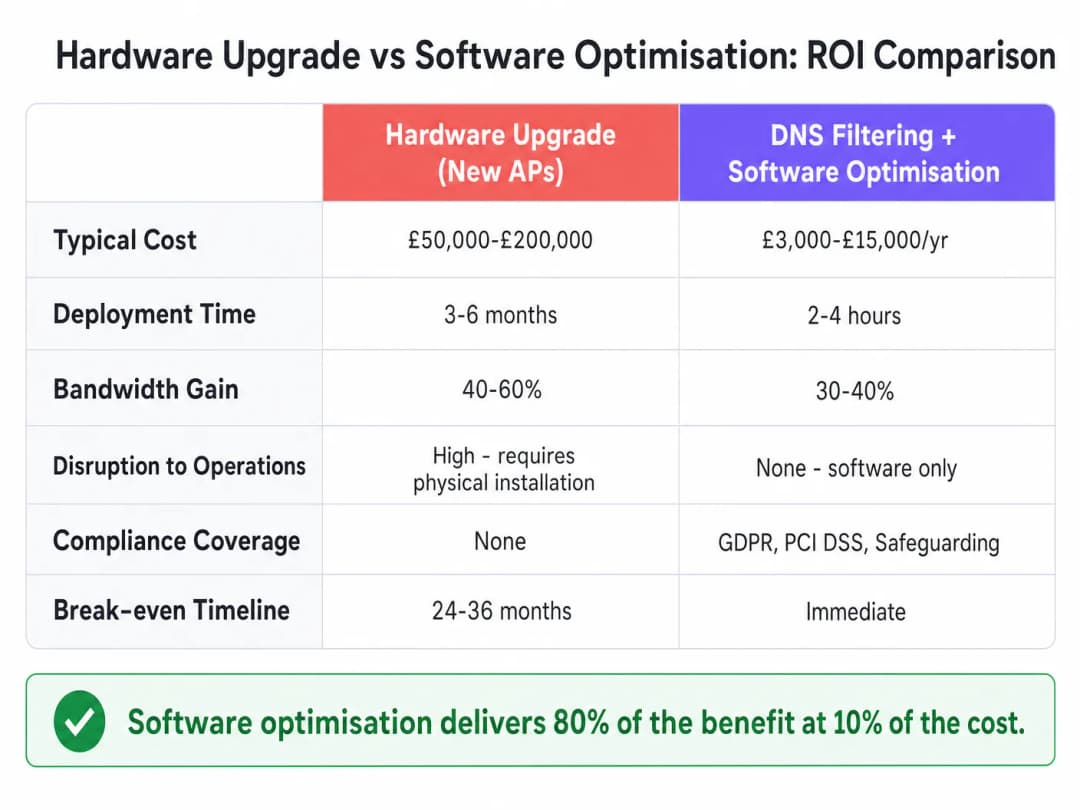
Software optimization delivers immediate ROI. While hardware upgrades can cost $50,000 - $200,000 and take months to deploy, the cost of DNS filtering and configuration changes is a fraction of that, and they can be deployed in hours. Venues typically see a 30-40% reduction in uplink utilization, extending the lifespan of existing APs by 2-4 years while strengthening CCPA/CPRA and PCI-DSS compliance.
Listen to our full technical briefing:
Key Definitions
DNS Filtering
The process of blocking access to certain domains at the DNS resolution stage, preventing the connection before data is transferred.
Used to reclaim bandwidth by stopping ad, tracker, and malware traffic before it consumes uplink capacity.
Band Steering
A wireless network feature that encourages dual-band capable clients to connect to the less congested 5GHz band instead of the 2.4GHz band.
Crucial for optimizing airtime and improving throughput in dense environments.
DNS over HTTPS (DoH)
A protocol for performing remote Domain Name System resolution via the HTTPS protocol, encrypting the data.
Creates challenges for network administrators as it can bypass traditional, unencrypted DNS filtering controls.
SSID Consolidation
Reducing the number of broadcasted network names (SSIDs) to minimize management frame overhead.
Each SSID consumes airtime; fewer SSIDs mean more airtime available for actual data transmission.
Quality of Service (QoS)
Technologies that manage data traffic to reduce packet loss, latency, and jitter on the network.
Used to prioritize critical business traffic (like POS transactions) over guest streaming.
VLAN Tagging
The practice of inserting a VLAN ID into a packet header to identify which virtual LAN the packet belongs to.
Allows for logical segmentation of network traffic (e.g., Guest vs. Staff) without requiring separate physical networks or SSIDs.
Beacon Frames
Management frames in IEEE 802.11 based WLANs that contain information about the network.
Broadcasting too many SSIDs generates excessive beacon frames, consuming valuable airtime and slowing down the network.
Co-Channel Interference
Crosstalk from two different radio transmitters using the same frequency channel.
Mitigated by proper channel planning and transmit power optimization to ensure APs don't shout over each other.
Worked Examples
A 200-room hotel is experiencing severe WiFi complaints during the evening peak. The infrastructure vendor recommends a $100,000 AP upgrade. How can software optimization address this?
- Deploy DNS filtering to block ad networks and malware, reclaiming ~30% of bandwidth. 2. Enable band steering to move capable devices to 5GHz. 3. Implement QoS to rate-limit video streaming to 5Mbps per client, prioritizing VoIP and operational traffic. 4. Consolidate from 8 SSIDs to 3 using VLAN tagging.
A large retail chain with 500 stores needs to improve network performance for POS terminals while still offering Guest WiFi.
- Segment POS devices and Guest WiFi onto separate VLANs. 2. Apply aggressive DNS filtering on the Guest VLAN to block high-bandwidth non-essential traffic. 3. Configure strict QoS rules prioritizing the POS VLAN traffic over the Guest VLAN. 4. Manage policies centrally via a unified dashboard.
Practice Questions
Q1. A stadium network is experiencing severe congestion on the 2.4GHz band, while the 5GHz band is underutilized. What is the most immediate software-layer action to take?
Hint: Consider how to force capable devices to use the better frequency.
View model answer
Enable and configure Band Steering on the wireless controller to actively push dual-band capable clients to the 5GHz band, freeing up 2.4GHz capacity for legacy devices.
Q2. After deploying DNS filtering, you notice that overall bandwidth consumption has only dropped by 5%, much lower than the expected 30%. What is the most likely technical reason for this?
Hint: Think about modern browser default behaviors regarding DNS.
View model answer
Client devices are likely using DNS over HTTPS (DoH), bypassing the network's standard DNS resolver. The network must be configured to intercept DoH traffic and redirect it to the filtering resolver.
Q3. A hospital IT team wants to implement DNS filtering but is concerned about blocking critical medical telemetry from IoT devices. How should they architect the deployment?
Hint: How can you apply different rules to different types of devices?
View model answer
Segment the IoT devices onto a dedicated VLAN. Apply a highly specific, permissive DNS filtering policy to the IoT VLAN that allows required telemetry, while applying the stricter ad/malware blocking policy to the Guest and Staff VLANs.
Continue reading in this series
Understanding RSSI and Signal Strength for Optimal Channel Planning
This guide provides a comprehensive technical deep-dive into RSSI, Signal-to-Noise Ratio (SNR), and RF propagation principles for optimal channel planning. It equips IT managers, network architects, and venue operations directors with actionable strategies to mitigate Co-Channel and Adjacent Channel Interference, optimize AP placement, and leverage analytics for measurable business impact across hospitality, retail, and public-sector environments.
WiFi 6 vs WiFi 5: Does it Solve Channel Interference?
This guide provides a technical deep dive into how WiFi 6 (802.11ax) addresses channel interference in high-density enterprise environments through OFDMA and BSS Coloring. It equips IT managers, network architects, and CTOs with actionable deployment strategies, real-world case studies from hospitality and healthcare, and a framework for evaluating the ROI of infrastructure upgrades in venues where wireless performance is business-critical.
Best WiFi Channels for High-Density Venues
A definitive technical reference for selecting and optimizing WiFi channels in high-density environments like stadiums, arenas, and large public venues. It covers RF physics, channel reuse strategies across 5 GHz and 6 GHz bands, and actionable deployment guidance for IT leaders.
Got questions about your specific setup?
Our team works with venue operators, IT managers, and network engineers across 80,000 venues. Book a 20-minute call and we will show you how others like you solved it.