
Integrating WeChat WiFi Login: Capturing Engagement via Social Captive Portals
This guide details how to integrate WeChat WiFi authentication into enterprise captive portals, covering the OAuth 2.0 architecture, RADIUS integration, and step-by-step deployment across Cisco Meraki, HPE Aruba, and Juniper Mist hardware. It gives IT managers and network architects a practical framework for capturing first-party data from WeChat's 1.3 billion users while driving engagement via Official Account follows and post-login redirects.
Listen to this guide
View podcast transcript
Executive summary
Integrating WeChat WiFi login transforms a standard captive portal into a strategic first-party data engine for venues that serve Chinese visitors and the broader WeChat ecosystem. For IT managers and network architects, deploying WeChat login via OAuth 2.0 and RADIUS requires balancing frictionless guest access with secure, compliant data collection. This guide details the technical architecture, implementation steps, and security considerations for deploying WeChat WiFi authentication across enterprise networks on hardware including Cisco Meraki, HPE Aruba, Ruckus, and Juniper Mist. It shows how Purple's Guest WiFi platform mediates the OAuth flow, maps profile data to your CRM, and drives engagement via post-login redirects to your WeChat Official Account.
WeChat has over 1.3 billion monthly active users, with Chinese tourists spending an estimated $255 billion internationally in 2023 (World Tourism Organization data). For hotels, luxury retail, airports, and conference centres, offering WeChat WiFi login is a direct channel to that demographic. Purple operates across 80,000+ live venues and recorded 440 million logins in 2024, giving us direct visibility into what works and what fails in production deployments.
Technical deep-dive
How WeChat WiFi authentication works
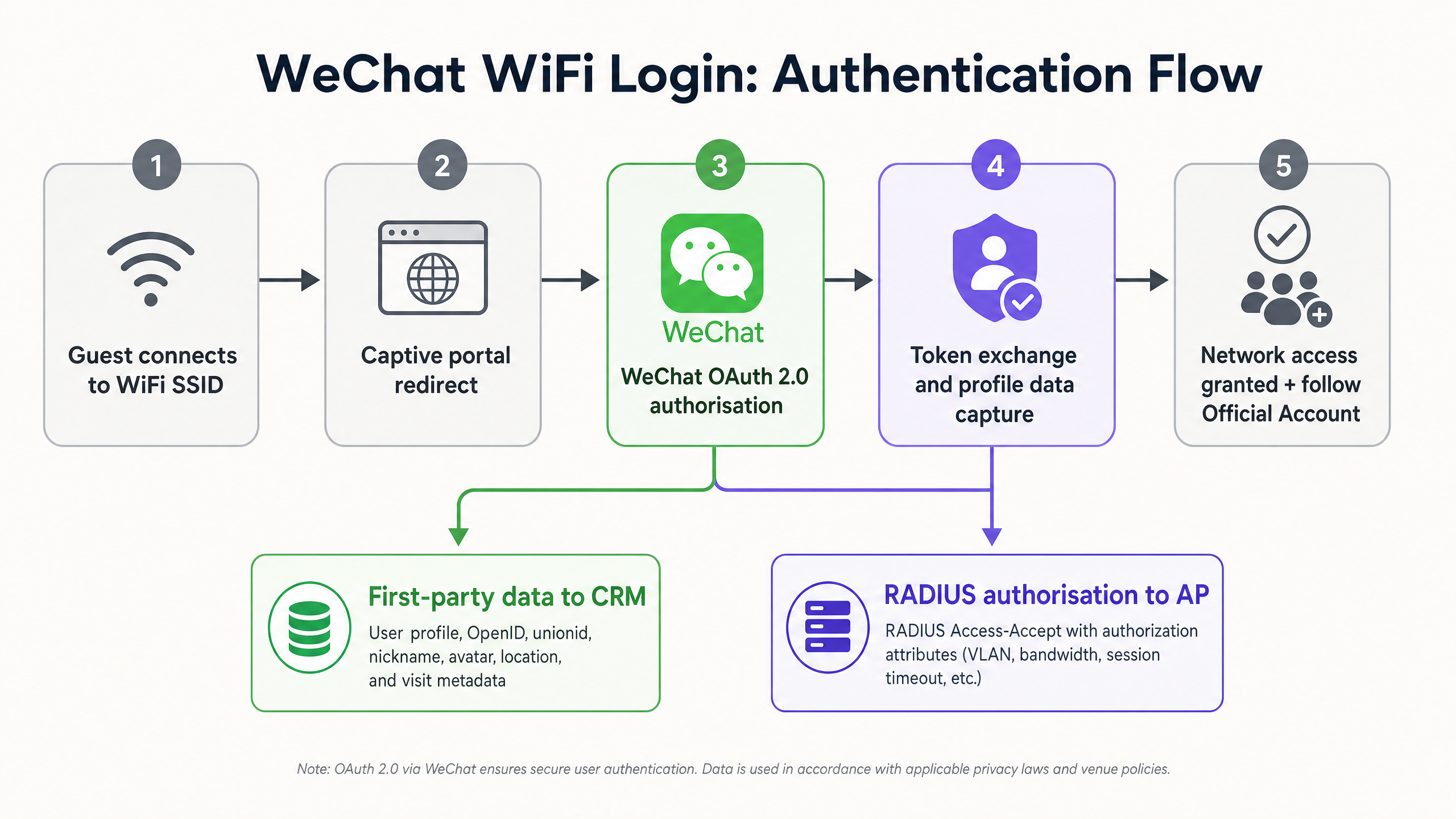
WeChat WiFi authentication replaces manual form entry with an OAuth 2.0 flow integrated directly into the captive portal experience. The sequence involves five components communicating in a defined order:
- The guest's device connects to the venue SSID.
- The access point intercepts unauthenticated HTTP traffic and redirects the device to the Purple-hosted captive portal.
- The user selects the WeChat login option on the splash page.
- The portal initiates an OAuth 2.0 authorisation request to the WeChat open platform API, passing the venue's AppID and a redirect URI.
- The WeChat app opens on the device and prompts the user to authorise the connection.
- WeChat returns an authorisation code to the redirect URI.
- The Purple platform exchanges the code for an access token and retrieves the user's profile data: OpenID, unionid, nickname, avatar, and registered location.
- Purple signals the RADIUS server to issue an Access-Accept message to the access point.
- The access point grants internet access and applies configured policies (VLAN assignment, bandwidth limits, session timeout).
- The portal redirects the user to the venue's WeChat Official Account or a targeted landing page.
Account type requirements
This is the single most common point of failure in WeChat WiFi deployments. You must use a verified WeChat Service Account (服务号). Subscription accounts (订阅号) do not expose the OAuth 2.0 webpage authorisation APIs required for captive portal integration. The table below summarises the key differences:
| Feature | Service Account (服务号) | Subscription Account (订阅号) |
|---|---|---|
| OAuth 2.0 WiFi login | Yes | No |
| API access level | Full | Limited |
| Push messages per month | 4 | 30 |
| Appears as a contact | Yes | Grouped in folder |
| WeChat Pay integration | Yes | No |
| Verification required | Yes | Yes |
Obtaining a verified Service Account requires a Chinese business licence or a special overseas application process through Tencent, which carries a $99 annual verification fee and a two-to-four week review period.
The walled garden: the most critical network configuration
A walled garden (also called a pre-authentication whitelist) defines which IP addresses and domains a device can reach before it has completed captive portal authentication. If the WeChat API domains are not in the walled garden, the device cannot initiate the OAuth handshake, and the login fails silently.
At minimum, the following domains must be whitelisted:
*.weixin.qq.com*.wechat.com*.wx.qq.comres.wx.qq.commp.weixin.qq.com- WeChat CDN IP ranges (consult Tencent's published IP range documentation, as these change periodically)
On Cisco Meraki, configure these under Wireless > Access Control > Walled Garden. On HPE Aruba, use the Captive Portal Profile whitelist. On Juniper Mist, configure the Guest Portal allowed domains list.
RADIUS integration and policy enforcement
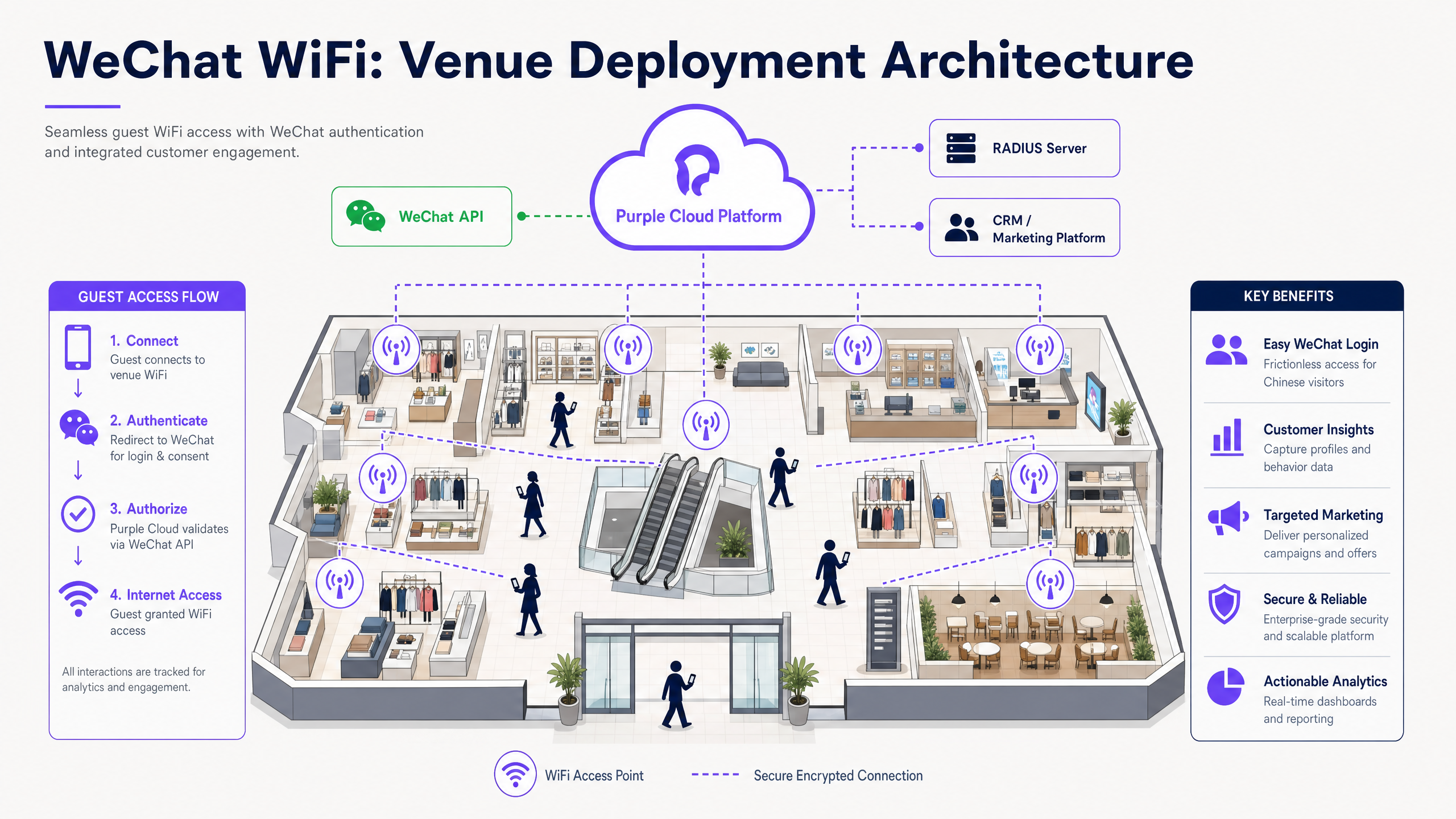
Purple acts as a RADIUS proxy in this architecture. After a successful WeChat OAuth exchange, Purple sends a RADIUS Access-Accept message to the venue's wireless controller. The Access-Accept message can carry standard RADIUS attributes to enforce per-user policies:
Tunnel-TypeandTunnel-Private-Group-IDfor VLAN assignment (isolating guest traffic from corporate networks, in line with IEEE 802.1X segmentation best practices)Session-Timeoutfor automatic disconnection after a defined periodWISPr-Bandwidth-Max-UpandWISPr-Bandwidth-Max-Downfor bandwidth throttling
This architecture is hardware-agnostic. Purple integrates with Cisco Meraki, HPE Aruba, Ruckus, Juniper Mist, Ubiquiti UniFi, Cambium, Extreme, and Fortinet without requiring firmware changes or additional on-premises servers.
Implementation guide
Step 1: Configure the WeChat developer account
Log in to the WeChat Official Account Platform at mp.weixin.qq.com. Navigate to Settings > Security Centre > Webpage Authorisation. Enable OAuth 2.0 webpage authorisation and add your captive portal domain as an authorised callback domain (e.g., wifi.yourvenue.com). WeChat will only return authorisation codes to domains registered here - a mismatch causes a silent failure.
Retrieve your AppID and AppSecret from the Development > Basic Configuration panel. Store the AppSecret securely; treat it as a private key.
Step 2: Configure Purple
In the Purple portal, navigate to Authentication > Social Login and enable WeChat. Input the AppID and AppSecret. Design the captive portal splash page using Purple's drag-and-drop editor. Make the WeChat login button the primary call to action above the fold.
Configure the post-authentication redirect. Options include:
- The venue's WeChat Official Account follow page (recommended for engagement)
- A promotional landing page hosted within a WeChat Mini Program
- A survey page using Purple's WiFi Analytics tools
- A loyalty programme enrolment page
Enable MAC address caching under Authentication > Return Visitor Settings. Set the cache duration to match your typical visit frequency (seven days for retail, 30 days for hospitality). Returning visitors will connect automatically without seeing the portal again, while their visit is still logged in the analytics dashboard.
Step 3: Configure the network hardware
On your wireless controller, configure the guest SSID to use an external captive portal. Input the Purple portal URL as the splash page URL. Add the WeChat domains to the walled garden. Set the RADIUS server IP addresses and shared secrets provided by Purple.
Test the full flow from a mobile device before going live. Specifically:
- Connect to the guest SSID.
- Confirm the captive portal loads in the Captive Portal Assistant (CPA) mini-browser.
- Tap the WeChat login button and confirm the WeChat app opens.
- Authorise the connection and confirm internet access is granted.
- Confirm the post-login redirect fires correctly.
Best practices
Optimise the walled garden. A misconfigured walled garden is the number one cause of failed WeChat logins in production. Test it before launch and re-test after any network firmware update, as some controllers reset whitelist entries during upgrades.
Drive post-login engagement. The moment after authentication is the highest-attention point in the guest WiFi journey. Redirect users to your Official Account follow page. A guest who follows your account is reachable via push notifications long after they leave the venue.
Implement MAC caching for return visitors. Requiring repeat authentication on every visit degrades the experience. MAC caching eliminates the friction for returning guests while still logging the visit for analytics. See Purple's WiFi Analytics for dwell time and return visit reporting.
Apply data minimisation. Request only the WeChat profile fields your CRM actually uses. Requesting unnecessary permissions increases the authorisation abandonment rate and adds GDPR compliance complexity. For most venues, OpenID, nickname, and avatar are sufficient for personalisation.
Segment guest traffic via VLAN. Assign WeChat-authenticated guests to a dedicated VLAN, isolated from your corporate or POS network. This satisfies PCI DSS network segmentation requirements and limits the blast radius of any guest-side security incident. For a full treatment of WiFi security architecture, see our enterprise WiFi security guide .
Comply with GDPR and PIPL. Display a clear privacy notice on the splash page before the user initiates the WeChat OAuth flow. The notice must identify the data controller, list the categories of data collected from WeChat, state the legal basis for processing, and provide a link to the full privacy policy. For detailed guidance, see our WiFi GDPR compliance guide .
Troubleshooting & risk mitigation
OAuth redirect mismatch
If the callback URL registered in the WeChat developer console does not exactly match the URL Purple uses for the redirect, WeChat returns an error code and blocks the authorisation. Check for protocol mismatches (HTTP vs HTTPS), trailing slashes, and subdomain differences. The registered domain must be an exact string match.
Captive Portal Assistant (CPA) interference
Mobile operating systems use a CPA mini-browser to detect and handle captive networks. These mini-browsers often lack the ability to open native apps, which breaks the WeChat app callout in the OAuth flow. Mitigation options include:
- Implementing a JavaScript redirect that detects the CPA environment and opens the full system browser before initiating the OAuth flow.
- Displaying a clear instruction on the splash page telling users to open the page in their full browser if the WeChat button does not respond.
Token expiration and stale sessions
WeChat access tokens expire after two hours. If your platform does not refresh the token, the user's CRM record will stop updating after the initial session. Configure Purple's token refresh settings to maintain active tokens for the duration of the guest's stay.
Geopolitical and regulatory risk
WeChat is subject to Chinese government regulation and Tencent's platform policies. API access can be suspended or modified without notice. Mitigate this by ensuring your captive portal supports multiple authentication methods (email, SMS, other social logins) so that a WeChat API outage does not take your entire guest WiFi offline. Purple's multi-method portal supports this fallback architecture natively.
ROI & business impact
Deploying WeChat WiFi authentication delivers measurable returns across three vectors.
Increased data capture rate. Social login reduces form-fill friction. Venues using Purple's social login options report authentication completion rates 20-30% higher than equivalent email-only portals (Purple internal data, 2024). At a venue processing 500 guest WiFi connections per day, a 25% uplift means 125 additional verified profiles captured daily.
Official Account follower growth. Redirecting authenticated users to the Official Account follow page converts transient footfall into a reachable digital audience. A hotel with 200 WeChat-authenticated guests per day, achieving a 40% follow rate, adds 80 new Official Account followers daily - followers who can receive targeted push notifications about return visit offers, loyalty programme updates, and seasonal promotions.
Operational visibility. Purple's WiFi Analytics platform maps WeChat-authenticated sessions to dwell time, visit frequency, and zone-level movement data. This gives venue operations directors the data to optimise staffing, layout, and promotional timing. For hospitality venues, this data integrates directly with PMS systems to enrich guest profiles.
For retail environments, the combination of WeChat authentication and Purple's analytics platform replicates the data richness of e-commerce in a physical store context - a capability that becomes increasingly valuable as third-party cookie deprecation reduces the effectiveness of digital retargeting.
For related guidance, see our WiFi GDPR compliance guide and our enterprise WiFi security guide . To explore how Purple deploys across specific verticals, see our pages for hospitality , retail , healthcare , and transport .
Key Definitions
OAuth 2.0
An industry-standard authorisation protocol that allows a user to grant a third-party application access to their account data on another service without sharing their password. In WeChat WiFi authentication, the captive portal is the third-party application and WeChat is the identity provider.
The underlying mechanism for all social WiFi login. IT teams encounter it when configuring the AppID, AppSecret, and redirect URI in the WeChat developer console and the Purple platform.
Captive portal
A web page that intercepts a device's network traffic and requires the user to authenticate or accept terms before granting internet access. It operates by redirecting all HTTP requests to the portal URL until authentication is complete.
The user-facing component of the WeChat WiFi login system. Purple hosts and manages the captive portal as a cloud overlay on top of the venue's existing hardware.
Walled garden
A pre-authentication whitelist of IP addresses and domains that a device can reach before completing captive portal login. Required to allow the device to communicate with WeChat's authentication servers during the OAuth flow.
The most commonly misconfigured element in WeChat WiFi deployments. Must be configured at the SSID level on the wireless controller.
RADIUS
Remote Authentication Dial-In User Service. A networking protocol providing centralised authentication, authorisation, and accounting for network access. After a successful WeChat OAuth exchange, Purple sends a RADIUS Access-Accept message to the access point to grant internet access.
The protocol that connects the Purple identity platform to the venue's network hardware. IT teams configure RADIUS server IP addresses and shared secrets in the wireless controller.
WeChat Service Account (服务号)
A category of WeChat Official Account designed for businesses, offering full API access including OAuth 2.0 webpage authorisation. Appears as a contact in the user's chat list. Requires Chinese business registration or overseas verification.
The mandatory account type for WeChat WiFi login. Subscription accounts cannot be used for this purpose.
OpenID
A unique identifier assigned by WeChat to a specific user for a specific Official Account. Two different Official Accounts will receive different OpenIDs for the same user.
The primary key used by the CRM to identify and track individual users across WiFi sessions.
Unionid
A unique identifier assigned by WeChat to a specific user across all Official Accounts and Mini Programs registered under the same WeChat open platform account. Allows cross-product user recognition.
Relevant for brands with multiple WeChat touchpoints (e.g., a retail chain with both a WiFi portal and a shopping Mini Program) that want to unify the user profile across all interactions.
MAC address caching
A network feature that stores a device's unique hardware identifier (MAC address) after initial authentication, allowing the network to automatically grant access on subsequent connections without presenting the captive portal again.
Used to improve the return visitor experience. Purple logs the return visit for analytics even when the portal is not displayed.
Captive Portal Assistant (CPA)
The mini-browser automatically launched by iOS and Android when they detect a network requiring captive portal authentication. CPAs have limited functionality and may not support native app callouts required for the WeChat OAuth flow.
IT teams must test the WeChat login flow specifically within the CPA environment and implement JavaScript detection to redirect to the full system browser if necessary.
VLAN
Virtual Local Area Network. A logical network segment that isolates traffic from other segments on the same physical infrastructure. Used to separate guest WiFi traffic from corporate or POS networks.
RADIUS attributes returned by Purple can assign WeChat-authenticated guests to a specific VLAN, satisfying PCI DSS network segmentation requirements.
Worked Examples
A luxury retail brand in London wants to offer seamless WiFi to Chinese tourists while increasing followers on their WeChat Official Account. They currently use Cisco Meraki access points and a standard email-capture portal. Their IT team has two weeks to deploy before a major Chinese New Year campaign.
Week one: Register and verify a WeChat Service Account if not already in place (allow two to four weeks for Tencent approval, so this step should have started earlier - if not, use a verified third-party Chinese entity as an interim measure). Configure the WeChat developer console with the callback domain matching the Purple portal URL. In the Purple platform, enable WeChat social login, input the AppID and AppSecret, and design the splash page with WeChat as the primary login option. Configure the post-authentication redirect to the brand's WeChat Official Account follow page. Week two: In the Meraki dashboard, update the guest SSID to point to the Purple portal URL. Add all WeChat API domains to the Meraki walled garden under Wireless > Access Control. Set RADIUS server details. Test the full flow end-to-end from an iOS and Android device. Enable MAC caching for 30-day return visitor recognition. Go live.
A 15,000-capacity stadium is hosting a series of international events with significant Chinese-speaking attendees. The IT director reports that 35% of guests abandon the WiFi login form before completing it. The network runs HPE Aruba access points managed via Aruba Central.
Deploy Purple's captive portal with WeChat as the primary social login option alongside email and SMS fallbacks. Configure the Aruba Central captive portal profile to redirect to Purple and add WeChat domains to the allowed list. Implement a JavaScript CPA detection script on the splash page to force the OAuth flow into the native system browser, bypassing the Aruba CPA mini-browser. Configure RADIUS attributes to assign authenticated fans to a dedicated guest VLAN, isolated from the stadium's operational network. Set session timeout to four hours to cover a typical event duration without requiring re-authentication. Post-authentication, redirect fans to a WeChat Mini Program hosting the event programme, live scores, and a food ordering service.
Practice Questions
Q1. Your venue's new WeChat WiFi login is failing. Guests tap the WeChat button on the splash page, but the page times out before the WeChat app opens. The Cisco Meraki dashboard shows the SSID is online and the Purple portal URL is correctly configured. What is the most likely cause and how do you fix it?
Hint: Consider what network access the device has before it completes authentication.
View model answer
The walled garden on the Meraki SSID is misconfigured. The device cannot reach WeChat's API domains before authentication, so the OAuth handshake cannot initiate. Fix: navigate to Wireless > Access Control in the Meraki dashboard, locate the Walled Garden section, and add the required WeChat domains including *.weixin.qq.com, *.wechat.com, and *.wx.qq.com. Test by attempting the login flow again from a device that has not previously connected to the SSID.
Q2. A marketing director wants to use their existing WeChat Subscription Account (订阅号) to enable WiFi login because it allows daily article publishing to followers. They ask you to configure the integration. How do you respond?
Hint: Review the API access levels for different WeChat account types.
View model answer
Advise them that a Subscription Account cannot be used for WiFi authentication. The OAuth 2.0 webpage authorisation APIs required for captive portal integration are only available to verified Service Accounts (服务号). They will need to register a Service Account. This requires a Chinese business licence or an overseas application through Tencent's special process, which takes two to four weeks and costs $99 annually. The Subscription Account can remain active for content publishing; the two account types serve different purposes and can coexist.
Q3. After a successful WeChat WiFi deployment, the IT team notices that users who authenticated three weeks ago are no longer appearing in the CRM with updated visit data, even though they are connecting to the network. What is the likely cause?
Hint: Consider the session management settings configured in Purple and the MAC cache duration.
View model answer
The MAC cache duration is likely set to a value shorter than three weeks (e.g., 14 days), so returning users are being granted access via MAC cache without triggering a new authentication event or CRM update. Alternatively, the WeChat access token for those users has expired and the platform is not refreshing it. Fix: extend the MAC cache duration to 30 days in Purple's return visitor settings, and ensure the token refresh configuration is active. Also confirm that Purple is logging MAC-cached visits as return visit events in the analytics dashboard, even when the portal is not displayed.
Q4. Your venue operates in both the UK and mainland China. You want to deploy a unified WeChat WiFi authentication system. What compliance obligations must you address before going live?
Hint: Two distinct privacy regimes apply to the two geographies.
View model answer
You must comply with both GDPR (applicable to users in the UK and EU) and China's Personal Information Protection Law (PIPL, applicable to users in mainland China). Key requirements include: displaying a clear privacy notice on the splash page before initiating the OAuth flow, identifying the data controller and listing the categories of data collected from WeChat, stating the legal basis for processing under each regime (legitimate interests or consent under GDPR; consent under PIPL), providing a mechanism for users to withdraw consent and request deletion, and ensuring data transfer mechanisms are in place if WeChat profile data flows between jurisdictions. Consult Purple's GDPR compliance guide and your legal counsel for jurisdiction-specific requirements.
Continue reading in this series
Measuring the Business ROI of Guest WiFi and Location Analytics
This guide provides a technical and operational framework for measuring the business ROI of guest WiFi and location analytics. It details how to calculate value from hardware investments through dwell time uplift, operational efficiency, and first-party data capture across retail, hospitality, and public venues. IT managers, network architects, CTOs, and venue operations directors will find concrete measurement frameworks, real-world case studies, and compliance guidance to justify and maximise their WiFi investment.
WiFi GDPR Compliance: How to Securely Collect Guest Data via Captive Portals
This technical guide gives IT managers, network architects, and venue operations directors a practical framework for achieving GDPR compliance across guest WiFi deployments. It covers how captive portals collect personal data, how to secure explicit consent, and how to implement automated data retention policies that protect your organisation from regulatory fines of up to 4% of global turnover. Purple's guest WiFi platform maps directly to each compliance requirement, from consent logging to one-click data erasure.
WiFi GDPR Compliance: How to Securely Collect Guest Data via Captive Portals
This technical guide gives IT managers, network architects, and venue operations directors a practical framework for achieving GDPR compliance across guest WiFi deployments. It covers how captive portals collect personal data, how to secure explicit consent, and how to implement automated data retention policies that protect your organisation from regulatory fines of up to 4% of global turnover. Purple's guest WiFi platform maps directly to each compliance requirement, from consent logging to one-click data erasure.