
The Network Administrator’s Guide to CCPA/CPRA and Guest Data Privacy Compliance
A comprehensive technical reference for IT managers, network architects, and venue operations directors on architecting CCPA/CPRA-compliant guest WiFi networks. It covers the four categories of personal data collected by guest networks, the legal basis for each, captive portal consent mechanics, VLAN segmentation, data retention automation, and how Purple's hardware-agnostic platform maps to each compliance requirement. Venue operators will learn how to transform guest WiFi compliance from a regulatory liability into a defensible, first-party data asset.
Listen to this guide
View podcast transcript
Executive Summary
Guest WiFi is a regulated data collection endpoint. Under the California Consumer Privacy Act (CCPA/CPRA) and state privacy laws, every hotel, retail chain, stadium and conference center offering public network access becomes a data controller the moment a guest connects. State attorneys general can impose substantial fines for violations - and regulatory enforcement has increased dramatically since 2018, with consent violations the most frequently enforced category (SecurePrivacy, 2026).
This guide gives you the technical framework for architecting a compliant guest network. We cover the four categories of personal data your network processes, the lawful basis each requires, Captive Portal consent architecture, VLAN segmentation, WPA3 encryption, RADIUS integration and automated data retention. We also show how Purple's Guest WiFi platform - deployed across 80,000+ venues and processing 440 million logins in 2024 (Purple internal data) - maps to each of these requirements, so you can close compliance gaps without replacing existing hardware.
If you manage guest connectivity at a Marriott, a Target flagship, a major US airport hub or a multi-site retail estate, the architecture in this guide applies directly to your environment.
-
Technical Deep Dive
What data does your guest network actually collect?
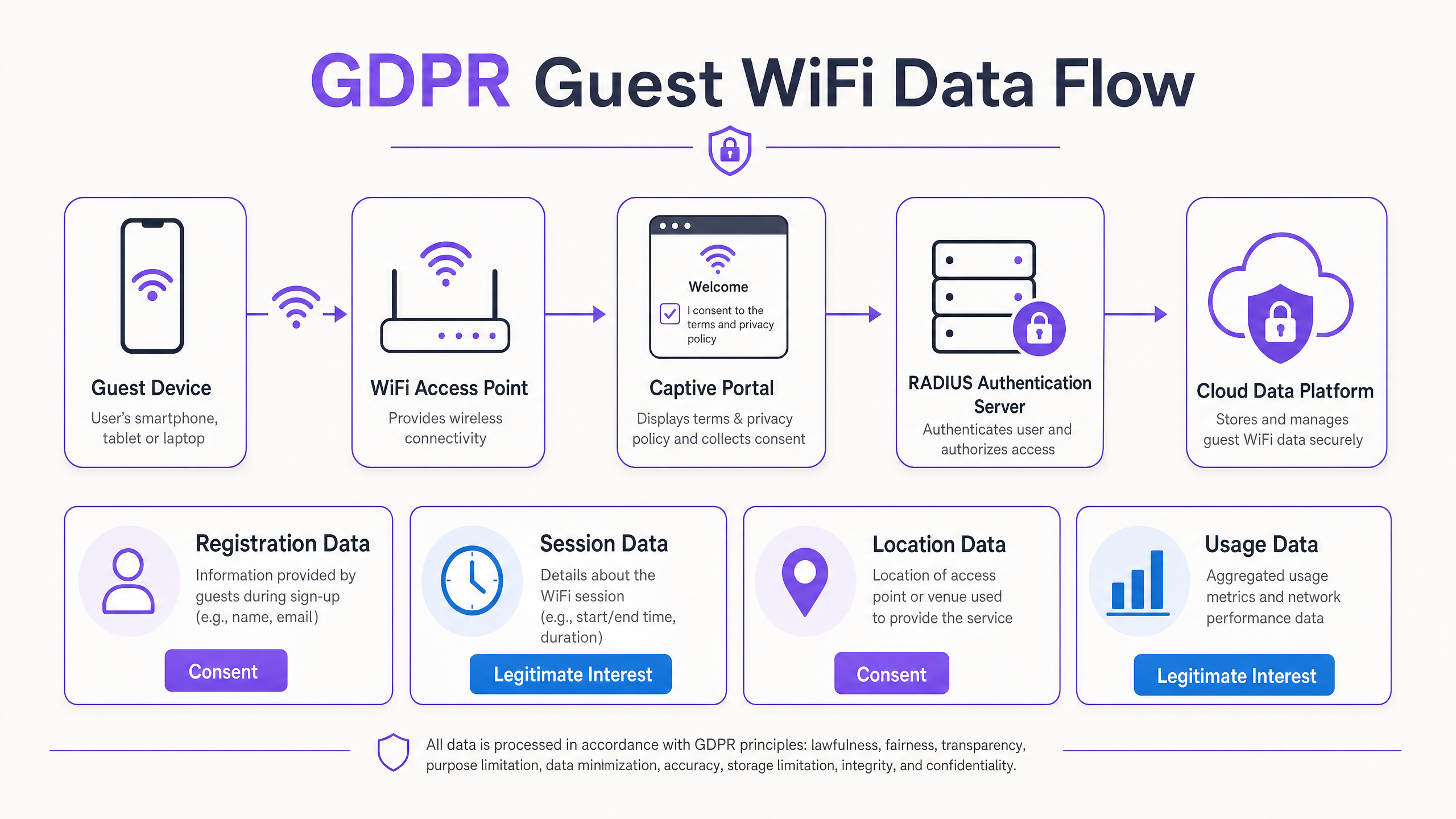
The first step in any compliance program is an honest data inventory. A guest WiFi network processes four distinct categories of personal data, each with different legal implications.
| Data category | Examples | Lawful basis | Key compliance considerations |
|---|---|---|---|
| Registration data | Name, email, cell phone number, social login profile | Consent | Must be collected via clear, granular opt-in. Cannot be bundled with network access terms. |
| Device and session data | MAC address, IP address, connection start/end times, bandwidth consumed | Legitimate interests | Requires a Legitimate Interests Assessment (LIA). Retain no longer than 30 days, for troubleshooting only. |
| Location data | AP association logs, RSSI triangulation, footfall heatmaps | Consent | Disclose explicitly in the privacy notice. Pseudonymize at the edge before it reaches the analytics platform. |
| Usage data | DNS queries, destination IP ranges | Legitimate interests | Limit to security filtering. Do not build individual browsing profiles without explicit consent. |
MAC addresses are personal data. The FTC and state attorneys general confirmed this position in 2023: a MAC address, combined with connection timestamps and venue location, is sufficient to identify an individual's presence and behavior. MAC address randomization (now the default on iOS 14+, Android 10+ and Windows 10+) reduces the persistence of device tracking but does not remove data privacy obligations at the point of collection.
The Captive Portal as a compliance interface
A Captive Portal (sometimes called a splash page or walled garden) is the web interface that intercepts a guest's HTTP traffic and redirects it to a consent and authentication page before granting network access. It is your primary mechanism for establishing a lawful basis for data processing.
Under CCPA/CPRA, a compliant Captive Portal architecture must satisfy five requirements:
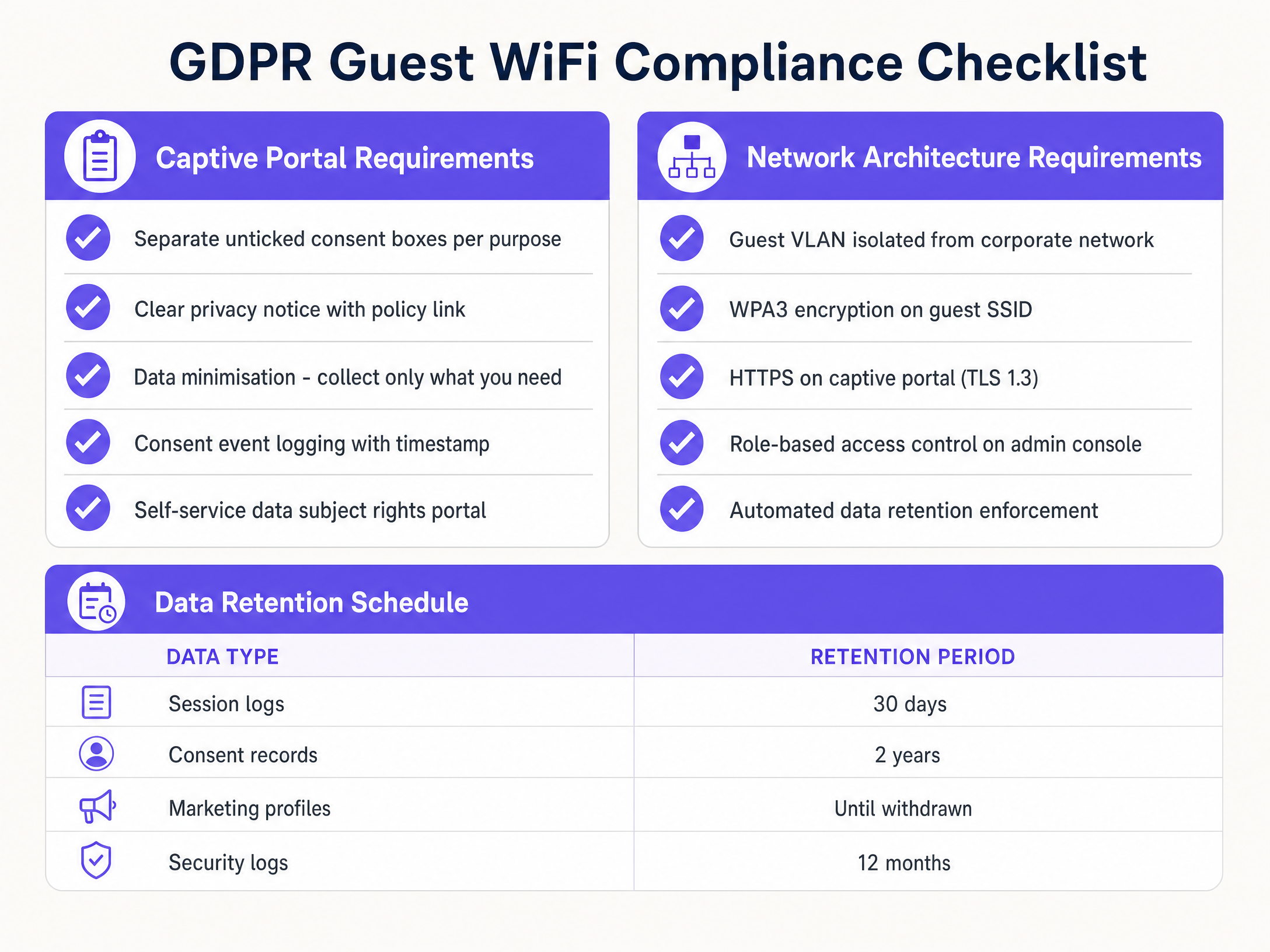
1. Unbundled consent. Network access terms and marketing consent must be presented as separate elements. A user must be able to connect to the WiFi without agreeing to marketing. If they cannot, the marketing consent is not freely given and is therefore invalid. This is the most litigated consent violation in the US.
2. Unchecked checkboxes. Every optional consent element must be presented as an unchecked checkbox. Pre-checked boxes are explicitly prohibited under CCPA/CPRA. The user must take affirmative action to opt in.
3. Granular purpose disclosure. Each processing purpose must be described clearly. "For business purposes" is insufficient. "To send you promotional emails about our loyalty program" is sufficient.
4. Consent audit logging. Your system must record the exact timestamp, the user's IP address, the device MAC address, the specific consent choices made, and the version of the privacy notice presented. Purple logs every consent event and retains these records for two years after the last interaction (Purple internal data), providing a defensible audit trail.
5. Privacy notice link. The splash page must link directly to your full privacy policy before the user submits any data.
Network architecture: segmentation and encryption
Compliant data processing starts at the network layer. Guest traffic must be isolated from your corporate infrastructure.
VLAN segmentation. Configure a dedicated VLAN for the guest SSID. Apply ACLs blocking guest devices from the RFC 1918 address ranges (10.0.0.0/8, 172.16.0.0/12, 192.168.0.0/16). Enable client isolation at the access point level to prevent guest-to-guest traffic. Cisco Meraki, HPE Aruba, Ruckus, Juniper Mist, Ubiquiti UniFi, Cambium, Extreme and Fortinet platforms all support this natively.
WPA3 encryption. Deploy WPA3 on your guest SSID where the hardware supports it. WPA3's Simultaneous Authentication of Equals (SAE) handshake eliminates the KRACK vulnerability present in WPA2's four-way handshake and provides forward secrecy, meaning a compromised session key cannot be used to decrypt past traffic. For hardware that does not yet support WPA3, enforce WPA2 with AES-CCMP, not TKIP.
HTTPS on the Captive Portal. Serve your splash page over HTTPS with a valid TLS 1.2 or 1.3 certificate. Collecting personal data over HTTP is a serious security failure that will be highlighted in any FTC and state attorneys general investigation. Purple's cloud-hosted Captive Portal enforces HTTPS by default.
RADIUS integration. Integrate your wireless LAN controller with a RADIUS server for authentication. When a user completes the Captive Portal flow, the platform sends a RADIUS Access-Accept message to the WLC, granting network access. This creates clean, auditable separation between the authentication event and the data collection layer. Purple integrates with Cisco Meraki, HPE Aruba, Ruckus, Juniper Mist, Ubiquiti UniFi, Cambium, Extreme and Fortinet over standard RADIUS, with no on-premises server required.
For a deeper look at enterprise authentication architecture, see our guide to enterprise WiFi authentication without Active Directory or on-premises servers .
Data retention: the silent compliance risk
Most organizations concentrate their compliance effort on the consent collection layer and neglect the storage limitation principle. Under CCPA/CPRA, personal data must be kept no longer than necessary for the purpose it was collected for. Retaining session logs indefinitely is a violation even where the original collection was lawful.
A defensible guest WiFi retention schedule:
| Data type | Recommended retention | Rationale |
|---|---|---|
| Session logs (IP, MAC, timestamps) | 30 days | Sufficient for network troubleshooting and security investigations |
| Consent records | 2 years after last interaction | Covers potential legal challenges and regulatory audits |
| Marketing profiles | Until consent withdrawn | Delete immediately on unsubscribe or consumer deletion request |
| Network security logs | 12 months | Aligns with cybersecurity guidance on incident response |
| DHCP/DNS logs | 30-90 days | Supports security forensics; document the rationale |
Purple applies configurable retention rules per data category and executes deletion automatically, so you are not relying on manual processes across a multi-venue estate.
Data processing addenda and vendor due diligence
Under CCPA/CPRA, your guest WiFi vendor is a Data Processor. You must have a signed Data Processing Addendum (DPA) in place before any personal data flows to a third-party platform. The DPA must specify the categories of data processed, the purposes of processing, the sub-processors used, the security measures in place, and the procedures for handling consumer rights requests and data breaches.
When evaluating vendors, ask for ISO 27001 certification, a SOC 2 Type II report, and documented evidence of their own CCPA/CPRA compliance. Purple holds ISO 27001 certification, is GDPR and CCPA compliant, and holds Cyber Essentials and B Corp certifications.
For further background on enterprise WiFi security architecture, see our enterprise WiFi security guide .
Implementation Guide
Step 1: Run a data inventory
Map every data point your guest network collects. Include Captive Portal fields, session logs generated by the WLC, any analytics data sent to third-party platforms, and any CRM integrations. Assign a lawful basis to each data category. Identify any processing that currently lacks a valid basis.
Step 2: Redesign your Captive Portal
Audit your current splash page against the five requirements above. If marketing consent is bundled with network access, separate them. If checkboxes are prechecked, uncheck them. If your privacy notice is buried in a terms of service document, surface it as a direct link on the splash page. Purple's Capture plan provides a ready-made compliant Captive Portal template that meets these requirements.
Step 3: Configure network segmentation
Create a dedicated guest VLAN on your WLC. Apply ACLs blocking access to internal subnets. Enable client isolation. Test the configuration by connecting a guest device and attempting to reach internal resources - you should get no response.
Step 4: Enforce HTTPS and WPA3
Verify your Captive Portal is served over HTTPS. Check your SSL certificate expiration date and set up automated renewal. Enable WPA3 on the guest SSID if your access points support it. For Cisco Meraki, HPE Aruba, Ruckus and Juniper Mist, WPA3 is available in current firmware releases.
Step 5: Implement automated data retention
Configure deletion schedules in your WiFi analytics platform. Set session logs to purge after 30 days. Set marketing profiles to delete immediately on consent withdrawal. Document your retention schedule in your privacy policy.
Step 6: Establish a consumer rights request process
Create a written procedure for handling consumer rights requests. You have 30 days to respond. A self-service preference center, where guests can view, amend and delete their data, significantly reduces the operational burden. Purple's platform provides a preference center guests can reach via a link in any marketing email.
Step 7: Sign DPAs with every vendor
Review every third-party platform that receives guest data: your WiFi analytics provider, your CRM, your email marketing platform, and any advertising networks. Ensure a DPA is in place with each one.
Best Practices
Use progressive profiling. Do not ask for everything on the first visit. Collect an email address on first connection. On the second visit, ask for a first name. On the third, offer loyalty program enrollment. This reduces friction, improves data quality, and aligns with the data minimization principle.
Validate email addresses. Implement real-time email validation on the Captive Portal. Fake email addresses pollute your CRM, damage deliverability, and create compliance complications when you cannot respond to a DSAR because the email address on file is invalid.
Pseudonymize location data at the edge. If you use WiFi analytics for foot traffic tracking (as many Hospitality and Retail operators do), pseudonymize MAC addresses at the access point before the data reaches your analytics platform. This materially reduces the privacy risk of location processing and strengthens your Legitimate Interests Assessment (LIA).
Run a DPIA before deploying analytics. Under CCPA/CPRA, a Data Protection Impact Assessment (DPIA) is legally mandatory before deploying systems involving large-scale location tracking, behavioral profiling, or processing of data about vulnerable groups. Document the assessment and retain it.
Monitor MAC address randomization. iOS 14+, Android 10+ and Windows 10+ randomize MAC addresses by default. This means your analytics platform will see higher churn in device identifiers. Design your analytics around session-level data rather than persistent device tracking.
For Healthcare and Transport operators, whose guests may include patients or passengers in vulnerable situations, apply heightened scrutiny to your Legitimate Interests Assessments and consider whether explicit consent is required for all processing.
Troubleshooting and Risk Mitigation
Failure mode: consent fatigue. If your Captive Portal asks for too much information or presents too many consent options, users either abandon the connection or click through without reading. Mitigation: limit mandatory fields to an email address. Offer a single optional marketing consent checkbox. Use clear, plain language. Test completion rates and optimize.
Failure mode: stale marketing data. Retaining marketing profiles for users who have not interacted in years violates the storage limitation principle and damages email deliverability. Mitigation: implement a re-engagement campaign after 12 months of inactivity. Delete profiles that do not respond within 30 days of the re-engagement email.
Failure mode: insecure Captive Portal. Serving the splash page over HTTP exposes user credentials and personal data to interception. Mitigation: enforce HTTPS. Automate certificate renewal. Test with a network scanner to confirm no HTTP fallback exists.
Failure mode: missing DPAs. Sending guest data to a third-party platform without a signed DPA makes you jointly liable for any breach or misuse by that processor. Mitigation: audit all data flows quarterly. Require a signed DPA before any new integration goes live.
Failure mode: missing the 72-hour breach notification window. The CCPA/CPRA breach notification clock starts the moment you become aware of a breach, not when your investigation concludes. Mitigation: maintain a breach response checklist with FTC and state attorneys general notification as a step within the first 24 hours of discovery. Ensure your team knows to notify before the investigation is complete.
For guidance on managing access revocation - relevant when staff leave or contractor access needs to be terminated - see our guide on how to revoke WiFi access when an employee leaves .
ROI and Business Impact
GDPR compliance is not purely a cost center. A well-architected, compliant guest WiFi deployment generates measurable commercial value.
First-party data quality. Guests who actively opt in to marketing are more engaged than those coerced through bundled consent. Venues using Purple's compliant consent flows report marketing opt-in rates of 35-45% (Purple internal data), with higher email open rates and lower unsubscribe rates than pre-GDPR bundled approaches.
Reduced regulatory exposure. The FTC and state attorneys general's enforcement record includes an $18.4 million fine against Marriott International for inadequate data security and a $500,000 fine against DSG Retail for security failings. Compliant architecture directly reduces this exposure.
Operational efficiency. Automated data retention and self-service DSARs reduce the staff time required to manage compliance. Purple's platform handles consent logging, retention enforcement and DSAR management automatically, reducing the compliance overhead of a 50-venue estate to a fraction of what manual processes require.
Customer trust. 79% of consumers say they are more likely to trust brands that are transparent about how their data is used (Cisco Consumer Privacy Survey, 2022). A clear, honest Captive Portal that explains the value exchange - free WiFi in return for an email address - builds trust rather than eroding it. Purple's WiFi Analytics platform gives you the tools to capture this value while remaining fully compliant. With 29 billion data points collected across 80,000+ venues (Purple internal data), we have the scale to validate what works in practice, not just in theory.
For venue operators in Retail , compliant first-party data capture combined with foot traffic analytics materially improves campaign targeting and the in-store experience. For Hospitality operators, it drives loyalty program growth and repeat bookings. For Transport hubs, it enables passenger flow management and targeted retail offers.
Network administrators who build compliant guest WiFi systems are not just avoiding fines. They are building the data infrastructure their organization's marketing and operations strategy will rely on for the next decade.
Key Definitions
Data Controller
The entity that determines the purposes and means of processing personal data. In a guest WiFi deployment, the venue operator is the Data Controller and holds ultimate legal responsibility for CCPA/CPRA compliance.
IT managers need to understand this designation because it means the venue - not the WiFi vendor - is primarily liable for any compliance failure.
Data Processor
An entity that processes personal data on behalf of the Data Controller, under a formal Data Processing Addendum. Purple acts as a Data Processor for its venue clients.
A signed DPA must be in place before any personal data flows to a third-party platform. Sending guest data to a vendor without a DPA makes the controller jointly liable for any misuse.
Captive portal
A web interface that intercepts a guest's HTTP or HTTPS traffic and redirects them to a consent and authentication page before granting network access. The primary mechanism for establishing a lawful basis for data processing on a guest network.
The design of the captive portal determines whether your consent collection is legally valid. Poorly designed portals are the most common source of CCPA/CPRA violations in guest WiFi deployments.
RADIUS (Remote Authentication Dial-In User Service)
A networking protocol that provides centralized authentication, authorization, and accounting for network access. In guest WiFi, a RADIUS Access-Accept message from the captive portal platform to the wireless LAN controller grants a guest network access after they complete the consent flow.
RADIUS integration creates an auditable, time-stamped record of every authentication event, which supports both security monitoring and CCPA/CPRA compliance documentation.
MAC address
A unique hardware identifier assigned to a network interface controller. Classified as personal data under CCPA/CPRA when it can be linked to an identifiable individual. iOS 14+, Android 10+, and Windows 10+ randomize MAC addresses by default to reduce persistent device tracking.
MAC addresses must be subject to your data retention policy. MAC address randomization does not eliminate the data protection obligation at the point of collection.
Legitimate interest
A lawful basis under CCPA/CPRA that permits processing where it is necessary for the controller's legitimate interests, provided those interests are not overridden by the data subject's rights. Requires a documented Legitimate Interest Assessment (LIA).
Often used to justify basic session logging for network security. Cannot be used as a catch-all basis for marketing or analytics without a robust LIA.
DSAR (Data Subject Access Request)
A formal request by an individual to access, rectify, or erase the personal data an organization holds about them. Venues must respond within 30 days. Failure to respond is an FTC and state attorneys general enforcement trigger.
A self-service preference center reduces the operational burden of DSARs. Purple's platform allows guests to view and delete their own data without requiring manual intervention from your team.
DPIA (Data Protection Impact Assessment)
A structured risk assessment required under CCPA/CPRA before deploying processing activities that are likely to result in high risk to individuals. Mandatory for large-scale location tracking, behavioral profiling, and processing data from vulnerable groups.
Any venue deploying WiFi-based footfall analytics or crowd density monitoring must conduct a DPIA before go-live. The assessment must be documented and retained.
WPA3
The current generation of WiFi security protocol, standardized by the WiFi Alliance. Uses Simultaneous Authentication of Equals (SAE) to replace WPA2's four-way handshake, providing forward secrecy and resistance to offline dictionary attacks. Supported on Cisco Meraki, HPE Aruba, Ruckus, Juniper Mist, and Ubiquiti UniFi in current firmware.
Deploying WPA3 on guest SSIDs is a security best practice and demonstrates to regulators that appropriate technical measures are in place under CCPA/CPRA regulations.
VLAN (Virtual Local Area Network)
A logical network segment that isolates traffic at Layer 2. In guest WiFi, a dedicated guest VLAN prevents guest devices from accessing corporate network resources, even if they share the same physical infrastructure.
VLAN segmentation is the foundational network architecture control for guest WiFi. Without it, a guest device on the same physical switch as a corporate server can potentially access internal resources.
Worked Examples
A 200-room Premier Inn property needs to provide seamless guest WiFi while collecting emails for their marketing newsletter. Their current system requires guests to accept marketing communications as a condition of getting online. The property manager has received a complaint from a guest who was unaware their email would be used for marketing.
Deploy a compliant captive portal using Purple's Capture plan. Configure the portal with two separate consent elements: Checkbox 1 (mandatory, unchecked until the user checks it): 'I accept the Terms of Service for WiFi access.' Checkbox 2 (optional, unchecked by default): 'I consent to receive marketing emails from Premier Inn.' The user must be able to check Checkbox 1 and connect without touching Checkbox 2. Configure the portal to log both consent choices with a timestamp and the privacy policy version. Integrate the portal with the hotel's CRM via Purple's API, syncing only those users who checked Checkbox 2. Set up automated deletion of marketing profiles upon opt-out. Test the flow by connecting a device, checking only Checkbox 1, and verifying that no marketing record is created in the CRM.
A stadium IT team at a 60,000-capacity venue wants to use WiFi analytics to monitor crowd density in real time, identify pinch points, and improve safety. The legal team has flagged that tracking guest device locations without consent may violate CCPA/CPRA. The stadium uses Cisco Meraki access points and currently has no captive portal.
Deploy Purple's Guest WiFi platform on the existing Cisco Meraki infrastructure via the Meraki API integration. Configure a captive portal that explicitly discloses location data processing: 'We use your device's WiFi signal to monitor crowd density and improve safety at this venue. This data is anonymized and not used to track individuals.' Enable MAC address pseudonymization at the Meraki access point level using Purple's edge processing configuration, so that raw MAC addresses are replaced with pseudonymous identifiers before the data reaches the Purple analytics platform. Configure the analytics dashboard to display aggregated density data by zone, not individual device paths. Conduct a DPIA before go-live, documenting the privacy risks and the mitigations applied. Retain the DPIA in your compliance records.
Practice Questions
Q1. A retail chain wants to use guest WiFi data to send promotional emails to shoppers. Their IT team proposes adding a pre-checked checkbox on the splash page labeled 'Send me exclusive offers'. The marketing team argues this is fine because users can uncheck it. Is this approach compliant, and what should be done instead?
Hint: Consider CCPA/CPRA regulations and the definition of unambiguous, active consent.
View model answer
No, this is not compliant. Modern privacy standards and the TCPA and CAN-SPAM regulations require that pre-checked boxes do not constitute valid, affirmative consent. Consent must be an active, affirmative act. The checkbox must be unchecked by default, requiring the shopper to actively opt in. The fix is straightforward: change the checkbox to an unchecked default. Also verify that the marketing consent is presented as a separate element from the terms of service for network access, so that shoppers can connect without agreeing to marketing.
Q2. Your network security team needs to retain DHCP and DNS logs from the guest network to investigate a malware outbreak that occurred three months ago. The logs are still held on the SIEM. The data retention policy states session logs should be purged at 30 days. How do you handle this conflict?
Hint: Consider the lawful basis of legitimate business interest and the concept of a documented exception.
View model answer
The standard 30-day retention period can be extended for an active security investigation under the lawful basis of legitimate business interest. However, this exception must be documented: record the date of the incident, the scope of the investigation, the specific data being retained beyond the standard period, and the expected end date of the extended retention. Once the investigation is closed, the logs must be purged. Do not use an active investigation as an indefinite reason to retain data.
Q3. A guest at your hotel submits a request to delete their data (Right to Erasure) via email. They connected to the guest WiFi six months ago and opted into your marketing newsletter. What actions must you take, and within what timeframe?
Hint: Think about all systems where the guest's data may reside, not just the WiFi platform.
View model answer
You must complete the erasure within 30 days of the request. Actions required: (1) Delete the guest's marketing profile from your WiFi analytics platform (Purple). (2) Ensure the deletion cascades to any integrated systems - your CRM, your email marketing platform (e.g., Mailchimp or HubSpot), and any advertising platforms that received the data. (3) Suppress the email address from future marketing sends to prevent re-collection. (4) Retain a record of the erasure request itself (not the personal data) for your compliance audit trail. Note: you may retain session logs for the standard 30-day period from the date of connection, but if those logs have already been purged under your retention policy, no action is needed.
Q4. You are deploying guest WiFi across a 15-site conference center estate. Each site uses a different hardware vendor: five sites run Cisco Meraki, five run HPE Aruba, and five run Ruckus. How do you implement a consistent, compliant captive portal and consent logging architecture across all 15 sites without deploying separate on-premises servers at each location?
Hint: Consider the hardware-agnostic cloud overlay approach.
View model answer
Deploy Purple as a hardware-agnostic cloud overlay. Purple integrates with Cisco Meraki, HPE Aruba, and Ruckus via their respective APIs and RADIUS protocols, presenting a single consistent captive portal template across all 15 sites. Consent logging, data retention enforcement, and DSAR management are centralized in the Purple cloud platform, eliminating the need for on-premises servers. Configure a single privacy policy and consent template in Purple, then push it to all sites. This ensures consistent compliance posture regardless of the underlying hardware vendor.
Continue reading in this series
GDPR and Guest WiFi: Compliance Guide for Venue Marketers and IT
This guide provides IT managers and venue operators with a practical framework for ensuring Guest WiFi services are fully GDPR compliant. It covers technical architecture, consent mechanics, data retention, and how to transform compliance into a secure first-party data asset.
GDPR and Guest WiFi: Compliance Guide for Venue Marketers and IT
This guide provides IT managers and venue operators with a practical framework for ensuring Guest WiFi services are fully GDPR compliant. It covers technical architecture, consent mechanics, data retention, and how to transform compliance into a secure first-party data asset.
The Compliance Playbook: GDPR and Guest WiFi Data Privacy
This comprehensive guide provides IT managers and venue operators with a technical framework for architecting GDPR-compliant guest WiFi networks. It details consent mechanics, network segmentation, automated data retention, and how to transform compliance from a regulatory liability into a defensible first-party data asset.