
The Best Wi-Fi Access Points for Enterprise and Homelabs
This technical guide evaluates the best enterprise Wi-Fi access points for 2025-2026, covering Wi-Fi 6E and Wi-Fi 7 hardware from Cisco, HPE Aruba, Ruckus, Juniper Mist, and Ubiquiti across high-density hospitality, retail, and public venue deployments. It provides actionable architecture strategies, vendor comparisons, security frameworks, and ROI metrics for IT leaders building next-generation wireless networks. Purple's hardware-agnostic guest WiFi and analytics platform is mapped throughout as the intelligence layer that transforms network infrastructure into a first-party data asset.
Video overview
Listen to this guide
View podcast transcript
Part of our core series: Guest WiFi Guide →
Executive Summary
Per i CTO e i direttori IT che gestiscono ambienti ad alta densità — dai corridoi degli stadi ai vasti campus ospedalieri — la scelta del miglior access point non è più solo una questione di throughput puro. Il passaggio al Wi-Fi 6E e all'emergente standard Wi-Fi 7 (IEEE 802.11be) ha radicalmente modificato il panorama delle reti aziendali. I moderni access points devono gestire una densità estrema di dispositivi, supportare il roaming continuo, integrarsi con sofisticate piattaforme di analisi e mantenere rigidi protocolli di sicurezza, inclusi WPA3-Enterprise e IEEE 802.1X.
Questa guida fornisce una rigorosa valutazione tecnica degli access points aziendali di alto livello di Cisco, HPE Aruba Networking, Ruckus, Juniper Mist e Ubiquiti. Esploriamo le considerazioni architetturali, le funzionalità Multi-Link Operation (MLO), il bilancio energetico PoE++ e le strategie pratiche di implementazione per la gestione delle strutture. Esaminiamo inoltre come l'integrazione di queste soluzioni hardware con un overlay intelligente di Guest WiFi possa trasformare l'infrastruttura di rete da un costo fisso a una risorsa in grado di generare ricavi.
Approfondimento Tecnico: Architettura Wi-Fi 6E vs. Wi-Fi 7
Il mercato degli access points wireless aziendali si trova attualmente a cavallo tra due standard principali: il maturo e ampiamente diffuso Wi-Fi 6E (IEEE 802.11ax operante nella banda a 6 GHz) e il Wi-Fi 7 (IEEE 802.11be) in rapida accelerazione. Comprendere le distinzioni tecniche è fondamentale per gli architetti di rete che pianificano cicli di aggiornamento hardware con un orizzonte di 3-5 anni.
Multi-Link Operation (MLO) e Throughput
Il Wi-Fi 7 introduce la Multi-Link Operation (MLO), un cambio di paradigma nel modo in cui i dispositivi client interagiscono con gli access points. A differenza degli standard precedenti in cui un client si connette a una singola banda — 2.4 GHz, 5 GHz o 6 GHz — l'MLO consente la trasmissione e la ricezione simultanea su più bande contemporaneamente. Ciò riduce significativamente la latenza e aumenta il throughput aggregato, rendendolo essenziale per ambienti ad alta densità come centri congressi e arene sportive.
Inoltre, il Wi-Fi 7 supporta ampiezze di canale di 320 MHz nello spettro a 6 GHz e la modulazione 4K-QAM (Quadrature Amplitude Modulation), offrendo un incremento fino al 20% nelle velocità di picco dei dati rispetto alla modulazione 1024-QAM del Wi-Fi 6. È importante notare che la modulazione 4K-QAM richiede un rapporto segnale-rumore (SNR) molto elevato per funzionare; in ambienti rumorosi e ad alta interferenza, il tasso di modulazione si ridurrà automaticamente. Non basare la pianificazione della capacità sui dati di throughput teorico di picco.
Panoramica dei Vendor e Specifiche Hardware
Quando si confrontano i migliori hardware per access point, gli array di antenne fisiche, l'architettura radio e le capacità di elaborazione determinano le prestazioni reali molto più dei dati di throughput nominali.

Cisco Catalyst 9136 Series è un peso massimo nel settore Wi-Fi 6E, con una robusta configurazione MIMO 8x8 sulla banda a 5 GHz, che lo rende eccezionalmente adatto ad aule magne o auditorium ad alta densità. Supporta il funzionamento tri-band (2.4/5/6 GHz) e si integra nativamente con Cisco Catalyst Center (precedentemente DNA Center) per la gestione on-premises o con Cisco Meraki per implementazioni gestite in cloud. Richiede lo standard 802.3bt (PoE++) per far funzionare tutte le radio alla massima capacità.
HPE Aruba Networking AP-735 è un'opzione Wi-Fi 7 all'avanguardia, che offre un sistema tri-radio MIMO 2x2 con doppie porte uplink Ethernet da 5 Gbps. Il filtraggio proprietario Ultra Tri-Band (UTB) di Aruba è estremamente efficace nel ridurre al minimo le interferenze tra le bande a 5 GHz e 6 GHz, un problema comune nelle implementazioni ad alta densità. L'AP-735 si gestisce tramite Aruba Central, una piattaforma cloud-native con AIOps integrata.
Ruckus R760 eccelle negli ambienti con forti interferenze RF. L'R760 (Wi-Fi 6E) sfrutta la tecnologia proprietaria di antenne adattive BeamFlex+ di Ruckus, che orienta dinamicamente i segnali verso i client e attenua l'interferenza co-canale. Questo lo rende spesso il miglior access point per ambienti fisici difficili come magazzini, vecchi hotel con spessi muri in cemento o strutture con significative riflessioni multipath. Supporta un uplink da 10 GbE e si gestisce tramite Ruckus One (cloud) o SmartZone (on-premises).
Juniper Mist AP45 è il modello di punta di Juniper guidato dall'intelligenza artificiale. L'AP45 (Wi-Fi 6E) include una quarta radio dedicata alla scansione di sicurezza e un array Bluetooth Low Energy (BLE) per i servizi di localizzazione indoor, integrandoli perfettamente con la piattaforma di gestione cloud Mist AI. Il motore AIOps fornisce analisi predittive, rilevamento proattivo delle anomalie e analisi automatizzata delle cause alla radice, riducendo significativamente il tempo medio di risoluzione (MTTR).
Ubiquiti UniFi U7 Pro offre funzionalità Wi-Fi 7 a un prezzo estremamente competitivo, rendendolo il miglior access point per aziende attente ai costi o per homelab sofisticati. Sebbene non offra gli SLA di supporto aziendale di Cisco o Aruba, il suo uplink da 2.5 GbE e il supporto completo ai 6 GHz lo rendono molto interessante per le implementazioni del mercato medio gestite da team IT interni qualificati.
Per un'analisi dettagliata dei paradigmi di gestione, consulta la nostra guida su Confronto tra Access Point basati su Controller e gestiti in Cloud.
Got questions about your specific setup?
Our team works with venue operators, IT managers, and network engineers across 80,000 venues. Book a 20-minute call and we will show you how others like you solved it.
Guida all'implementazione: Implementazione ad Alta Densità
L'installazione di access point aziendali richiede una pianificazione meticolosa. Un errore comune e costoso è l'approccio "più è meglio", che porta a un'eccessiva interferenza co-canale e a una rete con prestazioni inferiori rispetto a un'installazione progettata correttamente con meno AP.
1. Pianificazione della capacità e calcoli della densità
Non progettare esclusivamente per la copertura; progetta per la capacità. In un ambiente Retail ad alta densità, calcola il numero previsto di dispositivi simultanei, ipotizzando 2-3 dispositivi per utente.
Come regola pratica: per le installazioni aziendali standard, punta a 30-50 client attivi per radio. Negli ambienti ad alta densità che utilizzano AP Wi-Fi 6E/7 con pianificazione OFDMA avanzata, questo valore può salire a 75-100 client per AP, a condizione che i budget di uplink e PoE siano sufficienti. Convalida sempre queste cifre con un'indagine predittiva del sito RF utilizzando strumenti come Ekahau o Hamina prima di ordinare l'hardware.
2. Aggiornamenti dell'infrastruttura di rete
L'installazione di access point Wi-Fi 7 su un'infrastruttura di switching legacy crea gravi colli di bottiglia che annullano completamente l'investimento hardware.
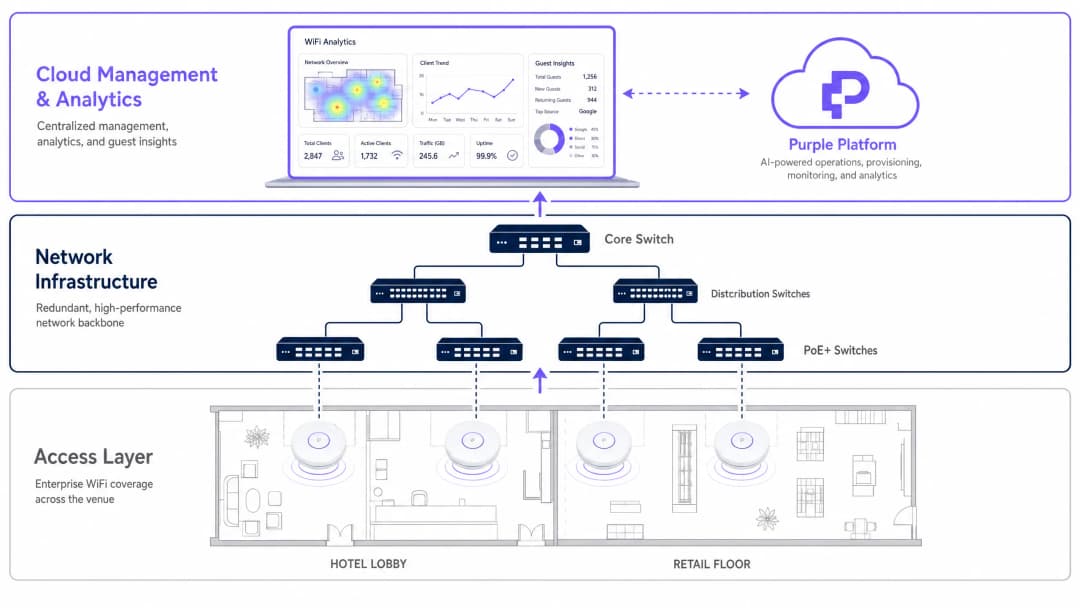
Gli access point come l'Aruba AP-735 o il Cisco 9136 richiedono switch Multi-Gigabit (mGig) che supportino 2.5 Gbps, 5 Gbps o 10 Gbps per porta a livello di accesso. Per quanto riguarda l'alimentazione, i moderni AP tri-band consumano un wattaggio significativo. Assicurati che gli switch di accesso supportino PoE++ (802.3bt, che fornisce fino a 60W Tipo 3 o 90W Tipo 4 per porta). Il funzionamento di questi AP su PoE+ standard (802.3at, massimo 30W) comporterà la disattivazione delle radio, prestazioni della CPU limitate e avvisi di modalità degradata nella dashboard di gestione.
3. Gestione delle identità e degli accessi
La sicurezza aziendale impone un'autenticazione robusta. WPA3-Enterprise con IEEE 802.1X/RADIUS è lo standard per i dispositivi aziendali, offrendo chiavi di crittografia per utente e l'applicazione centralizzata delle policy. L'accesso degli ospiti richiede un approccio diverso che bilanci la sicurezza con il minimo attrito.
L'implementazione di un Captive Portal integrato con una piattaforma di WiFi Analytics consente alle strutture di offrire un accesso sicuro acquisendo al contempo preziosi dati di prima parte per il marketing. Per un'esperienza ancora più fluida, considera l'implementazione di OpenRoaming. Come descritto dettagliatamente in How a wi fi assistant Enables Passwordless Access in 2026, Purple funge da identity provider gratuito per OpenRoaming con la licenza Connect, consentendo ai dispositivi di autenticarsi automaticamente e in modo sicuro senza interazione manuale con il portale.
Nei settori del Transport e pubblico, questo modello di autenticazione senza attriti è particolarmente prezioso per gestire l'elevato transito di utenti temporanei.
Best Practice e standard di settore
RF Site Surveys: condurre sempre sia un'indagine predittiva prima dell'installazione sia un'indagine di convalida attiva post-installazione. Tenere conto dell'attenuazione causata da pareti, vetri e corpi umani: una folla di persone assorbe significativamente l'energia RF, motivo per cui uno stadio che offre buone prestazioni durante un'indagine sul sito può fallire catastroficamente durante un evento sold-out.
Pianificazione dei canali: nelle bande a 5 GHz e 6 GHz, utilizzare larghezze di canale di 40 MHz o 80 MHz per le distribuzioni aziendali, in modo da bilanciare il throughput con la disponibilità dei canali. Evitare larghezze di 160 MHz o 320 MHz a meno che non ci si trovi in ambienti isolati, poiché limitano fortemente il numero di canali non sovrapposti e aumentano la probabilità di interferenze co-canale.
Conformità: assicurarsi che l'architettura di rete sia conforme agli standard pertinenti. Lo standard PCI DSS 4.0 impone la segmentazione della rete per qualsiasi sistema che elabori pagamenti con carta tramite Wi-Fi. Negli ambienti Healthcare, l'HIPAA richiede controlli rigorosi sulla trasmissione dei dati. Il GDPR si applica a tutti i dati personali acquisiti tramite i portali Wi-Fi per gli ospiti in tutti i settori.
Gestione del firmware: stabilire una cadenza rigorosa per l'applicazione delle patch del firmware. I fornitori di AP aziendali rilasciano regolarmente patch di sicurezza per correggere le vulnerabilità. Le piattaforme gestite in cloud (Aruba Central, Mist AI, Meraki) possono automatizzare questo processo con finestre di manutenzione configurabili.
Risoluzione dei problemi e mitigazione dei rischi
Sticky Clients: un problema comune in cui un dispositivo si rifiuta di effettuare il roaming verso un access point più vicino, trascinando verso il basso le prestazioni complessive della cella. Mitigare il problema implementando gli standard IEEE 802.11k (Radio Resource Measurement) e IEEE 802.11v (BSS Transition Management) per aiutare i client a prendere decisioni di roaming migliori. Impostare velocità di trasmissione dati minime obbligatorie su ciascun SSID per forzare la disconnessione dei client quando il segnale scende al di sotto di una soglia utilizzabile, in genere 12 Mbps su 5 GHz.
Routing asimmetrico: l'access point può trasmettere a una distanza maggiore rispetto a quella di trasmissione del client mobile, con il risultato che il client mostra la massima potenza del segnale ma sperimenta un throughput quasi nullo. La mitigazione è semplice: non far funzionare gli access point alla massima potenza di trasmissione. Adeguare la potenza Tx dell'AP alla capacità media dei dispositivi mobili, in genere 12-15 dBm. Questo riduce anche l'interferenza co-canale tra AP adiacenti.
Esaurimento del budget PoE: nelle grandi installazioni, è facile superare il budget di alimentazione PoE totale dello chassis di uno switch, anche se i budget delle singole porte sembrano sufficienti. Calcolare sempre il consumo energetico complessivo di tutti gli AP collegati rispetto al budget di alimentazione PoE totale dello switch, non solo i limiti per singola porta.
Proliferazione degli SSID: ogni SSID genera un sovraccarico di gestione (beacon frame) che consuma tempo di trasmissione nell'aria. Limitare gli SSID a un massimo di 3-4 per AP. Consolidare gli SSID per IoT, aziendali e ospiti anziché creare reti per singolo reparto.
ROI e impatto aziendale
Il business case per l'aggiornamento ai migliori hardware per access point va ben oltre le metriche di performance IT. Nel settore dell'Hospitality, un Wi-Fi affidabile è costantemente classificato tra i fattori principali nei punteggi di soddisfazione degli ospiti. Un guasto alla rete durante un evento congressuale importante può influire direttamente sui tassi di riprenotazione e sulla reputazione del brand.
Integrando una piattaforma di analytics avanzata sull'hardware, i team IT possono dimostrare un ROI diretto al business. La rete diventa uno strumento per comprendere i modelli di traffico pedonale, i tempi di permanenza, i periodi di picco di utilizzo e i dati demografici dei clienti. Questi dati informano direttamente le decisioni operative, dai livelli di personale al posizionamento del merchandising nei punti vendita.
Per una guida pratica su come sfruttare questi dati in un contesto alberghiero, consulta How To Improve Guest Satisfaction: The Ultimate Playbook. Nel settore pubblico, un'infrastruttura wireless robusta e inclusiva è sempre più centrale per le strategie di inclusione digitale, come evidenziato in Purple Appoints Iain Fox as VP Growth – Public Sector to Drive Digital Inclusion and Smart City Innovation.
I risultati misurabili di un'implementazione Wi-Fi aziendale ben eseguita con analytics integrati includono tipicamente: una riduzione del 15-25% dei reclami degli ospiti relativi alla connettività, un aumento del 30-40% dei tassi di conversione del Captive Portal quando si utilizza il social login rispetto ai moduli con sola e-mail, e un asset di dati di prima parte dimostrabile che riduce la dipendenza da fornitori di dati di terze parti in un ambiente post-cookie.
Key Definitions
Multi-Link Operation (MLO)
A Wi-Fi 7 (802.11be) feature allowing devices to simultaneously transmit and receive data across multiple frequency bands — for example, 5 GHz and 6 GHz concurrently.
Crucial for reducing latency and increasing throughput in dense enterprise environments. Requires both the AP and the client device to support Wi-Fi 7 to function.
4K-QAM (Quadrature Amplitude Modulation)
A modulation scheme used in Wi-Fi 7 that encodes 12 bits per symbol, compared to Wi-Fi 6's 1024-QAM (10 bits per symbol), delivering approximately 20% higher peak throughput.
Requires a very high Signal-to-Noise Ratio (SNR) to operate effectively. In noisy environments, the AP automatically falls back to lower modulation rates. Do not base capacity planning on 4K-QAM peak figures.
Spatial Streams (MIMO)
Multiple-Input Multiple-Output technology uses multiple antennas to transmit independent data streams simultaneously. Denoted as 2x2, 4x4, or 8x8 (transmit x receive antennas).
More spatial streams allow an AP to handle more simultaneous client connections and provide higher aggregate throughput. An 8x8 AP like the Cisco 9136 can serve significantly more concurrent clients than a 2x2 AP.
802.3bt (PoE++)
The Power over Ethernet standard capable of delivering up to 60W (Type 3) or 90W (Type 4) of DC power over twisted-pair Ethernet cables to powered devices.
Mandatory for powering modern, high-performance tri-band enterprise access points without compromising functionality. Deploying tri-band APs on 802.3at (PoE+, 30W) switches will result in degraded performance or disabled radios.
OpenRoaming
A Wi-Fi Alliance federation standard that allows users to automatically and securely connect to participating guest Wi-Fi networks without captive portals or manual password entry, using a pre-provisioned credential profile.
Purple acts as a free identity provider for OpenRoaming under the Connect licence, enabling venues to offer seamless, secure guest authentication. Particularly valuable in transport hubs and public sector venues with high volumes of transient users.
BSS Transition Management (802.11v)
An IEEE standard that allows the network infrastructure to send advisory messages to client devices, recommending a better access point to connect to based on signal strength and load.
Used by IT admins to mitigate 'sticky clients' and ensure load balancing across the wireless network. Works in conjunction with 802.11k (Radio Resource Measurement) to provide clients with a candidate list of APs.
Co-Channel Interference (CCI)
Interference caused when two or more access points operate on the exact same frequency channel and are within range of each other, forcing them to take turns transmitting via the CSMA/CA protocol.
CCI is the primary cause of performance degradation in over-deployed enterprise networks. Mitigated through careful channel planning, reducing transmit power, and using the wider 6 GHz band which offers more non-overlapping channels.
OFDMA (Orthogonal Frequency-Division Multiple Access)
A multi-user version of OFDM introduced in Wi-Fi 6 that divides a channel into smaller resource units (sub-carriers), allowing an AP to communicate with multiple clients simultaneously within a single transmission window.
Drastically improves efficiency in high-density environments with many small-packet transmissions, such as IoT devices or mobile applications sending frequent short bursts of data. Reduces latency and improves airtime efficiency.
BeamFlex+ (Ruckus Proprietary)
Ruckus Networks' adaptive antenna technology that dynamically selects the optimal antenna pattern for each individual client transmission, steering the signal to maximise SNR and minimise interference.
Particularly effective in challenging RF environments such as warehouses with metal racking or venues with significant multipath reflections. Provides a measurable performance advantage over standard omnidirectional antennas in these scenarios.
Worked Examples
A 400-room luxury hotel is experiencing severe guest complaints regarding Wi-Fi performance in the lobby and conference areas during peak evening hours. The current infrastructure uses Wi-Fi 5 (802.11ac) access points deployed in hallways. The IT Director needs a complete redesign. What is the recommended approach?
Step 1 — Shift from a coverage model to a capacity model. Remove APs from hallways, which cause 'sticky client' issues as guests move between rooms and the corridor. Replace with in-room wall-plate APs (e.g., Cisco 9105AXW or Aruba AP-303H) to create micro-cells that contain the RF domain within each room.
Step 2 — In the high-density lobby and conference areas, deploy Wi-Fi 6E or Wi-Fi 7 access points (e.g., Aruba AP-735 or Cisco 9136) using directional antennas if ceiling height exceeds 8 metres. Target one AP per 75-100 square metres in the lobby, and one AP per 50 attendees in conference rooms.
Step 3 — Upgrade edge switches to support mGig (2.5/5 Gbps) and PoE++ (802.3bt) to power the new tri-band APs without degraded mode.
Step 4 — Implement Purple's Guest WiFi captive portal to manage bandwidth allocation per user, enforce GDPR-compliant data capture, and gather analytics on conference attendee dwell times and repeat visit rates.
Step 5 — Enable 802.11k/v/r (Fast BSS Transition) to ensure seamless roaming between the lobby APs and conference room APs without session drops.
A large retail chain needs to deploy Wi-Fi across 50 new stores simultaneously. They require high reliability for handheld inventory scanners and POS terminals (PCI DSS compliance is mandatory), but also want to offer guest Wi-Fi to shoppers to capture first-party marketing data. Budget is constrained. What is the recommended architecture?
Step 1 — Deploy mid-tier Wi-Fi 6E access points (e.g., Juniper Mist AP45 or Ruckus R560) to balance cost and performance. The Mist AI platform's AIOps capabilities reduce ongoing IT management overhead across 50 sites, which is a significant operational cost saving.
Step 2 — Segment the network using VLANs and separate SSIDs: a WPA3-Enterprise SSID with 802.1X authentication for corporate devices and POS terminals (isolated on a dedicated VLAN with no inter-VLAN routing to guest traffic), and a separate open SSID with client isolation for guests.
Step 3 — For the guest network, implement Purple's captive portal. Configure the portal to require a social login or email address in exchange for access, enabling the marketing team to build a first-party CRM database. Apply bandwidth limits per client (e.g., 10 Mbps down / 5 Mbps up) to prevent any single user from saturating the uplink.
Step 4 — Utilise the BLE capabilities of the APs to track inventory scanner asset locations and analyse shopper foot traffic patterns for merchandising optimisation.
Step 5 — Standardise the configuration template across all 50 sites using the Mist AI zero-touch provisioning workflow, reducing per-site deployment time from days to hours.
Practice Questions
Q1. You are designing the Wi-Fi network for a high-density university lecture theatre seating 300 students. You plan to deploy three Wi-Fi 6E access points. What is the single most critical RF design consideration to prevent performance degradation, and how do you address it?
Hint: Consider what happens when multiple APs are in the same physical space and how they share airtime on the same frequency channel.
View model answer
The most critical consideration is mitigating Co-Channel Interference (CCI). With three APs in the same physical space, you must ensure they are configured on non-overlapping channels — particularly on the 5 GHz and 6 GHz bands. In the 6 GHz band, there are up to 59 non-overlapping 20 MHz channels, providing significantly more flexibility than 5 GHz. Additionally, you must significantly reduce the transmit (Tx) power of each AP so their cell sizes do not overlap excessively. If two APs can clearly hear each other on the same channel, they will defer transmissions via CSMA/CA, effectively reducing three APs to the capacity of a single AP. A secondary consideration is using directional antennas aimed downward toward the seating area rather than omnidirectional antennas, to contain the RF domain within the room.
Q2. A client wants to upgrade their warehouse Wi-Fi to support new automated guided vehicles (AGVs) requiring sub-50ms latency and consistent roaming. The warehouse has high metal racking and severe multipath interference. They are considering Ubiquiti UniFi U7 Pro for cost savings. What is your recommendation and reasoning?
Hint: Evaluate whether the hardware's antenna technology is suited to the specific RF environment, and consider the roaming requirements of the AGVs.
View model answer
While the U7 Pro is cost-effective, it is not the right choice for this environment. Metal racking creates severe multipath interference that standard omnidirectional antennas struggle to overcome. I recommend the Ruckus R760 or equivalent, specifically for its BeamFlex+ adaptive antenna technology, which dynamically adjusts antenna patterns to steer signals around physical obstacles and mitigate multipath reflections. For the AGV roaming requirement, implement 802.11r (Fast BSS Transition) to enable sub-50ms roaming handoffs between APs — this is critical for AGVs moving at speed through the warehouse. The Ruckus platform also supports 802.11k/v to assist the AGV clients in identifying the optimal AP before initiating a roam.
Q3. Your team has deployed new tri-band Wi-Fi 7 access points across a corporate campus. During the pilot phase, the 6 GHz radios are not broadcasting and the APs are reporting 'degraded mode' in the cloud management dashboard. The APs are connected to existing PoE+ switches. What is the root cause and what is the remediation path?
Hint: Review the physical infrastructure requirements for powering modern, high-performance tri-band access points.
View model answer
The root cause is insufficient Power over Ethernet budget. The existing PoE+ switches (802.3at) provide a maximum of 30W per port. Modern tri-band Wi-Fi 7 APs typically require 802.3bt (PoE++) — up to 60W or 90W per port — to operate all three radios simultaneously at full capacity. When the AP detects insufficient power, it automatically enters a degraded mode, disabling the most power-hungry components first, which is typically the 6 GHz radio and secondary Ethernet port. The remediation path is to replace the access layer switches with 802.3bt-capable models. As an interim measure, some APs support a power injector (midspan) to supplement PoE+ switch output, but this is not a scalable long-term solution.
Q4. A conference centre hosts events with up to 2,000 concurrent attendees in a single hall. During a recent event, the Wi-Fi performed well during setup but degraded severely once the hall filled to capacity. The RF site survey was conducted with the hall empty. What went wrong and how do you prevent it in future deployments?
Hint: Consider how the physical environment changes between an empty hall and a full one, and what effect this has on RF propagation.
View model answer
The issue is that human bodies absorb RF energy significantly — particularly at 5 GHz and 6 GHz frequencies. A hall filled with 2,000 people creates a dramatically different RF environment than an empty hall. The predictive site survey, conducted with the hall empty, did not account for this attenuation. The result is that APs that appeared to have sufficient coverage in the empty hall now have reduced effective range, leading to higher client counts per AP, increased retry rates, and degraded throughput. Prevention requires: (1) conducting a loaded site survey with the hall at or near capacity, or using simulation tools that model human body attenuation; (2) increasing AP density beyond what the empty-hall survey suggests; (3) deploying APs at lower heights (e.g., under-seat or under-balcony mounting) to reduce the distance between AP and client, compensating for body attenuation.
Continue reading in this series
What is a WLC (Wireless LAN Controller) and Do You Still Need One?
This comprehensive guide explores the evolution of Wireless LAN Controllers (WLCs) and provides a technical framework for determining the right architecture in 2026. It covers traditional hardware, cloud-managed, and controller-less models, detailing their impact on compliance, scalability, and guest experience.
Power over Ethernet (PoE) for Access Points: An Implementation Guide
This guide provides infrastructure technicians, network architects, and IT decision-makers with a definitive technical reference for deploying Power over Ethernet (PoE) access points across enterprise venues including hotels, retail estates, stadiums, and public-sector facilities. It covers IEEE standards from 802.3af through 802.3bt, power budget calculation, cabling requirements, VLAN segmentation, and security compliance, with concrete implementation scenarios and measurable ROI benchmarks. Understanding PoE architecture is foundational to any [Guest WiFi](/guest-wifi) or [WiFi Analytics](/guest-wifi-marketing-analytics-platform) deployment, as the reliability of the physical layer directly determines the quality of data capture, user experience, and operational uptime.
Mesh Network vs Access Points: Which is Better for Large Venues?
This technical guide provides a definitive comparison between mesh networks and traditional wired access points for large-scale venues, covering architecture, performance trade-offs, and deployment strategy. It equips IT managers, network architects, and CTOs with actionable frameworks to design high-performance, compliant WiFi infrastructures for hospitality, retail, events, and public-sector environments. The guide also maps these architectural decisions to Purple's hardware-agnostic guest WiFi and analytics platform, demonstrating how the right infrastructure choice drives measurable business outcomes.
Got questions about your specific setup?
Our team works with venue operators, IT managers, and network engineers across 80,000 venues. Book a 20-minute call and we will show you how others like you solved it.