
Managed services WiFi: a comprehensive guide for businesses
This guide provides a comprehensive technical framework for deploying managed services WiFi across multi-tenant environments including Build-to-Rent properties, retail estates, and hospitality venues. It covers VLAN segmentation, Dynamic VLAN Assignment via IEEE 802.1X, WPA3-Enterprise security, and cloud overlay management - giving property developers, landlords, and BTR operators a vendor-neutral blueprint to isolate resident traffic, simplify compliance, and transform shared network infrastructure into a revenue-generating asset.
Video overview
Listen to this guide
View podcast transcript

Executive summary
Property developers, landlords, and Build-to-Rent (BTR) operators face a critical infrastructure decision: how to deliver secure, high-performance internet across multi-tenant buildings without creating security liabilities or compliance exposure. A flat, shared network is not a viable architecture. It places every resident, every IoT sensor, and every retail tenant on the same broadcast domain - one compromised device away from a network-wide breach.
Managed services WiFi transforms shared infrastructure into a segmented, cloud-managed, revenue-generating asset. The core technology is IEEE 802.1Q VLAN segmentation, enforced by a strict Default-Deny firewall policy and authenticated via IEEE 802.1X and RADIUS. This guide covers the reference architecture, deployment sequence, security standards, and business case for BTR operators and property developers making this decision in 2024 and beyond.
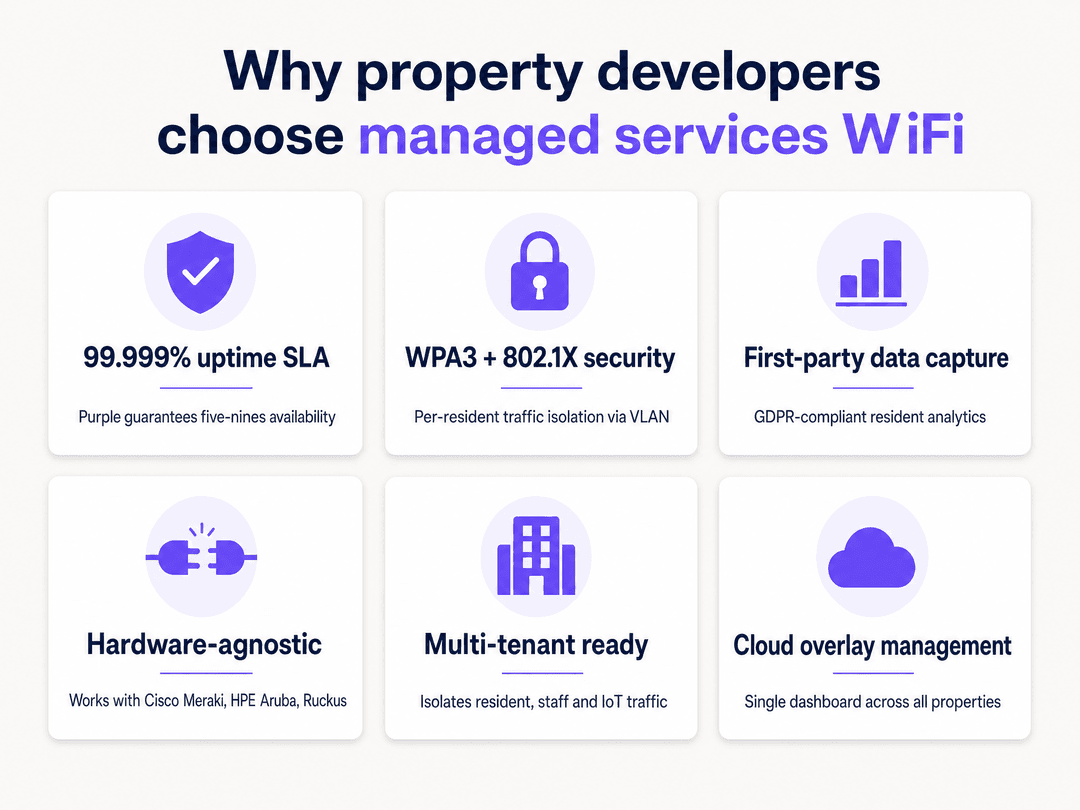
Purple operates across 80,000+ live venues (Purple internal data, 2024) and processes 440 million logins annually, providing the scale and reliability required for enterprise deployments. We guarantee 99.999% uptime and are ISO 27001, GDPR, and Cyber Essentials certified. Our platform is hardware-agnostic, integrating with Cisco Meraki, HPE Aruba, Ruckus, Juniper Mist, Ubiquiti UniFi, Cambium, Extreme, and Fortinet.
Technical deep-dive: architecture and standards
Transitioning to a managed services WiFi model requires a shift from a flat network to a segmented, zero-trust framework. The primary objective is to ensure that multiple independent tenants co-exist on a single physical infrastructure without compromising security, performance, or privacy.
VLAN segmentation and IEEE 802.1Q
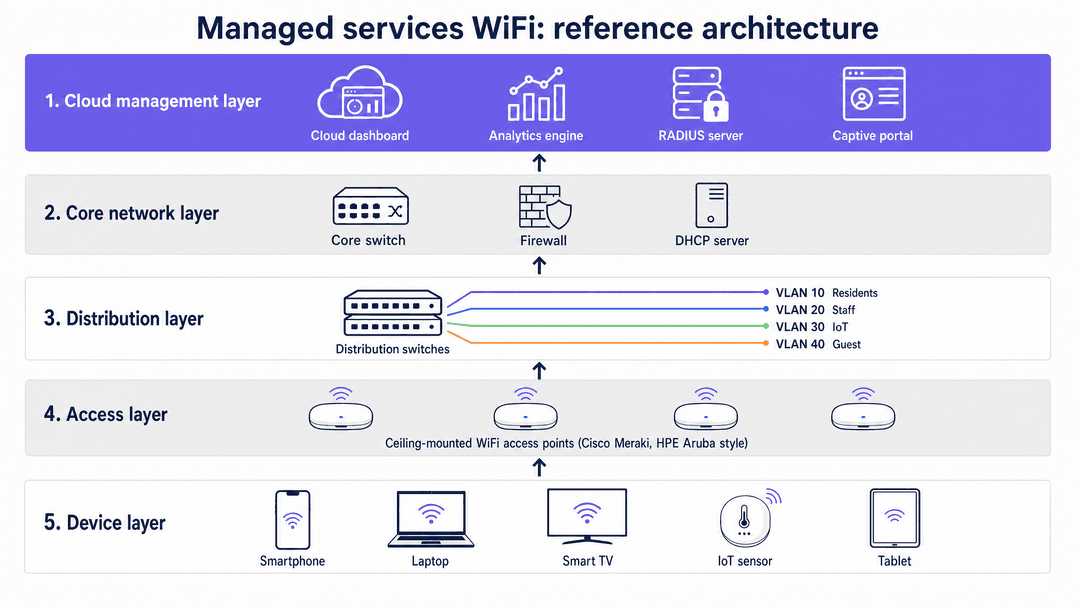
The cornerstone of any multi-tenant network is the Virtual Local Area Network (VLAN). Standardised under IEEE 802.1Q, VLANs partition a single physical switch fabric into multiple, logically separate broadcast domains. When a client connects to your WiFi, the access point tags that client's data frames with a specific 12-bit VLAN Identifier (VID). Your network switches read this tag and ensure that traffic from one VLAN is never forwarded to ports on another VLAN, unless explicitly routed by a firewall.
In a BTR building, a practical four-VLAN architecture looks like this:
| VLAN ID | Segment | Traffic type | Authentication method |
|---|---|---|---|
| VLAN 10 | Residents | Personal devices, streaming, BYOD | WPA3-Enterprise, 802.1X |
| VLAN 20 | Staff | Management laptops, admin systems | WPA3-Enterprise, 802.1X |
| VLAN 30 | IoT | HVAC, CCTV, smart locks, sensors | MAC Authentication Bypass |
| VLAN 40 | Guest WiFi | Common area visitor access | Captive portal, WPA3-Personal |
Without proper VLAN implementation, tenant separation is cosmetic. Multiple SSIDs on a single, flat LAN offer no meaningful isolation. Any device on the network can see broadcast traffic from every other device. This is a critical security and GDPR liability.
Dynamic VLAN Assignment via 802.1X and RADIUS
Historically, engineers segmented wireless environments by broadcasting a unique SSID for every tenant. SSID proliferation destroys performance. Every SSID you broadcast must transmit management frames (beacons) at the lowest basic data rate to ensure legacy devices can connect. Broadcasting six or seven SSIDs per access point consumes up to 30% of available wireless airtime on management overhead alone - before a single byte of user data is transmitted.
The modern approach is Dynamic VLAN Assignment. You broadcast one secure SSID using IEEE 802.1X authentication. When a resident connects, their device (the supplicant) exchanges credentials with a RADIUS server via the access point. Once authenticated, the RADIUS server sends an Access-Accept message back to the access point. This message includes three IETF standard attributes: Tunnel-Type set to VLAN, Tunnel-Medium-Type set to 802, and the Tunnel-Private-Group-ID containing the specific VLAN ID for that user.
The access point receives these attributes and dynamically drops that user's traffic into their dedicated VLAN. A resident, a retail staff member, and an IoT device can all connect to the same SSID, but their traffic is completely isolated at Layer 2. The switch handles them as if they were on entirely separate physical networks.
For your Guest WiFi segment in common areas, route traffic through a dedicated guest VLAN to a captive portal. Purple's captive portal handles GDPR-compliant consent management and first-party data capture on an isolated segment with zero routing access to your internal networks.
Security protocols: WPA3-Enterprise and WPA3-Personal
Security must be matched to the tenant type. For resident and staff traffic, deploy WPA3-Enterprise with IEEE 802.1X. This provides Simultaneous Authentication of Equals (SAE) for key exchange and 256-bit encryption, eliminating the vulnerability to offline dictionary attacks that affected WPA2-Personal. For Guest WiFi in common areas, WPA3-Personal or WPA3-Enhanced Open (OWE) provides opportunistic encryption without requiring a password, protecting users from passive eavesdropping on open networks.
Integrate your RADIUS server with a robust identity provider. Purple supports Microsoft Entra ID, Okta, and Google Workspace, centralising user management and automating resident onboarding and offboarding.
Implementation guide
Deploying managed services WiFi requires meticulous planning and strict adherence to network design principles. The following sequence applies to a BTR or MDU deployment.
Step 1: RF survey and hardware selection
Conduct a radio frequency (RF) survey before hardware procurement. In a residential building, wall materials, floor construction, and lift shafts create significant signal attenuation. The survey determines access point placement and density to achieve target signal strength (typically -65 dBm or better) in all areas. Purple is hardware-agnostic and integrates with Cisco Meraki, HPE Aruba, Ruckus, Juniper Mist, Ubiquiti UniFi, Cambium, Extreme, and Fortinet. Select hardware that supports Wi-Fi 6 (802.11ax) or Wi-Fi 6E for high-density residential deployments.
Step 2: VLAN architecture design
Map your tenant requirements before configuring a single switch. Define the number of VLANs, the security requirements for each, and the anticipated bandwidth demands. This informs your firewall policy design. Document every VLAN, its purpose, its DHCP range, and its permitted inter-VLAN routes. This documentation is essential for PCI DSS and GDPR compliance audits.
Step 3: Core firewall configuration
Your VLAN architecture relies entirely on your core firewall routing policies. Configure a strict Default-Deny policy. Every inter-VLAN path must be blocked by default, with only explicit, port-specific exceptions allowed. For example, your IoT VLAN (VLAN 30) should only be permitted to reach the specific cloud endpoints required by your building management system. It must never be permitted to route to the Resident VLAN (VLAN 10). This Default-Deny policy contains the blast radius of any compromised device to a single, isolated VLAN.
Step 4: RADIUS and identity provider integration
Deploy or configure your RADIUS server and integrate it with your chosen identity provider - Microsoft Entra ID, Okta, or Google Workspace. Configure RADIUS attributes to return the correct VLAN ID for each user group upon successful authentication. Test Dynamic VLAN Assignment with a pilot group before building-wide rollout.
Step 5: Captive portal and data capture
For your Guest WiFi VLAN, configure Purple's captive portal to present GDPR-compliant terms of service and collect conscious-choice opt-ins for marketing communications. Purple's WiFi Analytics platform captures first-party data on visitor behaviour, dwell time, and return rates - providing property operators with actionable intelligence on venue utilisation.
Step 6: QoS and bandwidth management
In a shared environment, you must prevent one noisy neighbour from consuming all available bandwidth. Define Quality of Service (QoS) policies for each VLAN. A typical BTR deployment might allocate 100 Mbps guaranteed bandwidth per resident unit, with burst capability up to the available backhaul capacity. Staff and IoT VLANs receive lower priority tiers. This ensures a predictable and fair experience for all residents.
Best practices
The following recommendations reflect industry-standard guidance from IEEE, the Wi-Fi Alliance, and Purple's operational experience across 80,000+ venues.
Disable VLAN 1. Most switches use VLAN 1 as the default native VLAN on trunk ports. Attackers exploit this for VLAN hopping attacks. Disable VLAN 1 and configure trunk ports to use an unused, non-routable VLAN ID as the native VLAN.
Audit your SSID count. If you are broadcasting more than four SSIDs per access point, you are degrading wireless performance. Transition to Dynamic VLAN Assignment via 802.1X to consolidate SSIDs and recover airtime. For a detailed guide on SSID architecture, read Three SSIDs to rule them all: guest, Passpoint, and IoT WiFi .
Manage DHCP lease times by segment. On your Guest WiFi VLAN, set lease times to one or two hours to prevent IP address exhaustion in high-turnover environments. Resident and corporate VLANs can safely use 24-hour leases.
Segregate staff and resident traffic. Never place building management staff on the same VLAN as residents. Read our guide on How to Safely Segregate Staff and Guest WiFi Networks for detailed configuration steps.
Implement 802.11r for seamless roaming. In a multi-floor residential building, residents move between access points constantly. Enable Fast BSS Transition (802.11r) and Opportunistic Key Caching (OKC) to ensure authentication state is cached across access points. This eliminates re-authentication delays as residents move through the building.
Troubleshooting and risk mitigation
Even with a robust design, issues arise. Understanding common failure modes helps you maintain your SLA commitments.
SSID proliferation and poor performance. If client throughput is poor despite high-speed fibre connections, audit your SSID count. Broadcasting more than four SSIDs per access point consumes excessive airtime. Consolidate SSIDs and implement Dynamic VLAN Assignment to recover performance.
Trunk port misconfiguration. If a user authenticates successfully via RADIUS but fails to receive an IP address, check your switch trunk ports. The access point is attempting to place the user on a specific VLAN, but that VLAN is not permitted on the switch port trunk. Ensure all tenant VLANs are explicitly tagged on every trunk port between the access point and the distribution switch.
Legacy IoT devices and MAC spoofing. Many smart TVs and building sensors do not support 802.1X. Use MAC Authentication Bypass (MAB) to assign these devices to an isolated IoT VLAN. Because MAC addresses can be spoofed, apply strict firewall rules to this segment, restricting access to only required external servers. Never place IoT devices on the same VLAN as resident or staff traffic.
DHCP exhaustion on guest VLANs. In high-turnover environments, DHCP pools can exhaust if lease times are too long. Monitor DHCP pool utilisation and set lease times to one or two hours on all guest and visitor VLANs.
Compliance scope creep. If a retail tenant in your building processes card payments, their network segment falls under PCI DSS scope. Proper VLAN isolation and Default-Deny firewall policies can reduce PCI DSS audit scope by up to 70% (Purple operational data, 2024), directly reducing annual compliance costs.
ROI and business impact
Managed services WiFi shifts the network from a cost centre to a strategic asset for BTR operators and property developers.
Resident satisfaction and retention. Connectivity is consistently ranked among the top three amenities by BTR residents. A managed WiFi service with guaranteed SLAs and per-unit bandwidth allocation differentiates your property in a competitive market and reduces churn.
Operational efficiency. A cloud overlay management platform centralises control across your entire property portfolio. Purple's single-pane-of-glass dashboard eliminates the need for on-site IT staff to manage individual access points. Network changes, new resident onboarding, and security policy updates are applied remotely in minutes.
First-party data and analytics. Purple's WiFi Analytics platform captures GDPR-compliant first-party data on visitor behaviour in common areas. Property operators gain actionable intelligence on amenity utilisation, peak occupancy times, and resident engagement - data that informs property management decisions and supports ESG reporting.
Compliance cost reduction. Proper VLAN segmentation reduces PCI DSS audit scope for any retail tenants in your building. GDPR compliance is built into Purple's captive portal with conscious-choice opt-ins and automated data retention policies.
Purple has been certified ISO 27001, GDPR, CCPA, Cyber Essentials, and B Corp. Founded in 2012, we have collected 29 billion data points across our network, providing the analytical depth that enterprise property operators require.
Key Definitions
VLAN (Virtual Local Area Network)
A logical partition of a Layer 2 network that isolates broadcast domains on a shared physical switch, standardised under IEEE 802.1Q.
Essential for separating resident, staff, IoT, and guest traffic in a multi-tenant building. Without VLANs, all devices share the same broadcast domain and can see each other's traffic.
IEEE 802.1Q
The networking standard that supports VLANs on an IEEE 802.3 Ethernet network by inserting a 32-bit tag into Ethernet frames, containing a 12-bit VLAN Identifier (VID).
The technical protocol that makes network segmentation possible across enterprise switches and access points. Every enterprise-grade switch and access point supports 802.1Q.
Dynamic VLAN Assignment
A method where a RADIUS server instructs an access point to place an authenticated user onto a specific VLAN, regardless of which SSID they connected to, using IETF Tunnel attributes in the Access-Accept message.
Allows venue operators to securely isolate different tenants without broadcasting multiple SSIDs, eliminating the airtime overhead of SSID proliferation while maintaining per-tenant isolation.
RADIUS (Remote Authentication Dial-In User Service)
A networking protocol that provides centralised Authentication, Authorization, and Accounting (AAA) management for users who connect to a network service.
The core server component that validates user credentials and assigns the correct VLAN attributes during 802.1X authentication. Purple integrates with Microsoft Entra ID, Okta, and Google Workspace as upstream identity providers.
IEEE 802.1X
An IEEE standard for port-based Network Access Control (PNAC), providing an authentication mechanism to devices wishing to attach to a LAN or WLAN. It defines the roles of Supplicant (client device), Authenticator (access point), and Authentication Server (RADIUS).
The enterprise security framework required for WPA3-Enterprise, ensuring only authorised devices can access the network. Mandatory for any regulated or corporate network segment.
Captive portal
A web page that a user of a public-access network is obliged to view and interact with before network access is granted, typically used to present terms of service and collect consent.
Used on Guest WiFi networks to capture GDPR-compliant first-party data, present terms of service, and manage marketing consent. Purple's captive portal supports conscious-choice opt-ins and integrates with the WiFi Analytics platform.
MAC Authentication Bypass (MAB)
A method of granting network access based on the MAC address of the connecting device, used when the device does not support 802.1X EAP authentication.
Necessary for connecting headless IoT devices, smart TVs, HVAC controllers, and legacy hardware to the network. Because MAC addresses can be spoofed, MAB must always be combined with strict firewall rules on the IoT VLAN.
Lateral movement
The techniques cyber attackers use to progressively move through a network after initial compromise, searching for high-value targets such as management systems or payment terminals.
Proper VLAN segmentation and Default-Deny firewall rules are designed specifically to contain breaches and prevent lateral movement. A compromised device on the IoT VLAN cannot reach the resident or staff VLANs.
WPA3-Enterprise
The Wi-Fi Alliance's enterprise security certification for wireless networks, requiring IEEE 802.1X authentication and providing Simultaneous Authentication of Equals (SAE) with 256-bit encryption.
The mandatory security standard for any network segment carrying personal, financial, or regulated data. Replaces WPA2-Enterprise and eliminates vulnerability to offline dictionary attacks.
Cloud overlay
A cloud-based management and control plane that sits above existing physical network hardware, providing centralised configuration, monitoring, and analytics without replacing the underlying infrastructure.
Purple's cloud overlay integrates with Cisco Meraki, HPE Aruba, Ruckus, and other hardware vendors, providing a single management dashboard across an entire property portfolio without requiring hardware replacement.
Worked Examples
A BTR operator is developing a 200-unit residential building with ground-floor retail and a resident gym. They need to provide secure internet to residents, manage building IoT sensors, and offer public WiFi in the retail space. How should they architect the network?
Deploy a single physical network infrastructure with enterprise-grade hardware - for example, Cisco Meraki MR57 access points and MS390 switches. Implement a four-VLAN architecture: VLAN 10 for Residents (WPA3-Enterprise, 802.1X, 100 Mbps guaranteed per unit), VLAN 20 for Building IoT (MAC Authentication Bypass, restricted to building management cloud endpoints only), VLAN 30 for Retail POS (WPA3-Enterprise, 802.1X, PCI DSS isolated segment), and VLAN 40 for Public Guest WiFi (captive portal, WPA3-Personal, 1-hour DHCP leases). Broadcast a single 802.1X SSID for residents, retail staff, and IoT devices, using a RADIUS server for Dynamic VLAN Assignment. Broadcast a separate open SSID with a Purple captive portal for public guests. Configure the core firewall with a strict Default-Deny policy, permitting only explicit inter-VLAN routes where operationally required. Integrate the RADIUS server with Microsoft Entra ID for resident identity management.
A hotel IT manager notices severe WiFi performance degradation in the conference centre during a large event. The network currently broadcasts seven different SSIDs to accommodate various corporate clients and public guests. How can they resolve this performance issue?
The performance degradation is caused by management frame overhead from broadcasting seven SSIDs. The IT manager must consolidate the network. They should transition to a two-SSID model: one secure 802.1X SSID for all corporate clients and staff, and one open SSID with a Purple captive portal for public guests. They must integrate a RADIUS server to authenticate corporate users and dynamically assign them to their respective client VLANs. Each corporate client is assigned a dedicated VLAN (e.g., VLAN 100 for Client A, VLAN 101 for Client B) via RADIUS attributes. The RADIUS server maps each user's identity provider credentials to the correct VLAN ID. QoS policies are configured per VLAN to guarantee bandwidth tiers for premium conference clients.
Practice Questions
Q1. You are deploying a managed WiFi solution for a 150-unit BTR property. The building management system requires network access for HVAC controllers and smart door locks, which do not support 802.1X. How do you securely connect these devices without exposing the resident network?
Hint: Consider how the network can identify devices without user credentials and how to restrict their access to only required destinations.
View model answer
Use MAC Authentication Bypass (MAB) to authenticate the HVAC controllers and smart locks based on their MAC addresses. The RADIUS server identifies each device by MAC address and assigns it to a dedicated, isolated IoT VLAN (e.g., VLAN 30). Because MAC addresses can be spoofed, configure a strict Default-Deny firewall policy for VLAN 30, explicitly permitting traffic only to the specific cloud endpoints required by the building management system. Block all routing between VLAN 30 and the Resident VLAN (VLAN 10). This ensures that a compromised IoT device cannot reach resident devices or data.
Q2. A retail tenant in your multi-tenant BTR building reports that their Point of Sale (POS) terminals are failing PCI DSS compliance scans because they are visible to devices on the public guest network. What is the architectural failure and how do you remediate it?
Hint: Think about Layer 2 isolation and Layer 3 routing policies between the POS segment and the guest segment.
View model answer
The architectural failure is inadequate network segmentation. Either the POS terminals and public guest devices are on the same flat network (same VLAN and subnet), or the core firewall is configured to route traffic between the POS VLAN and the Guest VLAN without restriction. The remediation is to place the POS terminals on a dedicated, isolated VLAN (e.g., VLAN 30) with a strict Default-Deny inter-VLAN routing policy at the firewall. The Guest VLAN must have no permitted route to the POS VLAN. This brings the POS segment into PCI DSS compliance by isolating cardholder data environment (CDE) traffic from all other network segments.
Q3. Your network monitoring dashboard shows high channel utilisation and poor client performance across all access points in a conference centre, even during off-peak periods when few users are connected. You are currently broadcasting six SSIDs per access point. What is the most likely cause and what is the recommended remediation?
Hint: Consider the impact of management frames on wireless airtime, independent of the number of connected clients.
View model answer
The performance issue is caused by SSID proliferation. Broadcasting six SSIDs per access point consumes a significant portion of wireless airtime with beacon management frames, regardless of how many clients are connected. Each SSID must broadcast beacons at the lowest supported data rate to ensure compatibility with legacy devices. The remediation is to consolidate the SSIDs. Implement Dynamic VLAN Assignment via 802.1X and a RADIUS server. This allows you to broadcast a single secure SSID and dynamically assign users to their correct VLANs upon authentication, recovering wireless airtime and improving throughput for all connected clients. Limit the total SSID count to four or fewer per access point.
Continue reading in this series
Staff WiFi vs. Guest WiFi: Best Practices for Corporate Network Segmentation
A comprehensive technical guide for IT leaders on segmenting staff and guest WiFi networks. It covers VLAN architecture, 802.1X authentication, firewall policies, and the business impact of secure network design.
Apartment WiFi solutions: a comprehensive guide for businesses
This guide covers the architecture, deployment, and business case for apartment WiFi solutions in Build to Rent and multi-dwelling unit properties. It explains how Identity Pre-Shared Key (iPSK) technology creates secure, isolated network bubbles for each resident while supporting smart devices and IoT. Property developers, landlords, and BTR operators will find actionable deployment guidance, ROI data, and worked implementation scenarios.
Cox business managed WiFi: a comprehensive guide for businesses
This guide details how property developers and BTR operators can deploy scalable, secure networks using Cox Business managed WiFi. It covers network architecture, vendor-neutral hardware deployment, and the business impact of transitioning connectivity from an operational headache to reliable infrastructure.