
Managed WiFi as a service: a comprehensive guide for businesses
A comprehensive technical reference for IT managers and property operators evaluating managed WiFi as a service. It covers multi-tenant VLAN architecture, security standards, and compliance frameworks for build-to-rent and enterprise deployments.
Video overview
Listen to this guide
View podcast transcript
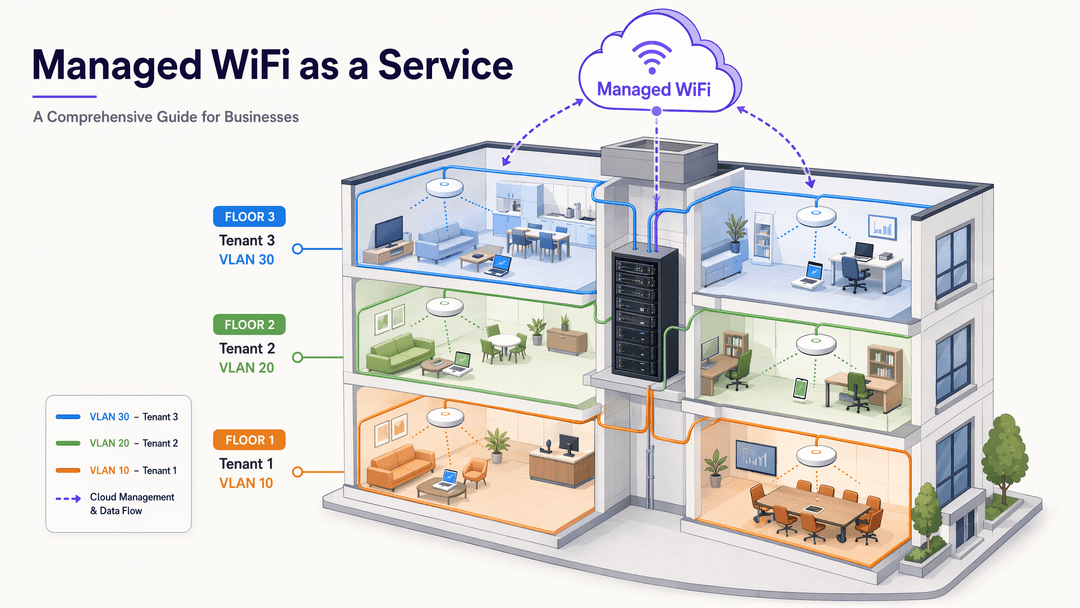
Executive Summary
For property developers, landlords, and build-to-rent (BTR) operators, connectivity is no longer an amenity. It is critical infrastructure. The decision is whether to build and maintain a wireless network in-house, or adopt managed WiFi as a service. This guide outlines the technical architecture, implementation strategies, and business impact of deploying a managed, multi-tenant WiFi solution. We examine how a cloud overlay simplifies operations, how IEEE 802.1Q VLAN segmentation secures resident traffic, and how platforms like Purple deliver 99.999% uptime while handling GDPR compliance automatically.
Listen to the full technical briefing:
Technical Deep-Dive
The foundation of a multi-tenant managed WiFi deployment is logical segmentation. When you provide connectivity to hundreds of residents, a flat network architecture is a critical security liability.
IEEE 802.1Q VLAN Segmentation
A Virtual Local Area Network (VLAN) allows you to partition a single physical network into multiple isolated broadcast domains. In a BTR development, this means Apartment 14A's traffic never touches Apartment 14B's traffic, even though both residents connect through the same physical access point.
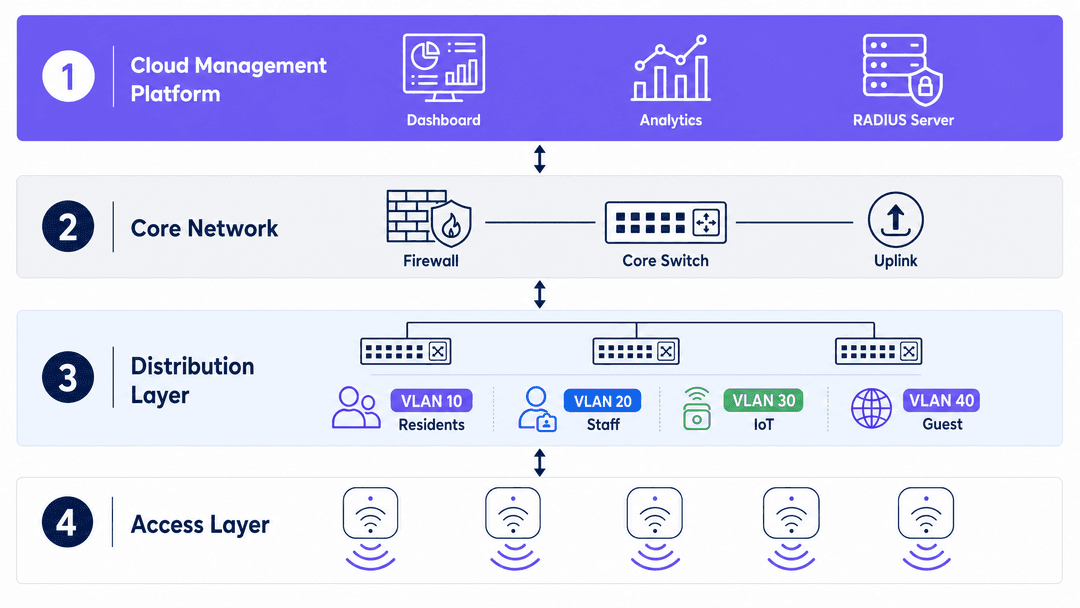
We achieve this through Dynamic VLAN Assignment. When a resident connects, their device authenticates against a RADIUS server using IEEE 802.1X. The RADIUS server validates the credentials and returns an Access-Accept message to the access point, including the specific VLAN ID assigned to that resident. The access point drops that device's traffic directly into the correct isolated segment. It scales to hundreds of units without manual intervention.
Device Isolation and WPA3
For smart home devices, you assign them to a dedicated IoT VLAN. This isolates vulnerable hardware from resident laptops and smartphones. Furthermore, the WPA3 security standard replaces WPA2 and introduces Simultaneous Authentication of Equals (SAE), which eliminates offline dictionary attacks. For seamless roaming, Passpoint (Hotspot 2.0) allows devices to authenticate automatically using a digital certificate.
Purple acts as a free identity provider for services like OpenRoaming under the Connect license, allowing seamless, secure authentication without friction.
Implementation Guide
Deploying managed WiFi as a service requires structured planning. The process shifts the operational burden from your internal IT team to a specialist provider.
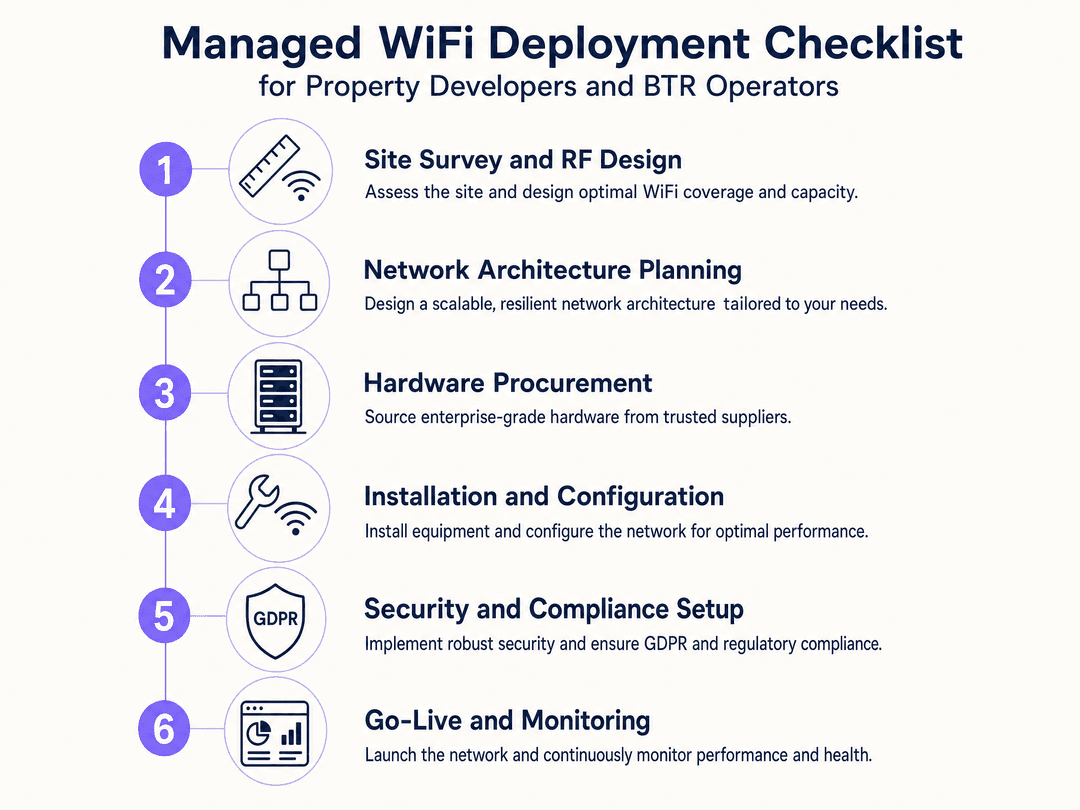
- Site Survey and RF Design: Assess the physical environment to determine optimal access point placement for capacity, not just coverage.
- Network Architecture Planning: Define your VLAN structure, including dedicated segments for residents, staff, IoT, and guests.
- Hardware Procurement: Select enterprise-grade hardware. A hardware-agnostic platform like Purple supports Cisco Meraki, HPE Aruba, Ruckus, Juniper Mist, Ubiquiti UniFi, Cambium, Extreme, and Fortinet.
- Installation and Configuration: Deploy the hardware and configure the cloud management platform. Ensure strict inter-VLAN firewall rules are applied.
- Security and Compliance Setup: Configure captive portals, integrate identity providers like Microsoft Entra ID or Okta, and set automated data retention policies for GDPR compliance.
- Go-Live and Monitoring: Launch the network. The managed service provider assumes responsibility for monitoring uptime and performance.
For guidance on separating network traffic, read How to Safely Segregate Staff and Guest WiFi Networks .
Best Practices
When deploying multi-tenant WiFi, adhere to these vendor-neutral best practices:
- Implement Default-Deny Routing: By default, routers route traffic. You must configure a strict default-deny policy between VLANs. Only allow explicit, port-specific exceptions.
- Isolate IoT Devices: Always place smart building infrastructure on a separate VLAN with outbound-only internet access. Read Three SSIDs to rule them all: guest, Passpoint, and IoT WiFi for more detail.
- Automate Data Retention: Do not rely on manual processes for GDPR compliance. Use your cloud management platform to automatically purge connection logs and personal data after the defined retention period.
- Disable VLAN 1: Never use VLAN 1 as the native VLAN on trunk ports. Change it to an unused, non-routable VLAN ID to prevent VLAN hopping attacks.
Troubleshooting & Risk Mitigation
The primary risk in a multi-tenant environment is a misconfigured firewall allowing lateral movement. Regular penetration testing and automated configuration audits mitigate this risk.
Another common failure mode is IP address exhaustion on public or guest segments. To prevent this, manage your DHCP lease times. While a 24-hour lease is appropriate for a resident VLAN, set lease times to one or two hours on a Guest WiFi segment.
If you are acquiring a property with legacy hardware, a hardware-agnostic cloud overlay allows you to monitor and manage the existing access points while planning a phased hardware refresh.
ROI & Business Impact
Managed WiFi as a service converts unpredictable capital expenditure and operational liability into a predictable operating expense.
For a BTR operator, the business impact is measured in resident satisfaction and reduced support overhead. When residents have seamless, secure connectivity managed by a specialist, the property management office stops fielding IT support calls.
Furthermore, integrating WiFi Analytics provides property operators with aggregate footfall data for communal areas, allowing you to optimise cleaning schedules and understand amenity utilisation.
Purple has deployed managed WiFi across 80,000+ live venues, processed 440 million logins in 2024, and collected 29 billion data points. We maintain 99.999% uptime and are ISO 27001, GDPR, CCPA, Cyber Essentials, and B Corp certified.
Key Definitions
VLAN (Virtual Local Area Network)
A logical grouping of devices on the same physical network, isolating their broadcast traffic.
Used to separate resident, staff, and guest traffic on shared access points.
IEEE 802.1X
An IEEE standard for port-based network access control, providing an authentication mechanism to devices wishing to attach to a LAN or WLAN.
Used to authenticate residents and dynamically assign them to their specific VLAN.
RADIUS
Remote Authentication Dial-In User Service; a networking protocol that provides centralised authentication, authorisation, and accounting management.
The server that verifies a user's credentials and tells the access point which VLAN to use.
Dynamic VLAN Assignment
The process where a network switch or access point places a user into a specific VLAN based on their authentication credentials, rather than the physical port or SSID they connect to.
Allows hundreds of BTR residents to use a single building-wide SSID while remaining securely isolated.
WPA3
The third generation of Wi-Fi Protected Access, offering improved encryption and security over WPA2.
Provides robust protection against offline dictionary attacks in multi-tenant environments.
Passpoint (Hotspot 2.0)
A standard that allows mobile devices to automatically discover and connect to Wi-Fi networks securely using digital certificates.
Enables seamless roaming for residents moving between their apartments and communal areas.
Captive Portal
A web page that a user must view and interact with before access is granted to a public Wi-Fi network.
Used to collect consent and manage terms of service for Guest WiFi access.
Hardware-Agnostic
Software or management platforms designed to work with equipment from multiple different manufacturers.
Allows property operators to manage Cisco Meraki, HPE Aruba, and Ruckus access points from a single dashboard.
Worked Examples
A 280-unit build-to-rent development in Manchester needs to provide secure, isolated WiFi for each apartment while supporting building-wide smart thermostats and door locks.
Deploy a managed WiFi as a service architecture using Dynamic VLAN Assignment via 802.1X. Assign a unique VLAN to each of the 280 apartments. Create a dedicated IoT VLAN for the smart thermostats and door locks. Apply a default-deny firewall policy between all VLANs. Use a hardware-agnostic cloud platform to monitor the entire estate.
A mixed-use commercial estate has retail tenants on the ground floor, office occupiers above, and a shared amenity space. They are currently running a flat network.
Implement a segmented architecture with four distinct VLANs: Retail, Office, IoT, and Guest. Deploy Purple's Guest WiFi platform for the shared amenity space to handle GDPR-compliant onboarding. Enforce strict inter-VLAN firewall rules to ensure point-of-sale terminals in the retail units cannot communicate with the building management systems.
Practice Questions
Q1. You are deploying a network in a multi-tenant building and want to avoid broadcasting 50 different SSIDs. How do you isolate tenant traffic securely?
Hint: Consider how you can authenticate users centrally and assign network segments dynamically.
View model answer
Implement Dynamic VLAN Assignment using IEEE 802.1X and a RADIUS server. All tenants connect to a single building-wide SSID. Upon authentication, the RADIUS server returns the specific VLAN ID for that tenant, and the access point drops their traffic into that isolated Layer 2 segment.
Q2. A retail tenant requires point-of-sale (POS) terminals to connect to the building network. How do you ensure PCI DSS compliance?
Hint: Think about how routers handle traffic by default and what needs to change.
View model answer
Place the POS terminals on a dedicated, isolated VLAN. Configure a strict default-deny policy on the inter-VLAN firewall, ensuring the POS VLAN cannot communicate with any other segment (like Guest WiFi or IoT). This reduces the PCI audit scope to just that specific segment.
Q3. Your BTR development uses a captive portal for the guest network in the lobby. How do you prevent IP address exhaustion during busy periods?
Hint: Consider how long devices hold onto their assigned IP addresses after leaving the building.
View model answer
Reduce the DHCP lease time on the Guest WiFi VLAN to one or two hours. This ensures that IP addresses assigned to visitors who have left the venue are returned to the pool quickly, preventing exhaustion.
Continue reading in this series
Staff WiFi vs. Guest WiFi: Best Practices for Corporate Network Segmentation
A comprehensive technical guide for IT leaders on segmenting staff and guest WiFi networks. It covers VLAN architecture, 802.1X authentication, firewall policies, and the business impact of secure network design.
Apartment WiFi solutions: a comprehensive guide for businesses
This guide covers the architecture, deployment, and business case for apartment WiFi solutions in Build to Rent and multi-dwelling unit properties. It explains how Identity Pre-Shared Key (iPSK) technology creates secure, isolated network bubbles for each resident while supporting smart devices and IoT. Property developers, landlords, and BTR operators will find actionable deployment guidance, ROI data, and worked implementation scenarios.
Cox business managed WiFi: a comprehensive guide for businesses
This guide details how property developers and BTR operators can deploy scalable, secure networks using Cox Business managed WiFi. It covers network architecture, vendor-neutral hardware deployment, and the business impact of transitioning connectivity from an operational headache to reliable infrastructure.