
Managed WiFi solutions in dubai: a comprehensive guide for businesses
This guide provides IT managers, network architects, and property developers in Dubai with a practical blueprint for deploying managed WiFi solutions across multi-tenant environments. It covers the technical architecture of VLAN segmentation, iPSK, and 802.1X authentication, alongside TDRA compliance requirements and the commercial case for treating connectivity as a managed amenity. Whether you operate a Build to Rent development, a luxury hotel, or a retail mall, this guide gives you the decision frameworks and implementation steps to deploy and manage enterprise-grade WiFi at scale.
Video overview
Listen to this guide
View podcast transcript
Executive summary
Dubai's commercial real estate and hospitality sectors are deploying WiFi infrastructure at a scale that flat, unmanaged networks cannot support. A 300-unit Build to Rent (BTR) development in Dubai Marina carries 4,500 to 6,000 connected devices at any given moment. A luxury hotel on the Palm Jumeirah serves guests, conference delegates, and back-of-house IoT systems simultaneously. Each group has distinct security, performance, and compliance requirements.
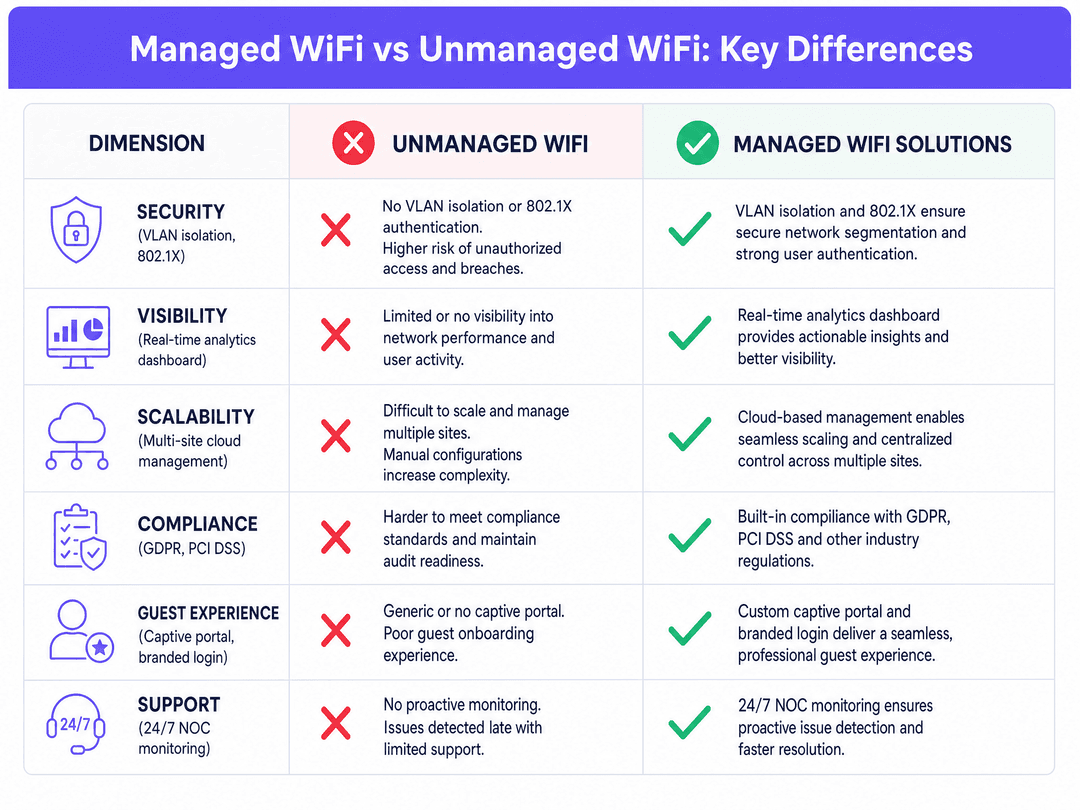
Managed WiFi solutions address this by deploying a cloud-managed overlay on enterprise hardware from Cisco Meraki, HPE Aruba, Ruckus, Juniper Mist, Ubiquiti UniFi, Cambium, Extreme, or Fortinet. The overlay handles authentication, VLAN assignment, analytics, and captive portal management centrally, without requiring a separate physical network per tenant.
Purple operates across 80,000+ live venues and has processed 440 million logins in 2024 (Purple internal data). We hold ISO 27001, GDPR, and Cyber Essentials certifications, and our platform delivers 99.999% uptime. This guide covers the architecture, deployment steps, and business case for managed WiFi solutions in Dubai.
Technical deep-dive: architecture and isolation
Transitioning from a single-occupant to a multi-tenant WiFi architecture requires a shift from a flat, trusted environment to a segmented, zero-trust framework. The primary objective is to ensure multiple independent tenants co-exist on a single physical infrastructure without compromising security or performance.
The foundational role of VLANs
The cornerstone of any multi-tenant network is the Virtual Local Area Network (VLAN). As defined by the IEEE 802.1Q standard, VLANs partition a single physical network switch into multiple logically separate broadcast domains. Traffic from a retail unit on VLAN 10 is invisible to a corporate office on VLAN 20, even when their devices connect to the same physical access point.
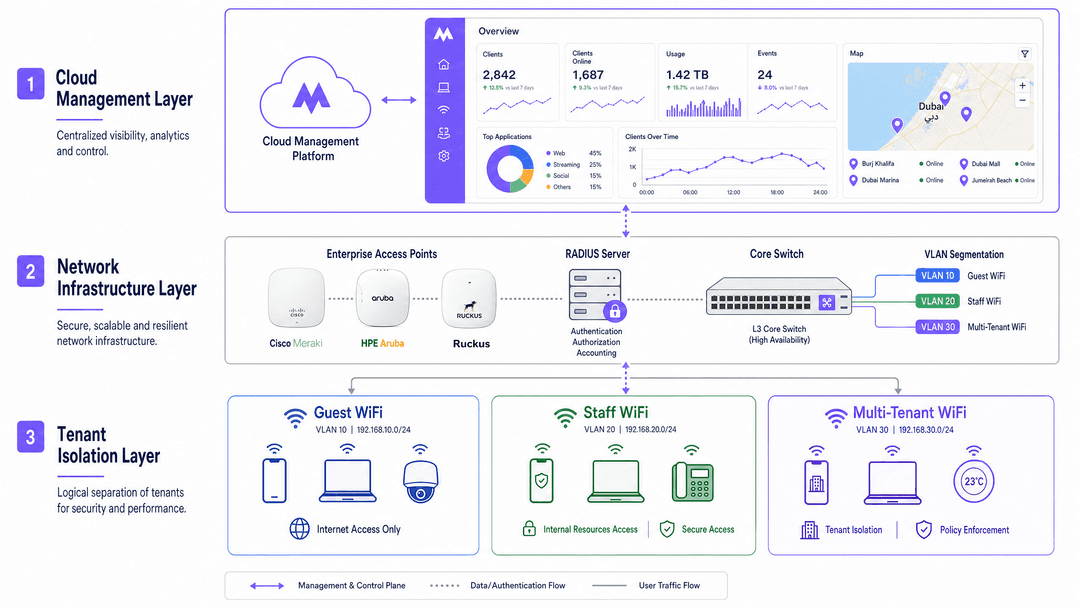
Without proper VLAN implementation, tenant separation is cosmetic. Multiple SSIDs on a single LAN offer no isolation against lateral movement if a device is compromised. A moderately skilled attacker on a flat network can see all traffic on the subnet. VLAN boundaries enforced by default-deny inter-VLAN firewall rules contain the blast radius of any breach to a single tenant segment.
Identity-based networks and iPSK
For residential BTR and student accommodation, operators face a specific challenge: residents need to connect headless IoT devices (smart TVs, games consoles, smart speakers) while remaining isolated from neighbours. Standard 802.1X authentication (WPA-Enterprise) requires a certificate or username/password combination that most IoT devices cannot process.
The solution is Identity Pre-Shared Key (iPSK), referred to by HPE Aruba as PPSK and by Cisco Meraki as Personal Private Network. Each resident receives a unique WiFi password during onboarding. The RADIUS server authenticates the password and dynamically assigns the device to that resident's specific VLAN.
Devices on the same key recognise each other. A resident's phone discovers their Chromecast. Devices on different keys remain invisible. When a resident moves out, Purple revokes their specific key without requiring a password rotation for the rest of the building. See our guide on Power probe PPSK: comparing features and deployment models for a full vendor comparison.
Authentication standards by tenant type
The correct authentication method depends on the tenant type and device profile.
| Tenant type | Recommended auth method | Standard |
|---|---|---|
| BTR residents and IoT devices | iPSK / PPSK | WPA2/WPA3-Personal per-key |
| Corporate tenants and staff | 802.1X with RADIUS | WPA3-Enterprise, EAP-TLS or PEAP |
| Hotel guests and retail shoppers | Captive portal | WPA3-Enhanced Open (OWE) |
| Conference and event attendees | Time-limited PSK or captive portal | WPA3-Personal |
| Back-of-house IoT sensors | MAC Authentication Bypass (MAB) | Vendor-specific |
For staff authentication, integrate the RADIUS server with Microsoft Entra ID, Okta, or Google Workspace. Purple supports SCIM provisioning and SAML-based single sign-on, meaning a new employee's WiFi access is created automatically when their account is provisioned in your identity provider, and revoked the moment HR deactivates it.
Quality of Service and bandwidth management
In a shared environment, a single tenant streaming 4K video can degrade performance for all others. Quality of Service (QoS) policies define upstream and downstream bandwidth limits per VLAN, per user, or per application category. A conference facility can guarantee a 100 Mbps dedicated tier for a corporate client while providing a 20 Mbps shared tier for general visitors. Purple's cloud dashboard applies these policies without requiring manual switch configuration.
Implementation guide: deployment strategies
Deploying managed WiFi solutions in Dubai requires alignment with both technical best practices and local regulatory requirements.
Step 1: RF planning and site survey
Conduct a predictive site survey before any hardware is installed. Dubai construction typically uses reinforced concrete and glass curtain walls, both of which attenuate 5GHz and 6GHz signals significantly. Model the expected device density per area: 15-25 devices per residential unit, up to 500 concurrent devices per conference room at a major hotel.
For high-density venues such as the Dubai World Trade Centre or Expo City Dubai, deploy directional antennas and reduce transmit power to minimise co-channel interference. The 6GHz band (Wi-Fi 6E and Wi-Fi 7) provides additional spectrum for high-density deployments.
Step 2: Hardware selection and integration
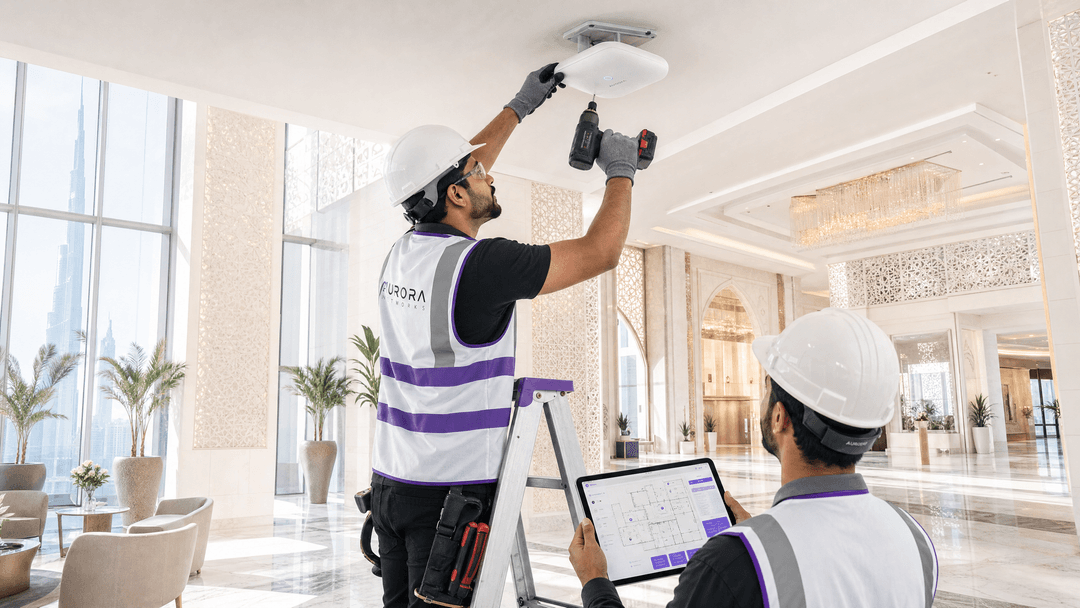
Purple operates as a hardware-agnostic cloud overlay. Deploy the physical infrastructure from Cisco Meraki, HPE Aruba, Ruckus, Juniper Mist, Ubiquiti UniFi, Cambium, Extreme, or Fortinet, and point authentication traffic to Purple's RADIUS servers. The cloud dashboard provides a single pane of glass across all hardware vendors and all sites.
For BTR and MDU deployments, consider switch-level PoE budgets carefully. A 48-port PoE+ switch at 30W per port supports 48 access points. A large residential tower may require multiple distribution switches with fibre uplinks to a core.
Step 3: VLAN and SSID design
Follow the three-SSID model described in Three SSIDs to rule them all: guest, Passpoint, and IoT WiFi . Broadcast a maximum of three to four SSIDs per access point to minimise management frame overhead. Use dynamic VLAN assignment via RADIUS to segment traffic without multiplying SSIDs.
Step 4: TDRA compliance and data sovereignty
Operating public or multi-tenant WiFi in the UAE requires compliance with the Telecommunications and Digital Government Regulatory Authority (TDRA). The TDRA's IoT Policy mandates registration for service providers. Data handling must align with UAE data sovereignty expectations. Purple's architecture supports selectable data residency, ensuring authentication logs and analytics data remain within compliant regional boundaries.
For venues capturing guest data through captive portals, implement conscious-choice opt-ins that clearly state the terms of data use. This satisfies both GDPR requirements for European visitors and UAE consumer protection expectations.
Step 5: Identity provider integration and lifecycle management
Automate the onboarding and offboarding lifecycle. Integrate the WiFi provisioning process with your Property Management System (PMS) for hospitality, or your tenancy management platform for BTR. When a lease is signed, the system generates an iPSK and delivers it to the resident. When the lease ends, Purple revokes the key. No manual intervention required.
For staff networks, connect Purple to Microsoft Entra ID or Okta via SCIM. Joiner-mover-leaver processes automatically propagate to WiFi access rights.
Best practices for venue operators
Segment traffic by use case
Never mix guest, staff, and resident traffic on the same logical network segment. Guest WiFi provides internet access with client isolation. Staff WiFi provides access to internal resources with 802.1X authentication. Multi-tenant WiFi provides per-resident isolation with device discovery within each household. Each has a distinct security posture and compliance requirement.
Implement Passpoint and OpenRoaming for seamless roaming
Passpoint (also known as Hotspot 2.0) allows devices to connect automatically to trusted networks without a captive portal interaction. OpenRoaming extends this to a global federation of networks. For Dubai's hospitality sector, where guests arrive from 190+ countries, Passpoint eliminates the friction of repeated captive portal sign-ins across a hotel's multiple buildings and outdoor areas.
Use WiFi Analytics to measure and optimise
Purple's analytics platform processes 29 billion data points (Purple internal data) to surface actionable insights. For retail operators, dwell-time heatmaps identify which zones attract the most traffic. For hospitality operators, repeat visit rates measure loyalty programme effectiveness. For BTR operators, aggregate usage data informs bandwidth planning for the next tenancy cycle.
Plan for IoT device density
A 200-unit BTR building carries 3,000 to 5,000 connected devices. Many are IoT devices that cannot handle 802.1X certificates. Design the IP addressing scheme to accommodate this density from day one. A /22 subnet (1,022 usable addresses) is the minimum for a 200-unit building. Use DHCP lease times of 24 hours or less to reclaim addresses efficiently.
Troubleshooting and risk mitigation
The Chromecast visibility issue
The most common support ticket in BTR environments is: my phone cannot see my Chromecast. If the network uses client isolation (correct for guest networks), multicast traffic is blocked. If the network uses iPSK correctly, multicast traffic is permitted within the resident's specific VLAN, resolving the issue securely. Diagnose by checking whether client isolation is enabled at the SSID level or the VLAN level.
Games consoles and NAT type
PlayStation and Xbox consoles require specific NAT types for online multiplayer. Strict CGNAT often causes Strict (Type 3) NAT, blocking voice chat and matchmaking. The fix requires correct UPnP handling and port forwarding rules mapped to the specific resident segment, rather than loosening security across the entire building. Configure UPnP per-VLAN, not globally.
Rogue access points and RF interference
In dense urban environments like Dubai Marina or Downtown Dubai, rogue access points from neighbouring properties can cause co-channel interference. Deploy WIDS (Wireless Intrusion Detection System) features available on Cisco Meraki, HPE Aruba, and Ruckus to detect and alert on rogue devices. Schedule regular RF spectrum scans to identify interference sources.
Captive portal bypass attempts
Some devices attempt to bypass captive portals by using DNS-over-HTTPS or pre-configured VPNs. Implement DNS filtering at the VLAN level to block DoH endpoints for guest VLANs. This ensures all guest traffic passes through the captive portal and complies with TDRA requirements for user identification on public networks.
ROI and business impact
Managed WiFi is a measurable asset, not a cost centre.
BTR and residential
BTR operators deploying managed WiFi report a £15-30 rent premium per unit per month (British Property Federation sector research). Providing move-in-ready WiFi reduces void periods by 5-10 days, as residents do not need to wait for a consumer broadband installation. The software-overlay model on owned hardware delivers a 30-50% lower per-door cost than bundled broadband contracts.
Hospitality
For Hospitality venues, the ROI is measured in data acquisition and guest experience scores. Purple captures first-party data through conscious-choice opt-ins via the captive portal. Premier Inn, a Whitbread brand, uses Purple's platform across its estate to automate guest engagement. This data integrates directly into CRM platforms to drive repeat bookings.
Retail
For Retail operators, WiFi analytics provide shopper dwell-time data that informs store layout decisions and promotional placement. McDonald's uses Purple's platform across its estate to capture first-party data and automate marketing campaigns. Harrods uses Purple to deliver a premium guest WiFi experience aligned with its brand standards.
Public sector and transport
For Transport hubs and public-sector venues, the ROI is measured in passenger satisfaction scores and operational efficiency. Manchester Airports Group (MAG) uses Purple to manage WiFi across its airport estate, providing passenger connectivity and operational analytics.
Purple was founded in 2012 and serves 80,000+ live venues across 29 billion data points. For a Guest WiFi deployment consultation or to explore Purple's multi-tenant WiFi platform, visit purple.ai.
Key Definitions
iPSK (Identity Pre-Shared Key)
A security protocol that allows multiple unique pre-shared keys to be used on a single SSID, with each key tying the connecting device to a specific user profile and VLAN. Called PPSK by HPE Aruba and Personal Private Network by Cisco Meraki.
Essential for BTR and student accommodation where residents need to connect headless IoT devices that cannot process 802.1X certificates.
VLAN (Virtual Local Area Network)
A logical grouping of network devices that behave as if they are connected to a single, isolated wire, regardless of their physical location. Defined by the IEEE 802.1Q standard.
The foundational technology for segmenting traffic between different tenants, staff, and guests on shared hardware. Without VLANs, tenant separation is cosmetic.
802.1X
An IEEE standard for port-based network access control that provides an authentication mechanism to devices wishing to attach to a LAN or WLAN. Typically implemented with EAP-TLS (certificate-based) or PEAP (username/password) methods.
Used for secure staff and corporate tenant authentication, integrating with Microsoft Entra ID, Okta, or Google Workspace via RADIUS.
Captive portal
A web page that a network user must view and interact with before internet access is granted. Used to collect conscious-choice opt-in data and enforce terms of service.
Used in retail and hospitality environments to capture first-party data. Must comply with GDPR for European visitors and TDRA requirements for user identification in the UAE.
RADIUS (Remote Authentication Dial-In User Service)
A networking protocol that provides centralised Authentication, Authorisation, and Accounting (AAA) management for users who connect to a network service.
The backend server infrastructure that verifies credentials (iPSK, 802.1X) and dynamically assigns VLANs. Purple operates RADIUS-as-a-Service, eliminating the need to self-host RADIUS infrastructure.
MAB (MAC Authentication Bypass)
A method of authenticating devices based on their MAC address rather than a username/password or certificate. Used as a fallback for legacy devices that do not support 802.1X or iPSK.
Used for back-of-house IoT devices in hotels and retail environments, such as IPTV systems, thermostats, and point-of-sale terminals.
Passpoint (Hotspot 2.0)
A Wi-Fi Alliance certification programme that enables automatic, secure connection to WiFi networks without captive portal interaction, using credentials stored on the device.
Deployed in hospitality and transport environments to allow returning guests and passengers to reconnect automatically. Particularly valuable for Dubai's international visitor base.
TDRA (Telecommunications and Digital Government Regulatory Authority)
The UAE government body responsible for regulating telecommunications services, including WiFi network operation, IoT service registration, and data handling requirements.
Any operator providing public or multi-tenant WiFi in the UAE must comply with TDRA regulations, including IoT service registration and data sovereignty requirements.
WPA3-Enterprise
The latest Wi-Fi Protected Access enterprise security standard, requiring 802.1X authentication and supporting 192-bit cryptographic strength for high-security environments.
Recommended for all staff and corporate tenant networks. Supersedes WPA2-Enterprise and provides protection against offline dictionary attacks.
Client isolation
A wireless network security feature that prevents devices connected to the same SSID from communicating directly with each other.
Required for public Guest WiFi to prevent one shopper's device from attacking another's. Must be disabled within a specific resident's VLAN in a multi-tenant setup to allow smart device pairing.
Worked Examples
A 300-unit Build to Rent (BTR) development in Dubai Marina requires move-in-ready WiFi for residents. They expect each unit to connect up to 20 devices, including smart TVs, voice assistants, and games consoles. The property developer wants to avoid password rotation every time a resident moves out. How should the network be structured?
Deploy enterprise access points (HPE Aruba or Cisco Meraki) providing high-density 5GHz and 6GHz coverage across all units. Implement an iPSK architecture via Purple's cloud overlay. Broadcast a single building-wide SSID. Each of the 300 units is assigned a unique pre-shared key during lease signing, automatically generated and delivered to the resident via email. The Purple RADIUS server dynamically assigns all devices using that key to the resident's specific VLAN. Multicast traffic is enabled within each VLAN to allow device discovery (Chromecast, Apple TV, Echo), but blocked between VLANs to ensure privacy. When a resident moves out, Purple revokes their specific key. No other resident's connection is affected. Configure a /22 subnet per VLAN to accommodate up to 1,022 devices per resident segment.
A luxury hotel on the Palm Jumeirah wants to offer seamless connectivity for guests while securely isolating staff operations and back-of-house IoT sensors. The hotel also wants to capture guest data for its loyalty programme.
Implement network segmentation using three VLANs. VLAN 10 (Guest WiFi): broadcast via captive portal using WPA3-Enhanced Open. Guests authenticate via the Purple captive portal with conscious-choice opt-in for loyalty programme data capture. Client isolation is enabled. VLAN 20 (Staff WiFi): broadcast via a hidden SSID using WPA3-Enterprise with 802.1X authentication tied to Microsoft Entra ID. Staff authenticate with their existing corporate credentials. VLAN 30 (IoT): back-of-house devices (thermostats, door locks, IPTV systems) connect via MAC Authentication Bypass (MAB) or iPSK. This VLAN has no internet access and is restricted to internal hotel management systems only. Deploy Passpoint on the guest SSID to allow returning guests to reconnect automatically without re-entering the captive portal.
Practice Questions
Q1. A property developer is planning a new 400-unit BTR complex in Dubai Marina. They want to provide building-wide WiFi but are concerned about the security of residents' smart home devices. They propose creating a separate hidden SSID for every apartment. Why is this a poor architectural decision, and what should they do instead?
Hint: Consider the physical limitations of the 2.4GHz and 5GHz spectrum, management overhead, and the scalability of the proposed approach.
View model answer
Broadcasting 400 separate SSIDs causes severe management frame overhead (beacon frames from each SSID consume airtime) and co-channel interference, degrading performance for all users. The 802.11 standard recommends a maximum of three to four SSIDs per access point. The correct approach is to broadcast a single building-wide SSID and use iPSK to dynamically assign each resident's devices to their own secure VLAN via the Purple RADIUS server. This provides the same per-resident isolation without the performance penalty.
Q2. A retail mall operator in Dubai wants to deploy Guest WiFi to collect shopper analytics, but they are concerned about TDRA compliance and GDPR for European visitors. What steps should they take to deploy compliantly?
Hint: Focus on how data is collected, what consent is obtained, and where data is stored.
View model answer
Deploy a captive portal that requires conscious-choice opt-in for data collection, clearly stating the terms of service in English and Arabic. Do not pre-tick consent boxes. Use a platform like Purple that supports selectable data residency to ensure authentication logs and analytics data remain within compliant regional boundaries. For European visitors, ensure the privacy notice meets GDPR Article 13 requirements. Retain guest-identifiable WiFi logs only as long as operationally necessary, with a maximum of six months as a common ceiling.
Q3. A coworking space manager in Dubai reports that members cannot print to the shared networked printers. The network uses client isolation on the member VLAN to protect members from each other. How do you resolve this while maintaining security between members?
Hint: The printers need to be accessible to all members, but members still need to be isolated from each other.
View model answer
Place the shared printers on a dedicated Services VLAN (e.g., VLAN 50). Configure the firewall to permit traffic from the member VLANs to the specific IP addresses of the printers on the Services VLAN, using destination-based firewall rules. Maintain client isolation within the member VLANs to prevent peer-to-peer communication between members. This allows all members to print while preventing any member from accessing another member's devices. Document the firewall rules and review them quarterly as the printer fleet changes.
Q4. A hotel IT director reports that the games console in Room 412 is showing NAT Type Strict, preventing the guest from playing online multiplayer. The hotel uses CGNAT for all guest traffic. How do you diagnose and resolve this?
Hint: Consider the relationship between CGNAT, UPnP, and the specific NAT type requirements of gaming consoles.
View model answer
Strict NAT (Type 3 on PlayStation) is caused by CGNAT blocking the UPnP port mapping requests that consoles use to open inbound connections. Diagnose by checking whether UPnP is enabled on the guest VLAN router and whether CGNAT is blocking UPnP responses. The fix is to enable UPnP per-VLAN on the guest network and configure the CGNAT to permit UPnP port mappings for the guest subnet. Do not enable UPnP globally across all VLANs, as this would expose staff and IoT VLANs to unnecessary risk. If CGNAT cannot be modified, consider deploying a dedicated gaming VLAN with a public IP range and directing guests to connect to it.
Continue reading in this series
Staff WiFi vs. Guest WiFi: Best Practices for Corporate Network Segmentation
A comprehensive technical guide for IT leaders on segmenting staff and guest WiFi networks. It covers VLAN architecture, 802.1X authentication, firewall policies, and the business impact of secure network design.
Apartment WiFi solutions: a comprehensive guide for businesses
This guide covers the architecture, deployment, and business case for apartment WiFi solutions in Build to Rent and multi-dwelling unit properties. It explains how Identity Pre-Shared Key (iPSK) technology creates secure, isolated network bubbles for each resident while supporting smart devices and IoT. Property developers, landlords, and BTR operators will find actionable deployment guidance, ROI data, and worked implementation scenarios.
Cox business managed WiFi: a comprehensive guide for businesses
This guide details how property developers and BTR operators can deploy scalable, secure networks using Cox Business managed WiFi. It covers network architecture, vendor-neutral hardware deployment, and the business impact of transitioning connectivity from an operational headache to reliable infrastructure.