
Managed WiFi for business: a comprehensive guide for businesses
This comprehensive guide explores the technical architecture, deployment strategies, and business value of engaging a managed WiFi provider for multi-tenant and build-to-rent properties. It details how to use iPSK for resident isolation, implement a three-SSID architecture, and generate measurable ROI through premium connectivity.
Video overview
Listen to this guide
View podcast transcript
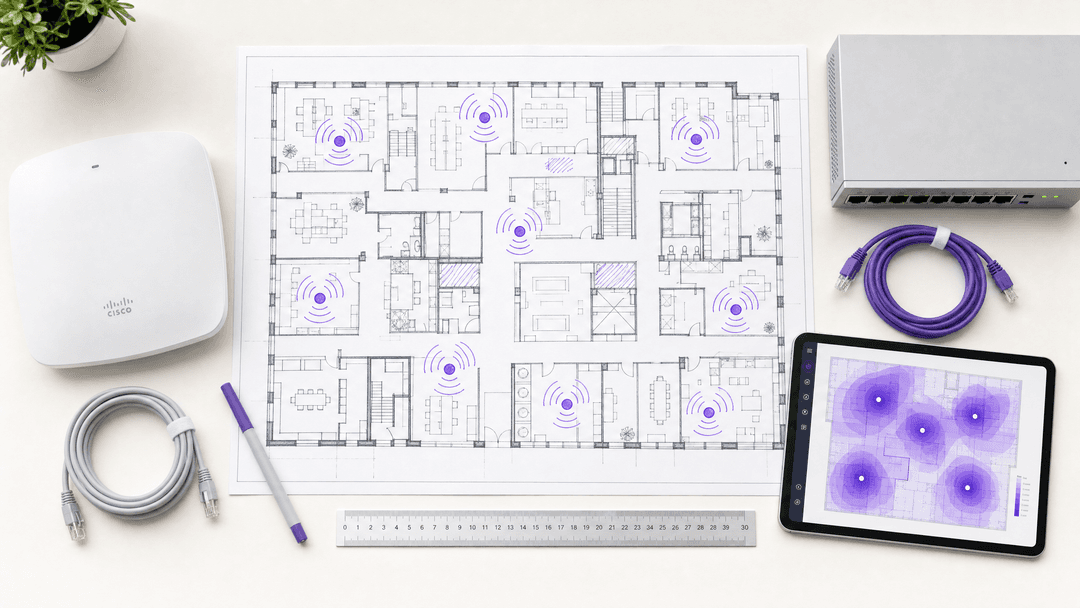
Listen to the audio briefing for this guide:
Executive Summary
For property developers, landlords, and build-to-rent operators, WiFi is no longer an optional extra. It is a utility as fundamental as water or electricity. Modern residents expect internet access to work the moment they cross the threshold, with the privacy and performance they would get in a standalone house. A managed WiFi provider takes ownership of the design, deployment, monitoring, and ongoing management of this wireless network.
By deploying a managed WiFi architecture, you secure a contractual service level agreement - typically 99.999% uptime - and automate the onboarding process for residents. The commercial return is measurable. National Apartment Association data indicates managed WiFi generates a 20 to 40 dollar rent premium per unit per month, while reducing vacancy periods by five to ten days. This guide details the technical architecture, deployment strategy, and business impact of engaging a managed WiFi provider for multi-tenant environments.
Technical Deep-Dive
The foundation of any enterprise managed WiFi deployment is network segmentation. You run multiple user populations on the same physical infrastructure: residents, staff, and IoT devices. Each population has different trust levels, data access requirements, and regulatory implications. The correct approach isolates them using Virtual Local Area Networks (VLANs). A VLAN is a logical partition that prevents traffic from one segment reaching another, even though they share the same physical access points.
The Three-SSID Architecture
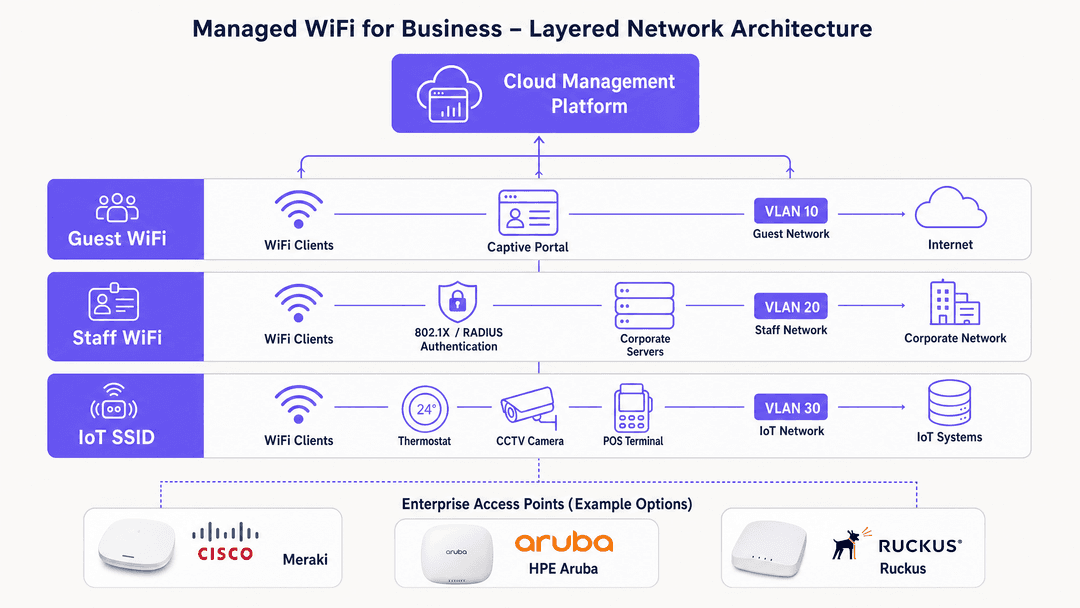
The standard architecture uses three wireless network names (SSIDs). This model is hardware-agnostic and works across Cisco Meraki, HPE Aruba, Ruckus, Juniper Mist, Ubiquiti UniFi, Cambium, Extreme, and Fortinet access points.
- Guest WiFi: Routes to the internet only, with no access to internal systems. Often uses a captive portal. For more on this, see our guide to Guest WiFi .
- Staff WiFi: Authenticates via IEEE 802.1X and connects to corporate resources. We recommend reading Three SSIDs to rule them all: guest, Passpoint, and IoT WiFi for detailed configuration.
- IoT SSID: Isolates smart devices like thermostats, CCTV cameras, and point-of-sale terminals onto their own segment.
Authentication and Identity
For staff authentication, 802.1X with RADIUS is the correct standard. Purple integrates natively with Microsoft Entra ID, Okta, and Google Workspace, allowing your existing identity provider to handle authentication without maintaining a separate database.
For security, WPA3 is the baseline for all new deployments. WPA3 replaces WPA2, eliminates the KRACK vulnerability class, and introduces Simultaneous Authentication of Equals to protect against offline dictionary attacks.
iPSK and Resident Isolation
Multi-tenant environments require one additional layer: per-resident isolation. Each resident needs a private network segment so their smart devices are not visible to neighbours. The technical mechanism is Identity Pre-Shared Key (iPSK), sometimes called Private Pre-Shared Key (PPSK) depending on the vendor.
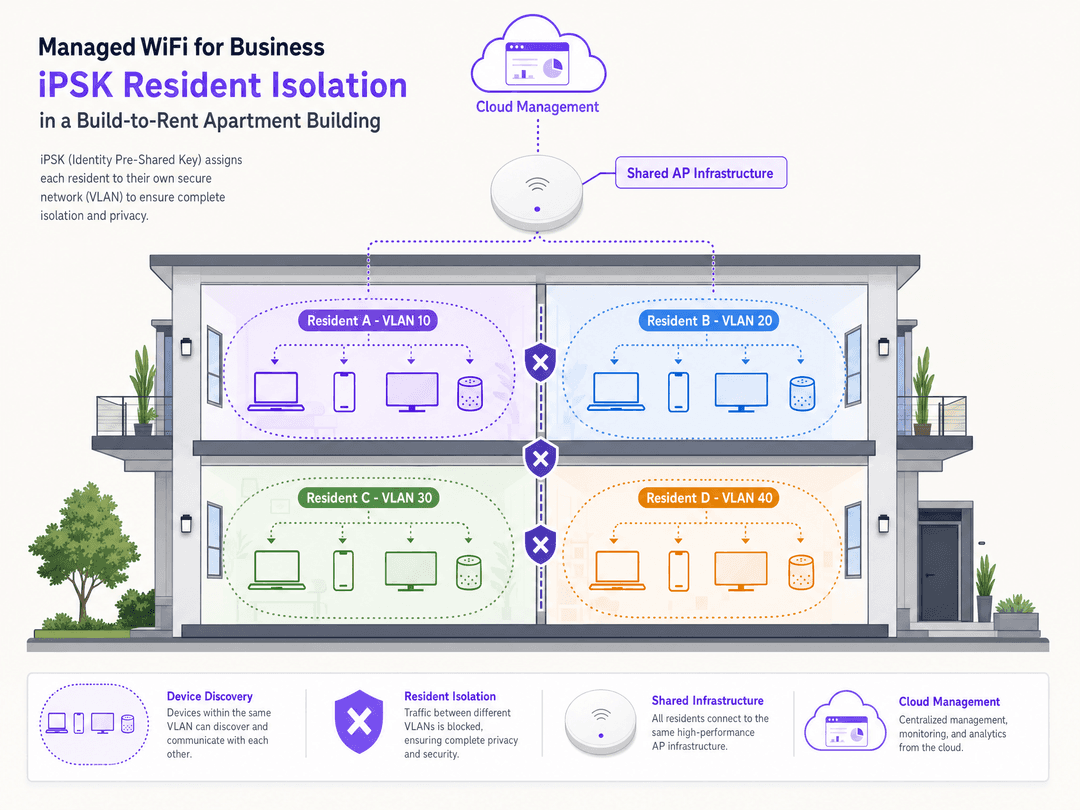
iPSK assigns a unique passphrase to each resident. The access point maps this passphrase to a dedicated VLAN. Every device on Resident A's key sees every other device on Resident A's key. Their smartphone discovers their Chromecast, and their smart speaker pairs with their bulbs. However, Resident B's devices remain completely invisible to Resident A. Purple's Multi-Tenant WiFi product automates this provisioning. When a resident moves in, their network segment is created automatically. When they move out, Purple revokes access instantly.
Implementation Guide
Deploying a managed WiFi network requires a structured approach to prevent performance and compliance issues.
- Conduct an RF Site Survey: Map signal coverage, identify interference sources, and determine access point placement. Under-provisioning access points is the primary cause of poor WiFi performance.
- Define Network Architecture: Map out your SSIDs, VLANs, and authentication methods before configuring hardware.
- Establish the SLA: A 99.999% uptime SLA allows approximately five minutes of downtime per year. Demand this standard from your provider.
- Plan Data Governance: If you collect personal data, establish a lawful basis under GDPR and sign a data processing agreement with your provider. Purple is ISO 27001, GDPR, and Cyber Essentials certified.
- Pilot and Test: Run a pilot in one zone. Validate authentication, roaming, VLAN isolation, and bandwidth performance under load.
Best Practices
- Use a cloud overlay: Do not replace your existing hardware if it meets current standards. Deploy a cloud overlay to manage Cisco Meraki, HPE Aruba, or Ruckus access points centrally.
- Automate the tenant lifecycle: Integrate your property management software with the WiFi platform. Generate iPSK credentials automatically on lease signing and revoke them on move-out.
- Standardise identity providers: Use Microsoft Entra ID, Okta, or Google Workspace for staff authentication via 802.1X.
- Segment IoT traffic: Never place building management systems or CCTV cameras on the Guest WiFi network.
Troubleshooting & Risk Mitigation
- Insufficient backhaul: Size your backhaul at a minimum of one megabit per concurrent user. Assume 30% of residents will be online simultaneously. A 200-unit building with 15 devices per household needs significant upstream capacity.
- Poor VLAN configuration: Always verify VLAN isolation with a penetration test before going live. A misconfigured trunk port exposes resident traffic across segments, creating a GDPR breach.
- Consumer hardware interference: Prohibit residents from installing personal routers. Consumer routers create radio frequency interference that degrades the managed network.
- Captive portal friction: Keep the onboarding flow simple. For resident networks, bypass captive portals in favour of iPSK for a seamless "instant-on" experience.
ROI & Business Impact
The business case for managed WiFi in build-to-rent and multi-tenant properties is clear. The operational cost of managing individual routers per unit is eliminated. Property managers no longer handle password resets or "Chromecast won't connect" support tickets.
The commercial return is measurable. Operators offering premium, managed connectivity see a rent premium and faster lease-up times. Furthermore, the network becomes a strategic asset. By understanding network utilisation and footfall, operators can optimise communal spaces and improve the resident experience. Purple has deployed this architecture across 80,000+ live venues, processing 440 million logins in 2024 alone. For more insights on leveraging this data, see our WiFi Analytics platform.
Key Definitions
VLAN (Virtual Local Area Network)
A logical partition of a network that isolates traffic, preventing devices on one segment from communicating with devices on another segment.
Used to separate guest traffic from staff traffic, ensuring visitors cannot access corporate servers.
iPSK (Identity Pre-Shared Key)
A security mechanism that assigns a unique WiFi password to an individual user or device, which the network uses to place them on a specific VLAN.
Essential for build-to-rent properties to give each resident a private network experience on shared hardware.
IEEE 802.1X
The industry standard for port-based network access control, requiring users to authenticate against a central directory before gaining network access.
The mandatory standard for securing staff WiFi networks and integrating with Microsoft Entra ID or Okta.
Captive Portal
A web page that intercepts a user's web browser when they connect to a public WiFi network, requiring interaction before granting internet access.
Used on Guest WiFi networks to capture first-party data, present terms of service, or authenticate visitors.
WPA3
The latest WiFi security protocol, offering stronger encryption and protection against offline dictionary attacks compared to WPA2.
The required baseline security standard for all new enterprise WiFi deployments.
RADIUS (Remote Authentication Dial-In User Service)
A networking protocol that provides centralised authentication, authorisation, and accounting management for users who connect and use a network service.
The backend server that processes 802.1X requests to verify if a staff member's credentials are valid.
SSID (Service Set Identifier)
The technical term for a WiFi network name broadcast by an access point.
Enterprise networks broadcast multiple SSIDs (e.g., Guest, Staff) from the same physical hardware to serve different user groups.
Cloud Overlay
A software management layer that sits above physical network hardware, centralising configuration, analytics, and authentication.
Allows IT teams to manage hardware from different vendors (like Cisco Meraki and HPE Aruba) through a single, unified dashboard.
Worked Examples
A build-to-rent operator with 200 apartments needs to provide secure, private WiFi to each resident without installing 200 individual routers, while ensuring smart home devices (like Apple TV and Sonos) work seamlessly within each flat.
The operator deploys HPE Aruba access points in communal areas and residential units, managed by Purple's cloud overlay. They implement an iPSK (Identity Pre-Shared Key) architecture. On move-in day, each resident receives a unique WiFi password. When a resident enters this password on their devices, the network assigns them to a dedicated VLAN. All their devices (laptop, phone, smart speaker) communicate freely within this VLAN, but remain completely isolated from other residents' devices.
A 350-room hotel needs to segment its network to support guest access, staff operations, and building management systems securely on existing Cisco Meraki hardware.
The IT team implements a three-SSID architecture using VLANs. They configure a 'Guest WiFi' SSID with a captive portal for visitors, routing traffic directly to the internet. They configure a 'Staff WiFi' SSID using 802.1X authentication tied to Microsoft Entra ID for secure access to corporate resources. Finally, they deploy a hidden 'IoT SSID' on a separate VLAN for smart thermostats and CCTV cameras.
Practice Questions
Q1. You are deploying WiFi in a new 150-unit build-to-rent property. The developer suggests putting a standard broadband router in every apartment to keep things simple. What is the technical argument against this approach?
Hint: Consider what happens when 150 wireless routers operate in close proximity.
View model answer
Deploying individual routers causes severe radio frequency (RF) interference as 150 devices fight for the same limited airspace, degrading performance for everyone. Furthermore, it creates a massive management overhead for the operator. The correct approach is a managed WiFi network using enterprise access points in communal areas and units, deploying iPSK to provide each resident with an isolated VLAN. This reduces hardware costs, eliminates RF interference, and allows central management.
Q2. A retail chain wants to deploy smart CCTV cameras and connected point-of-sale (POS) terminals across 50 stores. The IT manager plans to connect them to the existing Staff WiFi network. Why is this a risk, and what is the recommended architecture?
Hint: Think about the security capabilities of IoT devices compared to corporate laptops.
View model answer
Connecting IoT devices to the Staff WiFi network is a significant security and compliance risk. IoT devices often lack robust security features and cannot support 802.1X authentication. If a camera is compromised, the attacker gains lateral access to the corporate network and POS systems. The recommended architecture is to create a dedicated, third 'IoT SSID' mapped to an isolated VLAN with strict routing policies that prevent communication with the staff or guest networks.
Q3. A hotel operator wants to capture first-party data from guests using the WiFi, but is concerned about GDPR compliance and managing the database. How does a managed WiFi provider solve this?
Hint: Consider the role of the captive portal and the provider's certifications.
View model answer
A managed WiFi provider deploys a compliant captive portal on the Guest WiFi SSID. The platform handles the lawful basis for data collection, presents the necessary privacy notices, and secures the data. By using a provider like Purple, which is ISO 27001 and GDPR certified, the hotel offloads the compliance burden. The provider acts as the data processor under a formal agreement, ensuring the captured first-party data is stored securely and integrated legally into the hotel's CRM.
Continue reading in this series
Staff WiFi vs. Guest WiFi: Best Practices for Corporate Network Segmentation
A comprehensive technical guide for IT leaders on segmenting staff and guest WiFi networks. It covers VLAN architecture, 802.1X authentication, firewall policies, and the business impact of secure network design.
Apartment WiFi solutions: a comprehensive guide for businesses
This guide covers the architecture, deployment, and business case for apartment WiFi solutions in Build to Rent and multi-dwelling unit properties. It explains how Identity Pre-Shared Key (iPSK) technology creates secure, isolated network bubbles for each resident while supporting smart devices and IoT. Property developers, landlords, and BTR operators will find actionable deployment guidance, ROI data, and worked implementation scenarios.
Cox business managed WiFi: a comprehensive guide for businesses
This guide details how property developers and BTR operators can deploy scalable, secure networks using Cox Business managed WiFi. It covers network architecture, vendor-neutral hardware deployment, and the business impact of transitioning connectivity from an operational headache to reliable infrastructure.