
Nama ff iPSK ind: a comprehensive guide for businesses
This guide explains how iPSK (Identity Pre-Shared Key) solves the core connectivity challenge in multi-tenant residential buildings - delivering private, home-network-quality WiFi for every resident on shared infrastructure. It covers the authentication architecture, deployment steps, and the commercial case for treating managed WiFi as a revenue-generating amenity in BTR and MDU environments.
Listen to this guide
View podcast transcript
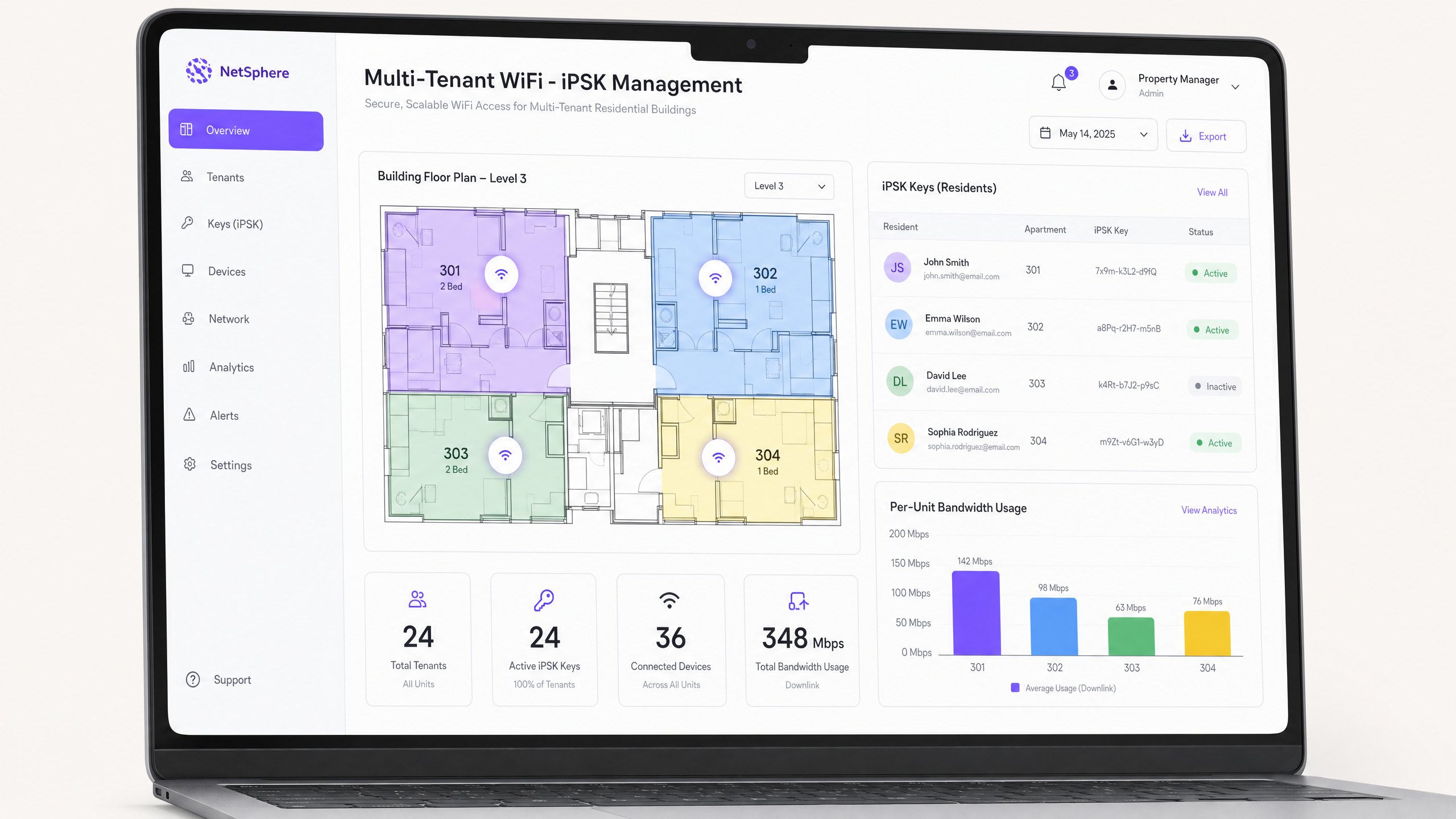
Executive summary
For Build-to-Rent (BTR) operators, property developers, and MDU landlords, WiFi is no longer a nice-to-have amenity. It is the utility residents evaluate before they sign a lease. Traditional approaches fail at scale: shared PSK networks expose one resident's devices to every neighbour, 802.1X Enterprise authentication blocks the smart home devices residents rely on, and a physical router in every unit creates severe radio frequency (RF) interference that degrades speeds for the whole building.
Identity PSK (iPSK) resolves all three problems. It issues a unique WiFi passphrase to every household on a single building-wide network. Each passphrase maps to an isolated VLAN, creating a private "WiFi bubble" per resident. Devices within the bubble discover each other - phones cast to TVs, consoles connect to the internet, smart speakers respond to voice commands - while remaining completely invisible to neighbours. Purple delivers this as a hardware-agnostic cloud overlay, running on Cisco Meraki, HPE Aruba, Ruckus, Juniper Mist, Ubiquiti UniFi, Cambium, Extreme, and Fortinet access points you already own. The result is a £15-30 per unit per month rent premium, 5-10 day shorter void periods, and a 30-50% reduction in per-door connectivity costs compared to individual broadband contracts.
Technical deep-dive
What iPSK actually does
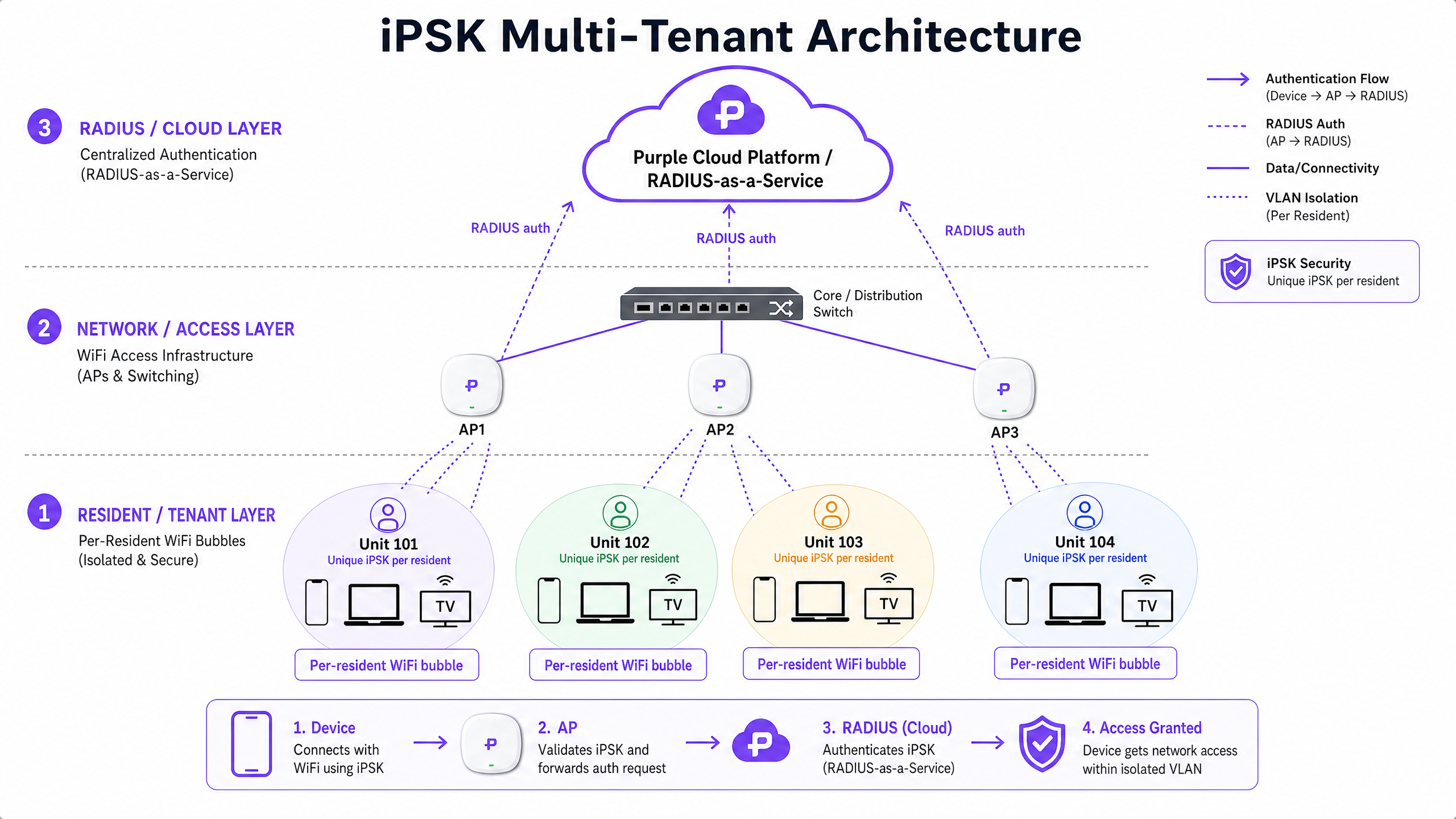
iPSK (Identity Pre-Shared Key) - known as PPSK by HPE Aruba, Personal Private Network by Cisco Meraki, and ePSK by Cambium and Juniper Mist - allows a single SSID to accept thousands of different passphrases simultaneously. Each passphrase is unique to a resident or household. The network uses that passphrase as an identity signal, not just a door key.
When a resident's device connects, the access point (AP) does not simply check whether the password is correct. It forwards the authentication request to a RADIUS (Remote Authentication Dial-In User Service) server. The RADIUS server validates the passphrase against the resident's profile and returns an Access-Accept message containing specific policy attributes - most importantly, the VLAN ID assigned to that resident. The AP then tags all traffic from that device with the correct VLAN, placing it inside the resident's isolated network segment.
This dynamic VLAN assignment is the mechanism that creates the per-resident WiFi bubble. Resident A's phone, laptop, and smart TV all share the same VLAN and can communicate freely using multicast and broadcast protocols (mDNS for AirPlay and Chromecast, SSDP for DLNA). Resident B's devices sit in a completely separate VLAN and are invisible to Resident A, even though both households share the same physical access points.
Why 802.1X does not work for residential
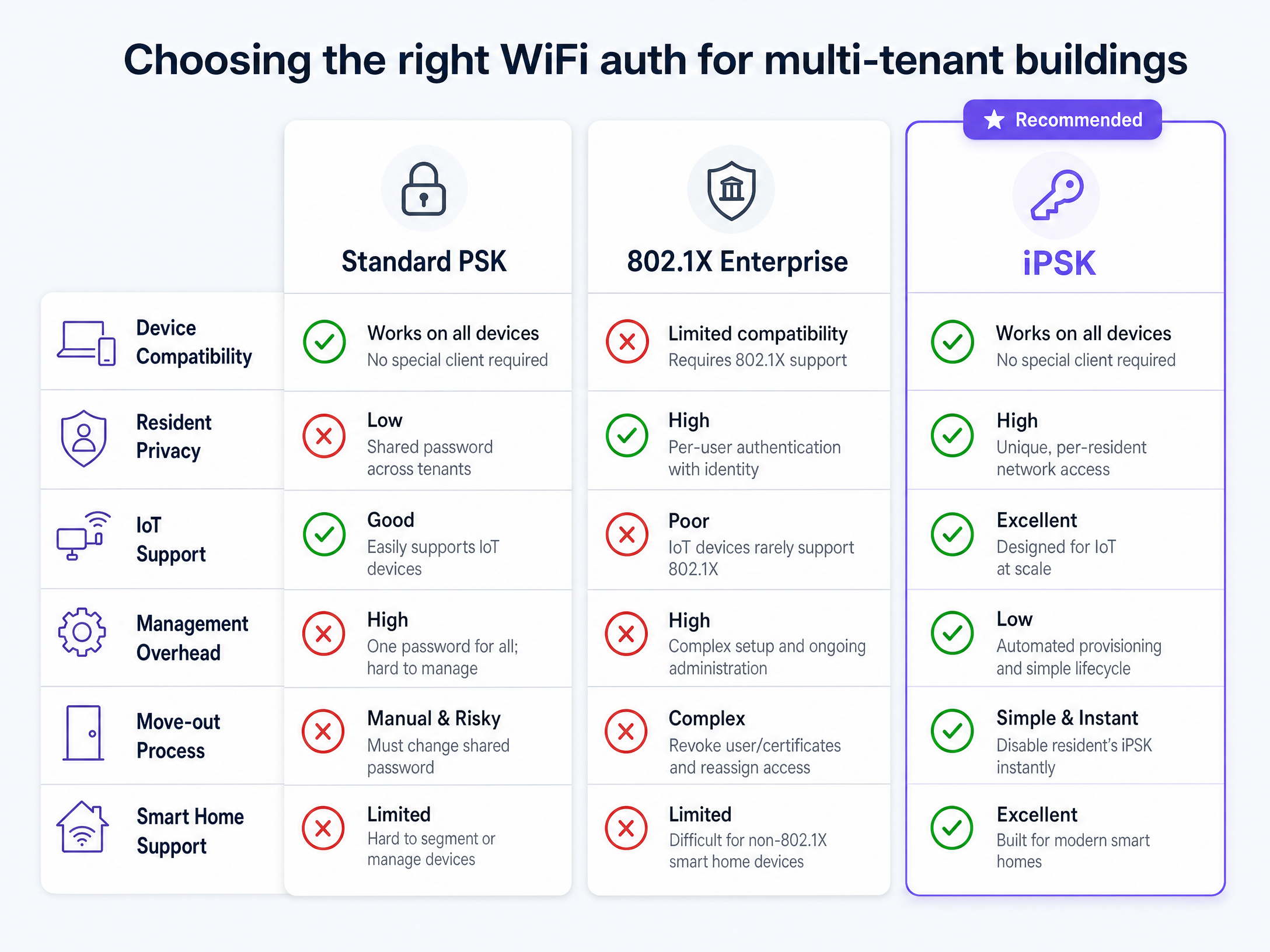
IEEE 802.1X is the gold standard for enterprise network authentication. It requires each device to present a username and password or a digital certificate to a RADIUS server via an EAP (Extensible Authentication Protocol) exchange. The problem in residential environments is device compatibility. Smart bulbs, voice assistants, gaming consoles, and most IoT sensors do not include an 802.1X supplicant. They cannot participate in an EAP exchange. Forcing 802.1X on a residential network means residents cannot connect their smart home devices, generating a flood of support calls and significant resident dissatisfaction.
iPSK uses WPA2-Personal or WPA3-Personal at the client level, which every consumer device supports. The enterprise-grade identity logic runs entirely on the backend between the AP and the RADIUS server, invisible to the connecting device.
Authentication flow in detail
The sequence below describes what happens from the moment a resident's device connects:
- The device broadcasts a probe request and associates with the SSID.
- The device sends its passphrase during the WPA2/WPA3 four-way handshake.
- The AP intercepts the passphrase and constructs a RADIUS Access-Request, including the device MAC address and the passphrase as a Cisco AV-Pair attribute (
psk-modeandpsk-password). - The cloud RADIUS server (Purple's RADIUS-as-a-Service) validates the passphrase against the resident database.
- On success, the RADIUS server returns an Access-Accept with the VLAN ID, QoS policy, and bandwidth profile for that resident.
- The AP assigns the device to the specified VLAN and completes the association.
- The device receives an IP address from the DHCP scope for that VLAN and is online within its isolated segment.
The entire sequence completes in under 500 milliseconds and is transparent to the resident.
Vendor implementation notes
The core concept is standardised, but vendor implementations differ in terminology and configuration:
| Vendor | Term used | RADIUS attribute | Notes |
|---|---|---|---|
| Cisco Meraki | Personal Private Network | Cisco-AVPair: psk-mode, psk-password | Configured via Meraki Dashboard; RADIUS required |
| HPE Aruba | PPSK (Private PSK) | Aruba-MPSK-Passphrase | Native in AOS-CX and Aruba Central |
| Ruckus | DPSK (Dynamic PSK) | Ruckus-DPSK-Passphrase | Managed via Ruckus One or SmartZone |
| Juniper Mist | ePSK | Juniper-MPSK-Passphrase | Cloud-native via Mist AI |
| Ubiquiti UniFi | PPSK | Tunnel-Password | Supported in UniFi Network 7.x+ |
| Cambium | ePSK | Cambium-MPSK-Passphrase | Managed via cnMaestro |
Purple's cloud RADIUS layer abstracts these vendor differences, presenting a single management interface regardless of the underlying hardware.
Implementation guide
Step 1: Network segmentation and IP addressing
High-density residential networks demand careful subnet planning. A typical household connects 15-25 devices. A 200-unit building can host 3,000-5,000 concurrent devices at peak. A standard /24 subnet provides 254 usable IP addresses - insufficient for even a single floor.
Use /20 or /21 subnets for client VLANs. A /20 provides 4,094 usable addresses; a /21 provides 2,046. Assign a dedicated management VLAN for your network infrastructure, a separate VLAN for building IoT systems (access control, CCTV, HVAC), and individual resident VLANs handled dynamically by the RADIUS server.
Enable client isolation between VLANs at the AP level, but ensure intra-VLAN communication is permitted so that devices within the same resident's bubble can communicate freely.
Step 2: RADIUS-as-a-Service integration
Purple's cloud RADIUS eliminates the need to deploy and maintain on-premises RADIUS infrastructure. Configure your APs to point to Purple's RADIUS endpoints (primary and secondary for redundancy). Purple operates at 99.999% uptime, ensuring authentication availability even during maintenance windows.
For properties using Microsoft Entra ID or Okta as their identity provider, Purple integrates via SCIM (System for Cross-domain Identity Management) to synchronise resident profiles automatically. This means when a resident is added or removed in your identity provider, their iPSK is provisioned or revoked without manual intervention.
Step 3: Automating the tenant lifecycle
The operational efficiency of iPSK depends on integration with your Property Management System (PMS). The workflow should be:
At lease signing: The PMS triggers an API call to Purple. Purple generates a unique iPSK for the unit, stores it against the resident's profile, and emails the passphrase to the resident. No manual IT involvement required.
At move-in: The resident connects their devices using the emailed passphrase. All devices are immediately placed in their isolated VLAN. The experience is identical to setting up a home broadband router.
During tenancy: The resident uses the Purple app to add new devices, check connectivity status, and manage their network. Headless IoT devices (smart plugs, sensors) can be registered by MAC address through the self-service portal.
At move-out: The PMS triggers a revocation API call. Purple immediately invalidates the resident's iPSK. No other resident is affected. The unit's VLAN is cleared and ready for the next resident.
Step 4: RF planning and access point placement
Replacing per-unit routers with a managed network reduces the number of radio transmitters in the building dramatically. In a 200-unit building, removing 200 consumer routers eliminates a significant source of co-channel interference. Deploy enterprise APs in corridors or purpose-built in-unit positions, targeting -65 dBm or better signal strength at the furthest point in each unit.
For buildings with thick concrete walls or complex floor plans, use wall-mount APs deployed inside units rather than corridor-mounted APs. Coordinate with your AP vendor's RF planning tools (Cisco Meraki RF Planner, Aruba AirMatch, Ruckus SmartRF) to model coverage before installation.
Best practices
Broadcast traffic management
High device density amplifies broadcast traffic. mDNS, ARP, and SSDP frames from thousands of devices can consume significant airtime. Enable Multicast-to-Unicast conversion on your APs to convert broadcast frames into targeted unicast transmissions. This reduces airtime waste and improves battery life for mobile devices.
For mDNS specifically, deploy an mDNS gateway or proxy (available natively on Cisco Meraki, Aruba, and Ruckus) to handle service discovery across VLANs where needed, such as for building-wide printing services in common areas.
CGNAT and gaming NAT types
IPv4 address exhaustion in large deployments requires Carrier-Grade NAT (CGNAT). However, strict CGNAT configurations break peer-to-peer gaming traffic, resulting in Strict or Type 3 NAT on PlayStation and Xbox consoles. Configure your gateway to support UPnP (Universal Plug and Play) or PCP (Port Control Protocol) for resident VLANs. This allows consoles to automatically negotiate open port mappings without requiring manual firewall rules.
Security and GDPR compliance
Resident WiFi data sits in a sensitive privacy context. Residents have an ongoing relationship with the operator, and data exposure extends over years rather than minutes. Key compliance considerations include:
Resident isolation as a privacy requirement: Under GDPR, operators have a duty of care to prevent one resident from accessing another's data or devices. iPSK's VLAN isolation is the technical mechanism that satisfies this requirement.
Data retention: Retain resident-identifiable WiFi connection logs only as long as operationally necessary. Six months is a common ceiling for security and compliance purposes.
Data residency: Purple stores data in EU-based infrastructure by default, with options for UK-specific data residency post-Brexit. Purple holds ISO 27001, GDPR, and Cyber Essentials certifications.
Consent: Residents should acknowledge a clear acceptable use policy at onboarding. Purple's self-service portal includes configurable consent flows.
Real-world case studies
Case study 1: 350-unit BTR development
A property developer managing a 350-unit BTR complex in a major UK city faced three problems: 350 individual consumer routers creating severe RF interference, a 72-hour average wait for broadband activation that delayed move-ins, and a support team spending 40% of their time on WiFi-related tickets.
The operator deployed Purple's Multi-Tenant WiFi across the building using existing Cisco Meraki APs. Purple integrated with the property's existing PMS via API. Upon lease signing, residents received their unique iPSK by email. On move-in day, connectivity was instant. The RF environment improved significantly with the removal of 350 consumer routers, and average speeds across the building increased by 35%. Support tickets related to WiFi dropped by 60% in the first three months, attributed to the self-service device management portal and the elimination of smart device pairing issues.
Case study 2: 1,200-bed student accommodation
A purpose-built student accommodation (PBSA) provider needed to onboard 1,200 students in a single weekend at the start of the academic year. The previous shared-PSK system required staff to manually distribute password sheets and handle hundreds of support calls from students unable to connect gaming consoles and smart TVs.
With iPSK deployed via Purple on HPE Aruba access points, each student received their unique passphrase with their welcome pack before arrival. Students registered their headless devices (consoles, smart TVs) via the Purple app during the week before move-in. On arrival weekend, the IT team handled fewer than 20 connectivity support calls across 1,200 students - a 94% reduction compared to the previous year. The mDNS proxy configuration resolved all Chromecast and AirPlay pairing issues that had previously generated the highest volume of tickets.
ROI and business impact
For BTR and MDU operators, the financial case for managed iPSK WiFi is straightforward. The British Property Federation's research and Purple's own data from 80,000+ live venues support the following benchmarks:
| Metric | Benchmark | Source |
|---|---|---|
| Rent premium per unit per month | £15-30 | British Property Federation / Purple data |
| Reduction in void period | 5-10 days | Purple customer data |
| Per-door cost reduction vs individual broadband | 30-50% | Purple customer data |
| WiFi ranking in BTR amenity surveys | Top 5 | British Property Federation |
The net operating income (NOI) impact compounds across three vectors: the direct rent premium, the reduction in void-period revenue loss, and the reduction in IT support overhead. In a 200-unit building at a £20 per unit per month premium, the annual revenue uplift is £48,000. Eliminating 200 consumer routers at an average replacement cost of £80 each saves £16,000 in hardware alone over a five-year cycle, before accounting for energy savings and maintenance time.
Purple's pricing model is per-unit per-month with no bundled broadband contract, meaning the operator captures the full value of the WiFi amenity rather than sharing it with a third-party ISP.
Further reading
For related network design topics, see Three SSIDs to rule them all: guest, Passpoint, and IoT WiFi and the iPSK: una guía completa para empresas reference guide. For the underlying platform, explore Guest WiFi and WiFi Analytics . Purple serves operators across Hospitality , Retail , Healthcare , and Transport verticals.
Key Definitions
iPSK (Identity Pre-Shared Key)
A wireless authentication mechanism that assigns a unique passphrase to each user or device on a single SSID. The passphrase acts as an identity signal, triggering dynamic VLAN assignment via a RADIUS server.
The enabling technology for per-resident network isolation in BTR and MDU environments. Also called PPSK (HPE Aruba), Personal Private Network (Cisco Meraki), or ePSK (Cambium, Juniper Mist).
VLAN (Virtual Local Area Network)
A logical network segment that groups devices into an isolated broadcast domain, regardless of their physical location on the network.
In iPSK deployments, each resident is assigned a dedicated VLAN. This is the technical mechanism that prevents one resident's devices from communicating with another's.
RADIUS (Remote Authentication Dial-In User Service)
A networking protocol that provides centralised Authentication, Authorisation, and Accounting (AAA) for network access. Defined in RFC 2865.
The backend engine that validates iPSK passphrases and returns dynamic VLAN assignments to access points. Purple provides RADIUS-as-a-Service, eliminating the need for on-premises RADIUS infrastructure.
Dynamic VLAN assignment
The process by which a RADIUS server instructs an access point to place an authenticated device into a specific VLAN, based on the user's identity attributes returned in the Access-Accept message.
The mechanism that creates the per-resident WiFi bubble in iPSK deployments. The VLAN ID is returned as a RADIUS attribute (Tunnel-Private-Group-ID) in the authentication response.
802.1X
An IEEE standard for port-based Network Access Control (PNAC) that requires devices to authenticate via EAP (Extensible Authentication Protocol) before gaining network access.
Highly secure for enterprise environments but unsuitable for residential deployments because most consumer IoT devices do not include an 802.1X supplicant.
mDNS (Multicast DNS)
A zero-configuration networking protocol that allows devices to discover services on a local network without a central DNS server. Used by Apple AirPlay, Google Cast, and many IoT devices.
mDNS operates within a single broadcast domain. In iPSK deployments, an mDNS proxy or gateway is required to enable service discovery within a resident's VLAN while blocking cross-VLAN discovery.
CGNAT (Carrier-Grade NAT)
A large-scale Network Address Translation implementation that allows multiple private IP addresses to share a single public IPv4 address, used to address IPv4 exhaustion in large deployments.
Commonly required in MDU deployments with hundreds of units. Must be configured to support UPnP or PCP to avoid breaking gaming console NAT types.
SCIM (System for Cross-domain Identity Management)
An open standard protocol (RFC 7642-7644) for automating the exchange of user identity information between identity providers and service providers.
Used to synchronise resident profiles between Microsoft Entra ID or Okta and Purple's platform, enabling automatic iPSK provisioning and revocation tied to the tenant lifecycle.
Worked Examples
A 250-unit BTR development currently has individual consumer routers in each apartment. Residents report slow speeds, frequent disconnections, and an inability to pair smart home devices. The property manager receives 30-40 WiFi support calls per week. How should the IT team redesign this network?
Remove all 250 consumer routers to eliminate co-channel RF interference. Deploy enterprise APs (Cisco Meraki MR46 or HPE Aruba AP-635) in corridors or in-unit positions, targeting -65 dBm coverage at the furthest point in each unit. Configure a single SSID with iPSK enabled, pointing to Purple's cloud RADIUS for authentication. Integrate Purple with the existing PMS via API so that unique iPSKs are generated and emailed to residents automatically at lease signing. Configure /20 subnets for client VLANs to support the expected device density of 15-25 devices per unit. Enable Multicast-to-Unicast conversion and deploy an mDNS proxy to resolve smart device pairing issues. Deploy the Purple self-service portal so residents can manage their own devices without contacting support.
A student accommodation provider needs to onboard 800 students across a single move-in weekend. Students will bring laptops, phones, gaming consoles, and smart TVs. The IT team has four staff available for the weekend. How should they prepare the network and the onboarding process?
Two weeks before move-in, send each student their unique iPSK with their welcome information. Provide a short guide explaining how to connect their primary devices (phone, laptop) and how to register headless devices (consoles, smart TVs) via the Purple self-service portal. Open the self-service portal for device pre-registration one week before move-in so students can register MAC addresses before they arrive. On move-in weekend, the IT team monitors the Purple dashboard for authentication failures and DHCP exhaustion alerts rather than handling individual connection issues. Configure /21 subnets per floor or block to ensure sufficient IP address capacity. Enable UPnP on the gateway for resident VLANs to support gaming NAT requirements.
Practice Questions
Q1. A 400-unit BTR operator wants to offer a premium 'Gamer Tier' subscription at an additional £15 per month, providing higher bandwidth and Open NAT type for gaming consoles. How should the network architecture support this tiered service?
Hint: RADIUS can return more than just a VLAN ID. Consider what other policy attributes can be applied per resident, and what gateway configuration is required for gaming NAT.
View model answer
Configure the RADIUS server to return a QoS bandwidth policy attribute (e.g., a rate-limiting profile) alongside the VLAN ID for standard residents. For 'Gamer Tier' subscribers, the RADIUS server returns a different QoS profile with higher bandwidth limits and a flag that instructs the gateway to apply less restrictive CGNAT rules for that VLAN. Enable UPnP or PCP on the gateway specifically for Gamer Tier VLANs to allow consoles to negotiate open port mappings. The PMS integration should update the resident's RADIUS profile when they subscribe or unsubscribe from the tier, triggering an immediate policy change without requiring re-authentication.
Q2. A resident reports that their Chromecast shows as 'offline' on their phone, even though both devices are connected to the building WiFi. The IT team confirms both devices are authenticated and have IP addresses. What is the most likely cause, and what is the fix?
Hint: Chromecast discovery relies on mDNS. Think about how mDNS traffic behaves across VLAN boundaries.
View model answer
The most likely cause is that the phone and Chromecast are on different VLANs, preventing mDNS discovery traffic from reaching both devices. This can happen if the devices connected at different times and were assigned to different DHCP scopes, or if the resident has multiple iPSK keys. Verify both devices are using the same iPSK and are in the same VLAN. If the building uses a single shared VLAN for all residents (not recommended), enable an mDNS proxy to handle cross-VLAN service discovery. The correct long-term fix is to ensure all of a resident's devices use the same iPSK, placing them all in the same isolated VLAN where mDNS operates natively.
Q3. During a peak evening period, the IT team receives alerts that DHCP is failing for new device connections in a 300-unit building. Investigation shows the DHCP pool is exhausted. What went wrong in the network design, and how should it be corrected?
Hint: Think about the relationship between unit count, devices per unit, and subnet size. What is the maximum number of IP addresses a /24 subnet provides?
View model answer
The network was designed with /24 subnets for client VLANs, providing only 254 usable IP addresses per VLAN. With 300 units at 15-25 devices each, the potential device count is 4,500-7,500. The /24 subnets are fundamentally undersized. The immediate fix is to expand the DHCP pool by migrating to /20 or /21 subnets (providing 4,094 or 2,046 addresses respectively). This requires updating the VLAN configuration on the core switch and the DHCP server scope. The long-term fix is to plan subnet sizes based on device density (15-25 per unit) rather than unit count, and to implement DHCP monitoring alerts that trigger at 80% pool utilisation rather than at exhaustion.
Continue reading in this series
PPSK wpa3: comparing features and deployment models
This technical reference guide compares PPSK and WPA3-SAE, explaining their architectural differences and deployment models for multi-tenant environments. It provides actionable guidance for IT managers and property developers on achieving secure, isolated WiFi networks using Purple's identity-based solutions.
PPSK wpa3: comparing features and deployment models
This technical reference guide compares PPSK and WPA3-SAE, explaining their architectural differences and deployment models for multi-tenant environments. It provides actionable guidance for IT managers and property developers on achieving secure, isolated WiFi networks using Purple's identity-based solutions.
PPSK life: comparing features and deployment models
This guide compares PPSK (Private Pre-Shared Key) against standard PSK and 802.1X, detailing implementation models for multi-tenant environments. It equips IT managers and property operators to deploy secure, resident-isolated WiFi that supports smart home devices and drives measurable business value.