
PPSK lights: comparing features and deployment models
A definitive technical guide comparing PPSK (Private Pre-Shared Key) authentication models for smart buildings and multi-tenant environments. It covers architecture, IoT segmentation, vendor implementations, and the business case for identity-based WiFi in the Build-to-Rent sector.
Listen to this guide
View podcast transcript
Executive Summary
For property developers and build-to-rent operators, WiFi is no longer an optional extra. It is a utility comparable to heating and water. However, standard home routers create frequency chaos in high-density buildings, and corporate authentication methods fail when residents try to connect smart bulbs and voice assistants.
Private Pre-Shared Key (PPSK) is the technical bridge between enterprise security and consumer simplicity. This guide provides IT managers, network architects, and operations directors with a practical framework for deploying PPSK networks. We explore the technical architecture required to isolate resident traffic, the integration of IoT devices, and the commercial impact of treating WiFi as a managed amenity. The decisions you make at the design stage will dictate your operational overhead and resident satisfaction for the next decade.
Listen to our companion briefing on the core concepts of PPSK lights and deployment models:
Technical Deep-Dive: The Authentication Dilemma
A multi-tenant building network has to serve distinct user populations simultaneously. You have residents connecting laptops and phones. You have smart home devices connecting to the internet. You have building management systems operating HVAC and security. You have transient guests requiring temporary access.
The traditional approach to WiFi authentication fails in this environment. Let us examine why, and how PPSK solves the problem.
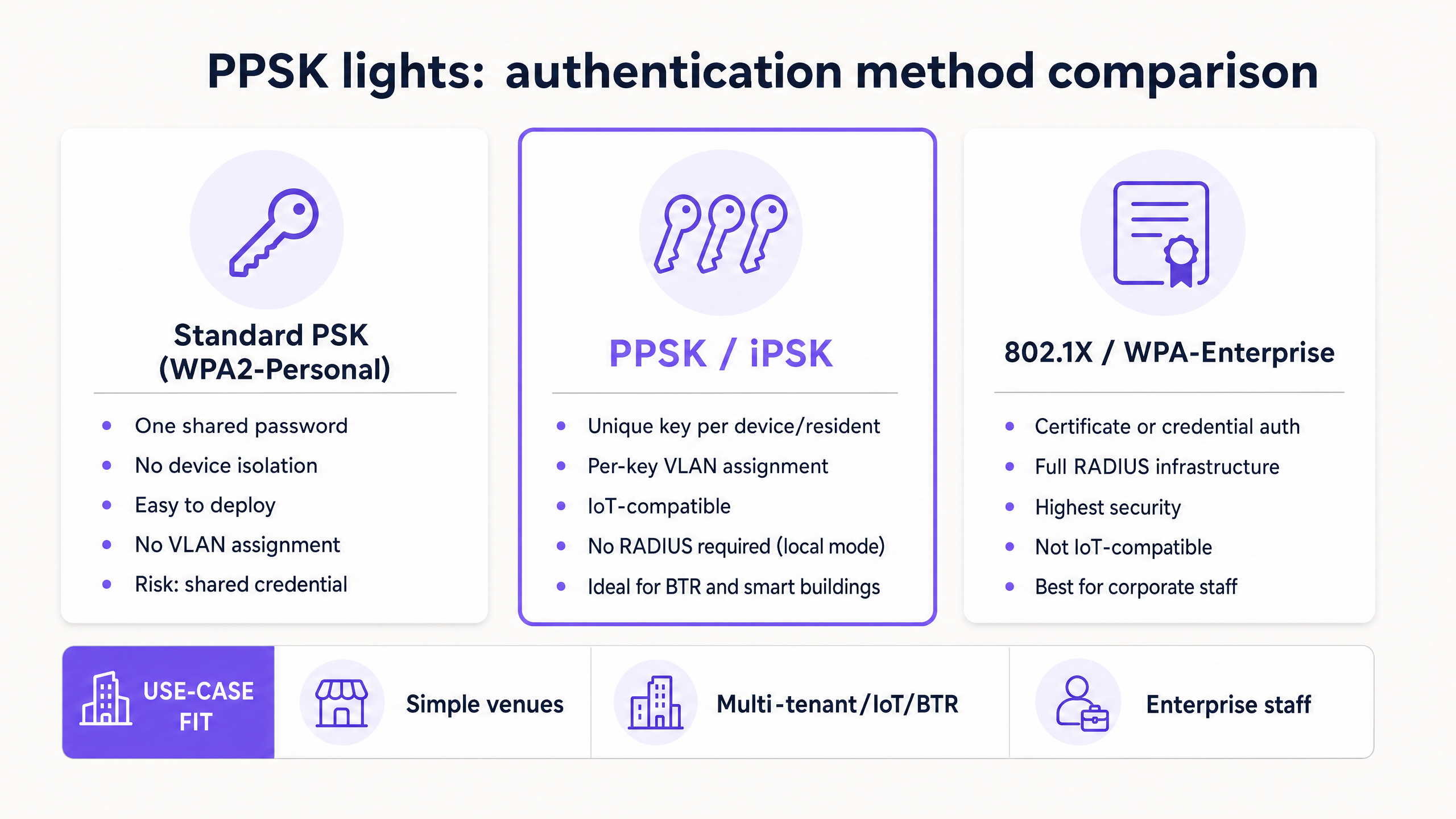
Standard PSK (WPA2-Personal)
Standard Pre-Shared Key is the method used by consumer home routers. One password grants access to the entire network. In a multi-tenant environment, this is a severe security risk. If a resident shares the password, or if it leaks, the entire building is compromised. Because all users share the same broadcast domain, residents can see each other's devices. A resident in flat 101 can accidentally cast a video to a smart TV in flat 102. Furthermore, when a resident moves out, rotating the building-wide password disconnects every other resident simultaneously.
802.1X (WPA-Enterprise)
WPA-Enterprise uses the IEEE 802.1X standard to authenticate users via a RADIUS server, using individual credentials or digital certificates. It is the gold standard for corporate networks and the correct choice for your building management staff. However, it is fundamentally incompatible with the consumer smart home. Smart bulbs, thermostats, and voice assistants lack the interface or certificate store required to complete 802.1X authentication. Deploying 802.1X for residents means their IoT devices will not connect.
Identity PSK (PPSK / iPSK)
Private Pre-Shared Key (PPSK) - also called Identity PSK (iPSK) by Cisco Meraki, or Dynamic PSK by Ruckus - bridges this gap. Every resident or unit receives a unique passphrase. The access point uses that specific passphrase to identify the user and map their traffic to a dedicated Virtual Local Area Network (VLAN).
To the resident, it feels exactly like a home network. They enter a password, and they are online. To the IoT device, it looks like a standard WPA2-Personal network, ensuring 100% compatibility. To the network administrator, it is a segmented, enterprise-grade architecture where every flat is isolated in its own secure broadcast domain.
Architecture and Network Segmentation
The foundational principle of any enterprise hospitality or residential network is logical segmentation. The physical access points and switches are shared, but the traffic is isolated.
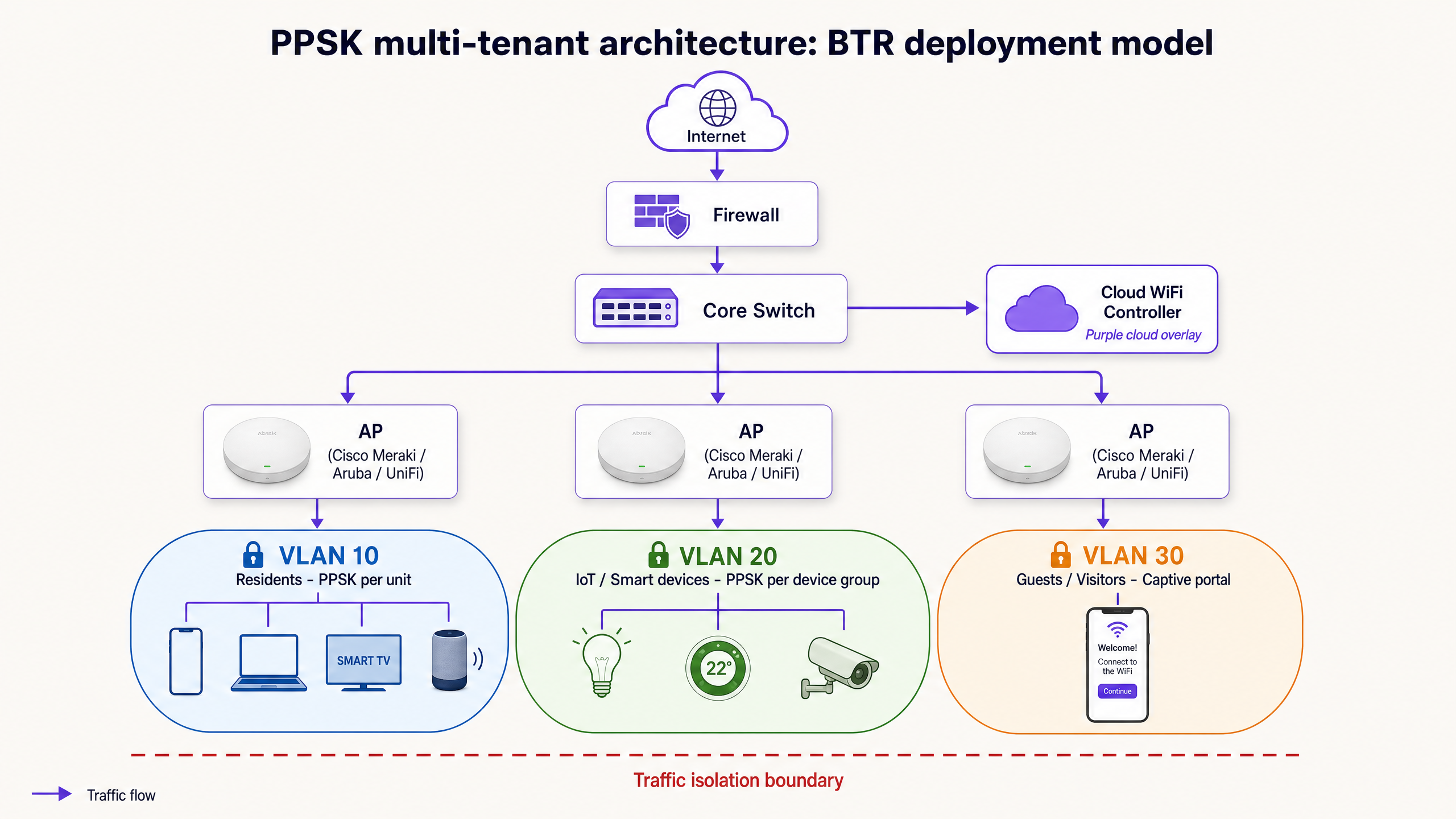
In a PPSK deployment, the architecture relies on VLAN tagging. When a device authenticates using Resident A's unique key, the wireless controller tags that traffic with VLAN 10. When a device uses Resident B's key, the traffic is tagged with VLAN 11.
The Three-VLAN Minimum Standard
We recommend a minimum of three logical segments for any modern Build-to-Rent deployment:
- Resident Personal Devices: Phones, laptops, and tablets. This segment uses PPSK to isolate each unit.
- IoT and Smart Building Systems: Smart lights, thermostats, and cameras. This segment also uses PPSK, but firewall rules are configured to allow specific communication between the resident's personal VLAN and their IoT VLAN, while blocking lateral movement between units.
- Guest Access: Visitors and delivery drivers. This segment uses an open SSID with a captive portal. It is completely isolated from the resident and IoT networks, with traffic routed directly to the internet.
Hardware and Vendor Implementations
The implementation of PPSK varies across hardware vendors. You must select hardware that supports dynamic VLAN assignment via PSK.
- Cisco Meraki: Uses iPSK (Identity PSK). Historically required an external RADIUS server for VLAN mapping, but recent firmware supports local iPSK directly on the dashboard.
- HPE Aruba: Uses PPSK. Often deployed in conjunction with ClearPass Policy Manager for enterprise-scale deployments.
- Ubiquiti UniFi: Introduced PPSK in UniFi Network version 8. It allows mapping unique passwords to specific virtual networks without external RADIUS, but is currently restricted to WPA2.
- Ruckus: Uses Dynamic PSK (DPSK), a patented technology that cryptographically generates time-limited keys.
Purple's multi-tenant platform operates as a hardware-agnostic cloud overlay. It integrates with Cisco Meraki, HPE Aruba, Ruckus, Juniper Mist, Ubiquiti UniFi, Cambium, Extreme, and Fortinet. This allows property managers to automate the PPSK lifecycle centrally, regardless of the underlying access point vendor. If you swap your hardware from Meraki to Aruba in five years, your resident onboarding process remains unchanged.
Implementation Guide: Step-by-Step Deployment
Deploying a PPSK network requires careful planning. Follow this sequence to ensure a stable, scalable deployment.
1. Document the Device Landscape
Before configuring switches, map every device category that will connect to the network. Categorise them by ownership (resident vs landlord) and capability (802.1X capable vs PSK only).
2. Design the VLAN Architecture
Assign a VLAN ID and IP subnet to each traffic class. Ensure your core switch and firewall are configured to handle inter-VLAN routing. The firewall must enforce a default-deny policy between resident VLANs. Resident A must not be able to ping Resident B.
3. Provision the Internet Uplink
A common failure mode in MDU deployments is under-provisioning the internet circuit. A 200-unit building with 15 devices per household generates significant concurrent traffic. Plan for 5 to 10 Mbps per active household at peak. A dedicated leased line with symmetrical bandwidth and a strict SLA is mandatory.
4. Automate the Key Lifecycle
Manual key generation does not scale. Integrate your network controller or Purple platform with your Property Management System (PMS). When a lease is signed, the PMS should trigger an API call to generate a PPSK and email it to the resident. When the lease terminates, the key must be automatically revoked.
5. Validate IoT Onboarding
Test the onboarding flow for common smart home devices before residents move in. Ensure that devices requiring local discovery (like Chromecast or Sonos) can communicate correctly when the controlling phone and the IoT device are on their respective PPSK-mapped VLANs.
Best Practices and Risk Mitigation
Control SSID Proliferation
Do not broadcast a separate SSID for every flat. This is a legacy approach that destroys wireless performance. Every broadcast SSID consumes airtime for beacon frames. In a dense environment, broadcasting 20 SSIDs from a single access point will cause severe channel congestion.
The correct approach is to broadcast a maximum of three SSIDs building-wide: one for Residents (PPSK), one for IoT (PPSK), and one for Guests (Captive Portal). The PPSK mechanism handles the segmentation on the backend.
Ensure Wired Network Segmentation
Wireless segmentation is useless if the wired infrastructure is flat. Ensure that switch ports connecting to access points are configured as trunk ports, carrying all necessary VLANs as tagged traffic. If a trunk port defaults to an access port, all traffic collapses onto the native VLAN, destroying your isolation.
Plan for Compliance and Data Privacy
In a multi-tenant environment, you are providing an ISP-like service. You must comply with GDPR regarding connection logs. Retain identifiable logs only as long as necessary for security and operational troubleshooting. Six months is a standard retention period. Ensure your privacy policy clearly states what network data is collected and how it is used.
ROI and Business Impact
Treating WiFi as a managed amenity transforms it from a cost centre into a revenue driver.
According to the British Property Federation, high-quality managed WiFi commands a rent premium of 15 to 30 pounds per unit per month in the UK Build-to-Rent sector. For a 200-unit building, that represents up to 72,000 pounds in additional Annual Recurring Revenue (ARR).
Furthermore, pre-provisioned WiFi reduces void periods. When a unit is instantly ready for a new tenant without a two-week wait for a broadband installation, the unit lets faster.
By deploying PPSK on enterprise hardware, you reduce support overhead. Residents self-serve their device connections. You eliminate the "Chromecast won't connect" tickets. You eliminate the truck rolls for password resets. The network becomes a silent, reliable utility that underpins the modern residential experience.
For further reading on network design and related topics, review our guides on Guest WiFi and WiFi Analytics , or explore our sector-specific insights for Hospitality and Retail . If you are evaluating specific hardware, read our detailed breakdown: PPSK unifi: comparing features and deployment models . For a deeper dive into SSID strategy, see Three SSIDs to rule them all: guest, Passpoint, and IoT WiFi .
Key Definitions
PPSK (Private Pre-Shared Key)
An authentication method where unique passphrases are provided to individual users or devices on a single SSID, allowing their traffic to be mapped to specific VLANs.
Used to provide secure, isolated networks for residents in multi-tenant buildings while maintaining compatibility with consumer IoT devices.
VLAN (Virtual Local Area Network)
A logical subnetwork that groups a collection of devices from different physical LANs, isolating their broadcast traffic.
Essential for separating resident traffic, building management systems, and guest access on shared physical infrastructure.
SSID (Service Set Identifier)
The public name of a wireless network broadcast by an access point.
Operators should minimise SSID count to reduce airtime congestion, using PPSK to handle segmentation behind a single SSID.
802.1X
An IEEE standard for port-based network access control that provides an authentication mechanism to devices wishing to attach to a LAN or WLAN.
The standard for corporate security, but incompatible with most consumer smart home and IoT devices.
Captive Portal
A web page that a user of a public-access network is obliged to view and interact with before access is granted.
Used on the Guest VLAN to capture first-party data, manage terms of service, and isolate transient visitors from the core network.
RADIUS
A networking protocol that provides centralised Authentication, Authorization, and Accounting management for users who connect and use a network service.
Used in 802.1X deployments and some vendor implementations of PPSK (like Cisco Meraki) to manage credential validation and VLAN assignment.
Client Isolation
A wireless network setting that prevents devices connected to the same access point from communicating directly with each other.
Must be enabled on Guest networks to prevent lateral movement, but carefully managed on resident PPSK networks so smart devices can communicate.
BSS Colouring
A Wi-Fi 6 (802.11ax) feature that assigns a 'colour' identifier to different basic service sets to help devices distinguish between their own network and overlapping networks.
Crucial for maintaining performance in high-density environments like apartment buildings where multiple access points operate in close proximity.
Worked Examples
A 250-unit Build-to-Rent development is experiencing severe WiFi performance issues. They currently broadcast a unique SSID for every apartment (e.g., 'Flat101', 'Flat102'). Residents complain of slow speeds, and smart home devices frequently disconnect.
The operator must consolidate the network. They should deploy a single building-wide SSID for residents (e.g., 'Building_Residents') configured with PPSK. Each resident is issued a unique passphrase that maps their traffic to a dedicated VLAN. A second building-wide SSID (e.g., 'Building_IoT') should be deployed for smart devices, also using PPSK.
A property manager wants to allow residents to control their smart bulbs and Sonos speakers from their phones, but the IoT devices and personal phones are placed on separate VLANs for security. The devices cannot discover each other.
The network architect must configure multicast DNS (mDNS) gateway or Bonjour forwarding on the core switch or wireless controller. This allows discovery protocols to cross the VLAN boundary between the resident's personal VLAN and their specific IoT VLAN, while firewall rules permit the necessary control traffic.
Practice Questions
Q1. You are deploying WiFi for a 300-bed student accommodation block. The client wants to use 802.1X (WPA-Enterprise) for all students to ensure maximum security. What is the primary operational risk of this approach?
Hint: Consider the types of devices students bring with them.
View model answer
The primary risk is incompatibility with consumer devices. Students bring games consoles (PlayStation, Xbox), smart speakers (Echo, HomePod), and streaming sticks (Chromecast). These devices generally do not support 802.1X authentication. Deploying 802.1X will result in massive support ticket volumes as students fail to connect their entertainment devices. PPSK is the correct approach here.
Q2. A landlord wants to provide a 'Gamer Tier' internet package with higher bandwidth for an additional fee, using the existing building WiFi infrastructure. How should this be implemented technically?
Hint: Think about how PPSK maps to backend infrastructure.
View model answer
This should be implemented using the existing PPSK infrastructure. The landlord upgrades the resident's profile in the management portal (e.g., Purple). The resident's existing PPSK remains the same, but the backend policy engine applies a new bandwidth rate limit to their specific VLAN or MAC addresses. No hardware changes or new SSIDs are required.
Q3. During a security audit, a penetration tester connects to the 'Guest_WiFi' SSID and successfully pings a resident's smart TV. What configuration failure has occurred?
Hint: Where does traffic isolation happen?
View model answer
The inter-VLAN routing policy on the core switch or firewall is misconfigured. The Guest VLAN must have a strict 'default-deny' policy blocking all traffic to internal subnets (including resident VLANs), permitting only outbound traffic to the internet. Additionally, client isolation may be disabled on the Guest SSID.
Continue reading in this series
PPSK wpa3: comparing features and deployment models
This technical reference guide compares PPSK and WPA3-SAE, explaining their architectural differences and deployment models for multi-tenant environments. It provides actionable guidance for IT managers and property developers on achieving secure, isolated WiFi networks using Purple's identity-based solutions.
PPSK wpa3: comparing features and deployment models
This technical reference guide compares PPSK and WPA3-SAE, explaining their architectural differences and deployment models for multi-tenant environments. It provides actionable guidance for IT managers and property developers on achieving secure, isolated WiFi networks using Purple's identity-based solutions.
PPSK life: comparing features and deployment models
This guide compares PPSK (Private Pre-Shared Key) against standard PSK and 802.1X, detailing implementation models for multi-tenant environments. It equips IT managers and property operators to deploy secure, resident-isolated WiFi that supports smart home devices and drives measurable business value.