
PPSK umpsa: comparing features and deployment models
This technical guide details the deployment of Private Pre-Shared Key (PPSK) and Identity Pre-Shared Key (iPSK) architectures in high-density multi-tenant environments. It provides actionable implementation strategies for property developers and IT managers to secure resident networks, support IoT devices, and generate positive ROI through managed WiFi.
Listen to this guide
View podcast transcript
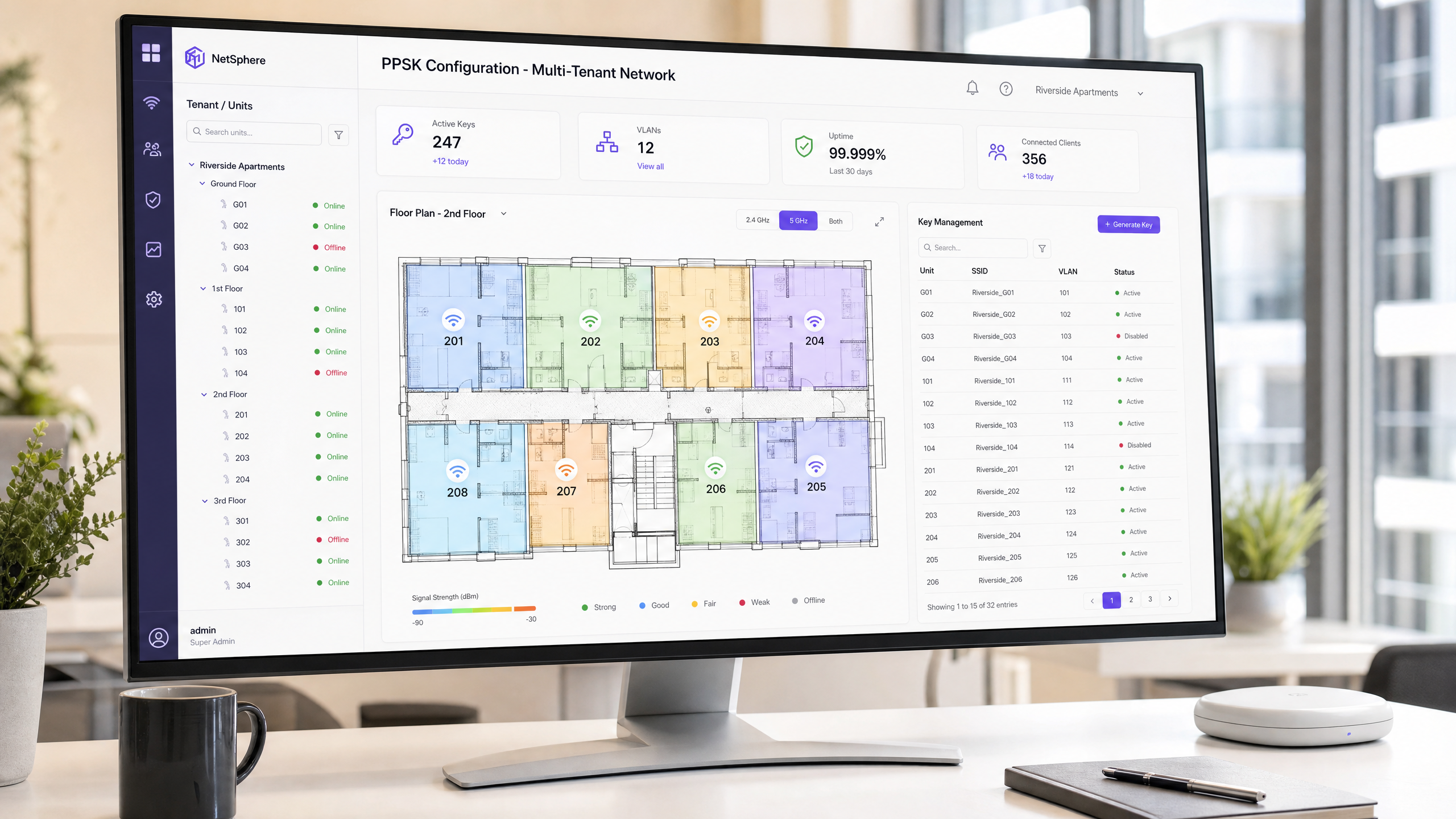
Executive Summary
Unmanaged WiFi in high-density multi-dwelling unit (MDU) and build-to-rent (BTR) properties is a serious operational liability. Relying on standard shared pre-shared keys (PSK) or individual tenant routers creates security risks, limits visibility, and prevents the delivery of managed connectivity as a premium amenity. The solution is Private Pre-Shared Key (PPSK) technology, specifically individual Identity Pre-Shared Keys (iPSK), which provides per-user or per-unit network isolation on a shared physical infrastructure.
This guide details the technical architecture of PPSK deployment models, comparing group-level segmentation with per-user iPSK. We examine implementation requirements across hardware vendors including Cisco Meraki, HPE Aruba, and Ruckus. We outline how property developers and BTR operators can transition to a centrally managed WLAN infrastructure that supports resident smart devices, reduces support overhead, and generates positive net operating income (NOI) through managed Guest WiFi and residential connectivity services.
Technical Deep-Dive
The core technical challenge in multi-tenant environments is balancing ease of onboarding with strict security and isolation. The 802.1X standard using EAP-TLS is the enterprise security baseline, but its requirement for certificate distribution makes it impractical for residential IoT devices and transient consumer hardware. PPSK bridges this gap by combining the simplicity of WPA2/WPA3-Personal with the segmentation capabilities of WPA-Enterprise.
The Problem with Shared PSK
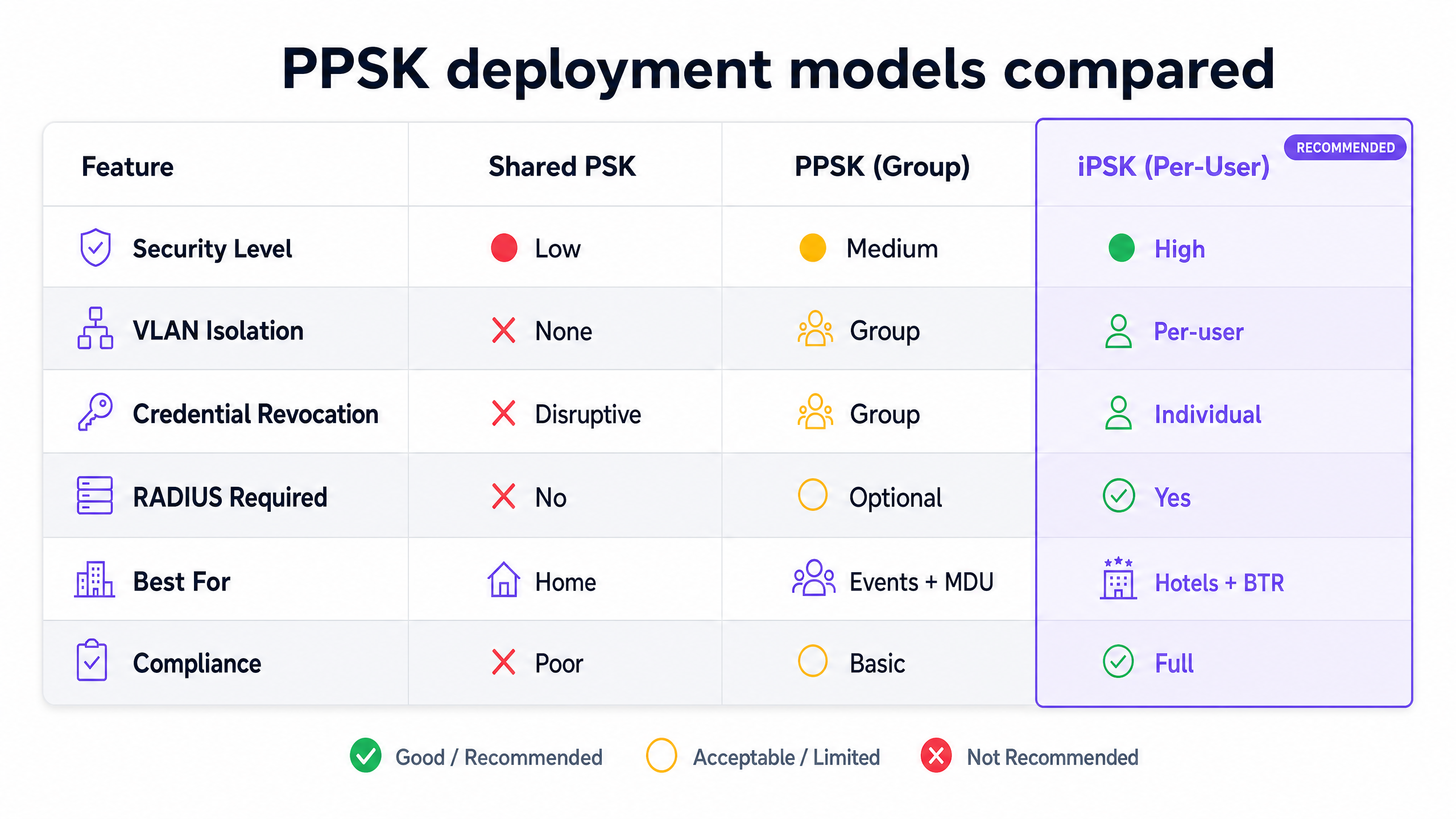
A standard shared PSK provides zero lateral security. Every device on the network shares the same encryption key, meaning any device can potentially intercept traffic from others. When a resident vacates the property, revoking their access requires changing the password for the entire building, disrupting all other residents. This model is incompatible with modern privacy requirements and MDU operations.
PPSK: Group-Level Segmentation
Group-level PPSK assigns a unique passphrase to specific cohorts—for example, isolating the marketing department from finance, or separating event attendees from staff. The access point or controller maps the specific key used during authentication to a predefined VLAN.
While group PPSK improves security by limiting lateral movement to within the group, it still suffers from shared-key vulnerabilities within that cohort. If one user in the group leaks the key, the entire group is compromised. This model is suited for Retail staff networks or temporary conference access, but fails the strict isolation requirements of residential deployments.
iPSK: Per-User Isolation
Identity Pre-Shared Key (iPSK) represents the target architecture for BTR and student accommodation. In an iPSK deployment, every resident or individual unit receives a unique encryption key. The network infrastructure maps this specific key to a dedicated, isolated VLAN.
This creates a secure "WiFi bubble" for each resident. A resident's smartphone, smart TV, and wireless speakers can communicate seamlessly with each other, replicating the experience of a private home network. However, they remain completely isolated from devices in adjacent units. This architecture satisfies GDPR data protection obligations by ensuring resident traffic remains private, while allowing the property operator to maintain central control over the RF spectrum.
Architecture and RADIUS Integration
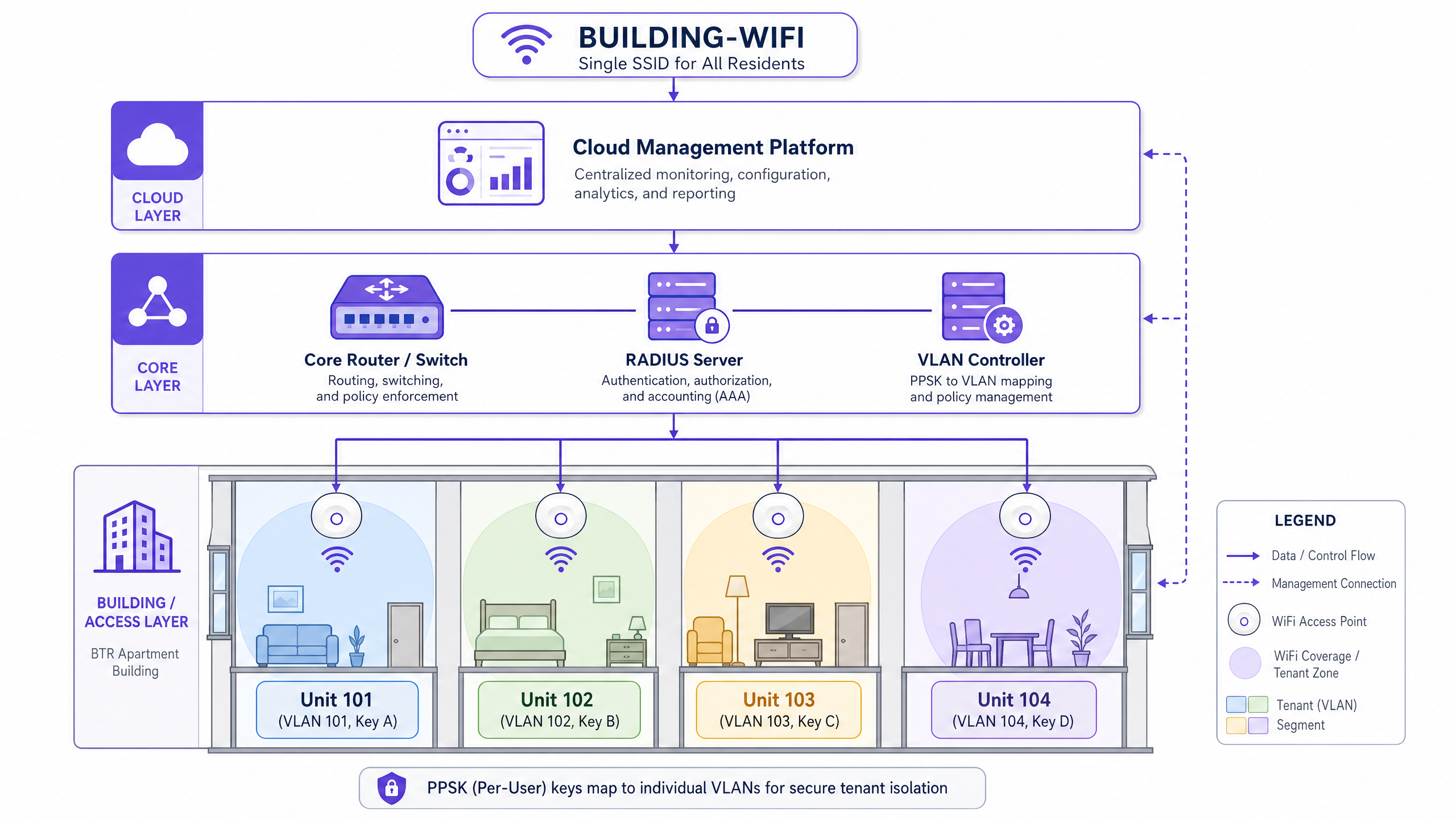
PPSK can be deployed with or without an external RADIUS server.
Without RADIUS: The access point maintains a local database mapping keys to VLANs. This approach is simple but limited by hardware constraints—often capping at a few hundred keys. It lacks centralised management and audit capabilities.
With RADIUS: For enterprise deployments, the access point forwards authentication requests to a central RADIUS server. The RADIUS server validates the credential against a directory (such as Microsoft Entra ID or Okta) and returns the appropriate VLAN assignment attributes. This architecture scales to tens of thousands of users and supports automated key lifecycle management.
Implementation Guide
Deploying a managed iPSK network requires precise planning and execution. The transition from unmanaged infrastructure to a centrally controlled service is a significant operational shift.
1. RF Planning and Access Point Density
A predictive site survey is mandatory. In concrete-walled MDU buildings, corridor-mounted access points fail to penetrate units effectively. The standard design places one enterprise-grade access point per unit, or one every other unit, depending on attenuation. You must plan for 15-25 devices per household.
2. Hardware Selection
Specify hardware from the canonical vendor list: Cisco Meraki, HPE Aruba, Ruckus, Juniper Mist, Ubiquiti UniFi, Cambium, Extreme, or Fortinet. Ensure the selected models support dynamic VLAN assignment via RADIUS and have sufficient memory to handle the expected client density.
3. Key Lifecycle Management
Integrate your network management platform with your property management system (PMS). Keys must be automatically provisioned upon lease signing and securely delivered to the resident. Crucially, keys must be automatically revoked at the end of the tenancy. Manual revocation processes inevitably fail, leading to stale credentials and security vulnerabilities.
4. Handling Legacy Devices
While steering clients to 5GHz and 6GHz bands is essential for performance, you must maintain 2.4GHz support for legacy IoT devices. Implement a checkerboard radio plan, disabling 2.4GHz on alternating access points to minimise co-channel interference while ensuring continuous coverage. Ensure your chosen hardware supports WPA3 transition mode, allowing WPA3-SAE and WPA2-PSK clients to connect to the same SSID.
Best Practices
- Implement Strict Client Isolation: Ensure that client isolation is enforced at the AP level for any shared or guest networks, and that inter-VLAN routing is strictly controlled by the core firewall for iPSK segments.
- Automate Onboarding: Use captive portals or dedicated resident applications to streamline device onboarding. Residents should be able to add headless IoT devices (like smart plugs or gaming consoles) via a self-service MAC address registration portal.
- Design for Scale: Size your DHCP scopes and IP subnets generously. A /24 subnet per unit is often excessive, but a /29 provides 30 usable IPs, which accommodates current average device counts with room for growth.
- Monitor and Audit: Utilise WiFi Analytics to monitor network health, identify rogue access points, and track authentication failures.
Troubleshooting & Risk Mitigation
The "Chromecast Won't Connect" Problem
The most frequent support ticket in multi-tenant environments involves device discovery protocols (mDNS, Bonjour). If a resident's phone cannot see their Chromecast, the iPSK VLAN mapping has likely failed, or multicast traffic is being dropped. Ensure your network configuration explicitly allows mDNS reflection within the specific resident VLAN, but blocks it across VLAN boundaries.
Stale Credentials
Failure to revoke keys at move-out leads to unauthorised access and potential IP address exhaustion. Audit your RADIUS logs monthly against active tenancy records to identify and purge orphaned credentials.
Access Point Database Limits
Deploying PPSK without RADIUS on consumer or entry-level enterprise hardware often results in random authentication failures once the local key database limit is reached. Always specify RADIUS-backed iPSK for deployments exceeding 50 units.
ROI & Business Impact
Transitioning to a managed iPSK network transforms WiFi from a cost centre into a revenue-generating amenity.
- Rent Premium: BTR operators consistently command a rent premium for units with high-speed, managed connectivity included.
- Reduced Support Overhead: Implementing per-unit iPSK reduces connectivity complaints and support tickets by up to 90% compared to unmanaged environments.
- Operational Efficiency: Automated key management eliminates the manual effort required for password rotations and resident onboarding.
- Brand Differentiation: Reliable, seamless connectivity is a top-three amenity factor for prospective residents, directly impacting occupancy rates and tenant retention.
For further insights on managing complex network architectures, review our guide on Three SSIDs to rule them all: guest, Passpoint, and IoT WiFi .
Key Definitions
PPSK (Private Pre-Shared Key)
An authentication method that allows multiple unique passphrases to be used on a single SSID, providing basic segmentation.
Used to replace single shared passwords in environments requiring basic group-level security without the complexity of 802.1X.
iPSK (Identity Pre-Shared Key)
A specific implementation of PPSK where every individual user or device receives a unique credential tied to a specific VLAN.
The mandatory standard for residential MDU and BTR deployments to ensure strict tenant isolation and privacy.
RADIUS
Remote Authentication Dial-In User Service; a networking protocol that provides centralised Authentication, Authorization, and Accounting (AAA) management.
Essential for scaling iPSK deployments beyond the local database limits of access points and integrating with external identity providers.
VLAN (Virtual Local Area Network)
A logical subnetwork that groups a collection of devices from different physical LANs.
The technical mechanism used alongside iPSK to isolate resident traffic and ensure data privacy in multi-tenant buildings.
802.1X
An IEEE standard for port-based network access control that provides an authentication mechanism to devices wishing to attach to a LAN or WLAN.
The enterprise gold standard for security, often used in corporate or retail segments, but typically too complex for consumer IoT devices in residential settings.
MDU (Multi-Dwelling Unit)
A classification of housing where multiple separate housing units for residential inhabitants are contained within one building or several buildings within one complex.
The primary target environment for managed WiFi solutions utilising iPSK to overcome density and interference challenges.
BTR (Build to Rent)
Purpose-built residential properties designed specifically for renting rather than for sale.
A rapidly growing sector where managed connectivity is deployed as a premium, revenue-generating amenity.
WPA3-SAE
Simultaneous Authentication of Equals; the secure key establishment protocol used in WPA3-Personal to protect against offline dictionary attacks.
The modern security standard that should be enabled alongside PPSK, often in transition mode to support legacy WPA2 devices.
Worked Examples
A 250-unit build-to-rent tower requires a managed WiFi solution. The developer wants residents to have a 'home network' experience where their smart devices (smart TVs, wireless speakers) communicate seamlessly, but remain completely isolated from other apartments. The current design proposes a single shared password for the building.
The shared password design must be discarded immediately due to severe security and operational flaws. The required architecture is a single building-wide SSID backed by per-user iPSK with RADIUS integration. Each unit is assigned a dedicated VLAN. Upon move-in, the resident receives a unique encryption key. The RADIUS server authenticates the key and dynamically assigns the resident's devices to their specific VLAN. This creates 250 isolated 'WiFi bubbles' on the shared physical infrastructure. When a tenancy ends, that specific key is revoked via the management platform, instantly terminating access without affecting the remaining 249 units.
A mixed-use development features ground-floor retail units, a coworking space on the second floor, and residential apartments above. The IT director needs to segment these user populations securely while minimising physical infrastructure costs.
Deploy a unified physical access point infrastructure using hardware from the canonical list (e.g., Cisco Meraki, HPE Aruba, Ruckus). Configure three distinct SSIDs mapped to different authentication methods. For the retail segment, implement 802.1X with corporate credentials to ensure strict PCI DSS compliance for payment terminals. For the coworking space, deploy group-level PPSK, assigning a unique key to each tenant company to provide departmental segmentation. For the residential floors, implement per-user iPSK with RADIUS to provide isolated, per-unit VLANs. All traffic is securely segmented at the access layer and routed via the core firewall according to distinct security policies.
Practice Questions
Q1. A property manager wants to deploy a single shared password for a new 100-unit student accommodation block to save on implementation costs. What are the primary technical and operational risks of this approach?
Hint: Consider the impact of a single resident moving out mid-term and the implications for data privacy between adjacent rooms.
View model answer
A single shared password provides no lateral security, meaning residents can potentially intercept each other's traffic, violating data privacy requirements. Operationally, it prevents individual credential revocation; when a student leaves, the password must be changed for the entire building, causing massive disruption. It also fails to provide the isolated 'home network' experience required for smart devices.
Q2. You are designing the network for a BTR property. The hardware vendor confirms their access points support local PPSK databases up to 250 keys. The property has 200 units. Should you proceed with a local PPSK deployment or integrate a RADIUS server?
Hint: Factor in the number of devices per unit and the long-term management overhead of local databases versus centralised control.
View model answer
You must integrate a RADIUS server. While 200 units is under the 250-key limit, managing 200 distinct keys locally on access points is operationally inefficient and prone to errors during move-in/move-out workflows. A RADIUS server provides centralised management, automated provisioning via API integration with the property management system, and scalable audit logging required for compliance.
Q3. A resident complains that they cannot cast Netflix from their smartphone to their smart TV. Both devices are connected to the managed building WiFi using the resident's unique iPSK. What is the most likely configuration error?
Hint: Think about how discovery protocols operate across network boundaries and within isolated segments.
View model answer
The most likely issue is that multicast/mDNS traffic is being dropped or improperly routed within the resident's specific VLAN. The network must be configured to allow mDNS reflection within the individual VLAN to enable device discovery, while strictly blocking it from crossing into other residents' VLANs.
Continue reading in this series
PPSK wpa3: comparing features and deployment models
This technical reference guide compares PPSK and WPA3-SAE, explaining their architectural differences and deployment models for multi-tenant environments. It provides actionable guidance for IT managers and property developers on achieving secure, isolated WiFi networks using Purple's identity-based solutions.
PPSK wpa3: comparing features and deployment models
This technical reference guide compares PPSK and WPA3-SAE, explaining their architectural differences and deployment models for multi-tenant environments. It provides actionable guidance for IT managers and property developers on achieving secure, isolated WiFi networks using Purple's identity-based solutions.
PPSK life: comparing features and deployment models
This guide compares PPSK (Private Pre-Shared Key) against standard PSK and 802.1X, detailing implementation models for multi-tenant environments. It equips IT managers and property operators to deploy secure, resident-isolated WiFi that supports smart home devices and drives measurable business value.