
PPSK wpa3: comparing features and deployment models
This technical reference guide compares PPSK and WPA3-SAE, explaining their architectural differences and deployment models for multi-tenant environments. It provides actionable guidance for IT managers and property developers on achieving secure, isolated WiFi networks using Purple's identity-based solutions.
Video overview
Listen to this guide
View podcast transcript
📚 Part of our core series: Enterprise WiFi Security Guide →
Executive Summary
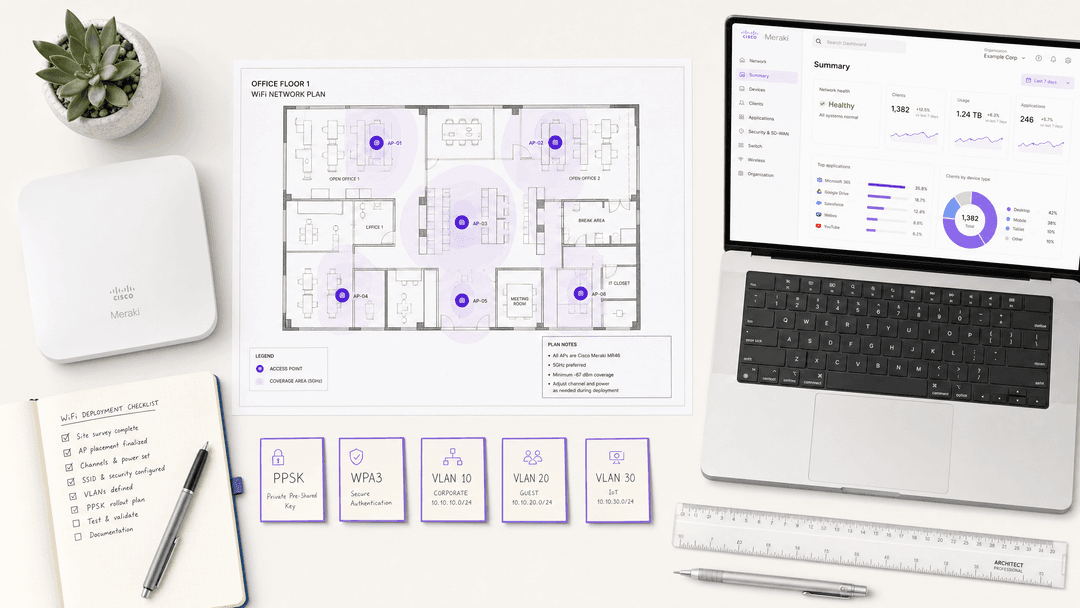
For IT managers and network architects overseeing enterprise WiFi deployments, the transition from WPA2 to WPA3 is a critical security mandate. However, deciding how to integrate Private Pre-Shared Key (PPSK) architectures with WPA3 requires a nuanced understanding of your venue's device ecosystem and compliance posture. While WPA3-Personal introduces Simultaneous Authentication of Equals (SAE) to mitigate offline dictionary attacks, traditional PPSK relies on the older WPA2 four-way handshake. This guide provides a vendor-neutral technical comparison, helping operations directors in retail, hospitality, and public sectors choose the optimal security mode, manage legacy device compatibility, and deploy isolated multi-tenant networks using Purple.
Technical Deep-Dive
The Architecture of WPA3-Personal and SAE
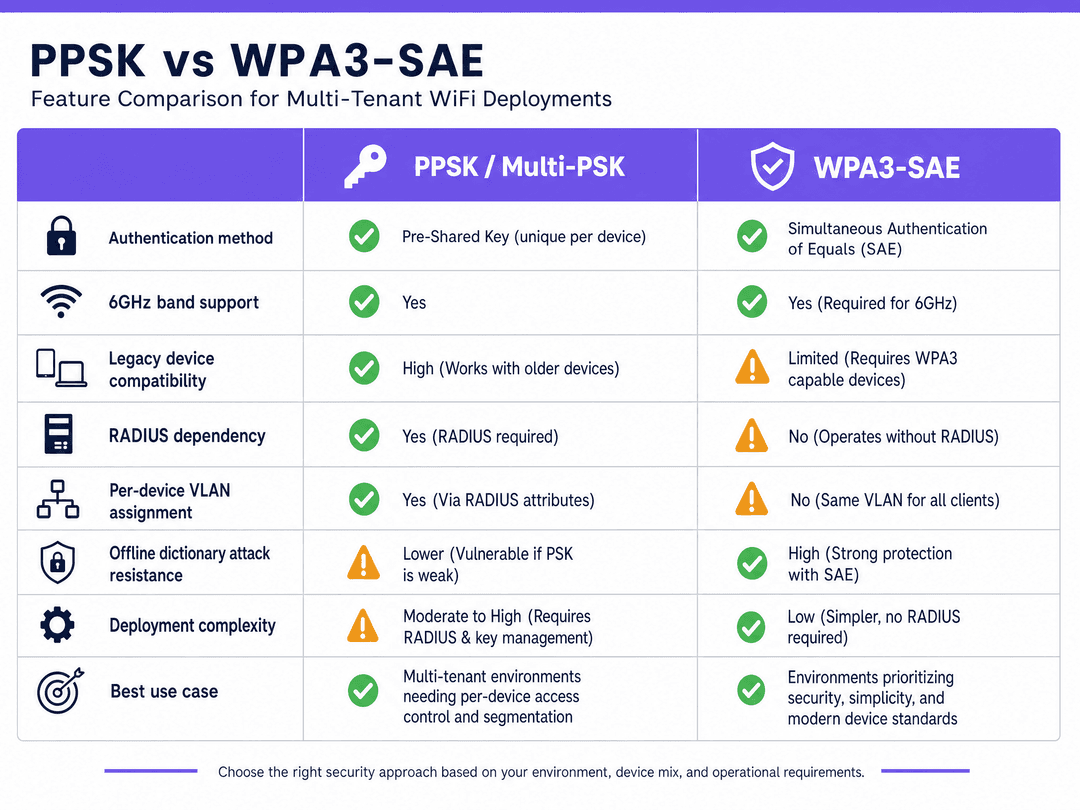
WPA3-Personal replaces the vulnerable Pre-Shared Key (PSK) mechanism of WPA2 with Simultaneous Authentication of Equals (SAE). SAE is a variant of the Dragonfly key exchange protocol, designed to provide forward secrecy and protect against offline dictionary attacks. When a device connects using WPA3-Personal, SAE ensures that even if an attacker captures the handshake traffic, they cannot brute-force the password offline. Each authentication attempt requires active interaction with the access point, severely rate-limiting automated attacks.
For venue operators managing Guest WiFi networks, WPA3-Personal offers a significant security upgrade without requiring the complex infrastructure of an 802.1X deployment.
PPSK and Multi-Tenant Isolation
Private Pre-Shared Key (PPSK) is a proprietary technology that allows an access point to support multiple passphrases on a single SSID. Instead of every device sharing one password, each device or user gets a unique passphrase. When a device connects, the access point or an external RADIUS server matches the passphrase to a specific VLAN.
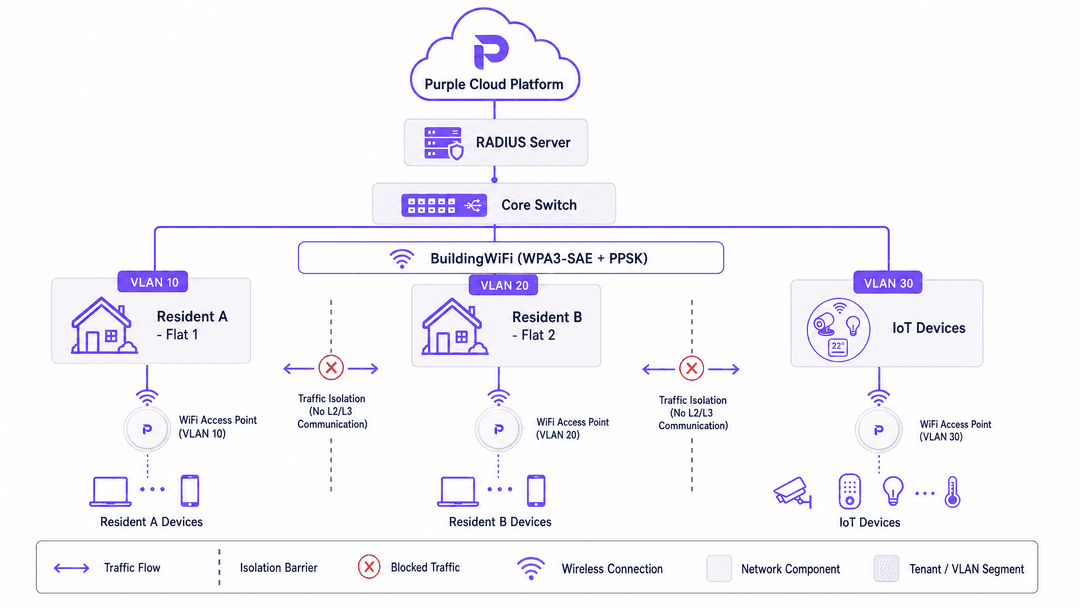
This architecture is foundational for Build-to-Rent (BTR) and Multi-Dwelling Unit (MDU) operators. It allows property developers to assign each resident a unique passphrase that maps to an isolated VLAN. Residents share the same physical infrastructure but their traffic is isolated at Layer 2, providing a private home-network experience. Purple's hardware-agnostic cloud overlay manages this provisioning workflow automatically.
The WPA3 and PPSK Protocol Conflict
PPSK, in its traditional form, relies on the four-way handshake defined in the IEEE 802.11i standard underpinning WPA2. Because WPA3-Personal replaces this handshake with SAE, the two mechanisms are fundamentally incompatible at the protocol level on older firmware. If you configure a pure WPA3-Personal SSID on legacy access points, you cannot simultaneously run PPSK on that same SSID.
However, modern enterprise hardware vendors—including Cisco Meraki, HPE Aruba, and Juniper Mist—now support WPA3-SAE with RADIUS-based multi-PSK. In this model, the access point operates in WPA3-SAE mode, and the RADIUS server handles the per-device key lookup. This is particularly critical for 6GHz deployments (Wi-Fi 6E and Wi-Fi 7), which mandate WPA3.
Implementation Guide
Assessing Your Device Fleet
Before deploying WPA3, IT teams must audit their device fleet. While modern smartphones support WPA3 natively, legacy IoT devices, point-of-sale terminals, and older barcode scanners may not. WPA3 mandates Protected Management Frames (PMF). If a legacy device does not support PMF, it will fail to associate with a pure WPA3 network.
Deployment Models
- PPSK with RADIUS (Recommended for BTR/MDU): The PSK pool lives in an external RADIUS server. When a device connects, the access point forwards the request to RADIUS, which returns the VLAN assignment. This integrates with identity providers (Microsoft Entra ID, Okta) for automated provisioning when a resident moves in or out.
- WPA3-Enterprise (Recommended for Staff/Corporate): Uses 802.1X port-based access control with EAP-TLS certificates. This is the gold standard for secure corporate environments but introduces too much friction for resident or guest networks.
- Enhanced Open (OWE) (Recommended for Public Guest WiFi): Uses a Diffie-Hellman key exchange to encrypt wireless traffic without requiring credentials. Ideal for Retail environments gathering WiFi Analytics securely.
Best Practices
- Automate Key Lifecycle Management: In a PPSK deployment, automate provisioning and deprovisioning via your property management system to prevent stale keys and security risks.
- Segment IoT Devices: Legacy IoT devices that do not support WPA3 should be isolated on a dedicated WPA2-PSK SSID on a separate VLAN.
- Plan for 6GHz: If you are deploying Wi-Fi 6E, WPA3 is mandatory. Ensure your PPSK strategy is supported by your vendor's WPA3 firmware implementation.
Troubleshooting & Risk Mitigation
- PMF Incompatibility: If devices fail to connect to a new WPA3 SSID, check if they support Protected Management Frames. Use WPA3 Transition Mode temporarily, or deploy a dedicated legacy SSID.
- Downgrade Attacks: WPA3 Transition Mode is susceptible to downgrade attacks. Monitor your network using Wireless Intrusion Prevention Systems (WIPS) and treat Transition Mode as a migration step, not a permanent state.
- Key Sprawl: Audit your RADIUS database quarterly to remove orphaned PSKs from former residents or decommissioned devices.
ROI & Business Impact
Deploying a centralised PPSK architecture via Purple allows property developers to consolidate network hardware. Instead of installing individual routers in every apartment, operators deploy enterprise access points in corridors and use PPSK to segment traffic. This reduces hardware capital expenditure by up to 40% and cuts ongoing maintenance costs. Furthermore, it enables landlords to offer "instant-on" WiFi as a premium utility, increasing rental yields and resident satisfaction.
Key Definitions
WPA3
The third generation of Wi-Fi Protected Access security certification, introducing SAE and mandatory PMF.
Required for all new 6GHz deployments and highly recommended for mitigating dictionary attacks.
PPSK (Private Pre-Shared Key)
A mechanism allowing multiple unique passphrases on a single SSID, with each passphrase mapping to a specific VLAN or policy.
Used heavily in BTR, student accommodation, and coworking spaces to provide private networks on shared infrastructure.
SAE (Simultaneous Authentication of Equals)
The secure key establishment protocol used in WPA3-Personal that replaces the WPA2 four-way handshake.
Protects networks from brute-force password guessing by requiring active AP interaction.
PMF (Protected Management Frames)
A standard (802.11w) that encrypts management traffic between devices and access points.
Mandatory in WPA3; its absence is the primary reason legacy devices fail to connect to modern networks.
RADIUS
A networking protocol that provides centralised Authentication, Authorization, and Accounting management.
Used in enterprise PPSK deployments to look up passphrases and return VLAN assignments dynamically.
VLAN (Virtual Local Area Network)
A logical subnetwork that groups a collection of devices from different physical LANs.
Used in conjunction with PPSK to isolate resident traffic in multi-tenant buildings.
OWE (Opportunistic Wireless Encryption)
A standard providing unauthenticated encryption for open WiFi networks.
Ideal for guest WiFi in retail or hospitality where passwords introduce friction but data privacy is required.
WPA3 Transition Mode
A configuration allowing an access point to accept both WPA2 and WPA3 clients on the same SSID.
Used as a migration strategy for environments with legacy devices, though vulnerable to downgrade attacks.
Worked Examples
A 200-unit build-to-rent development needs to provide private network segments for each resident, support legacy smart home devices, and minimise management overhead.
Deploy a single building-wide SSID using PPSK with RADIUS on a WPA2/WPA3 Transition Mode network. Integrate the property management system with Purple's RADIUS server. When a resident moves in, they are automatically assigned a unique passphrase mapped to a dedicated VLAN. They receive a secondary passphrase for IoT devices mapped to an isolated IoT VLAN.
A 150-room hotel requires frictionless guest access, highly secure staff access, and an isolated building management network for CCTV.
Implement a three-SSID architecture. SSID 1 (Guest): Enhanced Open (OWE) combined with Purple's captive portal. SSID 2 (Staff): WPA3-Enterprise using 802.1X and EAP-TLS certificates authenticated against Microsoft Entra ID. SSID 3 (Building Management): PPSK mapping devices to a firewalled VLAN.
Practice Questions
Q1. You are deploying WiFi in a new hospital wing. You need to secure clinical devices (infusion pumps, mobile workstations) that handle sensitive patient data. Which security model should you choose?
Hint: Consider the compliance requirements for healthcare data and the operational environment of the devices.
View model answer
WPA3-Enterprise with 802.1X and EAP-TLS certificates. This provides the highest level of security, eliminates the risk of shared passwords, and meets strict healthcare compliance standards.
Q2. A coworking space with 300 members is experiencing frequent WiFi disconnects on older laptops after upgrading to a pure WPA3-Personal SSID. What is the most likely cause and the recommended solution?
Hint: Think about the mandatory requirements introduced in WPA3 that were optional in WPA2.
View model answer
The older laptops likely do not support Protected Management Frames (PMF), which is mandatory in WPA3. The solution is to enable WPA3 Transition Mode to allow WPA2 connections, or to create a dedicated WPA2 SSID for legacy devices.
Q3. A BTR operator wants to use 6GHz (Wi-Fi 6E) access points to provide gigabit speeds to residents, while maintaining strict Layer 2 isolation between flats using PPSK. What architectural constraint must they address?
Hint: Consider the security requirements mandated by the Wi-Fi Alliance for the 6GHz band and how traditional PPSK operates.
View model answer
The 6GHz band mandates WPA3. Traditional PPSK relies on the WPA2 four-way handshake. The operator must ensure their chosen hardware vendor supports WPA3-SAE with RADIUS-based multi-PSK to achieve both 6GHz speeds and per-device isolation.
Continue reading in this series
PPSK WiFi: comparing features and deployment models
This technical reference guide compares Private Pre-Shared Key (PPSK) WiFi architecture against traditional 802.1X and standard PSK deployments. It provides network architects and IT managers with vendor-neutral implementation strategies for multi-tenant residential, IoT, and BTR environments.
How to Reduce the Number of WiFi SSIDs Using Per-Device PSK (iPSK, DPSK, MPSK)
This authoritative technical reference guide explains how IT teams can eliminate WiFi performance degradation caused by SSID beacon overhead by collapsing multiple purpose-built networks into a single SSID using per-device PSK (xPSK). It covers the vendor landscape across Cisco iPSK, HPE Aruba MPSK, Ruckus DPSK, Juniper Mist PPSK, and Ubiquiti UniFi PPSK, with practical implementation guidance on dynamic VLAN assignment, IoT onboarding, and PCI DSS compliance. Venue operators in hospitality, retail, stadiums, and public-sector organisations will find actionable architecture guidance and real-world worked examples.
The Checklist for Migrating from Legacy NAC to Cloud-Native NAC
This authoritative technical reference guide provides a structured, three-phase checklist for migrating from legacy Network Access Control (NAC) to a cloud-native architecture. It equips IT managers and network architects with actionable strategies to handle identity integration, policy parity, and compliance without disrupting venue operations.
Got questions about your specific setup?
Our team works with venue operators, IT managers, and network engineers across 80,000 venues. Book a 20-minute call and we will show you how others like you solved it.