
PPSK WiFi: comparing features and deployment models
Technical guide to Private Pre-Shared Key (PPSK) and Identity PSK (iPSK) architectures: dynamic VLAN steering, mDNS isolation, IoT onboarding, and airtime recovery across MDUs and student housing.
Video overview
Listen to this guide
View podcast transcript
Part of our core series: Enterprise WiFi Security Guide →
PPSK WiFi Deployment Architect & Airtime Recovery Planner
Model enterprise Private Pre-Shared Key (PPSK/iPSK/DPSK/MPSK) deployments across major wireless hardware vendors. Calculate airtime savings by replacing dozens of competing residential SSIDs with a single consolidated multi-tenant network.
Multi-Dwelling Units (MDU) & Build-to-Rent
Isolation: Private Personal Area Network (mDNS Isolated per Apartment)Replaces dozens of competing residential routers with a centrally managed enterprise WiFi infrastructure. Residents connect all phones, smart TVs, and IoT devices to a single building-wide SSID using their unique PPSK, seamlessly roaming across amenities while staying isolated from neighbours.
| Architecture Model | Headless IoT Support (TVs/Chromecasts) | Airtime Efficiency | Individual Key Revocation | Purple Multi-Tenant Fit |
|---|---|---|---|---|
| PPSK / iPSK (Recommended) | 100% Native (WPA2/WPA3 PSK) | Optimal (1 Property SSID) | Instant per Tenant / Device | Native Cloud Integration |
| 802.1X WPA3-Enterprise | Poor (Smart TVs & IoT fail EAP) | High (1 SSID) | Per-User Certificate Revoke | Staff / Corporate Only |
| Dozens of Per-Apartment SSIDs | Supported | Severe Beacon Congestion (-40%) | Manual Router Reset | Unmanageable at Scale |
Get a Customized PPSK Multi-Tenant Architecture Blueprint
Speak with Purple's enterprise network architects to design a zero-friction PPSK solution tailored to your property portfolio, Ubiquiti UniFi hardware, and PMS integration requirements.
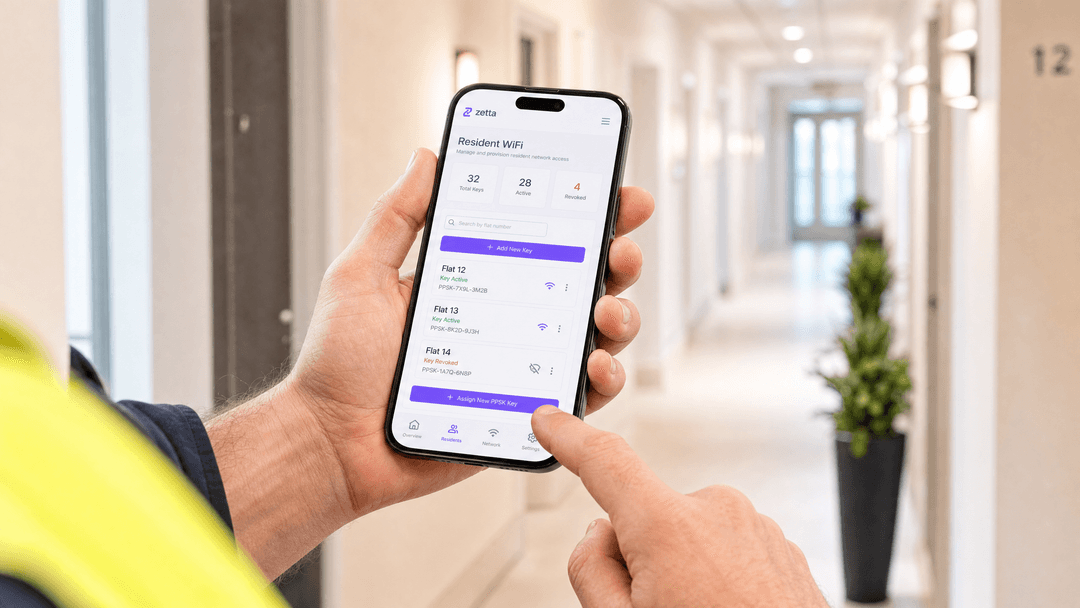
Executive Summary
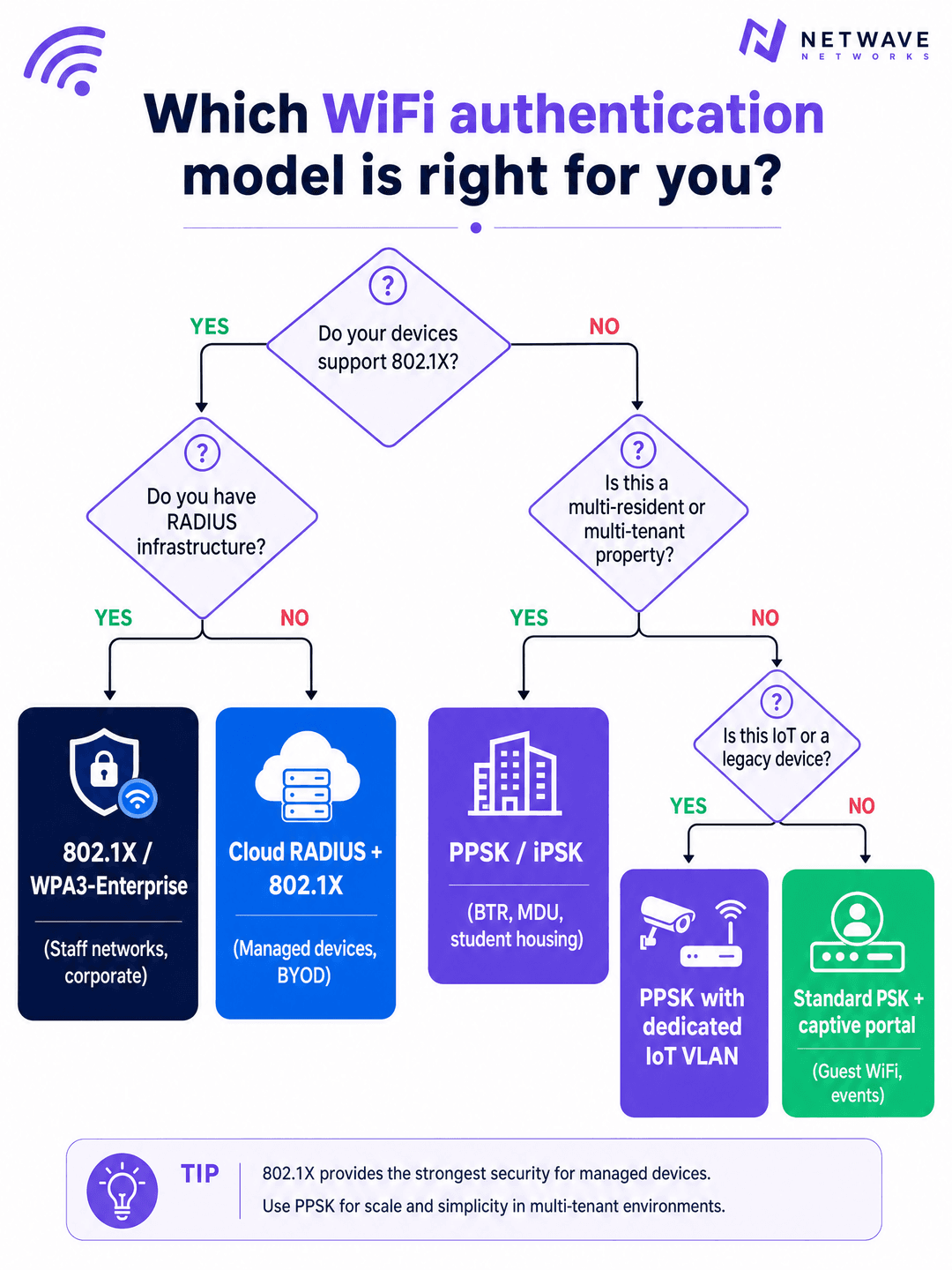
Network architecture for multi-tenant buildings demands a specific balance of isolation, scale, and device compatibility. Traditional WPA2-Personal networks fail at scale because shared passwords compromise resident privacy and break all devices when rotated. Conversely, 802.1X provides excellent security but fails in residential environments because IoT devices, smart speakers, and games consoles lack the supplicants required for RADIUS authentication.
PPSK WiFi solves this structural problem. By issuing a unique pre-shared key to each resident and mapping that key to an isolated VLAN, operators can deliver a secure, home-like WiFi experience across shared enterprise hardware. This guide details the architecture, implementation models, and business impact of deploying PPSK across Cisco Meraki, HPE Aruba, Ruckus, and other leading vendors, specifically targeting Build to Rent (BTR), student accommodation, and multi-dwelling unit (MDU) environments.
Technical Deep-Dive
The Architecture of PPSK
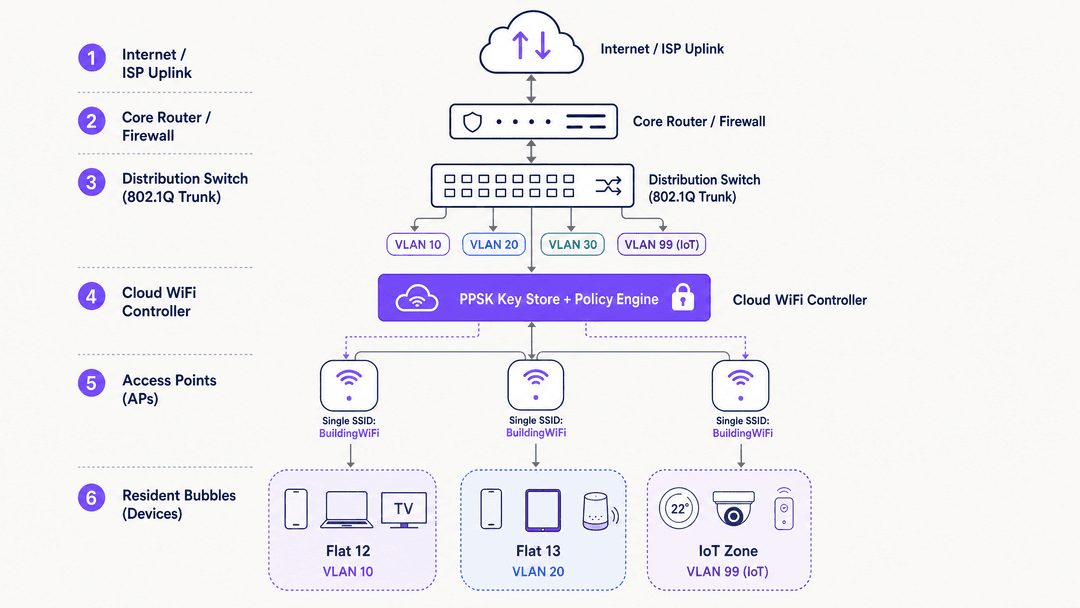
Private Pre-Shared Key (PPSK) operates at the WPA-Personal layer. The fundamental innovation is decoupling the SSID from a single password. Instead of one password for the entire network, the access point or cloud controller maintains a database of thousands of unique keys.
When a device connects, it presents its key during the standard WPA2 or WPA3 four-way handshake. The network validates the key and checks its associated policy. Crucially, this policy includes a VLAN assignment. The access point then tags all traffic from that device with the assigned VLAN ID before passing it to the distribution switch.
This creates a "WiFi bubble" for each resident. Device A and Device B, using the same key, are placed on VLAN 10 and can discover each other via mDNS. Device C, using a different key, is placed on VLAN 20. Device C cannot see or communicate with Devices A or B, even if all three are connected to the exact same physical access point.
PPSK vs 802.1X
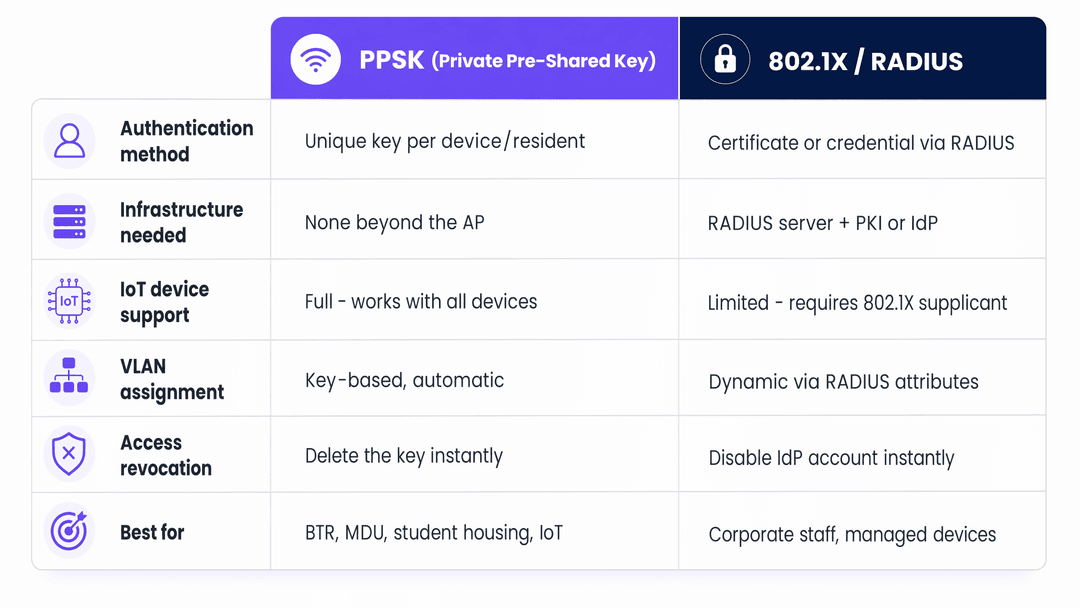
It is a mistake to view PPSK as a direct replacement for 802.1X. They serve different threat models.
802.1X with EAP-TLS provides mutual authentication. The client verifies the network via a server certificate, preventing rogue access point attacks, and the network verifies the client via a client certificate. This is the mandatory standard for corporate staff networks where data exfiltration is the primary risk.
PPSK provides inter-resident isolation. It does not provide mutual authentication. However, it supports 100% of WiFi-enabled devices, including headless IoT hardware. For a BTR operator, the primary risk is Resident A accessing Resident B's smart TV or viewing their local network traffic. PPSK mitigates this risk effectively without the administrative overhead of a Public Key Infrastructure (PKI).
WPA3 and Forward Secrecy
The transition to WPA3 significantly strengthens PPSK deployments. WPA3-Personal replaces the PSK handshake with Simultaneous Authentication of Equals (SAE). SAE uses the Dragonfly key exchange protocol, which provides forward secrecy.
In a WPA2-PSK network, an attacker who captures the initial handshake and later obtains the password can decrypt the captured traffic. In a WPA3-SAE network, this is cryptographically impossible. If your hardware supports it, WPA3-SAE should be the default configuration for new PPSK deployments.
Got questions about your specific setup?
Our team works with venue operators, IT managers, and network engineers across 80,000 venues. Book a 20-minute call and we will show you how others like you solved it.
Implementation Guide
Deploying a multi-tenant WiFi architecture requires strict adherence to layer 2 segmentation principles.
1. Logical Segmentation Strategy
Before configuring access points, define the VLAN taxonomy. A standard BTR deployment requires:
- Resident VLANs: One VLAN per unit (e.g., VLANs 10-210 for a 200-unit building).
- IoT VLAN: A dedicated segment (e.g., VLAN 99) for building management systems, HVAC, and access control.
- Management VLAN: A strictly isolated segment for AP and switch management traffic.
- Guest VLAN: A routed-to-internet segment for common areas.
2. Hardware and Vendor Selection
PPSK is a software feature, not an IEEE standard, which means implementation varies by vendor:
- Cisco Meraki: Termed iPSK (Identity PSK). Managed via the Meraki dashboard with per-SSID policies. Highly scalable.
- HPE Aruba: Termed PPSK or MPSK (Multiple PSK). Supported natively in ArubaOS and Aruba Central.
- Ruckus: Termed DPSK (Dynamic PSK). Managed via SmartZone or Ruckus Cloud.
- Juniper Mist: Termed ePSK. Integrates tightly with Mist's AI-driven RF management.
- Ubiquiti UniFi: Termed PPSK. Added in 2023. Note: Currently restricted to WPA2; incompatible with 6GHz bands.
3. Key Lifecycle Management
The operational success of a PPSK deployment depends entirely on key distribution. Generating keys is trivial; securely delivering them to residents is complex.
Integrate key generation with the property management system via API. When a lease is signed, the system should call the WiFi controller API (e.g., Aruba Central or Meraki Dashboard) to generate a key and assign it to the correct VLAN. The key is then delivered to the resident via email or a secure resident app. When the lease terminates, the API call revokes the key instantly.
Best Practices
RF Planning and SSID Consolidation
In a high-density environment, SSID proliferation destroys network performance. Every SSID broadcast by an access point consumes airtime for management frames. Broadcasting eight SSIDs in a dense corridor can consume 25% of available airtime before a single byte of user data is transmitted.
PPSK solves this by allowing hundreds of residents to share a single SSID. Best practice dictates broadcasting no more than three SSIDs per radio:
Building_Resident(PPSK for tenants)Building_Guest(Open with captive portal for visitors)Building_IoT(PPSK for infrastructure)
Managing CGNAT and IP Exhaustion
A 200-unit BTR property will host 3,000 to 5,000 concurrent devices. Standard /24 subnets will exhaust rapidly. Deploy /23 or /22 subnets for resident VLANs.
Because IPv4 addresses are limited, operators must deploy Carrier-Grade NAT (CGNAT). Ensure the firewall or core router handling the NAT translation has sufficient state table capacity to track tens of thousands of concurrent connections. Configure NAT policies to allow "Type 2" or "Moderate" NAT for games consoles, as strict NAT will break online multiplayer functionality.
Troubleshooting & Risk Mitigation
The Trunk Port Failure Mode
The most common deployment failure occurs at the switch layer. An AP is configured to map a PPSK key to VLAN 50, but the switch port connecting the AP to the distribution layer is not configured to permit VLAN 50 on the 802.1Q trunk. The AP tags the traffic, the switch drops it, and the resident has no internet access. Meticulously document and audit all trunk port allowed-VLAN lists during commissioning.
IoT Device Isolation
Residents will inevitably connect vulnerable, low-cost IoT devices to their personal VLANs. While PPSK isolates Resident A from Resident B, it does not isolate Resident A's laptop from Resident A's compromised smart bulb.
Implement layer 2 client isolation within the resident VLAN where possible, but use caution: strict client isolation breaks Chromecast and smart speaker pairing. The optimal mitigation is deploying a dedicated IoT VLAN for building infrastructure, while accepting the localized risk within individual resident VLANs.
ROI & Business Impact
Treating WiFi as a managed amenity rather than a tenant responsibility delivers measurable commercial returns for BTR and student accommodation operators.
Rent Premiums: Properties with managed, day-one WiFi command a rent premium of £15 to £30 per unit per month. For a 200-unit building, this generates £36,000 to £72,000 in additional annual NOI.
Operational Efficiency: Shared-password networks generate continuous support tickets regarding device pairing and move-out password rotations. PPSK deployments typically reduce WiFi-related support volume by 30% by mimicking a standard home network environment.
Retention: Move-in friction is a primary driver of early tenant dissatisfaction. By eliminating the 7-to-14 day wait for a broadband engineer and providing immediate connectivity, operators improve the initial resident experience, directly impacting long-term retention metrics.
Internal Linking
For further reading on related architectures, consult our guides on Managed WiFi provider: a comprehensive guide for businesses and Three SSIDs to rule them all: guest, Passpoint, and IoT WiFi. For sector-specific implementations, review our Hospitality and Retail deployment models, or explore the analytics capabilities of WiFi Analytics.
Key Definitions
PPSK (Private Pre-Shared Key)
A wireless authentication mechanism that allows multiple distinct pre-shared passphrases to operate concurrently under a single SSID, mapping each key to a specific user, device group, or dynamic VLAN.
Enterprise wireless access control and multi-tenant segmentation.
iPSK / DPSK / MPSK
Equivalent multi-key technologies across major vendors: Cisco Meraki and Catalyst Identity PSK (iPSK), Ruckus Dynamic PSK (DPSK), HPE Aruba Multi-PSK (MPSK), and Extreme Networks PPSK.
Vendor-specific implementations of Private Pre-Shared Keys.
RFC 2868 Tunnel-Private-Group-ID
A standard RADIUS attribute (Attribute 81) returned in an Access-Accept packet to instruct the wireless access point or controller to bind the client session to an isolated 802.1Q VLAN tag.
IETF RADIUS attribute for dynamic VLAN assignment.
Beacon Frame Airtime Overhead
The proportion of wireless channel capacity consumed by APs broadcasting management beacon frames at low mandatory data rates (1 or 6 Mbps), which scales linearly with the number of advertised SSIDs.
802.11 RF spectral efficiency.
mDNS Gateway / Bonjour Proxy
A network service on wireless controllers and gateways that filters and reflects Multicast DNS (mDNS) service advertisements exclusively between devices sharing the same PPSK or apartment VLAN.
Local multicast discovery across segmented micro-networks.
RADIUS Change of Authorization (CoA)
An asynchronous message sent on UDP port 3799 from a centralized identity platform like Purple to the wireless access point to instantly disconnect or re-authenticate a revoked user session.
RFC 3576 / RFC 5176 dynamic session management.
Worked Examples
A 250-unit Build to Rent operator currently provides WiFi via a single shared password. Residents constantly complain that they can see their neighbours' smart TVs, and when a resident moves out, the password must be changed, breaking connectivity for the entire building. The operator wants to fix this without replacing their existing Cisco Meraki access points.
The operator should transition from a standard WPA2-PSK configuration to Meraki iPSK (Identity PSK).
- Configure a single new SSID named 'Resident_WiFi'.
- In the Meraki dashboard, configure the SSID for 'Identity PSK without RADIUS'.
- Create 250 unique VLANs on the core switch (e.g., VLANs 100-350).
- Generate 250 unique iPSK passphrases.
- Map each passphrase to a specific VLAN ID in the Meraki dashboard.
- Distribute the unique passphrases to each resident.
When a resident connects, Meraki tags their traffic with their specific VLAN, isolating them from neighbours. When a resident moves out, their specific iPSK is deleted from the dashboard, revoking their access without affecting any other resident.
A university IT team is deploying WiFi across a new 400-bed student accommodation block. They require 802.1X (eduroam) for student laptops and phones, but students also bring games consoles and smart speakers that do not support 802.1X. How should the architecture handle this?
The IT team must deploy a hybrid authentication architecture broadcasting two SSIDs.
- SSID 1 (eduroam): Configured for 802.1X with RADIUS authentication against the university's identity provider. This handles all laptops, tablets, and smartphones.
- SSID 2 (Student_Devices): Configured for PPSK. A unique key is generated for each student room and mapped to a dedicated VLAN for that room.
Students use eduroam for their primary devices. For headless devices (consoles, smart speakers), they use their room's unique PPSK on the second SSID. The core network routes traffic from both the 802.1X VLANs and the PPSK VLANs to the internet, but prevents inter-VLAN routing to maintain security.
Practice Questions
Q1. A Build to Rent operator wants to deploy WiFi across 150 apartments using Ubiquiti UniFi access points. They want to use the 6GHz band (WiFi 6E) to ensure maximum throughput for residents, and they want to use PPSK to isolate each apartment. What is the architectural flaw in this plan?
Hint: Consider the specific encryption requirements for the 6GHz band and UniFi's current PPSK implementation.
View model answer
The architectural flaw is that the 6GHz band mandates WPA3 security, but Ubiquiti UniFi's current implementation of PPSK only supports WPA2. Therefore, PPSK cannot be deployed on the 6GHz band using UniFi hardware. The operator must either restrict the PPSK SSID to the 2.4GHz and 5GHz bands, or select a different hardware vendor (such as Aruba or Meraki) that supports PPSK with WPA3-SAE.
Q2. A hotel IT manager configures PPSK on their access points, assigning Room 101 to VLAN 101 and Room 102 to VLAN 102. Devices in the rooms connect to the WiFi successfully and receive an IP address, but they cannot reach the internet. What is the most likely configuration error?
Hint: The access point is doing its job, but the traffic isn't making it to the router.
View model answer
The most likely error is a missing 802.1Q trunk configuration on the switch ports connecting the access points to the network. The AP is correctly tagging the traffic with VLAN 101 or 102, but if those VLANs are not explicitly permitted on the switch trunk port, the switch will drop the tagged frames. The IT manager must update the switch configuration to allow all room VLANs on the relevant trunk links.
Q3. A corporate office wants to use PPSK for their employee laptops instead of 802.1X because they do not want to maintain a RADIUS server. They plan to issue a unique PPSK to each employee. Why is this a security risk for a corporate environment?
Hint: Consider what happens if an employee connects to a malicious access point broadcasting the corporate SSID.
View model answer
This is a security risk because PPSK does not provide mutual authentication. An attacker could set up a rogue access point broadcasting the corporate SSID. Because PPSK relies on a pre-shared secret, the employee's laptop would attempt to connect to the rogue AP, potentially exposing the key or allowing a man-in-the-middle attack. 802.1X with EAP-TLS prevents this by requiring the network to present a trusted certificate to the client before the client will connect.
Continue reading in this series
How to deploy iPSK on Cisco Meraki, HPE Aruba and Ruckus
This hands-on reference guide shows how to deploy iPSK on Cisco Meraki, MPSK on HPE Aruba Central and DPSK on Ruckus SmartZone, with a short UniFi PPSK appendix. It focuses on key issuance, VLAN or policy placement, RADIUS decision flows and revocation tests that prove a deployment works in a live venue.
Bulk internet agreement vs managed WiFi: which model fits your building
A practical procurement reference for property, IT and operations leaders comparing resident-paid retail broadband, a bulk internet agreement and managed WiFi. It clarifies ownership, resident move-in, security, cost scope and contractual exit, using US bulk-internet framing and UK equivalents.
Apartment WiFi solutions: a comprehensive guide for businesses
This guide covers the architecture, deployment, and business case for apartment WiFi solutions in Build to Rent and multi-dwelling unit properties. It explains how Identity Pre-Shared Key (iPSK) technology creates secure, isolated network bubbles for each resident while supporting smart devices and IoT. Property developers, landlords, and BTR operators will find actionable deployment guidance, ROI data, and worked implementation scenarios.
Got questions about your specific setup?
Our team works with venue operators, IT managers, and network engineers across 80,000 venues. Book a 20-minute call and we will show you how others like you solved it.