
The Checklist for Migrating from Legacy NAC to Cloud-Native NAC
This authoritative technical reference guide provides a structured, three-phase checklist for migrating from legacy Network Access Control (NAC) to a cloud-native architecture. It equips IT managers and network architects with actionable strategies to handle identity integration, policy parity, and compliance without disrupting venue operations.
Video overview
Listen to this guide
View podcast transcript
Part of our core series: Enterprise WiFi Security Guide →

Executive Summary
Migrating from legacy Network Access Control (NAC) to a cloud-native architecture is no longer an optional upgrade; it is a critical requirement for maintaining security, scalability, and compliance in modern enterprise environments. Legacy systems, which often rely on outdated on-premises hardware and rigid directory structures, struggle to support the explosive growth of IoT devices, dynamic staff mobility, and the strict demands of modern guest access. For Venue Operations Directors and IT managers in the hospitality, retail, and public sectors, the transition to cloud-native NAC mitigates the risks of hardware failure and policy fragmentation, while enabling API-driven automation.
This technical reference guide provides a comprehensive checklist for executing this migration. It outlines a structured three-step approach: pre-migration assessment, parallel run and validation, and full cutover and optimization. By decoupling policy enforcement from hardware and federating identity stores, organizations can achieve zero-touch provisioning, robust IEEE 802.1X enforcement, and seamless integration with ecosystem tools. Crucially, this guide details how to leverage platforms like Purple to integrate guest identity and network policy, ensuring the migration delivers immediate operational ROI and an enhanced security posture.
Technical Deep Dive
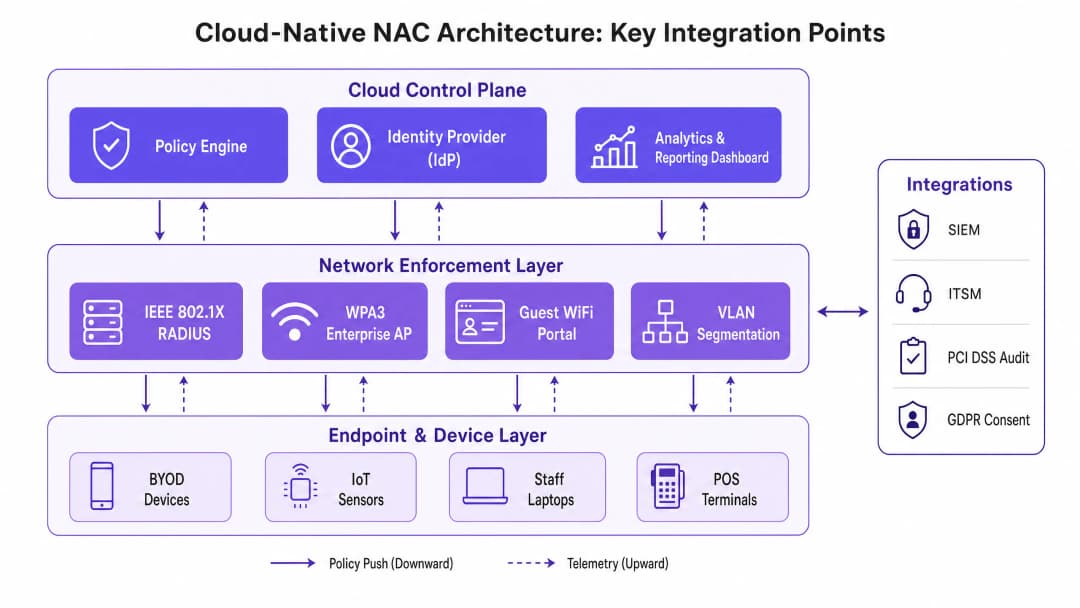
The fundamental shift in moving from legacy to cloud-native NAC is the separation of the control plane from the data plane. Legacy architectures typically rely on monolithic RADIUS servers and physical appliances deployed at the edge or centralized in a core data center. This model creates bottlenecks, increases latency for distributed sites, and demands constant manual intervention to maintain policy consistency.
Cloud-native NAC abstracts the policy engine and Identity Provider (IdP) into a scalable cloud environment. Enforcement is pushed to the edge, either through lightweight software agents or direct API integration with modern access points and switches. This architecture fundamentally changes how authentication and authorization are processed.
Identity Federation and RADIUS
At the core of the migration is the transition of identity management. Legacy NAC often relies on direct LDAP binds to on-premises Active Directory. Cloud-native solutions favor SAML or OIDC integration with cloud Identity Providers like Azure AD or Okta. When migrating, the RADIUS infrastructure must be modernized. Cloud RADIUS services handle IEEE 802.1X authentication globally (e.g. EAP-TLS, PEAP-MSCHAPv2), reducing latency by routing requests to the nearest geographical Point of Presence.
It is critical to document every Extensible Authentication Protocol (EAP) method currently in use. Failure to support existing EAP types in the new environment will result in immediate authentication failures for endpoints. Furthermore, for guest access, integrating a robust Guest WiFi platform like Purple allows for cloud-based policy enforcement, removing the complexity of RADIUS Change of Authorization (CoA) and VLAN assignment from local hardware.
Network Segmentation and Compliance
Modern NAC is not just about access; it is about dynamic segmentation. In environments subject to PCI-DSS or CCPA/CPRA, the ability to dynamically assign VLANs or enforce micro-segmentation policies based on user role, device posture, and location is paramount. Cloud-native NAC evaluates context - who, what, where, and when - before granting access.
During migration, existing static VLAN assignments must be mapped to dynamic policies. For example, a POS terminal must be isolated from the guest network and the general staff network. The cloud policy engine evaluates the device's MAC address (or ideally, a device certificate) and instructs the network infrastructure to place it in a secure PCI-compliant zone.
Got questions about your specific setup?
Our team works with venue operators, IT managers, and network engineers across 80,000 venues. Book a 20-minute call and we will show you how others like you solved it.
Implementation Guide
Executing the migration requires a disciplined, phased approach to minimize disruption to active venues and critical business operations.
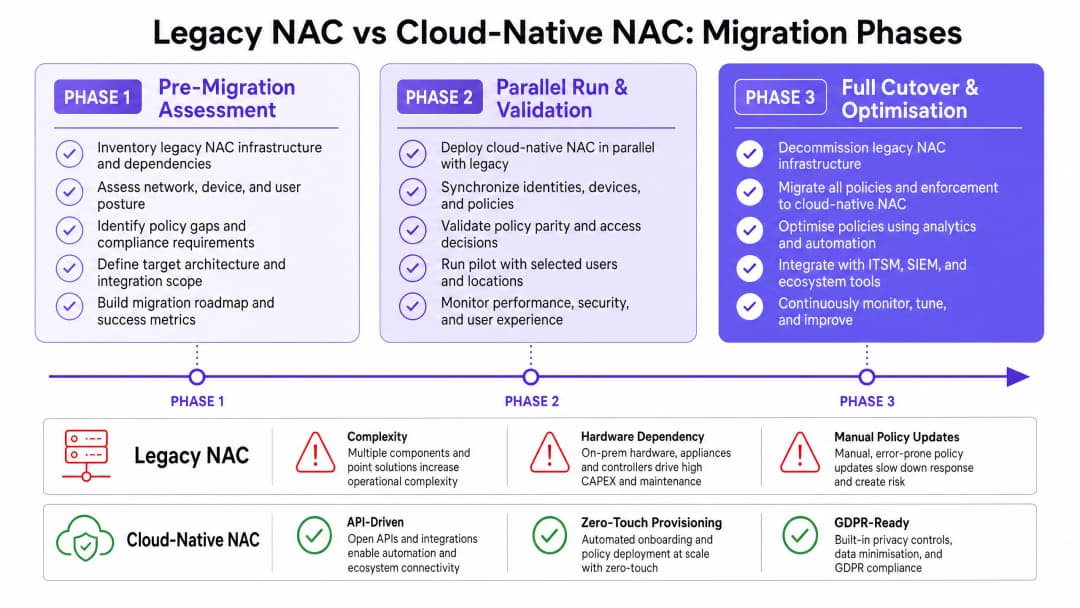
Phase 1: Pre-Migration Assessment
Before changing any configuration, a complete inventory of the existing NAC ecosystem is mandatory. This includes mapping all RADIUS servers, supplicant configurations, VLAN schemas, and third-party integrations (such as SIEM or ITSM platforms).
- Audit Identity Sources: Identify all directories and databases used for authentication. Clean up legacy accounts and enforce MFA on privileged identities.
- Map EAP Methods: Document all IEEE 802.1X methods in use across wired and wireless networks.
- Analyze Guest Flows: Document current Captive Portal integrations. Evaluate how a modern Guest WiFi solution can streamline this process.
- Review IoT Devices: Identify devices relying on MAC Authentication Bypass (MAB) and plan for certificate-based authentication where possible.
Phase 2: Parallel Run and Validation
The most effective strategy is to deploy the cloud-native NAC in shadow mode alongside the legacy system. This allows for policy validation without impacting production traffic.
- Deploy Cloud RADIUS: Configure the cloud NAC to receive authentication requests in parallel with the legacy system.
- Validate Policy Parity: Compare access decisions (Role, VLAN, ACL) made by both systems. Any discrepancies must be investigated and resolved.
- Test Latency: Ensure cloud authentication requests are completed within acceptable thresholds (typically sub-100ms).
- Pilot Groups: Migrate a small subset of users (e.g., IT staff) or a specific non-critical SSID to the new system to validate end-to-end functionality.
Phase 3: Full Cutover and Optimization
Once parity is confirmed, execute the cutover during a scheduled maintenance window.
- Sequence the Cutover: Begin with the lowest-risk networks. Migrate the guest network first, followed by staff wireless, wired 802.1X, and finally IoT/OT networks.
- Monitor Telemetry: Use the cloud platform's advanced visibility to monitor authentication success rates and identify anomalous behavior.
- Integrate Analytics: Feed telemetry into a WiFi Analytics platform to gain insights into device dwell times, connection patterns, and spatial utilization.
- Decommission Legacy Hardware: Once stability is achieved, securely wipe and decommission legacy NAC appliances.
Best Practices
To ensure a resilient and scalable deployment, follow these industry best practices:
- Embrace WPA3-Enterprise: Where hardware supports it, mandate WPA3-Enterprise with 192-bit mode for highly secure networks (e.g., finance, HR). This aligns with the latest Wi-Fi Alliance security standards. For a deeper understanding of modern wireless standards, see our guide on WiFi Frequencies: A Guide to WiFi Frequencies in 2026.
- Federate Guest Identity: Do not manage guest accounts in the corporate directory. Use a purpose-built platform like Purple to handle guest onboarding, consent management, and data residency, ensuring CCPA/CPRA compliance.
- Implement Zero Trust Principles: Move away from implied trust based on network location. Implement continuous posture assessment for all endpoints before granting access.
- Automate IoT Onboarding: Move away from MAB by implementing automated certificate provisioning for headless devices.
For more insights into the evolution of network security, review The Future of WiFi Security: AI-Driven NAC and Threat Detection and its Spanish counterpart, El Futuro de la Seguridad WiFi: NAC Impulsado por IA y Detección de Amenazas.
Troubleshooting and Risk Mitigation
Migration inherently carries risk. Anticipating common failure modes is critical for a smooth transition.
Failure Mode: Identity Synchronization Issues If the cloud IdP fails to synchronize with the on-premises directory, authentication will fail. Mitigation: Implement robust monitoring on directory sync agents. Configure redundant sync connectors across different physical sites.
Failure Mode: High Authentication Latency Routing RADIUS traffic to a remote cloud region can cause timeouts on the endpoint supplicant. Mitigation: Select a cloud region geographically close to the venues. Implement local RADIUS proxies or survivable branch appliances for critical sites, such as large Retail stores or Healthcare facilities.
Failure Mode: Loss of IoT Connectivity Legacy IoT devices often have hardcoded network configurations or lack support for modern EAP methods. Mitigation: Maintain a dedicated, isolated SSID with MAB fallback specifically for legacy IoT devices until they can be replaced. Ensure this VLAN has strict ACLs limiting lateral movement.
ROI and Business Impact
The transition to cloud-native NAC delivers measurable business value beyond enhanced security.
- Operational Efficiency: Zero-touch provisioning and centralized policy management significantly reduce the engineering hours required for moves, adds, and changes (MACs).
- Hardware Savings: Decommissioning on-premises appliances eliminates associated power, cooling, and maintenance contract costs.
- Enhanced Guest Experience: Integrating NAC with a modern Guest WiFi platform reduces onboarding friction, leading to higher opt-in rates and richer data collection for marketing teams in the Hospitality and Transport sectors.
- Risk Reduction: Automated compliance reporting and dynamic segmentation reduce the likelihood and potential impact of data breaches, lowering cyber insurance premiums and protecting brand reputation.
Key Definitions
Network Access Control (NAC)
A security solution that enforces policy on devices and users attempting to access a network.
Essential for ensuring only authorized, compliant devices connect to corporate or guest networks.
Cloud-Native Architecture
Designing applications specifically to leverage cloud computing models, typically using microservices and APIs.
Allows NAC to scale infinitely and decouple policy management from local hardware constraints.
RADIUS (Remote Authentication Dial-In User Service)
A networking protocol that provides centralized Authentication, Authorization, and Accounting (AAA) management.
The core protocol used by network switches and APs to communicate with the NAC policy engine.
IEEE 802.1X
An IEEE Standard for port-based Network Access Control, providing an authentication mechanism to devices wishing to attach to a LAN or WLAN.
The gold standard for secure, enterprise-grade network authentication for staff devices.
MAC Authentication Bypass (MAB)
A method of granting network access based on the device's MAC address rather than a username/password or certificate.
Commonly used for headless IoT devices (printers, cameras) that cannot support 802.1X, though it is inherently less secure.
Dynamic Segmentation
The ability to assign network access policies (like VLANs or ACLs) dynamically based on user identity, device type, or context.
Crucial for isolating different types of traffic (e.g., keeping POS terminals separate from guest WiFi).
Identity Provider (IdP)
A system entity that creates, maintains, and manages identity information for principals and provides authentication services.
Cloud-native NAC relies on modern IdPs (Azure AD, Okta) rather than legacy on-premises LDAP servers.
Change of Authorization (CoA)
A RADIUS extension that allows the NAC server to dynamically change the access permissions of an active session.
Used extensively in guest WiFi portals to switch a user from a restricted pre-authentication VLAN to a full access VLAN after they accept terms.
Worked Examples
A 500-room hotel is migrating to a cloud-native NAC. They currently use a legacy on-premises RADIUS server for staff 802.1X (PEAP) and a basic captive portal for guests. They have 200 IoT devices (smart TVs, door locks) authenticating via MAB. How should they sequence the migration to minimize guest disruption?
- Deploy the cloud NAC and integrate it with the existing IdP for staff. 2. Integrate Purple Guest WiFi with the cloud NAC for guest access. 3. Phase 1 Cutover: Migrate the Guest SSID to the new captive portal flow. This is low risk and provides immediate marketing ROI. 4. Phase 2 Cutover: Migrate staff 802.1X. Ensure the new RADIUS server certificate is trusted by staff endpoints to prevent warnings. 5. Phase 3 Cutover: Migrate IoT devices. Create a specific policy in the cloud NAC for MAB, ensuring these devices are placed in an isolated VLAN.
A large retail chain with 150 stores is experiencing high latency (over 500ms) during the parallel run phase of their cloud NAC migration, causing POS terminals to timeout during authentication.
The latency is likely caused by the geographical distance between the stores and the cloud RADIUS region, or inefficient directory lookups. The solution is to: 1. Verify the cloud NAC tenant is hosted in the optimal geographic region. 2. Deploy a lightweight RADIUS proxy or survivability edge appliance in regional hubs to cache authentications and handle local EAP terminations. 3. Ensure the IdP integration is using fast, indexed lookups (e.g., native Azure AD integration rather than querying an on-prem LDAP server over a VPN).
Practice Questions
Q1. Your organization is migrating from Cisco ISE to a cloud-native NAC. During the parallel run, you notice that a specific group of older barcode scanners in your warehouse are failing authentication on the cloud NAC, but succeeding on ISE. What is the most likely cause and how should you address it?
Hint: Consider how older devices handle encryption and protocol negotiation.
View model answer
The most likely cause is a mismatch in supported EAP methods or cipher suites. The cloud NAC may have deprecated older, less secure protocols (like TLS 1.0 or specific weak ciphers) that the legacy ISE server still permitted. To address this, you must either update the firmware/supplicant on the barcode scanners to support modern protocols, or, if that is not possible, configure a specific, isolated policy in the cloud NAC to temporarily permit the older protocol strictly for that device group, mitigating the security risk via strict network segmentation.
Q2. A university campus wants to implement WPA3-Enterprise for its staff network alongside the NAC migration. However, 15% of staff laptops are running older wireless NICs that do not support WPA3. How should the network architect design the SSIDs?
Hint: Consider transition modes and the impact on security posture.
View model answer
The architect should configure the staff SSID to use WPA3-Enterprise Transition Mode. This allows capable devices to connect using WPA3-Enterprise, while older devices fall back to WPA2-Enterprise. Alternatively, if strict security compliance is required for specific departments, a dedicated WPA3-only SSID can be created for compliant devices, leaving the legacy SSID active until the remaining hardware is refreshed.
Q3. During Phase 1 (Pre-Migration Assessment), you discover that the current guest WiFi relies heavily on RADIUS CoA to move users from a walled-garden VLAN to an internet-access VLAN. The new cloud APs do not reliably support CoA over the WAN. What is the recommended architectural change?
Hint: Consider how modern guest platforms handle policy enforcement without relying on complex local VLAN switching.
View model answer
The recommended approach is to shift away from local VLAN switching and utilize a cloud-managed guest WiFi platform (like Purple). In this model, the AP places all guest traffic into a single guest VLAN. The captive portal and policy enforcement (bandwidth limiting, content filtering, session time) are handled either by the AP's built-in firewall or a cloud gateway, abstracting the need for RADIUS CoA entirely and simplifying the edge configuration.
Continue reading in this series
PPSK wpa3: comparing features and deployment models
This technical reference guide compares PPSK and WPA3-SAE, explaining their architectural differences and deployment models for multi-tenant environments. It provides actionable guidance for IT managers and property developers on achieving secure, isolated WiFi networks using Purple's identity-based solutions.
Managing Bandwidth for Staff WiFi: Shaping, QoS and Reducing Traffic
This guide details practical methods for managing bandwidth for staff WiFi in enterprise venues. It covers traffic shaping, QoS implementation, and how deploying Purple Shield reduces network load without requiring infrastructure upgrades.
How to Reduce the Number of WiFi SSIDs Using Per-Device PSK (iPSK, DPSK, MPSK)
This authoritative technical reference guide explains how IT teams can eliminate WiFi performance degradation caused by SSID beacon overhead by collapsing multiple purpose-built networks into a single SSID using per-device PSK (xPSK). It covers the vendor landscape across Cisco iPSK, HPE Aruba MPSK, Ruckus DPSK, Juniper Mist PPSK, and Ubiquiti UniFi PPSK, with practical implementation guidance on dynamic VLAN assignment, IoT onboarding, and PCI DSS compliance. Venue operators in hospitality, retail, stadiums, and public-sector organisations will find actionable architecture guidance and real-world worked examples.
Got questions about your specific setup?
Our team works with venue operators, IT managers, and network engineers across 80,000 venues. Book a 20-minute call and we will show you how others like you solved it.