
Managed WiFi service providers: a comprehensive guide for businesses
This guide details how property developers and BTR operators can deploy scalable, secure networks using managed WiFi service providers. It covers network architecture, vendor-neutral hardware deployment, and the business impact of transitioning connectivity from an operational headache to reliable infrastructure.
Video overview
Listen to this guide
View podcast transcript
Executive summary
Connectivity is infrastructure. For property developers, landlords, and BTR operators, providing reliable WiFi is no longer an optional amenity; it is a core utility expected by residents on day one. A managed WiFi service provider takes full responsibility for the design, deployment, monitoring, and ongoing maintenance of your wireless network. You hand over the technical complexity. They hand back a working, secure, scalable network backed by a service level agreement.
This guide breaks down the technical architecture, implementation strategies, and business benefits of partnering with managed WiFi service providers. We cover how to segment networks securely using VLANs, why hardware-agnostic platforms prevent vendor lock-in, and how to structure SLAs to guarantee uptime across multi-tenant environments.
Listen to the companion podcast briefing:
Technical deep-dive: network architecture and standards
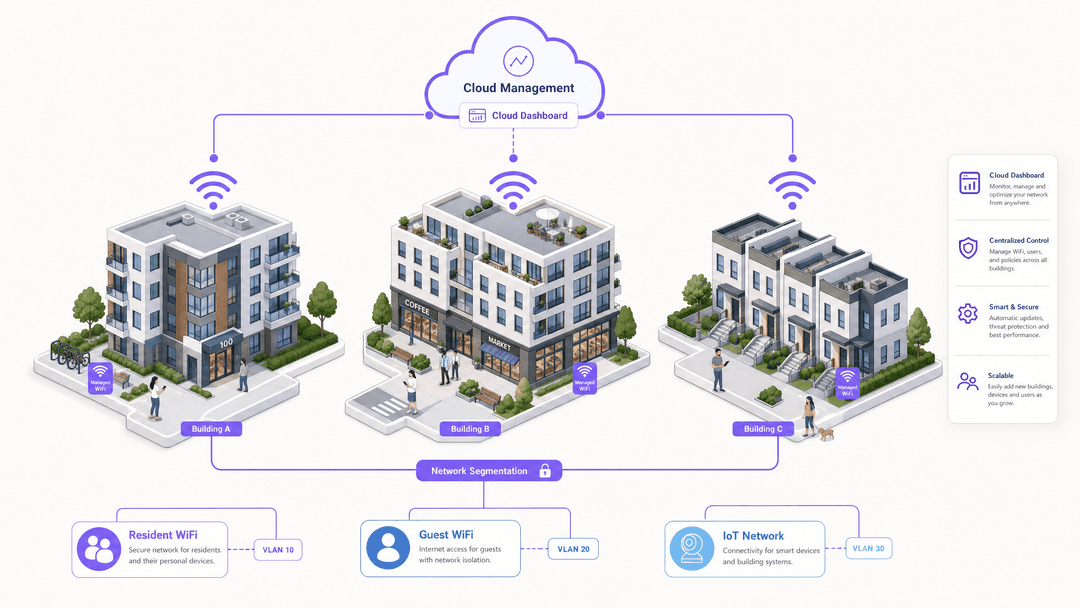
A well-designed managed WiFi deployment for a multi-tenant residential building runs on three separate networks. We recommend deploying three SSIDs to isolate traffic securely.
For a detailed exploration of this concept, see our guide: Three SSIDs to rule them all: guest, Passpoint, and IoT WiFi .
The resident network
The primary network serves residents. It must provide gigabit-class speeds and seamless roaming across the property. Authentication happens per-unit using iPSK (individual pre-shared keys) or 802.1X with a RADIUS server. This means each flat gets its own isolated network segment. Flat 12 cannot see flat 13's traffic. Full stop.
Purple's Multi-Tenant WiFi platform automates this segmentation. When a resident moves in, they receive a unique credential. When they connect their laptop, smart TV, and phone, those devices form a private micro-network within the wider building infrastructure.
For more on authentication methods, read Uu PPSK: comparing features and deployment models .
The guest network
The second network serves visitors. It requires simpler authentication, typically via a captive portal, and offers time-limited access. It is completely isolated from the resident network. A competent managed provider builds GDPR compliance into the captive portal by default, ensuring you have a lawful basis for any data processing.
Learn more about our Guest WiFi solutions.
The IoT network
The third network supports building management systems, smart meters, door entry panels, and CCTV. This network is air-gapped from both resident and guest traffic. You do not want a compromised smart thermostat on the same network as a resident's laptop.
Hardware and the cloud overlay
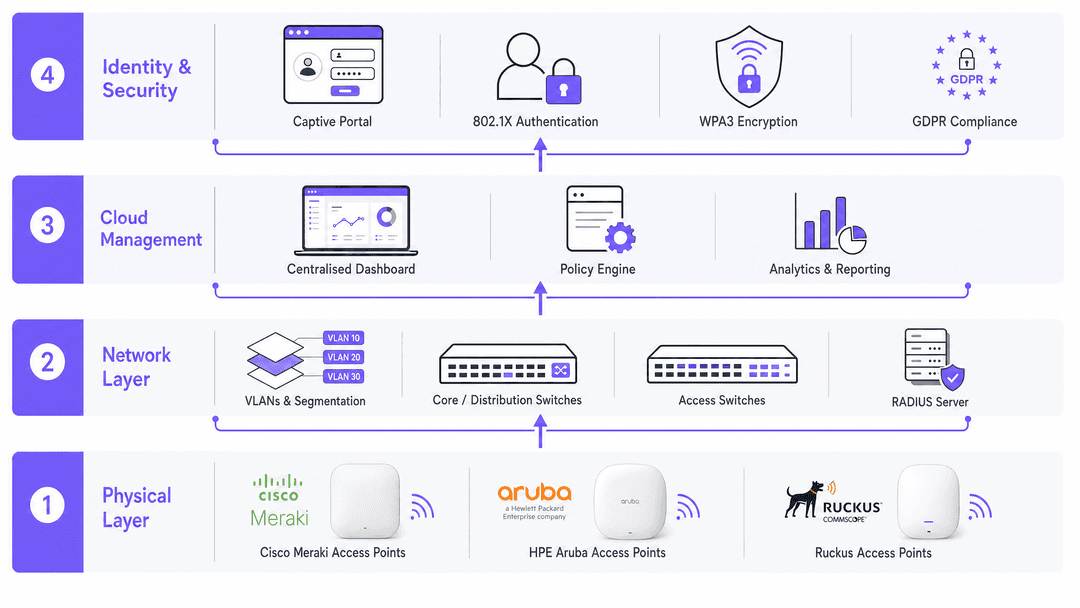
Your managed provider should be hardware-agnostic. They should support deployments using Cisco Meraki, HPE Aruba, Ruckus, Juniper Mist, Ubiquiti UniFi, Cambium, Extreme, or Fortinet access points. What matters is not the brand of access point on the ceiling; it is the cloud management platform sitting above it. That platform is where policies are set, firmware is updated, faults are detected, and usage data is analysed.
Implementation guide: deploying managed WiFi
If you are procuring a managed WiFi service for a new development, follow this sequence to ensure a successful deployment.
1. Conduct a site survey
Before specifying any hardware, conduct a radio frequency survey to map signal propagation across the building. Concrete walls, lift shafts, and metal-framed windows attenuate signal. The survey dictates how many access points you need and where to place them. Do not skip this step. Under-specifying access points is the single most common cause of poor resident experience.
2. Define the network architecture
Determine the number of SSIDs, the authentication method per segment, and the bandwidth allocation per unit. Establish QoS (quality of service) policies to prioritise video calling and gaming traffic over background downloads.
3. Agree the SLA
Define key metrics: uptime guarantee, mean time to repair for hardware faults, escalation paths, and reporting frequency. A 99.9% uptime guarantee sounds good, but check whether that is measured per access point or per site. There is a significant difference.
4. Plan for scale
If you are building phase one of a five-phase development, your managed provider needs to demonstrate that the architecture scales. Adding 200 units in phase two should not require a network redesign.
Best practices for multi-tenant environments
When working with managed WiFi service providers, adhere to these vendor-neutral best practices.
Enforce WPA3 encryption
A good provider will enforce WPA3 encryption on all SSIDs. This is the current WiFi security standard, replacing the older WPA2. They will run 802.1X authentication for staff and resident networks, using EAP-TLS or PEAP protocols.
Segment traffic using VLANs
Segment traffic using VLANs (virtual local area networks) so that a breach on one segment cannot propagate to another. This is particularly critical in Retail environments where PCI DSS compliance is mandatory for payment systems, and in Healthcare where patient data must be protected.
Automate firmware patching
Your provider must handle firmware patching automatically. This is the single most important action you can take to prevent network compromise.
Troubleshooting and risk mitigation
Avoid these common pitfalls when deploying managed WiFi.
Vendor lock-in
Some managed providers tie you to proprietary hardware that only works with their platform. When you want to switch provider in year five, you must replace every access point. Insist on hardware-agnostic deployments and open APIs.
Bandwidth contention
A shared internet connection across 200 units will fail during peak evening hours if it is not sized correctly. Model your bandwidth on 80% concurrent usage, not average usage.
Data ownership
The analytics your network generates - device counts, dwell times, usage patterns - are valuable. Make sure your contract specifies that you own that data, not the provider. This data is critical for understanding building utilisation, a concept we explore further in our WiFi Analytics platform.
ROI and business impact
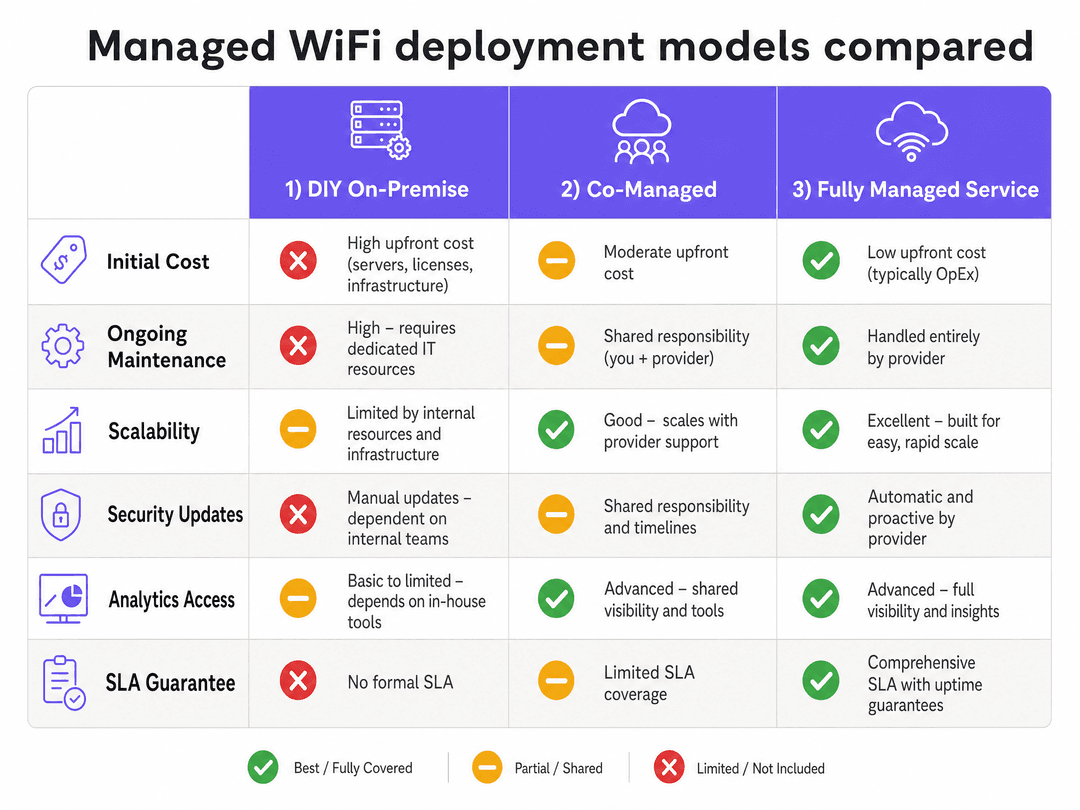
Managed WiFi service providers take the operational complexity of enterprise-grade wireless networking off your plate. For property developers and BTR operators, the business case is straightforward: residents expect connectivity as infrastructure.
A managed provider delivers that infrastructure with a defined SLA, handles security and compliance, and gives you analytics to demonstrate value. By transitioning to a managed service, you eliminate the need for dedicated internal IT resources to troubleshoot connectivity issues, allowing your team to focus on core property management operations.
Key Definitions
iPSK (Individual Pre-Shared Key)
A security method that assigns a unique password to each user or device on a single SSID.
Used in BTR environments to give each flat its own secure, isolated micro-network without broadcasting hundreds of different SSIDs.
VLAN (Virtual Local Area Network)
A logical subnetwork that groups a collection of devices from different physical LANs.
Essential for segmenting traffic, such as keeping the IoT building management system completely separate from resident laptops.
802.1X
An IEEE standard for port-based network access control that provides an authentication mechanism to devices wishing to attach to a LAN or WLAN.
The enterprise standard for authenticating staff and resident networks securely via a RADIUS server.
WPA3
The third generation of Wi-Fi Protected Access, providing enhanced encryption and security over WPA2.
Managed providers enforce this standard to protect against brute-force dictionary attacks.
Captive Portal
A web page that a user of a public-access network is obliged to view and interact with before access is granted.
Used for guest networks to collect first-party data, enforce terms of service, and ensure GDPR compliance.
RADIUS
Remote Authentication Dial-In User Service; a networking protocol that provides centralised authentication, authorisation, and accounting management.
The backend server that verifies a user's credentials when they attempt to connect to an 802.1X secured network.
SSID
Service Set Identifier; the public name of a wireless network.
Best practice dictates limiting the number of SSIDs to three (Resident, Guest, IoT) to reduce management overhead and interference.
Hardware-agnostic
Software or management platforms designed to function effectively regardless of the underlying hardware manufacturer.
Crucial for avoiding vendor lock-in, allowing operators to use Cisco Meraki, HPE Aruba, or Ruckus access points under one management pane.
Worked Examples
A 200-unit build-to-rent development in Manchester wants to include WiFi in the service charge as a single monthly fee covering connectivity for all residents. How should the network be structured?
The managed provider designs a network with one access point per two flats. They deploy a dedicated IoT VLAN for the building management system, and a cloud dashboard giving the property manager visibility of network health in real time. Residents authenticate via a branded app using iPSK, ensuring each flat has an isolated network segment.
A 50,000 square foot retail park has a mix of anchor tenants and smaller units. Each tenant needs their own isolated network that is PCI DSS compliant for card payment systems, alongside separate guest WiFi for shoppers.
The managed provider deploys a multi-tenant architecture where each tenant's traffic is isolated at the VLAN level. The retail park operator receives a single dashboard showing network health across all units. Guest WiFi is handled via a separate SSID with captive portal authentication.
Practice Questions
Q1. You are managing a 150-unit BTR property. The current network uses a single SSID with a shared password for all residents. Residents are complaining that they can see their neighbours' smart TVs and wireless printers. How do you resolve this?
Hint: Consider how to isolate traffic per unit without creating 150 different SSIDs.
View model answer
Deploy a managed WiFi solution using iPSK (individual pre-shared keys). This allows you to maintain a single building-wide SSID, but each resident receives a unique password. When they authenticate, the network places their devices into an isolated VLAN, ensuring they can only see their own devices and not those of their neighbours.
Q2. Your property development firm is planning a phased rollout of a 500-unit complex over three years. Phase one is 100 units. A vendor proposes a proprietary hardware solution that includes free access points but requires a five-year software contract. What is the primary risk?
Hint: Consider what happens in year four if the software platform underperforms.
View model answer
The primary risk is vendor lock-in. Because the hardware is proprietary and tied to the vendor's software platform, if you need to switch providers due to poor service or pricing changes, you will have to rip out and replace all the access points deployed across the 500 units. You should insist on a hardware-agnostic platform that supports standard enterprise access points (e.g., Cisco Meraki, HPE Aruba).
Q3. During the procurement process for a retail park's managed WiFi, the provider offers a 99.9% uptime SLA. The park operator assumes this means the network will rarely go down. What specific clarification must the operator seek regarding this metric?
Hint: Think about how uptime is measured across a large, distributed physical area.
View model answer
The operator must clarify whether the 99.9% uptime is measured per access point, per tenant unit, or across the entire site average. If it is a site average, 10% of the access points could be offline for days, severely impacting specific tenants, while the overall site average still meets the 99.9% SLA. The SLA should guarantee uptime and repair times per access point or per tenant zone.
Continue reading in this series
Staff WiFi vs. Guest WiFi: Best Practices for Corporate Network Segmentation
A comprehensive technical guide for IT leaders on segmenting staff and guest WiFi networks. It covers VLAN architecture, 802.1X authentication, firewall policies, and the business impact of secure network design.
Apartment WiFi solutions: a comprehensive guide for businesses
This guide covers the architecture, deployment, and business case for apartment WiFi solutions in Build to Rent and multi-dwelling unit properties. It explains how Identity Pre-Shared Key (iPSK) technology creates secure, isolated network bubbles for each resident while supporting smart devices and IoT. Property developers, landlords, and BTR operators will find actionable deployment guidance, ROI data, and worked implementation scenarios.
Cox business managed WiFi: a comprehensive guide for businesses
This guide details how property developers and BTR operators can deploy scalable, secure networks using Cox Business managed WiFi. It covers network architecture, vendor-neutral hardware deployment, and the business impact of transitioning connectivity from an operational headache to reliable infrastructure.