
Managed WiFi provider: a comprehensive guide for businesses
This comprehensive guide explores the technical architecture, deployment strategies, and business value of engaging a managed WiFi provider. It provides actionable recommendations for IT leaders on network segmentation, authentication protocols, and securing multi-tenant environments.
Video overview
Listen to this guide
View podcast transcript
Executive Summary
For modern enterprise environments, WiFi is no longer a peripheral utility. Across hotels, retail chains, stadiums, conference centres, and build-to-rent developments, connectivity has become as fundamental as electricity. But unlike electricity, WiFi carries data, and that data has compliance, security, and commercial implications that a simple broadband contract does not address. A managed WiFi provider takes ownership of the design, deployment, monitoring, and ongoing management of your wireless network. You secure a contractual service level agreement, typically 99.999% uptime, a network operations centre watching your infrastructure around the clock, and a team of engineers who patch vulnerabilities before they become active threats. This guide outlines the technical architecture required for enterprise deployments, detailing how to isolate traffic securely, automate authentication, and turn a cost centre into a first-party data asset.
Technical Deep-Dive
The foundation of any enterprise managed WiFi deployment is network segmentation. You are almost certainly running multiple user populations on the same physical infrastructure: guests or residents, staff, and IoT devices. Each of those populations has different trust levels, different data access requirements, and different regulatory implications. The correct approach is to isolate them using VLANs. A VLAN is a logical partition of your network that prevents traffic from one segment reaching another, even though they share the same physical access points and cabling.
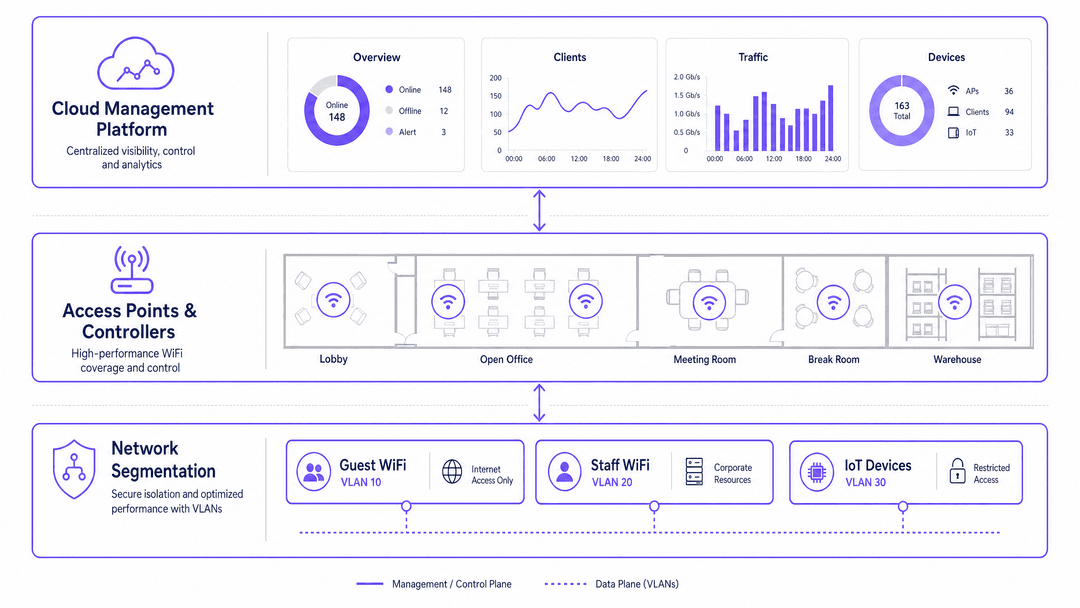
The standard architecture uses three SSIDs. The first is Guest WiFi, which routes to the internet only, with no access to internal systems. The second is Staff WiFi, which authenticates via IEEE 802.1X and connects to corporate resources. The third is an IoT SSID, which isolates smart devices like thermostats, CCTV cameras, and point-of-sale terminals onto their own segment. This three-SSID model is vendor-neutral and works across Cisco Meraki, HPE Aruba, Ruckus, Juniper Mist, Ubiquiti UniFi, Cambium, Extreme, and Fortinet hardware.
Authentication forms the next critical layer. For Guest WiFi or resident access, the most common approach is a captive portal. This is where a managed WiFi provider adds significant value beyond basic connectivity. Purple has processed 440 million logins in 2024 alone across 80,000 live venues. That scale means the authentication infrastructure is hardened, load-tested, and GDPR-compliant by default.
For staff authentication, 802.1X with RADIUS is the correct standard. RADIUS validates credentials against a directory service. Purple integrates natively with Microsoft Entra ID, Okta, and Google Workspace, which means your existing identity provider handles staff authentication without you maintaining a separate user database.
WPA3 should be your baseline for all new deployments. WPA3 replaces WPA2 and eliminates the KRACK vulnerability class. It also introduces Simultaneous Authentication of Equals, which protects against offline dictionary attacks. If you are deploying on hardware that supports WPA3, there is no reason not to use it.
For multi-tenant environments, the architecture requires one additional layer: per-resident isolation. Each resident needs their own private network segment so that their smart devices are not visible to neighbours. The technical mechanism here is either PPSK or iPSK. Both assign a unique passphrase per resident or per device, which the access point maps to a dedicated VLAN. Purple's Multi-Tenant WiFi product automates this provisioning, so when a new resident moves in, their network segment is created automatically. When they move out, it is revoked. No manual VLAN configuration. No residual access.
Implementation Guide
If you are evaluating a managed WiFi provider, here is the sequence I recommend.
Start with a site survey. A proper RF survey maps signal coverage, identifies interference sources, and determines access point placement. Do not skip this step. Under-provisioning access points is the single most common cause of poor WiFi performance, and it is entirely avoidable with a proper survey.
Next, define your network architecture before you touch any hardware. Decide how many SSIDs you need, what VLANs they map to, and what authentication method each uses. Document this in a network design document that your managed provider signs off on.
Third, agree your SLA terms in writing. A 99.999% uptime SLA means approximately 5 minutes of downtime per year. Anything less than 99.9% is not acceptable for a commercial venue. Ensure the SLA covers both the access layer and the cloud management platform.
Fourth, plan your data governance. If you are collecting personal data through a captive portal, you need a lawful basis under GDPR, a privacy notice, and a data processing agreement with your managed WiFi provider. This is not optional. The Information Commissioner's Office has issued fines for exactly this type of non-compliance.
Fifth, test before you go live. Run a pilot on one floor or one zone. Validate authentication, roaming between access points, VLAN isolation, and bandwidth performance under load. Fix issues at pilot scale, not after a full deployment.
Best Practices
Mandate WPA3 for new deployments. The Simultaneous Authentication of Equals handshake in WPA3 provides robust protection against offline dictionary attacks. While WPA2 remains common, any hardware refresh must include WPA3 support.
Automate resident provisioning. In multi-tenant environments, relying on manual VLAN configuration is unsustainable and introduces security risks. Use an identity provider integration to automate the assignment of PPSK credentials upon move-in and revoke them upon move-out.
Standardise on three SSIDs. Avoid SSID proliferation. Every additional SSID increases management overhead and management frame overhead on the radio frequency. A Guest, Staff, and IoT SSID structure covers almost all enterprise requirements. Read more about this in our guide: Three SSIDs to rule them all: guest, Passpoint, and IoT WiFi .
Troubleshooting & Risk Mitigation
The first common failure mode is insufficient backhaul. Your WiFi network is only as fast as the internet connection feeding it. A 200-room hotel with a 100 megabit internet connection will have a terrible guest experience regardless of how good the WiFi infrastructure is. Size your backhaul at a minimum of one megabit per concurrent user, and assume 30% of guests will be online simultaneously.
The second failure mode is poor VLAN configuration. If your guest VLAN has any route to your internal network, you have a security breach waiting to happen. Always verify VLAN isolation with a penetration test before going live.
The third is ignoring IoT devices. Smart TVs, IPTV systems, CCTV cameras, and building management systems all need network access. If you put them on the guest VLAN, they consume bandwidth and create security risks. If you put them on the staff VLAN, you mix operational technology with corporate IT. The correct answer is a dedicated IoT VLAN with restricted routing policies.
The fourth failure mode is not planning for Passpoint and OpenRoaming. Passpoint allows devices to connect automatically to trusted networks without a captive portal. OpenRoaming extends this across multiple operators. If you are deploying in a transport hub, conference centre, or stadium, Passpoint is increasingly expected by users. Plan for it from day one, because retrofitting it is significantly more complex.
ROI & Business Impact
How do you justify the cost of a managed WiFi provider versus managing the network yourself?
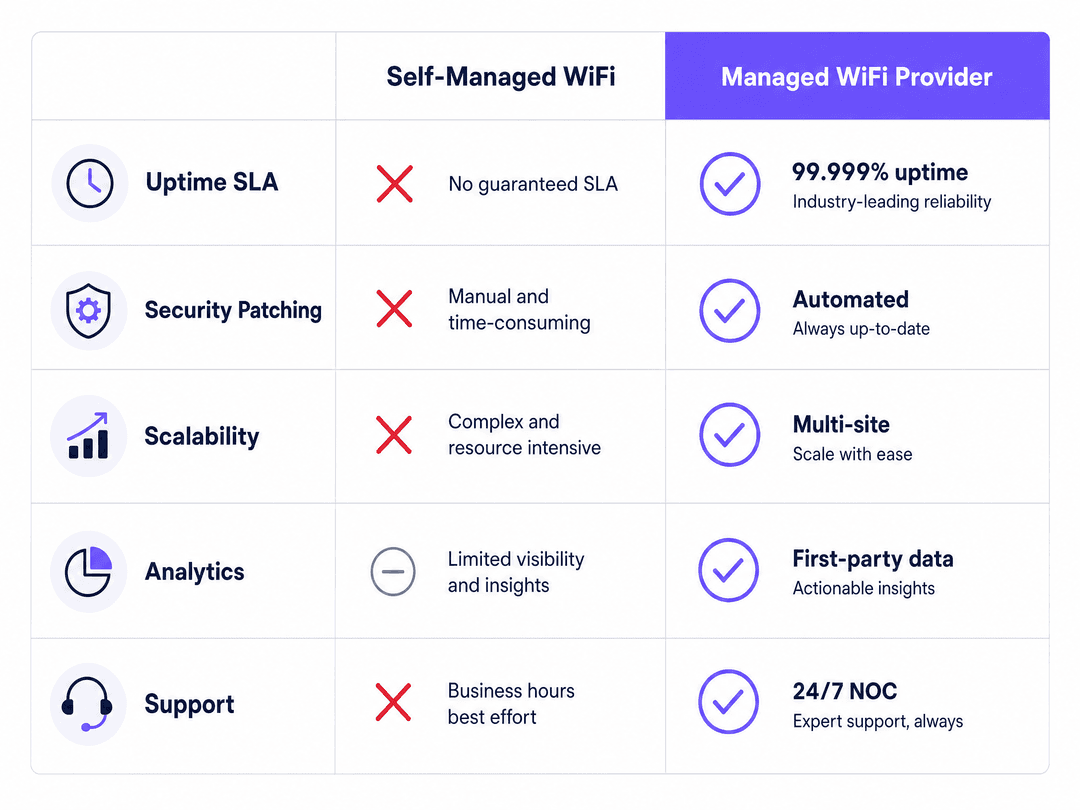
The direct cost comparison is straightforward. A self-managed network requires at least one dedicated network engineer, hardware maintenance contracts, a monitoring platform, and a security operations function. For a multi-site operator, that cost scales linearly with sites. A managed WiFi provider amortises those costs across their entire customer base and delivers them as a predictable monthly fee.
The indirect value is where the real business case sits. A managed WiFi provider with analytics capability, like Purple's WiFi Analytics platform, turns your network into a data asset. You can see dwell time by zone, repeat visitor rates, peak usage periods, and device demographics. For a retailer, that data informs store layout and staffing decisions. For a hotel, it informs F&B promotions and loyalty programme targeting. For a BTR operator, it demonstrates amenity quality to prospective residents.
Purple's own data shows that venues using first-party WiFi data for marketing see measurable uplift in repeat visit rates. That is a direct revenue contribution from the network infrastructure.
Audio Briefing
Listen to our senior network consultant discuss these concepts in detail:
Key Definitions
VLAN
Virtual Local Area Network. A logical partition of a physical network that isolates traffic, preventing devices on one VLAN from communicating with devices on another without explicit routing rules.
Used to separate guest, staff, and IoT traffic on the same physical access points.
SSID
Service Set Identifier. The public name of a wireless network.
Enterprise environments typically broadcast separate SSIDs for different user groups.
Captive Portal
A web page that intercepts user traffic upon connection, requiring authentication, registration, or acceptance of terms before granting internet access.
The primary mechanism for capturing first-party data on Guest WiFi networks.
802.1X
An IEEE standard for port-based network access control that provides an authentication mechanism to devices wishing to attach to a LAN or WLAN.
The standard protocol for securing Staff WiFi networks, usually integrated with a directory service.
RADIUS
Remote Authentication Dial-In User Service. A networking protocol that provides centralised authentication, authorisation, and accounting management.
The backend server that processes 802.1X authentication requests.
PPSK
Private Pre-Shared Key. A security feature that assigns unique passphrases to individual users or devices on the same SSID, often mapping them to specific VLANs.
Essential for isolating resident networks in build-to-rent and student accommodation.
WPA3
WiFi Protected Access 3. The latest security certification program developed by the Wi-Fi Alliance, featuring Simultaneous Authentication of Equals.
The required security baseline for all new enterprise WiFi deployments.
Passpoint
Also known as Hotspot 2.0. A protocol that streamlines network access by allowing devices to automatically discover and connect to trusted WiFi networks without user intervention.
Increasingly expected in transport hubs and stadiums to reduce friction during connection.
Worked Examples
A 350-room hotel runs Cisco Meraki access points throughout guest rooms, corridors, and conference facilities. The IT team needs to implement secure access for guests, staff, and conference attendees without replacing hardware.
The managed WiFi provider deploys a cloud overlay that handles authentication, analytics, and policy enforcement. Guests connect to the Guest WiFi SSID, authenticate via a branded captive portal, and the hotel captures first-party data that feeds directly into the CRM. Staff connect via 802.1X to the Staff WiFi SSID, authenticated against Microsoft Entra ID. Conference room attendees receive a temporary SSID with bandwidth limits and a session expiry. The hotel's IT team manages everything from a single cloud dashboard.
A build-to-rent development with 200 apartments needs to provide secure, isolated WiFi for residents, ensuring smart devices in one apartment are not visible to neighbours.
The developer installs HPE Aruba access points in each unit and in communal areas. Each resident receives a unique PPSK on move-in, which maps to their own VLAN. Their smart TV, laptop, and smart speaker are all on that VLAN and cannot see any other resident's devices. The communal WiFi in the gym and lobby runs on a separate SSID with a shared passphrase and bandwidth shaping.
Practice Questions
Q1. A retail chain with 50 locations is experiencing frequent point-of-sale terminal disconnects. The terminals are currently connected to the same SSID as the guest WiFi. What is the recommended architectural change?
Hint: Consider network segmentation and traffic isolation.
View model answer
Create a dedicated IoT/Operational SSID specifically for the point-of-sale terminals and map it to a separate VLAN. This isolates the critical payment traffic from guest traffic, preventing bandwidth contention and improving security.
Q2. A university is deploying WiFi across a new student accommodation block. They need to ensure students can cast from their phones to their smart TVs, but cannot cast to TVs in other rooms. What authentication method should be deployed?
Hint: Look for a solution that provides unique credentials on a shared SSID.
View model answer
Deploy Private Pre-Shared Key (PPSK) or Identity Pre-Shared Key (iPSK). Each student receives a unique passphrase that maps their devices to a personal, isolated VLAN, allowing their devices to communicate with each other while remaining invisible to other students.
Q3. An IT manager wants to implement 802.1X authentication for staff WiFi but does not want to manage a separate user database for network access. How should this be configured?
Hint: Consider how existing corporate identities can be leveraged.
View model answer
Integrate the RADIUS server directly with the organisation's existing identity provider, such as Microsoft Entra ID, Okta, or Google Workspace. This allows staff to authenticate to the WiFi using their standard corporate credentials.
Continue reading in this series
Staff WiFi vs. Guest WiFi: Best Practices for Corporate Network Segmentation
A comprehensive technical guide for IT leaders on segmenting staff and guest WiFi networks. It covers VLAN architecture, 802.1X authentication, firewall policies, and the business impact of secure network design.
Apartment WiFi solutions: a comprehensive guide for businesses
This guide covers the architecture, deployment, and business case for apartment WiFi solutions in Build to Rent and multi-dwelling unit properties. It explains how Identity Pre-Shared Key (iPSK) technology creates secure, isolated network bubbles for each resident while supporting smart devices and IoT. Property developers, landlords, and BTR operators will find actionable deployment guidance, ROI data, and worked implementation scenarios.
Cox business managed WiFi: a comprehensive guide for businesses
This guide details how property developers and BTR operators can deploy scalable, secure networks using Cox Business managed WiFi. It covers network architecture, vendor-neutral hardware deployment, and the business impact of transitioning connectivity from an operational headache to reliable infrastructure.