
Legal Liabilities and Content Filtering on Public Guest Networks
This guide provides IT managers, network architects, and CTOs with a definitive technical and legal framework for deploying content filtering on public guest WiFi networks. It covers the regulatory obligations under CCPA/CPRA, the UK Online Safety Act 2023, and PCI DSS, alongside a multi-layered architecture for DNS filtering, captive portal authentication, application-layer firewalling, and VLAN segmentation. Venue operators in hospitality, retail, healthcare, and transportation will find actionable implementation steps, real-world case studies, and decision frameworks to build a legally defensible, high-performance guest network.
Video overview
Listen to this guide
View podcast transcript
Part of our core series: Enterprise WiFi Security Guide →
Executive Summary
For IT managers, network architects, and CTOs managing public venues, deploying Guest WiFi is a baseline operational requirement. However, providing an open internet pipe without robust content filtering exposes the venue to serious legal, financial, and reputational risk. When you provide public internet access, your organization assumes the role of an Internet Service Provider (ISP). If malicious or illegal traffic - such as copyright infringement, peer-to-peer (P2P) piracy, or access to restricted material - originates from your public IP address, liability typically falls on the venue operator.
This guide provides the definitive technical framework for implementing mandatory content filtering. We examine the architecture required to maintain safe harbor protections, ensure regulatory compliance (including GDPR, the UK Online Safety Act 2023, and PCI DSS v4.0), and sustain network performance at scale. By pairing robust filtering with WiFi Analytics, venues across retail, hospitality, healthcare, and transportation can reduce risk while maintaining a seamless guest experience.
Technical Deep Dive
The Legal Landscape and Safe Harbor
The primary driver for content filtering is public WiFi liability. In most jurisdictions, ISPs and public WiFi providers are protected by "safe harbor" provisions - such as the Digital Millennium Copyright Act (DMCA) in the United States, or the EU's E-Commerce Directive and its successor frameworks. However, these protections are explicitly conditional. To qualify, providers must demonstrate that they have taken reasonable technical steps to prevent illegal activity and can assist law enforcement when required.
Without an audit trail and active filtering, a venue cannot demonstrate reasonable steps, which voids safe harbor protection entirely. This is especially critical for public sector deployments and educational institutions, where accountability requirements are more stringent. For background on managing WiFi in safeguarding-sensitive environments, see WiFi in Schools: The 2026 Administrator & IT Guide.
The three principal legal risk vectors of an unfiltered network are as follows. First, copyright infringement via P2P piracy: rights holders use automated monitoring to identify IP addresses sharing copyrighted files over the BitTorrent protocol. Under legislation such as the US Digital Millennium Copyright Act (DMCA), repeat infringements associated with a venue's public IP can result in service throttling, civil penalties, or litigation from rights holders. Second, access to harmful or illegal content: federal and state laws impose a strict duty of care on internet access providers. The FTC and state attorneys general can impose significant fines for serious breaches. If a guest accesses illegal material through your network and you have not implemented industry-standard blocking, your organization faces intense regulatory scrutiny. Third, data privacy and record-keeping compliance: under CCPA/CPRA, any network metadata collected (IP leases, MAC addresses, timestamps) constitutes personal data. Venues must balance the legal obligation to retain connection records for law enforcement against CCPA/CPRA's data minimization principle.

The Multi-Layered Security Architecture
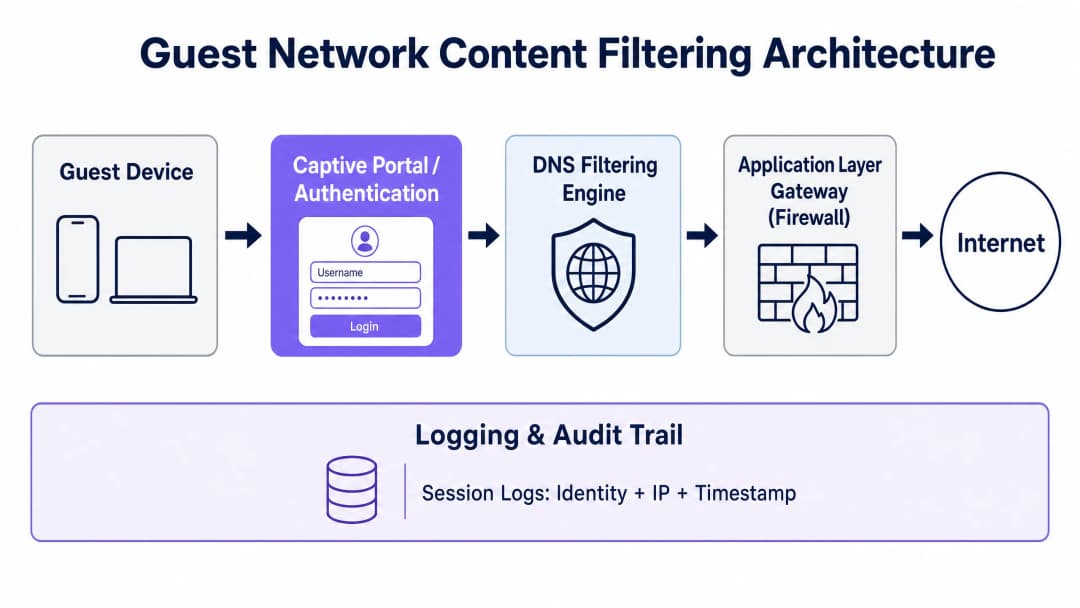
Protecting guests and the business requires a defense-in-depth approach. A single firewall rule or basic DNS filter is trivially bypassed by a moderately technical user. A robust guest network architecture must implement a layered security stack across four distinct control layers.
Layer 1 - Authentication and Identity (Captive Portal): Before network access is granted, users must authenticate through a Captive Portal. This binds the device's physical MAC address and its assigned local IP lease to a verified identity - such as an SMS-verified cell phone number, an email address, or a social media profile. This process establishes the critical audit trail needed to shift legal responsibility from the venue to the individual user. For enterprise environments requiring stronger assurance, integrating a Network Access Control (NAC) solution or implementing 802.1X authentication with Cloud RADIUS ensures that only authorized, compliant devices can connect.
Layer 2 - DNS-Layer Filtering: DNS filtering is the most scalable, low-latency method of blocking harmful content at the network edge. When a guest device requests a domain name resolution, the request is routed to a secure cloud DNS resolver. The resolver checks the domain against a real-time threat intelligence database categorized by content type (adult, gambling, P2P, malware, phishing). If the domain falls within a blocked category, the resolver returns the address of a local block page, preventing the connection from being established. For high-throughput deployments such as stadiums or large retail estates, cloud DNS filtering with local caching introduces negligible latency - typically under 20 milliseconds.
Layer 3 - Application-Layer Gateway (Next-Generation Firewall): Because DNS filtering blocks only domain names, users can bypass it by connecting directly to known IP addresses or using encrypted DNS tunneling. The network gateway must therefore perform application-layer filtering using Deep Packet Inspection (DPI) to identify and block specific protocols - such as BitTorrent, Tor, and common VPN signatures - regardless of the port or DNS server used. DPI does introduce throughput overhead, so it should be applied selectively to high-risk protocol categories rather than all traffic.
Layer 4 - Network Segmentation (VLANs): The guest network must be fully isolated from corporate resources, point-of-sale (POS) systems, and back-of-house infrastructure via dedicated VLANs and strict access control lists (ACLs). Under PCI-DSS v4.0, if guest traffic is not rigorously segmented from the cardholder data environment (CDE), the entire guest network falls within PCI audit scope, dramatically increasing compliance cost and audit complexity.
Implementation Guide
Step 1: Network Segmentation and VLAN Configuration
Configure a dedicated VLAN for guest traffic across all core switches and wireless controllers. Ensure inter-VLAN routing is disabled between the guest VLAN and any internal corporate VLANs. On your firewall, implement an access control list (ACL) that explicitly blocks the guest subnet from reaching any RFC 1918 private IP ranges while permitting all other outbound traffic to the internet. This single configuration step removes the guest network from PCI-DSS scope and prevents lateral movement in the event of a compromised guest device.
Step 2: DNS Filtering Deployment and DoH Mitigation
To prevent guests from bypassing the DNS-layer filter using DNS over HTTPS (DoH) or DNS over TLS (DoT), the network gateway must force all DNS traffic through the designated secure resolver. Configure destination NAT (DNAT) rules to intercept all outbound UDP/TCP port 53 requests from the guest VLAN and redirect them to your secure DNS filtering IP. For DoH mitigation, block outbound TCP port 853 (DoT) and restrict access over port 443 to known public DoH resolver IPs, using either your firewall's built-in DNS over HTTPS application blocking category or a curated IP blocklist maintained by a threat intelligence provider.
Step 3: Captive Portal and Session Logging Configuration
Integrate your wireless access points - for example, Cisco Wireless APs - with a centralized Captive Portal platform. The portal must capture the user's explicit consent to the terms of service and privacy policy before granting internet access. Under CCPA/CPRA, maintain a split retention schedule: retain connection metadata records (MAC address, assigned IP, session timestamps) for 12 months in encrypted, access-controlled storage to satisfy law enforcement data retention requirements, while marketing profile data must be purged immediately when a user withdraws consent or requests erasure.
Step 4: Content Filtering Policy Configuration
Deploy a tiered content filtering policy based on venue type. At a minimum, all public guest networks must block the following categories: malware and phishing domains, peer-to-peer file-sharing protocols, adult and obscene content, and known proxy and anonymizer services. Venues serving families or minors - such as community centers, libraries, or transit hubs - should additionally enforce search engine SafeSearch modes by rewriting DNS queries at the resolver level, and integrate with the Internet Watch Foundation (IWF) URL blocklist to meet Friendly WiFi certification standards.
Got questions about your specific setup?
Our team works with venue operators, IT managers, and network engineers across 80,000 venues. Book a 20-minute call and we will show you how others like you solved it.
Best Practices
Adopt the Friendly WiFi Standard
For public venues serving families, local government, or educational spaces, obtaining Friendly WiFi certification is strongly recommended. The standard, developed in partnership with the UK Council for Child Internet Safety (UKCCIS), assures the public that your guest network actively blocks access to illegal material and obscene content. Displaying the Friendly WiFi Approved logo at venue entrances and on the Captive Portal welcome page directly enhances customer trust and differentiates the venue from competitors.
The Content Filtering Policy Matrix
IT administrators should deploy tiered content filtering policies based on venue type and bandwidth capacity:
| Venue Type | Primary Focus | Mandatory Blocked Categories | Optional / Bandwidth Controls |
|---|---|---|---|
| Retail & Shopping Malls | Safety & compliance | Malware, phishing, adult, P2P | Throttle high-bandwidth video streaming |
| Hospitality & Hotels | Performance & liability | Malware, P2P piracy, adult | Dynamic per-session bandwidth limits |
| Healthcare & Clinics | Privacy & safeguarding | Malware, adult, gambling, P2P | Full blocking of VPN tunnels |
| Schools & Colleges | Child safeguarding | Adult, violence, proxy/VPN, P2P | Strict application controls, social media restrictions |
| Stadiums & Arenas | Throughput & compliance | Malware, P2P, adult | Strict per-device bandwidth caps |
Centralized Multi-Site Policy Management
For organizations operating across multiple venues - such as hotel chains, retail estates, or local authorities - centralized policy management is non-negotiable. Pushing policy updates to all access points and gateways simultaneously through a single interface ensures a consistent compliance posture across the estate. Any venue operating without centralized management is effectively running an unaudited network, which is indefensible in a regulatory investigation.
Troubleshooting and Risk Mitigation
Issue 1: Users Bypassing Filters via VPNs
Guests using commercial VPN clients encrypt their traffic end-to-end, bypassing DNS and application-layer filters. The mitigation strategy is to block common VPN protocols at the gateway by enabling the proxy and VPN categories on your next-generation firewall. It is worth noting, however, that a guest successfully using a VPN means their traffic egresses from the VPN provider's IP address, not yours. In many cases this actually reduces your risk exposure rather than increasing it, as legal responsibility shifts to the VPN provider.
Issue 2: Over-Blocking Legitimate Business Applications
Overly aggressive filtering policies frequently block legitimate enterprise SaaS platforms, prompting connection failure reports from corporate guests. The mitigation is to maintain a curated whitelist of essential business domains (such as Microsoft 365, Google Workspace, Zoom, Salesforce, and similar platforms) that bypass restrictive filtering categories. Consider deploying a separate "Corporate Guest" SSID with less restrictive filtering for verified business users who need access to corporate VPN endpoints.
Issue 3: MAC Address Randomization Breaking the Audit Trail
Modern mobile operating systems (iOS 14+, Android 10+) randomize the device's MAC address for each new network connection, preventing persistent device tracking. The mitigation is to base the audit trail on Captive Portal session tokens rather than hardware MAC addresses. When a user authenticates through the portal, their verified identity is associated with their active DHCP lease and session ID. If the MAC address changes, the user must re-authenticate through the Captive Portal, generating a fresh, valid log entry.
Issue 4: "Set and Forget" Policy Decay
Threat intelligence databases are updated continuously. A content filtering policy that was comprehensive at deployment can miss thousands of newly registered malicious domains within weeks. Ensure your DNS filtering provider delivers automatic, real-time threat intelligence feed updates, and schedule a quarterly policy review to assess whether the blocked and whitelisted categories still match the venue's operational needs and the current threat landscape.
ROI and Business Impact
Implementing a robust content filtering and legal compliance architecture on the guest network delivers tangible operational and financial returns beyond pure risk mitigation.
Bandwidth optimization and cost savings: Unfiltered guest networks are routinely abused by users running P2P protocols or continuously streaming high-definition video. By actively blocking P2P networks and throttling non-essential streaming services, venues can reclaim up to 40% of total network bandwidth. This optimization directly delays or eliminates the need to purchase expensive leased line upgrades, saving thousands of dollars in recurring telecommunications costs annually.
Legal defensibility and liability shielding: The financial consequences of a single copyright infringement claim or a regulatory investigation under the Online Safety Act can be severe. A fully audited, filtered network provides defensible safe harbor protection. If illegal activity is detected, the venue can immediately produce secure, de-identified connection records to demonstrate cooperation with law enforcement, deflecting liability away from the business and avoiding CCPA/CPRA fines of up to 4% of global annual turnover.
Enhanced brand reputation and guest trust: For the modern consumer, digital safety is a key differentiator. Displaying Friendly WiFi certification at your venue entrance or on the Captive Portal login page assures families, corporate clients, and public sector partners that your digital environment is safe and professionally managed. That trust translates directly into longer dwell times, higher guest satisfaction scores, and stronger brand loyalty across your retail or hospitality estate.
References
[1] UK Parliament. Digital Economy Act 2017. Legislation.gov.uk.
[2] US Copyright Office. Digital Millennium Copyright Act (DMCA). Copyright.gov.
[3] Purple.ai. WiFi in Schools: The 2026 Administrator & IT Guide. /blog/wifi-in-schools.
[4] Friendly WiFi. Is Your Public WiFi Safe? Understanding the Online Safety Act. FriendlyWiFi.com.
[5] Spotipo. Are Your Captive Portals Legal? CCPA, Data Retention, and Privacy Rules by Region. Spotipo.com.
[6] Purple.ai. How to Implement 802.1X Authentication with Cloud RADIUS. /guides/implementing-8021x-with-cloud-radius.
[7] TitanHQ. Web Filtering For Guest WiFi. TitanHQ.com.
[8] Purple.ai. Cisco Wireless APs: 2026 Guide to Products & Deployment. /blog/cisco-wireless-ap.
Key Definitions
Safe Harbor
A legal protection that shields internet access providers from liability for illegal content or activity transmitted over their networks, provided they can demonstrate they took reasonable technical steps to prevent abuse and cooperate with law enforcement. Safe harbor is conditional, not automatic.
IT teams encounter this concept when evaluating the legal risk of deploying an unfiltered guest network. The key operational implication is that safe harbor requires both active filtering and a verifiable audit trail - neither alone is sufficient.
DNS Filtering
A network security technique that intercepts DNS resolution requests and blocks or redirects queries for domains categorized as malicious, illegal, or policy-violating before a connection is established. Operates at the DNS layer (UDP/TCP port 53) and is typically delivered as a cloud-based service.
The primary content filtering mechanism for guest WiFi deployments. IT teams should be aware that DNS filtering alone is insufficient without complementary controls to block DNS over HTTPS (DoH) bypass attempts.
DNS over HTTPS (DoH)
A protocol that encrypts DNS resolution queries within standard HTTPS traffic (TCP port 443), making them indistinguishable from regular web traffic. DoH allows devices to bypass network-level DNS filtering by sending queries directly to a public DoH resolver rather than the network's managed DNS server.
The most significant technical bypass vector for DNS-based content filtering. Network architects must explicitly block known DoH resolver IPs and TCP port 853 (DoT) at the gateway to prevent guests from circumventing content filtering policies.
Captive Portal
A web-based authentication gateway that intercepts all HTTP/HTTPS traffic from a newly connected guest device and redirects it to a login or terms-of-service acceptance page before granting full internet access. The captive portal is the primary mechanism for creating a legally defensible audit trail.
Essential for any public guest network. The captive portal ties a verified user identity to a network session, MAC address, and IP lease - the three elements required to respond to a law enforcement data request or defend against a copyright infringement claim.
VLAN Segmentation
The practice of logically separating network traffic into distinct virtual local area networks (VLANs) at the switch and router level, preventing traffic from one VLAN from reaching devices on another without explicit routing rules. Guest traffic must be isolated in a dedicated VLAN, separate from corporate, POS, and management networks.
A mandatory PCI DSS v4.0 requirement for any venue that processes payment card data. Without VLAN segmentation, the guest network falls within the PCI cardholder data environment (CDE) scope, dramatically increasing audit complexity and compliance costs.
Deep Packet Inspection (DPI)
A firewall technique that analyzes the full content of network packets - including payload data - rather than just packet headers. DPI can identify and block specific application protocols (such as BitTorrent or Tor) regardless of the port number used, making it effective against protocol-level bypass attempts.
Used at the application-layer gateway to block P2P protocols and VPN tunnels that bypass DNS-layer filtering. DPI introduces measurable throughput overhead and should be applied selectively to high-risk protocol categories rather than all guest traffic.
CCPA/CPRA / GDPR
The California Consumer Privacy Act as amended by the California Privacy Rights Act (CCPA/CPRA) and the General Data Protection Regulation as applied across EU member states (GDPR). Both frameworks require lawful basis for processing personal data, data minimization, transparent privacy notices, and the ability to respond to data subject access requests.
Applies directly to any venue collecting guest WiFi connection metadata (IP addresses, MAC addresses, session timestamps) or user-provided data (email, phone number) via a captive portal. The venue is the data controller; the captive portal provider is the data processor.
PCI DSS v4.0
The Payment Card Industry Data Security Standard version 4.0, which defines security requirements for any organization that stores, processes, or transmits payment card data. Requirement 1.3 mandates strict network segmentation between the cardholder data environment (CDE) and all other networks, including guest WiFi.
Relevant to any hospitality or retail venue where guests may use the same physical premises as payment card processing systems. Failure to segment the guest network from the CDE brings the entire guest network into PCI audit scope, requiring full compliance assessment of all guest WiFi infrastructure.
Internet Watch Foundation (IWF) Blocklist
A dynamically maintained URL blocklist produced by the Internet Watch Foundation, containing URLs confirmed to host child sexual abuse material (CSAM) and other illegal imagery. Integration with the IWF blocklist is a mandatory requirement for the Friendly WiFi certification and is considered an industry-standard minimum for any public WiFi deployment.
IT teams should verify that their DNS filtering provider maintains an active integration with the IWF URL list and that updates are applied in real time. This is a non-negotiable baseline for any public venue and is increasingly expected by public sector procurement frameworks.
Friendly WiFi Certification
A certification scheme developed in collaboration with internet safety groups that verifies a public WiFi network actively filters illegal and harmful content, including integration with the IWF blocklist and enforcement of adult content restrictions. Certified venues may display the Friendly WiFi Approved symbol.
Relevant for hospitality, retail, transportation, and public sector venues. The certification provides a visible, trusted signal of compliance to guests and is increasingly referenced in public sector procurement requirements. It also provides a defensible record of due diligence in the event of a regulatory investigation.
Worked Examples
A 350-room full-service hotel chain with 12 properties across the US needs to deploy a compliant guest WiFi solution. Each property has a mix of leisure guests, business travelers, and conference delegates. The IT director has received a cease and desist letter from a rights holder regarding P2P activity traced to one of their public IPs. The chain has no current content filtering in place, no captive portal, and no session logging. What is the recommended remediation architecture?
The remediation should be executed in three phases. Phase 1 (Week 1 - 2): Emergency VLAN segmentation. On all 12 properties, immediately configure a dedicated guest VLAN (e.g., VLAN 200) on all core switches and wireless controllers. Apply an ACL at the gateway to block all inter-VLAN routing between guest and corporate networks. This immediately removes the guest network from PCI DSS scope and prevents any further lateral movement risk. Phase 2 (Week 2 - 4): Deploy cloud-based DNS filtering. Provision a cloud DNS filtering service across all 12 sites via centralized management. Configure the guest VLAN DHCP scope to assign the secure DNS resolver IPs as primary and secondary DNS servers. Enable the following blocking categories at minimum: P2P/Torrenting, Malware, Phishing, Adult Content, and Proxy/Anonymizers. Configure a DNAT rule on each site's gateway to intercept all port 53 traffic from the guest VLAN and redirect it to the managed DNS resolvers. Block outbound TCP port 853 and known DoH resolver IPs to prevent DNS bypass. Phase 3 (Week 4 - 6): Deploy captive portal and session logging. Integrate the wireless controllers with a centralized captive portal platform. Configure the portal to require email or SMS authentication before granting internet access. Ensure session logs capture: authenticated identity, MAC address, assigned local IP, NAT public IP, session start/end timestamps. Configure automated log retention for 12 months in an encrypted, access-controlled storage system. Produce a data processing agreement (DPA) with the portal provider to satisfy CCPA/CPRA requirements.
A national retail chain operating 85 stores wants to offer free guest WiFi as a footfall driver and marketing data capture tool. The CTO is concerned about three specific risks: (1) the network being used for illegal content access in stores near schools, (2) CCPA/CPRA compliance for the data collected at the captive portal, and (3) bandwidth abuse by customers streaming video for extended periods. How should the network be architected to address all three concerns simultaneously?
The architecture should integrate three distinct control planes. For concern 1 (harmful content): Deploy a cloud DNS filtering service with the Friendly WiFi certification-compliant category set enabled across all 85 stores. This includes mandatory integration with the Internet Watch Foundation (IWF) URL blocklist, enforcement of SafeSearch on all major search engines and video platforms via DNS query rewriting, and blocking of adult content, violence, and proxy/anonymizer categories. Apply this policy uniformly across all stores regardless of proximity to schools - a consistent policy is easier to audit and defend than a location-based policy. For concern 2 (CCPA/CPRA compliance): Configure the captive portal with a CCPA/CPRA-compliant consent flow: a clear privacy notice displayed before authentication, an unchecked marketing consent checkbox that is separate from the terms of service acceptance, and a split data retention schedule - connection metadata retained for 12 months in an encrypted log store, marketing profiles retained only while active consent is maintained. Ensure a signed Data Processing Agreement (DPA) is in place with the captive portal provider. For concern 3 (bandwidth management): Implement per-device bandwidth caps at the wireless controller level (e.g., 5 Mbps download / 2 Mbps upload per device). Configure QoS policies to deprioritize high-bandwidth streaming protocols during peak business hours. Use the DNS filtering service to throttle or block access to high-bandwidth streaming platforms during defined peak hours (e.g., 12:00 - 14:00 and 17:00 - 19:00), while permitting access during off-peak periods as a guest benefit.
Practice Questions
Q1. A conference center hosting 5,000 delegates per day has deployed a guest WiFi network with no captive portal and no content filtering. During a major industry event, the venue's IT team receives a notification from their ISP that the venue's public IP address has been flagged for repeated copyright infringement activity. The venue's legal team asks whether the venue is liable. What is your assessment, and what immediate technical steps should be taken?
Hint: Consider what "reasonable technical steps" means in the context of safe harbor protections, and which layers of the filtering stack are absent in this scenario.
View model answer
The venue is in a highly exposed legal position. Without a captive portal, there is no audit trail linking any specific individual to the infringing activity - the venue cannot identify the responsible user to law enforcement or to the rights holder. Without content filtering, the venue cannot demonstrate it took reasonable technical steps to prevent infringement, which is the core condition for safe harbor protection under the DMCA. The immediate technical steps are: (1) Deploy an emergency DNS filtering policy blocking P2P tracker domains and BitTorrent protocol signatures at the application-layer gateway - this stops the active infringement within hours. (2) Enable a captive portal requiring email or SMS authentication before granting internet access - this creates an audit trail for all future sessions. (3) Configure session logging to capture identity, MAC address, assigned IP, and timestamps, retained for 12 months. (4) Issue a written response to the ISP confirming the steps taken and the date of implementation. These steps will not retroactively resolve the existing claim, but they establish a defensible compliance posture for all future activity and demonstrate good faith to the rights holder and any regulator.
Q2. A regional hotel group is deploying a new guest WiFi platform across 20 properties. The IT architect proposes using a cloud-based DNS filtering service as the sole content filtering control, arguing that it is sufficient for compliance. A security consultant disagrees. Who is correct, and what specific technical gaps does DNS filtering alone leave unaddressed?
Hint: Think about how a guest could bypass DNS filtering entirely without using any specialist tools, and what protocols operate independently of DNS resolution.
View model answer
The security consultant is correct. DNS filtering alone is insufficient for three specific reasons. First, DNS over HTTPS (DoH) bypass: any guest using a modern browser with DoH enabled (Chrome, Firefox, Edge all support this by default) can send encrypted DNS queries directly to a public DoH resolver over port 443, completely bypassing the managed DNS filter. Without a complementary firewall rule blocking known DoH resolver IPs and TCP port 853 (DoT), the DNS filter is trivially circumvented. Second, direct IP connections: DNS filtering only blocks domain name resolution. A user who knows the direct IP address of a blocked resource (e.g., a torrent tracker) can connect directly without issuing a DNS query, bypassing the filter entirely. Third, P2P protocol operation: BitTorrent and similar P2P protocols do not rely solely on DNS for peer discovery - they use distributed hash tables (DHT) and peer exchange (PEX) mechanisms that operate independently of DNS. Only application-layer deep packet inspection at the gateway can reliably identify and block BitTorrent traffic. The correct architecture pairs cloud DNS filtering with a Next-Generation Firewall configured to block DoH resolvers, known P2P protocols, and Tor exit nodes.
Q3. A large retail chain is expanding its guest WiFi program to include marketing data capture via a Captive Portal. The marketing team wants to collect email addresses and cell phone numbers from all connecting guests and retain them indefinitely for re-marketing campaigns. The IT team flags CCPA/CPRA concerns. What specific CCPA/CPRA requirements apply, and how should the data architecture be configured to achieve the marketing goal while remaining compliant?
Hint: Consider the distinction between connection metadata (required for law enforcement) and marketing profile data (subject to consent and data minimization), and the specific requirements for valid marketing consent under CCPA/CPRA.
View model answer
Several specific CCPA/CPRA requirements apply. First, lawful basis: collecting email addresses and cell phone numbers for marketing requires explicit, freely given consent under CCPA/CPRA. The Captive Portal must present an unchecked marketing consent checkbox that is entirely separate from the terms of service acceptance - bundling marketing consent with WiFi access terms is explicitly prohibited. Second, data minimization: the chain should only collect data it will actively use. If SMS marketing is not planned, collecting cell phone numbers has no lawful basis. Third, retention: marketing profile data must not be retained indefinitely. The chain must implement an automated purge process for inactive contacts (e.g., those who have not engaged with marketing communications in 12 months) and must delete any profile immediately upon a data subject deletion request. Fourth, the split retention architecture: connection metadata (IP, MAC, session timestamps) must be retained for 12 months in a separate, access-controlled log store for law enforcement compliance. This data must not be merged with the marketing database. The compliant architecture is: Captive Portal with a CCPA/CPRA consent screen displaying what data is collected and why, a separate unchecked marketing consent checkbox, connection metadata stored in an encrypted log database with 12-month automated purge, and marketing profiles stored in a separate CRM with automated inactive-contact purge and immediate deletion capability. A signed Data Processing Agreement (DPA) must be in place with both the Captive Portal provider and the CRM provider.
Continue reading in this series
SOC 2 Type II and Staff WiFi: Passing the Key Controls on Your Wireless Network
You will be able to map each of the key SOC 2 Type II controls to your staff WiFi and close the gaps auditors find. You can then choose between 802.1X, iPSK and a segregated WPA2-PSK network for each device class. Finally, you will know how to prepare access points, controllers and BYOD for a SOC 2 Type II audit.
Portnox Alternatives: Cloud RADIUS Without the Full NAC
You will be able to decide whether your estate needs full NAC or only cloud RADIUS for WiFi, using a three-question test. You can then compare Portnox, Purple, SecureW2 and JumpCloud on wired enforcement, posture checks, certificates, guest access and three-year running cost, and plan a site-by-site pilot.
HPE Aruba Central presence analytics: setup, exports and limits
You will be able to enable Aruba Central presence analytics per site, calibrate the RSSI threshold and dwell boundaries against a ground-truth count, and export site-level aggregates through the Central REST API. You will also know where native presence analytics stops and when a hardware-agnostic platform layer such as Purple earns its place on your existing Aruba access points.
Got questions about your specific setup?
Our team works with venue operators, IT managers, and network engineers across 80,000 venues. Book a 20-minute call and we will show you how others like you solved it.