
A Network Administrator’s Guide to Configuring RADIUS Authentication for Guest WiFi
A comprehensive technical reference for network administrators on deploying RADIUS authentication for guest WiFi. Covers architecture, vendor-neutral configuration steps, security best practices, and troubleshooting common deployment failures.
Video overview
Listen to this guide
View podcast transcript
Part of our core series: Enterprise WiFi Security Guide →
Executive Summary
Providing secure, compliant, and reliable internet access to visitors is a core operational requirement for modern venues. However, deploying open networks exposes organizations to significant risk, while enterprise-grade 802.1X is impractical for unmanaged personal devices. The solution is RADIUS authentication paired with a captive portal.
This guide details the technical architecture, configuration requirements, and best practices for deploying RADIUS authentication for guest networks. By routing authentication and accounting traffic through a cloud-native RADIUS server, IT teams can enforce access policies, isolate guest traffic, and maintain a full audit trail without managing on-premise infrastructure. Purple operates this architecture across 80,000+ venues, handling 440 million logins in 2024. This document provides the blueprint for configuring Cisco Meraki, HPE Aruba, Ruckus, Juniper Mist, Ubiquiti UniFi, Cambium, Extreme, and Fortinet hardware to use Purple's Identity-Based Networks.
Technical Deep-Dive
RADIUS (Remote Authentication Dial-In User Service) is a client-server protocol that provides centralized Authentication, Authorization, and Accounting (AAA) management for users who connect and use a network service.
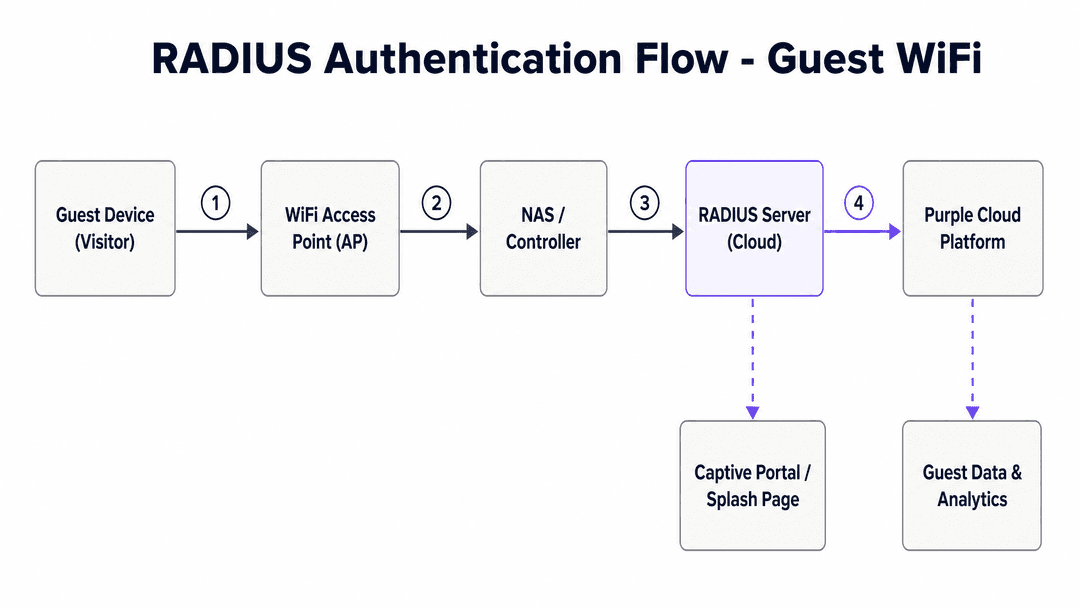
In a guest WiFi context, the visitor's device cannot natively authenticate against the RADIUS server using certificates (EAP-TLS) as corporate devices do. Instead, the WiFi access point acts as the Network Access Server (NAS) and the RADIUS client. When a visitor connects to the open SSID, the access point intercepts their HTTP traffic and redirects them to an external captive portal.
Once the visitor completes the authentication flow on the captive portal - whether via a form, social login, or single sign-on - the portal communicates with the RADIUS server. The RADIUS server then sends an Access-Accept message back to the access point via UDP port 1812, containing authorization attributes such as session timeouts or bandwidth limits. The access point then grants network access and begins sending accounting updates via UDP port 1813 to track the session.
The Cloud RADIUS Overlay
Managing on-premise RADIUS infrastructure requires significant hardware, maintenance, and redundancy planning. Purple provides a hardware-agnostic cloud RADIUS overlay. This means the authentication and accounting servers are fully managed in the cloud, offering 99.999% uptime and automatic scaling.
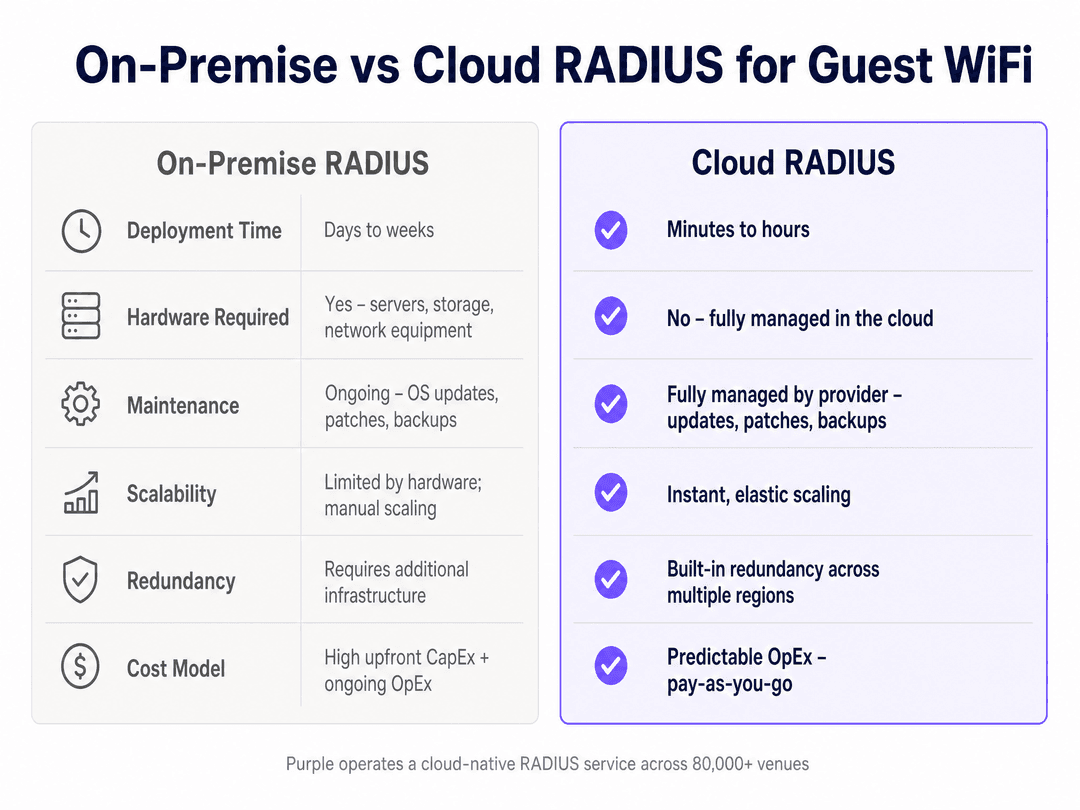
By using a cloud overlay, IT teams can standardize access policies across multiple sites and hardware vendors from a single pane of glass, integrating seamlessly with existing Guest WiFi deployments.
Got questions about your specific setup?
Our team works with venue operators, IT managers, and network engineers across 80,000 venues. Book a 20-minute call and we will show you how others like you solved it.
Implementation Guide
Deploying RADIUS authentication requires configuring both the wireless infrastructure and the authentication platform. The following steps outline the vendor-neutral process, with specific examples for common hardware.
1. Network Segmentation and SSID Configuration
Guest traffic must be isolated from corporate networks. Create a dedicated VLAN for guest access. Configure the SSID with open security (no WPA2/WPA3 password) but enable captive portal or web page redirection (WPR).
2. RADIUS Server Configuration
You must configure the access point to communicate with the primary and secondary RADIUS servers. This requires three components:
- Server IP or Hostname: The address of the RADIUS server.
- Authentication and Accounting Ports: Standard ports are 1812 for authentication and 1813 for accounting.
- Shared Secret: A cryptographic key used to verify communications between the access point and the RADIUS server.
For example, on a Pepwave MAX Series device, you configure the authentication server under the Captive Portal settings, specifying the IP, port 1812, and the shared secret. You repeat this for the accounting server on port 1813.
3. Walled Garden (Domain Whitelist)
Before authentication, the visitor's device must be able to load the captive portal and any associated identity providers (like Google or Microsoft Entra ID). You must configure a walled garden or domain whitelist on the access point. If this is incomplete, the captive portal will fail to load. Purple maintains a canonical list of required domains for its platform.
4. Accounting Interval
The accounting interval dictates how often the access point sends session updates to the RADIUS server. A common standard is 300 seconds (5 minutes). Setting this too low creates unnecessary traffic; setting it too high reduces the accuracy of your WiFi Analytics.
Best Practices
- Always Configure Secondary Servers: RADIUS infrastructure must be highly available. Always configure the secondary RADIUS IP provided by Purple. If the primary server is unreachable, the access point will automatically failover.
- Use Strong Shared Secrets: Treat the RADIUS shared secret as a critical password. Generate a long, random string and never reuse it across different venues or platforms.
- Validate the Whitelist: The most common cause of captive portal failure is an incomplete domain whitelist. Always test the login flow on a clean device before deploying to production.
- Isolate Traffic: Guest VLANs should be strictly isolated. Use firewall rules to prevent any routing between the guest VLAN and operational networks. This is a strict requirement for PCI-DSS compliance in retail and hospitality environments.
Troubleshooting & Risk Mitigation
When a RADIUS deployment fails, the symptoms are usually identical from the visitor's perspective: they cannot connect to the internet. Network administrators must isolate the failure point.
Symptom: The captive portal does not load.
- Cause: DNS resolution failure or incomplete walled garden.
- Resolution: Verify that the access point's domain whitelist includes all required URLs. Check that the client device is receiving a valid IP address and DNS server via DHCP.
Symptom: The portal loads, but authentication fails (Access-Reject).
- Cause: Shared secret mismatch or NAS ID misconfiguration.
- Resolution: Verify that the shared secret configured on the access point matches the secret in the RADIUS server exactly. Ensure the access point's MAC address or NAS ID is correctly registered in the authentication platform.
Symptom: Sessions disconnect unexpectedly.
- Cause: Accounting failures or strict idle timeouts.
- Resolution: Verify that UDP port 1813 is open outbound. Check the idle timeout settings on the access point; some mobile devices aggressively sleep their WiFi radios, triggering an idle disconnect.
ROI & Business Impact
Deploying RADIUS authentication transforms guest WiFi from a cost center and security risk into a managed, compliant asset.
For IT teams, the immediate impact is a reduction in support tickets and the elimination of shared password management. By shifting to a cloud RADIUS model, organizations avoid the CapEx of on-premises servers and the OpEx of maintaining them.
For the wider business, this architecture provides the foundation for secure data collection. By requiring a conscious-choice opt-in through the captive portal, venues build CCPA/CPRA-compliant first-party databases. In the Hospitality and Retail sectors, this data drives loyalty programs and personalized engagement, directly attributing revenue to the network infrastructure.
Listen to our senior consultant briefing on this topic below:
Key Definitions
RADIUS
Remote Authentication Dial-In User Service. A networking protocol that provides centralized authentication, authorization, and accounting management.
Used to secure network access by verifying credentials against a central database before granting a device an IP address or routing its traffic.
Captive Portal
A web page that a user of a public access network is obliged to view and interact with before access is granted.
The primary interface for guest WiFi, used to collect consent, display terms, and capture first-party data.
NAS (Network Access Server)
A gateway that controls access to a network. In a wireless environment, the WiFi access point or controller acts as the NAS.
The NAS acts as the RADIUS client, forwarding authentication requests from the visitor's device to the RADIUS server.
Shared Secret
A cryptographic key known only to the RADIUS client (access point) and the RADIUS server.
Used to verify that RADIUS packets originate from a trusted source and to encrypt passwords within the packets.
Accounting Interval
The frequency at which the access point sends interim session updates to the RADIUS server.
Critical for accurate reporting in analytics platforms. A standard interval is 300 seconds.
Walled Garden
A limited environment that controls the user's access to web content before they are fully authenticated.
Implemented via a domain whitelist on the access point, allowing the device to load the captive portal and identity providers.
VLAN
Virtual Local Area Network. A logical subnetwork that groups a collection of devices, isolating their traffic.
Essential for security; guest WiFi traffic must be assigned to a dedicated VLAN separate from corporate data.
Identity-Based Networks
A network architecture where access policies are dynamically applied based on the authenticated identity of the user or device.
Allows IT teams to enforce different rules for staff, guests, and IoT devices on the same physical infrastructure.
Worked Examples
A 200-room hotel needs to deploy secure guest WiFi across 50 Avaya access points. They require users to authenticate via a branded portal and need to track session data for compliance. How should the network administrator configure the RADIUS settings?
The administrator must configure the Avaya APs to use an external RADIUS server. First, navigate to Security > External Radius. Set the Called-Station-Id Attribute Format to 'UC-hyphenated' and enable Accounting with an interval of 300 seconds. Next, create a 'Guest WiFi' SSID with open encryption and enable Web Page Redirection (WPR). Set the Landing Page URL to the Purple portal and configure the Authentication Service with Purple's primary and secondary RADIUS IPs on port 1812, and accounting on port 1813, using the provided shared secret. Finally, populate the WPR Whitelist with the required domains.
A retail chain is rolling out guest WiFi using Pepwave MAX routers. During testing, the captive portal splash page fails to load on iOS devices, presenting a blank screen instead. What is the likely cause and resolution?
The likely cause is an incomplete Allowed Networks (domain whitelist) configuration. The administrator must log into the Pepwave local web interface or InControl2 dashboard, navigate to the Captive Portal settings, and verify the 'Allowed Domains / IPs' list. They must ensure all required domains for the captive portal, authentication endpoints, and any social login providers (e.g., Apple, Google) are explicitly listed.
Practice Questions
Q1. You are deploying guest WiFi at a large stadium. You have configured the primary RADIUS server, but the project manager asks if the secondary server configuration can be skipped to save time. How do you respond?
Hint: Consider the impact of a single point of failure in a high-density environment.
View model answer
You must configure the secondary server. RADIUS is the gatekeeper for network access. If the primary server experiences an outage or network routing issue, all new authentication requests will fail, resulting in a total loss of guest WiFi access. Configuring the secondary server provides automatic failover and ensures high availability.
Q2. A venue reports that guest WiFi sessions are disconnecting exactly 60 minutes after users log in, despite the Purple platform being configured for 24-hour sessions. Where should you investigate?
Hint: Think about which component actually enforces the session termination.
View model answer
You should investigate the local hardware configuration. The access point or controller (the NAS) ultimately enforces session limits. In this case, the hardware likely has a local 'Session Timeout' or 'Access Quota' hardcoded to 60 minutes, which overrides the RADIUS attributes sent by Purple. For example, on a Pepwave device, the 'Access Quota' setting must be adjusted.
Q3. You are reviewing a proposed network architecture for a retail chain. The design shows guest WiFi traffic and Point of Sale (POS) terminals operating on the same subnet. What is your recommendation?
Hint: Consider security standards and compliance requirements for payment processing.
View model answer
The design must be rejected. Guest traffic must be strictly isolated from operational networks, especially those handling payments. The guest WiFi must be assigned to a dedicated VLAN with firewall rules preventing routing to the POS subnet. Failing to do so violates PCI DSS compliance and introduces severe security risks.
Continue reading in this series
Implementing SCEP for Secure BYOD and 802.1X WiFi in Higher Education
This technical guide details how higher education IT teams can automate 802.1X certificate enrollment for thousands of BYOD devices using SCEP. It covers the architecture, security benefits, and practical deployment steps to replace manual onboarding with a secure, zero-touch network access model.
Configuring RADIUS Authentication for Guest and Staff WiFi Networks
This technical reference guide outlines the architecture, configuration, and deployment of RADIUS authentication for enterprise guest and staff WiFi networks. It provides network architects and IT managers with the exact protocols, security standards, and troubleshooting methodologies required to build secure, scalable wireless access control systems.
Passpoint and OpenRoaming: Complete Guide
This technical reference guide provides a comprehensive analysis of Passpoint (Hotspot 2.0) and WBA OpenRoaming frameworks within enterprise WiFi networks. It details the underlying authentication protocols, architectural components, and deployment strategies required to establish secure, frictionless guest connectivity. Network architects and IT leaders will learn how to design, implement, and troubleshoot these standards to eliminate manual login barriers while maintaining enterprise-grade security.
Got questions about your specific setup?
Our team works with venue operators, IT managers, and network engineers across 80,000 venues. Book a 20-minute call and we will show you how others like you solved it.