
Uu PPSK 2023: comparing features and deployment models
This technical reference guide compares Unique per-User Private Pre-Shared Key (UU PPSK) WiFi architecture against traditional shared PSK and 802.1X deployments, with a specific focus on the 2023 landscape of vendor implementations and platform capabilities. It provides property developers, BTR operators, and MDU landlords with actionable deployment strategies, VLAN architecture guidance, and automated lifecycle management workflows. The guide covers three deployment models, real-world case studies, and the compliance implications of each authentication approach.
Listen to this guide
View podcast transcript
Executive summary
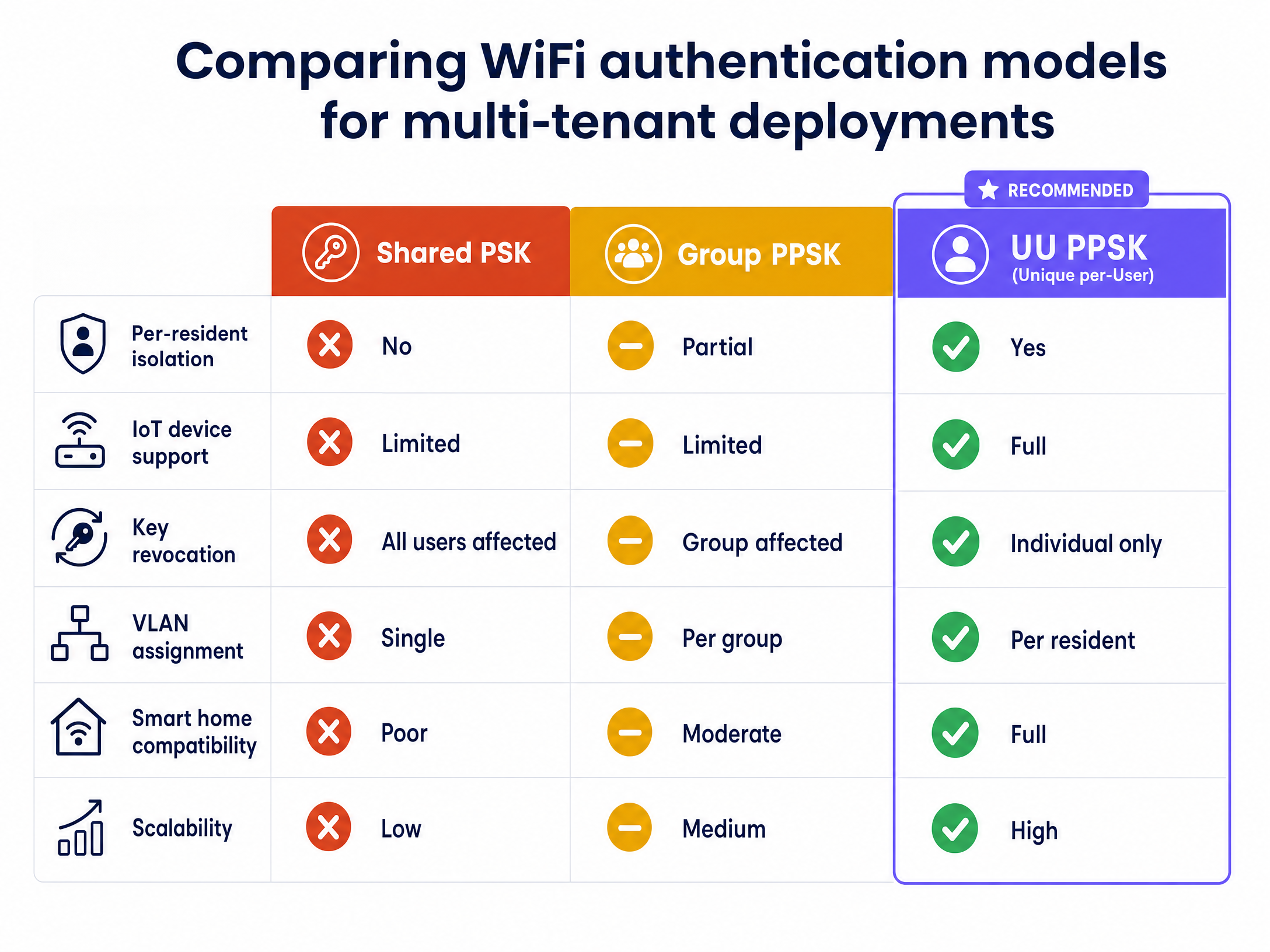
For IT managers and network architects operating multi-tenant environments, delivering secure, home-like WiFi at scale presents a distinct architectural challenge. Traditional shared passwords fail security audits and create operational bottlenecks when residents move out. Standard 802.1X enterprise authentication requires a RADIUS server and a supplicant on every device, rendering it incompatible with the vast majority of consumer smart home and IoT hardware.
Unique per-User Private Pre-Shared Key (UU PPSK) bridges this gap. It provides per-resident network isolation, automates key lifecycle management, and delivers a secure WiFi experience that supports the 15 to 25 devices found in a typical modern household. In 2023, Ubiquiti UniFi added native PPSK support, completing the picture across all major enterprise hardware platforms. This guide details how to implement UU PPSK, compares vendor-specific features across Cisco Meraki, HPE Aruba, Ruckus, Juniper Mist, Ubiquiti UniFi, Cambium, Extreme, and Fortinet, and outlines the deployment architecture required to support multi-tenant properties efficiently. For related context on the broader PPSK landscape, see What is PPSK: comparing features and deployment models .
Technical deep-dive
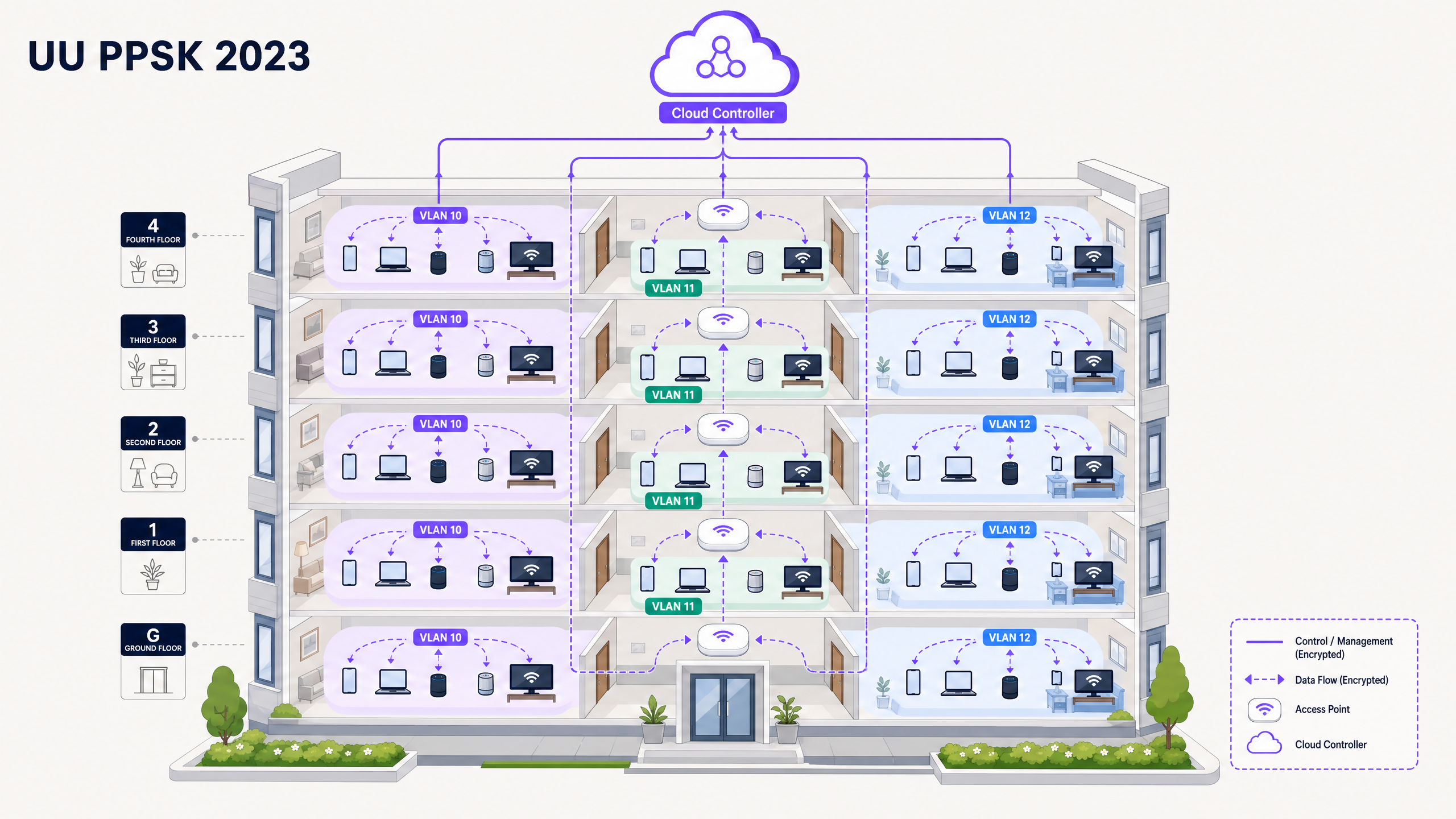
The fundamental premise of UU PPSK is straightforward: instead of broadcasting multiple SSIDs or relying on a single shared password, the wireless controller assigns a unique passphrase to each resident or device group. When a device authenticates using its specific key, the controller maps that connection to a dedicated VLAN. This architecture creates a WiFi bubble for each resident. Their devices can discover each other, cast media, and share files exactly as they would on a standard home network, while remaining completely isolated from every other resident in the building.
The authentication flow
When a device connects to the SSID, the access point intercepts the association request. During the WPA2 or WPA3 four-way handshake, the device presents its pre-shared key. The wireless LAN controller (or the cloud management platform) looks up this key in the PPSK database. If the key is valid, the controller identifies the associated VLAN and tags the device's traffic accordingly from that point forward.
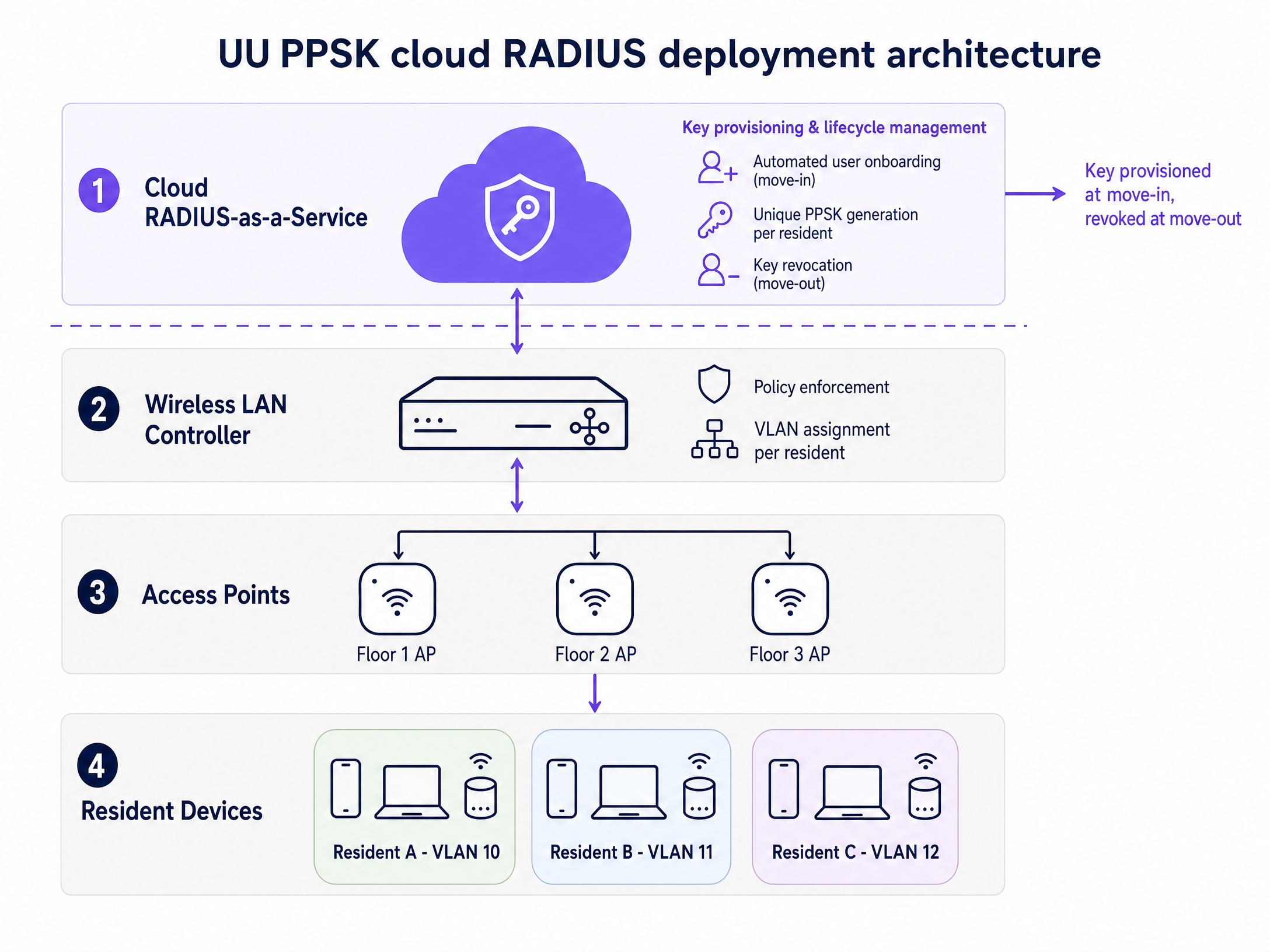
This mechanism differs fundamentally from 802.1X. While 802.1X requires an EAP (Extensible Authentication Protocol) exchange and a client-side supplicant, PPSK operates at the WPA Personal layer. The device simply sees a standard WiFi network requiring a password. This ensures compatibility with headless IoT devices, smart TVs, and gaming consoles that cannot process enterprise certificates. For a detailed comparison of when 802.1X is the right choice versus PPSK, the Three SSIDs to rule them all guide covers the three-SSID architecture in full.
Vendor implementations and terminology in 2023
The underlying mechanism is standardised, but vendor terminology varies significantly. Understanding which term maps to which platform is essential when evaluating hardware or reading vendor documentation.
| Vendor | Feature Name | WPA3 Support | Max Keys (local) | RADIUS-backed |
|---|---|---|---|---|
| Cisco Meraki | iPSK (Identity PSK) | Yes (transition mode) | 5,000 per network | Yes (Cisco ISE) |
| HPE Aruba | MPSK / PPSK | WPA2 only for MPSK | Unlimited via ClearPass | Yes (ClearPass) |
| Ruckus | DPSK (Dynamic PSK) | Yes (SmartZone 6.1+) | 10,000 per zone | Yes (SmartZone) |
| Juniper Mist | ePSK | Yes | Unlimited via Mist cloud | Yes (Mist cloud) |
| Ubiquiti UniFi | PPSK | WPA2 only | 1,000 per network | Yes (external RADIUS) |
| Cambium | ePSK | Yes | Unlimited via cnMaestro | Yes (cnMaestro) |
| Extreme | Private PSK | Yes | Unlimited via ExtremeCloud | Yes (ExtremeCloud) |
| Fortinet | MPSK | Yes | Unlimited via FortiGate | Yes (FortiAuthenticator) |
A significant milestone in 2023 was Ubiquiti UniFi shipping native PPSK support in October of that year. This completed enterprise-grade per-user key management across the full hardware stack. The UniFi implementation is currently WPA2 only, which means it will not function on the 6 GHz band. For deployments specifying WiFi 6E hardware, this is a critical constraint to evaluate before committing to a platform.
WPA3 and 6 GHz considerations
The introduction of WPA3 and the 6 GHz band (WiFi 6E and WiFi 7) introduces new variables. WPA3 replaces the traditional PSK handshake with Simultaneous Authentication of Equals (SAE), providing protection against offline dictionary attacks. However, not all vendor implementations of PPSK currently support WPA3-SAE. If you are specifying 6 GHz access points, which mandate WPA3, you must ensure your chosen platform supports PPSK over WPA3, or you will be forced to restrict PPSK clients to the 2.4 GHz and 5 GHz bands.
Implementation guide
Deploying UU PPSK in a Build to Rent (BTR) or multi-dwelling unit (MDU) environment requires careful planning across three phases: logical design, hardware configuration, and resident onboarding.
Phase 1: Logical design and VLAN architecture
Begin by mapping your resident count and device categories. A standard BTR deployment requires a dedicated VLAN for each apartment unit. For a 200-unit building, you need 200 resident VLANs. Additionally, you must provision separate VLANs for building management systems, IoT sensors, and common area Guest WiFi .
Allocate sufficient IP addresses. British Property Federation research indicates an average of 15 to 25 connected devices per household. A /24 subnet per apartment provides 254 usable addresses, which comfortably accommodates future IoT expansion without exhausting the DHCP pool. A /23 subnet provides 510 usable addresses for higher-density households.
A recommended VLAN scheme for a 200-unit BTR property:
| VLAN Range | Purpose | Subnet Size |
|---|---|---|
| VLAN 10 to 209 | Resident units (one per flat) | /24 per VLAN |
| VLAN 300 | Building management systems | /24 |
| VLAN 400 | IoT sensors and access control | /24 |
| VLAN 500 | Common area Guest WiFi | /23 |
| VLAN 600 | Staff and management devices | /24 |
Phase 2: Hardware and RADIUS configuration
For deployments exceeding 50 units, rely on RADIUS-backed PPSK rather than controller-local storage. Connect your access points to a cloud RADIUS service. Configure a single SSID across the property. Map the RADIUS attributes to return the correct VLAN ID based on the authenticated key. Ensure all trunk ports between the access layer switches and the distribution core permit the full range of resident VLANs.
Enable mDNS (Multicast DNS) reflection within each resident VLAN. This is the step most commonly missed in initial deployments, and its absence is the primary cause of Chromecast, Apple TV, and Sonos pairing failures. mDNS reflection allows devices on the same VLAN to discover each other while preventing cross-VLAN discovery.
Phase 3: Automated lifecycle management
The operational viability of UU PPSK depends entirely on automated key management. Integrate your property management system (PMS) with the WiFi authentication platform via REST API. When a tenancy agreement is signed, the system must automatically generate a unique key and assign it to an available VLAN. Deliver this key to the resident via email or a secure resident portal prior to move-in. When the tenancy ends, the system must instantly revoke the key, terminating access for all associated devices without manual IT intervention.
Purple's Multi-Tenant WiFi solution provides this orchestration layer as a cloud overlay on top of your existing hardware. It integrates with property management systems via API, automates key provisioning and revocation, and provides the WiFi Analytics dashboard to monitor network performance across all resident VLANs.
Best practices
Prevent SSID proliferation. Broadcast a maximum of three SSIDs per radio: one for residents (UU PPSK), one for staff and management (802.1X), and one for guests in common areas. Every additional SSID consumes airtime for beacon frames. In a dense residential building, six or eight SSIDs per access point degrades performance for everyone. See Three SSIDs to rule them all for a detailed breakdown of this architecture.
Address MAC randomisation from day one. Modern operating systems including iOS 14 and later, Android 10 and later, and Windows 11 use randomised MAC addresses by default. Implement a pre-registration workflow where residents register their devices, or ensure your portal guides them to disable private addressing for their home network. Failing to address this is the most common cause of authentication failures in new deployments.
Validate trunk ports during commissioning. Design a clean VLAN scheme, deploy the access points, and then test a device on each VLAN before residents move in. Silent traffic dropping due to incomplete trunk port configuration is the most common post-deployment failure mode. Document every trunk port configuration and verify it against your VLAN scheme.
Size your DHCP scopes correctly. A 200-unit building with 20 devices per household requires DHCP capacity for 4,000 devices. Ensure your DHCP server can handle lease renewals at the scale of your deployment, particularly during move-in surges when hundreds of devices attempt to connect simultaneously.
Troubleshooting & risk mitigation
The most common failure mode in UU PPSK deployments is silent traffic dropping due to incomplete VLAN trunking. If a device authenticates successfully but fails to obtain an IP address, verify that the assigned VLAN is permitted across all uplink ports from the access point back to the DHCP server.
A second frequent issue involves smart home devices failing to connect. This often occurs when residents attempt to connect 2.4 GHz-only IoT devices while their phone is connected to the 5 GHz band, and the setup app fails to bridge the gap. Ensure your access points use band steering appropriately, or provide a dedicated 2.4 GHz IoT onboarding SSID that maps to the same resident VLAN.
MAC randomisation failures present as intermittent authentication errors where a device connects successfully on the first attempt but fails on subsequent connections. The device presents a different randomised MAC address each time, causing the RADIUS lookup to fail. The fix is to configure the SSID to request permanent MAC addresses, or to implement a device pre-registration workflow.
For GDPR compliance, maintain a complete audit log of key provisioning and revocation events. Every connection must be traceable to a specific resident key and tenancy record. With a shared PSK, this accountability is impossible. UU PPSK is the only architecture that allows you to respond accurately to a subject access request or a law enforcement enquiry.
ROI & business impact
Implementing UU PPSK delivers measurable business value for property operators. By eliminating building-wide password rotations and automating key provisioning, operators typically see a 50% to 70% reduction in WiFi-related support tickets during peak move-in periods, based on deployment data from Purple's Multi-Tenant WiFi customers.
Providing a secure, high-performance network that supports resident IoT devices out of the box increases tenant satisfaction and retention. For BTR operators, WiFi is now a standard amenity included in rent, and the quality of that service directly influences lease renewal rates.
From a compliance perspective, UU PPSK ensures you meet GDPR requirements for data accountability. Because every connection is tied to a specific resident key, you maintain a clear audit trail of network activity. You can track network performance and utilisation effectively using WiFi Analytics , ensuring you deliver the service quality promised in the tenancy agreement.
For operators in the hospitality and retail sectors, the same UU PPSK architecture applies to staff networks, where per-employee keys replace shared staff passwords and eliminate the security risk of former employees retaining network access after they leave.
Purple has operated across 80,000+ live venues since its founding in 2012, with 99.999% uptime and ISO 27001 certification. The Multi-Tenant WiFi product is hardware-agnostic, operating as a cloud overlay on Cisco Meraki, HPE Aruba, Ruckus, Juniper Mist, Ubiquiti UniFi, Cambium, Extreme, and Fortinet infrastructure. For further reading on the broader PPSK feature set, see What is PPSK: comparing features and deployment models and the Spanish-language equivalent Qué es PPSK: comparación de funciones y modelos de despliegue .
Key Definitions
UU PPSK (Unique per-User Private Pre-Shared Key)
An authentication method that assigns a unique WiFi passphrase to every individual user or household on a single SSID. Each key maps to a dedicated VLAN, isolating the user's traffic from all other users on the same physical infrastructure.
Used in multi-tenant environments to provide network isolation without requiring enterprise 802.1X certificates. The standard architecture for BTR and MDU WiFi deployments.
VLAN (Virtual Local Area Network)
A logical subnetwork that groups a collection of devices together, isolating their broadcast traffic from other devices on the same physical infrastructure.
In a UU PPSK deployment, each resident's unique key maps to their own dedicated VLAN, creating a private network segment that functions like a home router.
RADIUS (Remote Authentication Dial-In User Service)
A networking protocol that provides centralised authentication, authorisation, and accounting management for users who connect and use a network service. Defined in RFC 2865.
Enterprise PPSK deployments use a RADIUS server to store keys and return the correct VLAN assignment to the access point. Cloud RADIUS-as-a-Service eliminates the need to operate your own RADIUS infrastructure.
mDNS (Multicast DNS)
A protocol that resolves hostnames to IP addresses within small networks that do not include a local name server. Defined in RFC 6762.
Must be enabled and reflected within resident VLANs so devices like Apple TV, Chromecast, and Sonos can be discovered by smartphones on the same VLAN. Without mDNS reflection, casting and smart home pairing fails.
MAC randomisation
A privacy feature in modern operating systems that generates a randomised MAC address for each WiFi network the device connects to, preventing tracking across networks.
Can interfere with PPSK authentication workflows that use MAC address lookups. Requires a pre-registration workflow or SSID-level configuration to request permanent MAC addresses.
802.1X
An IEEE standard for port-based network access control that provides an authentication mechanism to devices wishing to attach to a LAN or WLAN. Requires a RADIUS server and a client-side supplicant.
The enterprise alternative to PPSK, suitable for managed corporate device fleets. Not suitable for consumer IoT devices, smart TVs, or gaming consoles that lack a supplicant.
WPA3-SAE (Simultaneous Authentication of Equals)
The authentication mechanism used in WPA3 Personal, replacing the traditional PSK handshake with a Dragonfly key exchange that provides protection against offline dictionary attacks.
Mandatory for the 6 GHz band (WiFi 6E). Not all vendor implementations of PPSK support WPA3-SAE, which can restrict PPSK clients to the 2.4 GHz and 5 GHz bands on WiFi 6E hardware.
SSID proliferation
The negative performance impact caused by broadcasting too many network names from a single access point. Each SSID consumes airtime with beacon frames, reducing available bandwidth for data traffic.
UU PPSK solves this by allowing hundreds of isolated resident networks to operate under a single SSID, rather than requiring a separate SSID per resident or per floor.
iPSK (Identity PSK)
Cisco Meraki's implementation of per-user pre-shared key authentication. Functionally equivalent to UU PPSK. Supports up to 5,000 unique keys per network and integrates with Cisco ISE for RADIUS-backed deployments.
The term used in Meraki documentation and the Meraki dashboard. When evaluating Meraki hardware for a BTR deployment, iPSK is the feature to specify.
DPSK (Dynamic PSK)
Ruckus Networks' implementation of per-user pre-shared key authentication. Supports up to 10,000 keys per zone in SmartZone deployments and integrates with Purple's cloud RADIUS service.
The term used in Ruckus documentation. Ruckus SmartZone 6.1 and later adds WPA3 support for DPSK, enabling use on the 6 GHz band.
Worked Examples
A 250-unit Build to Rent development in Manchester needs to provide secure WiFi included in the rent. Residents expect to connect smart TVs, Sonos speakers, and gaming consoles from day one. The IT team wants to minimise support tickets during the September move-in surge and ensure that when a resident moves out, their access is revoked without affecting any other resident.
Deploy a single building-wide SSID using UU PPSK backed by Purple's cloud RADIUS service. Integrate the RADIUS platform with the property management system via REST API. Assign a /24 subnet and a dedicated VLAN to each of the 250 units (VLAN 10 through VLAN 259). Configure the API integration to generate a unique PPSK upon lease signing and email it to the resident with a QR code. Enable mDNS reflection within each VLAN to support Sonos, Chromecast, and Apple TV discovery. Configure the PMS integration to automatically revoke the key on the tenancy end date. Use Cisco Meraki iPSK with the Meraki dashboard connected to Purple's cloud RADIUS for key storage and VLAN assignment.
A 400-bed purpose-built student accommodation block currently uses a single shared password. Students frequently complain that they can see other people's Chromecasts, and the operator cannot revoke access for students who have moved out without changing the password for everyone. The operator also needs to handle annual cohort turnover, where 400 students move out and 400 new students move in within the same week.
Migrate from the shared PSK to a UU PPSK architecture using Ruckus SmartZone with DPSK, backed by Purple's RADIUS service. Provision 400 unique keys, one per student room, each mapping to a distinct VLAN. Distribute the keys via the student management system portal during pre-arrival registration, delivered by email with a QR code. Configure automatic key expiry aligned to contract end dates. At annual turnover, the system revokes 400 expired keys and provisions 400 new ones automatically via the student management system integration.
Practice Questions
Q1. You are designing the network for a 300-unit Build to Rent property. The developer wants to use Ubiquiti UniFi access points and store the PPSK keys locally on the controller to save costs. What is the primary risk of this approach, and what would you recommend instead?
Hint: Consider the scalability limits of local controllers versus cloud RADIUS, and the operational impact of manual key management at 300-unit scale.
View model answer
The primary risks are scalability and lack of automated lifecycle management. Ubiquiti UniFi's local PPSK implementation supports up to 1,000 entries per network, which a 300-unit building will approach quickly when accounting for multiple devices per household. More critically, local storage prevents API integration with the property management system, forcing the IT team to manually provision and revoke keys for every move-in and move-out. At 300 units with typical BTR turnover rates, this becomes a full-time operational burden. The recommendation is to use UniFi hardware but connect it to an external cloud RADIUS service via the RADIUS integration option, enabling automated key lifecycle management through the PMS API.
Q2. A resident reports that their smartphone connects to the UU PPSK network perfectly, but they cannot pair their new smart lightbulbs. The lightbulbs only support 2.4 GHz, while the smartphone is connected to the 5 GHz band. How should you resolve this?
Hint: Think about how the manufacturer's setup app communicates with the bulb during the initial pairing process, and what band both devices need to be on simultaneously.
View model answer
The issue is that the smartphone's setup app needs to communicate directly with the bulb during provisioning, which requires both devices to be on the same frequency band. The smartphone is on 5 GHz, the bulb is on 2.4 GHz, and the setup app cannot bridge this gap. The solution is to temporarily disable band steering for the resident's VLAN, or to provide a dedicated 2.4 GHz IoT onboarding SSID that maps to the same resident VLAN. Once the bulb is provisioned and connected to the resident's VLAN, the smartphone can return to the 5 GHz band and control the bulb via the cloud service or mDNS discovery within the VLAN.
Q3. Your organisation is upgrading to WiFi 6E access points, which require WPA3 for the 6 GHz band. You plan to use UU PPSK for resident authentication. What critical compatibility check must you perform before purchasing hardware, and what is your fallback if the check fails?
Hint: Not all vendor implementations of PPSK support WPA3-SAE. The 6 GHz band mandates WPA3.
View model answer
You must verify that the specific vendor's implementation of PPSK supports WPA3-SAE on the 6 GHz radio. Ubiquiti UniFi's PPSK is WPA2 only and will not function on the 6 GHz band. HPE Aruba's MPSK also has WPA3 constraints. Ruckus SmartZone 6.1 and later adds WPA3 support for DPSK. If your chosen hardware does not support PPSK on WPA3, the fallback is to configure the 6 GHz radio for WPA3-only corporate or staff traffic (802.1X), and restrict PPSK resident traffic to the 2.4 GHz and 5 GHz radios using WPA2. This is a valid architecture but limits resident devices to WiFi 6 speeds rather than WiFi 6E.
Q4. You receive a GDPR subject access request from a former resident asking for all network activity data associated with their tenancy. Your building currently uses a shared PSK. Can you fulfil this request accurately, and what architectural change would enable you to do so in future?
Hint: Consider how traffic is attributed to individual users in a shared PSK environment versus a UU PPSK environment.
View model answer
With a shared PSK, you cannot fulfil the request accurately. Every device on the network presents the same network credentials, making it impossible to attribute specific network activity to a specific resident. You can identify traffic by MAC address, but MAC randomisation means even this is unreliable. Migrating to UU PPSK resolves this. Each resident's unique key is tied to their tenancy record in the property management system. Every connection event is logged against that key, creating a complete audit trail that can be extracted and provided in response to a subject access request. This also satisfies the GDPR accountability principle under Article 5(2).
Continue reading in this series
Uu PPSK pdf: comparing features and deployment models
This technical reference guide compares Private Pre-Shared Key (PPSK) WiFi architecture against traditional 802.1X and standard PSK deployments. It provides network architects and IT managers with vendor-neutral implementation strategies for multi-tenant residential, IoT, and BTR environments.
Uu PPSK pdf: comparing features and deployment models
This technical reference guide compares Private Pre-Shared Key (PPSK) WiFi architecture against traditional 802.1X and standard PSK deployments. It provides network architects and IT managers with vendor-neutral implementation strategies for multi-tenant residential, IoT, and BTR environments.
PPSK xaverius: comparing features and deployment models
This authoritative guide examines PPSK xaverius architecture for multi-tenant environments like Build to Rent and student accommodation. It compares deployment models, details implementation strategies, and explains how per-unit VLAN isolation delivers a home-like WiFi experience while maintaining enterprise security.