

The Complete Guide to Guest WiFi for Businesses
This definitive technical guide provides IT leaders and network architects with a comprehensive blueprint for deploying, securing, and monetising enterprise guest WiFi. It bridges the gap between physical network infrastructure, compliance standards like GDPR and PCI DSS, and the commercial value unlocked through first-party data capture.
🎧 Listen to this Guide
View Transcript
Executive Summary
For modern enterprises, guest WiFi has evolved from a simple cost centre into a critical infrastructure asset capable of driving significant commercial return. Whether operating within Retail , Hospitality , or large public venues, IT leaders face a dual mandate: provide seamless, high-performance connectivity while simultaneously capturing first-party data securely and compliantly.
This guide provides a definitive architectural blueprint for enterprise guest WiFi. We detail the technical requirements for network segmentation, the cryptographic standards necessary for secure authentication, and the deployment methodologies required to prevent network saturation. Furthermore, we examine how platforms like Purple bridge the gap between network hardware and marketing technology, transforming anonymous MAC addresses into actionable customer profiles through compliant captive portals. By treating guest WiFi as a strategic deployment rather than a utility, organisations can achieve measurable ROI while mitigating the inherent security risks of public access networks.
Listen to the companion technical briefing podcast:
Technical Deep-Dive: Architecture and Standards
The foundation of any enterprise guest WiFi deployment is rigorous network segmentation and robust authentication protocols. Deploying an open SSID without structural safeguards introduces unacceptable risk to corporate data and payment systems.
Network Segmentation and VLAN Tagging
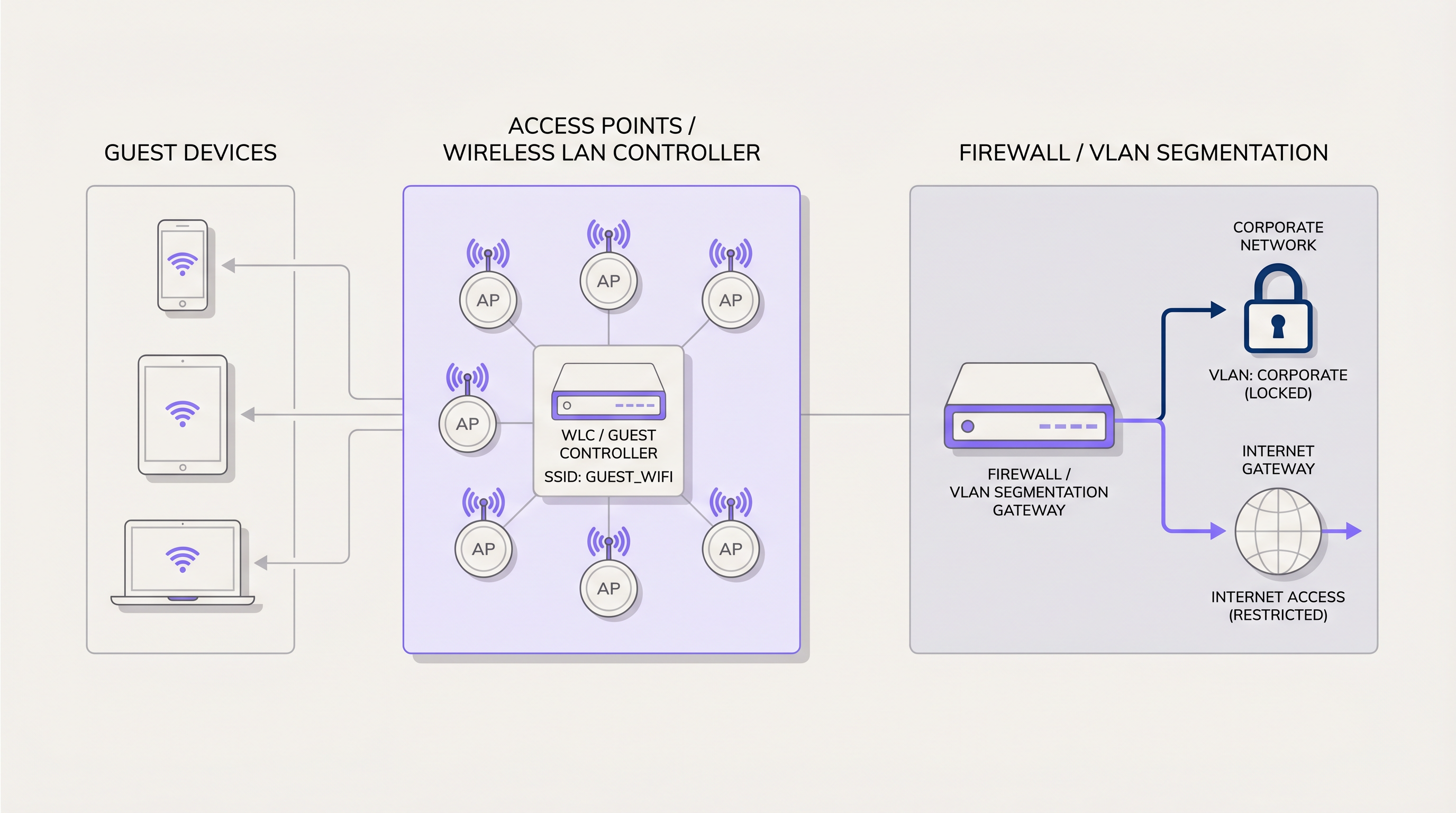
Guest traffic must be isolated at Layer 2 and Layer 3. The standard deployment model requires mapping the guest SSID to a dedicated Virtual Local Area Network (VLAN) at the Access Point (AP) or Wireless LAN Controller (WLC). This VLAN must be trunked through the core switching infrastructure directly to the edge firewall.
At the firewall, strict Access Control Lists (ACLs) must enforce a "deny all" policy for traffic destined to internal corporate subnets. Guest traffic should only be permitted to route to the internet gateway. This segmentation is not merely best practice; it is a fundamental requirement for compliance frameworks such as PCI DSS. If a compromised guest device can route packets to a point-of-sale terminal, the entire network falls out of compliance.
Authentication and Encryption Standards
The era of open, unencrypted guest networks is ending. To protect user data from passive eavesdropping and man-in-the-middle attacks, deployments should leverage WPA3. Specifically, WPA3-SAE (Simultaneous Authentication of Equals) provides forward secrecy, ensuring that even if the network passphrase is known, individual session traffic remains encrypted and cannot be decrypted retrospectively.
For environments requiring granular access control, IEEE 802.1X with RADIUS backend authentication provides enterprise-grade security. When transmitting authentication requests across Wide Area Networks (WANs) to cloud identity providers, securing the RADIUS traffic itself is critical. IT teams should implement RadSec: Securing RADIUS Authentication Traffic with TLS to prevent credential interception. Purple acts as a robust identity provider in these architectures, seamlessly integrating with existing RADIUS infrastructure and supporting modern roaming standards like OpenRoaming.
Throughput and Capacity Planning
In high-density environments, throughput is constrained not by the internet uplink, but by airtime fairness and channel utilisation. Deploying APs that support Wi-Fi 6 (802.11ax) is essential for mitigating these bottlenecks. The Orthogonal Frequency Division Multiple Access (OFDMA) capabilities of Wi-Fi 6 allow a single AP to communicate with multiple clients simultaneously, drastically reducing latency in crowded areas.
Furthermore, IT teams must implement per-user rate limiting at the controller or firewall level. Allocating a strict bandwidth cap (e.g., 10 Mbps down / 2 Mbps up per user) prevents a single client from monopolising the internet uplink with high-bandwidth applications, ensuring a consistent baseline experience for all guests.
Implementation Guide: From Hardware to Portal
Deploying a resilient guest WiFi network requires a systematic approach, integrating physical RF planning with cloud-based analytics platforms.
Phase 1: RF Planning and Site Survey
Before hardware procurement, a predictive RF site survey is mandatory. Using software tools to model the physical environment—accounting for wall attenuation, ceiling heights, and user density—allows network architects to determine optimal AP placement and channel allocation. This mitigates co-channel interference and ensures sufficient signal-to-noise ratio (SNR) across the venue.
Phase 2: Infrastructure Configuration
Once hardware is physically deployed, configure the WLC to broadcast the dedicated guest SSID. Ensure the corresponding VLAN is correctly tagged on all switch trunk ports. At the firewall edge, verify that DHCP scopes are adequately sized for the expected concurrent user count; a /24 subnet (254 addresses) is rarely sufficient for enterprise venues. Implement DNS filtering to block malicious domains and adult content at the network level.
Phase 3: Captive Portal Integration
The captive portal is the critical integration point between the network infrastructure and the business objective. Instead of a generic splash page, the WLC is configured to redirect unauthenticated guest traffic to an external captive portal hosted by a Guest WiFi platform like Purple.
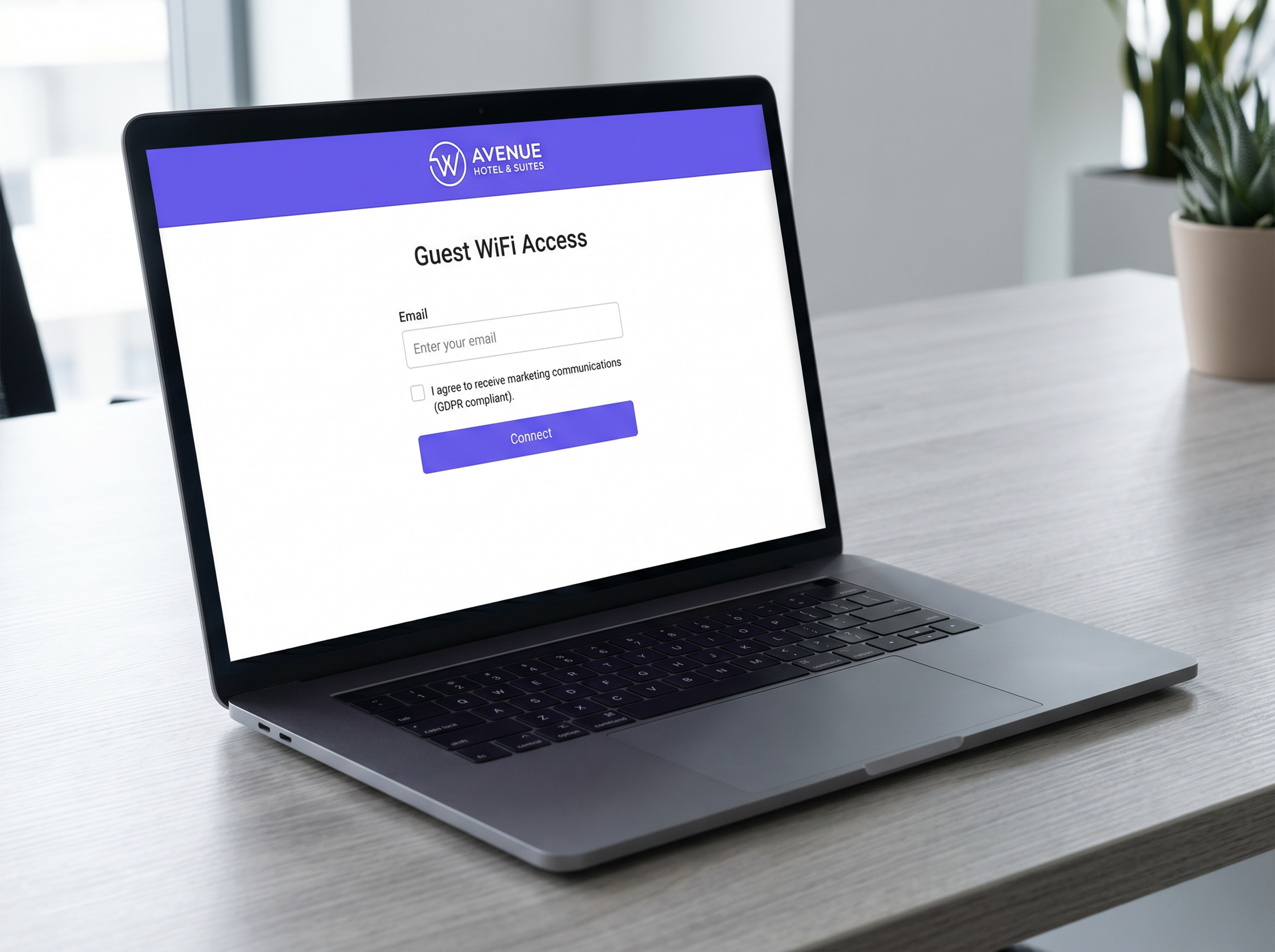
This portal must be designed to authenticate users via standard methods (email, SMS, social login) while capturing first-party data. Crucially, the portal must handle the complex requirements of GDPR compliance, presenting granular consent options and recording the exact timestamp and terms agreed to by the user.
Phase 4: Analytics and Marketing Automation
Once authenticated, the MAC address of the user's device is associated with their demographic profile. This data flows into a WiFi Analytics dashboard, providing IT with visibility into dwell times and footfall, while empowering marketing teams to trigger automated campaigns based on visit frequency.
Best Practices and Compliance
Adhering to industry standards protects the business from regulatory fines and reputational damage.
- Explicit Consent Mechanisms: Under GDPR and the UK Data Protection Act, consent for marketing communications must be freely given, specific, and unambiguous. Pre-ticked boxes on captive portals are strictly prohibited. The platform must maintain an auditable log of all consent transactions.
- Data Retention Policies: Implement automated data purging policies. Guest data should not be held indefinitely. Configure the analytics platform to anonymise or delete records after a defined period of inactivity (e.g., 24 months).
- Content Filtering: Public-facing networks must implement DNS-based content filtering to prevent the access of illegal or inappropriate material, protecting the venue from liability and ensuring a family-friendly environment.
Troubleshooting & Risk Mitigation
Even well-designed networks encounter issues. Understanding common failure modes accelerates time-to-resolution.
DHCP Exhaustion
Symptom: Guests can associate with the AP but receive an APIPA address (169.254.x.x) and cannot access the portal. Mitigation: Decrease DHCP lease times (e.g., to 2 hours instead of 24 hours) in high-churn environments like retail stores. Ensure the subnet size matches peak footfall estimates.
Captive Portal Interception Failures
Symptom: Guests connect to the network but the captive portal does not automatically appear (CNA failure). Mitigation: Ensure the "Walled Garden" or pre-authentication ACLs on the WLC allow traffic to the captive portal's IP addresses and necessary CDN domains. If the OS cannot reach its captive portal detection URL (e.g., captive.apple.com), the portal will not trigger.
Rogue Access Points
Symptom: Unauthorised APs broadcasting similar SSIDs or connected to the corporate LAN. Mitigation: Enable Wireless Intrusion Detection Systems (WIDS) on the WLC to automatically detect and contain rogue APs by sending de-authentication frames to connected clients.
ROI & Business Impact
The transition from a standard network to an intelligent WiFi platform yields measurable business outcomes. By leveraging the data captured through the captive portal, businesses can drive tangible revenue.
For example, in Healthcare , analytics can optimise patient flow and reduce wait times. In retail, integrating WiFi data with CRM systems allows for targeted retargeting campaigns—sending a promotional offer to a customer who hasn't visited in 90 days. Furthermore, the adoption of modern networking paradigms, such as those discussed in The Core SD WAN Benefits for Modern Businesses , allows multi-site operators to centrally manage these policies across hundreds of locations, significantly reducing operational overhead.
Key Terms & Definitions
VLAN (Virtual Local Area Network)
A logical grouping of network devices that acts as if they are on their own independent network, regardless of physical location.
Used to isolate guest WiFi traffic from corporate traffic on the same physical switches and access points.
Captive Portal
A web page that a user of a public-access network is obliged to view and interact with before access is granted.
The primary interface for authenticating users, capturing first-party marketing data, and securing GDPR consent.
Walled Garden
A limited environment that controls the user's access to web content and services before they have fully authenticated.
Essential for allowing devices to load the captive portal page and associated assets (like logos or social login APIs) before internet access is granted.
WPA3-SAE
Wi-Fi Protected Access 3 with Simultaneous Authentication of Equals. The modern standard for wireless encryption.
Replaces WPA2-PSK to provide forward secrecy, preventing attackers from decrypting captured traffic even if they later discover the network password.
OFDMA
Orthogonal Frequency Division Multiple Access. A feature of Wi-Fi 6 that allows an access point to divide a channel into smaller sub-channels.
Crucial for high-density venues (stadiums, conferences) as it allows simultaneous transmission to multiple clients, drastically reducing latency.
MAC Address
Media Access Control address. A unique identifier assigned to a network interface controller for use as a network address.
Used by analytics platforms to track unique device visits, dwell time, and return frequency, even before the user authenticates.
DHCP Exhaustion
A state where a network's DHCP server has no more IP addresses available to assign to new clients.
A common failure in retail environments where footfall is high but the IP subnet is too small or lease times are set too long.
PCI DSS
Payment Card Industry Data Security Standard. A set of security standards designed to ensure that all companies that accept, process, store or transmit credit card information maintain a secure environment.
The primary regulatory reason why guest WiFi must be strictly segmented from point-of-sale (POS) systems.
Case Studies
A 400-room luxury hotel is experiencing severe guest complaints regarding WiFi speeds during the evening hours (7 PM - 10 PM). The internet uplink is a dedicated 1 Gbps fibre circuit. Network monitoring shows the uplink is fully saturated during these times.
The IT team must implement per-device bandwidth rate limiting. On the Wireless LAN Controller or edge firewall, a QoS policy should be applied to the guest VLAN, capping individual client throughput to 15 Mbps download and 5 Mbps upload. Additionally, application-layer filtering should be enabled to throttle peer-to-peer (P2P) file sharing protocols.
A national retail chain wants to implement a captive portal to collect customer emails for marketing, but the legal team is concerned about GDPR compliance following recent ICO fines in the sector.
The deployment must utilize a dedicated Guest WiFi platform like Purple that handles consent natively. The captive portal must be configured with an unticked checkbox explicitly stating: 'I consent to receive marketing communications.' The platform must automatically record the user's MAC address, IP address, timestamp, and the exact text of the consent agreement. A secondary option to connect without providing marketing consent must be available.
Scenario Analysis
Q1. A stadium IT director is planning a network upgrade for a 50,000-seat venue. The current Wi-Fi 5 (802.11ac) network collapses during half-time. They are considering deploying more APs of the same model to increase coverage. Do you agree with this approach?
💡 Hint:Consider the difference between coverage and capacity, and how Wi-Fi 5 handles concurrent client transmissions.
Show Recommended Approach
No. Deploying more Wi-Fi 5 APs in a high-density environment will likely increase co-channel interference without solving the capacity issue. The venue requires an upgrade to Wi-Fi 6 (802.11ax) APs. The OFDMA technology in Wi-Fi 6 is specifically designed for high-density environments, allowing the AP to communicate with multiple clients simultaneously, rather than the sequential transmission limitation of Wi-Fi 5.
Q2. A retail client wants to use their guest WiFi to track how many people walk past their store versus how many enter, using MAC address probing. However, they are concerned about MAC randomization features in modern iOS and Android devices. How should you advise them?
💡 Hint:Consider the limitations of passive tracking versus active authentication.
Show Recommended Approach
Advise the client that while passive MAC tracking (probing) can provide directional trends, MAC randomization significantly reduces its absolute accuracy for unique user counts. The architectural solution is to incentivize active connection to the captive portal. Once a user authenticates, the platform associates the current MAC address with a known identity (e.g., email), providing highly accurate analytics for that session.
Q3. During a network audit, you discover that the guest WiFi subnet (10.0.50.0/24) can ping the IP address of the venue's internal Active Directory server (10.0.10.5). What is the immediate architectural remediation?
💡 Hint:Focus on Layer 3 routing and firewall policies.
Show Recommended Approach
Immediate remediation requires updating the Access Control Lists (ACLs) on the core firewall/router. A rule must be placed at the top of the ACL for the guest VLAN interface that explicitly denies all traffic destined for RFC 1918 private IP space (10.0.0.0/8, 172.16.0.0/12, 192.168.0.0/16), followed by a rule permitting traffic to the internet (0.0.0.0/0).




