
Cómo el filtrado DNS reduce el consumo de ancho de banda de la red
Esta guía detalla cómo la implementación del filtrado DNS en redes WiFi empresariales bloquea el tráfico de publicidad, seguimiento y telemetría antes de que consuma ancho de banda. Para los gerentes de TI y operadores de recintos, esto se traduce en reducciones inmediatas de los costes de ISP, una mejora del rendimiento de la red y una postura de seguridad reforzada.
Escuchar esta guía
Ver transcripción del podcast
Executive Summary
Para los gerentes de TI empresariales y arquitectos de red que supervisan entornos de alta densidad —como Hostelería , Comercio minorista , Transporte y grandes recintos— la gestión del ancho de banda es un desafío operativo persistente. A pesar de las continuas actualizaciones de las conexiones ISP y la densidad de los puntos de acceso, un porcentaje significativo del rendimiento disponible es a menudo consumido por tráfico no iniciado por el usuario. Las redes publicitarias, las balizas de telemetría, los píxeles de seguimiento y las actualizaciones del sistema operativo en segundo plano degradan silenciosamente el rendimiento de la red e inflan artificialmente los costes de infraestructura.
Esta guía de referencia técnica detalla cómo la implementación del filtrado DNS en el borde de la red aborda directamente esta ineficiencia. Al interceptar y bloquear las solicitudes de resolución para dominios conocidos de publicidad, seguimiento y maliciosos, los operadores de red pueden prevenir el establecimiento de conexiones TCP innecesarias. Este enfoque reduce el consumo de ancho de banda de la red hasta en un 35% en entornos densos, mejorando la experiencia del usuario final y mitigando los riesgos de seguridad. Exploraremos la arquitectura técnica, los modelos de despliegue y el ROI medible del filtrado DNS, proporcionando orientación práctica para profesionales de TI senior.
Technical Deep-Dive
The Mechanics of DNS Resolution and Bandwidth Waste
El Sistema de Nombres de Dominio (DNS) opera como la capa de enrutamiento fundamental para todo el tráfico de internet. Cuando un dispositivo cliente se conecta a una red Guest WiFi , la primera acción que realiza antes de establecer cualquier conexión HTTP/HTTPS es una consulta DNS para resolver un nombre de host a una dirección IP.
En las aplicaciones web y móviles modernas, una única acción del usuario (por ejemplo, cargar un sitio web de noticias o abrir una aplicación de redes sociales) desencadena una cascada de consultas DNS secundarias y terciarias. Estas consultas se dirigen a servidores de anuncios, plataformas de análisis y puntos finales de telemetría.
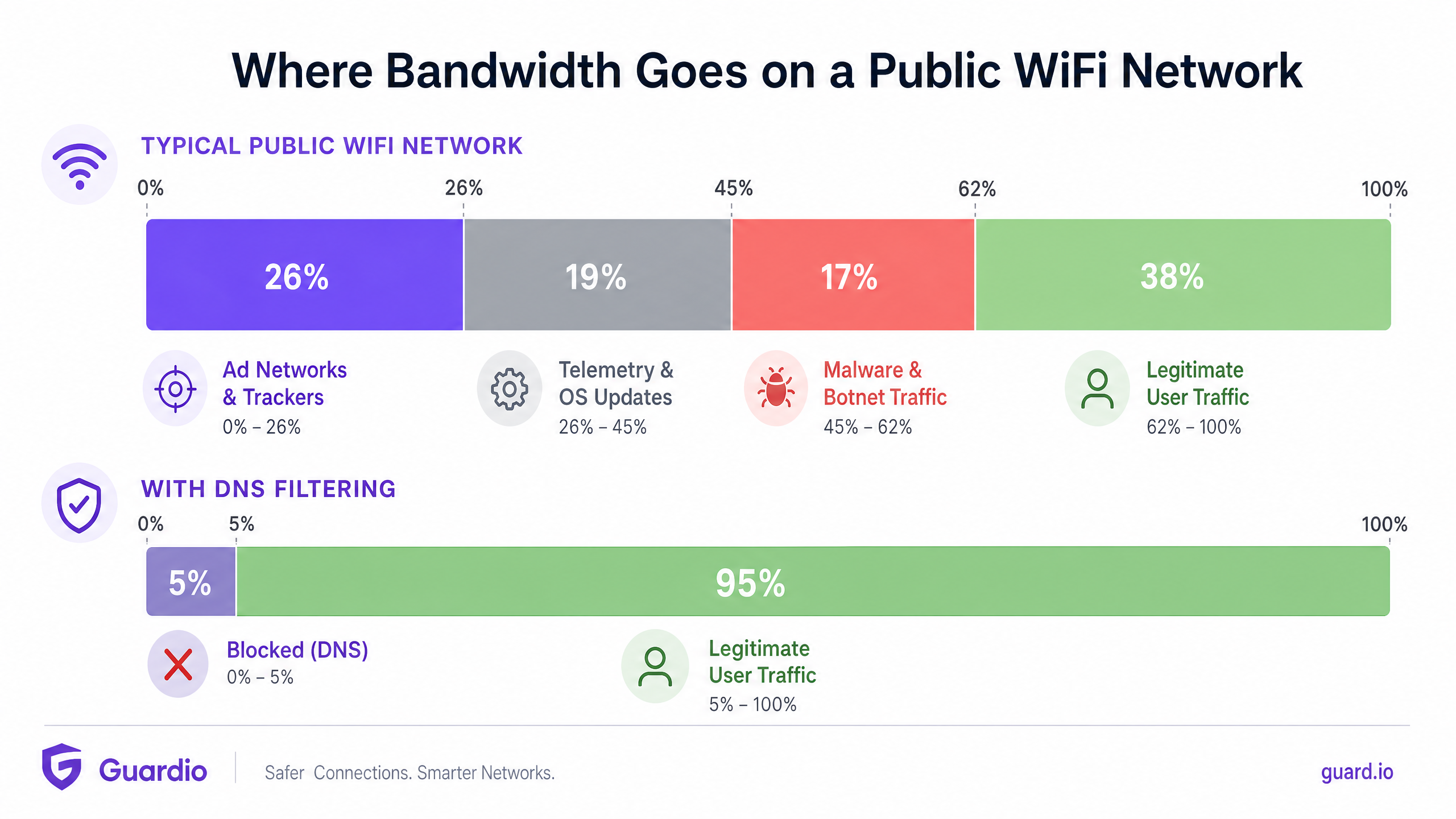
Cuando estas consultas se resuelven con éxito, el dispositivo establece una conexión y descarga la carga útil —a menudo archivos multimedia pesados para anuncios o flujos de datos continuos para telemetría. Este tráfico consume un valioso ancho de banda, tiempo de emisión de radio en el Access Point (AP) y límites de conexiones concurrentes en el router de la pasarela.
How DNS Filtering Reclaims Bandwidth
El filtrado DNS intercepta este proceso en la etapa de resolución. Cuando un dispositivo consulta un dominio, el resolvedor DNS verifica el nombre de host contra una lista de bloqueo mantenida (o fuente de inteligencia de amenazas). Si el dominio está marcado como una red de anuncios, rastreador o entidad maliciosa conocida, el resolvedor devuelve una respuesta nula (por ejemplo, 0.0.0.0 o NXDOMAIN) en lugar de la dirección IP real.
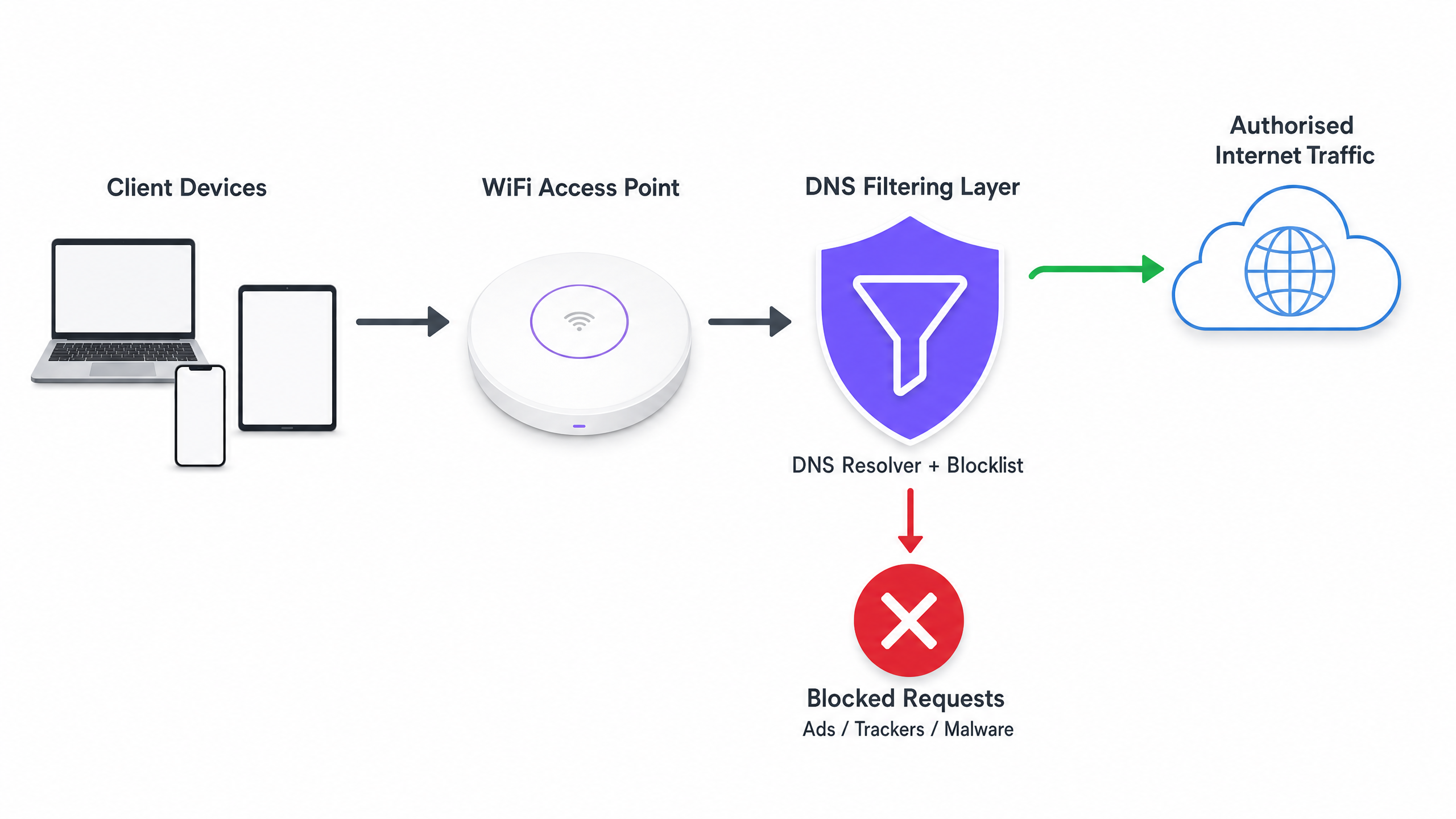
La ganancia de eficiencia crítica aquí es que la transacción se termina antes de que pueda ocurrir un handshake TCP. No se produce ninguna negociación TLS y no se descarga ninguna carga útil. El ancho de banda que habría sido consumido por el anuncio o el script de seguimiento se conserva por completo.
Deployment Architectures
Existen tres modelos arquitectónicos principales para desplegar el filtrado DNS en un entorno empresarial:
- Resolvedores basados en la nube: El servidor DHCP local se configura para asignar las direcciones IP de un servicio de filtrado DNS basado en la nube (por ejemplo, Cisco Umbrella, Cloudflare Gateway) a los dispositivos cliente. Este es el despliegue de menor fricción, que no requiere cambios de hardware en las instalaciones. Sin embargo, depende completamente de la latencia del proveedor de la nube.
- Dispositivos locales: Se despliega un resolvedor DNS dedicado (dispositivo físico o virtual) dentro de la infraestructura de red local. Esto proporciona la menor latencia para la resolución DNS y asegura que todos los registros de consultas DNS permanezcan en el sitio, lo que puede simplificar el cumplimiento de las regulaciones de soberanía de datos.
- Plataformas de gestión de WiFi integradas: El modelo más eficiente para operadores de múltiples recintos es integrar el filtrado DNS directamente en la capa de gestión de red o Captive Portal. Las plataformas que ofrecen WiFi Analytics integral a menudo incluyen filtrado DNS basado en políticas que se puede aplicar por SSID, por recinto o por grupo de usuarios.
Implementation Guide
El despliegue del filtrado DNS requiere un enfoque estructurado para evitar interrumpir el tráfico legítimo de usuarios o romper servicios esenciales.
Step 1: Establish a Baseline
Antes de implementar cualquier regla de bloqueo, configure sus resolvedores DNS actuales para registrar todas las consultas. Ejecute esto en modo de auditoría durante al menos 14 días para capturar una muestra representativa del tráfico en todos los recintos. Analice estos registros para identificar los dominios más consultados y calcule el porcentaje de consultas dirigidas a redes de anuncios y rastreadores conocidos. Esta línea de base es esencial para medir el ROI después del despliegue.
Step 2: Define Filtering Policies by Network Segment
Una política de filtrado monolítica rara vez es efectiva en un entorno empresarial. Debe segmentar sus políticas basándose en el propósito de la red:
- Guest WiFi: Implemente un bloqueo agresivo de redes de anuncios, rastreadores, contenido para adultos y dominios de malware conocidos para maximizar el ahorro de ancho de banda y proteger la reputación del recinto.
- Redes de personal/corporativas: Aplique un filtrado moderado. Si bien los dominios de malware y phishing deben bloquearse, un bloqueo de anuncios excesivamente agresivo podría interferir con los equipos de marketing o aplicaciones SaaS específicas. Revise Políticas seguras de BYOD para redes WiFi de personal para obtener orientación sobre el equilibrioseguridad y acceso.
- Redes IoT/Operacionales: Implemente una estricta lista de permitidos (denegación por defecto). Los dispositivos IoT (p. ej., termostatos inteligentes, terminales de punto de venta) solo deben poder resolver los dominios específicos necesarios para su funcionamiento.
Paso 3: Seleccionar y Probar Listas de Bloqueo
La eficacia de su filtrado DNS depende completamente de la calidad de sus listas de bloqueo. Depender de una única fuente es arriesgado. Combine fuentes de inteligencia de amenazas comerciales con listas de buena reputación mantenidas por la comunidad (p. ej., OISD).
Fundamentalmente, ejecute primero las listas de bloqueo seleccionadas en modo de 'prueba' o monitoreo. Analice los registros para identificar cualquier falso positivo (dominios legítimos que serían bloqueados). Por ejemplo, bloquear una CDN importante podría interrumpir inadvertidamente la representación de aplicaciones empresariales críticas.
Paso 4: Abordar DNS sobre HTTPS (DoH)
Los navegadores modernos (Chrome, Firefox, Edge) recurren cada vez más a DNS over HTTPS (DoH) por defecto, lo que cifra las consultas DNS y las envía directamente a los resolvedores en la nube (como Google o Cloudflare), eludiendo los servidores DNS asignados por DHCP de su red local. Si DoH está activo, su filtrado DNS es eludido.
Para mitigar esto, debe configurar sus firewalls perimetrales para bloquear el tráfico saliente a proveedores DoH conocidos en el puerto 443, forzando a los navegadores a recurrir al resolvedor DNS local no cifrado donde se aplican sus políticas de filtrado.
Mejores Prácticas
- Automatizar Actualizaciones de Listas de Bloqueo: Los panoramas de amenazas y los dominios de publicación de anuncios cambian a diario. Asegúrese de que su solución de filtrado DNS extraiga automáticamente las actualizaciones de sus fuentes de inteligencia de amenazas elegidas al menos cada 24 horas.
- Implementar una Caché Local: Para minimizar la latencia, asegúrese de que su resolvedor DNS local almacene en caché las consultas frecuentes. Incluso si utiliza un servicio de filtrado basado en la nube, un reenviador de caché local reduce el tiempo de ida y vuelta para las solicitudes comunes.
- Mantener una Lista de Permitidos Accesible: Los falsos positivos ocurrirán. Establezca un proceso claro y rápido para que los equipos de soporte de TI añadan dominios específicos a una lista de permitidos cuando un servicio legítimo sea bloqueado inadvertidamente.
- Garantizar el Cumplimiento: Los registros de consultas DNS contienen información sobre el comportamiento de navegación del usuario, que puede estar sujeta a regulaciones como GDPR o CCPA. Asegúrese de que sus prácticas de registro se alineen con las políticas de privacidad de su organización. Para más información sobre cómo mantener registros seguros, consulte Explain what is audit trail for IT Security in 2026 .
Resolución de Problemas y Mitigación de Riesgos
Modos de Fallo Comunes
- Fallo del Captive Portal: Un filtrado DNS agresivo a veces puede bloquear los dominios necesarios para la detección del Captive Portal del sistema operativo del dispositivo (p. ej.,
captive.apple.com). Asegúrese de que estos dominios esenciales estén explícitamente en la lista de permitidos. - Mal funcionamiento de la Aplicación: Algunas aplicaciones móviles no se cargarán o se bloquearán si sus dominios de telemetría o de publicación de anuncios son inaccesibles. Si una aplicación crítica utilizada por su personal o invitados está fallando, revise los registros DNS en busca de consultas bloqueadas originadas en esos dispositivos y ajuste la lista de permitidos en consecuencia.
- Cuellos de Botella de Rendimiento: Si implementa un dispositivo local, asegúrese de que esté adecuadamente aprovisionado para manejar el pico de consultas por segundo (QPS) de su red. Un resolvedor DNS con recursos insuficientes introducirá una latencia significativa, degradando la experiencia del usuario mucho más de lo que lo habrían hecho los anuncios.
ROI e Impacto Empresarial
La implementación del filtrado DNS proporciona retornos medibles en tres áreas clave:
- Reducción de Costos de Ancho de Banda: Al eliminar del 15% al 35% del tráfico no esencial, las organizaciones a menudo pueden retrasar costosas actualizaciones de circuitos de ISP. En entornos con conexiones medidas o backhaul satelital, el ahorro de costos es inmediato y sustancial.
- Mejora del Rendimiento de la Red: Reducir el volumen de conexiones concurrentes y el tiempo de emisión de radio consumido por el tráfico en segundo plano mejora directamente el rendimiento y la latencia para las actividades legítimas del usuario. Esto se traduce en menos tickets de soporte técnico relacionados con 'WiFi lento' y mayores puntuaciones de satisfacción del usuario.
- Postura de Seguridad Mejorada: Bloquear los dominios de comando y control (C2) de malware y los sitios de phishing en la capa DNS reduce significativamente el riesgo de una brecha exitosa originada por un dispositivo comprometido en la red de invitados o del personal.
A medida que se expanden las iniciativas del sector público y de ciudades inteligentes —como las impulsadas en nuestro reciente anuncio, Purple Appoints Iain Fox as VP Growth – Public Sector to Drive Digital Inclusion and Smart City Innovation —, la utilización eficiente del ancho de banda se vuelve crítica para ofrecer conectividad equitativa y de alto rendimiento a escala. Además, características como Purple Launches Offline Maps Mode for Seamless, Secure Navigation to WiFi Hotspots demuestran cómo la optimización de los recursos de red puede mejorar la experiencia general del usuario.
Definiciones clave
DNS Resolution
The process of translating a human-readable domain name (e.g., example.com) into a machine-readable IP address.
This is the prerequisite step for almost all network traffic; intercepting it here is the most efficient way to block unwanted connections.
DNS over HTTPS (DoH)
A protocol for performing remote DNS resolution via the HTTPS protocol, encrypting the query.
DoH prevents local network administrators from seeing or filtering DNS requests, requiring specific firewall rules to mitigate.
Telemetry Traffic
Automated communications sent by operating systems or applications to their vendors, reporting usage data, diagnostics, or status.
While individually small, the aggregate telemetry traffic from hundreds of devices on a public WiFi network consumes significant bandwidth.
NXDOMAIN
A DNS response indicating that the requested domain name does not exist.
DNS filters often return an NXDOMAIN response for blocked domains, immediately terminating the client's connection attempt.
Threat Intelligence Feed
A continuously updated stream of data providing information on known malicious domains, IPs, and URLs.
Used to dynamically update DNS blocklists to protect networks from newly identified malware and phishing infrastructure.
False Positive
In DNS filtering, when a legitimate, necessary domain is incorrectly categorized and blocked.
False positives cause application breakage and require a rapid allow-listing process to resolve user complaints.
Allow-List (Default Deny)
A security posture where all traffic is blocked by default, and only explicitly approved domains are permitted to resolve.
Best practice for highly secure or operational networks (like IoT or POS systems) where the required domains are known and finite.
Captive Portal Detection
The mechanism by which an OS determines if it is behind a captive portal, usually by attempting to reach a specific vendor domain.
If DNS filtering blocks these specific domains, devices will fail to display the WiFi login page, preventing users from connecting.
Ejemplos prácticos
A 400-room hotel is experiencing severe network congestion during the evening peak (7 PM - 10 PM). The 1Gbps ISP connection is saturated, and guests are complaining about slow video streaming. Upgrading the circuit to 2Gbps will cost an additional £1,500 per month. How can the IT Director use DNS filtering to address this?
- Deploy a cloud-based DNS filtering solution and configure the core router's DHCP scope to assign the new resolvers to the Guest VLAN.
- Enable a comprehensive blocklist targeting ad networks, tracking pixels, and known bandwidth-heavy telemetry endpoints.
- Configure the edge firewall to block outbound DoH (DNS over HTTPS) traffic to ensure all guest devices use the filtered resolvers.
- Monitor the bandwidth utilization during the next evening peak.
A large retail chain offers free Guest WiFi across 50 locations. They have noticed a high volume of background traffic originating from Android devices, primarily Google Play Services telemetry, which is degrading the performance of the in-store point-of-sale (POS) tablets sharing the same WAN link.
- Implement policy-based DNS filtering via the central WiFi management platform.
- Create two distinct policies: one for the Guest SSID and one for the POS SSID.
- On the Guest SSID policy, apply standard ad and malware blocking, plus specific rules to rate-limit or block non-essential OS telemetry domains.
- On the POS SSID policy, implement a strict allow-list, only permitting DNS resolution for the payment gateway, inventory management system, and essential MDM (Mobile Device Management) endpoints.
Preguntas de práctica
Q1. You are deploying DNS filtering across a university campus network. During the pilot phase, students report that they cannot access the login page for the campus WiFi. What is the most likely cause, and how do you resolve it?
Sugerencia: Think about how operating systems determine if they need to display a login screen.
Ver respuesta modelo
The DNS filter is likely blocking the specific domains used by Apple, Android, and Windows for Captive Portal Detection (e.g., captive.apple.com, connectivitycheck.gstatic.com). The resolution is to immediately add these vendor-specific captive portal domains to the global allow-list.
Q2. A stadium IT director wants to implement DNS filtering to save bandwidth during game days. However, they are concerned about the latency introduced by routing all DNS queries to a cloud provider. What architectural approach should you recommend?
Sugerencia: Consider where the DNS resolution process physically takes place.
Ver respuesta modelo
Recommend deploying an On-Premises DNS Appliance or a local caching forwarder. This keeps the initial DNS resolution local to the stadium infrastructure, providing sub-millisecond response times, while still utilizing cloud-based threat intelligence feeds to update the local blocklists asynchronously.
Q3. After implementing DNS filtering, the dashboard shows a 25% reduction in DNS queries, but the overall WAN bandwidth utilization has only dropped by 5%. What is the most likely reason for this discrepancy?
Sugerencia: What protocol bypasses local DNS resolvers entirely?
Ver respuesta modelo
Client devices (specifically modern browsers) are likely using DNS over HTTPS (DoH) to bypass the local DNS resolvers. While some background OS traffic is being caught by the local filter (the 25% query reduction), the heavy browser traffic is encrypted and bypassing the filter. The firewall must be configured to block outbound DoH traffic to force browsers to fall back to the local resolver.