
Integración de la autenticación WiFi de WeChat: incorporación de Captive Portal para clientes de APAC
WeChat cuenta con 1410 millones de usuarios activos mensuales, lo que la convierte en la identidad digital principal para los consumidores chinos a nivel mundial. Esta guía explica cómo integrar la autenticación OAuth 2.0 de WeChat en portales cautivos empresariales para recintos de APAC, abarcando el registro en la plataforma, la selección del alcance, la aplicación de RADIUS Change of Authorisation y el cumplimiento de un doble marco con GDPR y la PIPL de China. Está dirigida a responsables de TI, arquitectos de redes y directores de operaciones de recintos que necesiten actuar este trimestre.
Video overview
Escuchar esta guía
Ver transcripción del podcast
Parte de nuestra serie principal: Guía de Captive Portal →

Resumen ejecutivo
Para los establecimientos empresariales que operan en la región APAC, o que atienden a turistas chinos a nivel global, la autenticación de WeChat WiFi ya no es opcional. Con 1.410 millones de usuarios activos mensuales a partir de 2025 (fuente: Tencent), WeChat es la identidad digital principal para los consumidores chinos. Un invitado que se conecta a su SSID y solo ve opciones de inicio de sesión por correo electrónico o Facebook se enfrenta a una fricción inmediata. Es casi seguro que tienen WeChat. Es casi seguro que no tienen una dirección de correo electrónico local configurada en ese dispositivo.
Esta guía detalla cómo integrar WeChat OAuth 2.0 en un Captive Portal. Cubrimos los dos registros de plataforma distintos que Tencent requiere, la decisión del alcance (scope) que determina qué datos de primera mano recopila y el mecanismo RADIUS Change of Authorisation (CoA) que traduce un intercambio de OAuth exitoso en acceso real a la red. También abordamos los requisitos de cumplimiento superpuestos de GDPR y la Ley de Protección de Información Personal de China (PIPL).
La plataforma Guest WiFi de Purple automatiza la capa de ejecución de red en hardware de Cisco Meraki, HPE Aruba, Ruckus, Juniper Mist, Ubiquiti UniFi, Cambium, Extreme y Fortinet. Purple opera en más de 80.000 establecimientos activos y registró 440 millones de inicios de sesión en 2024 (datos internos de Purple).
Análisis técnico profundo
El flujo de OAuth 2.0
Un Captive Portal (una pasarela de autenticación basada en web que intercepta el tráfico HTTP de dispositivos no autenticados) redirige a los invitados a una página de inicio de sesión alojada en un servidor de portal, ya sea de forma local o en la nube. Añadir WeChat OAuth inserta la infraestructura de identidad de Tencent en ese flujo.
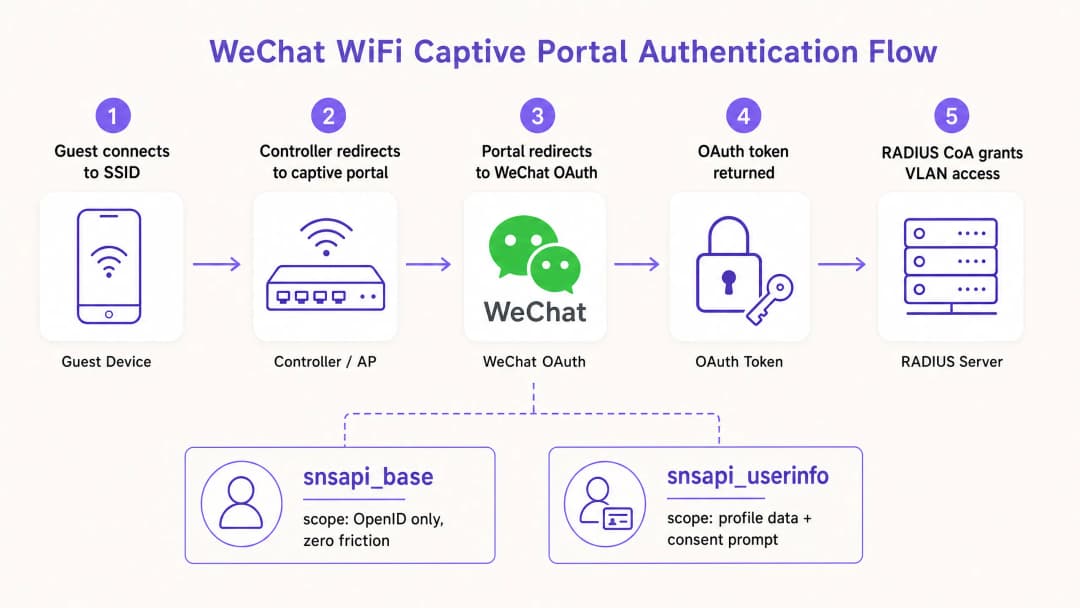
La secuencia se ejecuta de la siguiente manera. El invitado se asocia con el SSID. El controlador inalámbrico detecta la ausencia de una sesión autenticada y redirige todo el tráfico HTTP a la URL del Captive Portal. La página del portal se carga y presenta las opciones de inicio de sesión, incluido WeChat. El invitado selecciona WeChat. El servidor del portal construye una redirección al endpoint de autorización de WeChat en open.weixin.qq.com, pasando cuatro parámetros: el AppID, el URI de redirección, el tipo de respuesta configurado como code y el alcance (scope) solicitado.
WeChat autentica al usuario completamente en su propia infraestructura. Si el invitado ya ha iniciado sesión a través del navegador integrado en la aplicación WeChat, el alcance snsapi_base permite una autenticación silenciosa sin ninguna indicación visible. WeChat redirige de vuelta a la URI de redirección registrada del portal con un código de autorización de corta duración. El servidor del portal intercambia este código por un token de acceso llamando a api.weixin.qq.com/sns/oauth2/access_token con el AppID, AppSecret, el código y el tipo de concesión (grant type). WeChat devuelve un token de acceso, un token de actualización, el OpenID del usuario y el alcance concedido. Si se solicitó snsapi_userinfo, una segunda llamada de API a api.weixin.qq.com/sns/userinfo recupera el apodo, la imagen de perfil, el género y la ciudad del usuario.
Registro en la plataforma: la decisión que dificulta la mayoría de las implementaciones
Tencent opera dos plataformas de desarrollo independientes, y seleccionar la incorrecta es la causa más común de implementaciones fallidas.
| Contexto de acceso | Registro requerido | URL de la plataforma | Alcances admitidos |
|---|---|---|---|
| Navegador integrado en WeChat | Cuenta de servicio (Plataforma de Cuentas Oficiales) | mp.weixin.qq.com | snsapi_base, snsapi_userinfo |
| Navegador móvil estándar (Chrome, Safari) | Aplicación web (Plataforma abierta) | open.weixin.qq.com | snsapi_login (flujo de código QR) |
Una Cuenta de Suscripción en la Plataforma de Cuentas Oficiales no funcionará. Carece de permisos de autorización de páginas web OAuth. Solo una Cuenta de Servicio cuenta con esos permisos.
La mayoría de las implementaciones empresariales en Hospitality y Retail realizan ambos registros. Un huésped en un hotel puede abrir el portal en Chrome, escanear un código QR con WeChat y autenticarse a través del flujo de la Plataforma Abierta. O bien, puede seguir un enlace dentro de la propia aplicación WeChat, acceder al navegador integrado y autenticarse de forma silenciosa a través del flujo de la Cuenta de Servicio. Se deben gestionar ambas vías.
Selección de alcance y recopilación de datos
El alcance de OAuth es una decisión arquitectónica real, no un detalle de configuración. Determina la fricción que experimenta el usuario y los datos que recibe su plataforma de WiFi Analytics.
snsapi_base devuelve solo el OpenID: un identificador único y estable para ese usuario dentro de su Cuenta Oficial. No requiere ninguna solicitud de consentimiento del usuario. La autenticación es invisible. Utilice esta opción para los clientes recurrentes cuyos perfiles ya posea, o para entornos de alto rendimiento, como estadios y centros de transporte, donde la velocidad de conexión es la prioridad.
snsapi_userinfo devuelve el OpenID además del apodo, la imagen de perfil, el género, la configuración de idioma y la ciudad. Activa una pantalla de consentimiento explícito. Utilice esto para el registro de invitados por primera vez para crear un perfil de datos de origen, combinado con una capa de consentimiento que cumpla con la PIPL y el GDPR en la página del portal.
La regla práctica: use snsapi_base para mayor velocidad, snsapi_userinfo para la obtención de datos. Puede implementar ambos comprobando si el OpenID del usuario ya existe en su base de datos. Si existe, solicite snsapi_base. Si no, solicite snsapi_userinfo.
Aplicación de red: RADIUS CoA y omisión de MAC
Un token de OAuth demuestra la identidad. No abre la red. Un mecanismo independiente debe traducir la autenticación correcta en un cambio de política de red.
RADIUS Change of Authorisation (CoA), definido en el RFC 3576, es el enfoque estándar. Una vez que el servidor del portal recibe un token de OAuth válido, envía una solicitud de CoA al controlador inalámbrico. El controlador actualiza la sesión, moviendo el dispositivo de la VLAN del portal cautivo (un segmento de red restringido que solo permite el tráfico del portal) a la VLAN completa de invitados. Esto funciona con Cisco Meraki, HPE Aruba, Ruckus, Juniper Mist, Ubiquiti UniFi, Cambium, Extreme y Fortinet.
La omisión de dirección MAC registra la dirección MAC del dispositivo como un cliente autorizado tras un proceso de OAuth correcto. A continuación, el controlador permite el tráfico desde esa dirección sin solicitar más credenciales. Es más sencillo de implementar pero conlleva dos riesgos: las direcciones MAC se pueden suplantar y, a partir de iOS 14 y Android 10, se utiliza la aleatorización de direcciones MAC de forma predeterminada, lo que interrumpe el mecanismo al volver a conectarse.
Para cualquier implementación donde la seguridad sea importante, RADIUS CoA es la opción correcta. Para obtener más información sobre cómo proteger las redes de invitados, consulte What Is Secure WiFi: Essential Guide for Business 2026 y Enterprise WiFi Security: A Complete Guide for 2026.
¿Tiene preguntas sobre su configuración específica?
Nuestro equipo trabaja con operadores de recintos, responsables de TI e ingenieros de redes en 80 000 espacios. Reserve una llamada de 20 minutos y le mostraremos cómo lo han solucionado otros profesionales como usted.
Guía de implementación
Lista de verificación previa a la implementación
Antes de escribir una sola línea de configuración, complete estos cinco pasos.
Primero, determine el contexto de acceso. Examine su establecimiento e identifique si los invitados encontrarán el portal dentro del navegador integrado en la aplicación de WeChat, en un navegador móvil estándar o en ambos. La respuesta determina los requisitos de registro de su plataforma.
Segundo, regístrese en la plataforma correcta. Para el acceso desde el navegador integrado en la aplicación, cree una cuenta de servicio en la WeChat Official Accounts Platform. Para el acceso desde un navegador estándar, registre una aplicación web en la WeChat Open Platform. Anote su AppID y AppSecret para cada una.
Tercero, configure sus URI de redirección. Registre cada dominio y subdominio que utilice su portal, incluidos los entornos de prueba. WeChat aplica una validación de coincidencia exacta. Una discrepancia devuelve el error 40029.
Cuarto, implemente el intercambio de tokens en el lado del servidor. El AppSecret nunca debe aparecer en el código del lado del cliente. Cree un endpoint en el lado del servidor que acepte el código de autorización, lo intercambie por un token y devuelva solo los datos que su portal necesita.
En quinto lugar, implemente el parámetro state para la protección contra CSRF. Genere un valor aleatorio criptográficamente, almacénelo en la sesión del usuario, páselo en la solicitud de OAuth y valídelo al retornar.
Pasos de configuración para Ruckus SmartZone
Para los recintos que ejecutan Ruckus SmartZone, la configuración del portal de WeChat se encuentra en Services and Profiles, luego Hotspots and Portals y después en la pestaña WeChat. Debe configurar la Authentication URL (el extremo de devolución de llamada de WeChat de su servidor de portal), el DNAT Destination (el servidor que gestiona las redirecciones de clientes no autenticados) y el Grace Period (el intervalo de tiempo durante el cual un usuario desconectado recientemente puede volver a conectarse sin tener que volver a autenticarse, que por defecto es de 60 minutos). También debe configurar la lista blanca del walled garden para permitir el tráfico a los extremos de la API de WeChat durante la fase de autenticación. Consulte también la Step-by-Step Guide: Configuring Ruijie Wireless Controllers for Guest WiFi Captive Portals para ver patrones de configuración de controladores similares.
Detección del navegador integrado en la aplicación
El navegador integrado en la aplicación de WeChat establece una cadena de agente de usuario que contiene MicroMessenger. Su portal debe detectar esta cadena y ofrecer el flujo de OAuth adecuado. Si MicroMessenger está presente, utilice el flujo de Official Accounts. Si no lo está, utilice el flujo de código QR de Open Platform. No detectar esto correctamente produce experiencias interrumpidas o errores de autenticación.
Buenas prácticas
Minimización de datos y cumplimiento del marco dual
Tanto el GDPR (aplicable a los visitantes europeos) como la PIPL (aplicable a los ciudadanos chinos) requieren una base legal para procesar datos personales, una limitación clara de la finalidad y la minimización de datos. El alcance snsapi_base es más fácil de justificar bajo los principios de minimización de datos que snsapi_userinfo. Cuando recopile datos demográficos a través de snsapi_userinfo, documente su base legal, su periodo de retención y su acuerdo de procesamiento de datos con Tencent.
La PIPL, en vigor desde noviembre de 2021, exige el consentimiento explícito para la información personal confidencial y obliga a que los procesadores de datos fuera de China implementen estándares de protección equivalentes. Si el servidor de su portal se encuentra fuera de China continental, debe evaluar si se aplican las normas de transferencia transfronteriza de datos al OpenID de WeChat y a los datos de perfil que recibe.
UnionID para despliegues en múltiples propiedades
El OpenID es único por usuario y por Official Account. Si gestiona varias Official Accounts en distintas propiedades, un mismo invitado tendrá diferentes OpenIDs en cada una de ellas. WeChat proporciona un UnionID que se mantiene consistente en todas las cuentas vinculadas al mismo registro de Open Platform. Para cadenas hoteleras, grupos de retail u operadores aeroportuarios que gestionen múltiples recintos, implemente la resolución de identidad basada en UnionID desde el principio.
Robustecimiento de la seguridad
Almacene el AppSecret en una variable de entorno o en un gestor de secretos, nunca en el código fuente. Rotelo de inmediato si sospecha que ha quedado expuesto. Implemente la limitación de tasa en su endpoint de intercambio de tokens para evitar abusos. Registre todos los errores de OAuth, especialmente el 40029 (código no válido) y el 40163 (código caducado), ya que indican una configuración incorrecta o un sondeo activo.
Para obtener una perspectiva más amplia sobre la arquitectura de seguridad de redes de invitados, consulte Por qué los equipos de WiFi domésticos no deben usarse en su red de invitados.
Casos de estudio
Cadena de hoteles de lujo, Singapur
Un hotel de lujo de 350 habitaciones en Singapur que atiende principalmente a un segmento de viajes de negocios de origen chino implementó la autenticación WeChat WiFi junto con su opción de inicio de sesión por correo electrónico existente. Antes de la implementación, el personal de recepción reportaba un promedio de 15 quejas de huéspedes al día por dificultades para iniciar sesión en el WiFi. Los huéspedes chinos intentaban usar direcciones de correo electrónico que no tenían configuradas en sus dispositivos de viaje.
El hotel registró una Cuenta de Servicio en la plataforma WeChat Official Accounts Platform y una aplicación de sitio web en la Open Platform. Configuraron snsapi_userinfo para las primeras conexiones y snsapi_base para los huéspedes recurrentes identificados por su dirección MAC. El controlador HPE Aruba se configuró para RADIUS CoA para gestionar la promoción de sesiones.
En un plazo de 30 días, las quejas sobre el inicio de sesión de WiFi para huéspedes disminuyeron a menos de dos por día. La base de datos de WiFi Analytics del hotel creció en 4.200 perfiles de origen verificados en el primer mes, con datos demográficos a nivel de ciudad que permitieron comunicaciones personalizadas tras la estancia.
Centro comercial internacional, Kuala Lumpur
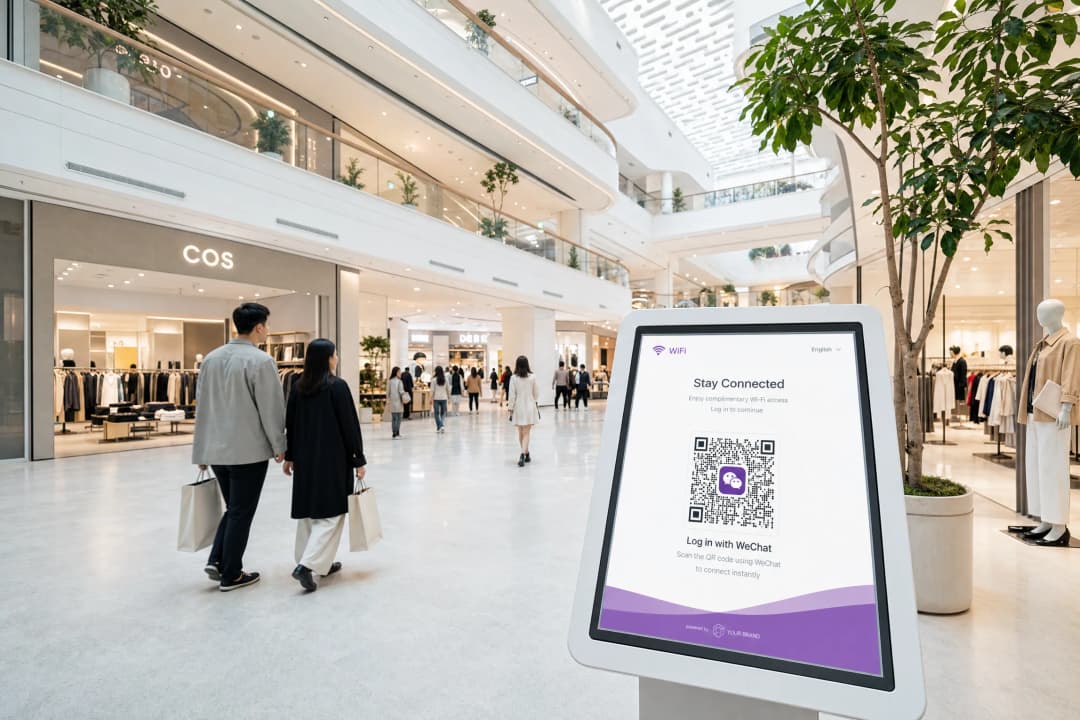
Un centro comercial premium en Kuala Lumpur, con 12 millones de usuarios de WeChat solo en Malasia, necesitaba una experiencia de acceso a la red WiFi que cumpliera con las expectativas digitales de su base de clientes. El centro comercial utilizaba puntos de acceso Cisco Meraki en sus 180.000 metros cuadrados de superficie comercial.
Para el despliegue se utilizó la plataforma de Guest WiFi de Purple como capa en la nube, con WeChat OAuth como método de autenticación principal y SMS OTP como alternativa de respaldo. La arquitectura independiente del hardware de Purple gestionó la integración de RADIUS CoA con Cisco Meraki sin necesidad de desarrollos personalizados.
El centro comercial registró un aumento del 34% en el inicio de sesiones WiFi en el primer trimestre tras el despliegue, lo que se atribuyó a la reducción de las dificultades de acceso para los usuarios de WeChat. Los datos de origen recopilados a través de los flujos de consentimiento de snsapi_userinfo permitieron al equipo de marketing del centro comercial segmentar a los compradores por su ciudad de origen para realizar campañas dirigidas de forma eficaz.
Resolución de problemas y mitigación de riesgos
| Error | Causa | Resolución |
|---|---|---|
| 40029 invalid code | Discrepancia en la URI de redireccionamiento o reutilización del código | Verifique que las URIs registradas coincidan exactamente; los códigos son de un solo uso |
| Pantalla en blanco después de la autenticación | RADIUS CoA no configurado o fallando | Verificar la configuración de CoA del controlador y las reglas del firewall en el puerto UDP 3799 |
| La aleatorización de MAC interrumpe el flujo del invitado recurrente | Aleatorización de MAC en iOS/Android | Migrar al seguimiento de sesiones basado en OpenID; evitar la identificación exclusiva por MAC |
| snsapi_userinfo devuelve campos vacíos | El usuario ha establecido restricciones de privacidad en WeChat | Gestionar los campos nulos de forma correcta; no requerir datos de perfil para el acceso |
ROI e impacto empresarial
El caso de negocio para la autenticación de WiFi con WeChat se basa en tres resultados cuantificables.
Adquisición de datos de primera mano. Cada autenticación de snsapi_userinfo genera un perfil de invitado verificado con datos demográficos. Para un hotel de 200 habitaciones con una ocupación del 70 % y un 40 % de huéspedes chinos, esto representa aproximadamente 20 000 nuevos perfiles verificados al año, cada uno vinculado a una identidad de WeChat que permite un re-engagement continuo.
Reducción de la carga de soporte. Los problemas al iniciar sesión son el principal motivo de las llamadas de soporte sobre WiFi de invitados. Los establecimientos que añaden la autenticación de WeChat junto con las opciones existentes informan de forma constante de una reducción en las consultas de recepción relacionadas con el WiFi, lo que libera tiempo del personal para interacciones de mayor valor.
Alcance de marketing. Las cuentas oficiales de WeChat permiten a los establecimientos enviar notificaciones a sus seguidores. Se puede sugerir a un invitado que se autentique a través de su cuenta oficial que la siga, creando un canal de comunicación directo que funciona dentro del ecosistema de WeChat, donde los consumidores chinos pasan una media de 82 minutos al día (fuente: Walk the Chat).
El plan Engage de Purple amplía aún más esta capacidad, permitiendo el envío automatizado de mensajes tras la visita, activadores de fidelización y campañas segmentadas basadas en los datos de primera mano recopilados en el punto de autenticación de WiFi.
Definiciones clave
Captive Portal
Una pasarela de autenticación basada en web que intercepta el tráfico HTTP de un dispositivo no autenticado y lo redirige a una página de inicio de sesión antes de conceder acceso a la red.
El mecanismo a través del cual se presenta la autenticación de WiFi de invitados a los usuarios. WeChat OAuth es uno de los diversos métodos de autenticación que puede ofrecer un Captive Portal.
OAuth 2.0
Un protocolo de autorización estándar del sector que permite a una aplicación de terceros (el Captive Portal) obtener acceso limitado a un servicio web (WeChat) en nombre de un usuario, sin que este comparta su contraseña con el tercero.
El marco subyacente que hace posible el inicio de sesión con WeChat. El portal nunca ve las credenciales de WeChat del usuario; solo recibe un token que confirma que WeChat lo ha autenticado.
RADIUS CoA
Cambio de autorización. Un mecanismo definido en RFC 3576 que permite a un servidor RADIUS modificar dinámicamente los atributos de autorización de sesión de un cliente de red activo, como cambiar la asignación de VLAN.
El mecanismo de aplicación de red que traduce un intercambio exitoso de WeChat OAuth en un acceso real a la red. Sin CoA, el invitado se autentica pero el controlador no sabe que debe abrir la red.
OpenID
Un identificador único asignado por WeChat a un usuario específico para una Cuenta Oficial o aplicación web concreta. Es estable entre sesiones pero difiere entre cuentas.
La clave principal utilizada para identificar a un invitado en su base de datos analítica de WiFi. Utilice UnionID en su lugar si gestiona varias Cuentas Oficiales y necesita una resolución de identidad entre cuentas.
snsapi_base
Un ámbito de WeChat OAuth que permite la autenticación silenciosa, devolviendo únicamente el OpenID del usuario sin mostrar una solicitud de consentimiento.
Úselo para invitados recurrentes o entornos de alto rendimiento donde la velocidad de conexión es la prioridad. No devuelve datos demográficos más allá del OpenID.
snsapi_userinfo
Un ámbito de WeChat OAuth que devuelve el OpenID, el apodo, la imagen de perfil, el género, el idioma y la ciudad del usuario, requiriendo una pantalla explícita de consentimiento del usuario.
Úselo para el registro de invitados por primera vez para crear un perfil de datos propios. Debe combinarse con una capa de consentimiento que cumpla con el GDPR y la PIPL.
PIPL
Ley de Protección de Información Personal. La legislación integral de privacidad de datos de China, en vigor desde noviembre de 2021, que regula cómo se deben recopilar, procesar y transferir los datos personales de los ciudadanos chinos.
Se aplica a cualquier establecimiento que recopile datos de ciudadanos chinos a través de WeChat OAuth, independientemente de dónde se encuentre el establecimiento. Requiere consentimiento explícito, limitación de la finalidad y minimización de datos.
AppSecret
Una clave criptográfica confidencial emitida por WeChat que autentica su aplicación cuando llama a la API de intercambio de tokens de WeChat.
Debe almacenarse únicamente en el lado del servidor. Su exposición en el código del lado del cliente permite a cualquiera suplantar su aplicación y realizar llamadas a la API de WeChat no autorizadas.
VLAN
Red de área local virtual. Un segmento de red lógico que aísla el tráfico en la capa de enlace de datos, permitiendo que una única red física transporte múltiples flujos de tráfico aislados.
Utilizado en despliegues de Captive Portal para separar los dispositivos no autenticados (VLAN de jardín vallado) de los invitados autenticados (VLAN de invitados). RADIUS CoA mueve un dispositivo entre VLANs tras una autenticación exitosa.
UnionID
Un identificador de WeChat que sigue siendo coherente para un usuario determinado en todas las Cuentas Oficiales y aplicaciones web vinculadas al mismo registro de Open Platform.
Esencial para cadenas hoteleras, grupos de distribución y operadores de múltiples establecimientos que necesitan reconocer al mismo invitado en varias propiedades, cada una con su propia Cuenta Oficial.
Ejemplos prácticos
Un hotel de lujo de 200 habitaciones en Singapur utiliza controladores HPE Aruba y atiende a un gran volumen de viajeros de negocios chinos. Quieren recopilar datos demográficos de los huéspedes que se alojan por primera vez y garantizar que los que regresan se conecten automáticamente sin volver a ver el portal. ¿Cómo deben configurar la integración de WeChat OAuth?
Paso 1: Registrar una cuenta de servicio en la plataforma de cuentas oficiales de WeChat (mp.weixin.qq.com) para gestionar el acceso de los huéspedes al portal dentro del navegador interno de WeChat. Registrar una aplicación web en la plataforma abierta de WeChat (open.weixin.qq.com) para los huéspedes que utilicen navegadores móviles estándar.
Paso 2: Configurar el Captive Portal para detectar la cadena del agente de usuario de MicroMessenger. Ofrecer el flujo de OAuth de cuentas oficiales para los usuarios del navegador interno y el flujo de código QR de la plataforma abierta para los usuarios de navegadores estándar.
Paso 3: Para las conexiones de primera vez (sin OpenID existente en la base de datos), solicitar el alcance snsapi_userinfo. Presentar una pantalla de consentimiento que cumpla con la PIPL antes del redireccionamiento OAuth. Almacenar el OpenID, el apodo, la ciudad y el sexo devueltos en la base de datos de perfiles de huéspedes.
Paso 4: Para los huéspedes que regresan (el OpenID existe en la base de datos), solicitar el alcance snsapi_base. Esto autentica de forma silenciosa sin que el usuario reciba ningún aviso visible.
Paso 5: Configurar el controlador HPE Aruba para RADIUS CoA en el puerto UDP 3799. Tras una autenticación OAuth exitosa, el servidor del portal envía una solicitud CoA para migrar el dispositivo de la VLAN de jardín vallado a la VLAN de invitados.
Paso 6: Implementar el registro de direcciones MAC junto con el OpenID para gestionar la detección de huéspedes que regresan. Tenga en cuenta que la aleatorización de MAC requiere OpenID como identificador primario, no la dirección MAC por sí sola.
El equipo de TI de una cadena de tiendas minoristas informa de una alta tasa de fallos en los inicios de sesión de WeChat WiFi en tres ubicaciones de centros comerciales. Los usuarios se autentican en WeChat pero regresan a la página del portal con un error. Los registros del portal muestran el error 40029. ¿Cuál es la causa probable y cómo se resuelve?
El error 40029 significa que WeChat rechazó el código de autorización durante el intercambio de tokens. Las dos causas más comunes son una discrepancia en la URI de redireccionamiento y la reutilización del código.
Paso 1: Iniciar sesión en la consola de desarrollo de WeChat tanto para la plataforma de cuentas oficiales como para la plataforma abierta. Navegar a la configuración de OAuth y enumerar todas las URI de redireccionamiento registradas.
Paso 2: Comparar estas con las URI de redireccionamiento reales que utiliza el servidor de su portal en producción en las tres ubicaciones. Comprobar si hay diferencias de subdominio (portal.brand.com frente a brand.com), diferencias de protocolo (HTTP frente a HTTPS) y diferencias de ruta (/callback frente a /wechat/callback).
Paso 3: Registrar cada variante en la consola de WeChat. WeChat realiza una validación de coincidencia exacta, no una coincidencia de prefijo.
Paso 4: Si las URI coinciden, investigar si el servidor del portal está intentando reutilizar códigos de autorización. Los códigos de WeChat son de un solo uso y caducan a los cinco minutos. Si el servidor vuelve a intentar el intercambio de tokens con el mismo código, recibirá el error 40029 en el segundo intento.
Paso 5: Implementar la idempotencia en el endpoint de intercambio de tokens para evitar solicitudes duplicadas.
Preguntas de práctica
Q1. Está desplegando un Captive Portal para un estadio con capacidad para 60.000 personas que alberga eventos internacionales con una base significativa de aficionados chinos. La prioridad es conseguir que todos los asistentes se conecten a internet en los primeros 15 minutos tras la apertura de puertas para reducir la congestión celular. La recopilación de datos de marketing es un objetivo secundario. ¿Qué alcance (scope) de OAuth de WeChat debería configurar y por qué?
Sugerencia: Considere el impacto que tiene una pantalla de consentimiento mostrada a 15 000 usuarios simultáneos en el servidor de un portal.
Ver respuesta modelo
Configure el alcance snsapi_base. Esto permite una autenticación silenciosa sin solicitud de consentimiento del usuario, lo que proporciona la experiencia de incorporación más rápida posible. A la escala de un estadio, una pantalla de consentimiento añade una fricción que se multiplica a través de miles de conexiones simultáneas y puede causar picos de carga en el servidor del portal. snsapi_base devuelve solo el OpenID, lo cual es suficiente para registrar la sesión e identificar a los aficionados que regresan. Para los aficionados que se conectan por primera vez y de los que desea obtener datos demográficos, puede solicitar que completen su perfil a través de una encuesta posterior a la conexión en lugar de hacerlo en la puerta de autenticación.
Q2. Un arquitecto de redes de su equipo propone almacenar el AppSecret de WeChat en el JavaScript del lado del cliente del Captive Portal para reducir los viajes de ida y vuelta al servidor realizando la llamada de intercambio de tokens directamente desde el navegador. Explique por qué este enfoque es un fallo de seguridad crítico y cuál es la arquitectura correcta.
Sugerencia: Considere quién puede ver el código del lado del cliente y qué les permite hacer el AppSecret.
Ver respuesta modelo
Almacenar el AppSecret en el JavaScript del lado del cliente lo expone a cualquier persona que vea el código fuente de la página o intercepte el tráfico de red. El AppSecret autentica su aplicación ante la API de WeChat. Con él, un actor malicioso puede suplantar la identidad de su aplicación, llamar al endpoint de intercambio de tokens de WeChat con cualquier código de autorización válido, recuperar los OpenID y datos de perfil de los usuarios, y potencialmente agotar sus límites de velocidad de la API. La arquitectura correcta es un endpoint de intercambio de tokens en el lado del servidor. El navegador recibe el código de autorización de WeChat y lo pasa a su servidor. Su servidor, utilizando el AppSecret almacenado en una variable de entorno o gestor de secretos, intercambia el código por un token y devuelve únicamente los datos que el portal necesita. El AppSecret nunca sale de su servidor.
Q3. Su establecimiento opera tres hoteles en diferentes ciudades, cada uno con su propia cuenta oficial de WeChat. Un miembro del programa de fidelización que se ha autenticado en las tres propiedades tiene tres OpenID diferentes en su base de datos. ¿Cómo se resuelve esto en una única identidad de cliente?
Sugerencia: WeChat proporciona un mecanismo para la resolución de identidades entre cuentas que requiere una configuración de plataforma específica.
Ver respuesta modelo
Implemente el mecanismo UnionID de WeChat. Vincule las tres cuentas oficiales al mismo registro de plataforma abierta en open.weixin.qq.com. Una vez vinculadas, WeChat devuelve un UnionID junto con el OpenID en la respuesta snsapi_userinfo. El UnionID es consistente para un usuario determinado en todas las cuentas vinculadas al mismo registro de plataforma abierta. Migre su base de datos para utilizar el UnionID como identificador de cliente principal para los registros entre propiedades, conservando el OpenID por cuenta para las llamadas a la API específicas de cada cuenta. Para los clientes que se autenticaron antes de que se implementara el UnionID, solicite una nueva autenticación con snsapi_userinfo en su próxima visita para capturar el UnionID.
Q4. Tras desplegar la autenticación WiFi de WeChat en un establecimiento comercial con puntos de acceso Cisco Meraki, los clientes informan de que completan el inicio de sesión de WeChat correctamente pero se les devuelve a la página del portal y no pueden navegar por internet. Los registros del servidor del portal muestran que la recuperación del token se realizó correctamente. ¿Cuál es la causa más probable y cómo la diagnosticaría?
Sugerencia: El portal ha verificado la identidad. ¿Qué es lo que aún no ha ocurrido?
Ver respuesta modelo
El Cambio de Autorización (CoA) de RADIUS no se está completando. El servidor del portal ha verificado la identidad del invitado mediante WeChat OAuth, pero no ha logrado indicar correctamente al controlador Cisco Meraki que mueva el dispositivo desde la VLAN de walled garden a la VLAN de invitados. Realice el diagnóstico comprobando: (1) si el controlador Meraki tiene habilitado RADIUS CoA y si la IP del servidor del portal figura como cliente de CoA autorizado; (2) si el puerto UDP 3799 está abierto entre el servidor del portal y el controlador; (3) los registros del servidor del portal para identificar errores o tiempos de espera en la solicitud de CoA; y (4) si la clave secreta compartida configurada en ambos lados coincide. Si CoA no es compatible con su nivel de licencia de Meraki, la omisión por dirección MAC es la alternativa, aunque conlleva el riesgo de aleatorización de MAC mencionado en la guía.
Continúe leyendo esta serie
El portal de invitados Ubiquiti UniFi no redirige: causas y soluciones
Esta guía aísla los fallos de redirección del portal de invitados de UniFi analizando en secuencia el estado del invitado, la redirección, la ruta de preautorización y la autorización del controlador. Ofrece a los equipos de TI de los establecimientos un método estructurado para resolver la confusión entre red de invitados y Hotspot, integraciones con portales externos, los requisitos actuales de las cuentas de UniFi OS y pruebas de aislamiento de DNS.
La página splash de Cisco Meraki no funciona: diagrama de flujo para la resolución de problemas
Esta práctica guía de mantenimiento identifica dónde ha fallado un flujo de splash de Cisco Meraki: autorización del cliente, inicio de redirección HTTP, accesibilidad de walled-garden o inicio de sesión RADIUS. Proporciona a los equipos de TI de los establecimientos una ruta de evidencias controlada para restablecer el WiFi de invitados sin realizar cambios drásticos en una red en producción.
Guía de configuración de WiFi para invitados empresariales: segmentación por VLAN, seguridad y Captive Portals
Esta guía técnica muestra a los equipos de TI cómo configurar el WiFi de invitados como un servicio controlado de acceso a internet, mediante segmentación por VLAN, políticas de firewall y un Captive Portal. También explica cómo los formularios de registro y los controles de incorporación de Purple admiten una experiencia de visitante proporcionada sin debilitar el límite en torno a los sistemas de personal, pago y operativos.
¿Tiene preguntas sobre su configuración específica?
Nuestro equipo trabaja con operadores de recintos, responsables de TI e ingenieros de redes en 80 000 espacios. Reserve una llamada de 20 minutos y le mostraremos cómo lo han solucionado otros profesionales como usted.